-
Victoria 8.1 from Victoria 4.2
Personally, I'd get what you fancy from Genesis 8/8.1 lineup, and when there isn't an alternative you feel like purchasing - use V4
I convert textures from V4, G1 and 2 to G3, which means they are also available for G8.
I have transferred a few shapes just for variety, and alternatively I just dialled them in to match - or created my own morph.
I have very rarely converted clothing, but it has happened.
Daz Studio 4.16 | Meet the MetaMixer ToolkitHey so, what is the point of this? Is there any difference between this and just using sliders the old-fashioned way? I'll admit, I've not paid much attention to Daz lately, I mean, I use it an awful lot still, just pretty fed up with the company and how greedy and dirty they seem to be lately. Been to the store and bought a few thing this last week because I wanted to try out some new stuff, and I keep seeing this stuff for sale that I already have, wondering why I would pay more money for character heads I already paid for so that I could use them as morph I already have. Hence my disinclination to come here and buy stuff as of the last year or so. Is this an actual thing that has any merit or reason for existing, or just more greed?
Daz to Maya Update 1.7aescalle_654802c013 said:
Hi,
I get this issue on the option "Rig or Re-target Skeleton" - DazToMaya 1.8 with Maya 2020 or 2022 versions. When I click on the option, nothing change on the model. No new rig. The model stay in T position. But these new things appears in the Maya's Outliner (Wich doesn't comes as seen on the DAZ videos with the same hierachie):- Geometry
- ExportSetup
- hip_ctrl_zero
And I get this error message:
"// Error: file: C:/Users/MACPRO03/Documents/maya/modules/DazToMaya/scripts/DAZTools.mel line 1694: Could not add constraint or connections."The Basic Genesis 8 model stay in the T pose. I have tried to reinstall several time the DazToMaya plugin. Doesn't want to work even with the github files...
Is someone to help or get same issue ? Thank you in advance for a help ;-)The complete log error is:
1- For the import sequence:
import maya.cmds as cmds
import DazToMaya
if int(cmds.about(v=True)) > 2020:
import importlib
importlib.reload(DazToMaya)
else:
reload(DazToMaya)
DazToMaya.run()
# pymel.core : Updating pymel with pre-loaded plugins: mayaHIK, invertShape, curveWarp, substanceworkflow, hairPhysicalShader, ATFPlugin, ikSpringSolver, retargeterNodes, RokokoMotionLibrary, sweep, AutodeskPacketFile, lookdevKit, Type, Boss, bifrostGraph, meshReorder, modelingToolkit, MayaMuscle, matrixNodes, bifmeshio, deformerEvaluator, shaderFXPlugin, objExport, bifrostshellnode, ufeSupport, GPUBuiltInDeformer, mayaVnnPlugin, substancemaya, svgFileTranslator, GamePipeline, tiffFloatReader, MASH, poseInterpolator, bifrostvisplugin, cacheEvaluator, mtoh, ik2Bsolver, xgenToolkit, AbcExport, gameFbxExporter, OpenEXRLoader, Unfold3D, mayaCharacterization, mtoa, rotateHelper, AbcImport, autoLoader, sceneAssembly, gpuCache, Substance, mayaUsdPlugin, OneClick, renderSetup, ArubaTessellator, substancelink, quatNodes, fbxmaya #
Daz to Maya, run() method
win32
d2m start
file -f -new;
// Result: untitled //
file -f -new;
// Result: untitled //
Importing Daz...
// Logfile: "C:\Users\MACPRO03\Documents\maya\FBX\Logs\2020.1\maya2022imp.log" //
setAttr -type "string" Genesis8Male.StudioNodeName "Genesis8Male";
setAttr -type "string" Genesis8Male.StudioNodeLabel "Genesis 8 Male";
setAttr -type "string" Genesis8Male.StudioPresentationType "Actor/Character";
setAttr -type "string" Genesis8Male.StudioPresentationAutoFitBase "/Genesis 8/Male";
setAttr -type "string" Genesis8Male.StudioPresentationPreferredBase "";
setAttr -type "string" Genesis8Male.ControllerScales "Youth Morph=-0.445;CTRLGunnar=0;CTRLCaspian=0;CTRLHugren=0.0599999;CTRL-RSC-GarethHD=0.036;FBMRealBodiesJules=-0.0324572;Beast HD=0.17;CTRL-FIYousef=0.03;CTRL-E3DYonni=0.021;CTRL-E3DWalker=0.065;CTRL-E3DTamati=-0.014;CTRL-E3DSeb=-0.025;CTRL-E3DLeonard=0.03;CTRL-E3DLeon=0.02;CTRL-E3DKichiro=-0.0499999;CTRL-E3DGui=-0.025;CTRL-E3DGanaatarDemon=0.026;CTRL-E3DGanaatar=-0.026;CTRL-E3DDonovan=0.012;CTRL-E3DBjarke=0.032;Daniel=0.0650001;CTRLVladimir8=0.056;CTRLValentino8=-0.048;CTRLTheBrute8=0.17;CTRLScar8=0.056;CTRLMrWoo8=-0.105;CTRLMichael8=0.04;CTRLLee8=-0.06;CTRLLandon8=0.04;CTRLKjaer8=-0.02;CTRLJonathan8=0.04;CTRLHolt8=0.068;CTRLDiego8=-0.018;CTRLDasan8=-0.02;CTRLDain8=0.044;FBM_CGI_Miklos_Body=0.03;FBM_CGI_HKClaus_Body=0.02;CCRafael=-0.018;CCMagnus=0.1515;CCJack=-0.0172213;CCDragomir=0.0453";
AutoIK...
namespace fix finished
// Error: line 1: No source attribute was specified. //
// Error: line 1: The source attribute 'm5philliplashes.outColor' cannot be found. //
// Error: line 1: setAttr: No object matches name: Genesis8Female.drawStyle //
------------------------------------
------------------------------------
// Error: line 1: Non-deletable node 'perspShape' cannot be deleted. //
// Error: line 1: Non-deletable node 'persp' cannot be deleted. //
// Error: line 1: Non-deletable node 'topShape' cannot be deleted. //
// Error: line 1: Non-deletable node 'top' cannot be deleted. //
// Error: line 1: Non-deletable node 'frontShape' cannot be deleted. //
// Error: line 1: Non-deletable node 'front' cannot be deleted. //
// Error: line 1: Non-deletable node 'sideShape' cannot be deleted. //
// Error: line 1: Non-deletable node 'side' cannot be deleted. //
// Error: line 1: setAttr: No object matches name: Genesis3Male.drawStyle //
// Error: line 1: setAttr: No object matches name: Genesis3Female.drawStyle //
// New character 'Character1' was created.
parentConstraint -mo -weight 1;
// Result: lBigToe_parentConstraint1 //
parentConstraint -mo -weight 1;
// Result: lSmallToe1_parentConstraint1 //
parentConstraint -mo -weight 1;
// Result: lSmallToe2_parentConstraint1 //
parentConstraint -mo -weight 1;
// Result: lSmallToe3_parentConstraint1 //
parentConstraint -mo -weight 1;
// Result: lSmallToe4_parentConstraint1 //
parentConstraint -mo -weight 1;
// Result: rBigToe_parentConstraint1 //
parentConstraint -mo -weight 1;
// Result: rSmallToe1_parentConstraint1 //
parentConstraint -mo -weight 1;
// Result: rSmallToe2_parentConstraint1 //
parentConstraint -mo -weight 1;
// Result: rSmallToe3_parentConstraint1 //
parentConstraint -mo -weight 1;
// Result: rSmallToe4_parentConstraint1 //
// New Rig: Character1_ControlRig was created.
// Error: line 1: setAttr: No object matches name: Scalp.cosinePower //
// Error: line 1: setAttr: No object matches name: SummerLash_1006.alphaGain //
DazToMaya Complete!
2- For the Retarget Skeleton sequence :
---- Running DAZ Rigger v1.02 ----
// Warning: file: C:/Users/MACPRO03/Documents/maya/modules/DazToMaya/scripts/DAZTools.mel line 491: New name contains invalid characters. Illegal characters were converted to "_". //
---- Geometries grouped ----
// Error: file: C:/Users/MACPRO03/Documents/maya/modules/DazToMaya/scripts/DAZTools.mel line 1694: Connection not made: 'hip_scaleConstraint1.constraintScaleX' -> 'hip.scaleX'. Destination attribute must be writable. //
// Error: file: C:/Users/MACPRO03/Documents/maya/modules/DazToMaya/scripts/DAZTools.mel line 1694: Could not add constraint or connections. //If it's the same problem I had, go to where it says control rig in the top right hand side and change it to none. Then retarget the skeleton and it should work. Now here's the thing, I have yet to get it to work with a character with clothes or hair, so I just send them over with absolutely nothing, get the rig set up and animate that and send the keys back into Daz to apply to the character and render in Daz. If you happen to figure out how to get the skeleton to work with the character having clothes, please post it here as I'd love to know how to do it. I'm sure it's doable but I don't know Maya well enough to know what's what.
How do I get this render result?Don't be shy with messing around with the rotation. Flat lighting with no shadowing at all doesn't look great for figures in my opinion. Shadows define and sculpt the face so rotate it until it looks great. If it's too bright, turn down the environment intensity, or vice-versa. Remember you can rotate the dome in all three axes as well so there's nothing stopping you shifting the light source to come from below the character, for example, or directly from the side. You can get some very striking effects with a dark background where the character appears to merge into it.
There's one 'gotcha' with the Photoshoot package that is worth mentioning - one or two include an additional point light (but are clearly marked) and it is not deactivated if you load another HDRI; this can mess up the effect.
If your character is getting lost, not by design, against the backdrop, the simplest fix is to position a spotlight directly behind and above the character at a distance of a few metres, angled 45 degrees down so it's aimed at your character's head/shoulders. Turn up the intensity until it's painful and you'll get a nice backlight effect to separate them from anything behind. LY's sets are kind and include a one-click solution to this as well.
I'm not sure if you know this so apologies if I'm teaching you to suck eggs but you can load a skin material from any G8 character onto any other G8 or G8.1. The reason I mention it is that the materials that Face Transfer creates are beyond terrible. It's no reflection on anyone who uses it, they're just strange and odd and I have never seen one that didn't evoke Cthulhu-like imagery... Load up Murph's textures onto your Face Transfer geometry, though, and you'll have a great character. Try it with a bunch of different skins that you have and see which comes closest to what you're after. Face Transfer materials are the stuff of nightmares!
Anyway, glad you're happy with the results. I just spotted that I recommended the same set as Bennie (above) and he's spot-on that preset #23 is just excellent without doing anything else. #02 is also a staple for me, the others being great for various environmental effects or atmospheres. Lighting is 95% of getting a scene to look good imho, and there are loads of videos on YT to help you out with more complex setups such as volumetric lighting or setting up real-world-mimicking emissive lights if you want to go further.. Type the words 'Daz lighting' into its search and you'll be overwhelmed. Daz also sell an all-in-one guide to all things lighting which is excellent, I'm told, but it's not cheap.
Still, the benefits of using an HDRI are an instant setup, minimal tweaking and improved render times. They're not a catch-all for all lighting situations but they're a great place to start with good results 9 times out of 10. I think you'll be pleased :)
Here's a couple of videos to get you started:

And a channel that's got some great info:
https://www.youtube.com/c/RaukoDaz3D/search?query=light
Need Help with body shapeIf you are interested in proportion (not mantaining the exact geometry) I suggest you to buy some morphs:
https://www.daz3d.com/genesis-8-female-body-morphs
https://www.daz3d.com/body-diversity-morphs-bundle-for-genesis-3--8-females
https://www.daz3d.com/glute-and-breast-control-bundle-for-genesis-8-female-s
https://www.daz3d.com/shape-shift-bundle-for-genesis-8-female-s-and-male-s
otherwise you can create a custom morph editing the figure (exporting to a 3D modelling software and later reimporting it).
Freebie Challenge April 2022-"New Beginnings" - Main ThreadBronzeDragon said:
So here's my entry for the New Beginings Freebie Contest. Hope you like it as it's a bit different from most entries.
-------------------------------------------------------------------------------------------------------------------------------------------------------
Title: Thanks Boss
Yes Boss, Sorry Boss, No Boss, Thank you Boss, I'll try Boss. No more "Goody Two Shoes" for me, no SIR, Thanks Boss.
There are many ways to have a new beginning, some good, some bad. She wasn't as much of a "Goody Two Shoes" as she thought she was. Ending up not exactly where she thought she would. She tried hard and learned a lot. And that got her a second chance, a new beginning. So rising from the grave she's game to go. Wasn't she lucky?
No count items:1) Genesis 8 Starter Set
2) Allenart material shaders - seems to no longer available
Paid for items:1) character and makeup - https://www.daz3d.com/erika-hd-plus-morphs-and-expressions-for-genesis-8-female
2) robe - https://www.renderosity.com/rr/mod/bcs/dforce-sensation-nights-for-genesis-8-females/152604/
Free items:1) geobra - https://www.sharecg.com/v/97449/browse/21/DAZ-Studio/GeoBra-for-G3-G8-G8.1
2) slenderpants thong - https://sharecg.com/v/97233/related/21/DAZ-Studio/Slenderpants-Thong-Pant-G8-8.1F
3) celtic marker - https://sharecg.com/v/76596/gallery/5/3D-Model/Celtic-Cross-Gravestone
4) Super Morphing Tree - https://www.dropbox.com/s/tissmrsuc7vujim/DASMT_2020.zip?dl=0&file_subpath=/My+DAZ+3D+Library/Props
5) grass - https://www.deviantart.com/kalhh/art/Mushrooms-Scene-885378790
6) raven - https://www.most-digital-creations.com/raven_2.htm
7) iro hair - https://www.sharecg.com/v/97502/browse/11/Poser/
8) ground shader - https://www.sharecg.com/v/87095/browse/7/Material-and-Shader/WTP3-Will-Timmins-Procedural-Shaders-for-Iray
9) background - https://www.renderosity.com/freestuff/items/90934/two-tones-backgrounds
Wow now that's a beginning that I'm not sure I'd look forward to.
 I think I'll be having nightmares for a few nights.
All of your links work and you have enough freebies, however it looks like you forgot to include a reference link for the horns and whether it was purchased or free. You will need to update that when you transfer to the entry thread. Otherwise...
The afterlife(?) awaits. Please move to the Entry Thread.
 Diffeomorphic DAZ Importer version 1.6.0 released
Padone said:
@speaker-60
In daz studio the morphs can also be used to pose figures. That is, a morph is not only a "geometry shape", but it can also be a "bone pose", or a combination of them. For example all the G8 expressions are bone poses. As for keyframing it's the same in daz studio and any other package you need to use keyframes in animation.
Please describe the exact steps to get the issue since I don't seem to be able to reproduce it. Again I need the exact steps. Keep it as simple as possible if you can avoid to use "bend control". Unless "bend control" is the only one that doesn't work. Also post some pictures so I can see what you get.
Or you can post directly to the tracker so we keep everything in one place.
https://bitbucket.org/Diffeomorphic/import_daz/issues/938/importing-morphs-on-a-posed-figure
EDIT. UPDATE.
Did various tests and everything works fine here. I guess what you were struggling with is the keyframe and morphs concept. That is, when you import a new pose you have to set keyframes and keep the previous morphs. The default values let this to the user for better control, but this doesn't help inexperienced users so may be it should come with better defaults.
steps:
- Import G8F and merge rigs
- import jcms and flexions
- import "bend control" as custom morphs
- import the "strength setter pose" and keyframe it
- set the bend controls as you wish and keyframe them
- import again the "bend control" morphs (this is stupid but just for testing), the keyframed pose and morphs will keep their settings
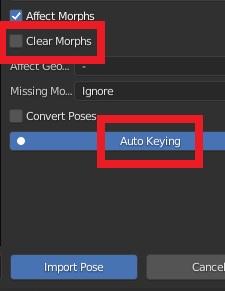
- import another pose, be sure to have clear morphs = off to keep your previous morphs and auto keying = on to keyframe the new pose, or keyframe it by hand for better control
Please let me know if this works for you. Or provide the exact steps if you still get the issue because I can't reproduce it.
Hay thankyou for your help so yer its basicly me not knowing things :P
Knowing those options defonatly help, maybe they shpuld be on by default , I did just post in bitbucket and i also made a suggestion about morph ordering but not the same one i made here as i recently found a wonderful addon for a new shapekey menu with folder grouping built in

https://github.com/MichaelGlenMontague/shape_keys_plus
This replaces and hides blenders origonal menu, iv asked if he could allow 'custom properties' to be able to be added to this menu as we could use those for sliders that contol multiple morphs(the ones that appear in diffo and not blenders shapekey menu)
Also i just discovered this http://blenderartists.org/forum/archive/index.php/t-247429.html About shapekeys driving bones its an arhived post i managed to find and the 3rd to last poster
Pesho says how to do it, Would this be of use to replicate daz's Bone morphs as shapekey sliders?
EDIT.
Okay so the settings you suggested didnt not fix the bend control spesific issue, i can import any other morphs(so far) over now keyframed poses
I have norrowed down the spesific morps responsable for the issue
pCTRLKneesUp.dsf - pCTRLKneesUpLeft.dsf - pCTRLKneesUpRight.dsf - pCTRLLegsOut.dsf - pCTRLLegsOutLeft.dsf - pCTRLLegsOutRight.dsf
Any one of these messes with the pose, Guessing these are bone morphs?
How do I get this render result?Thanks for the help! I purchased the HDRI Photoshoot and some of the other recommended packages. I have posted the renders from the HDRI Photoshoot with Revel HD and Murphy right out of the box. I believe there is a tremendous improvement. I have not played around with MATs. For the fourth image, I did a Face Transfer using the same preset as the third image. Not perfect, but much better.
Zeddicuss bike 'fix'N.B : I don't know anything about aniblocks, so I hope my answer can be applied to your specific issue.
How to fix a prop rotation in DAZ ? If you own ZBrush or Blender :
-1 Send the Bicycle to ZBrush or Blender using GoZ or the DAZ to Blender bridge. Be sure it's in its Base resolution, without Subdivision.
-2 Rotate the bicycle 90° and validate its position in space (ZBrush : Tool > Deformation > Unify x,y,z ; Blender : Object > Apply > All Transforms (Ctrl+A)).
-3 Send the Bicycle back to DAZ. As it's an object already existing in your scene, DAZ will open a pop-up asking you if you want to "Create Morph", or if you want to "Update Base Mesh". Choose to update the base mesh.
And there you go. You have an updated asset in your scene, in the proper position/rotation.
If you prefer, you can also load it back in DAZ using instead "Create Morph". And save that as a morph asset if you ever need to use it later. File > Save As > Support Asset > Morph Asset(s)
Question on Creating a Smooth Foot (No Toes) or Amputee MorphSpacious said:
Maybe import two copies of the base mesh into Blender and anly sculpt on one of them. Use a combination of the Elastic Deform and Smooth Brushes to sculpt until it's the same shape as the original mesh.
As long as you don't check the Dynotopo Box you should have no problems.
I once tried to use the Smooth brush and other sculpt tools to make stockings or socks from the feet and toes Base Mesh, but due to the very complicated geometry of the nails all I was able to sculpt was a nice sharp claws morph! Better try the Geograft option or use existing stockings with a skin texture.
Daz to Unity Update 4.0danielbui78 said:
cly3d_a2d886eb2c said:
Can this be fixed please (NO animations get exported) for the Daz to Unity Bridge.
We're working hard on getting new updates for the Bridges out. Animations have already been fixed, but it may take time to get it officially released. I realize there haven't been updates in a while, but I'm hopeful they will be out soon. Thanks for your understanding.
Is this going to have such that I can, e.g., used DAZ Originals Leprechaun for Genesis 8.1 Male transfer him to Unity 2021.2.19 using UWP render pipeline. I mean I can get the old version to work with Unity 2020 release and the HDP render pipeline and then copy it over and start making adjustments in unity 2021 with UWP but I'm just trying to make things easier on myself.
Anybody know how to create Twi'lek ears for Genesis 3 Females from Star Wars?Thanks for any tips or solutions, but I guess the cone ears don't really matter from my perspective, I just use the ears elf morph (not the long ears) from the Genesis 3 Female Head Morphs.
Genesis 8.1 / Victoria 8.1Transfer the morph to G8F and then you can just dial it in to G8.1F.
How do I get this render result?To be perfectly blunt the face textures are awful to begin with, I'm assuming you used face transfer or another program that does somehting similar. There is so much stuff baked into the face textures that it will probably be difficult trying to achieve a similer look to the examples you want.
Genesis 8.1 / Victoria 8.1PerttiA said:
alienarea said:
Something I noticed:
I use the script by Redz to transfer characters from G3 to G8. Works fine.
As G8F and G8.1F are identical, I tried to transfer a morph to G8.1F directly. The script worked fine as before, but the face looks horrible, lips much too large.
How did you try "transfering" a morph from G8F to G8.1F?
If you are using DS 4.15 or newer, there is no need to "transfer" any morphs from G8 to G8.1, as the G8 morphs are automatically loaded to G8.1
I tried to transfer a morph from G3 to G8.1F and that did not work as expected.
Help on ZBrush/DAZ Integration1. You would need to use Edit>Figure>Transfer Utility, setting the armour piece as the target and the base figure as the source. For something like armour you will certainly need to do a lot of adjustments to the weightmaps and probably add morphs to adjust for poses too - it might be better to keep it as a prop, or set of props, and make sure you limit the poses to those that could be achieved wearing such armour.
2. Make sure you are sending the mesh over at base resolution, rather than current, and that you are not adding or removing any geometry in ZBrush. Morphs may only move the existing, base resolution vertices around.
Fitting bracelets, rings and earringsYou must use Transfer Utility like you already did to create the Fit To.
The problem is that Transfer Utility projects weightmaps automatically and many times it's not OK for your use.
You must edit the bracelets, rings and earrings weightmaps.The left earring must be filled with a weightmap of value 1 relative to left ear joint. Same for the right earring (right ear joint), bracelets (neck joint) and rings.
Pratically It's the operation showed in this video: https://youtu.be/Tbhf7cwq9hM to correct Transfer Utility issues.
Umbra Outfit for Genesis 8 & 8.1 Females [Commercial]Herschel Hoffmeyer said:
slender331man said:
If I remember correctly, Daz Studio is incapable of clearing morph data from HD morph via geometry editing.
This, I never knew! I appreciate the detailed post and providing some new knowledge here. Give me some time, and I'll see what I can do to get this morph cleared up and a new fix put in.
The Geometry editor works only on the base vertices, as far as I know. It would not be clear how to extrapolate from those to the SubD vertices.
Diffeomorphic DAZ Importer version 1.6.0 released@speaker-60
In daz studio the morphs can also be used to pose figures. That is, a morph is not only a "geometry shape", but it can also be a "bone pose", or a combination of them. For example all the G8 expressions are bone poses. As for keyframing it's the same in daz studio and any other package you need to use keyframes in animation.
Please describe the exact steps to get the issue since I don't seem to be able to reproduce it. Again I need the exact steps. Keep it as simple as possible if you can avoid to use "bend control". Unless "bend control" is the only one that doesn't work. Also post some pictures so I can see what you get.
Or you can post directly to the tracker so we keep everything in one place.
https://bitbucket.org/Diffeomorphic/import_daz/issues/938/importing-morphs-on-a-posed-figure
EDIT. UPDATE.
Did various tests and everything works fine here. I guess what you were struggling with is the keyframe and morphs concept. That is, when you import a new pose you have to set keyframes and keep the previous morphs. The default values let this to the user for better control, but this doesn't help inexperienced users so may be it should come with better defaults.
steps:
- Import G8F and merge rigs
- import jcms and flexions
- import "bend control" as custom morphs
- import the "strength setter pose" and keyframe it
- set the bend controls as you wish and keyframe them
- import again the "bend control" morphs (this is stupid but just for testing), the keyframed pose and morphs will keep their settings
- import another pose, be sure to have clear morphs = off to keep your previous morphs and auto keying = on to keyframe the new pose, or keyframe it by hand for better control
Please let me know if this works for you. Or provide the exact steps if you still get the issue because I can't reproduce it.
Umbra Outfit for Genesis 8 & 8.1 Females [Commercial]slender331man said:
If I remember correctly, Daz Studio is incapable of clearing morph data from HD morph via geometry editing.
This, I never knew! I appreciate the detailed post and providing some new knowledge here. Give me some time, and I'll see what I can do to get this morph cleared up and a new fix put in.
Daz 3D is part of

Connect
DAZ Productions, Inc.
7533 S Center View Ct #4664
West Jordan, UT 84084Licensing Agreement | Terms of Service | Privacy Policy | EULA
© 2026 Daz Productions Inc. All Rights Reserved.