-
Suggestions for Recreating An Alien Horror Scene?
I'm trying to recreat a horror scene like in the Alien movie where the xenomorphs were bursting out of human bodies. Then suddenly I realized there is no such a morph to creat a realistically looking open wound/slash/cut on both g8f and g8m. Can anyone make some suggestions as for how to circumvent this situation? Geometry editing? Transparency/material manipulation? Thanks!
Secret Aztec Templelink because I keep having to look it up reading this thread

https://www.daz3d.com/secret-aztec-temple
a send to Hexagon and the smooth brush could probably reduce it too
I don't own it or I would create a thin lipped morph in Zbrush for you
AOBB's The Scandinavian for G8.1M head morph. No materials nor textures.@SapphireBlue - your image is just soooo cool. It could be in some great magazine! "Your" Scandinavian looks much better than "mine"! Wonderful job and great posing! Thank you and I'm honored that you made a special place in your gallery for your renderings using my morphs.
@Three_Wishes - Those A-ha guys were really good looking and the video for "Take On Me" was a real blast. Another of their songs that was popular and I loved was "Hunting High and Low".
@Kainjy - It would be great to turn this head morph into a product and make it easier to use. Thank you for the willingness to help! I really appreciate it !

I have created a new head morph that still requires some work and as I have a guest now for a longer while staying at my place I don't really have time to finish her. In the end though I'll upload her:
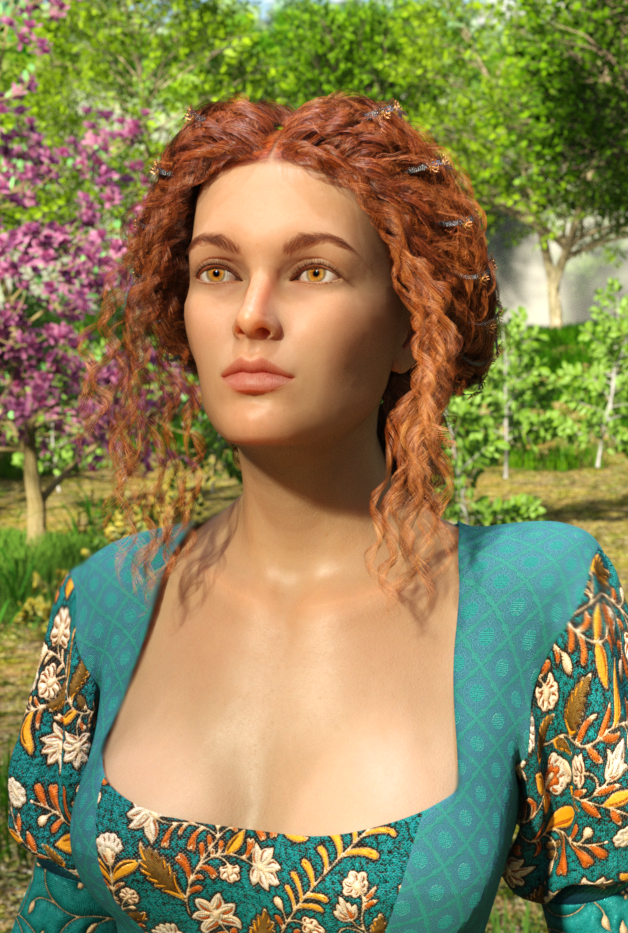
You will find another image with her here:
https://www.daz3d.com/gallery#gallery=newest&page=1&image=1215716
Thank you for all your appreciation. It's like having honey poured all over my heart.
AOBB
Daz Studio 4.16 | Meet the MetaMixer ToolkitQuasar said:
I want to use this but I'm disappointed we have to buy the extra add-ons for characters we already own. The add-ons would be great for people who don't have or want to buy the full characters. I hope DAZ will update all their characters for this some day. I'd love it if PAs could add their characters to it as well.
My point exactly. This stuff is starting to remind me of my other hobby of miniature painting. Getting nickel and dimed at every chance. I bought a 3d printer to get away from having to spend $40 on one single miniature made from .08$ worth of plastic. To me, this is a useful tool, but the fact that you have to buy an extra set of morphs to use the morph for a character you've already spent a lot of money on comparatively (let's face it, the Daz named characters used to count for something, but now they are just another character, of which there are many PA characters that are arguably much better quality, for half the price, which will often include the HD morph for free(again the nickel and dime)). Kaylesse used to be my go-to for these characters, but alas, has sold his soul to the overlords ( I'm being facetious, don't take all my words as serious, I tend towards the sarcastic when I'm typing on the internet), HM has taken his old spot. I mean, take Coral, for example, if that character had not been bought or commissioned or whatever Daz is doing now with Kaylesse, she would have been a base price of like $30, HD sculpt included. Add that your new release discount or PA sale or whatever and you could have gotten her for 'round about $20. You can't even get her HD morph for that now. Daz must have recognized this and made him an offer he couldn't refuse, to get the competition out of the way.
Guess all I'm saying is the add-on bundles are nice for people that aren't going to buy the full characters, but for someone that already bought the characters, it leaves a sour taste in the mouth to have to shell out even more money to use this fancy new feature.
How do I get this render result?This is a face transfer with the face transfer fix. I look for a figure that's about my age and apply their skin. The first one has Floyd 8 skin, second is just regular face transfer.

 For those who use M4/V4?! :)
Are there still people whol ove the old V4 and M4 people here? Well i am back with a new laptop and DS3, of all things .lol.
I am planning to make new celebrity morphs, that require no added morphs. Maybe they will even transfer to the new characters? I dunno, since i have not been around for ages. First one is Ian Somerhalder, that i once had made on another laptop but possibly lost.
[Released] Turbo Loader for Genesis 8 and 8.1 [Commercial]StarLabz said:
I rechecked my main directory and searched for the .tlOFF files and i have 1300+ morphs that are still off. thats not including the ones in other directories.
Why doesn't the G8 Script load all morphs from the directory(s) as i thought it did when watching you video. I think clearing the cache did this or am i mistaken?
It sounds like you hit the Clear button at one point (and then Saved the Settings). See explanation later in post.
OK, updated. Figured out how to reset each directory OPTIONS.G8 Script.Reset Morph Directory. Had to do this for multiple directories but that looks liek it fixed that.
Glad you found it.
But since i RESET the CACHE i will hyave to load my LOADED 20-30 min G8 figure again...... to fix this????? ugh.
This still doesnt explain why when i saved the All Enabled preset that it didnt include all my morphs or when i saved a Disabled all, (Which worked beautifully loading a clean g8 btw!!) it wouldnt recognize a few of my morphs on your pruduct even though they were in the same folder (ie. Head / Body) as one of them that was turned off in the Disabled All preset, but didnt include/recognize/load that other morph. I even checked to see if the file was locked / in use / or compressed and it wasnt. Just your program didnt recognize them even as a morphs even though they kept loading on the g8 perfectly fine.
TL uses the morph list as its "memory" of where ALL morphs (except for ones in products like G8 Essentials) are located on your system. When you ask it to inspect a figure, it looks over the loaded figure and adds all morphs on the figure to the morph list. However, if Daz Studio has not loaded those morphs for some reason (an error in the .dsf?), TL does not see them.
When you disable morphs (turning from .dsf to .tlOff) and load a figure in a new scene, Daz Studio no longer sees those morphs and they are not loaded. Inspecting the figure at this point will NOT find those morphs as they are no longer on the loaded figure. If you accidentally cleared the morph list (clearing TL's memory) and re-inspected, the morph list will be missing all those morphs as TL no longer remembers the old morphs and the loaded figure does not have them either. That is why you needed to reset.
The presets save a portion of TL's memory. If you save an Enabled preset, it will save a list of ALL the CHECKED morphs in the morph list. If you had some unchecked, they are NOT saved and not remembered in the list. Only an All preset saves all morphs in the morph list. However, if you install a new product with new morphs, these morphs are not in the presets as TL did not know about them at the time it saved the preset. You need to save the preset again (without clear the morph list!).
Brightness Manager (Commercial)Bought it yesterday, great product (as is your Projection Morph Manager) It's super easy to use.
Must haves for me, this allows more customization in a quick way!
Thanks Zev0 and team!
How do I get this render result?Sorel said:
To be perfectly blunt the face textures are awful to begin with, I'm assuming you used face transfer or another program that does somehting similar. There is so much stuff baked into the face textures that it will probably be difficult trying to achieve a similer look to the examples you want.
I would agree, your issue is the face-transfer or whatever was used; fix that, then worry about other aspects
Question on Creating a Smooth Foot (No Toes) or Amputee MorphInstead of collapsing the toes vertices, I scaled them down to .001, Vertex order remains. Just a quick made morph:
Question on Creating a Smooth Foot (No Toes) or Amputee Morphbarbult said:
It is not just vertex number that must remain the same for a morph. The vertex order must also be identical.
You're right, "Geometry did not match, failed to create morph."
[Released] Turbo Loader for Genesis 8 and 8.1 [Commercial]Look on the Options tab. At the bottom is a "Reset Morph Directory" button. It will open a folder selection dialog to select the folder (one at a time).
[Released] Turbo Loader for Genesis 8 and 8.1 [Commercial]I rechecked my main directory and searched for the .tlOFF files and i have 1300+ morphs that are still off. thats not including the ones in other directories.
Why doesn't the G8 Script load all morphs from the directory(s) as i thought it did when watching you video. I think clearing the cache did this or am i mistaken?
OK, updated. Figured out how to reset each directory OPTIONS.G8 Script.Reset Morph Directory. Had to do this for multiple directories but that looks liek it fixed that.
But since i RESET the CACHE i will hyave to load my LOADED 20-30 min G8 figure again...... to fix this????? ugh.
This still doesnt explain why when i saved the All Enabled preset that it didnt include all my morphs or when i saved a Disabled all, (Which worked beautifully loading a clean g8 btw!!) it wouldnt recognize a few of my morphs on your pruduct even though they were in the same folder (ie. Head / Body) as one of them that was turned off in the Disabled All preset, but didnt include/recognize/load that other morph. I even checked to see if the file was locked / in use / or compressed and it wasnt. Just your program didnt recognize them even as a morphs even though they kept loading on the g8 perfectly fine.
[Released] Turbo Loader for Genesis 8 and 8.1 [Commercial]"The morphs have their extensions renamed (from .dsf to .tloff), which is a directory table change and does not affect the morph. That is it. They are never deleted. There is also a button in options to rename all .tloff files in a directory (and its subdirectories) back to .dsf. This is a recovery solution that will work no matter what (except if the file is in use/locked but you can just reboot and then use this solution if that occurs)"
Where is this feature???
I tried to look for this feature as there is a serious issue with your product. I initally loaded my G8.1 Female with all the morphs from my library and i do have multiple places used for all my morphs. I originally saved a ALL ENABLED preset correctly but when i did this it didnt include some of the morphs in my other locations.... nOW i have a ton of morphs that are turned off and the system CANNOT locate them now... Its like the program forgot where they orginated from after turning them off. And i think some of the issue was i cleared the cache...
After i reloaded the ALL ENABLED preset it only captured most of the morphs and forgot the others in other locations. That's a serious issue. So i looked for the RESET feature to Turn On / Rename all TLOFF to dsf and this feature is not on your product....
The only other issue is that i did notice that it didnt include some morphs i had but they loaded on my G8.1 with no issues and worked perfectly. Like i had a seperate HEAD and BODY morph of a character i created and it would recognize the HEAD but the BODY was not detected on your product even after i rescanned g8. Closed DAZ restarted and it would still load on g8 but would not be detected on the TL....and there were quite a few that it did that for.
I really love this product and this should have been made so much earlier for its capabilities. Please help with those issues.
Saphirewild's Randomness RendersDone this render up to check out the new Daz Dog 8 Lab morph I got a while ago!
It was a quick render in 3Delight no postwork for this one maybe if I do it over again
 Geometry "disappearing"
I'm creating a few jewelry pieces for the G8F. I've exported the G8F figure (Collada), imported it on Blender, created and positioned the pieces (one by one) on Blender around the G8f geometry. Then, I exported the object I created as Collada, opened Daz, imported the Collada and reexported as an OBJ file (I know I could export as an OBJ from Blender, but there are so many problems like scaling, positioning, etc, that this is simply easier to do). Finally, with the OBJ of the new object saved, I open a new scene, load a G8F, import the OBJ (it lands perfectly positioned), use the "bake joint rotations" on the G8F, use the Transfer Utility, and finally save my new object as a Support Asset (figure/prop asset).
I've already created a bracelet, a ring and two earrings, with one LEFT and one RIGHT version for each. Everything worked fine, and after saving them as "support assets" I could open a new scene, load a G8F and double click each of the DUF files to load them. They landed perfectly, had their textures applied, followed the G8F movements, and I was a very happy person.
But now, after testing everything (all was working), when I loaded one of the earrings (the left one for one of the two models I created) it was loaded as a "brick" (see the attached image please). I've opened the Geometry Editor, and there was NOTHING there (no geometry, surfaces, nothing)... After trying to load it again a few times, I deleted the DUF and repeated the process, exporting it again from Blender, doing everything I had done inside Daz and finally recreating the DUF. Once again it worked fine, but soon the OTHER model (that loaded PERFECTLY before) had the same problem out of nowhere (coincidence or not, in the same left ear).
And, after it happens ONCE with that specific DUF file, it will ALWAYS happen (I'm not able to load that specific object correctly again).
How can it happen? If Daz loaded the object once and it worked, how can it be loaded without any geometry later, using the SAME FILE? And what can I do to avoid it happening again? Now I'm afraid it can happen to any other object for no reason.
Thanks in advance for any help!
Any tools to help me with my Database?There are none. Not a one. There are tools which can limit morph loading and reduce figure load times, some free, some commercial but there is no Swiss Army Knife script for your problem that I know of.
When you say database I'm assuming you're talking about your Data/Runtime directories and, unless you have multiples of these things, duplicates just aren't possible. The Runtime directory is the biggest user of disk space but unless you're using some strange combination of content directories and multiple installation types (DIM, manual, Connect) I can't see how that could have happened. You could possibly have multiple user-facing copies of a product in your content structure, or a bundle and one of its included products appear separately in Smart Content for example but this isn't really your problem.
I think you know the answer to this and I've had to do it myself. Delete the lot, re-install it.
At this point you might want to consider an installation route you prefer - manual or DIM. Pick one and stick with it. Connect is just too much hassle even though it looks like the easier route initially. Go manual if you want to create your own directory structure for your content and have a lot of non-Daz items, or go for DIM for ease and speed and understand you'll be flailing through whatever random directory structure your non-Daz assets have been assigned to by their creator.
You may have to make exceptions - I just could not get Ultra Scenery to work with a manual install and set up a seperate Content folder letting DIM handle it. I manually install 99.99% of items, removing redundant folders and self advertising, recombining products that are scattered across multiple unconnected folders and it can be slow going at times. The end result is a managed, curated content structure but the downside is it's not easy to uninstall content. It's doable, but it's a hassle searching through the Data and Runtime directories to remove the behind-the-scenes stuff. At the end of the day it's your choice.
One thing remains true though - if you've got to this point, figure out how you want to proceed, nuke your current data and start again. It will take time (I thought I could do this on our NAS box in 7 - 10 days but it took 4 weeks in the end to finally get it sorted) but we had around 75% of our core content back very quickly,
I know it's not what you want to hear and someone will undoubtedly come up with a way you don't have to do this following just 101 easy steps, but if you've come to the conclusion your current data is unmanageable and causing workflow issues then now is a good time to figure out how to organise it in the future and rebuild it.
Question on Creating a Smooth Foot (No Toes) or Amputee MorphIt is not just vertex number that must remain the same for a morph. The vertex order must also be identical.
Daz Studio 4.16 | Meet the MetaMixer ToolkitGordig said:
MetaMixer lets you blend specific details of faces, whereas morph sliders only give you the entire face, plus whatever specific features the creator decided to make separate sliders, which is usually none. You also don't necessarily need to buy the character twice, because the MetaMixer widgets work whether or not you own the base character.
Oh, right on, I suppose that does have a fair bit of utility. But there are separate ways you need to buy the morphs, right? They're not a part of the base figure, and the packs are just the morphs, correct? So if I wanted to use coral, who I just bought, I'd still need to get her metamixer morph to use her features with this?
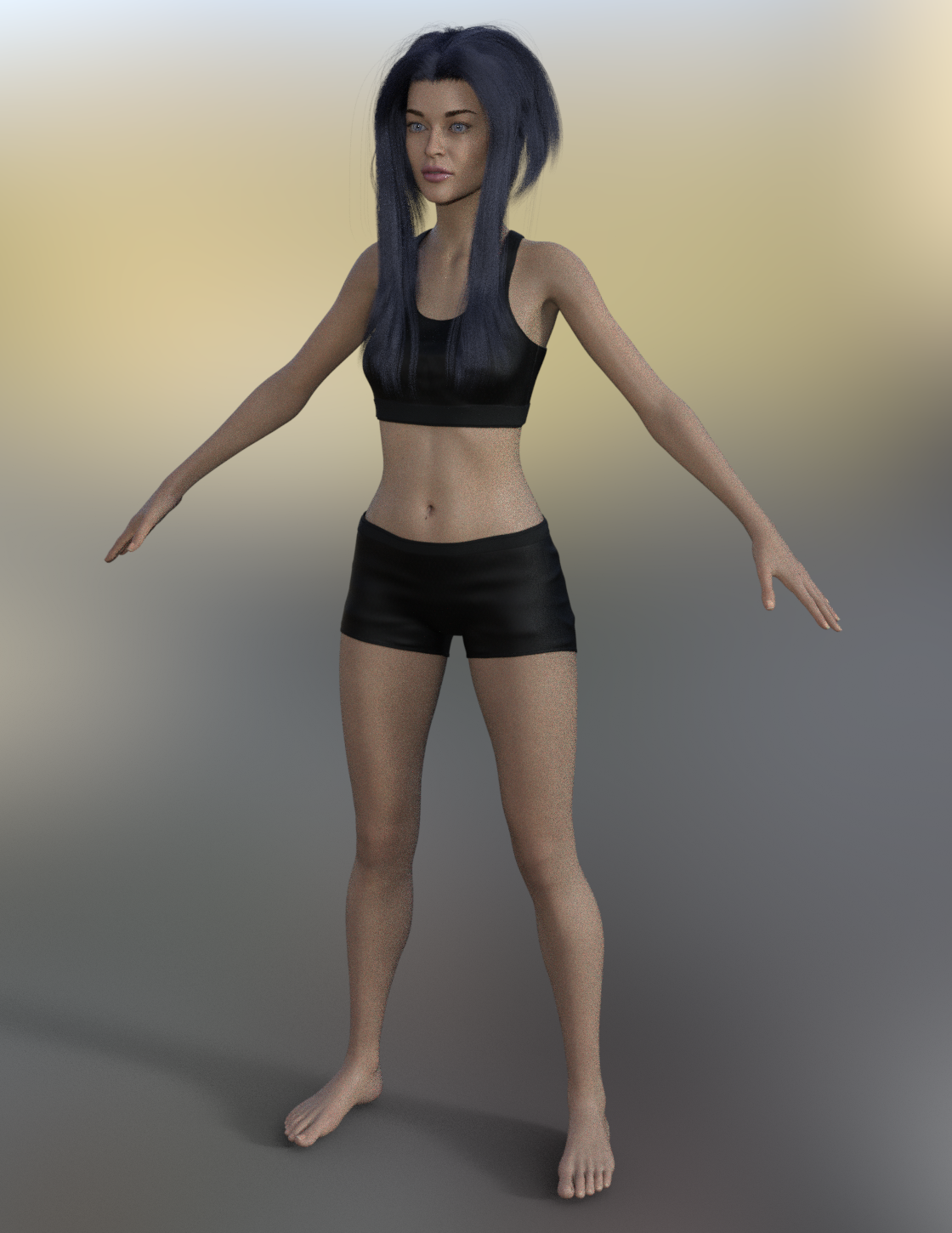
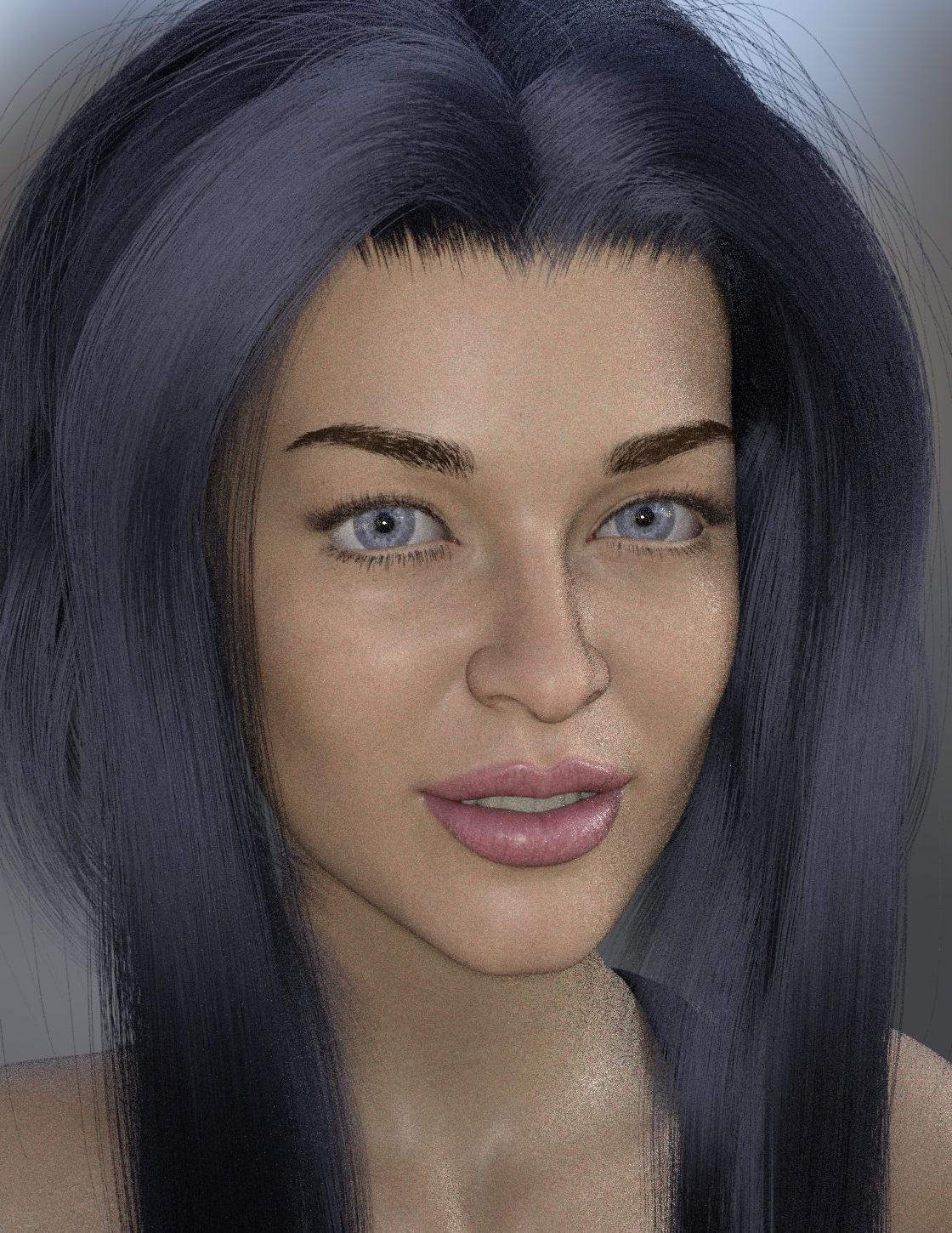
MimicMolly's Renders & WIPsI don't remember if I downloaded Mely3D's/Valandar's "Build a Cyborg Bundle," because Gina is supposed to have (wooden but also robotic-looking) prosthetics and not regular arms and legs like this. Interesingly, she looks more like a "Mousso girl," with White Priestess 8.1's skin and Kala 8's eyebrows than she did with the actual Mousso skin (Xion) I used previously. As previously said, I really needed to use the shoulder width morph because both Edie 8 and Sakura 8 made her shoulders way too narrow. Though I might also need to use "Aurore Size," morph too because she's supposed to be a tiny [but angry] gal.
Full body pic:
Face close up:
(Literally, none of these renders make her look like a "medieval" chick. But then again, in the story she's from is basically "renaissance fantasy," except like The Flintstone's-styled because as "fantasy" it doesn't need to be "historically accurate." And they have enchanted mirrors, like in The Beauty and the Beast, except it's compact mirrors, so it's actually a magical flip phone. Plus, there's Steampunk Venice, except it's called "Vaporezia," but Gina ain't from there. She's from some other place called "Gumdrop Village.")
Daz 3D is part of

Connect
DAZ Productions, Inc.
7533 S Center View Ct #4664
West Jordan, UT 84084Licensing Agreement | Terms of Service | Privacy Policy | EULA
© 2026 Daz Productions Inc. All Rights Reserved.