-
What is the hair used in the Elisse HD product image?
Here's the link: http://www.daz3d.com/elisse-hd-for-victoria-7
Found a few that did resemble this hair but not for sure.
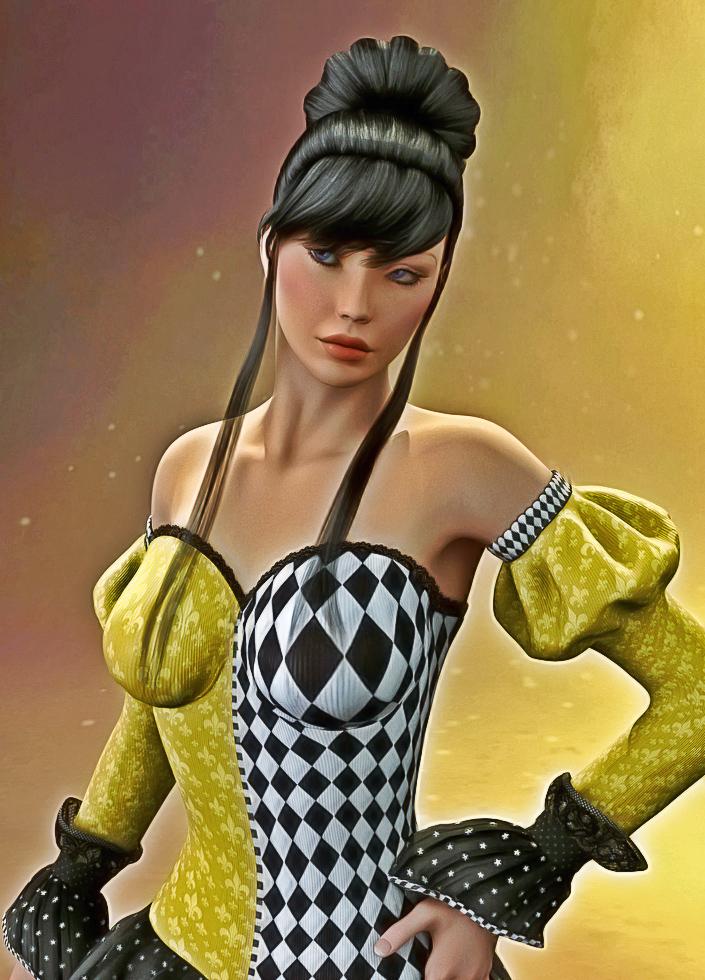
NEW! Novica & Invited Guest Contributors Tips & Product Reviews Pt 6I do postwork in Corel Photopaint and in Photoshop with tweaking hues, contrast, midtones, intensity, etc. While I'm sure most people know about adding layers and duplicating them (right click on a layer and Duplicate) this is also a helpful link shared in another thread that talks you through making those kinds of tweaks. I did this Photoshop to show you, as I think more people use that the Corel (and I have an old version. It works fine for what I do.) I don't do it exactly as Laticis, I do more contrast/instensity, particularly at the end. The first one is the original, the second is the Photoshop/Corel combined postworked one. This render was previously posted, it's Ariella, Cherry Blossom Hair. Don't remember the outfit, anyone know?
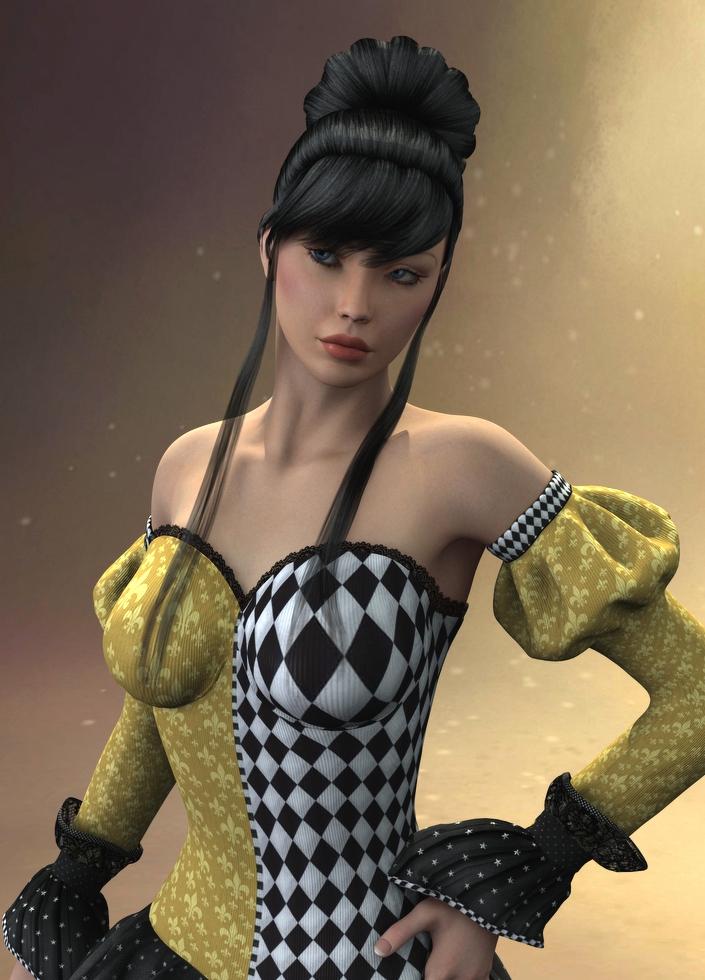
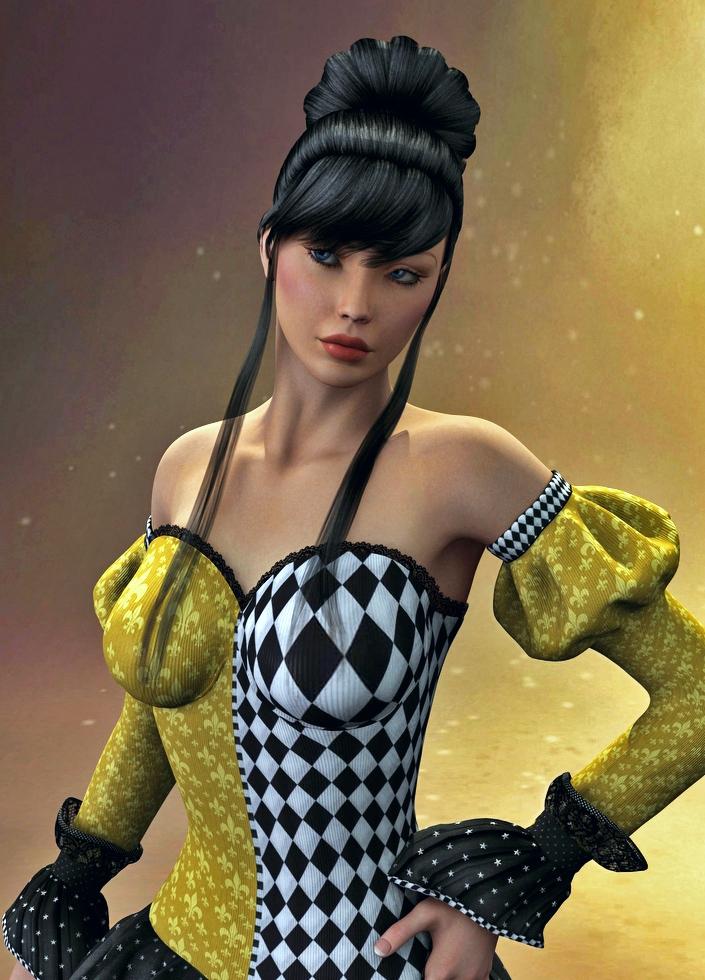
Edit: This is Ariella with the Creative Retouch product from Envato, with a lot of layer tweaking. It is a cartoon style but slightly more realistic than cartoons.
 Genesis 3 children, how to make them?
When Victoria 7 and Michael 7 love each other very much...
Nine months later...Zev0 releases the Growing Up G3 packages (I sure hope it doesn't take 9 months).
Basically, without those packs, it's a combination of scaling morphs, existing morphs and more often than not, custom sculpting.
Genesis 3 children, how to make them?When Victoria 7 and Michael 7 love each other very much...
Best low-poly character for crowd-making?Thanks, do you know how many polys each character is roughly?
Also, I just realized that the Daz store also offers a decimator. Do you know if I can decimate a Genesis 2 male from ~85,000 polys down to <20,000 and still be able to wear all Gen. 2 clothing and accessories?
Thanks again.
This is one of the male figures:
Name :
P3DA_LRM_BusinessSuit_6104
Label :
BusinessSuit
Class :
DzLegacyFigure
Vertices :
6 104 / 6 104
Triangles :
364 / 364
Quads :
5 094 / 5 094
Total Faces :
5 458 / 5 458
Compared to Victoria 6:
Name :
Genesis2Female
Label :
Victoria 6
Class :
DzFigure
Vertices :
85 253 / 21 556
Triangles :
0 / 34
Quads :
84 358 / 21 064
Total Faces :
84 358 / 21 098Makeup, Skin and All of That... I have the makeup maker script, but it puts the eyebrows, eyeliners, etc. in the wrong places on the model's face, such as eyebrows above the existing models eyebrows; eyeliner positioned liker a football players'. So, the makeup maker script is useless for me.
While usually you can't interchange makeup between one purchased item and another, there are occasional exceptions. I don't recall the names, but there was a set of three characters somewhere that all appeared to share the same base skin material, so you could actually mix between them, but that was rare. Some items such as lips are only the lip material with no surrounding skin so you can use those on any character within the same figure. There are a few eyebrow products that are separate items as well, although I don't recall offhand which ones they are, hopefully somebody else knows.
I'm unfamiliar with this script, but just in case this is the issue you are having with it: note that if you have materials for, say, V4 that you want to apply to V5, in the Surfaces tab you have to change the "UV Set" parmameter from "Victoria 5" to "Victoria 4" (or whatever the appropriate UV set is you are trying to use). If you don't do this, they get drawn in the wrong place with a similar result to what you are describing.
Help with Generation X2Have you got the Generation 3 add-on for Genx2? It's here: http://www.daz3d.com/genx-addon-gen3-for-v3-and-m3
This is what allows you to use GenX2 on Michael 3 and Victoria 3 - GenX2 itself only covers M4, V4 and Kids4 in itself.
ETA: There are a whole bunch of add-ons to cover various other figures, some available as bundles - look here: http://www.daz3d.com/dimension3d
Yes. As far as I know it installed correctly through install manager. I
Help with Generation X2Have you got the Generation 3 add-on for Genx2? It's here: http://www.daz3d.com/genx-addon-gen3-for-v3-and-m3
This is what allows you to use GenX2 on Michael 3 and Victoria 3 - GenX2 itself only covers M4, V4 and Kids4 in itself.
ETA: There are a whole bunch of add-ons to cover various other figures, some available as bundles - look here: http://www.daz3d.com/dimension3d
2015 Holiday - PA giveawayROFL! I can just hear that Victoria model in the promo - "Seriously?" :o)
Daz Studio Pro BETA - version 4.9.0.44!When I load Michael 7 or Victoria 7 all I get is the base Genesis 3 Male/Female but the M7/V7 Morphs are at 100%, does anyone know how fix this?
All the content I have was loaded using DAZ Connect only. Genesis 2 figures load normally.
Cyclorama: Portrait Paper BackdropsAlways looking for simple backdrops I grabbed this one. Used to be lots of folks included Templates. That unfortunately seems to have become out of fashion. But I output it as an OBJ and put it into Hexagon 2.5 and was able to extract a template and then figure out the aspect ratio stuff and squish it in Photoshop for both the cyc itslef and the three hidden panels. I wanted to 1. Make the backdrop full length. Real backdrop paper is never long enough it seems and models walk on it. Not a problem here. And then one can go crazy making all sorts of textures and so forth. And 2. For the panels I made opacity masks and gradients. Those I fiddled with. Sure enough you can turn those on and use them to do things like add color blooms to the backdrop without any additional lights. Here only a main shadow casting light is used and a non shadow casting fill light. Victoria 4 as I do not like to wait all day to see how I messed up yet another attempt at a render.
A few tricks. The panels should be tilted and shoved so the inside edge pierces the backdrop. Otherwise you will get mysterious yellow lines if the panel is yellow where the edge reflects back somehow. But if you tilt the panels and shove them just right they can make all sorts of blooms and shades that can be positioned and adjusted around the model. For the center panel I am experimenting with a back cutter light effect that can be positioned.
So far I am just pleased my fumbling around managed to turn on the panels, make an opacity mask that WORKS! and get the entire idea to happen. Not perfect but the panels do move around so the various artifacts caused by things intersecting can often be moved out of the frame. Seemed a shame not to try to use the panels since they were still there.
With the template sorted out all sorts of things become possible like antique backdrops with painted silly pictures AKA 1880s which should appeal to SteamPunk lovers. That used to be common in portrait studios of the time. Some kind of column to lean on and steady yourself and a silly oil painted backdrop of some kind. Some even had strange ideas like an actual boat on the floor for you to sit in against a painting of a lake behind. Could get very Victorian done right.
I also experimented with using two backdrops nested so one could be made transparent in an attempt to do a "16 Miles of String" idea. But that is a work in progress. First try was promising but clumsy garbage. However it was cool how the lines on the front one cast shadows on the back one making additional complexity.
Chunky Knit Sweater Outfit for G3MI love the look of the sweater. Just wanted to feed this back to the artist. It's beautiful work and exactly the sort of thing I need for my male characters and unfortunately I won't be buying it because it's for G3 so my opinion won't be reflected in the sales numbers. Not over the next 18 months anyway.
This is not a complaint - either about the outfit or G3 in general. It's just that there is so much discussion about why artists don't do male outfits (lack of sales) that I wanted to clarify why they don't have my support yet when this product is exactly what I say I'm looking for.
I'm a wanna-be writer who'll be launching my original fiction on Amazon Kindle within the next 18 months. I currently use DAZ Studio for graphic novel work and I will eventually be needing it for book covers as well as the graphic work for my website.
I need stuff to work out of the box. I suck at reworking textures. I've never really been able to convert clothes well from one generation to the next because I'm doing work that requires me to reuse the characters from multiple angles. I generally can't hide a bad poke-through situation by shifting the camera.(One shot book covers being the exception). And I have limited time to learn new skills. As a result, I rely heavily on using what the artists create more or less as is. Movement morphs and additional texture support are very important to me.
Because I'm working on stories that might take 6-18 months to get written, I'm always wishlisting stuff for upcoming projects. (I wish we could have sub wishlists, sigh). I wait for sales. Rarely is something an insta-buy for me. Exceptions are usually environments that work better than the one I'd planned on. So I might go months buying scattered pieces, then drop a couple grand during the yearly PA Sale.
I use mid and close up shots mostly. I don't like to mix generations if I can avoid it because I personally don't find they match stylistically if the characters are side by side in the same shot. (This is also why I tend to buy all my characters from the same artists and why artists like Raiya who create both female and male characters are so valued by me)
I never buy the pro packages at full price. I wait until they are $20-$30 each, then get them all in one go. And I never buy clothes and stuff for the newer models until I've bought the base figures. So I'm always lagging the curve as far as your sales figures are concerned.
I almost didn't switch to G2 this time because of the lack of support for male characters. I write romance novels and graphic comics in contemporary settings. Men are mandatory, lol. I did go to G2 because there was a great sale on Victoria 6 and there were a couple outfits I fell in love with. But the support for the men never really materialized and now that we are shifting to G3, it probably won't. This means that except for the odd book cover, my G2 stuff is mostly worthless to me.
I won't make that mistake again. I'll wait and see what materializes for G3M. If there is a good body of characters, hair, and outfits to choose from, I'll upgrade.
I have no idea where I fall in terms of market. I'm probably in the minority. And I know artists need to make immediate income from a new release. But I am out there, with money to spend. Eventually.
G3F/ Victoria 7 FBX export with animationSame problem here, Let me know if you was able to solve this issue with Victoria 7
G3F/ Victoria 7 FBX export with animationHey! I'm trying to export .FBX with animation. The model is G3F/ Victoria 7. When Morphs are included animation gets partly lost + some body-parts are moving independently of bones. There are some distortions as well. Tested in 3ds max and Unity - must be an export issue. My peers noticed the same thing - recommended me to revert to Genesis 2. Need your help guys.
G3M G3F, Q and A. V7 welcome as well.Hey! I'm trying to export .FBX with animation. The model is G3F/ Victoria 7. When Morphs are included animation gets partly lost + some body-parts are moving independently of bones. There are some distortions as well. Tested in 3ds max and Unity - must be an export issue. My peers noticed the same thing - recommended me to revert to Genesis 2.
Any ideas?
Daz Studio Pro BETA - version 4.9.0.44!7. But, DAZ promise to offer clean reliable meta-data about all producs by DAZ connect. when DS 4.9 become product build.
This is the one thing I can't say is correct. We are working to clean up the meta-data on all of our products that need it. It is a monumental task to ensure our entire product catalog of 20,000+ products are all cleaned up, and is one that has to be done by someone who really knows the products. Daz Studio 4.9 will almost certainly release before it is all fixed. We are committed to correcting / improving the meta-data and are updating it as fast as we can, but this is one of those cases where "perfection is the enemy of progress."
So that,, I simply ask then at current how many meta-data- of product can be downloaded from DAZ connect, which have not offered by DIM? because
"there is a dedicated librarian with dedicasted systems, and the internal processes are being (or have already been) updated to improve things in future. By the list I saw something on the order of 3,500 items have been updated over the last four weeks or so with more being worked on"
then How many products meta-data have not been offered still? actually I do not hope, (though I emhasize intentionally) real perfect,
( no miss category etc) but I strongly push DAZ to offer meta-data about products which have not offered at all , long time.
then I do not know why DAZ can not show time table or plan clear?
why keep thrid and four generation figure items without meta-data (so long time) still?
now I serch items from your shop "people and wealable" , then filtered by "victoria 4 to Hiro 4"(4th generation figure only)
(Actually I find,, and disapointed now, why there is no filter about AIko3 , and these thrid generation figure,, animore,,,
but may repuest it another chance)
then the sum of product which filttered is 2919. OK? if you have clear plan to offer meta-data (and DAZ really think so )
at least you can say "we have finished this work, about this category , already"
then you can say "next month we correct about other generation figure," etc.
I really often heared daz best effort,, "We are committed to correcting / improving the meta-data and are updating it as fast as we can"
then why so long time some items are leave it off without meta-data, even though you can easy check them.?
Because we're a company with limited resources. We didn't have a good way to push just meta-data updates out previously. We do now with Daz Connect. Now that we have a good method to deliver it, we're devoting the resources to clean up the meta-data.
We do have a priority for cleaning up the products and are moving through our catalog systematically. We haven't announced what that is or spoken much about it because it is prone to change as we see "Oh, this thing needs to be done first because this is going to impact more customers or is causing a lot of confusion, so jump that to the head of the queue." I imagine that is happening less and less now as the beta stabalizes, but will continue to happen as we get feedback. We're basically trying to do it in order of "what are the products that are contributing to the biggest issues" first.
Daz Studio Pro BETA - version 4.9.0.44!7. But, DAZ promise to offer clean reliable meta-data about all producs by DAZ connect. when DS 4.9 become product build.
This is the one thing I can't say is correct. We are working to clean up the meta-data on all of our products that need it. It is a monumental task to ensure our entire product catalog of 20,000+ products are all cleaned up, and is one that has to be done by someone who really knows the products. Daz Studio 4.9 will almost certainly release before it is all fixed. We are committed to correcting / improving the meta-data and are updating it as fast as we can, but this is one of those cases where "perfection is the enemy of progress."
So that,, I simply ask then at current how many meta-data- of product can be downloaded from DAZ connect, which have not offered by DIM? because
"there is a dedicated librarian with dedicasted systems, and the internal processes are being (or have already been) updated to improve things in future. By the list I saw something on the order of 3,500 items have been updated over the last four weeks or so with more being worked on"
then How many products meta-data have not been offered still? actually I do not hope, (though I emhasize intentionally) real perfect,
( no miss category etc) but I strongly push DAZ to offer meta-data about products which have not offered at all , long time.
then I do not know why DAZ can not show time table or plan clear?
why keep thrid and four generation figure items without meta-data (so long time) still?
now I serch items from your shop "people and wealable" , then filtered by "victoria 4 to Hiro 4"(4th generation figure only)
(Actually I find,, and disapointed now, why there is no filter about AIko3 , and these thrid generation figure,, animore,,,
but may repuest it another chance)
then the sum of product which filttered is 2919. OK? if you have clear plan to offer meta-data (and DAZ really think so )
at least you can say "we have finished this work, about this category , already"
then you can say "next month we correct about other generation figure," etc.
I really often heared daz best effort,, "We are committed to correcting / improving the meta-data and are updating it as fast as we can"
then why so long time some items are leave it off without meta-data, even though you can easy check them.?
Installing 3rd party content in Daz 4.8 (Windows 10)So, I did a clean install of Daz 4.8 after being away from the software for a few years. I have used the DIM to download and install Gen3 figures and some other items specifically for them; However, I also have tons of content for Victoria 4.2 and want to use her as well. For the sake of a clean install, I repurchased and installed V4.2 and it works fine. the problem is that when I "install" third party characters for Victoria (such as Danae's characters), they do not appear in the content library.
My step for "installing" these third party is as follows:
I have a folder called Daz on an second internal drive that has all of my runtimes and such.
I unzip the product folder and then dragged the data folders (runtime, render presets, etc.) into DAZ and do a merge. This is the method I used to use in the past and it worked fine. Not this time.
I also did a "refresh" in the right click menu of the content library to no avail.
Any idea what might be going on?
Thanks!
Stratus McCleod assembled on Genesis 2 male figure?I was able to transfer a Victoria 4 morph of Grace to Genesis 2 Female. This morph is a .pz2 file type.
I also tried to transfer an Aiko 3 morph of Rei to Genesis 2 Female, but I got the same two error messages that I got before with Stratus. The Rei morph is also a .pz2 file type.
Missing Genesis 3 Male Morphs?The log file (log.txt) contains a large number of missing morph messages when I load Michael 7 into Daz Studio 4.8.0.59. I bought the Michael 7 Pro bundle the past week along with the Victoria 7 Pro bundle.
(snippet of log.txt)
WARNING: fileinput\dzassetdaz.cpp(5311): Could not find target property for formula: Genesis3Male:/data/DAZ%203D/Genesis%203/Male/Morphs/DAZ%203D/Expressions/eCTRLTriumph.dsf#eCTRLTriumph?value in file : /data/DAZ%203D/Genesis%203/Male/Morphs/DAZ%203D/Michael%207/eJCMMichael7TriumpHDLv2.dsf
WARNING: fileinput\dzassetdaz.cpp(5253): Could not find output property for formula: Genesis3Male:/data/DAZ%203D/Genesis%203/Male/Morphs/DAZ%203D/Head/PHMEyesPuffyLower.dsf#PHMEyesPuffyLower?value in file : /data/DAZ%203D/Genesis%203/Male/Morphs/DAZ%203D/Michael%207/eJCMMichael7SmileHDLv2.dsf
WARNING: fileinput\dzassetdaz.cpp(5253): Could not find output property for formula: Genesis3Male:/data/DAZ%203D/Genesis%203/Male/Morphs/DAZ%203D/Head/PHMLipsThin.dsf#PHMLipsThin?value in file : /data/DAZ%203D/Genesis%203/Male/Morphs/DAZ%203D/Michael%207/eJCMMichael7SeriousHDLv2.dsf
WARNING: fileinput\dzassetdaz.cpp(5311): Could not find target property for formula: Genesis3Male:/data/DAZ%203D/Genesis%203/Male/Morphs/DAZ%203D/Expressions/eCTRLSerious.dsf#eCTRLSerious?value in file : /data/DAZ%203D/Genesis%203/Male/Morphs/DAZ%203D/Michael%207/eJCMMichael7SeriousHDLv2.dsf
WARNING: fileinput\dzassetdaz.cpp(5311): Could not find target property for formula: Genesis3Male:/data/DAZ%203D/Genesis%203/Male/Morphs/DAZ%203D/Expressions/eCTRLScream.dsf#eCTRLScream?value in file :(end of snippet)
I assume this is not normal. Am I missing something?
I'm getting a similar thing - most of the expresssion morphs lised in the ReadMe for M7 seem to rely on Partial Head Morphs which are in the G3M Head Morphs set (which I don't have), despite the fact that the ReadMe says "Required Product: None" and the store page shows no required products except G3M (which of course I have installed before installing M7) - I guess it's a little "bonus" for buyers of M7 and the G3M Head Morphs to see extra expressions in the Pose Controls?
Daz 3D is part of

Connect
DAZ Productions, Inc.
7533 S Center View Ct #4664
West Jordan, UT 84084Licensing Agreement | Terms of Service | Privacy Policy | EULA
© 2026 Daz Productions Inc. All Rights Reserved.