-
Shakespeare Look-a-Like?
echristopherclark said:
Thanks for the feedback, but no. I don't use generative AI and don't plan to.
What do you think Face Transfer is or does that isn't AI?
Shakespeare Look-a-Like?echristopherclark said:
Thanks. Yes, those are the two I was trying to work from with Face Transfer. But then I watched the trailer for the upcoming movie Hamnet, remembered also the vast number of different-looking folks who have played him over the years, and what Lorraine said, and I think I'll be OK with whatever I come up with.
Should I post an image when I'm done mucking about with him this morning?
EDIT: Feeling delighted by how it came out, so sharing for now. Keep in mind that this is for a comic and is of a younger version of the man and is meant to look a little stylized. Or a lot, I guess.
Excellent take on Shakespeare, fwiw!
Halloween Style Neck & Temple BoltsI have come up with a pair of Bolts to go through G8F's neck and temple. Each bolt consists of a bolt, a nut and a spacer tube. One is located in G8F's neck, the other in her temple.
These are wearable presets, and include some information on hiding neck and temple facets, so you can see through the spacer tube when it's fitted. It isn't perfect as some of the neck/temple facets can be seen in the apertures, I really needed a geograft, however it's OK at a little distance. The neck bolt is distorted by bending and twisting the neck - so not perfect, but may well be adequate for your purpose.
There is a bolt withdrawal morph. The nut and bolt can be hidden, and a spare bolt is supplied. The pose below (brain being scrambled as the temple bolt is withdrawn) is included.
Please let me know if there are any issues other than the ones mentioned. I have had my own brain scrambled by COVID, so may have missed something.
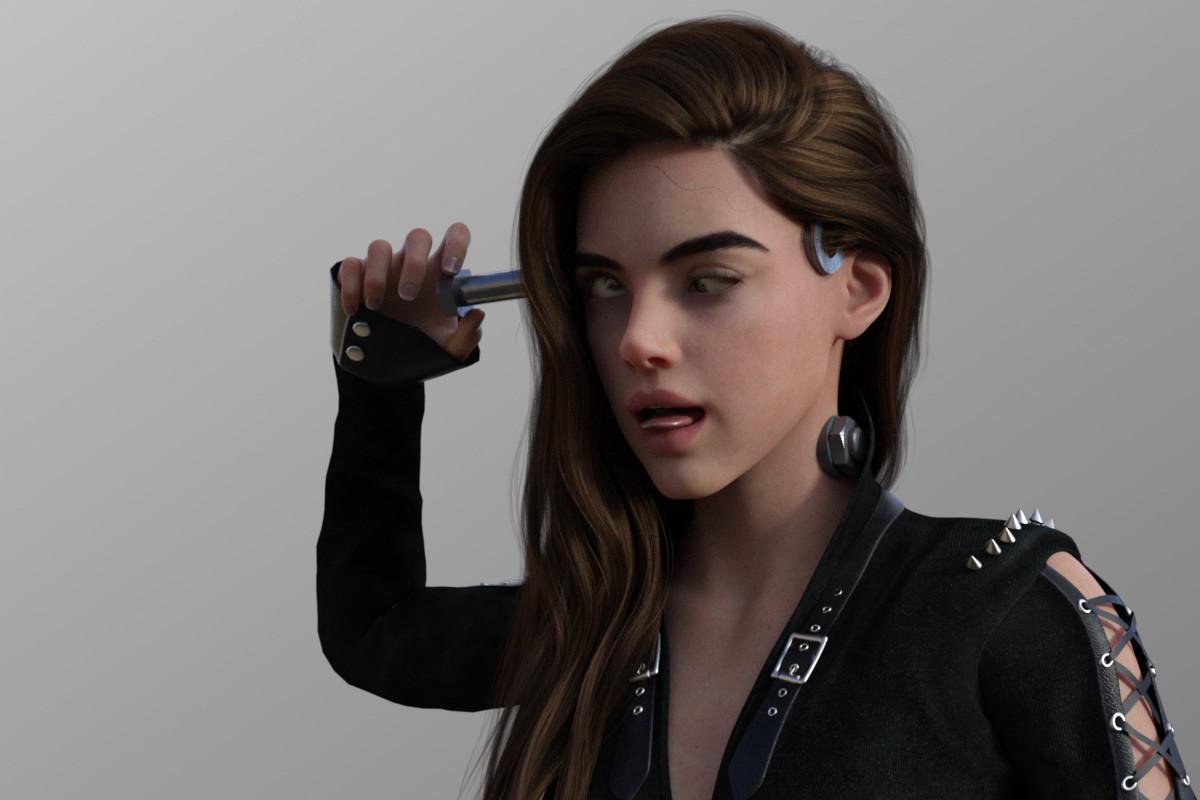
Have fun with it, please.
Regards,
Richard
Celebrity Look-a-Likes for 3D figures Part 4Does anyone here have HID's Avril Lavigne? https://www.daz3d.com/hid-ariel-for-genesis-9 The resemblence is pretty good for contempoary version of her but I am wondering if it's possible to tinker with the morph to get the younger pop-punk princess era Avril when the face was rounder. The only one I've seen is this V4 version https://www.forender.com/component/mijoshop/product/1553-avin-for-v4.html?
I know there is Growning Up but I've been told that it doesn't do well with facial morphs with very angular cheeks like HID Ariel.
Shakespeare Look-a-Like?Thanks. Yes, those are the two I was trying to work from with Face Transfer. But then I watched the trailer for the upcoming movie Hamnet, remembered also the vast number of different-looking folks who have played him over the years, and what Lorraine said, and I think I'll be OK with whatever I come up with.
Should I post an image when I'm done mucking about with him this morning?
EDIT: Feeling delighted by how it came out, so sharing for now. Keep in mind that this is for a comic and is of a younger version of the man and is meant to look a little stylized. Or a lot, I guess.
Daz Studio 6 Beta - version 6.25.2026.19821! (Updated July 23, 2026)ALPHA version 6.25.2025.27507.
minor bugs report.
- Saving a layout still crashes and behaves like the previous ALPHA builds. Layout is saved and is loadable. No png image file is saved for the layout preview. (this isn't a major bug to worry about at the moment since the layouts are able to save. Only real issue I see is if someone is unaware about this issue and haven't saved their current working scene and decides to save a layout. Which results in them losing the current working scene due to the crash.
- When selecting a Node in the Scene tab, the Node is highlighted and there is a rectangle lined selection box over the selected Node. The rectangle is only active on the last selected Node. It cuts off about halfway into the "C" column. I assume this is due to the new "C" column.
- The spacing of the Columns, (C), (S), and (V) in the Scene tab appears to be aligned centered which is good. However, the icons under those columns appears to be aligned to the far left. I still don't see the benefit of the "Node Color" (C) column. Is this for animation purposes? If it is appropriate, I would like to request a feature to have a way to enable/disable the "Node Color" (C) column.
While I have been reporting bugs, I am happy to see many good updates based on the QT6 foundation.
- I would like to note that there is a good improve with the Scene node selection that annoyed me in the past that appears to be working in a better behavior. In the past, when having multiple nodes selected, and then selecting one node to make it active made it have the rename option active. Now that is fixed where if having multiple nodes selected, and then selecting one node makes it active without the rename option. This is a good quality of life update.
- Also, the previous ALPHA update to this one introduced search options in the "Customize Daz Studio" menu. This is a feature that I have been looking forward to since many other 3D softwares have this feature to quickly find Actions that can be nested deep in its own category. This is a welcomed QoL update :)
- Posing with the translation tool is far more responsive now that I noticed that IK bones are created instantly and offloaded. In DS 4.x versions, I noticed a lag as the IK bones are created. There wouldn't be any lag if the IK bones were created beforehand, but still, in DS 4.x version, creating IK bones still took a noticable time to load compared to DS 6.x. This is a great update I noticed that is improving my posing.
Content Library Rename those extra(s) "Manage" tabs?
- I believe others have mentioned it before, but is there a way to rename any of those [Mange (1)], [Mange (2)], and [Mange (3)] tabs to something like [Hair], [Clothing], and [Characters]? It would be great to be able to rename these tabs for organization purposes. I have been using the Content Library more lately and the extra tabs are an amazing update.
- Along with the forward/backward history in the Content Library that was introduced several versions ago. (I think it was introduced in DS 4.24?) This is a very helpful method to quickly go back to a folder.
- I would like to make a request for DS to remember the state of the Content Library to keep the [Info] tab active. Below, there are three tabs, [Tips], [Info], and [Tags]. I personally find [Info] to be useful. However, when closing and reopening DS, it appears that the [Tips] is the default tab in the Content Library.
- I would like to request a feature to disable the [Tips] tab in the preference settings, as it appears to be geared towards beginner users. Or if not, make it so the [Tips] tab can be rearranged.
- Comparing [Tips] tab in the ALPHA build compared to 4.24, the [Tips] tab in the ALPHA appears to have nothing.
A feature request for QoL update
- I would like to request Daz to work on creating a script that should be standard in the program. The script is the ability to turn all object to base res and back to high res. 3D Universe has created a script that works exactly like this for DS 4.x. However, it does not work in any of the current ALPHA builds from my testing. This should be a standard script at this point, since many users are capable of creating morphs. And this is one of the common mistakes users make when creating morphs, forgetting to set the OBJ to base res for morph creation.
- Or rather than a script, it would be extremely beneficial to have this be included in the export options. A way to toggle on/off the base/high res during export settings would be great to have. This makes the morph creation far more smoother. I work with Blender and it would make the morph creation pipeline have less steps to remember.
- Ideally, it would be amazing to have a similar plugin for Blender like there is for the GoZ zbrush plugin.
- 3D Universe's script is still beneficial since it can be a way to increase viewport responsiveness by having an easy way to toggle everything to base res for easy posing, then toggling it back to high res in order to see how everything looks when using Iray viewport preview render.
- Or rather than a script, it would be extremely beneficial to have this be included in the export options. A way to toggle on/off the base/high res during export settings would be great to have. This makes the morph creation far more smoother. I work with Blender and it would make the morph creation pipeline have less steps to remember.
Audrey 9 - the obligatory discussion threadjmucchiello said:
N-RArts said:
4 items in the character bundle... PASS
If you don't mind, genuine curiosity here. What should be in a character bundle? What should not? Doesn't have to refer to this specific bundle in any manner.
The truth is that it means whatever DAZ marketing feels like it means (or in the case of PA produced bundles, what the PA's want), and there's no specific definition other than that there must be multiple items being sold for the same price. That said, there's been a long history of the bundles having more elements and a higher base price tag over the years, and the only thing that's consistant is that bundles usually consist of several items are available in the store seperately at a higher price, one of which is the actual base morphs and textures for the specific figure. Beyond that, there may sometimes be the inclusion of items that are exclusive to the purchasers of bundle... the DAZ Horse 2, for example, contained many of the various breed morph and textures that were only available as part of the bundle. Now, where things get contentious is that in the past, since the introduction of the Geneis line of figures, we had Starter Bundles and Pro Bundles, but the number of items both of those has been whittled down over the years to the point where a starter bundle would ocntain 5 or 6 items. But that was the past, and for the last year or so DAZ has dropped the starter and pro bundles in favor of a single bundle that started at 6 items and was reduced over several months to just four. Meanwhile, the "official" price of the bundle has actually risen to a little higher than the ones for the older Starter Bundles as the undiscounted cost of the bundle has crept to the point where there is very little discount over the price of the individual items, while items that were once considered a normal part of the original main product, such as the HD morphjs for characters that are marketed as being HD characters, have been split off into seperate add-on bundles, while the contents of the main bundles have been heavier in "filler" like poses and expression sets. The end result, of course, is that the effective price of the bundles has gone up considerably on a per-item basis unless you are a member of Premier, where you get one "free" bundle a month, have a large number of teokens to us, or if DAZ happens to running some other similar free/discountining promotion that happens to include that item.
searching for a bela lugosiMatt_Castle said:
Surely you can just use any old model? I mean, it was good enough for Ed Wood.
(As a slightly more serious note, it'd help people to know which generations you'd consider).genesis 9 specifically or genesis 8 and i can use the face transfer to get it onto g9
This is not the thread you're looking for...this is not the bone broth I was looking for...
I just read a facebook post about people saving their gnawed bones to make broth, and guests bones, especially if they left some meat on it
apparently it is traditional to have a bone plate everyone puts their bones on after chewing their drumbsticks or T bone
um
NOT IN MY WORLD

I threw up in my mouth a little
hell I make bone broth myself
from fresh meaty bones and smoked hocks
not from table scraps, though definitely leftovers not already eaten untouched by others get reheated for me
I wouldn't even reuse my own chewed bones
is this an American thing maybe
my mother grew up in the depression and they certainly never did this either
https://www.reddit.com/r/Cooking/s/M5wwbFmRbq
OK, I think I have entered the twilight zone
don't invite me to dinner
the Ai agrees with me
Risks of Reusing Eaten Bones
-
Bacterial Contamination:
Once bones are in a pet's mouth or have been cooked and potentially left out, they are prone to contamination with harmful bacteria, including Salmonella, E. coli, and Campylobacter.
-
Increased Risk of Foodborne Illness:
Reusing these contaminated bones to make bone broth increases the risk of foodborne illness for humans.
-
Cross-Contamination:
Bacteria from the bones can transfer to the food being prepared, leading to illness.
Safer Alternatives and Best Practices
-
Use Fresh, Unused Bones:
For making bone broth, always use fresh, unused bones that have not been handled by pets or been in contact with other potentially contaminated materials.
-
Proper Handling:
Practice good hygiene when handling raw bones to prevent the spread of bacteria.
-
Reusing for a Second Batch:
You can sometimes reuse bones for a second batch of stock (remouillage), but it is best to do so with fresh bones or by adding more ingredients for a less rich broth, according to this Instagram reel.
-
Discard Bones After Use:
Dispose of bones properly after making a batch of broth to prevent any potential contamination.
Find Genesis Model from PromoHi Yall.
I wondering how to find this Genesis model from this promo:
The first large dude...
https://www.daz3d.com/ez-dforce-larry-hair-for-genesis-9The four models in the promo uses the same skin, but maybe a mix of the morph of the first one.
The large dude, seems familiar but can't find any G9 that fits... and the hair is only for G9... so maybe it's a custom G9 that isn't on DAZ?And yes, I did search through the Daz Store and "the other stores."
How do i fix this boots_Toes issuecrosswind said:
zaselim_08eb9236 said:
crosswind said:
If both of your characters had very identical body shapes as well as Poses, the issue wouldn't happen...in principle.
You can try saving a Properties Preset with both Shaping and Pose from the character that has no issue, then apply the preset to the problematice one, see if there's any change.
No their shape is not indentical like i said they are 2 different characters, yes they both have curvu muscular bodies but their oveall shape is different so the look different from the body as well and not just the face.
wjay do you mean properties preset? You mean i save the shape preset but only for the feet part and for the feet pose as well?
Ah, I misunderstood ~~ I saw you said in the OP.. " have 2 same gen 8 custom characters", I though they're identical. So, just ignore my suggestion.
Well, yes, some body shapes may bring you the distortion issue. In principle, the more changes there're on the feet / toes of the body shape, the more chance it'll bring distortion to the conformed wearables. That's why shoe vendors usually fix auto-generated FBM (full body morph) on the shoes for popuplar character products... However, they have no way to provide fixed morphs for all characters ~~
So, I'm afraid you have to fix the issue (on the 2nd character...) yourself ... by using Rigidity Group in DS or using external modeling/sculpting software like Blender...
I fixed it with Rigidity Group for a unique body shape that brings the similar distortion on the boots, as shown in below screenshots.
Pls be noted that depending on different bodyshape, the result of fixing may be different or not really as respected. The best way is to always fix such issue with external software ~~ I myself usually fix them with Blender, which can bring nearly perfect result.
Edit: How to fix it with a Rigidity Group: You may refer to this mini tutorial that I ever wrote, the method is almost the same : https://www.daz3d.com/forums/discussion/comment/8765141/#Comment_8765141 ;
Thanks i will check it out. I already fixed the issue like i said i would. I used the trasnfer utlity and that fixed the issue but then made the heels way longer so i deleted all the polys from disfiqured boots except the heels and tehn removed the heels from the fixed boots and put the heels inside the fixed toes boots.
How do i fix this boots_Toes issuezaselim_08eb9236 said:
crosswind said:
If both of your characters had very identical body shapes as well as Poses, the issue wouldn't happen...in principle.
You can try saving a Properties Preset with both Shaping and Pose from the character that has no issue, then apply the preset to the problematice one, see if there's any change.
No their shape is not indentical like i said they are 2 different characters, yes they both have curvu muscular bodies but their oveall shape is different so the look different from the body as well and not just the face.
wjay do you mean properties preset? You mean i save the shape preset but only for the feet part and for the feet pose as well?
Ah, I misunderstood ~~ I saw you said in the OP.. " have 2 same gen 8 custom characters", I though they're identical. So, just ignore my suggestion.
Well, yes, some body shapes may bring you the distortion issue. In principle, the more changes there're on the feet / toes of the body shape, the more chance it'll bring distortion to the conformed wearables. That's why shoe vendors usually fix auto-generated FBM (full body morph) on the shoes for popuplar character products... However, they have no way to provide fixed morphs for all characters ~~
So, I'm afraid you have to fix the issue (on the 2nd character...) yourself ... by using Rigidity Group in DS or using external modeling/sculpting software like Blender...
I fixed it with Rigidity Group for a unique body shape that brings the similar distortion on the boots, as shown in below screenshots.
Pls be noted that depending on different bodyshape, the result of fixing may be different or not really as respected. The best way is to always fix such issue with external software ~~ I myself usually fix them with Blender, which can bring nearly perfect result.
Edit: How to fix it with a Rigidity Group: You may refer to this mini tutorial that I ever wrote, the method is almost the same : https://www.daz3d.com/forums/discussion/comment/8765141/#Comment_8765141 ;
Oversized SweaterI don't have the set, but the decription says it has the sweater and the materials - so you need to load the sweater first, select it in the scene, and apply the colour preset you want. Usually the actual model will be in one folder and the materials in a sub-folder of that, but since this appears to be a transfer from another store (judging by the product page) the layout may not be standard.
Making fit and muscular charactersChezjuan said:
What generation are you using? In addition to the packages mentioned in Halcon Bluesky's post, Daz has head and body morph packs for Genesis 2 through Genesis 8/8.1 that have "fitness" and "bodybuilder" dials. Just search the Daz store for <figure name> head morphs and <figure name> body morphs (e.g. Genesis 8 Female Body Morphs).
Additionally, SickleYield has a 200 free morphs for Genesis 8 pack that has dials for individual muscles/muscle groups (thighs, back muscles, abs, biceps, delts, etc.) https://www.deviantart.com/sickleyield/art/SY-200-Free-Morphs-Genesis-8-756465264DAZ Studio 4.24 and Genisis 9
Shakespeare Look-a-Like?The King of the Crazy Ask is back. Anyone seen a figure/model that might pass for William Shakespeare?
I'm messing around with Face Transfer and getting less than stellar results. Will probably resort to sculpting mostly from scratch, but figured I'd ask before I went down that road.
Let's appreciate/discuss today's new releases - more ongoinger threaddaveso said:
FenixPhoenix said:
Hey everyone, I spoke with Nathy-Designs, and she agreed to create a morph for human ears for our NDFP Woods Druids in Genesis 9. I'll issue an update to the product once I receive it, create the icon, and run a promotion to showcase it. If you'd like to get it early, keep an eye on the forum, as I will create a thread for the product and post a link to it.
@FenixPhoenix wow..thank you both..that is very cool, and so very fast for response, and a positive one at that.
Our pleasure! We ended up splitting the ears and the head. Now, you will be able to use ears on other characters or have human ears on our characters. Of course, that means I won't be able to distribute the file, since that would also mean distributing the main morph. However, I am currently working on a quick promo to showcase the human ears and will update the product through PASS later today.
Giving facial geometry symmetry or asymmetry for Genesis 9If you cannot or find less asymmetrical morph products for G8F, you can transfer asymmetrical morphs from G9 to G8F by using Transfer Utility + Clone.
Let's appreciate/discuss today's new releases - more ongoinger threadFenixPhoenix said:
Hey everyone, I spoke with Nathy-Designs, and she agreed to create a morph for human ears for our NDFP Woods Druids in Genesis 9. I'll issue an update to the product once I receive it, create the icon, and run a promotion to showcase it. If you'd like to get it early, keep an eye on the forum, as I will create a thread for the product and post a link to it.
@FenixPhoenix wow..thank you both..that is very cool, and so very fast for response, and a positive one at that.
Let's appreciate/discuss today's new releases - more ongoinger threadHey everyone, I spoke with Nathy-Designs, and she agreed to create a morph for human ears for our NDFP Woods Druids in Genesis 9. I'll issue an update to the product once I receive it, create the icon, and run a promotion to showcase it. If you'd like to get it early, keep an eye on the forum, as I will create a thread for the product and post a link to it.
Blender to DAZ Bridge: How to export images without adding a second extension?I purchased the Blender to DAZ Bridge last week, and I am having a minor problem with regards to exporting the .png images as I transfer the object in Blender into DAZ Studio through the bridge.
Whenever the images import, it adds a second instance of ".png" on the end, which means the images now have a double .png extension, which I don't want after I learned that files that have double extensions tend to have viruses. What would I need to do with the Blender add-on in order to export the image (as I export the object) without the extra extension?
Daz 3D is part of

Connect
DAZ Productions, Inc.
7533 S Center View Ct #4664
West Jordan, UT 84084Licensing Agreement | Terms of Service | Privacy Policy | EULA
© 2026 Daz Productions Inc. All Rights Reserved.