-
AIUTO...CHI CONOSCE L’ITALIANO? PARTE TREDICI
Tiziano said:
Sapete cosa mi piacerebbe trovare, in una futura versione di Daz Studio? Un nuovo sistema di renderizzazione, tipo quello dei videogiochi, che non fosse ossessionato dal super-iper-ultra realismo.
Un sistema che mi permettesse di usare i personaggi in una ambientazione in tempo reale, dove tutto si vede sempre bene, senza dover posizionare al millimetro le luci e poi dover fare innumerevoli render di prova.
Iray è ottimo per chi fa illustrazioni, ma per chi fa immagini seriali (fumetti) è scomodo, e per chi fa animazioni è addirittura pressochè impossibile da utilizzare.
A me piacerebbe, insomma poter utilizzare i meravigliosi oggetti dello store in un motore tipo quello di qualsiasi videogioco moderno (ma sempre all'interno di Daz Studio).
Io vorrei fare fumetti, non fotografie ^_^;
Avevo sperato in Filament, ma così com'è non serve a nulla.
Ho timore che tu non abbia ben presente come funzionano i motori in tempo reale.
 Non c'è modo di poter avere l'infinità di possibili illuminazioni di 3Delight e IRay in un motore in tempo reale con dei semplici preset. E devi posizionare tu in ogni caso i punti luce che ti servono, il motore non può immaginarsi che tu vuoi un neon qui e una candela là...
E se vuoi provare a costo zero, scaricati i bridge per Unity e Unreal.
AIUTO...CHI CONOSCE L’ITALIANO? PARTE TREDICISapete cosa mi piacerebbe trovare, in una futura versione di Daz Studio? Un nuovo sistema di renderizzazione, tipo quello dei videogiochi, che non fosse ossessionato dal super-iper-ultra realismo.
Un sistema che mi permettesse di usare i personaggi in una ambientazione in tempo reale, dove tutto si vede sempre bene, senza dover posizionare al millimetro le luci e poi dover fare innumerevoli render di prova.
Iray è ottimo per chi fa illustrazioni, ma per chi fa immagini seriali (fumetti) è scomodo, e per chi fa animazioni è addirittura pressochè impossibile da utilizzare.
A me piacerebbe, insomma poter utilizzare i meravigliosi oggetti dello store in un motore tipo quello di qualsiasi videogioco moderno (ma sempre all'interno di Daz Studio).
Io vorrei fare fumetti, non fotografie ^_^;
Avevo sperato in Filament, ma così com'è non serve a nulla.
Daz Studio 5 development updatewsterdan said:
Yes, these are example images of glass, atmosphere and interior lighting, there's others, including skins, fire and others, not to mention conversion scripts.
If soemone's not dead-set on iRay photorealism, I think they could make some very decent images or animations, with minimal render times without requiring an Nvidia card. let alone a high-end one.It's a different rendering engine, one with very low hardware requirements.
I've been holding off doing too much Filament testing until the Mac version is avaialble, but looking at the images has me thinking about using the Windows version to see what I might be able to do.
-- Watl Sterdan
That is why I have hoped for Filament on the MacBook Pro M1, as well as my Window computers. Especially since my 2012 iMac is limping to its death. I hope to replace it with a iMac M2 when they are released.
Filament is a valid form of art, just as 3Delight, Iray, or Octane, or taking your base image into Photoshop or AI, whatever. You have a vision and want to create it. It is a tool to express yourself. And I love being able to use it during the creation process.
Daz Studio 5 development updateYes, these are example images of glass, atmosphere and interior lighting, there's others, including skins, fire and others, not to mention conversion scripts.
If soemone's not dead-set on iRay photorealism, I think they could make some very decent images or animations, with minimal render times without requiring an Nvidia card. let alone a high-end one.It's a different rendering engine, one with very low hardware requirements.
I've been holding off doing too much Filament testing until the Mac version is avaialble, but looking at the images has me thinking about using the Windows version to see what I might be able to do.
-- Watl Sterdan
Daz Studio 5 development update@wsterdan. Those actually are not bad at all, they tend to have a decidedly "painterly" look, which is difficult to get with Iray, that would be great for book covers and illustrations.
So images like those could be done with the Filament utilities available in the store.
It seems like in daz 4.21.0.5 taking a screenshot right after switching to filamentpbr always crashe4070ti, driver 528.02 aka driver 31.0.15.2802
It might just be this scene, though, as it's now crashing any time I even try to enter filamentpbr mode.
DAZStudio.exe caused ACCESS_VIOLATION in module "V:\DAZ 3D installed here\DAZ 3D\DAZStudio4\dzfilamentapi.dll" at 0033:0000000076AE14D7, std::vector<unsigned char,std::allocator<unsigned char> >::_Xlength()+555579 byte(s)
I haven't updated anything since last week when filament was more reliable, but this is a more complex scene, with strand hair and genesis 8.1 skin all of which I asn't using last week.Daz Studio Pro BETA - version 4.22.0.15! (*UPDATED*)upgraded to 4.21.1.29 because i use guided sampling, and that got fixed in this beta along with new IrayVersion out (http://docs.daz3d.com/doku.php/public/software/dazstudio/4/change_log#private_build_channel). DS beta working fine so far.
In case anyone is wondering about quick toggle to render engine - iray vs viewport. I know i was. Only thing could find was scripts for 3dl. Found this just by trying things. Save Render Presets storing engine Iray vs viewport(Filament) do work. Do have a certain image dimension with that. Then save as custom action and can add to toolbar for quicker switching. Rendering filament frame is instant. Like less than one second. Handy for icons for example. Did get Dreamlights Filament render guide along with changed lighting in the past. Default filament lighting was too bright for me.
Edit: Speaking of rendering icons. Found this handy script. http://docs.daz3d.com/doku.php/public/software/dazstudio/4/referenceguide/scripting/api_reference/samples/rendering/render_to_asset_icon/start
shortcuted and added script to toolbar and changed to my prefered image size the 91,91 to 800,800
oRenderOptions.imageSize = new Size( 91, 91 );
now if only could figure out the syntax to add to this script to delete the orig *.duf.png. Manual delete after browisng to menu adds more time again. Can anyone suggest?Daz Studio 5 development updateinquire said:
@westerdan: So you used OpenGL on these. Were you able to do any in Filament? Or did you do these in Filament? You mentioned that There are a number of products in the store that help get exceptional (to me, at least) quality out of Filament (click on linked image to unsqueeze it): Which products are you referring to?
Sorry for not being clearer (I've updated my last post to clarify); those are Filament images from some of the products in the store, they're not mine and certainly not OpenGL. Search for "filament" in the store.
-- Walt Sterdan
Daz Studio 5 development update@westerdan: So you used OpenGL on these. Were you able to do any in Filament? Or did you do these in Filament? You mentioned that There are a number of products in the store that help get exceptional (to me, at least) quality out of Filament (click on linked image to unsqueeze it): Which products are you referring to?
Daz Studio 5 development updateRichard Haseltine said:
WendyLuvsCatz said:
this is why they added Filament I guess
it needs to be working properly (cutout opacity, glow, shadow) and for every operating system though
Filament is a drawstyle, not a full renderer.
With all due respect, we'll have to disagree with what a "renderer" is. I know Filament as it's currently implemented is supposed to be used for previews for iRay, and it's certainly no replacement for iRay as a final rendering engine but I suspect part of that is that people don't fully set their scenes up for Filament, simply because they don't want to mess up their iRay settings, and even compromising to get their iRay images to work well in Filament still knocks their iRay-render qualtiy down a notch or two.
There are a number of products in the store that help get exceptional (to me, at least) quality out of Filament; here's a few of the store's images for some of the products (click image for full size):


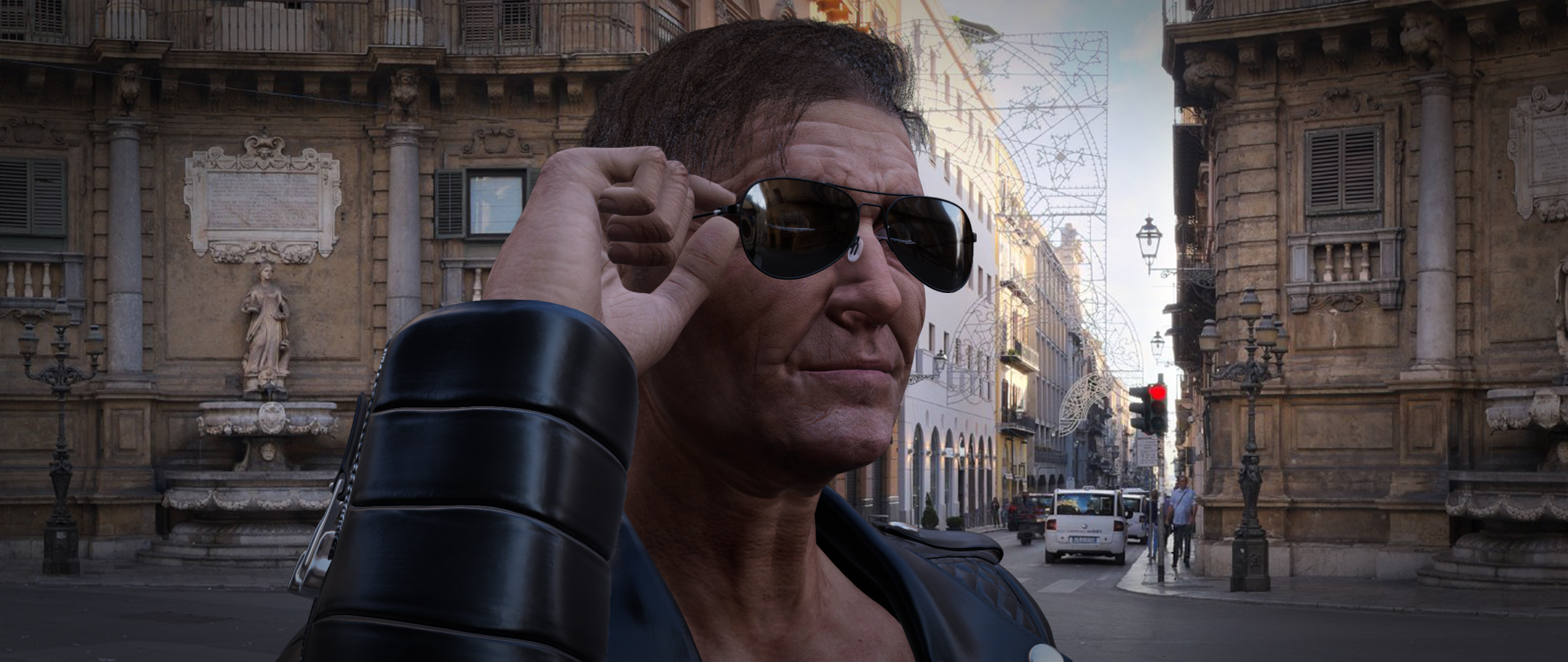
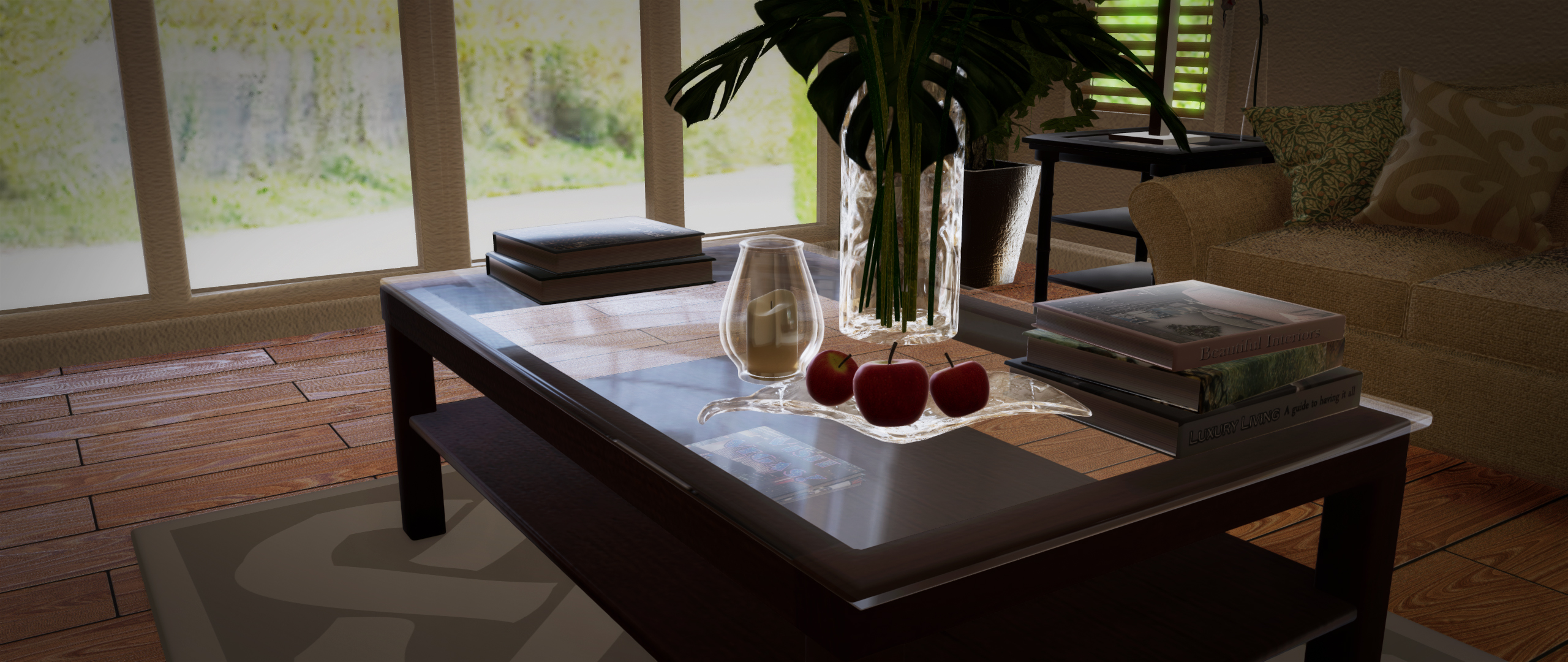
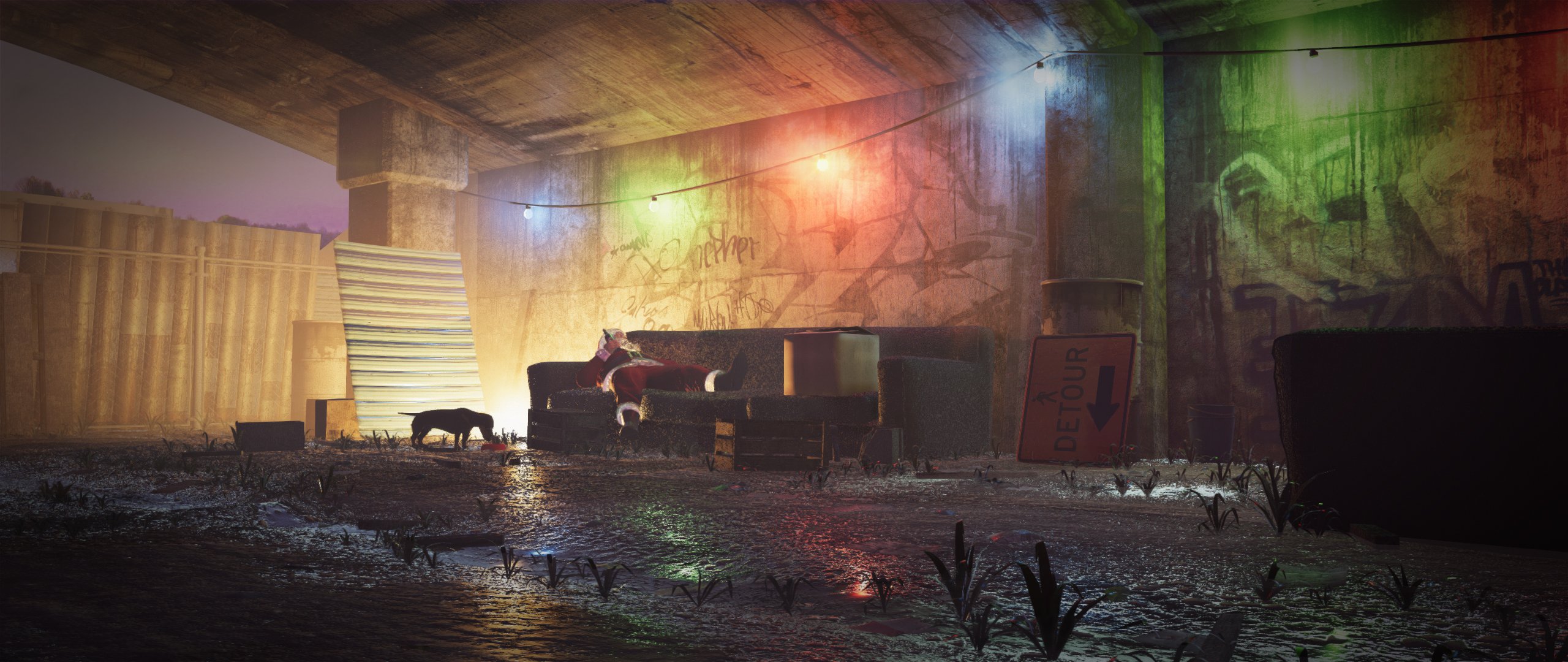
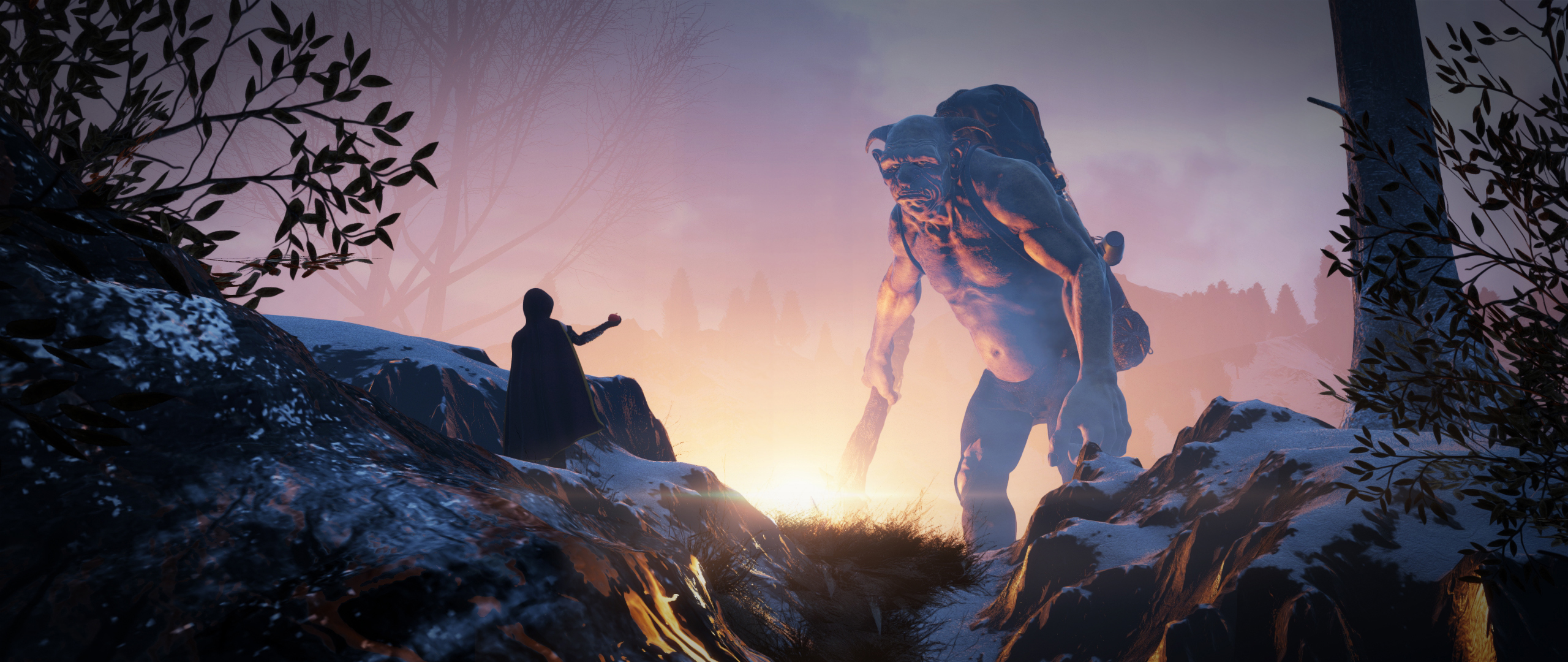
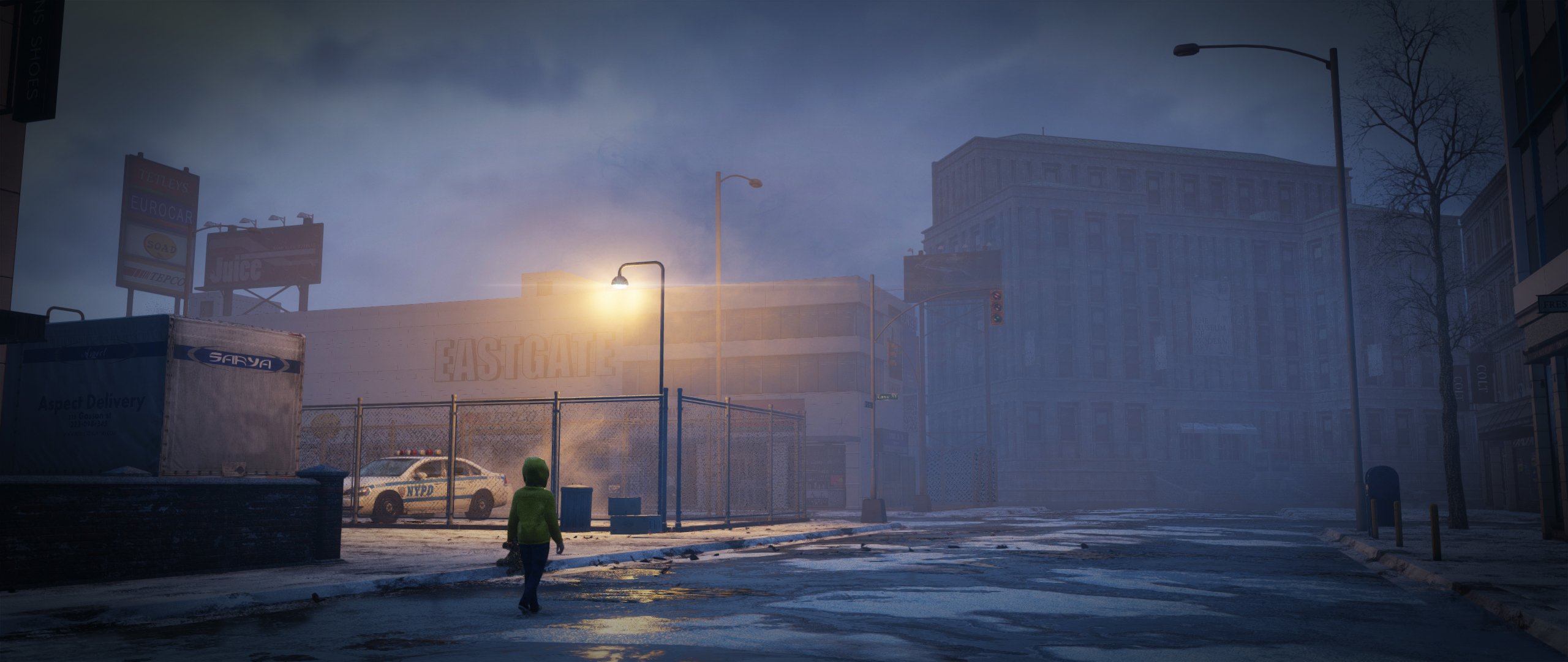

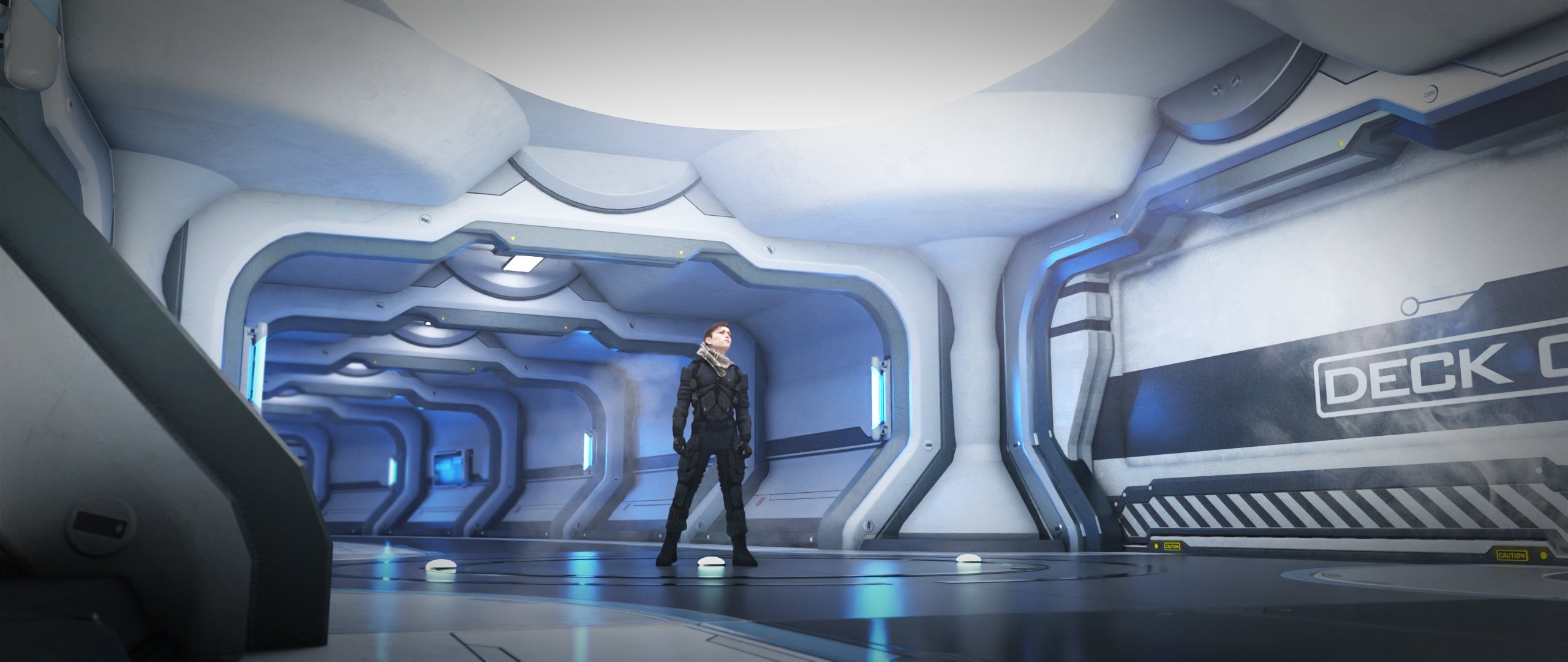
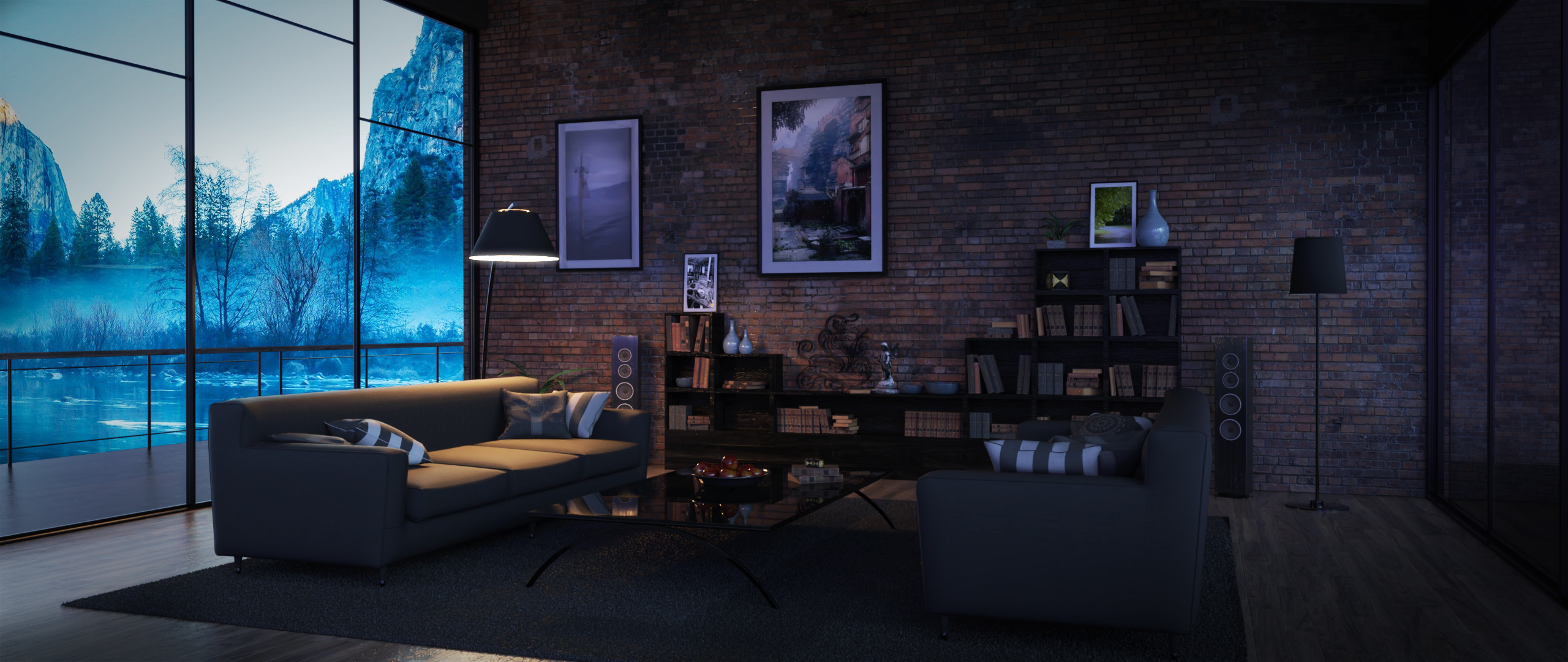
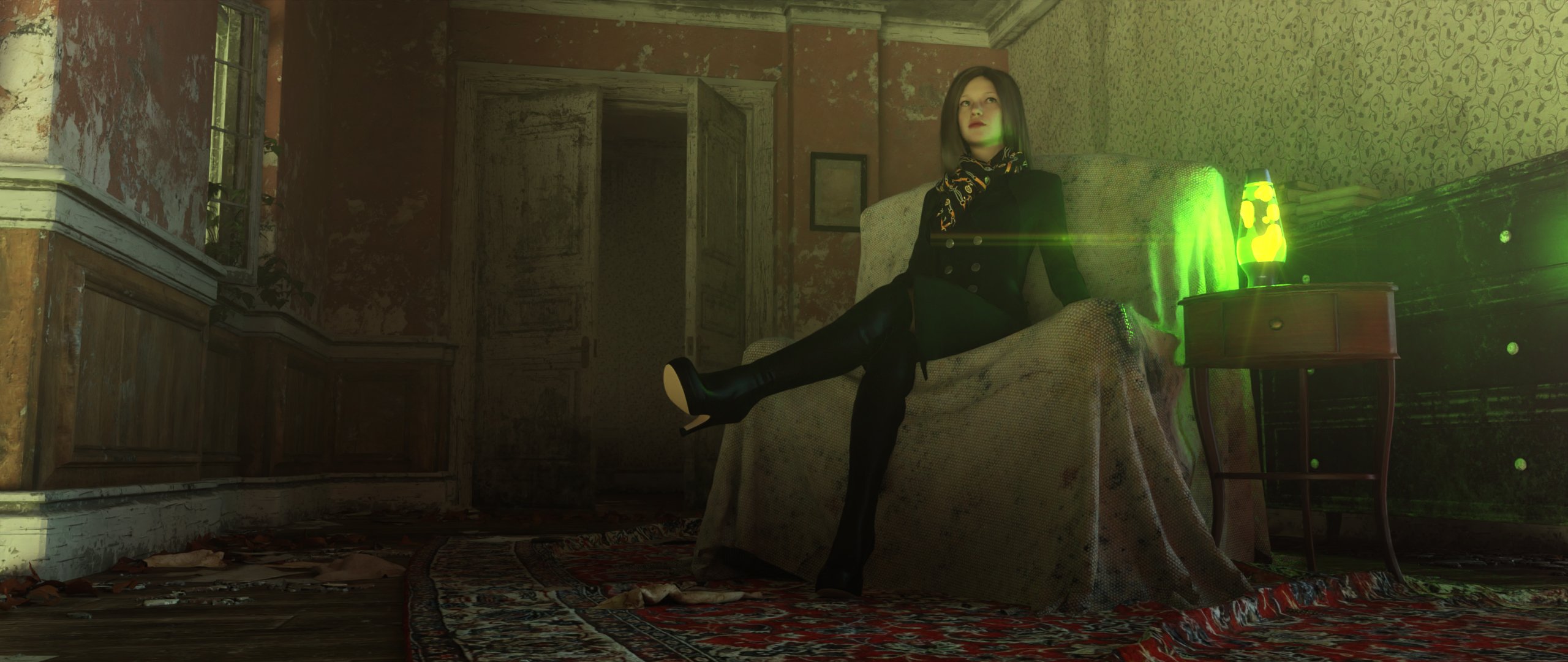
I know die-hard iRayers won't find this photorealistic enough for their needs, and I agree with them. Others might not find the output "cinematic" enough, and again, I agree with them and their needs.
For me, I'm using and am happy with OpenGl for my toon animations, Filament would allow for more semi-realitic animations.
I'm currently getting 1080p renders at over two fps with OpenGL on my M1 iMac, if I can get rendered frames like the above without a huge hit to speed, sign me up. Me, I call this a rendering engine.
-- Walt Sterdan
Edits made to clarify that the images are from the store's Filament products pages, they're not mine, and to resize preview images.
Daz Studio 5 development updateRichard Haseltine said:
As far as I know it's a version issue - Filament needs a newer version of the Qt framework than DS was built with.
To the best of my knowledge, metal support (the preferred back-end for Filament) wasn't available in QT until version 6.
-- Walt Sterdan
Daz Studio 5 development updateWendyLuvsCatz said:
Richard Haseltine said:
WendyLuvsCatz said:
this is why they added Filament I guess
it needs to be working properly (cutout opacity, glow, shadow) and for every operating system though
Filament is a drawstyle, not a full renderer.
but why does that have to exclude Mac users who cannot use Nvidia either
As far as I know it's a version issue - Filament needs a newer version of the Qt framework than DS was built with.
as for Windows users, I render videos with openGL sometimes too, just being a drawstyle does not mean it cannot be used for something you are going to postwork or need a quick video done to demonstrate something
if users cannot use a Nvidia card for some reason it's a good alternative to 3Delight and considerably faster than CPU based iray so why not add the omitted features
edit
forum not showing posts until after I have posted
I wasn't intentionally repeating what others have said
 Daz Studio 5 development update
Richard Haseltine said:
WendyLuvsCatz said:
this is why they added Filament I guess
it needs to be working properly (cutout opacity, glow, shadow) and for every operating system though
Filament is a drawstyle, not a full renderer.
but why does that have to exclude Mac users who cannot use Nvidia either
as for Windows users, I render videos with openGL sometimes too, just being a drawstyle does not mean it cannot be used for something you are going to postwork or need a quick video done to demonstrate something
if users cannot use a Nvidia card for some reason it's a good alternative to 3Delight and considerably faster than CPU based iray so why not add the omitted features
edit
forum not showing posts until after I have posted
I wasn't intentionally repeating what others have said
Daz Studio 5 development updateWendyLuvsCatz said:
this is why they added Filament I guess
it needs to be working properly (cutout opacity, glow, shadow) and for every operating system though
Filament is a drawstyle, not a full renderer.
Daz Studio 5 development updatethis is why they added Filament I guess
it needs to be working properly (cutout opacity, glow, shadow) and for every operating system though
Do we have a Mac (M1) version of DAZ Studio yet?Congrats on the upcoming MBP sounds great!
No updates that i'm aware of, other than the official plan back in July, 2021 when they were still planning to publish a bare-bones release version of DAZ Studio 5 at the end of 2021:
- This release will work on at least x86 Macs (with both Filament and Iray). We are still investigating if this initial early-access release will run either natively or through emulation on M1 macs, but M1 support will come during the continued development of Daz Studio 5.
So, they were in a position where they were planning to publish a mostly working DAZ Stuido 5 last January, and were planning to release/update any missing features throughout the year which would have been done... about now. With the pressure off a bit and time needed to update for Genesis 9 and to keep iRay working, I'm guessing (just a guess) that we might see DAZ Studio 5 in the next six months, in time for my birthday. (fingers crossed)
That said, even if we do get an Apple Silicon native version, it most likely help iRay renders all that much. For what it's worth, my M1 iMac renders iRay about three or four times faster than my Intel-based Macs, and yours should be a fair clip faster than that. Still glacial rendering times compared to a high-end nvidia card though.
-- Walt Sterdan
Daz Studio and LinuxEvery plugin I have tried works.
Thickener, Simterno Randomizer, Filament, autofit,mesh grabber,measure metrics, and a few others.
Keyframing & Animating in Daz is a slog - is there a better way?Saxa -- SD said:
Have for example 10xG8s in test scene with morphed geografts, hair-clothing, not base res and 200 frames. Though base-res recco is a good one. Search forums and you'll find script. Think was technical forums.
And have an obscene amount of morphs for anyone making scenes. That will get reduced to bare bones visible to DS later.
300 morphs? Did you enable show hidden in parameters to see other JCMs etc also active?My PC specs are similar to yours.
Animation is single threaded for all software.
So that heavy hitter CPU is only using one core. So fastest CPU is still best in 2023 for animation. Eyeroll bigtime.
RAM amount is good, but ram speed is the most important for anims.
GPU has zero bearing on anim manip - unless it bottlenecks - which higher end GPUs don't generally do.Click IK bone in filament and drag.
Takes about 5 seconds holding the mouse dray button the whole time and then bone posing moves normal speed.
However there is a moment with all these chars&morphs where up top at DS menubar says 'not repsonding'. Happens at about second 3-4.
While still holding down mouse button drag a smidge. Non response disappears and now easily move.Moving anims out of DS means the whole game of export, are all bones there, all morphs, geografts working render appearance for mats change.
And learn new software.Feels hilarious to say in 2023, anim-users are still limited to single-thread for anims and moving assets around to get them fully recognized is still a lifestyle time-wise.
Also, wendy's screengrab is one of they key parts. Play with that. That and draw style pane.
Found the script. Noticed my 5 second loading when moving a limb is down to 2 or 3 now, and turning the cam in the viewport is closer to 20fps versus its previous 5 fps slog.
Definitely considering using animation software for the rest of this project, but not really sure what my next best steps should be.
Keyframing & Animating in Daz is a slog - is there a better way?WendyLuvsCatz said:
use the opposite settings to these
 except performance
 they are the ones on my Filament Render machine not my iray one
(which is busy rendering )

I saw a noticeable improvement from these settings, thanks Wendy.
Keyframing & Animating in Daz is a slog - is there a better way?Have for example 10xG8s in test scene with morphed geografts, hair-clothing, not base res and 200 frames. Though base-res recco is a good one. Search forums and you'll find script. Think was technical forums.
And have an obscene amount of morphs for anyone making scenes. That will get reduced to bare bones visible to DS later.
300 morphs? Did you enable show hidden in parameters to see other JCMs etc also active?My PC specs are similar to yours.
Animation is single threaded for all software.
So that heavy hitter CPU is only using one core. So fastest CPU is still best in 2023 for animation. Eyeroll bigtime.
RAM amount is good, but ram speed is the most important for anims.
GPU has zero bearing on anim manip - unless it bottlenecks - which higher end GPUs don't generally do.Click IK bone in filament and drag.
Takes about 5 seconds holding the mouse dray button the whole time and then bone posing moves normal speed.
However there is a moment with all these chars&morphs where up top at DS menubar says 'not repsonding'. Happens at about second 3-4.
While still holding down mouse button drag a smidge. Non response disappears and now easily move.Moving anims out of DS means the whole game of export, are all bones there, all morphs, geografts working render appearance for mats change.
And learn new software.Feels hilarious to say in 2023, anim-users are still limited to single-thread for anims and moving assets around to get them fully recognized is still a lifestyle time-wise.
Also, wendy's screengrab is one of they key parts. Play with that. That and draw style pane.
Daz 3D is part of

Connect
DAZ Productions, Inc.
7533 S Center View Ct #4664
West Jordan, UT 84084Licensing Agreement | Terms of Service | Privacy Policy | EULA
© 2026 Daz Productions Inc. All Rights Reserved.