-
Installation Issue: Installation will begin after previous installations
frank0314 said:
It's best to avoid Central
Thanks, but I never used DAZ Central before. I had to try it today because DIM would not install DAZ. Sadly DAZ Central didn't work either.
First time I see an "Install Failed!" message in DIM...
Installation Issue: Installation will begin after previous installationsIt's best to avoid Central and go with DIM to install everything. It is a heck of a lot less headache and rarely fails and if it does it's usually easy fixes and you don't get many of the various errors that you get when you install all of your content with Central.
Installation Issue: Installation will begin after previous installationsChezjuan said:
and I have never had a problem installing Studio with it.Me neither. Until... today. DIM or DAZ Central : same. None of them installs DAZ nor PostgreSQL CMS.
Damn...
DazCentral won't install Daz studioNever had such an issue... until today. Bought a new 2TB SSD as a boot disk. Installed Windows 11 all clean.
And now I'm also stuck. DIM does not not install DAZ nor PostgreSQL CMS.
I deleted all clean with Revo. And tried an install with DAZ Central instead. Same as others. Installing stuck at 86%.
I constantly check what's happening with Voidtools Everything and indeed... nothing at all is happening.
Could someone please explain a way to install all that manually if it's possible ?
Only thing that's different today : I have Windows 11 instead of 10. Eveyrthing else is setup as I always do. Full admin, UAC reduced to minimum, etc.
Reading / writing permissions are maximized for all folders where DIM installs things. I even put Bitdefender Security to sleep just in case but in vain. I'm a bit out of ideas.
Log.txt (the one generated by DAZ Central) states always the same, as it's obviously retrying multiple times :
2022-07-14 12:00:10.876 Installing: 18869-2 : PostgreSQL CMS (Win 64-bit)
2022-07-14 12:01:12.550 WARNING: Killed Process
2022-07-14 12:01:12.550 WARNING: QProcess: Destroyed while process ("cmd") is still running.
2022-07-14 12:01:12.552 Install Failed: PostgreSQL CMS (Win 64-bit)
2022-07-14 12:01:12.553 Installing: 13176-2 : DAZ Studio 4.20 (Win 64-bit)
2022-07-14 12:02:13.486 WARNING: Killed Process
2022-07-14 12:02:13.486 WARNING: QProcess: Destroyed while process ("cmd") is still running.
2022-07-14 12:02:13.488 Install Failed: DAZ Studio 4.20 (Win 64-bit)How large are your Daz Studio folders?My folder sizes are about 15mm, but I have screen scaling on.
I have about 1.7TB of stuff including installers for apps and content going back to Poser 4. Also my own runtimes and all the poser ones up to now and all the images and such that I've created over the last 20 years or so. Also some cat photos. Probably too many cat photos. Want to see a cat photo?
I've got Vista pro on CD and Imagine 2.0 on floppies. Got some really old DAZ stuff on 3D World cover disks.
Modern stuff is installed on the system drive via DAZ Central, dunno how much, probably a few hundred gigs. I'm currently only buying G8 stuff or props and environments with Iray shaders. And only then if it's on a big discount and it's going to get used repeatedly.
So probably about 2TB of stuff over the last 30 years.
Backing up DS customisation%AppData%/daz 3d/
- the cms folder contains the database by default (make sure nothing is suing it when backing up/restoring)
- the Install manger folder has the user settings for DIM/Daz Central
- The Studio4 folder, and/or Studio4 Public Build, have the UI files for Daz Studio
Although backing up the database should catch everything it is also prudent to run the Export userdata command - Contet Library option menu (the lined/hamburger button, or right-click the tab)>Content DB Maintenance. It gets written to the first Daz Studio Format content directory.
http://docs.daz3d.com/doku.php/public/software/dazstudio/4/referenceguide/scripting/api_reference/samples/file_io/save_mapped_paths/start can be used to create a script that will restore content paths when run.
Prominent/Bucked Teeth - the best way to do this?hello all.
as per the title, i have been trying to set up a way of doing prominent front teeth which i can dial in to whichever figure i want (just doing G8F for now)
i am trying to aim for a cute/friendly appearance, NOT a goofy look - think Felicity Jones, not Bugs Bunny.
i have made 3 custom morphs:
1 Head - moves the lower jaw back slightly, moves all front teeth forward slightly so they are closer to the upper lip.
2. Teeth - extends the upper central incisors downward, very VERY slightly outward, also makes them a tiny bit wider with a very slight central gap
3. Lips - creates a incisors-width indent on the lower lip (and a really small peak under the upper lip) for when the mouth is closed
using 3 separate morphs should let me fine-tune things better than if i'd done all the above in a single morph, or that's the plan anyway
right now i'm winging it by trying to get a combination that looks right, without knowing how they should *really* be done. i'm kinda sorta ok with how it's going so far, but it could be better (or can it? i find the lower lip doesn't have enough polys for me to make the exact shaped dent that i want)
pic shows the current state of things, perhaps dialed in a bit too high but suitable for demo purposes
any advice to help me make them look more natural? - something i may have missed or not considered? a better approach perhaps?
Smart Content MissingHello guys,
So I had to re-install my Windows and before I did that I transfer My Daz 3D Library to my other disc following this https://www.daz3d.com/forums/discussion/407716/moving-daz-content-off-of-c-drive-in-2020
So now after I connected everything, when I go into DAZ on the Smart Content tab I have only 30 installed products out of 373 installed. In DAZ Central and DIM everywhere shows 373 installed, but when I go into DAZ it shows only 30 and I can't figure it out. If you can help out with this would be awesome, I don't really want to install everything again. Thank you in advance.
How can I get DAZ to export all maps like normals, roughness etc with my .OBJ?TheMysteryIsThePoint said:
romboutv said:
@TheMysteryIsThePoint Many thanks for all the work you've put into this!
EDIT
Ive put the file in '''C:\Program Files\DAZ 3D\DazCentral\plugins''' but it doesnt seem to work from there. Ill check if i can find other folder. I basically dropped it in the default folder
This is why i kinda hate Windows, why 2 folders? Probably due to the other folder being the Central app for downloading.
just found this folder '''C:\Daz 3D\Applications\64-bit\DAZ 3D\DAZStudio4'''It still doesnt show up in studio 4.15 on Windows?
EDIT2
Okay got it, its under the edit menu, i was looking under export > options dropdwon
You are very welcome. We do what we can.
Sorry about the Edit menu... for some reason there's a DzEditAction class, but no DzFileAction class, and I'm just lazy. I think you can still put it wherever you want by clicking on Windows|Workspace|Customize.
Let me know how it works out for you.
This might be a dumb question but is there a way to import the maps into C4D ?
When i import the alembic, the tag are there but none of the materials.All Content is MissingDaz central and Install manager use the .dsx files in the Manifests folder to track what they have installed and where - presuambly that is gone or not where the installer is looking for it. It has nothing to do with whether or not the content shows in Daz Studio, however.
The content installed through Daz Studio will not show - even if the files are still there, without the original database Daz Studio doesn't know about them. The oens you do see are presumably the ones installed through Install Manager - you should be bale to get those back into Smart Content by opening the Content Library option menu (the lined/hamburger button in the top corner orr ight-click the tab), selecting Content DB Maintenance, and checking Reimport Metadata - that will also reimport any user data (your own files and categorisations) that you may have exported.
All Content is MissingDAZ Central also indicates that all of my DAZ assets need to be installed.
All Content is MissingAll of the content was originally installed using DAZ Studio or the DIM. Not a fan of DAZ Central, but it shows recent purchases. As far as finding the products in the Content Library, that seems to be a hit or miss situation. That might be because I haven't had it do a search since some new purchases.
Inactive IconsIf your installtion works and you don't use Daz Connect, my advice is to not log into Daz Studio,
DIM, Daz Central and manual installation is one method, Daz Connect another. And if it is installed with Daz Connect (inside Daz Studio) it will override other installations, even if it is not working.
Having trouble installing GoZ to my Mac version of DAZThe Daz Studio end goes into the plug-ins folder in the application folder, the rest goes into the ZBrush GoZ folder in your Public profile. The only way it could go wrong is using mixed instalaltion methods (e.g. stand-alone installer for the application and Install Manager or Daz Central for the plug-in) so the paths don't match or using the wrong version of the plug-in installer (e..g. Public Build of GoZ with the General Release of Daz Studio) so that the wrong applicastion folder was used.
Daz to Cinema 4D Bridge - Meet the TeamGraffi23 said:
I'm having trouble with the new June 2022 version of DAZ to C4D Bridge. I followed all the new install instructions, but after installing it then un-installing it and then re-installing in many times it still doesn't work. I tried it with C4D R25.117 and C4D R22. Using the latest version of DAZ 4.20. I had an older version of the Daz to C4D Bridge installed previously that had been working.
If you are only installing from DIM or Daz Central, then you should try downloading and installing the latest bugfix on github: https://github.com/daz3d/DazToC4D/releases. ; There are a number of bugfixes that have not yet been pushed to DIM / Daz Central. If you are still having problems, please give us some more detailed information about the exact steps you took and what parts did not work. Please include the exact version of the bridge you are using and any screenshots of error messages or missing options. I am in the process of creating some more videos with how to manually install from Github.
Installation Issue: Installation will begin after previous installationsIt looks like all these problems are related to using Daz Central to install. Has anyone with this problem tried using the Daz Install Manager?
https://www.daz3d.com/install-manager-info
It's the "old" way but uses the same database, etc. and I have never had a problem installing Studio with it.
Installation Issue: Installation will begin after previous installationsWell, I can tell you it's nothing anyone has done wrong nor does the problem have to do with other versions of fax or poser or anything else.
I have a brand new Alienware, Daz Studio is literally the first program I'm trying to download (ok 2nd after daz central). The install freezes at 57% and the install button appears again. I've shut down and restarted central. No good. I've restarted the computer and tried again. No good.
Actually so pissed off I have to walk away for a minute. So stoked to have gotten my computer before the weekend so I could waste the weekend learning and instead kick in the groin.
Where can I get Daz To Maya 1.7?polimorphick said:
danielbui78 said:
I am working on adding in archive branches to github. For now, you can access the last DSA-based Maya bridge version here: https://github.com/daz3d/DazToMaya/tree/0c330faa183faa0f23e436d7d3c77e1bb917de66
I downloaded the version from the link. Uninstalled Daz2Maya in Daz Central. Copied two files(Daz to Maya.dsa DzMayaMorphSelectionDialog.dsa) to Daz Studio/appdir_common/scripts/support/DAZ/. Daz2Maya is missing from Daz3d. What am I doing wrong?
You need to create custom menu actions in Daz Studio for the script files. This was previously done by a "RunOnce" installer script which was packaged with the DIM package for DazToMaya-DSA. It's probably easiest for you to do it manually than to try to track down, install and run that script just to create a menu item.
Here's how to do it manually:
- Open Daz Studio
- Press F3
- Right-Click on "Custom" on the left pane and select the only option: "Create New Custom Action"
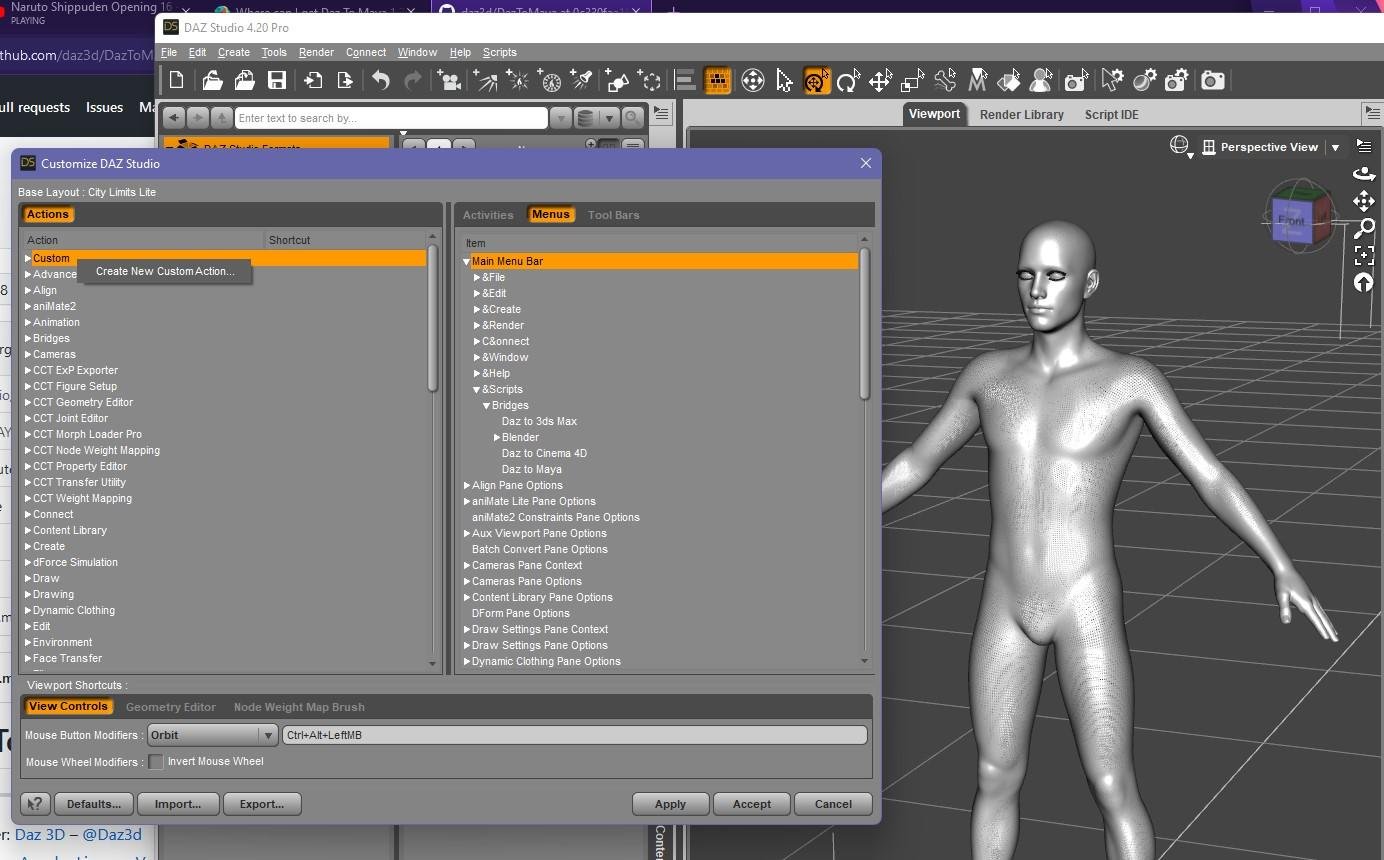
- Enter desired custom action name ("DazToMaya-Script")
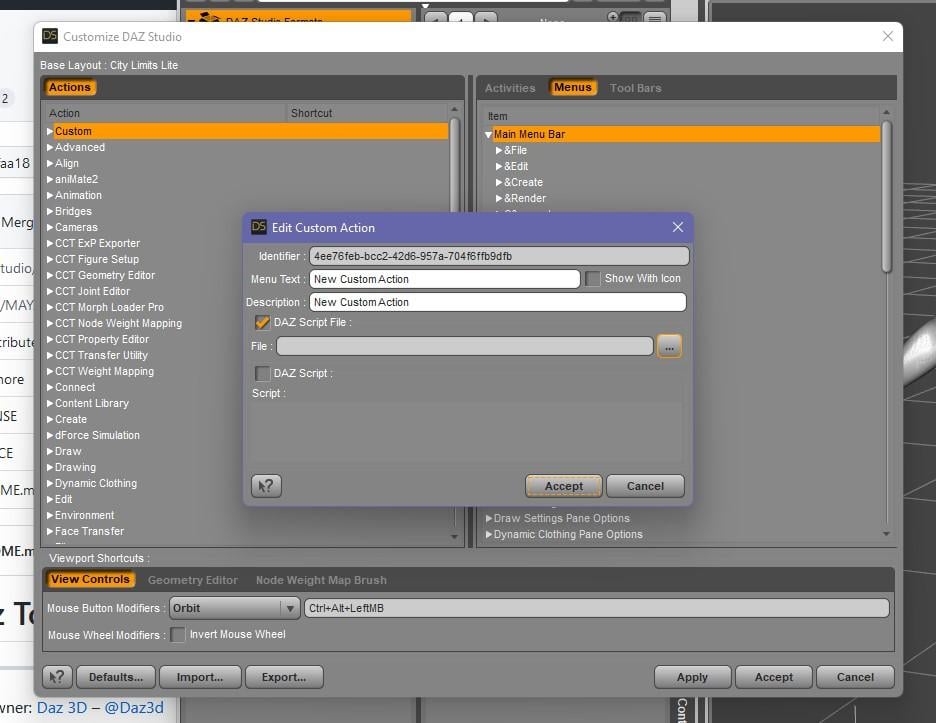
- Click "..."
- Navigate to where you installed the dsa files
- Select the "Daz to Maya.dsa"
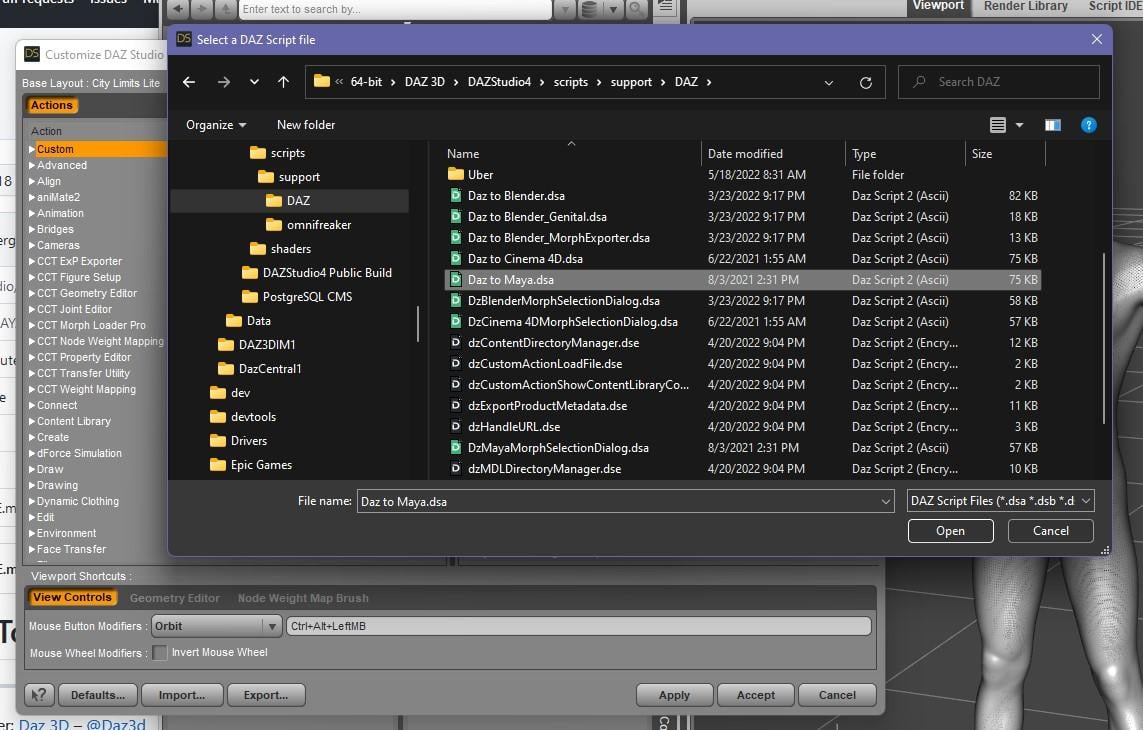
- Now click Accept.
- Drag the new Custom Action into where-ever you want in the right-pane ("Menus -> Main Menu -> Scripts"). Right-click on the right-pane to get "Add Submenu" option.
I am assuming that you installed the dsa files into the true parent folder containing your DAZStudio.exe and not literally "Daz Studio/appdir_common/scripts/support/DAZ/". Example, the correct path for my installation is: "C:\DAZ 3D\Applications\64-bit\DAZ 3D\DAZStudio4\scripts\support\DAZ"
Where can I get Daz To Maya 1.7?danielbui78 said:
I am working on adding in archive branches to github. For now, you can access the last DSA-based Maya bridge version here: https://github.com/daz3d/DazToMaya/tree/0c330faa183faa0f23e436d7d3c77e1bb917de66
I downloaded the version from the link. Uninstalled Daz2Maya in Daz Central. Copied two files(Daz to Maya.dsa DzMayaMorphSelectionDialog.dsa) to Daz Studio/appdir_common/scripts/support/DAZ/. Daz2Maya is missing from Daz3d. What am I doing wrong?
Rendering ProblemsHello my name is Victor,
Problem: I can not render a single image.
After reinstalling my video card drivers (three times) with the latest NVIDIA drivers and ensuring I have the right one and also reinstalling Daz studio 4.2 several times using both Daz Central and Install Manager (The location of the installation is on a SSD C: Drive) I can not get DAZ Studio to Render images. The IRAY renderer works in the Viewport. However, I can not render a single image. I always get a white screen and it just bogs down and the program then freezes (I have watched it climb in memory usage through the task manager and it does nothing but stay white) The computer does not freeze. When I click on the white rendering window in Daz Studio an error message appears asking to shutdown the program. Initially, I did not fiddle with the daefault rendering settings. I left them at default. Finally after the over ten times of trying (leading to insanity) I tried rendering with different variations. CPU only, GPU only etc and was still getting the white screen of death. Please help DAZ Community?
SYS Specs:
OS Name Microsoft Windows 10 Pro
Version 10.0.19044 Build 19044
Other OS Description Not Available
OS Manufacturer Microsoft Corporation
System Manufacturer Gigabyte Technology Co., Ltd.
System Model TRX40 AORUS XTREME
System Type x64-based PC
Processor AMD Ryzen Threadripper 3990X 64-Core Processor, 2900 Mhz, 32 Core(s), 64 Logical Processor(s)
BIOS Version/Date American Megatrends International, LLC. F5, 11/23/2021
SMBIOS Version 3.3
Embedded Controller Version 255.255
BIOS Mode UEFI
BaseBoard Manufacturer Gigabyte Technology Co., Ltd.
BaseBoard Product TRX40 AORUS XTREME
Installed Physical Memory (RAM) 256 GB
Total Physical Memory 256 GB
Available Physical Memory 247 GB
Total Virtual Memory 294 GB
Available Virtual Memory 282 GB
Page File Space 38.0 GB
Page File C:\pagefile.sys
Hyper-V - VM Monitor Mode Extensions Yes
Hyper-V - Second Level Address Translation Extensions Yes
Hyper-V - Virtualization Enabled in Firmware No
Hyper-V - Data Execution Protection Yes
Daz 3D is part of

Connect
DAZ Productions, Inc.
7533 S Center View Ct #4664
West Jordan, UT 84084Licensing Agreement | Terms of Service | Privacy Policy | EULA
© 2026 Daz Productions Inc. All Rights Reserved.