-
Are any of these neon Japanese?
Dartanbeck said:
Perhaps Typi3D would work for you? not sure if there's a TrueType Japanese font but, if there is - and you have it, you could make your own.
I can do that in Carrara with Carrara's Text modeler. Then just export to OBJ... Bam!
I bought some Japanese neon signs on CGTrader. Much simpler.
Off Topic Thread #2WendyLuvsCatz said:
Bunyip02 said:
Eeeeeekkkk......
Extensions troubles on the Laptop.
Copied all of my extensions from my Graphics computer over to my Laptop thinking that since they were running okay it would be all smooth sailing.
When I tried starting Carrara I got a nasty Error message.
Deleted all the extensions and copied a base install extensions into the Laptop.
Next started the time consuming process of adding the extensions one by one till I found what was causing the error.
Fortunately number 4 on the list proved to be the problem - removed it and added the rest, now working fine.
it's an ongoing issue for me, not so much the crashing, that does happen with some, but conflicts more common
what worked on my first C:drive now doesn't on my new one
some things work on my Win7 not my Win10
Mimic messing up Octane render plugin or other plugins clashing with others
I am juggling projects between the beta and release all the time
Hello Wendy, your setup sounds like an ongoing PITA.
Both of my computers are Win 10 so I thought copying over working plugins would be a breeze.
The plugin that caused the Carrara install to chuck a wobbly on the Laptop works fine on the Graphics computer, so must be some setting it does not like on the Laptop.
Off Topic Thread #2Bunyip02 said:
Eeeeeekkkk......
Extensions troubles on the Laptop.
Copied all of my extensions from my Graphics computer over to my Laptop thinking that since they were running okay it would be all smooth sailing.
When I tried starting Carrara I got a nasty Error message.
Deleted all the extensions and copied a base install extensions into the Laptop.
Next started the time consuming process of adding the extensions one by one till I found what was causing the error.
Fortunately number 4 on the list proved to be the problem - removed it and added the rest, now working fine.
it's an ongoing issue for me, not so much the crashing, that does happen with some, but conflicts more common
what worked on my first C:drive now doesn't on my new one
some things work on my Win7 not my Win10
Mimic messing up Octane render plugin or other plugins clashing with others
I am juggling projects between the beta and release all the time
Are any of these neon Japanese?Perhaps Typi3D would work for you? not sure if there's a TrueType Japanese font but, if there is - and you have it, you could make your own.
I can do that in Carrara with Carrara's Text modeler. Then just export to OBJ... Bam!
Freebie Challenge February 2024 - "The Glow Up" - Entries Thread
Have you ever experienced a Glow Up? Perhaps you bought a sharp new shirt, got yourself a fresh haircut, and a brand-new attitude to go with it. Or perhaps the transformation happened on the inside; you took a deep breath and you stepped into the world as a happier/calmer/more assertive/more daring person. Perhaps we're talking about an old car that got its hood polished until it sparkled, or a threadbare dress that got mended and taken in. Perhaps it's the eternal metaphor of the caterpillar that transforms into a butterfly, or the fable of the ugly duckling that becomes a swan. Or perhaps your render isn't about transformations at all, but simply about something that glows and sparkles? Let your creativity shine bright, the theme of February is The Glow Up!
New rule: The use of image generating AI technology (midjourney, stable diffusion, etc.) is not allowed. The use of items (freebies or paid) that have been created with such technology is also not allowed. We realise it's not always easy to tell; let's all use our best judgement, and you can always ask the person hosting the contest if you're not sure.
The Rules For This Months Freebie Challenge are:
1. A minimum of (5) Freebies must be included in your image along with Links to the freebies you have used. For an item to be considered free it must be offered as a freebie for the whole month. The exception to this rule is all Daz Bi-Weekly Freebies will be allowed throughout the entire month in which they are free as well as the month following their release as a freebie (For a total of 2 months). Also, if a freebie is broken down into multiple downloads/links/parts (IE like if the freebie is broken down into 3 zips etc...)it only counts as 1 freebie, not 3.
2. There will be a Maximum of 5 purchased items.
3. Base figures (All Gen 2,3,4, and Genesis 1,2,3) as well as their general morphs packs (Morphs++ and similar) do not count as a purchased item or a freebie and may be used as needed
4.Your Rendered Picture must be a new render and postwork is allowed but you MUST include a before and after Postwork versions of your entry in the Entry Thread.
5. All DAZ 3D Programs are allowed (IE Bryce, Carrara, Daz Studio and Hexagon) plus Poser for the contest.
6. All entries are subject to the Daz3D TOS Found Here: Terms Of Service
7. You may enter a Maximum of 4 Entries per month.
8. You may edit your entry as much as you like in the main thread but once it is posted to the "Entries Thread" it may not be further modified. Also, if you edit or add things, be sure you update any links or freebie changes you make.9. The use of image generating AI technology (midjourney, stable diffusion, etc.) is not allowed. The use of items (freebies or paid) that have been created with such technology is also not allowed. We realise it's not always easy to tell; let's all use our best judgement, and you can always ask the person hosting the contest if you're not sure.
This Freebie Challenge will end February 29th, 2024 @ 23:59 Daz time.
*Please Note: Please allow 7 days from the Announcement of the Winners to recive your prize*
If you have not recived your prize, or have any questions, please contact Linwelly, Saphirewild, or Hylas in a PM here on the forumsPost your images and freebie links here for judging after verification. For the verification you can post your image and links in Main Thread.
First Place: $15 store credit from KindredArts
Second Place: $10 store credit from KindredArts
Third Place: $5 store credit from KindredArtsAny other donations for prizes will be gratefully accepted. Please send a PM to Saphirewild
Freebie Challenge February 2024 - "The Glow Up" - Main Thread
Have you ever experienced a Glow Up? Perhaps you bought a sharp new shirt, got yourself a fresh haircut, and a brand-new attitude to go with it. Or perhaps the transformation happened on the inside; you took a deep breath and you stepped into the world as a happier/calmer/more assertive/more daring person. Perhaps we're talking about an old car that got its hood polished until it sparkled, or a threadbare dress that got mended and taken in. Perhaps it's the eternal metaphor of the caterpillar that transforms into a butterfly, or the fable of the ugly duckling that becomes a swan. Or perhaps your render isn't about transformations at all, but simply about something that glows and sparkles? Let your creativity shine bright, the theme of February is The Glow Up!
New rule: The use of image generating AI technology (midjourney, stable diffusion, etc.) is not allowed. The use of items (freebies or paid) that have been created with such technology is also not allowed. We realise it's not always easy to tell; let's all use our best judgement, and you can always ask the person hosting the contest if you're not sure.
The Rules For This Months Freebie Challenge are:
1. A minimum of (5) Freebies must be included in your image along with Links to the freebies you have used. For an item to be considered free it must be offered as a freebie for the whole month. The exception to this rule is all Daz Bi-Weekly Freebies will be allowed throughout the entire month in which they are free as well as the month following their release as a freebie (For a total of 2 months). Also, if a freebie is broken down into multiple downloads/links/parts (IE like if the freebie is broken down into 3 zips etc...)it only counts as 1 freebie, not 3.
2. There will be a Maximum of 5 purchased items.
3. Base figures (All Gen 2,3,4, and Genesis 1,2,3,8 and 9) as well as their general morphs packs (Morphs++ and similar) do not count as a purchased item or a freebie and may be used as needed
4.Your Rendered Picture must be a new render and postwork is allowed but you MUST include a before and after Postwork versions of your entry in the Entry Thread.
5. All DAZ 3D Programs are allowed (IE Bryce, Carrara, Daz Studio and Hexagon) plus Poser for the contest.
6. All entries are subject to the Daz3D TOS Found Here: Terms Of Service
7. You may enter a Maximum of 4 Entries per month.8. You may edit your entry as much as you like in the main thread but once it is posted to the "Entries Thread" it may not be further modified. Also, if you edit or add things, be sure you update any links or freebie changes you make.
9. The use of image generating AI technology (midjourney, stable diffusion, etc.) is not allowed. The use of items (freebies or paid) that have been created with such technology is also not allowed. We realise it's not always easy to tell; let's all use our best judgement, and you can always ask the person hosting the contest if you're not sure.This Freebie Challenge will end February 29th, 2024 @ 23:59 Daz time.
*Please Note: Please allow 7 days from the Announcement of the Winners to receive your prize*
If you have not recived your prize, or have any questions, please contact Linwelly, Saphirewild, or Hylas in a PM here on the forumsPost your images and freebie links here for link verification. Once the links are verified, you can post your image and links in Entries Thread for judging.
First Place: $15 store credit from KindredArts
Second Place: $10 store credit from KindredArts
Third Place: $5 store credit from KindredArtsPast Freebie Contests (the links to previous years can still be found in last years challenges):
January 2022 - Around and around and around...
February 2022 - Mysteries of the heart
March 2022- Luck Of The Draw
April 2022 - New Beginnings
May 2022 - Cozy Corner
June/July 2022 - The Secret Life Of...
August 2022- Sniff, sniff... what's that smell?
September 2022-Cars Cars and More Cars
October 2022 - Horror Movies
November 2022 - Thieves, Robbers, and Fraudsters all around!
December 2022 - The Night is Darkest...
January 2023 Speed Demons and Slowpokes
February 2023- I See Red
March / April 2023 Magical
May 2023 - Sweet Music
June/July 2023 Holes, Gaps, Caves, Tunnels
August 2023 Fabulous Pink
September 2023 Gardening
October 2023 Hallowed Night
November 2023 Wobble, jiggle, sway, and shake
December 2023 / January 2024 Driving Home For...
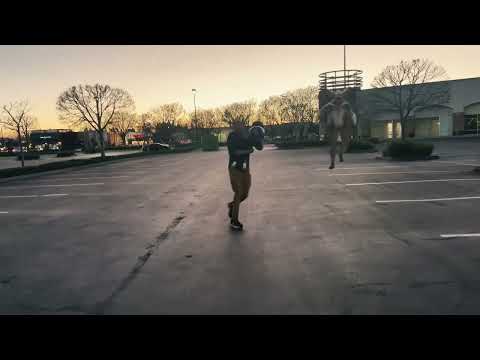
Remixing your art with AISpeaking of simple to detailed quickly. I watched 'Wag the Dog' (1997) again and it inspired me to do some more 3D to Stable Diffusion experiments. In this case, I rendered the simplest of all simple renders in Carrara. I dredged up Poser 4 Lo Res Man - yes, even less resolution than Poser 4 Dork! I set up a scene in which one figure is in a running pose close to the camera, one figure is in a running pose further away, and there are a few plane primitives to block out a path. In carrara, I rendered out a base render and a depth pass. In Stable Diffusion,I used the extensions for Controlnet and Latent Couple so that my renders could determine the basic layout of the scene. The Latent Couple extension allows the background to be changed separately from the left side figure which could be changed separately from the right side figure. So I have a young girl jogging in a park with cherry blossom trees during the day and then an old man being chansed by a ghoul at night in a graveyard. Both use the same simple 3D render as a start.
P4 Dork is out of the Graveyard - Carrara to SD workflow - warning AI discussionDork is Back - As an Old Man then as a Young Woman
More use of carrara to block out simple shapes as first step in an AI workflow - stable diffusion
The setup = Poser 4 Dork Casual posed in simple running in foreground, Poser 4 Lo man running in background and some primitives as a footpath
I rendered out multipass for depth pass in addition to simple base render
I used controlnet 'Depth' to process the Carrara depth pass to a SD depth image
I used controlnet 'Canny' to generate outlines for SD
I used Latent Couple with AND (all caps) to assign prompts to the background, left side, and right side of image.
Repeat, for prompt, AND is in caps - separate the (1st part = all image so state background), AND (2nd part = left half image), AND (3rd part = right half image)
You can actually be more detailed in dividing up the image how you want; but the above is a useful default.
Off Topic Thread #2Eeeeeekkkk......
Extensions troubles on the Laptop.
Copied all of my extensions from my Graphics computer over to my Laptop thinking that since they were running okay it would be all smooth sailing.
When I tried starting Carrara I got a nasty Error message.
Deleted all the extensions and copied a base install extensions into the Laptop.
Next started the time consuming process of adding the extensions one by one till I found what was causing the error.
Fortunately number 4 on the list proved to be the problem - removed it and added the rest, now working fine.
Carrara Non Photo Realistic Works 2WendyLuvsCatz said:
you are getting good use out of that laptop bunyip

Thanks Wendy, am keeping the scenes simple and small, also cut the renders to 3/4 the size I normally do. Was able to setup my E-drive backup to get My Library & Runtimes added to my Carrara install so have my full DAZ/Poser library available - subject to memory usage of course !!!
Now I can do more than surf the Net on hot days !
DAZ Studio : Movie Magic | Digital Art LiveThis Webinar series is for you if…
- You’re eager to learn workflows for creating separate renders in DAZ Studio that seamlessly merge into a final image or animation, enhancing the overall visual impact.
- You are looking for techniques to expedite your work process in DAZ Studio, achieving more with an efficient workflow, whether for still images or animations.
This is for you if you want to accomplish…
- Mastering a workflow that offers total creative control over every element of the scene, from characters to environments, and understanding how to render these components as individual layers for a cohesive final result.
- Building a versatile library of assets, including skies, foreground, midground, and background elements, as well as animations and effects for different layers, to enrich your scenes.
- Gaining skills in manipulating saved character animations for various purposes, such as changing lighting, camera angles, and even the characters themselves, culminating in a final project like a short video. Additionally, learning to utilize post-production techniques in software like DaVinci Resolve to bring these elements together effectively.
Check Out the Event Page for More Details and to Sign Up!
Webinar Details
Session 1
Date: Sunday Feb 11th
Time: 19:00 GMT (London) / 14:00 EST (New York) / 11:00 PST (Los Angeles)
Duration: 1.5 – 2 hours
Session 2
Date: Sunday Feb 18th
Time: 19:00 GMT (London) / 14:00 EST (New York) / 11:00 PST (Los Angeles)
Duration: 1.5 – 2 hours
Webinar Ticket Options
Free ticket
- Entry to Part 1 for an introductory session only (30 minutes)
- Excludes searchable recording and any bonus content
Premium ticket
- Entry to both sessions of this series.
- HD recording of both webinars with optional captions. 1 x bonus video set from Dartanbeck on Complete Guide to Dynanic Character Animation.
VIP Ticket
- Entry to both sessions of this series.
- A searchable HD recording of the mini course with optional captions.
- A private sub forum associated with this mini course.
- Two bonus video sets giving you all round teaching on animating for DAZ Studio.
- “The Complete Guide to Animating Dynamic Characters by Dartanbeck”
- 4.5 hours of video content
- Worth $60
- “The Power of Animate ” by Dartanbeck
- 5 hours of video content
- Worth $50
- “The Complete Guide to Animating Dynamic Characters by Dartanbeck”
Check Out the Event Page for More Details and to Sign Up!
About the presenter Dartanbeck
Dartanbeck began his Digital Art journey by painting game tiles for tabletop fantasy games. He then became a texture artist for 3d game characters for a world-wide gaming community from which he has received several Hall of Fame awards. This immediately sparked his desire to create digital animations in the form of movies or shorts and has been dedicated to that pursuit ever since.
Now as a Daz 3d published artist, he has released several environment kits for Carrara software – specifically designed with animated movie makers in mind, plus released two character animation packs.
Dartanbeck is currently animating using Daz Studio and Carrara software and is having a lot of fun and success with it. Throughout his animation projects, he loves to share his experiences to help others to succeed as well.
His animation workflow includes Daz Studio with a collection of add-on plugins, Carrara 8.5 Pro, PD Howler, Affinity Photo, DaVinci Resolve, HitFilm and Magix MusicMaker Premium.
Dartanbeck lives in a small fishing city in Wisconsin and loves the changing seasons and has always been at home in the wilderness. He has spent his career chiseling custom stonework, designing and building cliff extensions, waterfalls, ponds, walls, patios… even custom outdoor furniture made of stone. He is also a performing musician.
An open source carraraDiffeomorphic works on most things I've tried to export.
I remember being reasonably happy with Carrara and Hexagon about a dozen years ago, but I haven't worked with either of them since -- despite my desire for something less time-demanding than Blender -- because I hit bugs or missing needed upgrades and it was already evident that Daz wasn't going to fix the bugs or maintain compatibility with future figures. So I gave up on both. I too suggested open-sourcing because I thought either could make a good 3D introductory package. Hexagon's rather elegant that way. A pity if it's not feasible.
I know about Bforartists but I haven't been following it. I looked at it briefly, but I didn't seriously try it for one reason: the tutorials all the rest of the world produces are for standard Blender. And "I know _______ must exist, but where the bleep is it?" is one of the significant obstacles to learning Blender. I couldn't see how to follow the standard Blender tutorials and Bforartists at the same time.
It took me about five tries to get into 3D modelling seriously, not because I considered it incomprehensible -- I had plenty of background for it -- but because every time I got more-or-less used to some piece of software, either it disappeared, or -- in the case of Blender -- it changed seriously enough while real-life disruption kept me away, that the answer to Where the Bleep is Function X, and How Do I Invoke It? changed enough, by the time I got back, that I usually nearly ended up starting over.
Blender's changing rapidly right now, and probably will be for a while ... and it needs to, so I'm not complaining about that. But that makes it a trying choice for someone who's trying to get into 3D modelling with no background at all.
Bforartists has a non-trivial number of people keeping up with standard Blender releases. What they (unsurprisingly) don't have, is an equivalent number of people making tutorials for people getting up to speed with Bforartists.
Carrara was never half as complicated as Blender, as I remember it. To make a Carraraesque face for Blender that stayed reasonably stable on the front end doesn't seem as if it should be impossible. However, a project like this would need enough coders to keep up with Blender's rapid changes on the back end. Also at least one person who writes comprehensible documentation.
Carrara Community Art Gallery - Show us your Renders!!!therixx said:
These German guys make quite good renders! :-)
My rusty German allowed me to more or less understand what you two said.
And thank you for the time travel device @fettbemme, I see you attached the Carrara scene. Is it for study or may we use the model as well?Please do. I'm curious what you guys do with it. But make a reset button. You know, when get lost in time and all that (I forgotten all about it, Sorry.)
Carrara Community Art Gallery - Show us your Renders!!!These German guys make quite good renders! :-)
My rusty German allowed me to more or less understand what you two said.
And thank you for the time travel device @fettbemme, I see you attached the Carrara scene. Is it for study or may we use the model as well?Gone but Not Forgotten - SloshWerksoh damn, I love his content and own quite a bit, so sad to hear of his passing

some scenes I have never rendered
plus Triplemoon Cottage in Carrara Octane which I have never tried before
(I buy a lot and don't get around to rendering)
but apparently 49 of 82 of his things not bought by me yet
Click Video to play
An open source carraraAt this point, it is probably easier to start off with Blender 4 or Bforartists 4 and simplify the UI to be even more Carrara like. Daz is providing plugins for Daz content, there is another one for Daz content too. Have not tried them myself, but they seem to work with newer content.Russian Architecture? Kremlin? Red Square? St. Basil's?actually Carrara has a very basic model of St Basils in it's object browser
less blotches and artifacts in your GI renderthis could be useful if you experience artifacts in your GI rendering
to speed up render time you could try lowering the Photons
good luck all
PS.: Carrara 8.5 Pro - migjht not work on previous versions, but you can try the same settings
Visual Novel support groupI haven't post here for a long time, but I keep working on my VN. I also have upgraded the main characters.
These are the main characters of my Burning Babes Gang's VN. There are more characters, but the main are ready. On this Holiday I'll have more time to dedicate to the VN and more will come up in 2024.


Now there's a Dev. Blog showing the game's progress.Hope you enjoy it!
Happy New Year for all!February 2024 - DAZ 3D New User Challenge - Lighting and Light EffectsBeginner Challenge:
"Lighting"
This month's focus will be on how you light your image. Lighting is what defines and enhances the viewer's experience when looking at an image. Lighting helps a viewer to "see" the story. The presence of light, or the lack thereof, provides us with the ability to believe the world we are looking at. It can tell us if an object is round, whether it is close or far away, what colors were used and even if the surface is reflective. As an artist, it will be your ability to master the use of light, that will set you apart from the others. Below is a source list of lighting tutorials, articles and videos that will help you understand how to use your software, the different techniques used to light a scene, and the theory behind why lighting is needed. This list is not comprehensive; it is just a starting point.
Also, keep in mind the topics we've covered during previous challenges. Build upon what you have learned to create a compelling image to light this month.
This year of New User challenges is just getting started. So far this year we have covered :
Inspiration:
Check out the amazing entries and discussion in last year's Lighting Challenge.
Other Helpful Links:
When following tutorials, be cognizant of the different applications (Bryce, Daz Studio, Poser, Carrara Blender, etc.) and different render engines (3Delight, Iray, Reality, etc). Techniques for one may not apply directly to another.
How to Use Your Software:
DAZ Studio
VII - Lights
Daz 101: Lighting (video)
Point Lights, the BasicsDAZ Studio Lights Tutorial - Presets - 3D Software (this contains undressed characters that's why it has a warning at the start, just so you know)
3Delight IBL or HDR type lighting environments
UberEnvironment2 - Made Easy
UberEnvironment2 Basics
Learning UberEnvironment 2 Return to Topic
Uber Area Lighting: The Basicscommercial for 3Delight
IBL Master (store link) IBL Master Discussion (forum discussion)
Iray
Creating and Lighting a Scene with Iray in DAZ Studio by SickleYield
Lighting and Tone Mapping in Iray by SickleYield
commercial for Iray
Emission Profile Master (store link) Emission Profile Master Discussion (forum discussion)Regarding ghostlights which had some changes since we last had this challenge: https://www.daz3d.com/forums/discussion/551301/ghost-lights-what-s-happening-and-what-s-next/p1
Poser
Poser Pro 11 Tutorial: Lighting, Part 1 https://www.youtube.com/watch?v=ZjCkDHWX6VM
Poser Pro 11 Tutorial: Lighting, Part 2 https://www.youtube.com/watch?v=J_paY90kz40
POSER Tutorial Lesson 3: Lights https://www.youtube.com/watch?v=v3m4Xy5lPrE
Bryce
Artist’s guide page 125
Thoughts on Lighting in Bryce 7.1 by Rashad
Bryce: http://www.youtube.com/watch?v=C772CuZ6RgI
Bryce: http://www.bryce-tutorials.info/bryce-tutorials/lighting-and-skies.html#
Bryce: https://www.youtube.com/watch?v=e-Pe-IVp_dY
Theory:
Mastering Lighting in Blender the first 25 minutes of the video is relevant for everyone not just blender users.
Lighting Basics:
http://www.3drender.com/light/3point.html
http://bensimonds.com/2010/06/03/lighting-tips-from-the-masters/I will be checking in as will the rest of the Community Volunteers to try and help with anything you all may need.
For a list of the current contest rules, please see this thread: Challenge Rules
Closing Date: February 29, 2024
one example for the use of lights