-
Diomede's Notepad, Sketchpad, and Chilling Pad
Thanks. Carrara is ideal for blocking out scenes for AI, and also for bringing AI images in in the scene backdrop and rendering a new detail. Blender even more so. For Daz Studio, which does not have native modelers, and which is focused on Iray photoreal renders, need some advanced info. For Controlnet's 'depth' preprocessor, the depth information can be gotten in a straight depth canvas, but Daz Studio produces that canvas in EXR format only. Solutions exist, just more steps. For Controlnet's 'canny' preprocessor, the equivelant of Carrara's native Toon III render is a little more complicated. The bad news is that I think (merely think!) that a good solution could be (merely could be) to use the canvas for Material ID and then construct your own 'Canny' assistant. The good news is that the Daz Studio plugin 'Line Render 9000' is designed to accomplish this task. The 'I'm not sure' news is that Line Render 9000 was designed for 3Delight, not Iray, so I am not sure if it will play nicely with more recent content.
Here is a helpful video introduction to Daz Studio canvases by ArtCollaboration. This is the 1st of two related videos. This one introduces and describes each Studio canvas and explains how to set them up. The second video explains how to use them for postwork. At the moment, anyone following along with me would be focused on the canvas for depth, and perhaps the canvas for material id (or the line render plugin).
Please give me any suggestions. There is always more to learn! (and as I get older, I am always having to relearn the stuff I used to know).
 Diomede's Notepad, Sketchpad, and Chilling Pad
Another recent 3D to AI image. This one was sent back to 3D (Carrara) to fix the hand. I simply loaded the AI image as a backdrop then rendered the original blockout figure with shadow catchers to get the hand. This hand has a particularly challenging hand pose for AI internal fixes.
 No one asked me - Diomede screenshots on whatever - Warning AI Discussion OK
Good point Bunyip.

I did a similar workflow for a simple fantasy art image. However, this time I addressed the hand not within AI, but by loading the image back in Carrara and rendering the hand which was used as the original blockout. Shadow catchers are awesome! Original blockout toon and depth renders also attached.
Carraracafe down? *ONLINE NOW*Jetbird D2 said:
Which also makes me think that, if I get things sorted out with Carrara Cafe, most likely I may have to do a grand project to remake Carrara Cafe into other platform and go away from wordpress.
Thank you Danas. If you do that and need help, I bet you could find it among Carrarists. I, for one, do not know if I would be able to help, but would like to know about it.
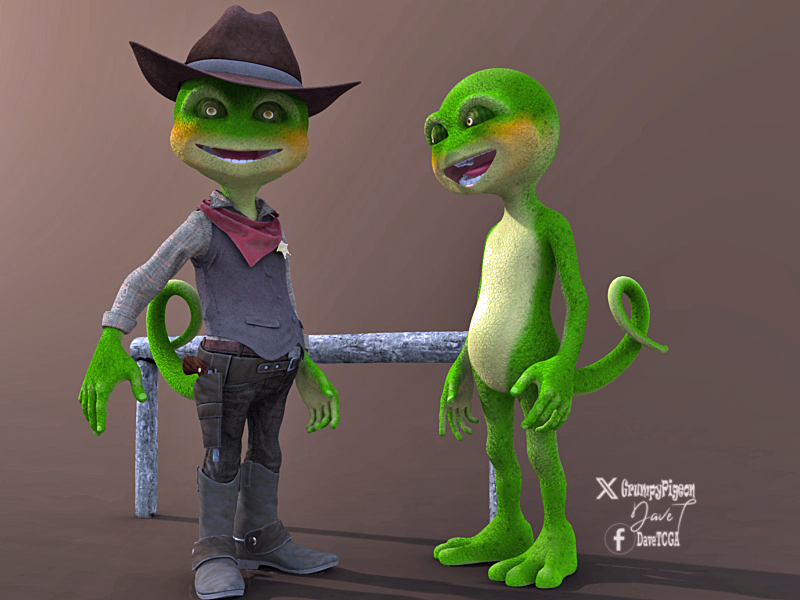
Buy Something That Doesn't Work in Carrara? Post your Questions and Workarounds here. (please)took a bit of work but managed to get Predatron's Bizzle/Cowboy into Carrara after modifications..
had to use the DS plugin to load the tail, boots and feet transfer to blended weight.. then duplicated each one and converted to object then transfer utility on each model to the corresponding object then save as scene subset.... phew..

result so far after nticking UVs
 Carraracafe down? *ONLINE NOW*
Jetbird D2 said:
WendyLuvsCatz said:
I have a feeling they just don't care.

I will admit to using DAZ studio a lot lately simply because it's just easier for content from DAZ.
I hope they care, I've finally figured out who may help and hopefully things will get sorted out, or at least I would get some answer on to what happend and what will happen next. While Daz3D seems not active on anything Carrara, they seemed to have desire to keep Carrara Cafe going for us. I admit I've got scared that maybe it was canceled, but since I can log in to Carrara Cafe e-mail system, I think there is an error from hosting side or maybe some Carrara Cafe's wordpress plug-in got an update that crashed everything, but that wouldn;t explain why I am not able to login to hosting services and troubleshoot.
Anyway, I asked Steven from Daz3D if they could initiate Carrara Cafe hosting account recovery and lets hope for the best.
And Wendy, there is nothing bad about moving forward and using up to date tools for what you do. We all know that, no matter what, Carrara will have a special place in our hearts, But life goes on and so do we all. On the mean time I will keep on dreaming what Carrara 9 could have been. And what surprises Carrara 2024 could have brought. :)
best of luck
No one asked me - Diomede screenshots on whatever - Warning AI Discussion OKVariations on Output
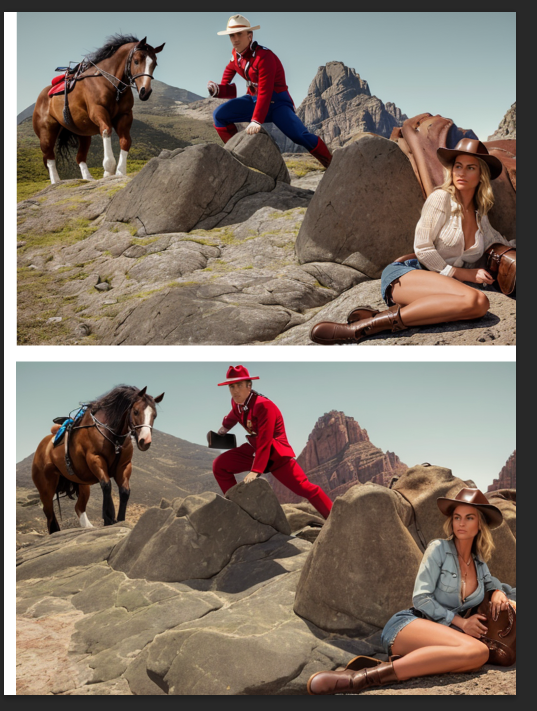
You can set a number of iterations for each set of prompts you process. I generally do 4-6 per iteration. But I might do only 1 if I am still testing if something is working at all, or I might have moe than 6 if I have used a high denoiser, which gives Stable Diffusion discretion to depart more from my prompts. Here are two of the results from loading my Carrara renders in Controlnet and using my prompts with Latent Couple. In general, I like the image with the blue pants uniform better, but there are some elements from the other that I like as well. So I took these in an image editor to combine the elements that I liked. Note that the image is still relatively small (768x512).
 No one asked me - Diomede screenshots on whatever - Warning AI Discussion OK
Carrara Output Loaded in Stable Diffusion Controlnet Processors
In this case, I am using image2image; therefore, the adjusted Carrara diffuse pass is loaded in the image2image box.
Controlnet 'Depth.' The slightly blurred depth pass is uploaded to a Controlnet tab. I also upload the depth as the mask, set the preprocessor to 'none' for depth.
Controlnet 'Canny.' The adjsuted Toon render (multiplied by coverage pass) is uploaded to Canny. Do use the Controlnet processor to use it to detect lines. Click the orange icon that looks like a fireball.
No one asked me - Diomede screenshots on whatever - Warning AI Discussion OKDimensions. Stable Diffusion models generally prefer either square 512x512, portrait 512x768, or landscape 768X512 dimensions. Therefore, I set my Carrara output to be a multiple of these dimensions. In this case, 1535x1024.
Toon III settings. I reduce the width of the edges, and I lighten the shadows.
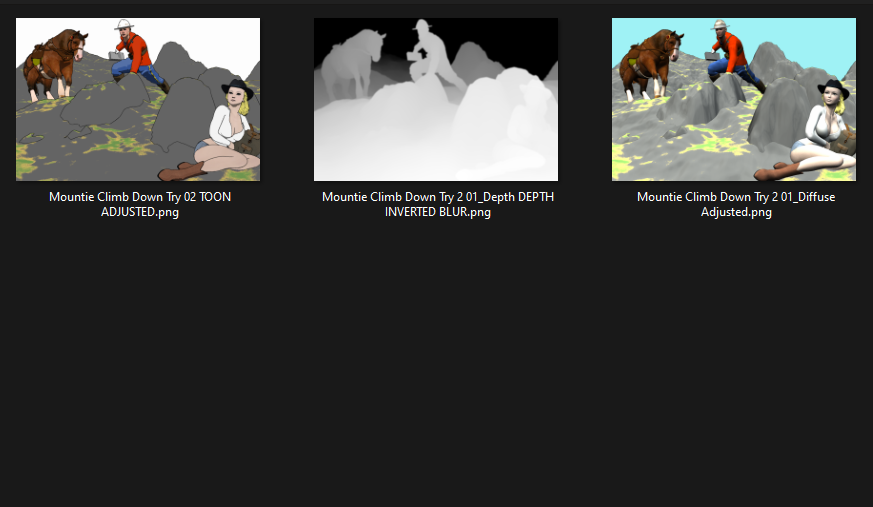
The result is several image outputs. The toon render, the depth pass, the coverage pass, the background pass, and the diffuse pass.
The Toon III render is being used to help the AI 'canny' processor identify edges. Therefore, I have reduced the shadows which can yield false edges, and then I multiply the toon result by the coverage pass in an image editor. This reinforces many of the primary outlines.
The depth pass has to be inverted to be used correctly in stable diffusion caontrolnet.
I do some minor touch ups to the toon and diffuse passes if I anticipate some problem - such as a shadow edge fooling Controlnet that the edge of an object might be someplace it is not.
I also do a very minor blur on the depth pass to give the artificial intelligence a little wiggle room.
In this case, I used image2image in Stable Diffusion. Therefore, I took the diffuse pass and multiplied it by the coverage pass. I load the result in the image2image main area.
So, before I open the Stable Diffusion processor, I have three 1536x1024 prep images. Here they are for this example.
 No one asked me - Diomede screenshots on whatever - Warning AI Discussion OK
Carrara setup.
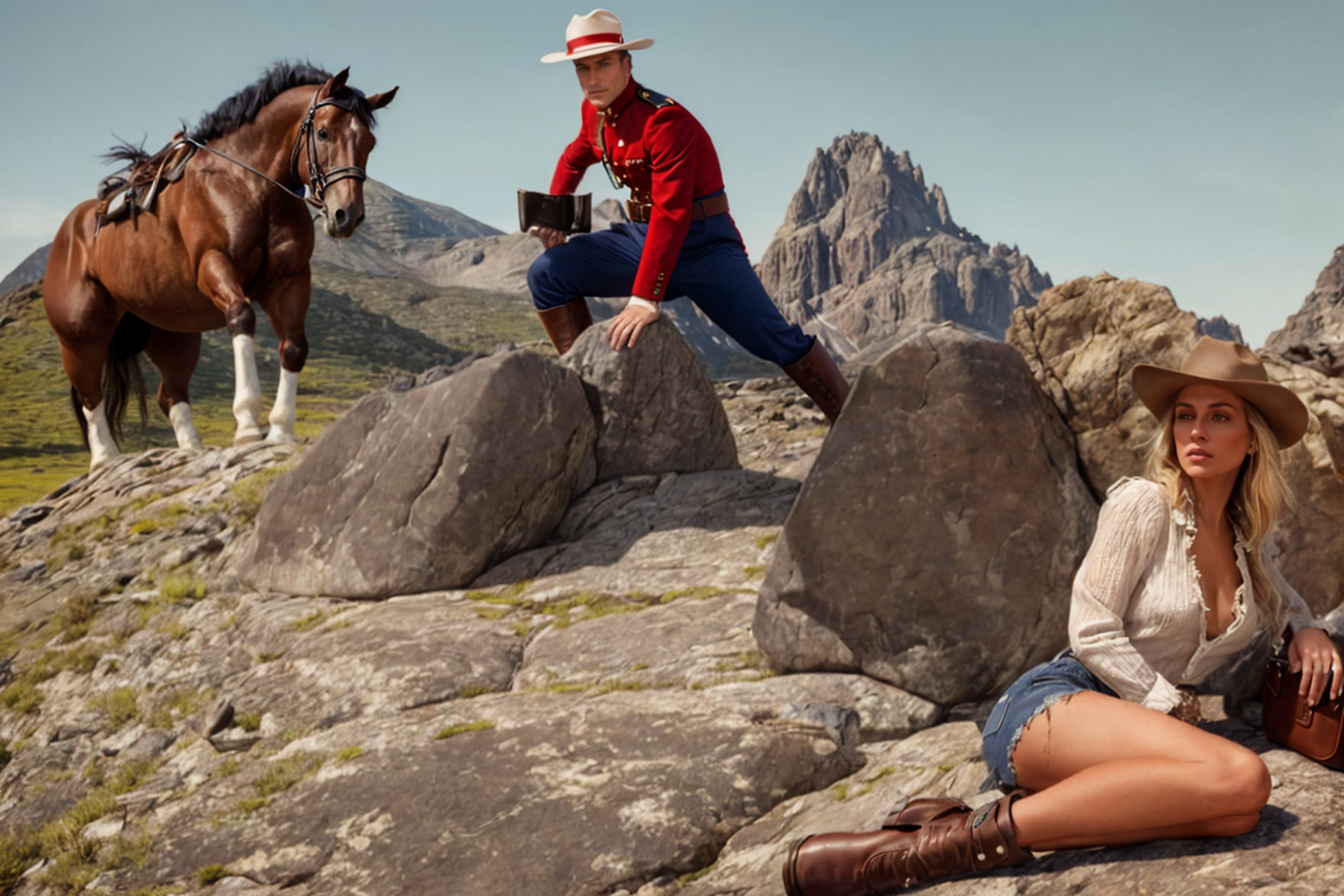
Simple scene. Note, intending to use an extension called 'Latent Couple' which can divide the Stable Diffusion canvas into areas for separate processing. So I am thinking of this in three basic regions. The left third, which is further back, has a horse. The center, which is midground, has a Royal Canadian Mounted Policeman. The right, which is closest to the camera has the exhausted and tattered desperado hiding behind a rock.
The scene has high ambient and the toon filter is on. I want to reduce the inmpact of shadows on the AI processor edge detection. I will be rendering a Toon III pass, a depth pass, a coverage pass, a diffuse pass, and a background pass.
Used Carrara terrain editor to create a basic hillside with rocks and ledges. Placed the old Daz Horse with reins and saddle in back left. Placed an M4 with the Content Paradise RCMP uniform in mid center. Placed a G2F with cowboy boots, hat, denim shorts (jeans with alpha) and blouse clutching bag in front right.
I used the Carrara hair modeler to grow strand based hair under the hat, and used Philemo's hair-to-mesh plugin (rememeber to reduce display percentage in the hair modeler). I selected the hair mesh and in Effects checked the Toon III over ride. I don't want the black lines for toon edges dominating the render of the hair.
No one asked me - Diomede screenshots on whatever - Warning AI Discussion OKA Canadian Western Themed Image
Warning - Created combining Carrara Toon III Pro filter renders and Carrara multipass renders in Artificicial Intelligence Processor.
I will be posting a series of Carrara and other screen shots for this workflow. Frankly, this one took more steps and more time than might be worth, but presumably learning and experience would speed things up. I think the final result is not bad. Going for a western pulp illustration look. A featured content item was the Royal Canadian Mounted Police uniform from the old Content Paradise site.
Carrara arrangement and preprocessing outlines and depth -> Stable Diffusion / Controlnet / Latent Couple processing and first draft -> Composite preferred elements -> Stable Diffusion upscale and reprocess in image2image
 Carraracafe down? *ONLINE NOW*
WendyLuvsCatz said:
I have a feeling they just don't care.
I will admit to using DAZ studio a lot lately simply because it's just easier for content from DAZ.
I hope they care, I've finally figured out who may help and hopefully things will get sorted out, or at least I would get some answer on to what happend and what will happen next. While Daz3D seems not active on anything Carrara, they seemed to have desire to keep Carrara Cafe going for us. I admit I've got scared that maybe it was canceled, but since I can log in to Carrara Cafe e-mail system, I think there is an error from hosting side or maybe some Carrara Cafe's wordpress plug-in got an update that crashed everything, but that wouldn;t explain why I am not able to login to hosting services and troubleshoot.
Anyway, I asked Steven from Daz3D if they could initiate Carrara Cafe hosting account recovery and lets hope for the best.
And Wendy, there is nothing bad about moving forward and using up to date tools for what you do. We all know that, no matter what, Carrara will have a special place in our hearts, But life goes on and so do we all. On the mean time I will keep on dreaming what Carrara 9 could have been. And what surprises Carrara 2024 could have brought. :)
Carraracafe down? *ONLINE NOW*therixx said:
Hi Danas, nice to find you still here (we chatted about your Carrara locomotive tutorials via email) and with such useful posts! Thank you.
Riccardo
(P.S. the link www.danas-imaging.com seems to be broken)Hello!
I am a rare bird here nowadays, pretty much just come here to see if miraculously there are any exciting news about Carrara.
But I've found a scary forum thread about Carrara Cafe being down... again...Miss old good days when I actively participated in ventures of Carrara community.
Regarding my website, it is actually intentionally offline, one reason I am looking for a better hosting, other thing I am moving away from wordpress based website and am redoing my portfolio.
Which also makes me think that, if I get things sorted out with Carrara Cafe, most likely I may have to do a grand project to remake Carrara Cafe into other platform and go away from wordpress. Not only wordpress based sites are too attractive to hackers, but also maintenance of them are hazardous road to walk. You never know when which plug-in may cause critical error with an update. I just need to figure out how to make it so that other people, who are editors in Cafe, could easily do the updates and articles should they come across some exciting news and stories for Carrara Cafe.
Carraracafe down? *ONLINE NOW*Hi Danas, nice to find you still here (we chatted about your Carrara locomotive tutorials via email) and with such useful posts! Thank you.
Riccardo
(P.S. the link www.danas-imaging.com seems to be broken)Official Release of Carrara 8.5 **Update - 8.5.1.19**Fettbemme said:
Has anyone tried Carrara on Linux with Wine?
I have and it worked - I think. I couldn't figure out what to do because the fonts were all wrong so everything was blank.
I wonder if we look at the default font in Carrara Preferences on Windows, then installed the correct font on Linux if it would solve that. I'm fairly certain it should.
I don't know for sure because I am not used to Linux at all, so I have no idea how things should be.
Official Release of Carrara 8.5 **Update - 8.5.1.19**Has anyone tried Carrara on Linux with Wine?
Carraracafe down? *ONLINE NOW*Headwax said:
Contact @Richard Haseltine via pm. I think/hope can help point you to an email.
Make that https://www.daz3d.com/forums/profile/7440/Richard Haseltine
Hello,
thank you! I contacted Richard, hopefully he will be able to help.
I am also looking through my e-mails to see what other contacts I may have, I know I used to communicate with CEO of DAZ3D back in the active Carrara days, but it was so long time ago... I am not sure I will be able to dig it out.
PS. is there any way to see and find staff memebers on these forums? And does the last active status shows real data?
Carraracafe down? *ONLINE NOW*my concern is to keep Carrara Cafe alive, even if not as active, there is a lot of valuable information and content about Carrara.
I was even considering redoing it from wordpress based site to something less problematic to maintain.But the fact that I couldn't log in to web hosting account and see what is going on and troubleshoot worries me a lot.
I hope Daz3D didn't cancel it without notice. Waiting for their reply, I've submitted a support ticket. But I don't expect immediate response. It is sad that so many original staff members seems to be no longer working, all contacts I have seems to be no longer accessible. People I used to work on Carrara Cafe from Daz3D were so awesome and nice. They would respond even on their time off.Carraracafe down? *ONLINE NOW*I'm not sure if Carrara is using parts of TGS Amira API (very old stuff), then, to open source it will be out of the question, especially if nobody turns the radio back on and listens and answers questions
(Example: RadishWorks Cosmos Creator > Righthemisphere DeepCreator > Esperient Corp. Esperient Creator - the proprietary closed source makes Creator a delisted software, whoever owns it can install as many times due to its local activation. RightHemisphere bought parts of the API and is still in use with Deep Exploration - now part of the SAP fat man junk eaters. without them the world would suck less)
Autodesk, anyone? 123D ? hahaha
If Carrara staff turned the lights out in their office, I'm affraid it won't be as easy as with Caligari trueSpace (another delisted software Caligari > Microsoft > Killswitch … lights off > Forum continues to my knowledge)
last to wrap this up Pandromeda MojoWorld - he quit because of family issues and had to look after a family member. at least he told me so on the phone years ago when I asked him to sell me a copy he said I could find any on the web and how I unlock it wouldn't bother him
Let's hope the Carrara comunity continues as the app is very capable. With lot of luck we get access to portions of the code to improve aspects of the program without the need of core TGS features ( ? )
The right way to export Victoria 4 into, and out of Daz?WendyLuvsCatz said:
well unlike Genesis+ you don't have to export all of the mesh, just the head
(with eyelashes etc, whole head)
as all body parts are separate meshes by bone name
you then reimport that mesh using morphloader specifying its the head (or whatever other part under attenuate I think (read or watch a tutorial been a while and I used Poser or Carrara personally)
eyes and mouth you can move the bones manually to fit (again separate meshes)
creating ExP injection files is another load of fun (I have done it but following DAZ documentation tutorials)
It took me a while to figure out how to move the eyes and mouth in Daz. It's just a shame that it isn't possible with the eyelashes. Because then everything thing could be corrected in Daz Studio.
Alas, no.
crosswind said:
1. Even with Genesis figures, you don't have to hide or delete anything, just use Filter Objects option when exporting OBJ ( DS version 4.12+, IIRC...). The same settings apply for V4 when exporting to OBJ, there's nothing special.
2. V4 has no multi-resolutions by default. Leave it alone if you did not convert it to SubD beforehand.
3. If you use FaceForm Wrap, as the floating geometry, V4's vertex positions must have change after wrapping. Then when importing OBJ with MLP, you'll get the delta with no problem, just by using Reverse Deformations + Deltas Only.
4. As per my exp., with wrapping V4/G2, in FaceForm Wrap, 1) hide eyelashes, inner mouth, gum, eyes related surfaces, etc. on the floating and fixed geometry with the nodes of Selection Polygons and Subset; 2) Add a Brush Node after Wrapping node to smooth / tweak any distortion / displacement.
5. After importing OBJ into DS, if there's any rigging issue on eyeballs / mouth cavity, etc., re-rig them as needed.
Attached is my attempt. I managed to reposition the eyes. But the Lacrimal, lashes, and eye sockets have "dropped". I've tried to fix everything in Blender, but when I try to import it through MLP into Daz, I get the "missing deltas" message.
As a quick test. I even created a morph for V4.2 in Blender. When I tried to load the morph through MLP, "No deltas".
No matter what I do, everything just comes up as having no deltas. Right now, I feel like smashing my face into a blender - turned up to full.
NylonGirl said:
That is two cats in a row.
It'd be three, but my boy doesn't stay still for very long ^^'
Thank you for the replies.
Daz 3D is part of

Connect
DAZ Productions, Inc.
7533 S Center View Ct #4664
West Jordan, UT 84084Licensing Agreement | Terms of Service | Privacy Policy | EULA
© 2026 Daz Productions Inc. All Rights Reserved.