-
Skin Builder Basic for Genesis3?
Is there any product that is like Skin Builder Basic for Genesis 3? I'm mostly looking for a ghostly white skin that comes with it that can easily be adjusted to other colors. Thanks!
Genesis 1/2 version: http://www.daz3d.com/skin-builder-basic-for-genesis-and-genesis-2-female-s
I saw those too and I don't know how that works but I think like you - I would like extemely pale skin like in NW Europe and added to that various ethnicity / sun exposure tint overlays. It must be done very simply with tint opacity images. http://www.daz3d.com/lie-baker
This product below seems to have Lie Baker and various base textures build in but unfortunately it's for Victoria 5 only:
http://www.daz3d.com/skin-builder-for-genesis-and-genesis2-female-s
How do I contact DragonStorm and/or Zev0 for support? I would not buy this unless I know I can modify the UV sets and source code it uses for other Genesis 2 & Genesis 3, both male and female characters, to create skins. There should be reasonable instructions with such a product on how to use and extend it.
So that's the answer to your question - yes it's possible to do such a thing but the scripts must be extended and new base skins generated. It's shouldn't be that difficult if you started with the Skin Builder Pro for Genesis 2 Female & Genesis if those are made with quality documentation.
DAZ Studio 4.9 Resource Error, file not foundI'm having the same problem, but with Victoria 4. It says that the support files cannot be found. I can load The GIrl 4 just fine, though.
I also cant use the Smart Content window, since nothing shows up on it.
Do you have more than one Poser-format content folder? How were V4 base and Girl 4 installed?
Does the Victoria 4 thumbnail have a scroll at top-left and the Girl 4 thumbnail not?
February, 2016 New User 3D Art Contest “Lighting” (Entry Thread)"Geisha's Koï" - Rendered Daz Studio 4.9 | IRay Engine | Postwork in Photoshop (Camera Raw filter, Signature).

Products:
- Geisha = Victoria-6 - Thian Hair - Shiny SheetZ
- Lights = Idg-Portrait-Studio + some emissives surfacesStar Trek Builders Unite 7: The Continuing MissionHI, gang! Sliding through again! This time I have a question about converting Oshikai's Retro Skirt from Aiko 3 to Victoria 4 - I posted the question and pics on the RDNA forum, so rather than repeat all that here, I'll link it (since we're all one big happy family now, dontchaknow? ;) ) Has anyone done this successfully with the PP Fitting Room, or, for that matter, another clothing converter? I'm still amazed that, with all the Trek art being made, that no one has ever created an accurate dress for the more realistic figures ...
Wardrobe Wizard did a good job foe me
Star Trek Builders Unite 7: The Continuing MissionHI, gang! Sliding through again! This time I have a question about converting Oshikai's Retro Skirt from Aiko 3 to Victoria 4 - I posted the question and pics on the RDNA forum, so rather than repeat all that here, I'll link it (since we're all one big happy family now, dontchaknow? ;) ) Has anyone done this successfully with the PP Fitting Room, or, for that matter, another clothing converter? I'm still amazed that, with all the Trek art being made, that no one has ever created an accurate dress for the more realistic figures ...
Where is victoria 4Thank you so much!!! I'll give that a go. I found the clothing in the poser stuff. I just kept searching through the daz content because that file said it was for daz when I purchased it. It never occured to me to look in poser. I also found some other things I did not even know I owned. :) So no problem with that any more.
Oh yeah. I would have rather owned the v4.2 but the clothing said v4 and v4 elite so that is what I bought.Yeah, a lot of items say Victoria 4, but they all work with Victoria 4.2.
3d Art Freebie Challenge----February:"EleMENtary, my dear Watson!" ( entries)Title: Who's Doing the Paper Work
Joy riding in daddies new ride. Does he know you have it? Does he know you brought all the way to
Earth? You are in big trouble young lady. I am calling your father as soon as were back at HQ.Now Captain, may I say I find your attitude unbelievable.
This has got to be the most significant event ever in your life and all you can think to ask is who is
doing the paper work. Well no need for concern, there will be no paper workPlease look into the red lens of this flashy thingy I am holding.
Genesis
01) * Skull cap and Hair
02) * Alien Skin
03) * Shorts
04) * Tie
05) * Belts and Knee Pads
06) * SuspendersVictoria 4.2
07) Short Bob Hair (click Downloads Item 1)
08) EZ Casual (7 Down)
09) * Camo shader
Bossy Boots (Link no longer active)
10) * Base Ball CapMichael 3
11) M3 Hair (4 down)
12) Casa Blanca Suit and ShoesScene
UFO (Link no longer active)
13) * Jeep
14) * Desert Road
15) 3Df Free Sky (6 down)
Paid Item
Belt (holster and side arm not visible) from DAZ Shadow Dancer
Sunglasses from Mech Girl for A3No Count
Genesis Female
Victoria 4.2
Michael 3
Primitives cylinder and orb with shaders for nueralizer4 distant lights
All work in DAZ 4.8
no post work
asterisked items require registration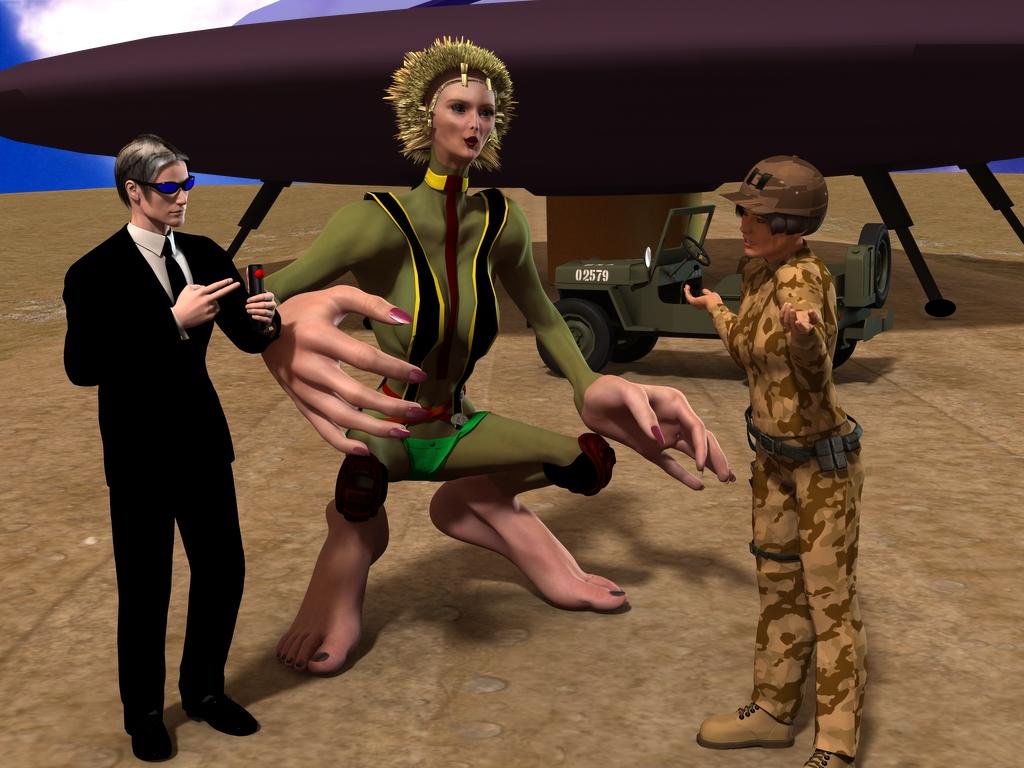 DAZ Studio 4.9 Resource Error, file not found
I'm having the same problem, but with Victoria 4. It says that the support files cannot be found. I can load The GIrl 4 just fine, though.
I also cant use the Smart Content window, since nothing shows up on it.
Do you have more than one Poser-format content folder? How were V4 base and Girl 4 installed?
3d Art Freebie Challenge----February:"EleMENtary, my dear Watson!" ( main thread)Title: Who's Doing the Paper Work
Joy riding in daddies new ride. Does he know you have it? Does he know you brought all the way to
Earth? You are in big trouble young lady. I am calling your father as soon as were back at HQ.Now Captain, may I say I find your attitude unbelievable.
This has got to be the most significant event ever in your life and all you can think to ask is who is
doing the paper work. Well no need for concern, there will be no paper workPlease look into the red lens of this flashy thingy I am holding.
Genesis
01) * Skull cap and Hair
02) * Alien Skin
03) * Shorts
04) * Tie
05) * Belts and Knee Pads
06) * SuspendersVictoria 4.2
07) Short Bob Hair (click Downloads Item 1)
08) EZ Casual (7 Down)
09) * Camo shader
Bossy Boots (Link no longer active)
10) * Base Ball CapMichael 3
11) M3 Hair (4 down)
12) Casa Blanca Suit and ShoesScene
UFO (Link no longer active)
13) * Jeep
14) * Desert Road
15) 3Df Free Sky (6 down)
Paid Item
Belt (holster and side arm not visible) from DAZ Shadow Dancer
Sunglasses from Mech Girl for A3No Count
Genesis Female
Victoria 4.2
Michael 3
Primitives cylinder and orb with shaders for nueralizer4 distant lights
All work in DAZ 4.8
no post work
asterisked items require registrationLinks checked...entry accepted.
DAZ Studio 4.9 Resource Error, file not foundI'm having the same problem, but with Victoria 4. It says that the support files cannot be found. I can load The GIrl 4 just fine, though.
I also cant use the Smart Content window, since nothing shows up on it.
Ice Dragon Art WIP's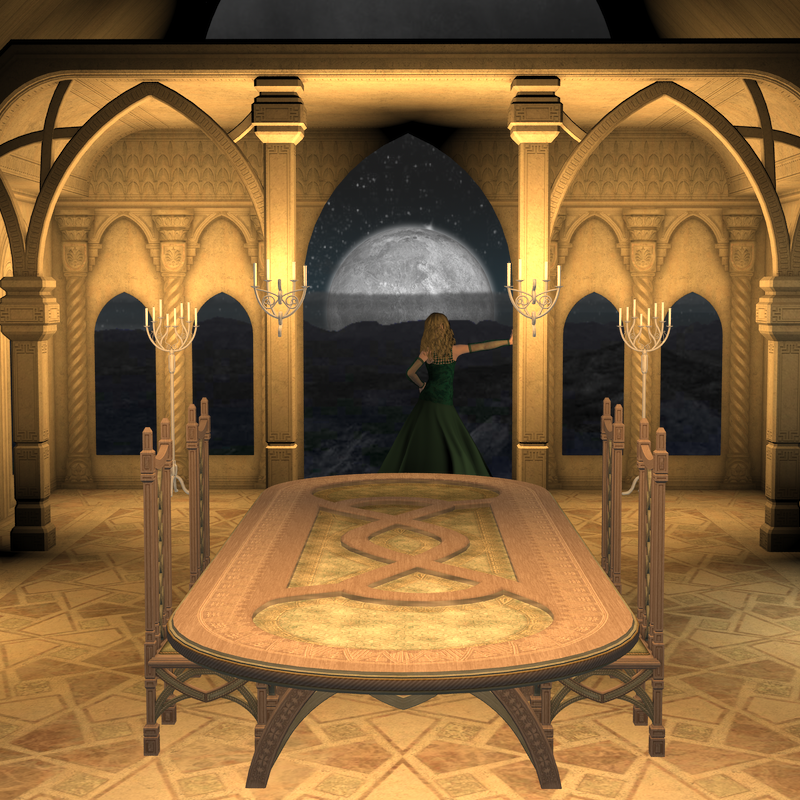 Moon Rise at Mog Ruith. Just checking out some of my new goodies. This is 3delight, for some reason the table does NOT like Iray even with conversion. May try a different texture on ti at some point. Victoria 4 with Amaraseda hair and Roses Fantasy Dove dress (freebie). Background is FM's Night. I will try from here on out to list what I am using but don't hold me too it. I will do it if I remember lol. 3d Art Freebie Challenge----February:"EleMENtary, my dear Watson!" ( main thread)
Title: Who's Doing the Paper Work
Joy riding in daddies new ride. Does he know you have it? Does he know you brought all the way to
Earth? You are in big trouble young lady. I am calling your father as soon as were back at HQ.Now Captain, may I say I find your attitude unbelievable.
This has got to be the most significant event ever in your life and all you can think to ask is who is
doing the paper work. Well no need for concern, there will be no paper workPlease look into the red lens of this flashy thingy I am holding.
Genesis
01) * Skull cap and Hair
02) * Alien Skin
03) * Shorts
04) * Tie
05) * Belts and Knee Pads
06) * SuspendersVictoria 4.2
07) Short Bob Hair (click Downloads Item 1)
08) EZ Casual (7 Down)
09) * Camo shader
Bossy Boots (Link no longer active)
10) * Base Ball CapMichael 3
11) M3 Hair (4 down)
12) Casa Blanca Suit and ShoesScene
UFO (Link no longer active)
13) * Jeep
14) * Desert Road
15) 3Df Free Sky (6 down)
Paid Item
Belt (holster and side arm not visible) from DAZ Shadow Dancer
Sunglasses from Mech Girl for A3No Count
Genesis Female
Victoria 4.2
Michael 3
Primitives cylinder and orb with shaders for nueralizer4 distant lights
All work in DAZ 4.8
no post work
asterisked items require registrationRRRR - The Sequel Render Contest *closed*tag: luci45 #5
Women in Black I - Alien Daycare
"This is not what I signed up for!"Used:
Rock Demon
Dream Home - Eclectic Study Decor
Millennium Horse Texture Pack 1
Grungy Jeeps
GIS OrionAlso Used:
Business Suit for Genesis 3 Female(s)
Eclectic Study desk, chair, and rug
Sci Fi Gear Bundle
Sultry Hair for Genesis and Genesis 2 Females
Rikki Hair for Genesis 2 Female(s)
Genesis Creature Creator
Everyday 1950 for Genesis Female Skirt
Mall Girl for Genesis top
Creature Creator for Genesis 2 Male(s) texture
Felicity HD for Victoria 6
Olympia 7
Various morphs
Daydream dress
Scoopback Mini Dress for Genesis
Time for School Sweater for Genesis 2
Casual Jeans and T-Shirt for Genesis and Genesis 2 Female(s)
Superhero Training Gear
K4 Basic Wear
Ground Shaders for DAZ Studio What kind of mesh?
They all use tris at runtime. The quads is meant to help ensure good layout and topology nd eaier on the eye. You can always switch to tris, drape, back to quads and when you are finished select surfaces that don't need as many quads (because they aren't in a bendy area that's draping) and decimate to reduce quad in that flattish area, and repeat for each less complex area.
I read recently that was the gist of what DAZ did with Genesis 3 - increase detail in really supple areas like lips and decrease detail in less supple areas although I haven't compared the different versions of the Genesis and V | M4 character geometry myself personally. I just read that. I think I even read Genesis 3 Female has less quads than Victoria 4 which seems sort of weird.
Lara rendersI used
Thank you Ice Dragon Art and Saphirewild

Thats really nice, are you using the same face morph from sharecg?
Thank you, no I did't use the morphs fron sharecg I create the face my selve
thats nice. if you dont mind telling me, which character did you use for the face morphs. Im trying to do the same for both male and female and Genesis 2/3 or Michael 6 dont seem to have enough morphs to change the facial features. (in this case im trying to replicate hitman)
Edit: nvm, it seems i need head morphs separately.
I used Victoria 4 for Genesis 2 Female and some head morphs for Genesis 2 female
Where is victoria 4That's not the Victoria 4 base, its an add-on for Genesis 2 Female to use V4 textures and clothes. This is the V4 base: http://www.daz3d.com/victoria-4-2-base
Sorry, misunderstood what you were trying to do. To use V4 textures on Genesis 2 Female they need to be saved as .duf material presets. Load Genesis 1, apply the material preset, and then save it as a new material preset.
The V4 clothing won't show up in Smart Content when you have G2F loaded. You'll need to find it in the Content Library pane > Poser Formats > [content library name] > Figures; check the readme for the exact folder names if you're having trouble finding it.
Hi freni-kyn,
To echo on what Fixmypcmike said, you can also purchase this: http://www.daz3d.com/v4-skins-batch-converter-to-genesis-2-female-s to help with converting the V4 textures. It is just a conveniance item, as you can do it yourself individually :-). I used it once, to convert everything in mass, so I didn't have to do it again. Good luck!
Rich S.
DAZ Studio 4.9 Pro, General Release, Now Available!My biggest issue with the smart content pane is that the way it is categorized is just not intuitive nor is it conducive to my work flow. Since I was pretty much able to define my own categories with the advent of Daz Studio Advanced (name drop) I have gotten very comfortable with a specific layout and flow for finding content. I see how DAZ has it set up and it seems logical at first but not so much in practise. Thanks to my experience with the old school "Dressing Room" tab from way back when, if I was to look for say Sky Princess for Morphing Fantasy Dress. It would look something like this...
People > Genesis (or Victoria 4.2) > Wardrobe > Morphing Fantasy Dress (I didn't bother to put it in a "Dresses" category since I used it often, Same with the "Basic Wear") > Expansion Pack 2 (for example) > Materials
Granted it seems like a lot of clicking but what you would have us do is Wardrobe > Dresses > Morphing Fantasy Dress > Expansion Pack 2.. followed by
Materials > Wardrobe > Morphing Fantasy Dress > Expansion Pack 2. That just seems so redundant and with my setup, you can get both the Dress and the Expansion and the Textures in one forward movement.Personally, I would like to see a similar pane to the Smart Content pane that allows us to create our own Categories. Not sure if it works that way now as I have not tried yet but you get the point.
On a side note, show of hands, who here has completely obliterated and reset their database in order to try and understand the Smart Content pane, and are now not only being distracted by the intricacies and lack of documentation but discouraged from making the art you really want to? Am I the only one? I doubt it.

You can still create your own categories -- that's what I do, and my system works better for me that the defult categories. Smart Content still works with custom categories.
DAZ Studio 4.9 Pro, General Release, Now Available!My biggest issue with the smart content pane is that the way it is categorized is just not intuitive nor is it conducive to my work flow. Since I was pretty much able to define my own categories with the advent of Daz Studio Advanced (name drop) I have gotten very comfortable with a specific layout and flow for finding content. I see how DAZ has it set up and it seems logical at first but not so much in practise. Thanks to my experience with the old school "Dressing Room" tab from way back when, if I was to look for say Sky Princess for Morphing Fantasy Dress. It would look something like this...
People > Genesis (or Victoria 4.2) > Wardrobe > Morphing Fantasy Dress (I didn't bother to put it in a "Dresses" category since I used it often, Same with the "Basic Wear") > Expansion Pack 2 (for example) > Materials
Granted it seems like a lot of clicking but what you would have us do is Wardrobe > Dresses > Morphing Fantasy Dress > Expansion Pack 2.. followed by
Materials > Wardrobe > Morphing Fantasy Dress > Expansion Pack 2. That just seems so redundant and with my setup, you can get both the Dress and the Expansion and the Textures in one forward movement.Personally, I would like to see a similar pane to the Smart Content pane that allows us to create our own Categories. Not sure if it works that way now as I have not tried yet but you get the point.
On a side note, show of hands, who here has completely obliterated and reset their database in order to try and understand the Smart Content pane, and are now not only being distracted by the intricacies and lack of documentation but discouraged from making the art you really want to? Am I the only one? I doubt it.
Where is victoria 4That's not the Victoria 4 base, its an add-on for Genesis 2 Female to use V4 textures and clothes. This is the V4 base: http://www.daz3d.com/victoria-4-2-base
Sorry, misunderstood what you were trying to do. To use V4 textures on Genesis 2 Female they need to be saved as .duf material presets. Load Genesis 1, apply the material preset, and then save it as a new material preset.
The V4 clothing won't show up in Smart Content when you have G2F loaded. You'll need to find it in the Content Library pane > Poser Formats > [content library name] > Figures; check the readme for the exact folder names if you're having trouble finding it.
Where is victoria 4I sure hope someone can help. I purchase and installed victoria 4 base today, (http://www.daz3d.com/victoria-4-for-genesis-2-female) as well as the elite package(http://www.daz3d.com/v4-elite-bundle.) I've been messing with Daz for a few months and find the storage awkward, but I thought I had a good handle on it until today. The victoria base does not show up in either my smartcontent panel or my Content library. After using the search button in the content library I located a set victoria 4 uv option. I've done that but the clothing I purchased for the victoria model are still not showing up and I can not apply the material files from the victoria elite downloads to the 'genisis' figure that has the set victoria applied to it. If anyone knows where I am supposed to look or what I am doing wrong I would love a heads up. Thanks! ~~Elisabeth
Daz 3D is part of

Connect
DAZ Productions, Inc.
7533 S Center View Ct #4664
West Jordan, UT 84084Licensing Agreement | Terms of Service | Privacy Policy | EULA
© 2026 Daz Productions Inc. All Rights Reserved.