-
No one asked me - Diomede screenshots on whatever - Warning AI Discussion OK
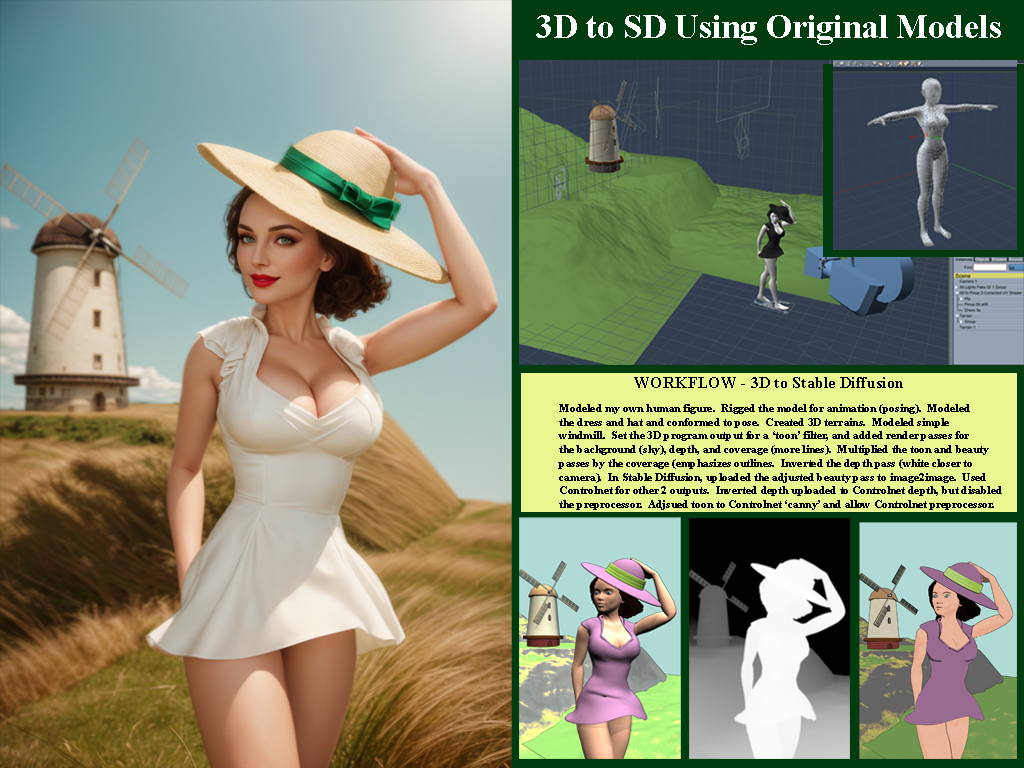
Another Carrara to Stable Diffusion Example. All custom Carrara models. No acquired 3rd party assets, purchased or otherwise.
 Remixing your art with AI
Windmill pinup
One more demonstration of low res models to block out a scene. Will post side by side with workflow in next post. The following could be done with Blender or.... Or, Daz Studio and Poser users could adjust the figures they have. I modeled and rigged a low res beauty suitable for toon renders using Carrara. The emphasis on toon here is to aid the 'canny' preprocessor in the AI program to detect the edges. Similarly, the terrain and the windmill are low res models created in Carrara. In this case, although the blockout elements were designed for toon, the final output is more photorealistic. I generally prefer pulp, illustration, and toonish stuff, but this is a demonstration. Here is the final result.
 Are G2 items still selling?
I buy G2 stuff (and earlier) when discounted. Not only does it work in Carrara as Wendy points out, it works in Daz Studio as well - and can be exported to even more programs to the extent most anything can.
Some caveats on using older content in ways not designed for. I recently bought a G2 item in the sale (a Santa Claus outfit) for use in Carrara, only to find that the highly dense mesh necessary for the fur trim of the Santa Claus outfit took forever to load or use. Would have been much better for me to kitbash existing conent I own and use Carrara's native dynamic hair to add fur trim, or make it myself.
Some positives. For background elements which are going to be obscured by depth of field anyway, some older content is much better for scene management than the highly detailed more recent releases.
So I echo the earlier comment in the thread about paying attention to categories of items.
Are G2 items still selling?it works in Carrara so yes I still buy it
Carrara's shadow catcher is greatHere is an example of Carrara's shadow catcher. I think using Carrara's multi-pass render for the final output would be even better. That way, each layer can be edited in composition software.
DAZ's Genesis 2 Creature Caught Inside Carrara 8.5 | Visual Effect Animation (youtube.com)
Carraracafe down? *ONLINE NOW*therixx said:
Samuel S. said:
Samuel, in your "3D Graphics Adventures for hobbyists(YouTube videos & shorts)" link you seem to have a lot of interesting stuff! I must explore it soon. Thank you :-)
Thank you. I wanted to post more stuff, but I do not get subscribers (probably because videos are not good or people are losing interest in Carrara), therefore, progress is slow. If I can get 500 + subscribers, then I can probably make a video for hobbyists to create a Hollywood-like movie clip or previz using Carrara and Genesis 2's power.
Dartanbeck's Journey - CG FilmmakingDartanbeck said:
...
It's funny. I have a fairly modern (Genesis 8) main character, yet I still use assets from Generation 3 with her. Not Genesis 3... Generation 3 as in V3, M3 and the rest. I also use products for all generations between them and up into Genesis 9.
Good point. When I am just using the 3D as a blockout, such as for Controlnet 'canny' preprocessor, I actually do not want the extra detail that comes with the latest and greatest photorealistic content. As you know, I even go back and use Poser 4 Posette and Dork! And then, after using AI to process from generic to a scene, I can then use Carrara or Daz Studio (or...) to add detail. Then one might want the latest and greatest Genesis 9 high detail content. It is great to have tools in the toolbox that best fit each task. Generic to get started, highly detailed to finish off.
 No one asked me - Diomede screenshots on whatever - Warning AI Discussion OK
I think that plan will work very well. Can't wait to see what you come up with. And modeling is always a good skill to have. I suggest a third way to use Carrara. After you have used any AI-related workflow to generate an image, use Carrara's shadow catchers, etc to add additional details. For example, AI is notoriously horrible at elements that have text - such as a road sign or a newspaper. Can add with a 2D image editor, which might be fine for a lot of purposes. But with Carrara, you get shadow catchers!
No one asked me - Diomede screenshots on whatever - Warning AI Discussion OKDiomede said:
@Bunyip02 great examples! Thanks for posting them.
.
Carrara is much, much, much better of a partner with AI than Daz Studio Iray. In my opinion. I tried to put together a series of screenshots in a tutorial for people to use Daz Studio to create the blockouts the way I am using Carrara. It is so much faster to insert a Carrara terrain modeler and get the basic shape of desired background terrain than to search one's content collection hoping you have something roughly close to what is in mind. Or insert a vertex object or spline object and get the rough shape of a desired object. And the built in Toon!!! creates lines without having to go in and mess with the material IDs of lots of objects. I gave up on the Daz Studio screenshot tutorial because the entire point is to save time, and it takes too much time to mimic Carrara. No modeler!
Thanks !!!
I am planning on using the AI two ways in Carrara.
First of all is to generate a number of iterations on subjects that interest me, then I will use those images as a guide for setting up a scene in Carrara with my content library.
Second is to use Diomede's method of exporting a scene from Carrara into the AI to generate an image of it.
Also I am keen to get back into 3D modeling, will use the AI images as inspiration for the models. Have been doing a series of start/stops with the modeling largely as I have too much fun rendering.
No one asked me - Diomede screenshots on whatever - Warning AI Discussion OK@Bunyip02 great examples! Thanks for posting them.
.
Carrara is much, much, much better of a partner with AI than Daz Studio Iray. In my opinion. I tried to put together a series of screenshots in a tutorial for people to use Daz Studio to create the blockouts the way I am using Carrara. It is so much faster to insert a Carrara terrain modeler and get the basic shape of desired background terrain than to search one's content collection hoping you have something roughly close to what is in mind. Or insert a vertex object or spline object and get the rough shape of a desired object. And the built in Toon!!! creates lines without having to go in and mess with the material IDs of lots of objects. I gave up on the Daz Studio screenshot tutorial because the entire point is to save time, and it takes too much time to mimic Carrara. No modeler!
Looking for a staff with an AnkhI modelled one in Carrara and converted it to an OBJ so it can be imported.

untextured, but if you need it I posted the zip in the wacky modelling thread
 more....Wacky Modelling ~ In Carrara ~
I modelled an ankh dagger a while back.. it's here somewhere

well, now here is the ankh staff in OBJ format modelled in Carrara from the polygon tool and a cylinder

it's in the zip file to do with what you please
Diomede's Notepad, Sketchpad, and Chilling PadYou know what does a really cool depth pass?
Carrara! :)
If all you're after is a depth pass, you can have everything in the scene using only a single, ultra-fast-to-render shader, and just go for the depth pass! :)
I haven't gotten into the Iray canvasses much more than looking to see how to access them. However, since then I've seen talk in the Daz Studio Discussion Forum that there is a new feature for... is it line rendering or is it toon? I don't remember. But there's a pretty decent thread with instructions.
Being one of those who has and loves Carrara, and being a fan of taking the path of least resistance, that's what I would go for - but, like you... I'd still investigate for sure!
For Carrara, if I wanted to use more modern character shapes, I'd start with a conversion to Genesis or Genesis 2 - then set myself up a library of conversions that are specifically made for my work in Carrara, yet it would still all work for DS, so it's a win either way.
The coolest solution I can think of is to have Daz 3D sharpen their pencils and update Carrara to include compatibility with all Daz! Although some might disagree, I wouldn't even ask for a newer render engine - already loving the ones it already has. For me, it was dForce (rather, a product that I NEED that absolutely requires it) that forced my hand to use Daz Studio - for which I'm grateful. I find myself having a Lot more power having both!
Getting on the 9 train, or notainm.sloinneadh said:
Mattymanx said:
I think the biggest crap storm over a new figure happened when we went from Generation 4 which was the last figures made to work in Poser, to the very first Genesis (Generation 5) which was Daz Studio only natively (though could work in Poser with a plugin). Be glad you missed that one.
I just checked and Genesis 9 doesn't work in poser either. Unbelievable!
I heard G9 does work in Carrara. Just sayin'. It's probably fine in Blender, too.
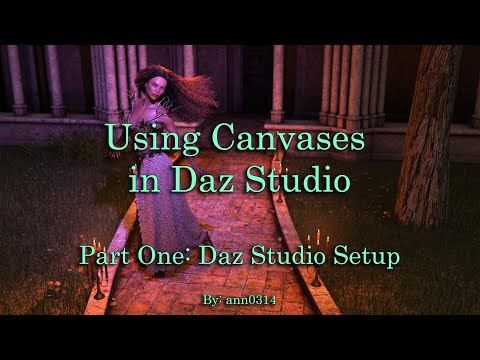
Diomede's Notepad, Sketchpad, and Chilling PadThanks. Carrara is ideal for blocking out scenes for AI, and also for bringing AI images in in the scene backdrop and rendering a new detail. Blender even more so. For Daz Studio, which does not have native modelers, and which is focused on Iray photoreal renders, need some advanced info. For Controlnet's 'depth' preprocessor, the depth information can be gotten in a straight depth canvas, but Daz Studio produces that canvas in EXR format only. Solutions exist, just more steps. For Controlnet's 'canny' preprocessor, the equivelant of Carrara's native Toon III render is a little more complicated. The bad news is that I think (merely think!) that a good solution could be (merely could be) to use the canvas for Material ID and then construct your own 'Canny' assistant. The good news is that the Daz Studio plugin 'Line Render 9000' is designed to accomplish this task. The 'I'm not sure' news is that Line Render 9000 was designed for 3Delight, not Iray, so I am not sure if it will play nicely with more recent content.
Here is a helpful video introduction to Daz Studio canvases by ArtCollaboration. This is the 1st of two related videos. This one introduces and describes each Studio canvas and explains how to set them up. The second video explains how to use them for postwork. At the moment, anyone following along with me would be focused on the canvas for depth, and perhaps the canvas for material id (or the line render plugin).
Please give me any suggestions. There is always more to learn! (and as I get older, I am always having to relearn the stuff I used to know).
 Diomede's Notepad, Sketchpad, and Chilling Pad
Another recent 3D to AI image. This one was sent back to 3D (Carrara) to fix the hand. I simply loaded the AI image as a backdrop then rendered the original blockout figure with shadow catchers to get the hand. This hand has a particularly challenging hand pose for AI internal fixes.
 No one asked me - Diomede screenshots on whatever - Warning AI Discussion OK
Good point Bunyip.
I did a similar workflow for a simple fantasy art image. However, this time I addressed the hand not within AI, but by loading the image back in Carrara and rendering the hand which was used as the original blockout. Shadow catchers are awesome! Original blockout toon and depth renders also attached.
Carraracafe down? *ONLINE NOW*Jetbird D2 said:
Which also makes me think that, if I get things sorted out with Carrara Cafe, most likely I may have to do a grand project to remake Carrara Cafe into other platform and go away from wordpress.
Thank you Danas. If you do that and need help, I bet you could find it among Carrarists. I, for one, do not know if I would be able to help, but would like to know about it.
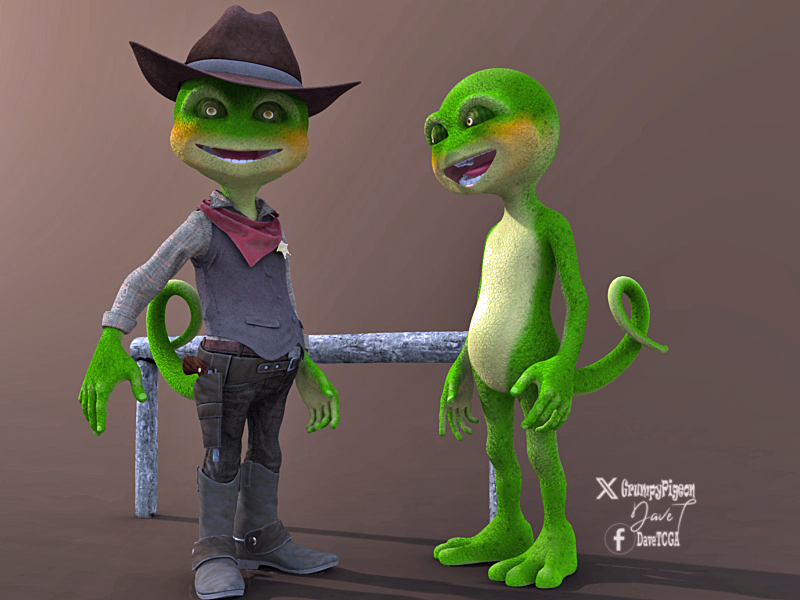
Buy Something That Doesn't Work in Carrara? Post your Questions and Workarounds here. (please)took a bit of work but managed to get Predatron's Bizzle/Cowboy into Carrara after modifications..
had to use the DS plugin to load the tail, boots and feet transfer to blended weight.. then duplicated each one and converted to object then transfer utility on each model to the corresponding object then save as scene subset.... phew..

result so far after nticking UVs
 Carraracafe down? *ONLINE NOW*
Jetbird D2 said:
WendyLuvsCatz said:
I have a feeling they just don't care.

I will admit to using DAZ studio a lot lately simply because it's just easier for content from DAZ.
I hope they care, I've finally figured out who may help and hopefully things will get sorted out, or at least I would get some answer on to what happend and what will happen next. While Daz3D seems not active on anything Carrara, they seemed to have desire to keep Carrara Cafe going for us. I admit I've got scared that maybe it was canceled, but since I can log in to Carrara Cafe e-mail system, I think there is an error from hosting side or maybe some Carrara Cafe's wordpress plug-in got an update that crashed everything, but that wouldn;t explain why I am not able to login to hosting services and troubleshoot.
Anyway, I asked Steven from Daz3D if they could initiate Carrara Cafe hosting account recovery and lets hope for the best.
And Wendy, there is nothing bad about moving forward and using up to date tools for what you do. We all know that, no matter what, Carrara will have a special place in our hearts, But life goes on and so do we all. On the mean time I will keep on dreaming what Carrara 9 could have been. And what surprises Carrara 2024 could have brought. :)
best of luck
Daz 3D is part of

Connect
DAZ Productions, Inc.
7533 S Center View Ct #4664
West Jordan, UT 84084Licensing Agreement | Terms of Service | Privacy Policy | EULA
© 2026 Daz Productions Inc. All Rights Reserved.