-
Daz Studio and Linux
Kitsumo said:
brainmuffin said:
lostindebian said:
After spending days with bottles and wine-staging I got it working with Lutris. This is how I think I did it.
My system.
- DAZ Studio 4.21.0.5
- Debian 11.
- ASUS GeForce RTX 3060 12GB DUAL OC V2.
- NVIDIA-SMI 470.161.03
- Driver Version: 470.161.03
- CUDA Version: 11.4
My steps.- Install NVIDIA drivers for Debian. Not sure which, but the recommended that you use for everything.
- Install "Lutris".
- Install "DAZ Studio".
- Start "DAZ Studio" and set the viewport to NOT use "filament". Else it will crash later!
- Download and extract "nvidia-libs-0.7.7.tar.xz" and enter folder in terminal.
- Run the script "WINEPREFIX=/home/user/Games/daz ./setup_nvlibs.sh install".
- Start "DAZ Studio" and the GPU rendering WORKS!. At least I think it works.
Big thanks to this thread. Could not have done it without you!
I'm running Mint and do have Studio running under Lutris, but not sure where to get this extra file and where to put it.
https://github.com/SveSop/nvidia-libs/releases
https://www.daz3d.com/forums/discussion/comment/7942656/#Comment_7942656
It's been a while since I used DS in Lutris, but as far as I can remember the setup is pretty much the same as with regular wine-staging.
Downloaded 0.7.9 and ran nvml_setup.sh. Still renders, but doesn't use GPU....hmmm....
overexposedBezinex said:
Thank you Crosswind! Much better, although i came to understand it also has to do with filament PBR, which i apperently can't get because i work on a mac.
Ha~ I even don't know Filament does not work on Mac as I never use Filament
 overexposed
Thank you Crosswind! Much better, although i came to understand it also has to do with filament PBR, which i apperently can't get because i work on a mac.
Daz Studio and Linuxbrainmuffin said:
lostindebian said:
After spending days with bottles and wine-staging I got it working with Lutris. This is how I think I did it.
My system.
- DAZ Studio 4.21.0.5
- Debian 11.
- ASUS GeForce RTX 3060 12GB DUAL OC V2.
- NVIDIA-SMI 470.161.03
- Driver Version: 470.161.03
- CUDA Version: 11.4
My steps.- Install NVIDIA drivers for Debian. Not sure which, but the recommended that you use for everything.
- Install "Lutris".
- Install "DAZ Studio".
- Start "DAZ Studio" and set the viewport to NOT use "filament". Else it will crash later!
- Download and extract "nvidia-libs-0.7.7.tar.xz" and enter folder in terminal.
- Run the script "WINEPREFIX=/home/user/Games/daz ./setup_nvlibs.sh install".
- Start "DAZ Studio" and the GPU rendering WORKS!. At least I think it works.
Big thanks to this thread. Could not have done it without you!
I'm running Mint and do have Studio running under Lutris, but not sure where to get this extra file and where to put it.
https://github.com/SveSop/nvidia-libs/releases
https://www.daz3d.com/forums/discussion/comment/7942656/#Comment_7942656
It's been a while since I used DS in Lutris, but as far as I can remember the setup is pretty much the same as with regular wine-staging.
figures disappear from Filament viewmy whole scene disappears sometimes in Filament on my Win7 with only integrated Intel graphics
I have close DAZ studio and sometimes reboot the PC to get it back
that's simply my sad OpenCL driver being overwhelmed
Daz Studio and Linuxlostindebian said:
After spending days with bottles and wine-staging I got it working with Lutris. This is how I think I did it.
My system.
- DAZ Studio 4.21.0.5
- Debian 11.
- ASUS GeForce RTX 3060 12GB DUAL OC V2.
- NVIDIA-SMI 470.161.03
- Driver Version: 470.161.03
- CUDA Version: 11.4
My steps.- Install NVIDIA drivers for Debian. Not sure which, but the recommended that you use for everything.
- Install "Lutris".
- Install "DAZ Studio".
- Start "DAZ Studio" and set the viewport to NOT use "filament". Else it will crash later!
- Download and extract "nvidia-libs-0.7.7.tar.xz" and enter folder in terminal.
- Run the script "WINEPREFIX=/home/user/Games/daz ./setup_nvlibs.sh install".
- Start "DAZ Studio" and the GPU rendering WORKS!. At least I think it works.
Big thanks to this thread. Could not have done it without you!
I'm running Mint and do have Studio running under Lutris, but not sure where to get this extra file and where to put it.
general question, how do you keep DAZ workable ?PerttiA said:
You can use 3DLight or Filament, but it's not just a matter of selecting an other renderer. DS can convert the textures on the fly and does a pretty decent job at it except for transparent and mirror surfaces, but for example the lights work differently and probably need to be changed.
At one year shy of sixty, I have considered myself a youngster here as there are people here that have been working with computers for a living in the 60's and 70's
ok thanks, i'll try(and error :D ) with that ...
I'm autodidact when it comes to computers... been in artistic branche all my life (painting, drawing, sculpting ...) so i tought to give it a go on computers as well :D started early 2000 with computers as a 'deeper' interest and poser 3, 4,.... not considireing myself 'old' but it feels sometimes like waking up in the morning and 'what the heck ?? 64 already ???" :D
Render losing background elementsalexanderlshah_b8ebfb31f1 said:
Here in the two screenshots, you can see my problem. I have created a new DAZ file and just inserted the basic stone wall tunnel element into the scene, just to test the render. So, when I choose FILAMENT (PBR) it renders something closer to what I want (though it is very pale), but as soon as I hit NVIDIA (LRAY) -- the render preview turns black !?!?! WHY? I have included both the Distant Lights and the Spotlight in front ... and yet ... pitch black :-((((
What is going on ? My settings are normal, as you can see on the left of the screenshot...
And which lights is there in the scene?
Render losing background elementsHere in the two screenshots, you can see my problem. I have created a new DAZ file and just inserted the basic stone wall tunnel element into the scene, just to test the render. So, when I choose FILAMENT (PBR) it renders something closer to what I want (though it is very pale), but as soon as I hit NVIDIA (LRAY) -- the render preview turns black !?!?! WHY? I have included both the Distant Lights and the Spotlight in front ... and yet ... pitch black :-((((
What is going on ? My settings are normal, as you can see on the left of the screenshot...
Things you may not know about Genesis and DAZ Studio 4Ey gang!
So, my birthday is coming up and it's a moment where I like to reflect a bit on some things that matter to me. At the time of writing I've been using Daz Studio for a very long time now; when I check my order overview I see that it's almost 10 full years of 3D awesomeness. So I felt like venting a bit, but I don't think that really fits the forum; IMO it's better to try and make such a vent useful for others as well.
As such I'd like to share my take on things within the spirit of the threads intention...
Features that I discovered in Daz Studio & Genesis which I deem invaluable to use
(and which can hopefully help some of you out as well!)
#1 Customization features, why ignore 'm?
As far as I can tell many people start by selecting a workspace layout (where 'City Limits' seems to be quite popular), they select a style (where 'Darkside' seems to be ditto popular) and then that's it. Or so it seems to me because when I look at some YouTube videos which feature Daz Studio I often see the exact same workspace layout. I'm referring to videos from both Daz 3D but also some seemingly popular other Tubers.
Now, there's nothing wrong with this, really, but just for some context: when you see videos that feature ZBrush you're bound to see a completely different interface layout each and every time because within 3D efficiency is key because that can help you get things done a lot quicker.
And I think some people overlook the insane amount of customization options we have!
Toolbars
Some examples... for my workspace / viewport I heavily rely on both the texture & Filament render options, sporadically I also use Iray. By default you can select individual draw styles by using the 'ctrl + number' keycombo: ctrl + 9 is the texture render for example whereas ctrl + 3 gives you a wireframe. Unfortunatley you can't directly switch to Filament, but Iray works like a charm. You don't think I'm going to try and remember all that, do you? Instead I put some commonly used drawstyles on my toolbar.
And speaking of Filament: if you're going to use this then you have to add a "Filament draw options node" to your scene because otherwise your viewport is going to be oversaturated. I'm not going to open the 'Create' menu and try to find the option in there.. heck no: I've addded that to my toolbar as well. Just like the options to add cameras, lights, Iray environment & tonemapper nodes, groups, primitives, shells, dformer nodes.. you get the idea.
Menus
When you enable a so called 'Bridge' then this option gets added to the File menu... at the bottom. No thank you, the bottom option of 'File' should be Exit in my opinion. So... I made sure that it is.
Viewport(s)
So I often like to use 2 viewports: the main screen and a smaller Aux viewport. For obvious reasons I want my controls to be as-easy as possible in my main viewport, but as condensed as possible within the aux window. Couldn't be easier: just check the viewports options menu which you can find in the upper right corner. Or in the middle if you're using the docked view controls vs. the cube view controls.
How to customize Daz Studio?
Easy: either press F3 or check the 'Window' menu: Window => Workspace => Customize.
In the Customize dialog you'll find all available options on the left side of your screen ("Actions") and the current setup on the right ('Activities', 'Menus' and 'Toolbars') and you can simply drag & drop from the left to the right. Try for starters to expand the current activity and then check the enabled toolbars. If you hop over to the toolbars tab you can expand all those individual toolbars and add or remove any item you want (right click on an item to remove it, or to add other entries like a divider). You can also rename items to make it easy to understand what they are meant to be used for.
Be careful though: this section can glitch at times and options get sometimes moved around without warning. If that happens make sure no options are highlighted and then just try again.
Make sure to save any customizations you made!
Saving your work is easy and can be done in multiple ways... You can save your full layout by pressing F4: this will include any custom actions, menus and toolbars. But! => don't forget about any possible changes you made to the style of the program. You can save that by using the Windows menu: Windows => Styles => Save style as... The style basically consists of color schemes like your viewport color, accent colors, etc, etc.
And there's more: you can also save your layout, actions, menus and toolbar settings individually. For this you merely need to click "Export" within the customization dialog (see its bottom options).
#2 Making your own custom categories
If you're using the smart contents pane then you're using categories. But these aren't hard coded into Daz Studio! For example: I often make my own poses and for this I prefer to work with a Genesis base model. I can't be bothered to dig around Figures => Male => Fantasy SciFi. ... wait, it's not in there? ah, of course I meant Real World! err... nope! Genesis is actually in the main 'Male' or 'Female' category. SO much fun having to dig through ALL my male or female models just to find Genesis. Fun fact: Genesis 9 does this "better" because that is placed inside the main "People" category. Now I'd have to dig through my WHOLE figures category to find it.
Needless to say: I use Figures => Genesis instead.
Or what about Wardrobes? There's a default Wardrobe => Outfits category so obviously I expanded on that by adding my own outfits or collections thereof.
How to do this yourself?
It's easier than you may think! Right click on an item within your smart contents pane and then simply use "Categorize". Here you can add an item to as many other categories as you'd like by enabling the checkbox in front of them. Want to create a category of your own? Just right click on an existing category and use the "Create" option to create a sub-category. Couldn't be easier I think.
#3 Only keeping panes around you actually use?
Adding or removing a pane ("tab") is quite easy: just right click on a so called "Pane group bar" (in other words: right click on an empty space next to a pane tab) and then use the "Add Pane" option. Removing a pane is easy as well: right click on a pane tab and then use "Clone pane". If you're not sure what pane(s) you're looking for you can easily add a floating pane using the Windows => Panes menu option. Keep in mind that you can easily assign keyboard shortcuts to this as well, so you don't really need to have all panes present. For example... I only use the timeline and aniMate2 panes very sporadically so I keep these hidden and rely on a keyboard shortcut to open 'm (after which I usually move them to my 2nd monitor).
Maybe also good to know: these "pane options" can also be added to the toolbar which I mentioned before.
(edit) => Also useful to know: if you want to prevent any nasty accidents you can also lock your panes (and toolbars!) into place by using Ctrl + U, or use: "Window => Workspace => Lock docking/undocking". This will put a stop to accidentally dragging a pane outside its bar or at another location where you don't want it to be.
#4 Don't solely rely on the smart contents pane!
Now, I think the smart contents pane is awesome because it can give you very quick access to any asset you may need at that time. Need to change the hair color of my figure? I select the hair, click on the "Materials" category and from there on I merely have to double click on whatever preset I want to use.
But it's not perfect either. For example... assets for Genesis (the first generation?) can easily be used for later generations but once you select those you won't find those assets in your smart contents pane anymore. Or what if I have a figure like, say, Kanade 8 or Sukai 8 and then I only want to use assets that were actually meant for them.. digging through tons of different categories? I think not! => right click on the item, then use: "Show asset in => Content Library: Products" and wham: full overview of all your assets related to that specific figure. Eye materials, lip colors, morphs and in some cases also specific assets.
Keeping both the "smart content" and "library content" panes around side by side is really the best of ideas here.
#5: Surface settings can become gamechangers!
Figures in Daz Studio are made up from surfaces where each surface represents a part of that figure. Looking at Genesis for example we have surface entries like lips, fingernail, SkinTorso, Toenail, and so on. All those surfaces have properties. For example: any texture that gets applied to a figure is basically nothing more but a 2D image that gets applied to a surface. I'll do you one more: material presets? Those are essentially "surface presets", no more and no less.
So if you want parts of your figure to look "different" then I would start by checking out the 'Surfaces' pane to see what you may find. Giving a female figure colored nails for example honestly doesn't have to be all that difficult. Just change the base color for that specific surface...
I'm not claiming this is going to be easy, you may need to dig into some of the basic standards a bit, but it'll be rewarding for sure!
#6: Don't ignore your Parameters pane!
If you check some "getting started" guides out on the Internet you'll often see that they focus on "easy". So, say, applying a pose to a figure? Select the figure and go over your pose items. Or if you want to change the position of his hand.. use the universal tool and just drag it in place. Now, while this will work just fine you can also use some of the pre-installed and/or available parameters. Sometimes less can truly lead up to much more.
Don't ignore what subtleties can do for your figure, especially with the proper lighting for instance...
But also.. rotating a figure or parts thereof can sometimes be much easier to control using the parameters pane. And if you worry about not being able to find 'm quickly enough again then just "Favor" them by clicking on the heart icon. Easy!
And there you have it!
I don't want to risk turning this into a huge essay so I'll leave it here, and I hope some of you may find this useful. I've attached a screenshot of my Studio layout and as you can probably see.. it probably doesn't even look anything closely to what you may use ;) THAT to me at least is the true "power" of Daz Studio: being able to truly set up your own workflow and environment. Oh, right, for obvious reasons I decided to focus on Genesis here, seems fitting with the OP and all :)
Thanks for reading, I hope you could put this to good use!
Artini's experimentsWendyLuvsCatz said:
all lovely AI and 3D
as for V4, you could have the best of both worlds and use Stable Diffusion Image to image on the render
I am digging out all my older figures and scenes doing mostly Filament renders and giving them an AI glowup
Thanks a lot, Wendy.
That is a good idea with using image to image on the renders from Daz Studio.
Will need to explore it more.
I am still overwhelmed of what kind of pictures AI could do - hard to not use it.
Artini's experimentsall lovely AI and 3D
as for V4, you could have the best of both worlds and use Stable Diffusion Image to image on the render
I am digging out all my older figures and scenes doing mostly Filament renders and giving them an AI glowup
general question, how do you keep DAZ workable ?william VV said:
as said earlier to Perttia, a new graphicscard is within budgetrange :) ... however, on the other hand, .. can items that require iray be rendered in 3delight as well ? (e.g. lights, shaders, character textures etc ... (same question for Dforce ... can anything that requires Dforce be posed without the Dforce animation as well ? like a conforming clothing or hair ? (yes, poserhabit again :D )
thanks for the tip on online rendering, but not so keen on doing things online... i'm an oldskool, , so I like to arrange things myself.. that's why i'm not very fond of smartcontent as well... I have even never used things like onedrive etc .. :D ... yes call me prehistoric .. approaching my midsixties .. (damn how did they get here suddenly so fast ??
 You can use 3DLight or Filament, but it's not just a matter of selecting an other renderer. DS can convert the textures on the fly and does a pretty decent job at it except for transparent and mirror surfaces, but for example the lights work differently and probably need to be changed.
At one year shy of sixty, I have considered myself a youngster here as there are people here that have been working with computers for a living in the 60's and 70's
general question, how do you keep DAZ workable ?Probably the only problems I have using Daz are due to VRAM and render speed of iray preview. I have 2080TI with ~12GB and I always go over VRAM and then have to split up render into chunks, even without multiple characters in scene. Optimisation is an option, but that too takes time. Im thinking of getting a 3090TI or 4090 for 24GB VRAM, but those are very expensive and not sure it's worth it for me.
I dont think I would have the patience to use Daz (or Blender etc) if I was stuck rendering on a CPU. I was doing that when i started Daz in 2017 and it was too restrictive. Having a card that can render Iray Preview and complete a render to decent iteration count within an hour or so made things so much more palatable.
Filament or porting to Blender and using Eevee may be options for people who cant use Iray.
general question, how do you keep DAZ workable ?First of all, thank you all for so much informative feedback and very useful information !!
@crosswind :
I knew I forgot to mention something
Win10
HP workstation Z23O 32GB ram
NVIDIA Quadro K2200 4GB
(not much, i know, but it runs poser smooth as silk (yes, still making that mistake of comparing DAZ to poser :D )@Sofacitizen :
indeed that is perhaps the case that it drops back to CPU .. my scenes are not that complex (at least not in build) it's just 1 or 2 character, clothes, hair and a very basic room setting with only some very basic furniture (e.g 2 chairs, table, simple obj cupboard closet and perhaps a picture on the wall.) . I still keep it as simple as possible just to tryout DAZ and experimenting with lighting etc.
Very good to know about spot render. will surely make a big time difference :)
it is not my intention to do other things while rendering. that I have never done in poser as well.. it's perhaps my luxury habit that i could continue work in poser's scene while it was rendering both in background and in Queu manager. In DAZ i can twiddle thumbs or leave it running at night.
I have a second pc indeed, but that one is even lighter than the workstation and still on w8.1. it runs poser, but has difficulties with complexer scenes like outdoors or 5+ MV/V4 characters etc... so i'm not even gonna bother installing daz on that one :D
@ Shelluser :
I render in lray but i switch to 3delight occasionally just to see if it makes difference in time. (also not fully understanding lighting as well.. as for instance, some require dome or are HDRI lights but regardless DOME is activated or not, these lights never load (at least , there's no visible change in the viewport.. but that's perhaps another topic :) )
I've only seen filament as a viewportpreview, .. Do i have to select that for filament rendering ? or where can i find it ? sure is something to try out. And I would be more than happy with 40minute renders :D
the few clothing sets I have are mostly Dforce, as well as the hair. it seems to me Dforce clothing can't be posed (or is very limited to be adjusted by sliders to the figure's pose). Do you have only non Dforce cloth sets or how do you do it to 'avoid'/workaround Dforce? (as that would be a major timesaver ofcourse )
Sorry about the confusion of 'workflow' .. I only intended it as comparison of DAZ to poser. for the rendering ... my system runs easy and smooth working in poser scene while it's rendering in background and simultaneously in queue manager . I tought something similar would be possible in DAZ as well ... that is what i meant with 'workflow' . Ofcourse, what you understood under 'workflow' is for DAZ vs poser indeed apples-oranges :D
i'm totally not in complex scenes, just basic try-and-error 'get to know daz' minimalistic scenes
@ FSMCDesigns :
totally agree on that one .. allthough i achieve very realistic character/portrait rendering in poser, they're still stuck on V4 and M4 for decades now. only newer figure there was LaFemme. I tried and tried to get genesis to poser but it always gave somewhere bugs, flaws mesh/posing/clothing issues, so I finally gave up and continued with good ole V4
so my next step would be getting V4 into DAZ and somehow copy my custom characters to genesis8-9 (I did already some research but it seems a steep long path...)
I switch to lray preview often.. i've been able to reduce previewrendertime drastically, but it's sadly not continuously usable while working. Or are you perhaps able to work on the scene while in lray preview?
that 30minute rendering including Dforce sim would be very welcome for me as well :D but I guess only solution is to upgrade my system :D
@Padone
thanks for the tip on scene optimizer, will check it out and consider it ...
never used blender, but since i'm learning daz, i might take blender on as well :D
Sorry all for replying this way, but this was the fastest easiest way as the server disconnects often
Fisheye Lens Camerairay now has options under the camera's lens parameters added since this old thread
they only show using iray though not flat, textured or Filament view etc
general question, how do you keep DAZ workable ?william VV said:
rendertime : I've been able to 'reduce' rendertime to approx 1.5-2hrs. (i've seen discussions here where rendertimes of 12-15 hours, even days are mentionned)
still, one to two hours is too long for me (e.g. in poser12 takes a firefly/superfly render at an acceptable decent quality setting (for me) 15-60minutes (depending on the complexity of the scene)So what render engine do you use? I'm kinda missing that in your post: there's quite a difference between Iray and 3Delight for example. And in addition I'd also like to mention Filament which, though less detailed than Iray, can still be a very useful engine for creating "quick" renders. Maybe not as detailed, but you can definitely build some solid renders with it.
with renders in an average of 20-30minutes i can live , because if something needs to be fixed, it can quickly be adjusted en rerendered. In DAZ, waiting for an hourandahalf only to find out rerendering is needed is too much timeloss. Also because while DAZ is rendering , work can't continue in the scene. (in poser you can continue working while rendering)
That can also be done in Daz Studio: you can change the viewport's render engine to either Filament or Iray. While this doesn't necessarily help to reduce render time you could use it that way by telling Daz Studio to merely use your viewport as render output. Still, my rendering time heavily depends on the scene at hand. That and the render settings, these can make quite a difference as well. Generally speaking my rendertime is approx. 40 minutes using Iray which is IMO not too shabby.
Can't comment on dForce because I seldomly use it, not much of a fan of that.
I know my system isn't state of the art, but if I can achieve decent quality renders in about 30minutes in poser and continue working meanwhile, I would expect something more or less similar in DAZ but atm you can see that DAZ doesn't lend itself to a fluid workflow at all ...
Apples and oranges IMO: workflow doesn't necessarily have much to do with the rendering process because that's mostly dependand on your engine and its settings. Workflow, to me, would be the way you set up your scenes, how you bring your assets together and the time you take to actually pose and model them. That's the part that confuses me here because generally speaking (again) it takes me waay more time to set up my scene than to render the whole thing.
Which, once again, is where workflow comes into place IMO: being able to quickly center a figure to check my pose from multiple angles, being able to quickly (un)hide other parts of my scene to make this checking easier, being able to quickly move assets around without necessarily havving to drag 'm, being able to quickly pose parts of a figure or, in extension: being able to group items together.
That is what I'd consider workflow, not the rendering process.
so my question is , is everyone experiencing DAZ this way ? any tricks tips, to speed up things, to continue work while rendering at least ?
Not for me, no. Like I said: the process to build my scenes using my own poses and sub-sets which I then bring together in my main project takes way more time (and effort) than the rendering process. As for speeding up... well, Filament comes to mind but maybe also making less complex sceneries?
Of course I have to guess but the more assets you add to a scene the more work this is going to be for the render engine. Do you really need all of that to make it work?
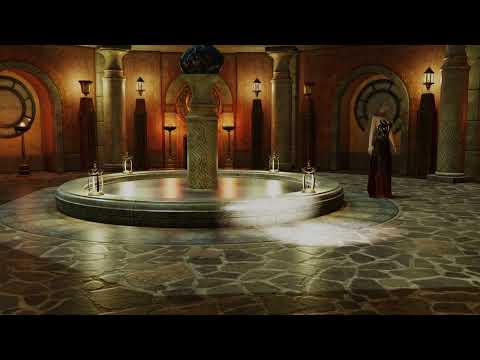
Jaderail is looking down on the STUPID THREAD XI stopped it after 640 frames
the result will need to be watched on YouTube signed in as age restricted by me because it's a Filament render and her top disappeared first camera cut, Filament does some odd things sometimes.
She is by a pool so not implausible she'd be topless about to disrobe for a plunge.
Will do iray renders another day.
 Working in Daz studio but without a 'GPU'
Only for iray, not for filament. That is, iray works both with the cpu (without denoiser) and nvidia gpus, while filament works with any modern gpu. Apparently intel has issues, but I can use my ryzen apu just fine for example.
[Released] Turbo Loader for Genesis 8 and 8.1 [Commercial]diogenese19348 said:
I moved my libraries to a network drive also, and had the same issue with it not finding sincludefileedit. The fix is that you need to map the network drive, and use the mapping in your content library path. Scripts will not find that data folder from an unmapped network drive. It probably isn't just Turbo Loader, and there may be some DAZ program functions themselves that don't work right if that isn't fixed. In particular it also cleared up an issue I was having with Filament where adding an HDRI map turned the scene black and didn't add any lights.
Bottom line is if you use a network drive for a library, it needs to be mapped to a drive letter and you need to set that mapping in the content manager.
Thanks for sharing your tip!
Daz 3D is part of

Connect
DAZ Productions, Inc.
7533 S Center View Ct #4664
West Jordan, UT 84084Licensing Agreement | Terms of Service | Privacy Policy | EULA
© 2026 Daz Productions Inc. All Rights Reserved.













