-
Daz 3d Merch
outrider42 said:
It would also be cool to sell real model kits of "famous Daz core models." That stuff could be sold at any sort of hobby store with any theme. And...these can be your best advertisement for the 3D print plug in ever. The shopkeeper leans over and tells the customer "Hey bro, you like this model kit of Victoria in a metal bikini swinging a sword? Well guess what, YOU can make your own custom one to print!" And the customer is taken aback. "Whhooaaa, seriously?! These Daz cats are so fly!"
It would go just like that. The fellow frolics back to his place and embarks on his Daz indoctrination journey. One of us!!!
That IS cool.
V4 Poses in Nov 2023I purchased this: https://www.daz3d.com/flexi-girls-poses because as I've said before; Not being a contortionist is a life regret. Not dating a contortionist is a life mistake.

After a couple years I thought I'd see if I could use the poses on a figure in DAZ Studio as a reference for creating G8-9 poses, what with them being mesh based not carbon based bipedal mammals and all. I'm terrible at posing & this would be a challenging practice. I purchased these: https://www.daz3d.com/victoria-4-for-genesis-2-female | https://www.daz3d.com/victoria-4-2-base however I could not find them in my content directory after a DIM install. I checked under the Poser section too. I'll try looking again tonight but if anyone has any V4 tips I'd owe you one.
"Jerry, get out of the booth, take all your cloths off and fold yourself 12 times." - The Rickshank Rickdemption episode
Daz 3d MerchIf you let a 3rd party handle the merch it is easy extra money for almost no effort. But it isn't even about that, IMO. People wearing your logo are walking billboards, which can be worth way more than whatever the profits on the merch are. That kind of advertising can be priceless. Considering the types of customers seen here, a simple tshirt could lead to a conversation with a friend, or a curious passerby decides to search what Daz3D is.
Not that I would wear one, that's not my thing. But I do believe lack of merch is a major missed opportunity. Just get a 3rd party with experience and let them handle it instead of using your own resources. You don't even need a warehouse these days, they can produce small batches quickly on demand.
It would also be cool to sell real model kits of "famous Daz core models." That stuff could be sold at any sort of hobby store with any theme. And...these can be your best advertisement for the 3D print plug in ever. The shopkeeper leans over and tells the customer "Hey bro, you like this model kit of Victoria in a metal bikini swinging a sword? Well guess what, YOU can make your own custom one to print!" And the customer is taken aback. "Whhooaaa, seriously?! These Daz cats are so fly!"
It would go just like that. The fellow frolics back to his place and embarks on his Daz indoctrination journey. One of us!!!
Render your buys! Use buys from the current month and the previous month of salesDartanbeck said:
richardandtracy said:
Well, this is a mixture of oldies - the Millenium Dragon which I got in 2007 as part of a bundle, Jim Burton's Glamorous Vickie 3 (Dec 2004) and some Iray volumetric fire & the icy background HDRI bought in the last few days of sales. GV3, being TriAxed with autofit clones is wearing G3F hair & G8F clothing.
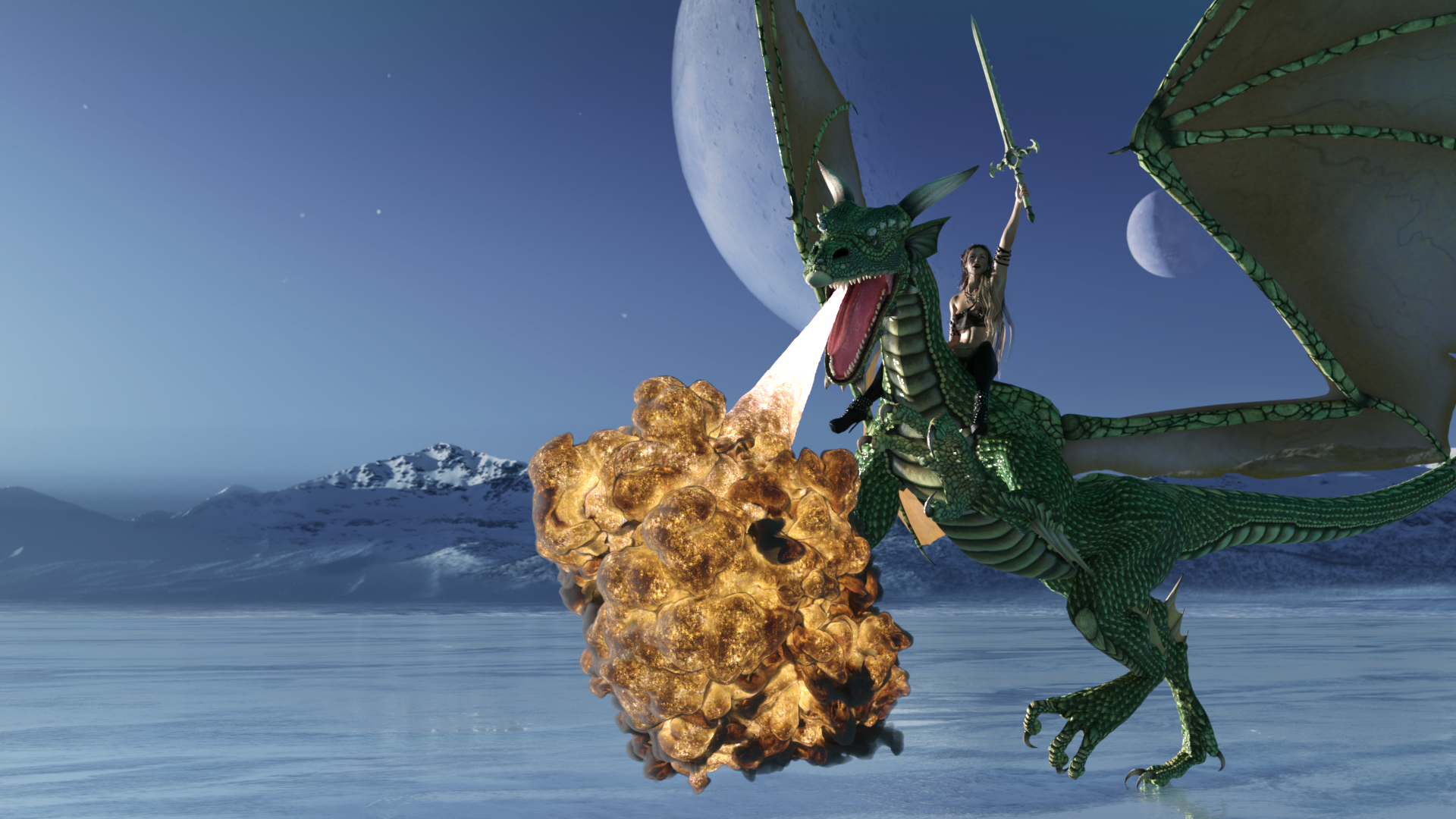
Feels very retro, reminiscent of NVITWAS type images without going that far.
Regards,
Richard
Very nice Richard! I love nostalgia! So... what was that about Traix on Victoria 3? Did you make the clone, or use a clone to add the Triax... ? Interested!
I use a Lot of V3 and M3 clothing on my newer figures. I'd love to bring my older figures to Traix and have them work with modern clothing, etc.,
Say, I have some free aniBlocks for your dragon if you want them: dB Animation Kits for MilDragon and M4
I'm pretty sure that Millennium Dragon 1 and 2 have the same rigging
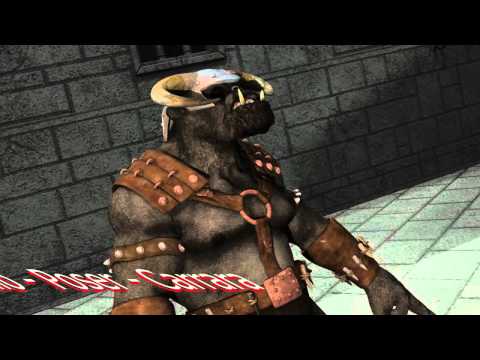
The Generation 3 & 4 characters are parametric rigged. With Genesis the rigging changed to TriAx, and things like autofit clones and morph autofollow became possible. I stumbled on a way to convert the parametric figures so they could have such things, and documented it in a freebie tutorial here: https://www.daz3d.com/forums/discussion/655676/tutorial-making-triax-figures-from-old-parametric-characters/p1 . The net result is my GV3 can wear V3, V4, M3, M4, A3, GND2, G3F, G3M, G8F and G8M clothing when previously was limited to only that designed for GV3. The process doesn't improve the rigging of V3, which has to be said is poor by current standards, but the biggest advantage of autofit clones is possible, and that makes up for a lot.
I'll take a look at the ani-blocks. Thanks. Not sure if I will be able to use them. Finding time for still images is hard enough, but animations.. Phwee. Not often.
Regards,
Richard.
Render your buys! Use buys from the current month and the previous month of salesrichardandtracy said:
Well, this is a mixture of oldies - the Millenium Dragon which I got in 2007 as part of a bundle, Jim Burton's Glamorous Vickie 3 (Dec 2004) and some Iray volumetric fire & the icy background HDRI bought in the last few days of sales. GV3, being TriAxed with autofit clones is wearing G3F hair & G8F clothing.
Feels very retro, reminiscent of NVITWAS type images without going that far.
Regards,
Richard
Very nice Richard! I love nostalgia! So... what was that about Traix on Victoria 3? Did you make the clone, or use a clone to add the Triax... ? Interested!
I use a Lot of V3 and M3 clothing on my newer figures. I'd love to bring my older figures to Traix and have them work with modern clothing, etc.,
Say, I have some free aniBlocks for your dragon if you want them: dB Animation Kits for MilDragon and M4
I'm pretty sure that Millennium Dragon 1 and 2 have the same rigging
One more time: converting Victoria 4 custom character to Genesis 8In my world, Victoria 4 content is still highly beneficial.
Character Identification - FESoul's Cute Dynamic Short Hair for Genesis 9Looks like a custom character based on Ally 9 with Victoria 9 skin.
One more time: converting Victoria 4 custom character to Genesis 8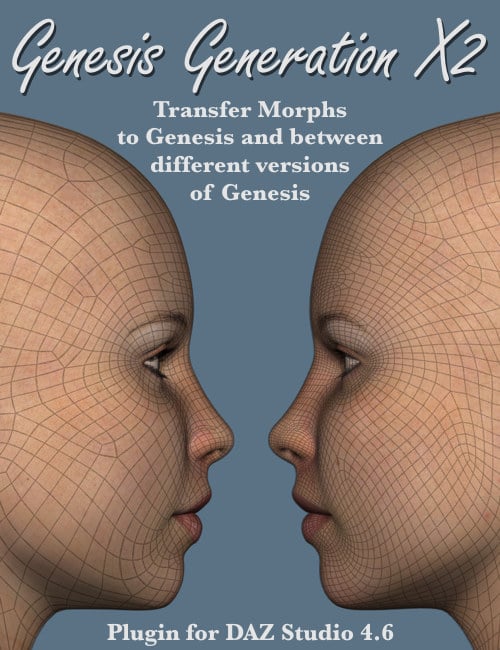 There are also some Really Good Victoria 4 textures out there.
Genesis Generations X2 is one incredible piece of software.
Genesis 1 comes with Victoria 4 UV's right out of the box and is still a fantastic generation to work with.
GenX2 with the right addons can get your custom Vicky 4 character all the way up to Genesis 3, which is also a fantastic figure. If you go to Genesis 1, however, you'll
- have fewer GenX2 addons to buy (none)
- be able to use your Victoria 4 maps on a shiny new Iray set, if you want to go that route
I'm loving using my Genesis 8. But before my massive data wipe took years and years of everything I've done away from me, I was using Genesis 3 and Loving it!
Genesis 1 rendered using the Free OctaneRender Kit
Question about the update to older OOT hairsSo I remember there was a issue with newer DAZ Studio not like a shader that OOT used on his older hars, causing crashes. IIRC all his hairs that use this shader are being updated
Anyway Ive been looking at the Linda Pony Tail for G8, has this beern fixed? If it hasnt will uninstalling & reinstailling the only other OOT hairs I have, Soft Curls Ponytail for Genesis 9 and Victoria 9 and Glamorous Style Hair for Genesis 8 and 9 replace that shader, or do they work differently?
ED terrible spelking
ED Using DS 4.22.0.1, Intel i5 9600k Radeon RTX 3060 TI, 546.01 studio drivers, 32 MB RAM if that matters, with lates win 10
*CLOSED* RRRR "That went well" Render ContestPull #1
#466 FWSA Adaline HD for Victoria 7 (#22175)
#2998 Aniyah for Darcy 8 (#65283)
#1938 Building Site DS (#47215)
#4362 M3D Curious Expressions for Genesis 9 (#88353)
LB1: #170 My Camel Camelia HD (#21424)
LB2: #2444 Various Faces for Mabel 8 (#54091)Timestamp: 2023-11-23 13:41:35 UTC
A Camel, Always a camel, but at least not the old DAZ Camel this time, such a typical LB!
*CLOSED* RRRR "That went well" Render ContestThe RRRR is back for another round!
This time the theme is "That went well", somewhat inpired by the Serenity episode with that same name. So, anything goes this time, because whatever you did, it might have gone well in the end.
RRRR stands for Random Runtime Roulette Renders, and it's a contest that has been running for over seven years until it needed a well deserved break. We invite anyone to enter, specially all those new users who have shown up the past years. This is not the usual make a very nice render contest but more like tell a really great story, often fun, with your render!
How does it work?
Make your pull of 4 items, and if your any Lucky Bastards, you pull one extra item per LB.Who can play?
Anyone can play!How do you prepare yourself for play?
The rules are very simple, but first you need to have all your items in some kind of order in a text file, dumped from the itemized history into a text file or a spread sheet. Remove things like software, gift certs, and special plugins from the list and items that wil not work with the software you work with. For example if you have items for Poser, Bryce or Carrara, and want to use DAZ Studio, remove those other items from your list. If you have loads of older figures, M3, M4, a ton of non Iray stuff and you only want to use Studio with Iray, remove all the junk from you list. (I personally will see much joy in dropping Camel, I don't know how many times it has been pulled over the years)Then you use a randomizer to randomly pick items from your list (your Runtime/My Library) for your start pull . You can use items from any store. Now build a scene with those 4 items plus any other items you want to add to make a fun scene. For newcomers I heartly recommend looking at the previous contests below to get ideas how you can do this.
Working randomizer:: https://www.random.org/integers
There are some situations where you allowed to redraw, these are:
- You pulled something that doesn’t work, broken thing, only works in a version / software not used etc etc, or you forgot to remove that item from you list even though you knew it wont work, or figure that out later.
- You pulled a software or add-on to a software or anything you should have filtered out from the list.
- You pulled only huge environment props and will not be able to render a scene without crashing.
- You pulled an item you already have been using in two RRRR renders in this content and that was picked randomly. Three is a curse - rule!Lucky Bastard Rule!
I say this again: If you have Lucky Bastards, you pull one extra item for each LB you have, simple as that.
Explaination of Lucky Bastards.
Lucky Bastards, or LBs, are a form of handicap system which makes the contest a little more difficult for those who have won. No lucky bastards are in play now, but will be for the next run.
Current Lucky Bastards Standings:Player LB count f.boschanski 2 Totte 2 Rafael 2 Bohemian3 1 Luci45 1 Gopherus 1 How to play?
You pull, you compose and you Render. You post your images and pulls in this thread (Don't miss that, entries without pulls and posts in this thread will be disqualified!!).
Then the entry should also be posted in the Entries only threadBundles
If you pull a bundle, use two or three complete items from it, or more if you like, but you do not need to use all, but only picking a hairpin from Victoria 8 Pro Bundle is “too little”. Clarification: A bundle still counts as only one pulled item.Poses, Expressions and textures/colors
If you pull a pose pack, an expression pack or a texture/color pack, you only need to use one of them, not all. For example if you pull 500 expressions for Genesis 8 Female, use one, if you pull 128 colors for Frappe Hair, use one.
Accidenty breaking the TOS
If your entry is removed by the forum mods because it accidentally, not deliberate, broke the TOS, you do not have to redo that entry but can move on and make a new pull.The rules of madness!
Now you have successfully and randomly picked your items, make a scene, you can add other items as well but the one you picked should be prominent or cleverly used. Render it, post it and make us all laugh! Remember though that the renders must follow the TOS of the forum. As we have a theme on the contest, the render should in some way touch that theme.The contest categories!
There are two categories Best and Funniest. Every image will compete in both categories.Contest duration!
It starts now at Thursday November 23 2023, and will go on all over the holidays until Sunday January 28 2024 at 23:59:59 local DAZ time.This months sponsors so far:
Totte (Code 66) is sponsoring with two items from his store
A $20 DAZ GC to the winner in each tier from an Anonymous Donor
A $10 DAZ GC to the second place in each tier from an Anonymous Donor
A $5 DAZ GC to the third place in each tier from an Anonymous DonorWe want more sponsors!
Do you want to sponsor the RRRR?
Please chip in a gift card sponsorship, sponsors can play, they should play, they are even extra encouraged to play, as sponsors always plays for keeps.Maximum number of entries?
For this round it will be a maximum of 12 entries per player.So, good luck and start your render engines!
One more time: converting Victoria 4 custom character to Genesis 8Hi there.
I know, it's a many times repeated discussion, but every month the store is filled with new products, some threads become obsolete or their authors abandoned DAZ, and anyway I don't have an advanced programmer level to editing objs, textures, transferring morphs and all the blessed paraphernalia. So I ask (once again, and certainly not the last DAZ member):
-Is there a PRODUCT in the store that EASILY converts a custom character from V4 to G8?
I appreciate your wonderful tutorials but unfortunately I don't have time for it. My experience with GenX was a disaster and I need a product or products that will do the conversion with as few steps as possible. Not just the mere raw shape of V4; not just the textures of V4; a custom character. I attach the example of MRL Elena by Mihrelle that I would KILL to be able to use with G8 (metaphorically speaking)
Please...Olivia 9 Alternate Shapes and How Not to Make MoneyPhilippi_Child said:
G9 isn't backwards compatible like G8 being able to wear G3 items.
But it is…
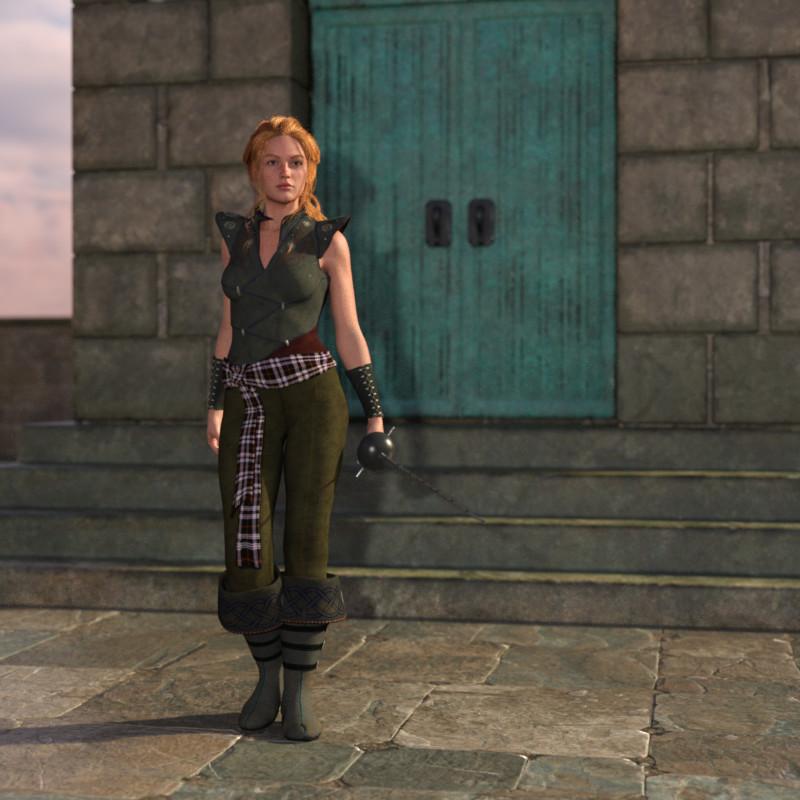
Autofit clones for all previous Genesis lines are included in the Genesis 9 Starter Bundle. Here's Victoria wearing the Journeyer Scout outfit (and a Genesis 9 sword because I didn't want to spend my day positionning it in her hand
 ):
):
What's not included is autofit clones to use Genesis 9 clothes on previous Genesis figures (which seems to be what's usually done: I had to download autofit clones to use G8 clothes on G3, clones done by the same person who wrote the tutorial bellow), but you can either buy a product or build one following a tutorial.
The product: https://www.daz3d.com/mmx-genesis-9-clones-for-all
The tutorial to create your own autofit clones (I suppose the process is the same for every generation but I bough the product, so I don't know): https://www.daz3d.com/forums/discussion/599231/making-clones-of-g9-tutorial/
When did you come to DAZ?Dartanbeck said:
True. But by the time I started following them, I don't recall if V3 had come out already or not, but it was already Daz 3d by then. My 3D Mentor who bought me a copy of Poser 5 turned me onto the Daz 3d site. I think I even got V2 and V3 for free (at different points in time). For the longest time I had my hands full with nothing but the free stuff I could get from Daz 3d and elsewhere along with the digital Ton of stuff that came with Poser :)
Yeah this is similar to how I found them. My first purchase from December 2005 has DAZ Studio 2.3.3.146 in it. I was using Poser 5 I think... was a member of whatever the Subscription thing was at Content Paradise (back then they mailed MONTHY CDs. Can you IMAGINE? LoL). I am pretty sure I got clued into D.A.Z. with its old logo (and the periods) from people there. I found out their software was free. I remember thinking "Yeah but how long will that last?" not realizing the content was the bread and butter. The second I used Daz Studio, I was like, omg, this is SOOO much easier to use than Poser.
As for V2 and 3 free, yeah they for sure were. I can see the purchase in my history. When I came back in 2011, all that stuff was free. My purchase from 6-1-2011 ($0.00)
- DAZ Studio 4.5.1.56 & DAZ Studio 3.1.2.32 (?? Not sure what that is about)
- 'Millennium Woman' Victoria 1
- Aiko 4 Base
- Stephanie 4 Elite Base
- Michael 4 Base
- the Girl 4 Base
- Victoria 4.2 Base
- Aiko (Anime/Manga Character)
- Victoria 3.0 Base
- Stephanie
- Victoria 2.0
- Stephanie 3.0 Petite Base
It also had a heap of those old Dystopia Blocks in there.
First Impressions Genesis 9 - A ReviewFirst, I am happy to see that Genesis has returned to it's original vision. When Genesis (1) first hit the scene, the promise had been that it would be an adaptable "universal" tool. Androgeny would allow for the sharing of clothes, shapes and materials like never before and theoretically, be a better investment. To see Genesis 9 embrace that concept once again is very exciting!
I'm also very pleased with all the parameters, shapes, textures and "posability" available right out of the box. Being able to play with the figure and have a positive experience is what makes it possible to fall in love with them. With 6 complete characters (3 male and 3 female) including unique textures, body shapes and a range of skin tones, hair and clothing, and other assests, makes this Generation of Daz3D figures the most versatile base figure to date.
It's important that it be fun to use right away. And (in my opinion) is why Victoria 4 was so loved in her prime. She was simply the best thing anyone had seen to that point. No figure before her (or since, really) had as much support, content (free and purchasable) or devotion as V4. And that's because people fell in love with her. It's what made them WANT to buy stuff for her.
Genesis 9 has similar potential for me. They are, by far, the most realistic figure I have ever seen.
Now, for the cons...
It's very strange to me to see what Genesis 9 is missing. No Iris or lip parameters in the surface tab? Limited adjustability of legs and hips? Why do the thighs seem so long and the shins so short once I start dialing in a character? With no option to scale them independently, I sometimes end up with something that looks, just - off. And with no practical way to fix it, I feel a little less satisiified with the character I'm creating. Is it just me? It just brings me back to that first point of desiring a positive experience and really wanting to fall in love, you know?
For the most part, I really do like Genesis 9. The realism is very impressive and being able to create unique and diverse characters right from the start without needing to invest right away in plus plus shapes or morphs, is certainly going to encourage me to keep creating them. And wanting to create for them.
9/10 stars.
 When did you come to DAZ?
GiGi_7 said:
I first tried poser 4 and bryce in some demo or similar of some computer magazine from Spain. I remember that there were things from Zygote and Victoria 1/2 seemed to me an amazing model that I couldn't buy. Officially in 2007 I started in DS2. I was not consistent. Since the free version of DS4 at 2012 I knew that I would continue with this hobby on this software definitely. Although I had Aiko 3 and Victoria 4, I consider my first fundamental figure to be Genesis. The problem of transmitting the morphs from the figure to clothes seemed to me a very important limitation. That problem disappeared in Genesis.
Absolutely! The first time I saw Genesis on my screen I was All In! I still love Genesis 1!!!
As they rolled out the clones for them ("Legacy Shapes"), I collected them all. I grabbed GenX2 and expansions as well. Handy Dandy Tool! Monsters, animals and people galore, Genesis filled my library!
And yes. Carrara, Bryce, Hexagon and Daz Studio were seen in quite a few 3D enthusiast magazines and e-zines. I was looking for such a magazine to score a copy of Carrara 5 when all of a sudden I saw Carrara 6 at Daz 3d! Daz bought Carrara? So Cool!!! It had a wonderful price tag but raising two kids... I just couldn't swing it. One day my hero and wife, Rosie, came up and said - I saved up the money you need for that art thing.
What?
That... what was it... something Daz?
Bam! Special Thanks to the Love of My Life - My Rosie!!!
Question about purchasesToonen1988 said:
It say's that i've bought the full package under my account purchase history but the store itself doesn't recognise it.
If this is true I would still advise raising a sales support ticket so they can fix it on your account properly. If you don't do this then you may end up buying them a second time by accident. I think I remember seeing that this has happened to someone before so it is a thing - just very rare.
When I go to the Install Manager, it says that all the packages has been installed, but yet I can't find them anywhere in Daz3d. For example face expressions, they don't appear anywhere within Daz3d wile they are installed. I also bought the Victoria 9 HD model as a base model, which should be compatible with the Genesis 9 Essential Expressions.
When I also select my Genesis 9 model, go to smart content and disable "Filter by context" the expressions still doesn't show up.
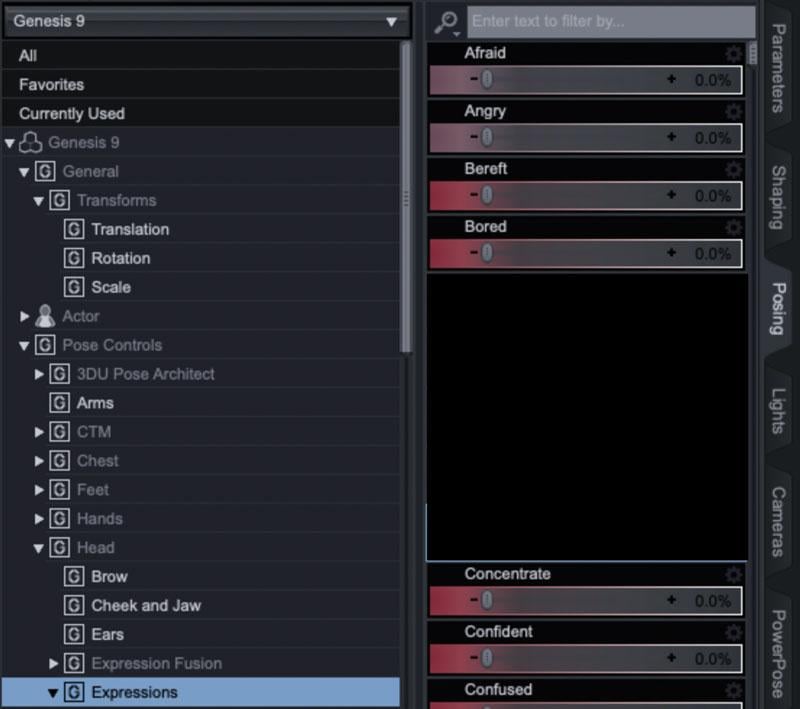
Sorry, I may have lead you a little astray in the previous post - the four products do show up in Smart Content but the expressions product doesn't have any visible items inside the product and so would not be included when filtering. Instead if you select your G9 figure and open the posing tab and go to Pose Controls / Head / Expressions the sliders for them will be in there (alongside others from any other products you may have). Example below (again with other items redacted to avoid confusion). The full list of which ones are included is in the product description.
 When did you come to DAZ?
I first tried poser 4 and bryce in some demo or similar of some computer magazine from Spain. I remember that there were things from Zygote and Victoria 1/2 seemed to me an amazing model that I couldn't buy. Officially in 2007 I started in DS2. I was not consistent. Since the free version of DS4 at 2012 I knew that I would continue with this hobby on this software definitely. Although I had Aiko 3 and Victoria 4, I consider my first fundamental figure to be Genesis. The problem of transmitting the morphs from the figure to clothes seemed to me a very important limitation. That problem disappeared in Genesis.
Question about purchasesSofaCitizen said:
If you have purchased that bundle you linked to then the four items listed as part of the bundle should also be set as purchased when you view them while being logged into your account.
If not then you should raise a sales support ticket (https://bugs.daz3d.com/hc/en-us) referencing the order that contains the purchase of the bundle.
It say's that i've bought the full package under my account purchase history but the store itself doesn't recognise it. When I go to the Install Manager, it says that all the packages has been installed, but yet I can't find them anywhere in Daz3d. For example face expressions, they don't appear anywhere within Daz3d wile they are installed. I also bought the Victoria 9 HD model as a base model, which should be compatible with the Genesis 9 Essential Expressions.
When I also select my Genesis 9 model, go to smart content and disable "Filter by context" the expressions still doesn't show up.
November 2023 - Daz 3D New User Challenge - Materials and next level KitbashingTitle: Say Cheese
Challenge: Beginner
Notes:
When I saw this challenge, I had just bought https://www.daz3d.com/dforce-shy-girl-outfit-for-genesis-8-and-81-females, thinking it might be a good dress for a child character if I could make it look cute instead of creepy by changing the materials. I wished to make the doll less creepy too. I never intended to make it into a full scene, but it reminded me of the photos my parents took of me back in the sixties. So I added some props and a random sky HDRI and this image was born.
Yes, she’s standing right smack dab in the middle of the picture, the lighting is meh (but looks like the sunny days in Florida I remember so well), and the camera angle is uninspiring, It looks exactly like what it is: a noob render. But there is a method to my madness. It resembles those old pictures from my childhood, though this render would never be mistaken for an actual photograph.
The shaders on the doll, the stockings, and the shoes come from https://www.daz3d.com/fabric-basics-mix-and-match-for-iray, which I am finding invaluable for changing materials on all sorts of things. The shaders on the dress were purchased elsewhere, as were the props. Other Daz products I used are:
shape: https://www.daz3d.com/growing-up-for-genesis-8-female-s
skin: https://www.daz3d.com/mrl-brienne-for-victoria-8
hair: https://www.daz3d.com/mnn-hairs-for-genesis-8-and-81-females
hair flower: https://www.daz3d.com/mrl-dforce-fantasy-hair-pack-2-for-genesis-8-and-81-females
stockings: https://www.daz3d.com/pastel-goth-outfit-for-genesis-8-female-s
shoes: https://www.daz3d.com/dforce-fiona-outfit-for-genesis-8-and-81-females
This is the first render I have ever posted anywhere. Though far from perfect, it is a start. Constructive criticism is always welcome.
Daz 3D is part of

Connect
DAZ Productions, Inc.
7533 S Center View Ct #4664
West Jordan, UT 84084Licensing Agreement | Terms of Service | Privacy Policy | EULA
© 2026 Daz Productions Inc. All Rights Reserved.