-
UltraScenery - new(er) territory [Commercial]
memcneil70 said:
@tsroemi I have used some of Flipmode's Easy Environments sets' HDRIs which have a distant background image along with sky and light. It just depends on what foreground I used. I also use Orestes Iray HDRI Skydomes, PRO-HDR-SKIES by Com Jackson and the Skies of series by DimensionTheory which also have backgroud images. Maybe these can keep you going until a specific set for USC2 is released?
After USC being released so many years ago, we have become used to a large body of products for it and it naturally feels like USC2 is skimpy, even though the USC items can be used with it, except some of the tools, which were incorporated. It would be nice to have some other biomes. Although the Tropics, if apply to the USA, are actually only seen in the Pacific Islands and Florida or the Gulf Coast. (Not sure never been there. Too humid and bugs.) But going south, would work for parts of Central America, South America, Africa, and Asia.
Mary
Thanks for the hints, I'll try that!
WINDOWS: DIM keeps installing hexagon 32-bit version, but I need 64-bit versionRoman_K2 said:
It would be nice to see new "News" from time to time. Like maybe reworked tutorials? New primitives?
One of my foibles is that I tend to overlook the included content... so for me a reminder manifest or list might be... good.
DAZ does not ignore other areas, like DIM wastes no time promoting stuff like "Mateo 9" with little pop-up ads.
Exactly what happent to me, overlooked that "enable betas" option. Indeed I didn't know there was a desktop program for Daz Central!!
(Now I can't find it in Daz Central, tho.)
WINDOWS: DIM keeps installing hexagon 32-bit version, but I need 64-bit versionNova said:
It is as Richard writes, you have to activate the beta in Daz Central, only then can you download it.
But you can also work with the 32-bit version.
Whoa, I didn't know a downloadable Daz Central existed. I was working raw with just Daz and Hexagon and DIM hahaha.
Thanks for the heads up!
UltraScenery - new(er) territory [Commercial]@tsroemi I have used some of Flipmode's Easy Environments sets' HDRIs which have a distant background image along with sky and light. It just depends on what foreground I used. I also use Orestes Iray HDRI Skydomes, PRO-HDR-SKIES by Com Jackson and the Skies of series by DimensionTheory which also have backgroud images. Maybe these can keep you going until a specific set for USC2 is released?
After USC being released so many years ago, we have become used to a large body of products for it and it naturally feels like USC2 is skimpy, even though the USC items can be used with it, except some of the tools, which were incorporated. It would be nice to have some other biomes. Although the Tropics, if apply to the USA, are actually only seen in the Pacific Islands and Florida or the Gulf Coast. (Not sure never been there. Too humid and bugs.) But going south, would work for parts of Central America, South America, Africa, and Asia.
Mary
Load times are absurdly long, Daz unusableSpectralFrames said:
Cinnatwist said:
artxtap said:
when you load an actor, all morphs that actor may use are also load, even if you are not going to use them. or they were in the past.
Very true, but the loading in of an actor was just one of many things (not to mention it taking upwards of 15 or 30 mins plus). Daz also freezes for minutes at a time, randomly, or when doing mundane traversal of the interface, or yeah, when loading in models, shaders, clothing, hair, or just switching from Iray Preview to any other mode.
This can't be normal, can it? Richard mentioned some good potentials, which I did my best by allowing every Daz related exe through my firewall, but I am still having this problem. I've used Daz for years and it has never been this ridiculous.You probably have too much content installed. I always install ONLY the character morphs I need for my current project and put them in a separate content library. Having multiple enviroment and prop packs won't affect load times, but multiple installed figures will, as every figure adds loads of new files like corrective morphs and so on.
I have noticed also, If I have multiple Genesis 9 figures installed at once, posing them becomes impossible.
On the other hand, Multiple G8 figures make the load times absurdly long.
One way to debug this problem:
1) Make a new folder for a new content library such as for example D:/MyNewTestLibrary
2) Download manually (so NOT using DIM or Daz central) .zip packs with Genesis 8 and Genesis 9 starter Essentials and unpack them to the root of the newly created library
3) Launch DAZ, go to Edit -> Preferences -> Content -> Content Directory Manager and un-plug every DAZ library you have there in the "Daz studio formats" (just note down where they are as you will need to replug them later)
4) Plug in the D:/MyNewTestLibrary that contain only fresh G8 and G9 files
5) Test the load times. If they're lightning fast, than some of your installed content causes this problem. Most probably it's too much characters installed.
Thanks for this response!
This is what I was thinking/afraid of, as I have 90% more content installed than I use or need for any given project. File hoarding tendency, I guess...
I'll try your idea out and report back.Load times are absurdly long, Daz unusableCinnatwist said:
artxtap said:
when you load an actor, all morphs that actor may use are also load, even if you are not going to use them. or they were in the past.
Very true, but the loading in of an actor was just one of many things (not to mention it taking upwards of 15 or 30 mins plus). Daz also freezes for minutes at a time, randomly, or when doing mundane traversal of the interface, or yeah, when loading in models, shaders, clothing, hair, or just switching from Iray Preview to any other mode.
This can't be normal, can it? Richard mentioned some good potentials, which I did my best by allowing every Daz related exe through my firewall, but I am still having this problem. I've used Daz for years and it has never been this ridiculous.You probably have too much content installed. I always install ONLY the character morphs I need for my current project and put them in a separate content library. Having multiple enviroment and prop packs won't affect load times, but multiple installed figures will, as every figure adds loads of new files like corrective morphs and so on.
I have noticed also, If I have multiple Genesis 9 figures installed at once, posing them becomes impossible.
On the other hand, Multiple G8 figures make the load times absurdly long.
One way to debug this problem:
1) Make a new folder for a new content library such as for example D:/MyNewTestLibrary
2) Download manually (so NOT using DIM or Daz central) .zip packs with Genesis 8 and Genesis 9 starter Essentials and unpack them to the root of the newly created library
3) Launch DAZ, go to Edit -> Preferences -> Content -> Content Directory Manager and un-plug every DAZ library you have there in the "Daz studio formats" (just note down where they are as you will need to replug them later)
4) Plug in the D:/MyNewTestLibrary that contain only fresh G8 and G9 files
5) Test the load times. If they're lightning fast, than some of your installed content causes this problem. Most probably it's too much characters installed.
DAZ Upgrade Failure and My Plan to Repair Thingsdocbadwrench said:
Thanks very much for your guidance Richard. Follow-up question: Is there a preferred reinstall method? Like, should I just download the app from the main site or should I install via Daz Central? It appears that Daz Central is going away, but I just wanted to make doubly sure.
Install Manager would be the recommendation - it should share the Daz Central settings automatically.
DAZ Upgrade Failure and My Plan to Repair ThingsThanks very much for your guidance Richard. Follow-up question: Is there a preferred reinstall method? Like, should I just download the app from the main site or should I install via Daz Central? It appears that Daz Central is going away, but I just wanted to make doubly sure.
Space Road Stop and Add-Ons [Commercial]some news of the next add-on
the add-on will only have the hospital level (originaly i wanted to put also the garden level but my plants and trees are too ugly to be credible)
the whole structure of the hospital is done,and i'm actually working on some little props like medecine packet etc.
the addon is composed by a waiting room, consultations room, one restroom for the employees, operating room with automated machine with 15 arms fully articullated, convalescence room, stock/maintenance room, pharmacy room and a corridor with central hub to connect all those things
i think the add will be ready en january or february
here some fast render:


 WINDOWS: DIM keeps installing hexagon 32-bit version, but I need 64-bit version
It is as Richard writes, you have to activate the beta in Daz Central, only then can you download it.
But you can also work with the 32-bit version.
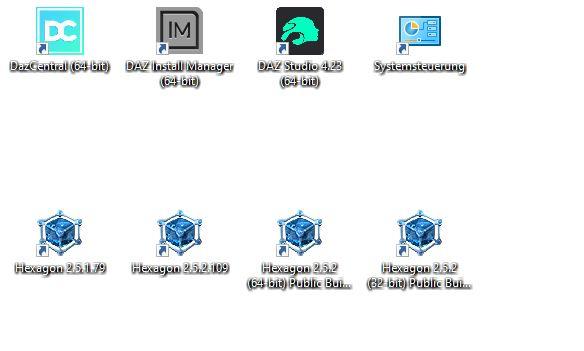
Working with Hexagon 32-bit
 Noob Question - Headshop 14 doesn't work?
vasiliypoebayko said:
info_b3470fa520 said:
Throwawaytales has had a skype/screen share session and we were able to find a solution in 5 minutes flat. He also forgot to mention, that he installed HeadShop via DAZ Central and IM - neither of which can be used with HeadShop. As the README clearly states, HeadShop has its own installer that, when used, installs on the correct location.
Good afternoon!
How did you solve this problem?
I have the same situation. I would be very grateful for your help
It is always install issue. To solve install please visit the following tut:

Follow steos carefully, don't skip! If still no luck, we can have a skype screen share - works 100% of the time.
Let me know: [email protected]
Webshop Not Loading on Laptop9 am Central Time here on 12/6 and I am having the same issue. The store is spinning, my wishlist is not showing up, but my library is
There's Always Another Sale Thread -- Discussions Only Pt 3Cam Fox said:
CES3D said:
I have a query regarding the time zones used in punch card systems.
Specifically, when punch card rules mention terms like "a day", "daily" or "the next day," which time zone are they referring to? Is it Mountain Standard Time (MST), Coordinated Universal Time (UTC), or the user's local time?I encountered a strange occurrence last year. A hole that had been closed on my card was inexplicably reopened on the same day, according to MST.
I'm uncertain whether this indicates that the system operates on a time zone different from MST or if it was simply a technical glitch.Without a clear understanding of the time zone used by the punch card system, it's difficult to maintain punched holes consistently on a daily basis.
I would guess the punches are coordinated to match the time that sales have been switching over - that's 1am Central from my POV, and I think it's always the same moment (in your respective time zone) for all customers.
If you're planning to maximize the punch promotion, from past experience there's usually some in-between days where you'll have to compromise your price target, or buy a product you wouldn't normally buy, to stay in the game. If you ever skip a day, there'll typically be a stronger day soon after, where you'll wish you had filled all the punches. :) No way to know in advance, so consider your budget and find a strategy that works for you.
The disappearing/reappearing punch sounds like a glitch to me.
Yes, I also thought the punch card followed the timing of DAZ's sales switchover, which means it should be MST now.
However, last year's punch card showed some behavior that made me unsure if it was actually following MST, so I had some doubts.
Richard says it should be in sync with the Debut release switchover, so I'll believe that.
Last year's strange behavior was probably just a glitch, as you said.There's Always Another Sale Thread -- Discussions Only Pt 3CES3D said:
I have a query regarding the time zones used in punch card systems.
Specifically, when punch card rules mention terms like "a day", "daily" or "the next day," which time zone are they referring to? Is it Mountain Standard Time (MST), Coordinated Universal Time (UTC), or the user's local time?I encountered a strange occurrence last year. A hole that had been closed on my card was inexplicably reopened on the same day, according to MST.
I'm uncertain whether this indicates that the system operates on a time zone different from MST or if it was simply a technical glitch.Without a clear understanding of the time zone used by the punch card system, it's difficult to maintain punched holes consistently on a daily basis.
I would guess the punches are coordinated to match the time that sales have been switching over - that's 1am Central from my POV, and I think it's always the same moment (in your respective time zone) for all customers.
If you're planning to maximize the punch promotion, from past experience there's usually some in-between days where you'll have to compromise your price target, or buy a product you wouldn't normally buy, to stay in the game. If you ever skip a day, there'll typically be a stronger day soon after, where you'll wish you had filled all the punches. :) No way to know in advance, so consider your budget and find a strategy that works for you.
The disappearing/reappearing punch sounds like a glitch to me.
Noob Question - Headshop 14 doesn't work?info_b3470fa520 said:
Throwawaytales has had a skype/screen share session and we were able to find a solution in 5 minutes flat. He also forgot to mention, that he installed HeadShop via DAZ Central and IM - neither of which can be used with HeadShop. As the README clearly states, HeadShop has its own installer that, when used, installs on the correct location.
Good afternoon!
How did you solve this problem?
I have the same situation. I would be very grateful for your help
Zer0 Rei is wondering about the ongoing legacy of Bryce - What's going on in 2024?NGartplay,
If you do decide to explore some of the more technical aspects of Bryce you may not yet be as familiar with, I can point you to a few concepts. Horo has many tutorials on his website, many written quite verbosely by me I admit, that explain in great detail the way I approached lighting in my studies. My thinking is quite different than most users, so be prepared for surprises. For now I'll just mention a few.
Antialiasing:
Many of the lighting approaches I use are somewhat "complex" and therefore do not get along well with anything other than standard AA. The complex lighting rigs alone add quite enough time to rendering, and higher AA settings and Premium effects just increases that another 10-fold or more. 2 days is one thing, 20 days is quite another!! Keep this in mind if you explore the concepts I'm offering. Stick to standard AA, even though its kinda ugly. Better lighting adds more to the result than better AA in my opinion. All of the renders I shared above are standard AA and still took days to render.
Lighting:
"Cool to the Touch" Always consider if you could reach into the screen and touch the objects with your hands, how warm would they feel? Think in terms of thermodynamics. I'll explain.
I made several fellow Brycers annoyed years ago when proposing obnoxiously that uniform ambience "glow" at the material level wasn't a good solution for realism on most surfaces. But we kinda needed ambience back then for indirect lighting when most people's computers werent fast enough for much anything else. Networks of radials werent feasible yet for most users. I went and spent about a million dollars on what was then a state of the art machine that I still use todaty. Most everyone today has a faster computer than the one I'm using. Anyhow I stopped relying on ambience probably 15 or 20 years ago.
Indirect lighting is probably the biggest challenge if seeking realism in Bryce. I avoid Ambience at the material level at nearly all costs, aside from items which are out of thermal equilibrium. Basically, unless it's meant to feel "hot" to the touch and glow like fire or lightning, or even a light bulb, I dont use ambience. Ambience flattens the geometry because it bakes away self-shadows. There are many other methods for correcting hard shadows locally that I think lend more depth and dimension to the apparent image. You want some degree of shadows yes, just not too much or too little. This is also why I always keep Sun/Moon shadows at 100%, and correct shadows using more lights placed strategically within the scene. Lowering that Sky Lab setting below 100, while it might allow lights to penetrate more surfaces and would seem to save time by requiring fewer additional lights to correct, will actually have a flattening effect similar to material ambience, so it is to be avoided in most cases. It also adds to rendering time substancially. Yep, bad for speed!
Another trick: You can also use a small Light Dome with modest quality settings to create the appearance of soft shadows from a light source within a scene, without the need to enable Premium Rendering effects and run into AA related time explosions. Volumetric clouds are an exception however. NEVER light a volume cloud with IBL or Light Domes or TA, as this leads to suffering beyond comprehension. Use only sunlight, and material ambience for clouds. Works really well.
Geometric Complexity and Lighting Choices:
Bryce is quite ideal for scenes of low geometric complexity. Quick to build, quick to render, and onto the next project. But realism often requires more detail to be convincing even for a moment. The level of geometric complexity a scene requires to appear somewhat realistic usually determines which approach I take. I'll explain a few considerations.
IBL for instance is fantastic, but it has the limitation of sourcing light only from extremely far away from world center, so in scenes where a simple central focus is displayed, with few geometric obstructions from the IBL sky, IBL really shines. This is the case in the Coffee Break render, lit with IBL. However in scenes with lots of geometric complexity, the models will likely still have hard shadows where they should not for realism sake. Typically noticeable on the undersides of surfaces. I think of IBL as being more similar to sunlight, but instead of only shining from one point in the sky IBL provides colored light from many more angles and many colors based on real world measurements which is awesome, but it still doesnt always supply enough light in local areas blocked from direct view of the sky... unless you correct for these shortcomings such as I'll describe below.
IBL and Light Domes set to Infinite share most of the same strengths and weaknesses. One way to overcome the main weakness they share is to disable shadow casting for ground terrains and water planes, allowing the IBL or Dome Light illumination to penetrate the terrain and water palnes and directly illuminate the target models from full 360 degrees instead of only 180. Giving the impression of light "bouncing" back upward into space, which is more similar to real life helps a lot.
True Ambience is also quite fantastic, but for some reason the rendering time scales exponentially with the number of radial lights in a scene. One or two radials, no sweat. But 5 or 50, crazy rendering times. Though TA is surely unbeatable for accuracy, it limits lighting options too much for my tastes with most projects. So I use faked GI methods, like Domes and 3D Fills instead. Much faster rendering, acceptable results, much more user control. No need for high levels of AA and Premium settings.
If the scene has a super high degree of geometric complexity, and the camera is set deep within the nest of geometry, I might actually use a 3D Fill, as this is a tool initially conceived by David Brinnen and further regulated with Horo's and my own studies that provides illumination on all sides of a model by means of virtual radial lights floating randomly within a given 3D volume of space. 3D Fills can "see" around corners. A very clever cheat David discovered. Super useful for interiors like the Open House render and Deco White renders above. However, I use them for landscapes as well when there are lots of trees, mountains, buildings etc surrounding the camera.
3D Fills are by far my preferred method for indirect lighting for interiors. Rarely use TA, sadly. Though I love TA and use it for certain things like product promos, not for discussion just now.
Learn the Instancing Lab if you havent already. Realism in landscapes needs lots of stuff. Lots of grass, lots of trees with lots of leaves, stones, etc. They say less is more, but for vegetative landscapes, my opinion is that only more is more.
Atmosphere and Scaling:
The Haze feature of the Sky Lab is very useful as well as problematic, thus knowing the sense of scale you want to create is essential. Create a metric for reference, like 12 Bryce units equals 1ft. This will help you better know where to place distant objects so they arrive within the desired area of the haze field.
Closeup items should not need haze at all, however sprawling landscapes will. Most of the skies available in the Sky Lab are for me set in the exact opposite manner than they need to be. But also keep in mind the original programmers thought of scenes much smaller than what I was trying to achieve, so I had to start over from scratch with a whole noew approach to haze. Bryce has the flexibility I found so no worries! I'm sure I wrote a tutorial at some point about Sky Lab settings regarding Haze, probably on Horo's site someplace. The Cement Jungle render and the Green Canyons are examples of haze that thickens with distance in a convincing manner while remaining clear in the foreground. Another trick: I always use maximum Cloud Height in the Sky Lab for Sky Lab generated clouds, as this setting has unexpectedly helpful effects on the haze field. Maximum Sky height also improves the appearance of the Cumulus Cloud settings in the skylab, as they modify the viewing angle and the clouds appear less flat because of it. Also MAximum Cloud height widens the "Horizon Line" we often see with the haze in Bryce. Once you raise the Cloud Height, you will find you need much less haze for the same desired result.
If you have any questions we can discuss details further in PM's, or likely in another thread, as I have already derailed this one enough I'd say. Fun fun!
How-to: Make your own info popups in StudioMODS: I don't know if this really belongs in the Commons; I don't know where it belongs. Feel free to move it. -c
Because I tend to forget short bits of important information about products unless they're right there in my face along with the other parts of the product, I make a lot of little information icons. These show up in Studio's content tree and can be double-clicked to get a popup dialog with information, just like the pros do!
These instructions should be read and followed carefully, but they are harmless -- the worst that'll happen is you'll make a script that doesn't work, and you'll get an error. However, you are required to:
- Be familiar with your computer's file system (that is, if you see a file path, you know how to get to that location and inspect what's there) and where Daz stores things;
- Know how to use a plain text file editing tool of some kind with confidence (Notepad will work for this, but NOT something like Word that adds extra garbage)
- Have enough sense not to mess with anything that shouldn't be messed with.
Follow these instructions at your own risk.
----------
I'm going to use an actual example I created, because that'll be easier. I needed to make an explanatory popup for Easy Snap Space Habitat so that I wouldn't have to go find a video on YouTube and scan through it every time just to remember the two tiny vital numbers you need to make the snap work right.
Because the info box will live in the same place as the product, first step is to find the product. Note that I have never tried this with items that install via Daz Central/Daz Connect, where the files are stored in a different hierarchy by product ID. I only use DIM or manual install, and I have only ever used this for products installed that way.
For me, Easy Snap Space Habitat lives in
D:\DAZ\LocalLibrary\Environments\Midnight_stories\Space HabitatYour content structure is probably in a different place; I have an unusual setup. If you don't know how to find the main content tree (this is where you'd find the directories like Data, Runtime, People, Materials, etc), you probably don't want to be trying this.
Anyway, once you've found where you want to put the file, you'll make a text file there with a .dsa extension. The name of this file, minus extension, is what will be displayed as the name of the icon in Studio. So my file
EasySnapSettings.dsa
displays as
EasySnapSettingsHere's the entire contents of that file. All one line. Text only, no special characters, no line breaks.
MessageBox.information(qsTr("Midnight_Stories recommends the following tool snap settings:\nRotate: 45 degrees\nTranslate: 100 cm"), qsTr("Important"), qsTr("&OK"));
You'll notice that there are three places in this line where there's something enclosed in double-quotes. These are the "parameters" and are the only parts you can change. The double-quotes are important -- they're "delimiters," they show the script where your parameter begins and ends. You can't use double-quotes IN the text of these three parameters, or the script will get confused. (You can use apostrophes, though.)
The rest of the line should be kept exactly as you see it here, including capitalization. Don't miss any of the parentheses or the semicolon at the end. It's all important.
The first parameter is the message that will be shown in the dialog. You can't actually type line breaks in the message text, but you can use \n which is a "newline" and the script will know what to do.
My message text is
Midnight_Stories recommends the following tool snap settings:\nRotate: 45 degrees\nTranslate: 100 cmwhich will display in the dialog as
Midnight_Stories recommends the following tool snap settings:
Rotate: 45 degrees
Translate: 100 cmThe second parameter is the title of the dialog. Keep this fairly short and don't use the \n newlines. My dialog is titled Important.
The third parameter is what will display on the button you click to close the message box. The ampersand is not displayed; it tells the script that the next character is the hotkey; that is, you can press O to close the message box instead of clicking the button. The button just says OK. Keep this very short and don't use \n here either. (Actually, I don't know why you'd ever want to change this parameter.)
Once you've made your edits and saved your little .dsa file, you may want an icon. You don't have to make one; if you don't, Studio will show the script with the "missing resource" image, AKA the Confused Picture Frame.
If you do care enough to give your new item a real icon (I use an exclamation point in a circle), you'll want to make a 91x91 PNG image of your choice, put it in the same directory, and give it the same name as the file you just made, but with an extension of .png instead of .dsa.
Again:
If your script isEasySnapSettings.dsa
your icon must beEasySnapSettings.png
so that Studio will know they go together.That's it! It takes longer to write up than to do. The hardest part is usually finding where the product lives.
You can do this stuff while you have Studio running and it won't cause problems, but Studio may not automatically see your new script and icon ... you will probably have to restart Studio, to force it to rescan the content tree and get your new goodies to show up.
----------
Notes and nerdy bits:
1. This script calls a function named MessageBox.information() which, amazingly enough, creates an informational message box! I don't know why its parameters need the qsTr("quoted string") wrapper function, and I haven't had time to experiment. Nor can I tell you why it's not qStr(). In the example I first stole this from it was written qsTr and I went with that; one day when I have time to really fool with Studio scripting I will probably learn that was because the original script I stole was done by someone who had no idea either.
2. Similarly, I suspect the script parser IS smart enough to understand line breaks in the script -- say, between parameters (after each comma) to make it more readable -- but I'm not going to experiment right now, and anyway, I'm sure line breaks INSIDE the double-quoted parameters are forbidden. Hence the use of \n.
3. Most scripting languages have a way to "escape" quotation marks (that is, in English, "please literally show these as quotation marks and do not treat them as a string delimiter"), but I don't know what that method is in Studio's scripting language, which is why I say not to use them.
4. I don't know if there is an upper limit on how much message you can cram into one of these popup dialogs. I do know I have a product which has a HUGE info popup that's probably got close to five hundred words in it, so I'm guessing the upper limit is just what your screen can comfortably hold. I wouldn't try to test that theory, though.
5. You can also do a rollover/tooltip image, shown when you hover over the icon. This image can be larger, I think up to 256x256. Some PAs put their special information and instructions right in this image, usually instead of a popup dialog. I prefer the popups; I don't need an image editor to make those when I want one. If you do make a tooltip image it needs to be named .tip.png to match, e.g. in my example
EasySnapSettings.tip.png.(SOLVED) Having issue with a productWell, perhaps I wasn't as through as I thought I was. I just redid the uninstall by choosing uninstall in Daz, then again uninstalling it in Instal Manager. Then deleted the links in the ready to install in Daz itself. I then installed it again with Daz Central, meaning to try both it and Install manager and for whatever reason, this time, it installed properly, I can see the icons in the Library and when clicked the items populate in the render space.
Dunno what changed, but it's working now and thanks very much Felis for the help!
Fit Control for Genesis 8 (Commercial)dobbyelf said:
FIT CONTROL FOR GENESIS 8 IS MISSING
I purchased Fit Control for Genesis 8 and it doesn't appear anywhere!
When I try to open it from DAZ Central it shows me an error message that says: Could not find the "50515" product!
Please help!
Can you try and install it via DIM?
Which DAZ files to Save for a Clean Windows Install?Richard Haseltine said:
You mean to preserve settings? Unfortunately some are in the registry, but a lot for Daz Studio, Install manager, and the content database are in
%appdata%/daz 3d/
Just make sure that all of the applicaitons are closed before trying to back it up.
If you install through DIM or Daz Central you will also want the Manifests folder, which defaults to the Public Documents folder on C: that is what tells DIM what it has installed, and where.
Thanks for your reply.
I really don't want to lose all of my Scenes, Presets and Subsets that I've created for renders. If it's content purchased elsewhere, I usually unzip them to MyDAZ Library in the Documents folder. I have all of my zips copied to other drives and can re-install those again.
I don't know if it's a dumb question but how do you back up the important Daz files? I haven't performed a file/folder specific backup for quite sometime.
Daz 3D is part of

Connect
DAZ Productions, Inc.
7533 S Center View Ct #4664
West Jordan, UT 84084Licensing Agreement | Terms of Service | Privacy Policy | EULA
© 2026 Daz Productions Inc. All Rights Reserved.