-
Released : Wet And (Or) Tanned Skins For Genesis 2 (Commercial)
Ok I just had a look and it works!!! I just tried on Victoria 6.
What is happening is : when you swap from another preview mode to this one (preview mode is "texture shaded", "wireframe", "Nvidia Iray", etc, etc), OR if you apply the shader for the first time in your Daz Studio Session, then the shader must be "calculated" by the render engine (this is not Iray uber). So, during something like 20 seconds on my computer when I swap from, for instance, texture shaded to Iray preview mode, then I have something Clay as you mention, but after that it is OK. It takes 20 seconds whether I use my video board or only my CPU. (for info : CPU = i7-4770K, and Video Nvidia 780Ti)
It is only that long when you swap from another preview mode to Iray. The good news is that, after that, if you simply move your figure or camera or adjust the shader, it just takes 1 to 2 seconds for the result to be displayed. I don't remember it behave like that before, so it works, but when you swap from another preview mode to Nvidia Iray preview mode, you have a time when you go "clay" before the shader is visible.
One thing I wanted to add, is that this behavior is not linked only to my shader. When, for instance, I apply Stephanie 6 material on V6, then it is rendering "white" during 15 seconds. Same when I loaded Mei Lin 7 in the scene, I had a Clay render during 17 seconds. If I swap from AoA to IrayUber shader I also have a 17 seconds Clay. So this seems to be a pretty general behavior.
I also just checked that if you change the tan preset or wetness preset, it also takes only around 1 second of clay before it is visible.
Can you tell me if it solved your issue ? I mean, that if you wait the "clay step", then the skin is properly displayed?
Pose Builder & Pose Converter Support Thread [Commercial]trying to use V4 to Genesis 2 Pose Converter, when loading app message appears that the following file was missing
data/daz 3d/genesis 2/female/uv sets/daz 3d/victoria 4/victoria 4.dsf
am using Daz 4.9.2.70, when I look for that file I can find it in data/daz 3d/genesis/female/uv sets/daz 3d/base/victoria 4.dsf
any way I can fix this? Thanks.
ZDG random Daz Studio discoveries and questions.17,000x4x4x4x4 for Victoria 7 HD.
17,000x4x4x4 for FWSA Paloma.
4960x4x4 for the item you're testing today.
Released : Wet And (Or) Tanned Skins For Genesis 2 (Commercial)Hi V3Digitimes,
Whatever I do, I get completely gray skin when I use this product. I've tried it on a few figures including some DAZ original figures such as Victoria 6, but I get the same gray skin for all of them. I am following the instructions in the User's Guide by the way. The gray I get is not the "silver" issue outlined in the user's guide. It's just a dull, clay-like gray. I am using Daz Studio 4.9 and iRay. Does the product work with Daz Stduio 4.9?
My Lease Is Nearly Up On The Complaint Thread...yeah cars may be safer and more efficient today compared to the heavily chromed bests of a half century ago, but they are all looking more and more alike each year. Getting hard to tell a Chevy from a Nissan or a Ford from a Hundai these days.
...and some are just plain butt ugly (like most SUVs and the Nissan Leaf).
Form follows function.
 (Except in Italy where where form is everything! Function be damned.
  ) I suspect that Victoria's bikini armor was Italian.Help with starting on Daz- the right content.
Well, you can use V4 and M4 poses on Genesis, and Genesis 2 (which come free with DAZ Studio) but the feet and hands don't transcribe correctly, so you might have to do a little bit of tweaking there.
Before you start buying, I'd recommend that you join the PC club (at least temporarily), as you get a lot of content cheaper (for example, you get a discount of 30% on DAZ originals). Also, keep an eye open for PC-items; the majority of the back catalogue is $1.99 for PC members. Also, if you have a bit patience, M4 and V4 base figures occasionally show up in the "Freebies".
There's also a 80% off M4/V4 sale right now. If you buy any new release, you get a discount of 80% off items:
- http://www.daz3d.com/featured-michael-4-products-5003#
- http://www.daz3d.com/featured-victoria-4-products
If you just want to test out things, perhaps it's best if you use plain Genesis (any generation) in your animations, and see if the work flow suits you. It's my experience that it's rather easy to get carried away by all the useful and bling stuff in the shop, but once the initial excitement wears off, and you have to tackle the posing, lighting and render times problems, it can get rather frustrating.
Get Your Encrypted Daz Connect Content Here Thread - none at the moment 2018-01-30http://www.daz3d.com/fw-nadine-hd-for-victoria-7 Release Date: 2016-06-26 link is wrong as it includes the word Release and a prior space.
BTW thanks for the list! Just going through to see how many I grabbed without releasing it!
Thank you very much - I corrected that link.
The title of the thread stays as it is, as Daz3d is calling it "Encrypted Content" and everybody around here knows what it is about.
Character CatalogingGenesis 2 - Jenny (freebie)

Victoria 4 - Luna for A4

Victoria 4 - Willow for S4
 Character Cataloging
I embarked on a similar project a few years ago, but I'm taking a rather different approach. I'm leveraging my background as an application developer-slash-systems analyst, and building a content management application, complete with database and a super-slick-looking UI. I'll spare you the techno-geek details, but I'm writing the thing to go all the way down to the file level -- what each product is, where it's installed, what files it is composed of, the content type (figure, character morphs, hair, props, textures, environments, etc.), genre (fantasy, sci-fi, contemporary, steampunk, whatever)....
I concluded that I was going to have to do something drastic if I was ever going to get a handle on my content libraries. I've been accumulating content for going on twelve years now, for both DAZ Studio and Poser (and, to a lesser extent, Carrara and Bryce). It is scattered across no less than ten different runtimes, and consumes close to 800 gigabytes on my hard disk. I realized some time ago that I honestly don't know where half of my stuff is, as in which runtime I installed it to. (Hell, I no longer know what half of it is!) So I can definitely relate.
At least you're getting started early; I have over a decade of accumulated crap I'm going to have to wade through. (And yes, I went through my own period of 'freebie-bingeing' in my early days. Unfortunately, most of the archives were lost when I accidentally tripped over the signal cable on the external hard disk I had it all stored on, and dragged it off the desk onto the floor!)
Oh man! I can't imagine trying to get a handle on all that content. The Content Management Application sounds amazing. I would pay good money for something like that. There needs to be a better way to catalog items then what is currently used. An application to help orginize peoples files and products would be a HUGE seller, I'll bet.
I'd love to see something like Right Click on the item, a drop down menu shows up that gives a list like "Figure" "Prop" "Background" "Lighting" "Hair" "Clothes" etc - you put a check by the category that represents what the item is and it puts that item in a file or catalog with all other items that have been checked of that same type. I realize that you would have to do that for each of your items, but that would, hopefully, forever keep them in the right catagory for easy finding. You could then maybe farther catalog them from there, like within the FIGURE catalog maybe have seporate sub catalogs for GENESIS 1 figures, VICTORIA 4 figures, etc. I'd love something like that.
I do that now inside of studio in custom categories. It took me literally over a month to redo it when I lost it several months ago. Working on several hours a night and more than that on weekends. And I have only been doing this for 10 months....Works pretty well but its not perfect of course.
Yeah, I'm totally attempting that right now - using the custom categories to orginize. It's working but as you said, it's such a slow process. Having to dig through all your files and get everything orginized is definitely a major undertaking. But I think it will be totally worth it when I'm done. I already can find things much easier and I'm only about half way done. lol
Get Your Encrypted Daz Connect Content Here Thread - none at the moment 2018-01-30Looks like there is another new one to add to the list:
http://www.daz3d.com/fw-nadine-hd-for-victoria-7
As normal it is heavily discounted, with a price under 4$ if you buy one of today's releases.
Impossible to discount DRMed products enough.
I'll buy it for free.
Get Your Encrypted Daz Connect Content Here Thread - none at the moment 2018-01-30http://www.daz3d.com/fw-nadine-hd-for-victoria-7 Release Date: 2016-06-26 link is wrong as it includes the word Release and a prior space.
BTW thanks for the list! Just going through to see how many I grabbed without releasing it!
Carrara Challenge #25: Light and Shadow - WIP THREADI got a confession to make : there is any stick in my scene, I was only afraid about the one of Chohole !
The 3D character is Victoria, but in the story, his name is Michaël...

Cheers !
Product Updated: UHT2: Ultimate Color [Commercial Product] with video links... Share your renders!I am having so much fun playing with hair colours! On the attached image, I used Victoria 4 and an older SAV hair. SAV's hair takes to UHT2 very nicely from my limited testing on a couple of styles.
That hair looks so soft! I bought a few SAV hairs to test UHT2 on recently, and although the textures looked good on the hair I bought, I think the styles I chose were not my taste, so I was ultimately unhappy with them. I will probably buy a few more and work with them. I had some nice results with Ali hair styles, some of which you can see in my promos. Your render does a really nice job of showing how soft and natural the hair can look in Iray. Thank you for sharing :)
Help! Third-Party Morphs for Genesis 2 Do NothingThank you, Richard. I installed them with DM, and then I tried installing one morph pack manually as an experiment, but that didn't solve anything.
I'm surprised to hear you say that Evolution is only for Genesis 1, since there are two Evolution folders in my Genesis 2 subdirectories that contain the properly functioning morphs, as you will see shortly.
The DSF files for the morphs that work fine are located in the following directories.
C:\Users\Gregory H. Bontrager\DSON Content\data\DAZ 3D\Genesis 2\Female\Morphs\DAZ 3D\Evolution Body\
C:\Users\Gregory H. Bontrager\DSON Content\data\DAZ 3D\Genesis 2\Female\Morphs\DAZ 3D\Evolution Head\
C:\Users\Gregory H. Bontrager\DSON Content\data\DAZ 3D\Genesis 2\Female\Morphs\DAZ 3D\Victoria 6\
C:\Users\Gregory H. Bontrager\DSON Content\data\DAZ 3D\Genesis 2\Female\Morphs\DAZ 3D\Victoria 4\
C:\Users\Gregory H. Bontrager\DSON Content\data\DAZ 3D\Genesis 2\Female\Morphs\DAZ 3D\Base\
C:\Users\Gregory H. Bontrager\DSON Content\data\DAZ 3D\Genesis 2\Female\Morphs\DAZ 3D\Control Rig\
There is also a "Creature Creator" folder that only contains one file, and since I've never used it and don't even know if the dial appears on the CR2, I can't say for sure whether it works or not. In any case, fantasy morphs aren't my concern right now.
The DSF files for the morphs that definitely have little or no effect are located in the following directories.
C:\Users\Gregory H. Bontrager\DSON Content\data\DAZ 3D\Genesis 2\Female\Morphs\Cake One\Faces\
C:\Users\Gregory H. Bontrager\DSON Content\data\DAZ 3D\Genesis 2\Female\Morphs\Zev0\Shape Shift\
C:\Users\Gregory H. Bontrager\DSON Content\data\DAZ 3D\Genesis 2\Female\Morphs\HSTW\G2MK2\
C:\Users\Gregory H. Bontrager\DSON Content\data\DAZ 3D\Genesis 2\Female\Morphs\HSTW\V6MK1\
The DSA and DSX files for all morph packs except for the HSTW resource kits are here.
C:\Users\Gregory H. Bontrager\DSON Content\Runtime\Support\
The lack of DSA and DSX files for the resource kits is suspicious, but even that wouldn't explain why Ethnics and Shape Shift are also non-functional, since they both have DSA and DSX files.Product Updated: UHT2: Ultimate Color [Commercial Product] with video links... Share your renders!I am having so much fun playing with hair colours! On the attached image, I used Victoria 4 and an older SAV hair. SAV's hair takes to UHT2 very nicely from my limited testing on a couple of styles.
Help with starting on Daz- the right content.Hi Everyone,
i have just joined Daz 3d and i am keen to start on some short animations. Just a quick question, i looked at some packs e.g. Cheyenne Village Action for Victoria 4 and i wanted to confirm do i need to purchase Victoria 4 to use this. I have noticed Victoria 7 is available would that work with 4 as 7 is obviously a later model. i think many of the Packs say Michael 4 also. Does the same apply here? What is the cheapest price for these two characters (Michael and Victoria) as they seem to be sold as packs with a lot of stuff that i don't need.
Thanks Ian
Get Your Encrypted Daz Connect Content Here Thread - none at the moment 2018-01-30Looks like there is another new one to add to the list:
http://www.daz3d.com/fw-nadine-hd-for-victoria-7
As normal it is heavily discounted, with a price under 4$ if you buy one of today's releases.
Thanks for the HU, almost put her in my cart.
parenting and morphsThosea re not weight-mapped, since theya re for Michael 4/Victoria 4. You could still turn the add-ons into a figure that conformed to the goggles, it would be the same as using the Figure Setup pane to make a conformer for V4/M4 but with the goggles as the source figure.
Ivan 7 ... was not expecting thisIvan sporting a full set of lush lashes:
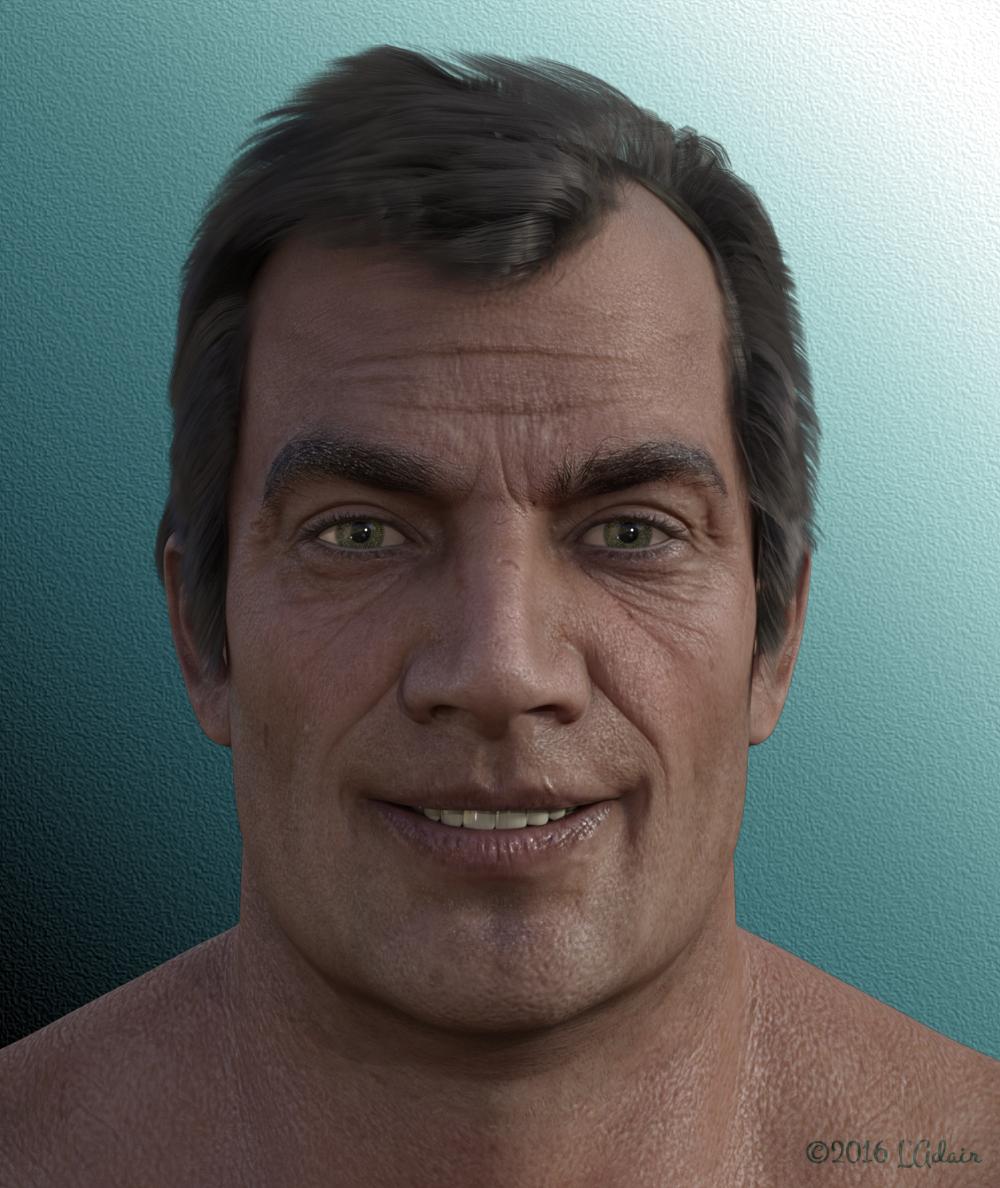
I changed the UV Set just for the eyelashes to Base Male and changed the Cutout Opacity image to one of those for Victoria 7 eyelashes. (I have the Genesis 3 UV Swap from Slosh, and choosing the Genesis 3 Female UV instead made no difference. Experiment a bit, but I suspect there are a lot of opacity maps for the gals' eyelashes that will work for the guys...)He seems very happy, L'Adair
 Get Your Encrypted Daz Connect Content Here Thread - none at the moment 2018-01-30
Looks like there is another new one to add to the list:
http://www.daz3d.com/fw-nadine-hd-for-victoria-7
As normal it is heavily discounted, with a price under 4$ if you buy one of today's releases.
Impossible to discount DRMed products enough.

Daz 3D is part of

Connect
DAZ Productions, Inc.
7533 S Center View Ct #4664
West Jordan, UT 84084Licensing Agreement | Terms of Service | Privacy Policy | EULA
© 2026 Daz Productions Inc. All Rights Reserved.