-
Legacy UVs for Genesis 8 [Commercial]
Greenturnsblue, yes, the Michael 4 UV conversion is almost done. Then I will submit it, then it will be QA'd, and eventually (hopefully) it will be released. So I think you have to think in terms of several weeks.
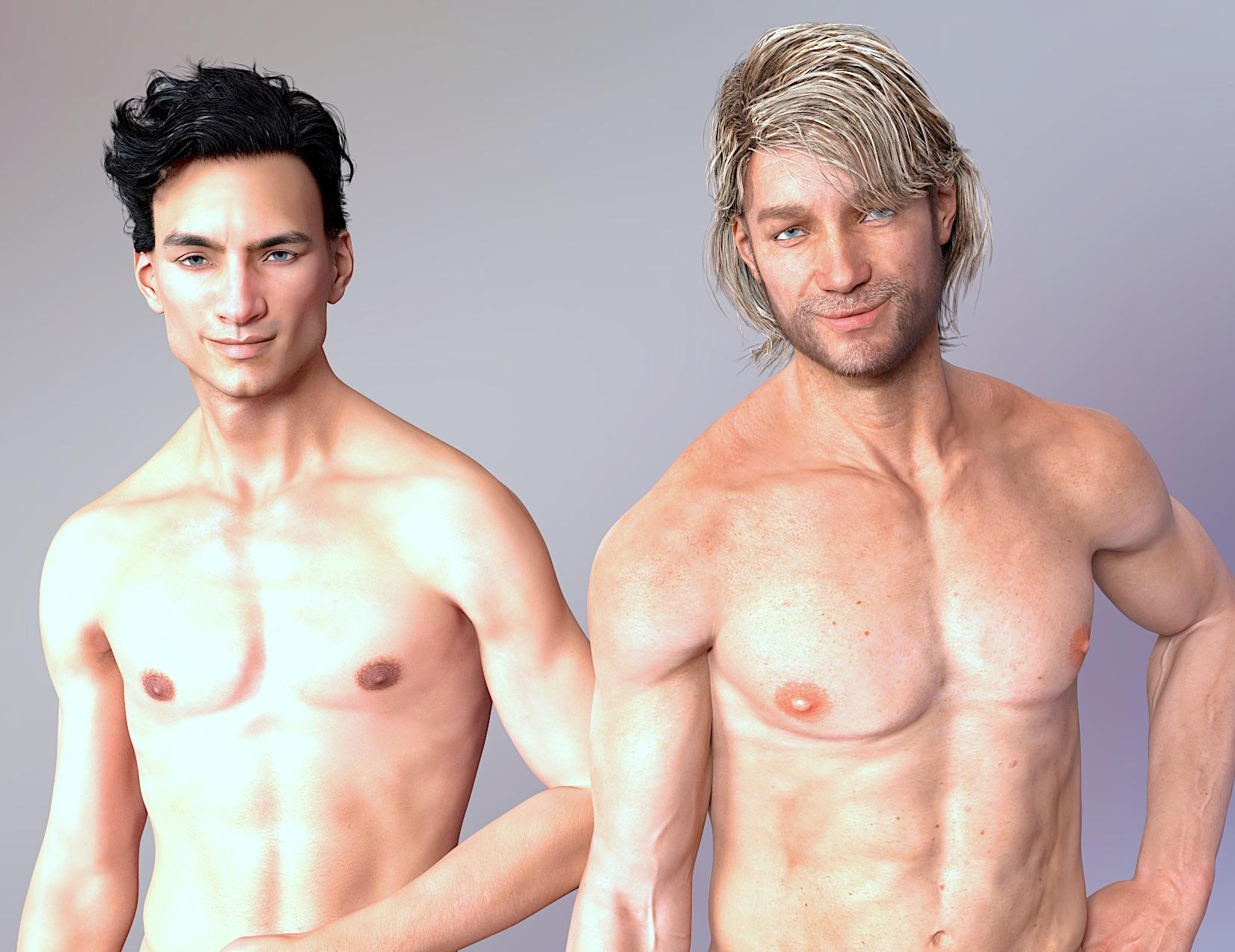
Novica & Forum Members Tips & Product Reviews Pt 9In another thread, people were discussing the situation when you recognize the merchant resources used. I decided to render two Raiya characters who might or might not be using the same resource masterfully changed by the artis . I realized I ended up being more curious about how there is a unique Raiya look (sunken cheeks, distinctive nose, cupid lips ) and noticed how much more pronounced the HD displacement is in Genesis 8. I'm going to go back and render some of the Michael 4 and Genesis series characters.
 Not real artists?
I think true art fans would think otherwise. Post some of your stuff publicly and let them prove your friend's friend wrong. Art is subjective the only one who can identify it as art is the one who is viewing it. One of my most famous pieces is related to my avatar and it literally only features Michael 4 in a muscle skin. It is by far my most viral piece I have ever made and I still get compliments and requests because of it.
Is there a way to apply M4 textures made in Poser to G8 Male In Daz Studio?I can't answer the question wether you should wait, or not. Cayman has a thread here, where you can ask if they will do it and how far down the horizon it is. https://www.daz3d.com/forums/discussion/181856/legacy-uvs-for-genesis-8-new-release-commercial#latest
I use all four generations, mostly G2, and as I have quite a bit of money invested in content for older stuff, I am not really going for G3/G8 at the moment. But when you start nw, the current figures are as good a start as any other, i.e. now that the PAs are making more for them, and you can uise G3 textures on G8. But it's really your own choice. You can always try out the G1&2 base figures for free.
Also, to answer the previous question about the detail of M4 vs G8 maps: Yes and no. G8 maps are mostly high resolution at 4096x4096, while M4 maps can be much lower resolution, starting as low as 512x512. Then again, you will only need the high resolution materials when you do a closeup of the character, so when he's just lurking around in the background or you have a full body shot type of distance, you are fine with lower resolutions.
That said, the older maps use a lot more different "source humans", and as such, you will have more different "unique" skins. That is probably what you notice about the "lesser details", as a PA has to temper with a lower range of resource skins rather than having a unique new one in high res available. That said, I'm not a PA and so this is just what I know from reading the forums about the topic.
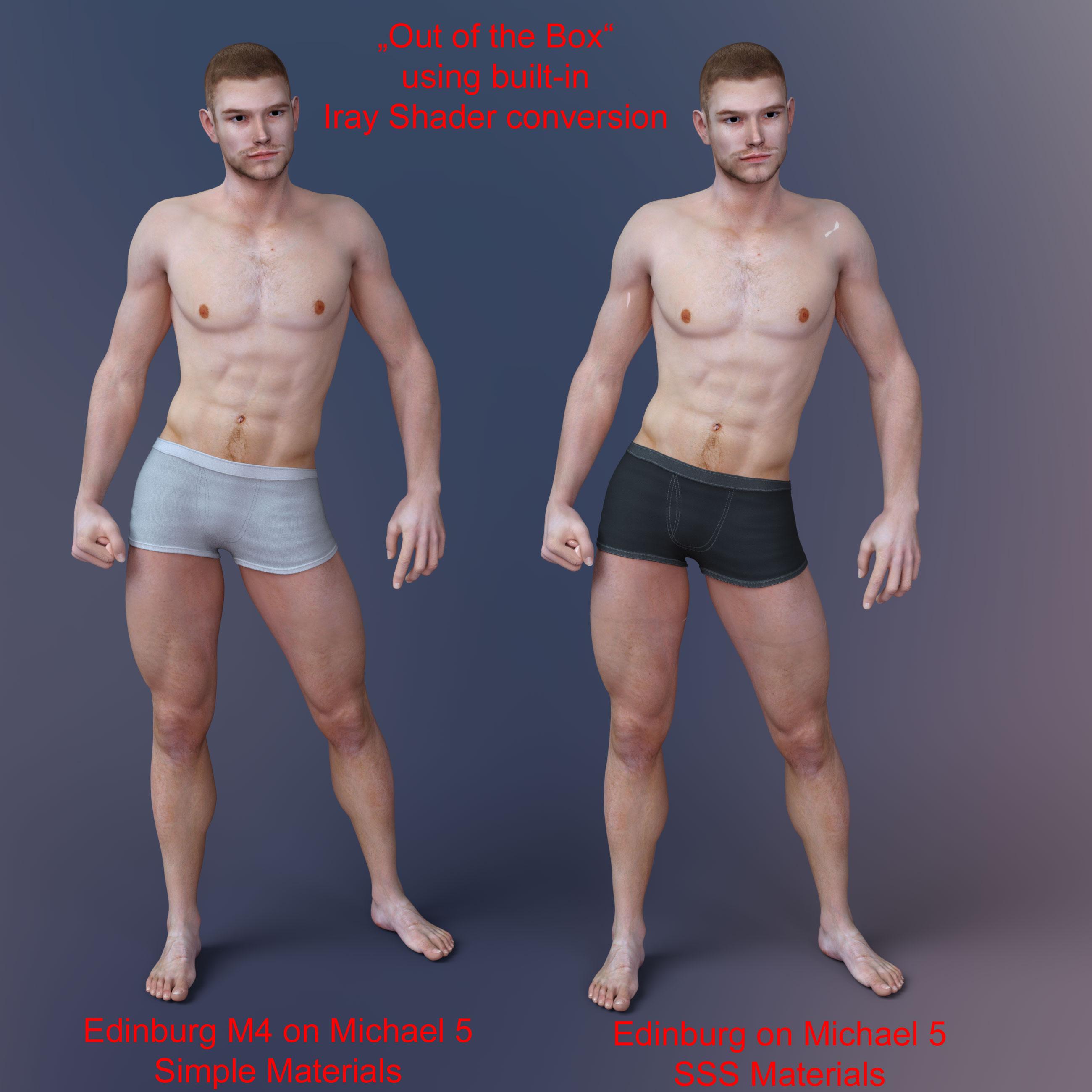
As for Iray conversion, that of course is up to you. DAZ Studio does an "on the fly" conversion to Iray materials, but you have no influence on the outcome. If you convert to Iray materials, you have full control over the materials, and can change settings like translucency to your liking.
By the way, I've noticed some problems with this particular skin. The shoulder and Arms for unknown reasons use the bump map for the torso. If you do use Iray conversion, you'll have to check the maps, a well, it was quite a mess. (EDIT: I've added a duf file with the material preset. Not sure if it will work with the file references, as I have the Rendo content in a different content directory. The Legacy one is for use in DS 4.8, the other one for the current version of DS. You'll need the actual product of EdinburgM4 to make them work, too, as this is just a preset, no maps included.)
Here's some render samples (after the mess was fixed...). The body and head morph is Michael 6 HD. I used a subdevision level of 2 for the render on both of the dudes. "Default" means it is the "out of the box" skin. I applied it to G1 first, then saved it as a material preset, and applied it to G2; afterwards. For the conversion, I then used V3Digitimes's converter. I adjusted the gloss level, and afterwards sorted out the mess of the maps of both, the unconverted and the converted version.
I am also using this product so I can apply the UV of M4 to G2M: https://www.daz3d.com/michael-4-for-genesis-2-male
A full body front view:

Front closup with backlights (see difference in the translucency of the ears).

Closeup no backlights:

And a render of the back...
 Using morphs and hair on different character
Issue #1: I've been a user of Daz Studio just a few months. I have been using the genesis 3 base male for the custom characters I'm creating and have purchased several face and body morph products to change their appearance. But I recently found a full character for genesis 3 that I'm considering buying. My question is, will genesis 3 morphing products work on it or will they only work on the genesis 3 base male? The products themselves do not say, although little snippits that I've read for one of the products (200 Plus Head and Face Morphs) seems to imply that it will work on figures other than G3M. I can't be sure of that, though. Though the character I'm thinking of buying is great, it's not perfect. I'd need to make some changes, especially to the face, so if my morphing products won't work on it, there's no point in buying it. Unfortunately, I've found no way to contact the creator.
Issue #2: There seems to be an appalling lack of basic short, straight hairstyles available for G3M. I just want a plain haircut, something that doesn't scream 21st century hairstyle. I did find one haircut that was absolutely perfect, but it's not for G3M. It's for Victoria 4, Michael 4, Victoria 3, Michael 3, Aiko 3, Stephanie 3, David 3, Hiro 3, Millennium Kids - Young Teens, Millennium Kids - Preschoolers, Millennium Baby 3. Obviously, it's an older product. So, my question is, will it work on G3M? I've heard that using hair, clothing, etc. made for older millennium characters can be problematic for G3M and G3F because the Auto-Fit dialog box won't include older millennium characters in the "What figure was the item designed for?" drop-down list.
Thanks in advance for any help or advice that someone can give.
Is there a way to apply M4 textures made in Poser to G8 Male In Daz Studio?Thanks for the info!
Wow, I was surprised to see a render of him! I looked at Cayman Studios products and found this: Legacy UVs for Genesis 3: Michael 4
Do you suppose that I should try to adapt Edin to M7 (which I own through a great sale) using that product or should I wait for Cayman to produce the M4>G8 UV (if they are actively doing so which I do not know)?
I am looking at the supporting products for G1 through M4 and I think they are a little to outdated for me to want to start buying G1 and M4 products other than the base M4 and Edin which I own. Being new to this I think I want to stick with G3 and G8 giving that new product releases are on them.
Also, why do I need to get a skin conversion to Iray? Doesn't M4 skin render with Iray currently in Daz Studio or is that an update that I need to apply through V3Digitime's product as you suggested?
What is your advice BeeMKay?
Is there a way to apply M4 textures made in Poser to G8 Male In Daz Studio?Cayman Studio is bringing out special UV sets with geometry that allows for older textures to be used on G3 and G8. The M4 to G8M hasn't been completed yet, though the G2M, M5 and M6 to G8M are already available: https://www.daz3d.com/cayman-studios
You'll have to change the UV map from Michael 5 (or Base Male) to Michael 4, otherwise the map won't work properly.
For skin conversion to Iray, I can recommend V3Digitime's products; in this case https://www.daz3d.com/iray-converter-for-generation-4
He also has them for other Genesis generations, and I use the converters on a regular base.
What Upcoming Daz Original Genesis 8 Character Are You Waiting For?Would like to see Darius, David, Freak and The Guy. Stephanie's next? Well, maybe. The most use I got out of Stephanie 4 was mixing her morphs in with Michael 4's to give me an ersatz David. If I can do that with G3 or G8 version of her, I just might buy. Also if she has sensible clothes and things I can crossfit to the males. No more boob flap "Grecian Goddess" outfits, please.
Library directoryOne thing to bear in mind - if you have ExP products (morph sets) for Victoria 4, Michael 4, Kids 4, or the SubDragon those do have to go in the same content directory as the base figure (but non-ExP addons, which would be most clothes and hair and many characters, you can place anywhere).
Clothes conversion Michael 1,2 and 3 to Genesys 2Hi,
I have installed Clothes Coverter 4.0 and I changed the clothes from Michael 2 to Michael 4 and then autofit to genesis 2 male and looks that it works fine. I will do the same for Michael 3 clothes, since I saw that I have the option in auto converter. Thank you for the answer and for solution !
Best regards,
Lucian
Morphs from G3 to G8I think Patreon, along with most other things, works best when there is an exchange of value. When patrons feel that there is something more on the horizon to be excited about, and that the artist cares about where they are, at least collectively, coming from. Which I do. I think, if I were to decide to do something like that, it makes sense to open with, "This is where I want to go. What do you think?"
Um ....
Not a lawyer or anything like that, but for anyone considering setting up a Patreon: CONSULT A TAX ACCOUNTANT/ATTORNEY FIRST.
The thing to remember about Patreon is that once you've got that coming in, however much or little: this is income. Talk to a lawyer or accountant before setting up a Patreon to make sure you know what you're doing and anything you need to take into account.
On topic: Singular Blues, I really do very much appreciate all the work you've gone through to make this program work. I've used it for a few things and it's worked beautifully. During the accidental move of all the G2M characters that I'd sent to G3M through GenX2, it even kinda sorta fixed a character that I'd moved over to G3M via GenX and then abandoned because I didn't really like what GenX did to him. (It also did interesting things to his hands -- the script seems to HAAAAATE the Michael 4 shape, which isn't a huge surprise, since it wasn't meant to deal with that shape.)
Be careful with the script. I used it yesterday and now I get a duplicate error message every time I load G8F now. Also, my G3F was messed up (that G3F issue happened months ago, not the fault of the script) with a couple of character morphs somehow had gotten saved with the base G3F, so every time I load G3F now I have those character morphs dialed into her. Very annoying, but since I don't use G3F much anymore and I knew I'd eventually find a fix for it and restore G3F to her original shape, I wasn't too worried about. However after running the script, now my Genesis 8 Female has those SAME issues - the exact same morphs are now dialed into base G8F every single time I load her. I'm exasperated and have no idea how to fix it.
So please, be very careful with this script. If there are any issues at all with your base G3F, don't run it until you get it straightened out.
...Now I need to figure out how to fix both G3F AND G8F.
DivaMakeup: To fix, this may help:
1. Load up G8F/G3F. (Given the situation, I might work with G8F first, just because there would be fewer morphs overall; once you've identified the miscreants, then all you'd have to do would be to find the same files and delete those in G3F.)
2. Check the Parameters tab, clicking on the "All" option at the top of the tab.
3. Scroll through the list to see if anything at all is loaded at 100% or even more than 0%, actually.
-- 3A. If you don't see anything offhand, click on the hamburger menu at the top of the Parameters tab and click on "Show Hidden Parameters". Repeat step 3, scroll through list to see if anything is active.
4. When you find the morph(s), click on the gear shift thing on the slider, then select "Parameter settings"
5. On that screen, you should seen an option called "Path". That will tell you where the misbehaving morph is located on your system.
6. Delete with malice aforethought, afterthought, betweenthought.
7. Redownload and Reinstall G3F/G8F. (Strictly speaking, not really necessary, but not a bad idea in this situation.)Hope this is helpful.
Oh thank you! I'll try this! :) *crosses fingers that it works and that I don't mess anything else up* lol :D
Morphs from G3 to G8I think Patreon, along with most other things, works best when there is an exchange of value. When patrons feel that there is something more on the horizon to be excited about, and that the artist cares about where they are, at least collectively, coming from. Which I do. I think, if I were to decide to do something like that, it makes sense to open with, "This is where I want to go. What do you think?"
Um ....
Not a lawyer or anything like that, but for anyone considering setting up a Patreon: CONSULT A TAX ACCOUNTANT/ATTORNEY FIRST.
The thing to remember about Patreon is that once you've got that coming in, however much or little: this is income. Talk to a lawyer or accountant before setting up a Patreon to make sure you know what you're doing and anything you need to take into account.
On topic: Singular Blues, I really do very much appreciate all the work you've gone through to make this program work. I've used it for a few things and it's worked beautifully. During the accidental move of all the G2M characters that I'd sent to G3M through GenX2, it even kinda sorta fixed a character that I'd moved over to G3M via GenX and then abandoned because I didn't really like what GenX did to him. (It also did interesting things to his hands -- the script seems to HAAAAATE the Michael 4 shape, which isn't a huge surprise, since it wasn't meant to deal with that shape.)
Be careful with the script. I used it yesterday and now I get a duplicate error message every time I load G8F now. Also, my G3F was messed up (that G3F issue happened months ago, not the fault of the script) with a couple of character morphs somehow had gotten saved with the base G3F, so every time I load G3F now I have those character morphs dialed into her. Very annoying, but since I don't use G3F much anymore and I knew I'd eventually find a fix for it and restore G3F to her original shape, I wasn't too worried about. However after running the script, now my Genesis 8 Female has those SAME issues - the exact same morphs are now dialed into base G8F every single time I load her. I'm exasperated and have no idea how to fix it.
So please, be very careful with this script. If there are any issues at all with your base G3F, don't run it until you get it straightened out.
...Now I need to figure out how to fix both G3F AND G8F.
DivaMakeup: To fix, this may help:
1. Load up G8F/G3F. (Given the situation, I might work with G8F first, just because there would be fewer morphs overall; once you've identified the miscreants, then all you'd have to do would be to find the same files and delete those in G3F.)
2. Check the Parameters tab, clicking on the "All" option at the top of the tab.
3. Scroll through the list to see if anything at all is loaded at 100% or even more than 0%, actually.
-- 3A. If you don't see anything offhand, click on the hamburger menu at the top of the Parameters tab and click on "Show Hidden Parameters". Repeat step 3, scroll through list to see if anything is active.
4. When you find the morph(s), click on the gear shift thing on the slider, then select "Parameter settings"
5. On that screen, you should seen an option called "Path". That will tell you where the misbehaving morph is located on your system.
6. Delete with malice aforethought, afterthought, betweenthought.
7. Redownload and Reinstall G3F/G8F. (Strictly speaking, not really necessary, but not a bad idea in this situation.)Hope this is helpful.
M4/V4Assuming you used standard install paths, In DS Content Library: Poser Format > My DAZ 3D Library > Figures > DAZ People > Victoria 4.2 (or Michael 4)
Clothes conversion Michael 1,2 and 3 to Genesys 2I'm not sure there is a clone for Michael 1/2 (which are the same basic figure). For Michael 3 you could use https://www.daz3d.com/gen-3-iconic-shapes-for-genesis to AutoFit to Genesis, then AutoFit that to Genesis 2 Male (or Female). The only option I can think of for the original Michael would be a Poser-format converter, Crossdresser or Clothes Converter, to get to Michael 4 and then AutoFit that to Genesis 2 (directly or via Genesis).
Celebrity Look-a-Likes for 3D figures Part 2Well...That's WEIRDSo, I just logged into DS to download a couple freebies I just got, and was massively surprised to see the Michael 4 Pro bundle! I just finished checking my account, and it appears to have been manually added to my product library.
The odd thing is, I never ordered the Pro bundle.
Don't look a gift Daz in the mouth. ;)
Laurie
Well...That's WEIRDSo, I just logged into DS to download a couple freebies I just got, and was massively surprised to see the Michael 4 Pro bundle! I just finished checking my account, and it appears to have been manually added to my product library.
The odd thing is, I never ordered the Pro bundle.
Morphs from G3 to G8Trying out the G3M script now. One thing to note is that if you transferred a lot of morphs via GenX2 to G3M, the script can take a while. How long, I do not know, for it is still running. It's parsing the DXD GenX directories alphabetically, and after what Studio is reporting as 6 minutes 10 seconds, it's up to the letter B and says it's 3% complete. Since the morph I want to transfer actually is in those directories, it's going to take a while.
Some of the DXD GenX subdirectories, it just sprints through, and some take forever, even though it's not doing anything with them. It just now sprinted from 3% complete to 17% complete in a couple seconds, then took about two minutes to chug through the next 1%.
Apologies if this has been asked and answered, but this is a lengthy thread! Is the script building some sort of database on first run so that it doesn't need to do this same sort of parsing again, or will it need to do this sort of work every time? (I am not complaining, believe me! I've done the method that's more or less the Redz tutorial, and I'm kind of terrible at it, so if I have to wait a long time for transfers, that's fine. It does mean I'll likely be fairly judicious about which things I choose to transfer, but I am absolutely thrilled not to have to do all those steps myself.)
EDIT: And it took a full hour to run through all the directories. But it also pulled over the shapes on which the morph depended, which I wasn't expecting; I was doing the GenX'd head morph for Rob Elite M4, and it pulled Michael 4 along for the ride. That said, his fingers are very long if I dial in the Michael 4 body shape. If I dial out Michael 4, his fingers return to normal....ish; the nail beds seem to show the underlayer breaking through a bit.
EDIT 2: ... OK, so it turns out that, I guess because the particular version of Rob that I was pulling over had come from Genesis 2 Male, the script somehow pulled over ALL of the Genesis 2 Males that were in G3M. This includes both the GenX ones, and the shapes that Slosh created as part of his Legacy shapes product.
It also appears to have pulled over the original flavor Genesis 1 males that were I'd upconverted, but there were only 2.
I favorited the Rob morph only; I've no idea what made all the others come along.
Weirdly, as far as I can tell at this point, Michael 4 -- which is also the Sloshworks Legacy shape version and not the GenX clone -- is the only shape that's making the hands go weird when it's dialed in.
This is strangely convenient ... but what on earth happened?
Black characters for M8??Genesis 1 can use V4 & M4 skins right out of the box, all you need do is apply them and if necessary, change to the proper UV set in the surfaces tab. Here he is doing a very good impression of Michael 4. Those are the Daz M4 hi-res textures, render 1 is Iray and 2 is 3Delight. Nothing fancy about light or settings, I just loaded him up, put the skin on him and rendered.
Wow, very cool! I must admit I tend to move on from one generation to another when they come out. I'm fickle. I'll have to go back and work with the older figures more, especially since I have so much for them. I've invested in all the aging morphs and details for genesis through g3, and the growing up bundle. So I have the stuff to work with, just don't spend a lot of time doing it. I do a LOT of beta testing which eats up most every day all day, and by the time I'm done, I'm wiped. Need to makes some 'me' time.
Black characters for M8??Genesis 1 can use V4 & M4 skins right out of the box, all you need do is apply them and if necessary, change to the proper UV set in the surfaces tab. Here he is doing a very good impression of Michael 4. Those are the Daz M4 hi-res textures, render 1 is Iray and 2 is 3Delight. Nothing fancy about light or settings, I just loaded him up, put the skin on him and rendered.
Daz 3D is part of

Connect
DAZ Productions, Inc.
7533 S Center View Ct #4664
West Jordan, UT 84084Licensing Agreement | Terms of Service | Privacy Policy | EULA
© 2026 Daz Productions Inc. All Rights Reserved.