-
Catchup sale for $4th of July Celebration, PLEASE
HEADS UP: The banner is gone but the July catchup for RDNA items seems to still be in effect. Four dollars each or $3 with purchase of new release. Plus buy 3 and get one of select promo items free.
Edit to add: Banner ad is back up now
Aiko 7A female character whose bundles doesn't come overloaded with barely there bikini-style skimpwear, has virtually no killer high heels if she trips, and sci-fi attire? DAZ, are you sure you're feeling well? This isn't like you guys at all. (Kidding, I'm super happy for all of the above, haha) Fudge, if I didn't have a convention this weekend, I'd totally splurge on the Pro Bundle for sure.
My only gripe is that the Sakura for Aiko 7 character looks like the Generic Victoria McSameFace with the doll eyes/button nose/bloated lips (which I will concede, works far better for a toon character than one that's supposed to be rooted in realism), but mind you, I'm really bad at reading or telling apart faces if they don't have anything distinct about them, lmao. But I don't think she's part of the bundle anyhow, so it's no skin off my back and I have no need to spend money on her.
On a different note, has anyone tried mixing Aiko 7 with SickleYield's Anime Character Creator yet? Now that we have an anime character, it might be worth seeing how the two mesh.
Dracorn's Render ThreadGlacier Queen:
I just picked this up during the last sale. It has a couple of problems - looks like some things may have broken in D/S since it was created for V4 by Arki some years ago. I had opened up a ticket for it.
These are the problems (and how I fixed them):
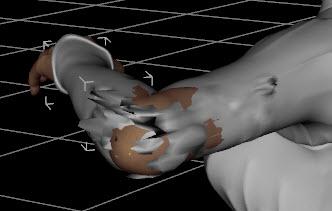
Elbow Distortion - apply Smoothing Modifiers.
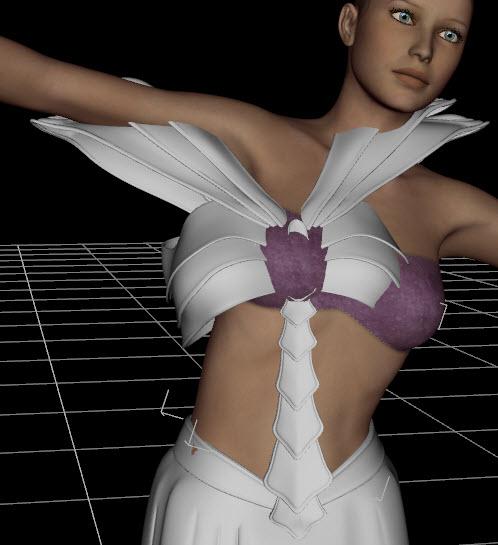
No autofollow - manually apply Fit To Victoria 4.
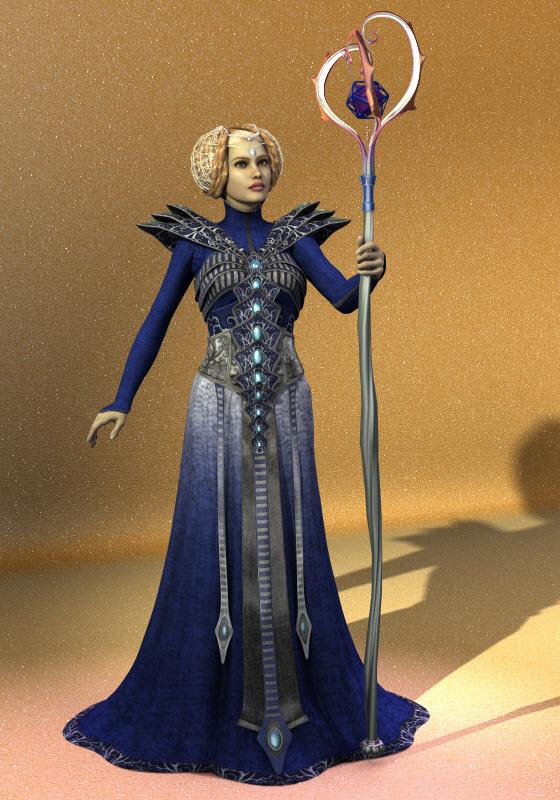
This complete, here is a test render in 3Delight (I applied Omnifreaker's Simple Surface Base). She is holding Dragonkeeper's staff with Gemologica shaders applied, because it's missing textures (fix coming). There's a lot of Runtime stuff needing fixes, but considering how many items they are converting to D/S, it is understandable.
 Girls, girls...girls
I always get a little skeptical when people say "business is business" but they're stacking the deck to support whatever statistics they're trying to promote, such as when Hollywood knows that actions films and sci fi tend to sell well overseas and comedies don't and they keep saying films with minority leads don't sell abroad, yet the majority of minority led films they tend to greenlight are comedies.
If the male figures or accessories for those figures aren't what the majority of people are requesting, or the aritcles don't meet user requirements, it's easy to say male stuff just doesn't sell, show the figures for the last item that didn't sell because it didn't fit, or morph well, call it a day and go back to designing skimp wear, and another female character that looks like a cousin of Victoria 7.*
* And there honestly seem to be a couple of female characters coming out each week to the point now that I have a really hard time trying to figure out how they differ from the last figure that came out last week.I promise you if the promo renders didn't have hair and they didn't have names, you probably couldn't tell them all apart. I'd be curious to know how all these female characters are really selling.My Lease Is Nearly Up On The Complaint Thread??
The DragonBraid addon - Tails 40.27 MB
The DragonBraid for Victoria 4 48.34 MB
The DragonBraid bundle 48.34 MBmb dont add up
OilyHello;
I am trying to give Genensis 3/Victoria 7 a nice oily looking skin....
How can i achieve this?...are there any products that can help me acomplish this?...or special skin settings?...
Tks.
Aiko 7I like her better than Aiko 6. I can say that for certain.
I would say the other way around as I see Aiko 6 was the last of the Aiko series that had that certain charm.. Aiko 7 seems to have lost that Anime look that Aiko was known for.. Infact if you look at Aiko's 3 4,5 and 6 Aiko 7 looks nothing like them now..
Okay, time to point-out the obvious... The Razor-Cut Bob and Waterfall Tails Stylized Hairs are clear references to Biosock Infinite's Elisabeth and Vocaloid's Hatsune Miku.
Also, who else is noticing that all her content is now 100% J-Pop as opposed to anything traditionally Japanese? Hell, she's not even referred to as anything "Anime" in her description anymore. Aiko has officially become her own niche and everything specifically Anime/Manga is now Keiko's territory...
Yeah I would say that Keiko is the new Aiko when it comes to Anime/Manga characters, since Aiko 7 looks nothing like her forebears, to me she has lost all that made Aiko, Aiko..I completely agree. I bought all the other Aiko generation bundles. I've been waiting for Aiko 7 and all I have to say is....What the hell happen to Aiko?? I'm very disappointed and wont be buying. Thanks for ruining my favorite character.
I have to agree. The iconic characters are looking less and less iconic and leaning more toward realistic these days. Aiko used to have that cool Japanese anime feel to it. Now she reminds me of the earlier Victorias. I remember using Victoria 4 and thinking man... this 3D stuff rocks, but the characters are just a wee to unrealistic to substitute for a photo of a real person. Now Aiko has that look. Wherease before, she was definitely a cartoon. You didn't have to try to fake her as real, because she wasn't meant to be real.
Free SeaFolk KelpHair and Skin TextureThese two freebies some how managed to excape my attention, and I thought I'd make a post about it, as I might not be the only one to miss them:
Girls, girls...girlsI want those imperfections for my 3d gals. Victoria is just too perfect.
I do appreciate there are a small minority of dressed character women that will work in apocalyptic scenarios. I do own a few of those ragamuffin girls. (not gorgeous)
The reality is that even the "gorgeous" women will survive for a time, but may not look it without the makeup and perfect hair. :)
Urban Sprawl 3 ...It's here(in the store...no really..go see)!...(Commercial)Any suggestions for low polygon people for the streets?
I just purchased Predatron's Lorenzo and Loretta Bundle on sale and they work great with Urban Sparwl 3. Renders very fast. This sample only took 10 min to render at 1920 X 1080 with over 100 figures.
I also tried the same scene at night. I was surprised on how slow this rendered 60 minutes vs 10 minutes for the daytime version. And still some fireflies.
Joepingleton, that's amazing with all the figures and the neat camera angle. How much memory does your GPU card have (or were you rendering by CPU)?
Slower night time renders: yeah, apparently in Iray, less light(s) mean longer renders and more noise, as with cameras. I love night time, and love to do nighttime renders with great mood and interesting light effects but they are often v e r y s l o w.
-Gen
Thanks for the kind words,
I am using a Nvidia Geforce GTX 970 card and was rendering in GPU only.
I also discovered that the Micheal 4 and Victoria 4 models have low resolution versions included that are smaller than the Lorenzo and Loretta figures (The low res M4 & V4 have no clothes compared to Lorenzo and Loretta). More info can be found in this forum post [ http://www.daz3d.com/forums/discussion/98161/lorenzo-posing-question-now-create-lowrez-ma-v4 ].
PS. Great render love the atmosphere and the rain.
Girls, girls...girlsGirls, girls --- girls. That is the preponderance of content in the shop continuously.
Mostly, I do video production. That means...since I am a man I have to get women actors voices if I use those content items.
I use women sparingly in my work for that reason.
It is not very well accepted to use Synthesized or computer generated voices, even though the characters are animated.
Something about the way Hollywood has always used real human voices for animated films makes viewers uneasy when they don't hear for-real voices.
Yes, I know Hollywood promotes the real actors voices with their animated features...which probably the reason for it.
Anyway, for months the shop promotions are of girls, girls and more girls.
I would really appreciate to see more a variety of content items.
All it would take is an additonal promo box or two each day.
Flash sales are good too, because they usually pick up on content from PA.
Maybe, gamers are the market for Daz3d content and they want more of the almost naked girls.
Anyway, no biggy... I just don't buy the girls.
I did finally buy a Victoria 7, but is was a super deal. I thought it might be able to use the content in some closeups.
I like the quality of Daz3d shop items better than others
Wired Hair Revisited questionI would imagine so as the store page says
Compatible Software:
DAZ Studio 4.9, DAZ Studio, Poser
Required Products:
What's really weird is mine isn't showing the 'required products' note :(
Store bug. The note sometimes disappears and then reappears again later, apparently at random, on random products.
Including addons in existing Product metadata.You would need to add the Base morph injection folder contents to the Victoria 4.2 Base product. Assuming you haven't change the file paths or V4.2 product name:
1. Select the Poser Format Library folder Pose>DAZ's Victoria 4>Morph Injections>Base
2. Right Click, select Create a Product From..
3. Enter the exisitng product name when prompted: Victoria 42 Base Victoria 4.2 Base Click OK
4. You'll get a message the product exists and if you want to add the files to it, Click YesGo to the Victoria 42 Base Victoria 4.2 Base product and launch the Content DB Editor and go to the Assets tab, you should see the morph presets in the upper window.
_____________________________________________________
Edit: Upon viewing your picture, in Step 3, Enter Victoria 4.2 Base
What Lindsey said.
You have not properly added them to the product. Not sure what you are doing, but its not the correct method.
Exporting Genesis 3 from DazStudioHi all,
I'm new to Daz Studio and I'm trying to export Genesis 3 including morphs to Cinema 4D. This seems to work quite nicely with FBX, but There are a lot of things I still don't understand. Are there any tutorials or technical descriptions around, how G3 works. I've known from Poser all the details about V4 and JCMs and magnets included in the figure, but I really miss such technical information regarding G3.
- How do I get a list of all morphs that are included in G3 and how can I export a G3 with all morphs (including JCM and whatever)? During bending I may have to add these JCMs to the bend in Cinema 4D to get equal results.
- What are the face bones for, when the expressions are made with morphs?
- How do I know, which morphs are part of which package? Sometimes the lists on the product page description do not fit to the actual morphs, that I find.
- Why do I get all kind of morphs, when I load G3 and almost no morphs, when I load V7 which is based on G3? Should I always load G3 and then use the Victoria 7 slider to get V7 with the morphs?
Daz Tutorials are fine, but I really would love to get more information about the FBX export options and how G3 internally is set up to establish a stable workflow to Cinema 4D and get the most out of the Daz content there.
Aiko 7I think it's the lacrimals on the base Aiko 7 figure that make her look kinda odd to me. I find it interesting that she's different but I'm not sure if I'm the biggest fan of them being so pronounced either. But I love her skin, I like that she isn't a Victoria, and she has some really nice characters for her, so overall I'm happy with her.
+1
The Gothic Lolita outfit is outstanding, or looks it; not got time to try stuff out today.
And I even got to use my PC+ coupon on her; I've used both this month, something of a rareity.
...I must say, this is the first Pro Bundle I've seen in a long time where I actually like all the clothing.
*Sigh*, yet another wishlist item for now.
Agree. It is one of the reasons this is the first pro bundle this year for me.
Aiko 7I think it's the lacrimals on the base Aiko 7 figure that make her look kinda odd to me. I find it interesting that she's different but I'm not sure if I'm the biggest fan of them being so pronounced either. But I love her skin, I like that she isn't a Victoria, and she has some really nice characters for her, so overall I'm happy with her.
Wired Hair Revisited questionI would imagine so as the store page says
Compatible Software:
DAZ Studio 4.9, DAZ Studio, Poser
Required Products:
What's really weird is mine isn't showing the 'required products' note :(
Wired Hair Revisited questionI would imagine so as the store page says
Compatible Software:
DAZ Studio 4.9, DAZ Studio, Poser
Required Products:
Is It A Secret?Ok, see this is a good example of why it is important to lay out your exact process. You are using a head morph resource kit. Hopefully you read the licensing agreement for the use of these morphs ( http://docs.daz3d.com/doku.php/public/read_me/index/31276/start). Some kits require you to make morphs that must, in turn, require the customer to have those morphs in order to utilize yours. It would be a different process for setting that kind up for distribution.
Ok, sorry if I haven't been spacific on what I'm actually doing. I am using Genesis 3 Male Head Morph Resource Kit 2 within Daz Studio. Following Richards steps to the best of my ability on the thrird post above.I load genesis 3 and zero any morphs left on him out and leave him in the default pose.This is fine.
I apply the head merchant resource morphes, shaping them to my liking. No poses, no other morphs and set the mesh resolution to Base.Fine, too.
Now this is where I feel like I'm messing up.I export it in Wavefront.obj (that's the only choice I get as an obj.) As in the screenshot below, I leave the default settings alone. Including the "Convert To Daz Sudio to: Daz Studio (1unit = 1cm) at the top. (I'm actually doing this as I type)This is correct.
Then I go to Morph Loader Pro, but Wavefront (obj) isn't in the list to convert it to Daz Studio From: dropdown,This is where we have been trying to tell you that what MLP is looking for is the scale that you want to import at and that this MUST be the same as the scale you exported so you choose Daz Studio.
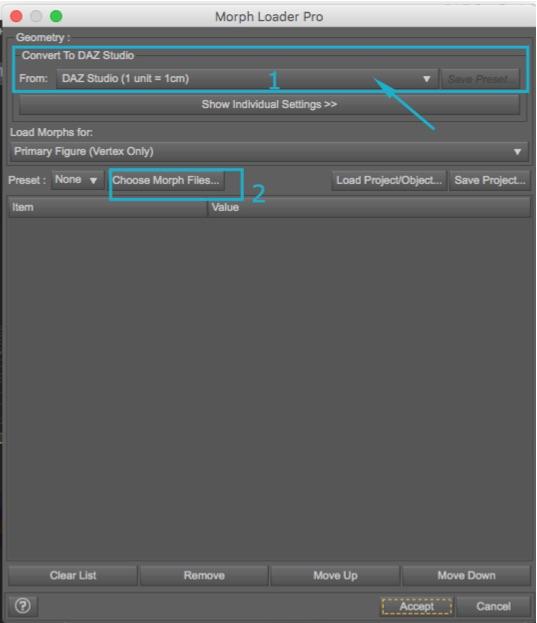 so I choose "Custom".
Do the above, previous, instead.
I chose the obj file in "Choose Morph Files",Correct.
Drop down the file list and right click on Property Group and choose Actor/people. Hit Accept and get "Morph Created Successfully"I would use Actor/Head. This is a head morph. Actor/People is usually for full character morphs such as Victoria 7 or Michael 7.
Now where did it go? I can't find it in my Daz files anywhere.Select the Genesis 3 Male root. Actor/Head should be in Parameters under Head or Shaping under Head (if you use what I suggest).
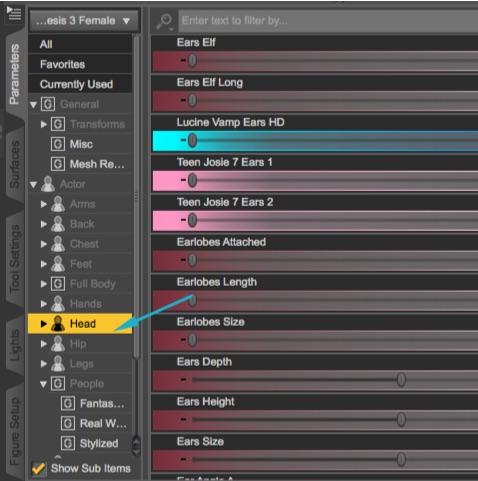
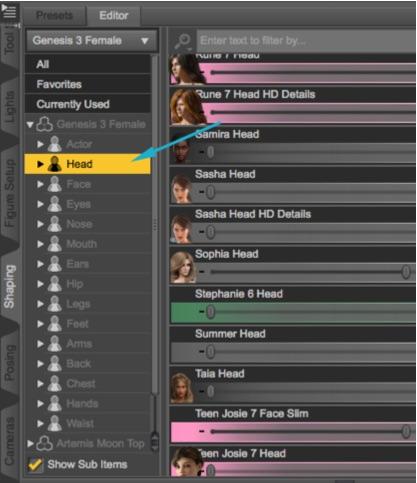 When I try to save it as a morph asset I get vendor name and Product name. But the only two choices I get to save it in is either C:/Users/Me/Documents/DAZ 3D/Studio/My Library or C:/Users/Public/Documents/My DAZ 3D Library, as well as the choices as what to save in a tick list below, from Genesis 3 male at the top (on to pelvis, left thigh bend etc.) to Head at the bottom.
I believe you need to use the one that ends in My DAZ 3D Library to be correct, but I just got contradictory info (as I am on a Mac, not a PC). I have to check with Richard to make sure, so wait on this one.
The Genesis 3 male at the top has a dropdown containing Actor, Hidden, Morphes and Pose controls. Sorry I'm being such a pain, I wish this would all soak in, if I don't get it this time, I give up.You need to know where your morph is in order to properly save it and you will drill down to it in the asset window with the same path you used to create it.
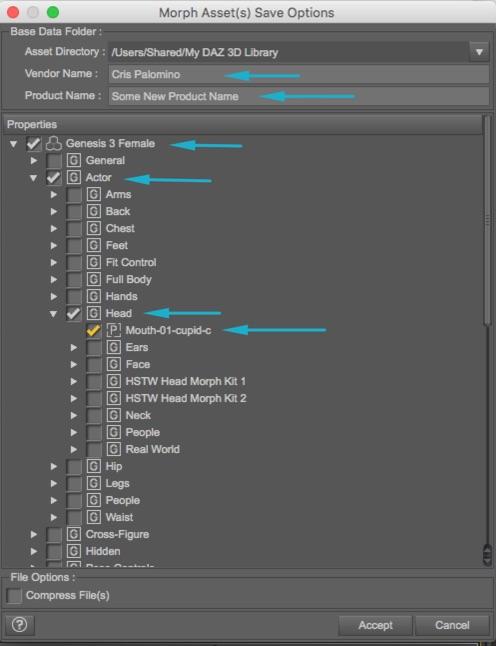
Hopefully, that explains it. I'll get back to you on the library location.
Including addons in existing Product metadata.You would need to add the Base morph injection folder contents to the Victoria 4.2 Base product. Assuming you haven't change the file paths or V4.2 product name:
1. Select the Poser Format Library folder Pose>DAZ's Victoria 4>Morph Injections>Base
2. Right Click, select Create a Product From..
3. Enter the exisitng product name when prompted: Victoria 42 Base Victoria 4.2 Base Click OK
4. You'll get a message the product exists and if you want to add the files to it, Click YesGo to the Victoria 42 Base Victoria 4.2 Base product and launch the Content DB Editor and go to the Assets tab, you should see the morph presets in the upper window.
_____________________________________________________
Edit: Upon viewing your picture, in Step 3, Enter Victoria 4.2 Base
Daz 3D is part of

Connect
DAZ Productions, Inc.
7533 S Center View Ct #4664
West Jordan, UT 84084Licensing Agreement | Terms of Service | Privacy Policy | EULA
© 2026 Daz Productions Inc. All Rights Reserved.