-
Flash Sale alerts
I really wish they hadn't added all those great new bundles. Now I'm kicking myself - as I'd rather have some of the other bundles then the ones I got yesterday. Poop. I am now sadface. I don't think those bundles will go that cheap again. :(
Victoria 6 Bundle, Michael 6 Bundle, The Girl 6 Bundle, Giselle 6 Bundle, Stephanie 6 Bundle, Genesis 2 Female Morphs Bundle - I don't have any of those and have been waiting for them to go cheap. Argh
Argh too here ... I am long enough in the game to have even some of the Pro bundles, but for example I never even bought the Gia6 base ... now I could get the Starter bundle. But I spent money yesterday ... and now I would have to add another new release ...
July 2016 New User 3D Art Contest “Portrait Rendering” – WIP ThreadAfter much lighting adjustment, getting pretty close to what I initially envisioned.
This is much better. We still really can't see her eyes, though. What have you got for lights here? And what are the materials on her eyes like?
I generally use the Human Essentials for Iray package for skin surfaces, but the eyes here might be Victoria 7 (Iray). I have reduced the opacity of the cornea to about 10% to allow more color through, but am not sure what else can be done for dark brown eyes.
What about the lights?
I will remain mum on Human Essentials, I've never used it.
I don't think its the cornea opacity that is the problem, its the lack of light in the eyes. They need some gloss, and some penetrating light.
Switched to a different set of eyes ...
Getting there.
What lights are you using? Because, yes, you need a specular highlight in there
IG Full Spectrum Lighting. I've treid everything I can but can't get any specular in the eyes. I shifted some lights around and, in my opinion, improved the light/shadows (this render is only at 2%). I am hesitant to add anything else that might add more light to the face.
You can always try to add the highlights in postwork. Maybe you can try again to do it with Daz Studio in your second entry.
FBX Export Animation Expression to Unity3D?well I dont know why but I tried to export to Unity from the same in Public beta, and there are no even blendshapes exported
i tried to export victoria 4.2 with facial animations.
legacy?generci, there are no blendshapes, and there are no eny facial animations..
tried coalla and fbx... why this thing just can not work???
Flash Sale alertsI really wish they hadn't added all those great new bundles. Now I'm kicking myself - as I'd rather have some of the other bundles then the ones I got yesterday. Poop. I am now sadface. I don't think those bundles will go that cheap again. :(
Victoria 6 Bundle, Michael 6 Bundle, The Girl 6 Bundle, Giselle 6 Bundle, Stephanie 6 Bundle, Genesis 2 Female Morphs Bundle - I don't have any of those and have been waiting for them to go cheap. Argh
July 2016 New User 3D Art Contest “Portrait Rendering” – WIP ThreadAfter much lighting adjustment, getting pretty close to what I initially envisioned.
This is much better. We still really can't see her eyes, though. What have you got for lights here? And what are the materials on her eyes like?
I generally use the Human Essentials for Iray package for skin surfaces, but the eyes here might be Victoria 7 (Iray). I have reduced the opacity of the cornea to about 10% to allow more color through, but am not sure what else can be done for dark brown eyes.
What about the lights?
I will remain mum on Human Essentials, I've never used it.
I don't think its the cornea opacity that is the problem, its the lack of light in the eyes. They need some gloss, and some penetrating light.
Switched to a different set of eyes ...
Getting there.
What lights are you using? Because, yes, you need a specular highlight in there
IG Full Spectrum Lighting. I've treid everything I can but can't get any specular in the eyes. I shifted some lights around and, in my opinion, improved the light/shadows (this render is only at 2%). I am hesitant to add anything else that might add more light to the face.
July 2016 New User 3D Art Contest “Portrait Rendering” – WIP ThreadAfter much lighting adjustment, getting pretty close to what I initially envisioned.
This is much better. We still really can't see her eyes, though. What have you got for lights here? And what are the materials on her eyes like?
I generally use the Human Essentials for Iray package for skin surfaces, but the eyes here might be Victoria 7 (Iray). I have reduced the opacity of the cornea to about 10% to allow more color through, but am not sure what else can be done for dark brown eyes.
What about the lights?
I will remain mum on Human Essentials, I've never used it.
I don't think its the cornea opacity that is the problem, its the lack of light in the eyes. They need some gloss, and some penetrating light.
Switched to a different set of eyes ...
Getting there.
What lights are you using? Because, yes, you need a specular highlight in there
July 2016 New User 3D Art Contest “Portrait Rendering” – WIP ThreadAfter much lighting adjustment, getting pretty close to what I initially envisioned.
This is much better. We still really can't see her eyes, though. What have you got for lights here? And what are the materials on her eyes like?
I generally use the Human Essentials for Iray package for skin surfaces, but the eyes here might be Victoria 7 (Iray). I have reduced the opacity of the cornea to about 10% to allow more color through, but am not sure what else can be done for dark brown eyes.
What about the lights?
I will remain mum on Human Essentials, I've never used it.
I don't think its the cornea opacity that is the problem, its the lack of light in the eyes. They need some gloss, and some penetrating light.
Switched to a different set of eyes ...
Those eyes are better. Now if you could just get a specular highlight in the eyes, I think you'd please evilded777.
 May be try Colm Jackson's freebie linked in his YouTube video description.July 2016 New User 3D Art Contest “Portrait Rendering” – WIP Thread
After much lighting adjustment, getting pretty close to what I initially envisioned.
This is much better. We still really can't see her eyes, though. What have you got for lights here? And what are the materials on her eyes like?
I generally use the Human Essentials for Iray package for skin surfaces, but the eyes here might be Victoria 7 (Iray). I have reduced the opacity of the cornea to about 10% to allow more color through, but am not sure what else can be done for dark brown eyes.
What about the lights?
I will remain mum on Human Essentials, I've never used it.
I don't think its the cornea opacity that is the problem, its the lack of light in the eyes. They need some gloss, and some penetrating light.
Switched to a different set of eyes ...
July 2016 New User 3D Art Contest “Portrait Rendering” – WIP ThreadAfter much lighting adjustment, getting pretty close to what I initially envisioned.
This is much better. We still really can't see her eyes, though. What have you got for lights here? And what are the materials on her eyes like?
I generally use the Human Essentials for Iray package for skin surfaces, but the eyes here might be Victoria 7 (Iray). I have reduced the opacity of the cornea to about 10% to allow more color through, but am not sure what else can be done for dark brown eyes.
What about the lights?
I will remain mum on Human Essentials, I've never used it.
I don't think its the cornea opacity that is the problem, its the lack of light in the eyes. They need some gloss, and some penetrating light.
July 2016 New User 3D Art Contest “Portrait Rendering” – WIP ThreadAfter much lighting adjustment, getting pretty close to what I initially envisioned.
This is much better. We still really can't see her eyes, though. What have you got for lights here? And what are the materials on her eyes like?
I generally use the Human Essentials for Iray package for skin surfaces, but the eyes here might be Victoria 7 (Iray). I have reduced the opacity of the cornea to about 10% to allow more color through, but am not sure what else can be done for dark brown eyes.
My Issue with Daz HairI find it surprising that some think hair from one vendor is more everyday looking than most of the Daz hair (too glamorous or old fashioned). Checking their store, I see lots of "runway" style hair and big, sweeping waves, and hair blown all over the place. It's good hair, I'm sure (I only own 2 of them. Well, 3 now because one came in a Pro Bundle), but it's not fair to criticize the other hair when it is no different. Please, understand, I am in no way trying to put down that vendor's hair... Just, to me, it is as glamorous as the other hair being talked about and, with a few exceptions, is not "everyday" hair.
I do agree, OOT's side pony hair (I know that name isn't right) is quite simplistic and looks good in the promos. And Leyton Hair is clearly a classic already, and is used in a lot of renders.
But, for me the following hair also looks very natural and "everyday". Maybe you could give these styles a try :)
http://www.daz3d.com/zofia-hair-for-genesis-3-female-s
http://www.daz3d.com/belinda-hair-for-genesis-3-female-s-and-genesis-2-female-s-and-victoria-4
http://www.daz3d.com/sally-hair-for-genesis-3-female-s-and-genesis-2-female-s
http://www.daz3d.com/seema-hair-for-genesis-3-female-s
http://www.daz3d.com/oleander-hair-for-genesis-3-female-s
http://www.daz3d.com/mada-hair-genesis-3-female-s-genesis-2-female-s-and-v4
http://www.daz3d.com/force-hair-for-genesis-3-female-s
Actually, I could do this all day, but it's not easy on an iPad.... :) Just take another look at SWAM, goldtassel, and AprilYSH, as well as OOT and OziChick, and EmmaAndJordi. Heck, I even have a few in my store (though they don't fit into what you say you are looking for)... and think outside the promos a bit... when I was testing UHT2, I bought A LOT of hair from Daz and from other markets. .I spent more than $320 in one week to get hair for my promos and videos. I found that many times the hair can be made to look quite ordinary with the morphs supplies, and sometimes they just load that way. Perhaps the vendors are glamorizing the styles in the promo by using the most dramatic morphs available.
Why Are Anime Figures Impossible in DAZ?Thank you. Your criticism is not necessarily wrong; the "wallet vote" pretty much agrees with you. And if LadyLittlefox manages to pull off a great-looking working anime head for G3, more power to her. She's a very talented artist and I have the greatest respect for her work.
It's always a good rule of thumb that when you submit a support ticket, you're talking to a corporation; when you post on the forum, you're talking to people.
I think a big part of the reason that didn't sell better were the lack of cell shaded promos. Like others said, anime doesn't lend itself well to 3d, so using realistic skin or shaders can turn people off. If you are going for an anime look, go all out. There's only one cell shaded promo pic in that gallery. if people are wanting to make a digital manga with cell shaded art, they probably overlooked that product. Another issue, anime fans are not flocking to Daz, for obvious reasons. If you want to sell to people interested in 3d art with anime figures, somebody has to reach out to the places anime fans will be. That place isn't here. That's not really your fault, though. Daz is still very niche, I'd bet most of the potential buyers out there have never heard of Daz, or they just think Daz is sexy Victoria 6/7 stuff and has nothing to offer them.
And I have to agree with the original poster, it doesn't look like a truly great anime character has come out for Daz since Aiko 3. That's a really long time ago. Everything else has been some kind of hybrid character that straddles between real and anime too much. Aiko 7 doesn't cut it at all. Belbel is absolutely PERFECT. A modern version of that, with anime style shaders could do well. But it has to be marketed outside of Daz. People looking to make their own manga and visual novels are the target here. That means a place like Steam. There are lots of 3d party software's on Steam, including freemium ones like Daz. There's also places like Crunchyroll where ads can be shown. And don't bother advertising Victoria or Aiko (they'll laugh at Aiko.) And you advertise it as a tool that can help make a 2d manga or visual novel.
What I Have Learned So FarHere's another render, of Meralda standing in the sun in her work clothes.
The figure is Finley for Victoria 7. The setting is Balinor. I think this took my poor Nvidea-free PC about six hours to create. The full image is much larger, but I cropped it because her shoes weren't quite touching the ground. Newb mistake, I know. But I am pleased with what I could salvage from the full render.
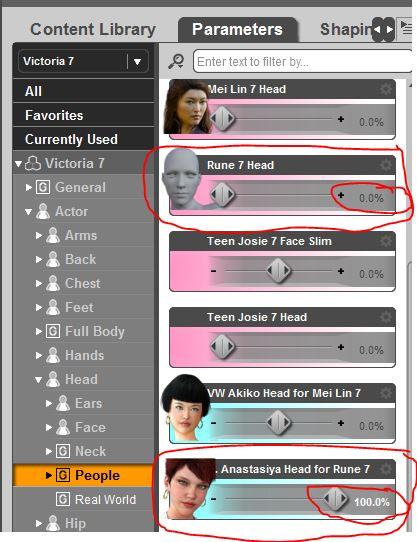
From Russia for Rune 7I don't have time to test the 4 morphs included in Russia, without Rune 7; but I tested Anastasiya that is one of my favorite morphs. I didn't want to unistall Rune 7, so I applied Anastasiya Head morph first and then changed Rune 7 head dial back to zero (see screen capture attached).
Here is the result.
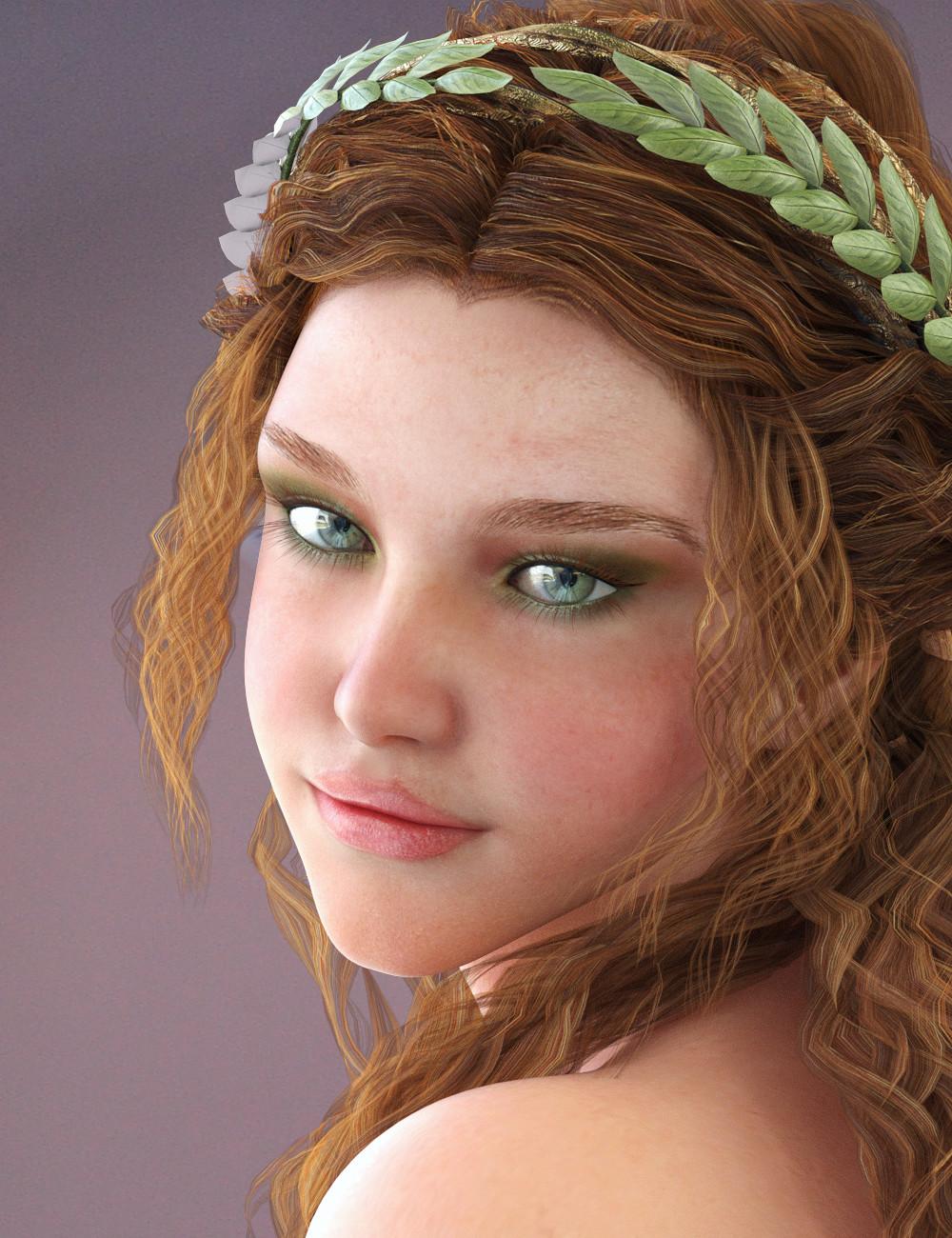
Thank you. It's in the cart, to be purchased as soon as DAZ gets the Victoria 7 freebie fixed...
Try as I might, I still have yet to get a face that balanced.
 .why is my daz so slow!!I think I have the same specs as you. More or less. If you mean 4gb ram. The only time mine is slow is when loading my runtime libraries. But it doesn't take 10 minutes. Loading Victoria 4 takes 2 minutes max. As it loads all morphs, shapes, parameters as well etc. That's because I set it up to load everything as I never know what I'm gonna do. So if I do that, I don't have to mess around with adding elite morphs or aiko morphs or anything. It's all loaded.
Certainly update all the drivers. One of things you have to realize about Daz is it's really resource dependent. There are basically 3 main places that it could hang up: processor, Ram, video card ( in the case of Iray). 2 minutes to load victoria is really slow. Should take about 20 seconds.
I started using daz on an i7 laptop, running Windows 7 32 bit, with 4 gig of ram. Ran Daz3d 3.1 just fine, with 4th generation figures. I started to see a serious slow down when I upgraded to 4.5x, using Genesis fugures. All of the sudden, I couldn't load more than 2 figures, and no scenery. So i moved up to an i7 with 8, then 16 gig of ram, Win 7 64 bit, mobile nvidia 5200m card (for what that's worth). Now I could load scenes as big as I wanted, if I didn't mind waiting, and I could render reasonably fast at high quality using 3Delight.
But not Iray. This would be a huge issue on your current computer. I'm sure it'll render, but it'll take days to do a single image. Video card dependent, and mobile intergrated card mean basically nothing. Has to be a real, good, Nvidia card. But like I said, if the card is really good it could still be slowed down at the level of the processor (in the case of an i3 core duo), or the Ram (really, 4 gig is a minimum.) My current set up : I7 4790, 16 gig ram, 980 giog SSD, Nvidia GeoForce GTX 970 with 4 gig of ram. I can now make a good Iray render in about 2 hours. Thinking of adding a second card to see if it would get any faster.
So Daz3d ...fun program, but I don't think you realize what it could do if you upgraded your computer. I built my new computer specifically to run Daz. I love it.
Animation Conversion for Genesis 3 (commercial)Be sure that the name in your scene is exactly
Victoria 4.2
The script is looking for that in the scene and if it can not find it you will get that error. If you know it is Victoria 4.2, and it is not named that you can change the name to Victoria 4.2
Ahhh, it's considering capitalization. V4.2 loads in as "victoria 4.2" and the script is looking for "Victoria 4.2". Renaming the figure with a capital V did fix it.
Perhaps if that had been mentioned earlier in this thread...
Thanks though.
July 2016 New User 3D Art Contest “Portrait Rendering” – WIP ThreadThanks for all the incredible images in this thread! I learned a lot by studying them and the accompanying comments.
@barbult asked this question about my image a couple of pages ago:
I'm curious - what character and outfit is this? I don't recognize either one.
The character is Finley -- see her at: http://www.daz3d.com/fwsa-finley-hd-for-victoria-7-and-her-jewelry
The outfit is Victoria Iven -- see it at http://www.daz3d.com/victoria-iven-for-genesis-3-females
I put Victorian hair on the Finley shape, since the woman I'm trying to portray is described that way in the books. The outfit is perfect too; long skirts, full sleeves, and high necks are her go-to clothes. There's a variant availble for this which features a white coat and a red dress.
I've learned how to increase me render times to get rid of the noise that plagued my early efforts. Now if Windows would just stop updating twelve hours in, and the power would stay up, I'll be in business!
She has a very mischevious look on her face.
The white background is quite stark but really puts the focus on her face.
Animation Conversion for Genesis 3 (commercial)Be sure that the name in your scene is exactly
Victoria 4.2
The script is looking for that in the scene and if it can not find it you will get that error. If you know it is Victoria 4.2, and it is not named that you can change the name to Victoria 4.2
why is my daz so slow!!I think I have the same specs as you. More or less. If you mean 4gb ram. The only time mine is slow is when loading my runtime libraries. But it doesn't take 10 minutes. Loading Victoria 4 takes 2 minutes max. As it loads all morphs, shapes, parameters as well etc. That's because I set it up to load everything as I never know what I'm gonna do. So if I do that, I don't have to mess around with adding elite morphs or aiko morphs or anything. It's all loaded.ya 4gb ram sorry bad typing. the driver could be the problem. i had to try to find one that even had open gl1.3 or greater once i loade windows 10. but the computer is a slim so the graphic card is bult onto the board. so getting a beter one my be out.
July 2016 New User 3D Art Contest “Portrait Rendering” – WIP ThreadThanks for all the incredible images in this thread! I learned a lot by studying them and the accompanying comments.
@barbult asked this question about my image a couple of pages ago:
I'm curious - what character and outfit is this? I don't recognize either one.
The character is Finley -- see her at: http://www.daz3d.com/fwsa-finley-hd-for-victoria-7-and-her-jewelry
The outfit is Victoria Iven -- see it at http://www.daz3d.com/victoria-iven-for-genesis-3-females
I put Victorian hair on the Finley shape, since the woman I'm trying to portray is described that way in the books. The outfit is perfect too; long skirts, full sleeves, and high necks are her go-to clothes. There's a variant availble for this which features a white coat and a red dress.
I've learned how to increase me render times to get rid of the noise that plagued my early efforts. Now if Windows would just stop updating twelve hours in, and the power would stay up, I'll be in business!
Daz 3D is part of

Connect
DAZ Productions, Inc.
7533 S Center View Ct #4664
West Jordan, UT 84084Licensing Agreement | Terms of Service | Privacy Policy | EULA
© 2026 Daz Productions Inc. All Rights Reserved.