-
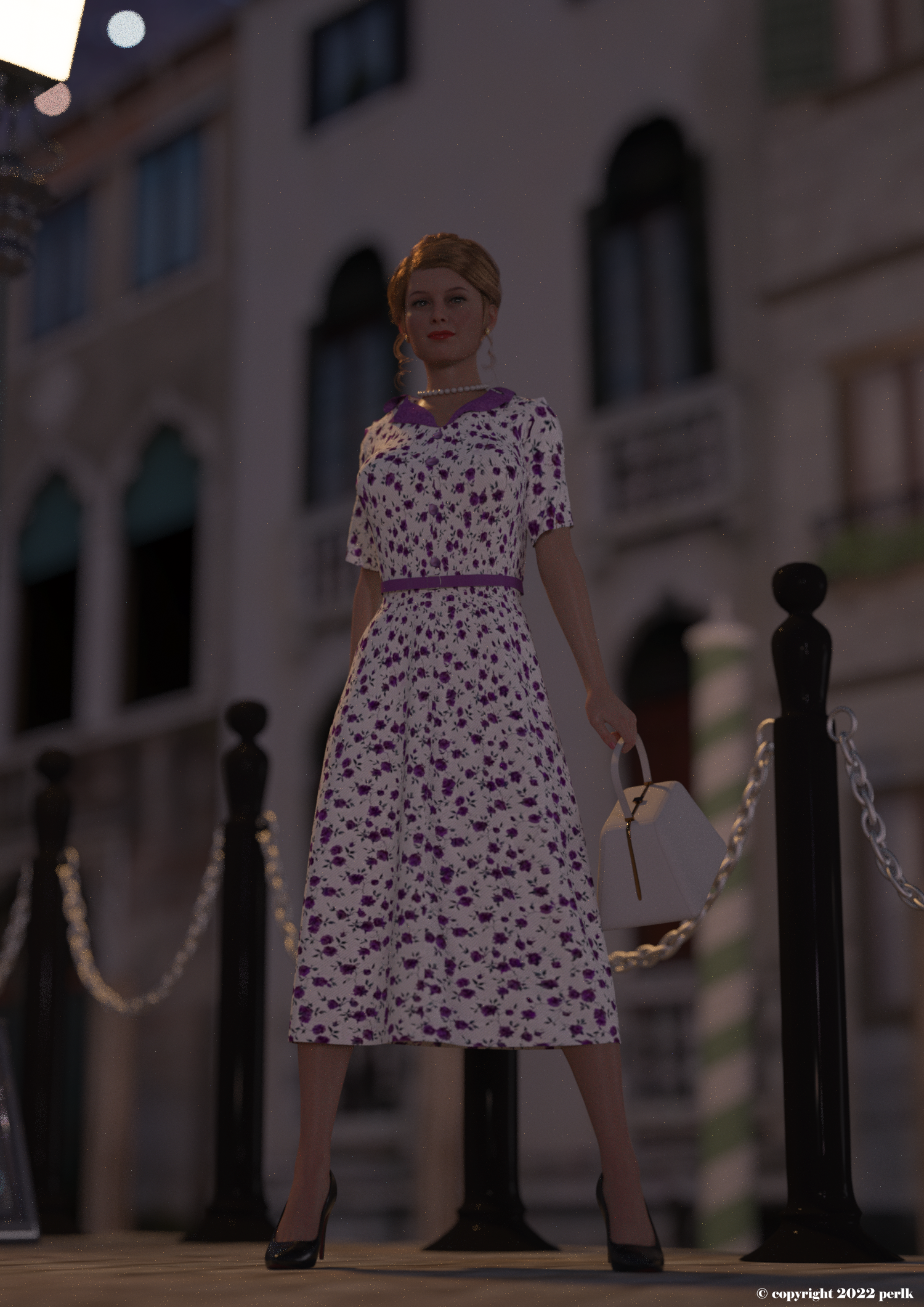
Charming for G8.1F. 1940's Hollywood style beauty. Head morph. No textures.
@AOBB - just wanted to show you that I used your Charming morph in my latest render.
 What’s with the clothes ?
richardandtracy said:
marble said:
Somewhat off-topic but, looking at the picture in the OP, my eyes were immediately drawn to the mop, not the character or her clothes. Is it really a mop or some kind of anti-gravity device?
Exactly my thought too. Needs a morph or dForce to be activated.
Or it was left to dry outside over a very hot summer
Gap with falsies eyelashes for genesis 8.1 femaleit looks like you have a character dialed on the genesis 8 figure. The lashes do not actually follow the character eye shapes well particularly close to the inner eye and need their own corrective morph for each character. Also, most lash textures don't have high density of hair near the lacrimal/inner eye as most of the lash density naturally occurs slightly past the lacrimal, so a lash texture with high density all the way to the edge would look a little strange regardless. It's easy enough to at least edit the textures but the morph may be more of a fix.
Celebrity Look-a-Likes for 3D figures part 3Does anyone know of a G8F version of Marilyn Monroe?
StudioArtVartanian has Marina for Genesis 2 Female which you may be able to transfer up to Genesis 8 if you have the transfer tools/knowledge. At the very least it will give you textures to use with the other morph only offerings. (Hair too)
SAV Marina for G2F 3D Figure Assets 3D Models StudioArtVartanian (renderosity.com)
SAV Marina Hair 3D Figure Assets StudioArtVartanian (renderosity.com)
If you need to practise without spending cash there are two free Genesis 2 ones
What’s with the clothes ?marble said:Somewhat off-topic but, looking at the picture in the OP, my eyes were immediately drawn to the mop, not the character or her clothes. Is it really a mop or some kind of anti-gravity device?
Exactly my thought too. Needs a morph or dForce to be activated.
Saphirewild's Randomness RendersWinterMoon said:
Ohai, you've been busy!
This is for the Freebie contest!!
Aww, bebbi elephant!

Done this render up to check out the new Daz Dog 8 Lab morph I got a while ago!
Labs are such good doggos! I kind of want one, but I've never owned a dog and I don't know if I'm cut out for it.
Titled: A Medation In Nature
I absolutely love the mood in this one!
Trying out some new to me stuff again!!!
The poor guy's in his pajamas! Talk about rude awakening?!?!?
Titled: Married Life
In 20 years, they'll be the ones getting married! Yes?
Miss Kitty was a science project gone very wrong but that did not stop her from trick or treating her own way with the closest bird she could find!!
I'd say she's science gone very right!
 Keep up the good work!
Thank you @Wintermoon for such nice comments!!
Celebrity Look-a-Likes for 3D figures part 3Off the top of my head, magnus1781's done a good Marilyn Monroe morph. (link)
 Smart Content - Copy to New PC
Richard Haseltine said:
User categorisations are fairly simple to transfer:
- on the old system, open the Content Library pane option menu (the lined/hamburger button in the top corner, or right-click the tab)
- Click Content DB Maintenance
- in the dialogue check Export Userdata
- Click Accept
- this will write a bunch of userdata.dsx files to the /Runtime/Support folder in the first Daz Studio content directory
- copy the userdata fioles to the new machine, in the equivalent location (/runtime/Support/ in the first Daz Studio content direcotry)
- on the new system, open the Content Library pane option menu (the lined/hamburger button in the top corner, or right-click the tab)
- Click Content DB Maintenance
- Check Reimport Metadata
- Click Accept
- in the dialogue that opens check the option for the Userdata
- click Accept
That will not, however, copy grouping (e.g. the New marker)
Thanks! I am embarrassed to admit that after posting this, I looked through my own old posts and found you had answered the same question for me five years ago. I must be getting old and forgetful...!
pJCM Poses - For Clothing Creators - QuestionsMada said:
I'm going to add a pro tip here in case anyone runs into it. Once you start deleting morphs from the data folder - NEVER EVER do it while you have the garment loaded in DS.
If you then save the outfit instead of loading a new one, it will write empty morph files and JCMs and you can't recover it, only way out is to redo them.
Another way I avoid the issue is to save with a new product name every time I delete morphs in DS. It will createa new data directory and the morphs you deleted won't be saved.
Good tips, thank you Mada :-)
Yes I always suggest to close D/S before digging through its data folders. AFAIK that's a standard practice when tampering with the data folders for any program.
pJCM Poses - For Clothing Creators - QuestionsI'm going to add a pro tip here in case anyone runs into it. Once you start deleting morphs from the data folder - NEVER EVER do it while you have the garment loaded in DS.
If you then save the outfit instead of loading a new one, it will write empty morph files and JCMs and you can't recover it, only way out is to redo them.
Another way I avoid the issue is to save with a new product name every time I delete morphs in DS. It will createa new data directory and the morphs you deleted won't be saved.
Eastern DragonI would love a new Asian Dragon! With the new strand based hair, they could really do some cool things with it. I'd be fine with a morph for Daz Dragon 3 or a stand alone creature (or even a morph for the Daz Dog 8, they seem to be able to do anything with it!). Herschel Hoffmeier, Oso or RawArt would all be good candidates to make it!
Geografting LimitationsYou couldn't (in a distributable form) apply new bones to the original head, but you certainly can use the Transfer utility on the graft to start it from matching the base rigging and then adjust as needed, just as you can for clothing.
How to morph hair poly groupslululee1 said:
Is it possible to take the bangs prop and the hair base prop into ZBrush and morph them with GoZ then combine them into 1 prop and keep the morphs in DS?
Cheerio
lululee
If you combine them into one object, you won't be able to import them as a morph. You would have to morph the items separately, then export them separately, then import them as morphs to the two hair parts.
How to morph hair poly groupsIs it possible to take the bangs prop and the hair base prop into ZBrush and morph them with GoZ then combine them into 1 prop and keep the morphs in DS?
Cheerio
lululee
Losing detail on teethThere was an issue in Genesis 3 where creating morphs in ZBrush and dividing the emsh while morphing, then restoring to zero divisions for the morph, would distort the teeth - but I don't recall its effect looking like that.
AIUTO...CHI CONOSCE L’ITALIANO? PARTE TREDICIImago said:
Imago said:
Muscleman said:
MA secondo voi, qual'è il metodo più semplice per fare della buona erba/grass in DAZ Studio, senza che ti esca fuori un fila da giga di dati!?!?! Sto diventando matto!....ho provato a farlo in blender con le particelle ma viene una cosa spropositata esportato poi ....
Io uso dei displacement 8000x8000 perlin noise in modalità due colori bianco/nero BMP. Erba buonissima (meglio di quella di Crios
 ). Se hai pazienza puoi anche associarci una Transparent per avere delle zone vuote o le Geoshell per mescolare più tipi di erba.
Ricopri anche dieci chilometri quadrati con erba senza alcun impatto sulla RAM o la velocità di render. Non con Iray, però, lì devi usare delle TIFF 256x256 e ripetere il tiling fino a riempire il terreno, sperando che i 1024Gb di VRAM delle tue quattro RTX 3090 Super riescano a contenere cotanta abbondanza di dati.

Ah, Ragazzone! Dimenticavo per puoi anche farla muovere al vento o al passaggio di un personaggio/oggetto con dei Dformer o dei morph basilari, basta utilizzare come base un plane con abbastanza suddivisioni da potere avere delle zone specifiche ben circoscritte.
Grazie ragazzi, a tutti. Cercherò di risparmiare RAM con delle instanze, dovrebbe darmi la possibilità di avere l'idea del 3d senza uscire matto con una marea di poligoni....vi tengo aggiornati
Losing detail on teethI mean I made a character shape from an old figure (Genesis 2) and add it to genesis 3 using the transfer utility. Then I just fine tuned using the Genesis 3 Morphs (height, weight, nose and eye, etc). If I load a new figure and apply my character shape (except the fresh figure don't have the Gensis 2 shape I created) it still loses detail on the teeth. I've made some test and noticed that if I save the shaping uncheking everything from Actor-> Head the figure don't lose detail on the teeth so I suppose is one of those morphs.
Losing detail on teeth"loading a fresh figures and applying the shape" whichcshape? Is this all associated with a single morph? If so, how did you make it?
Daz to Unity not workingHello !
Unhoppely nothing work for me... XD
Daz to Unity is instaled but there is no more install Unity file option. Is it normal ? My latest bridge of DazUnity is 2.0 and Daz 4.15
(PS: i tried to do the famous Read The F...... Manuel but the only thing i found was the readme txt file i put in attachement file).
When i try to import on Unity, the Unity file (scripts,ressources,etc) seem's to import themself (so i guess there is no more option install Unity file to turn on), but the fbx model is not imported.
1- i have selected a regular model G8 M/F in my scene
2- Asset Type ->Skeletal Mesh / Static Mesh (nothing work)
3- Enable Morph On (i try to import the morph leg,arms,G8....) and off
4- EnableSubdivision On and Off
5- Advanced Settings On and Off
FBX Version 2014 Binary
Same for the import of the DaztoUnity file, on Unity, the bridge version seem's to be out of date to the latest version. i got try with the Unity 2020 3.15f2 and 2020 1.5f1.
Up to which version does it work ?
(i'm instaling Unity 2019.4 as they suggest on the website to look if it's getting better. i keep you tune if there is any solution)
Best regards
[Released] Morph Editor for ManFriday's Mesh Grabber [Commercial]Maybe you need to update your Mesh Grabber. I have version 3.0.1 (2020-09-14). The instructions are in version 3.0.1 of the manual.on page 9. Maybe you have the right Mesh Grabber version but are just looking at the old manual.
I think the name of the "Save" button for the Mesh Grabber morph is kind of misleading. It should be "Create", in my opinion. It creates a morph from the moved vertices, but does not save it permanently to disk for future use in another scene. Hence, as described in the manual, you must manually dial the morph to 0 and save it as a morph asset. (If you only want the morph used in the current scene, not available for other scenes, there is no need to save it as an asset.This is often the case, because you just want to make a change to avoid poke through with a particular pose, or something like that.)
Once you have saved the morph as a morph asset, it will be available as a slider in the Parameters pane when the same model is loaded in a new scene. As long as you were careful to zero the morph before saving, it will be available, but not dialed in automatically. To use the saved morph, there is no need to "Load" it with Mesh Grabber. It is just available for you to dial in, just like any morph that you purchased.
As I understand it, the purpose of the "Load" button in Mesh Grabber is to import existing morphs as vertex deltas that you can modify with Mesh Grabber. I have never used this.
Daz 3D is part of

Connect
DAZ Productions, Inc.
7533 S Center View Ct #4664
West Jordan, UT 84084Licensing Agreement | Terms of Service | Privacy Policy | EULA
© 2026 Daz Productions Inc. All Rights Reserved.