-
Altering clothing items
bstanle said:
Another question...
The shirt I am talking about was bought from DAZ. Can I alter that shirt? What about the ability of that shirt to conform to whatever pose the figure is in? For example. When the figure bends over, can the altered shirt move in sync with the figure?
You can alter a bought asset as long it is for personal use.
And if you do your modification as a morph you can also share the morph.
For the shirt, if you do the modification as a morph, it is essentially the same shirt, just with the modifications that you have made, and will follow the initial rigging when posing.
For a morph you are only allowed to change vertex position; you cannot add or remove verteces.
If you are altering the verteces, then your option is to import as a new shirt , and has to do transfer rigging to make it follow the character. But then you will also loose the additional modifications made by the PA. This shirt must not be shared.
Blender to Daz3D with G8F modifications?Hello! First post here, I wanted to know how I could import a Blender model into Daz3D with all of its textures, and if its possible to edit that model using a G8F face morph modifier. This is the model I am trying to import, I've followed different tutorials detailing how to import it into Daz3D as an obj. file but when being imported, the figure appears like this. Apologies, this is my first time using Daz3D and trying to make some edits to the facial features in Daz using morphs.
[Solved] How to make pJCM works with rigid follow nodeIt turns out the buttons also have to be "Transfer Utility" too
Altering clothing itemsDitto the above comment on the need for a modelling application.
If you have (or can afford) ZBrush the above instructions will help and it has the advantage of the GOZ bridge which simplifies import and export.
Hexagon also has a bridge but I don't use Hexagon because it crashes repeatedly on my PC and DAZ don't give it much love by way of updates and fixes.
So Blender is a free and reliable alternative with good sculpting and modelling tools. The DAZ-to-Blender bridges are not really designed for use in the same way that GOZ is with ZBrush so it is probably better to look for a tutorial on exporting the OBJ mesh and re-importing as a morph using Morph Loader Pro in DAZ Studio. There are threads on this forum and videos on YouTube showing how to do that. I use Blender for clothing morphs and it will do what you describe.
GENERAL FREEBIE REQUESTS part 3daybird said:
Ok, this maybe a little much to find all, but I search for a fan art project some clothes who comes near the drawing, especially the hood maybe tricky.
This might help: https://www.sharecg.com/v/54886/related/11/Poser/V4DrapedHood
It seems, this will only work in Poser and I forgot to say, that I search the outfit for G3f or G8f.
Sorry for spamming. :)
You can load a cr2 in DS and convert it using the transfer utility...
Altering clothing itemsIf you have access to modelling software the answer is yes! Depending on the software you use depends how easy it is. There are bridges for ZBrush, Hexagon and Blender now.
Put very simply if sending it do ZBrush which is what I use.
1. Load the character and the figure you want to alter.
2. Lower the base mesh resolution to 0. I do the sub div stuff also.
3. Select both items and hit the GoZ button. (In my set up it's along the left hand side and if you hover over the icon it should tell you the name.)
4. when it loads into zbrush ensure you don't change the geometry, I mainly use the move brushes, smooth and I've also found the deformation menu useful.
5. When finished hit the goz button and it should start a dialogue which allows you to either create a new object or to update one. It should automatically update it if you haven't changed the mesh. Give your morph a name and set where you will find it in the parameters tab.
6. It should then be a case of dialling your morph in.
There are often problems that need trouble shooting and also if you just want to shorten the sleeves and the top there are other options.
The two that I am thinking of are:
1. You can create a tranparency map and apply it in the cut out opacity slot
2. Create surface groups and then hide those sections by dialling opacity to 0.
There are lots of tutorials around on how to do these types of things. Some of the best I've come across are by Josh Darling in particular for creating morphs.
Hope this helps...
Exporting a frame ????You can save a Pose and/or Shaping preset for the current frame (in the options dialogue that opens after the file requester) and apply them to the figure in a new scene, assuming you haven't got custom morphs (from dForms or Morph Loader).
Uh oh, i've somehow saved the base g8.1 with a morph appliedPerttiA said:
globally said:
Platnumk said:
globally said:
I recently posted here asking about why my morphs would cause my sub scenes to load in at sub d level 5 instead of three. I have noticed (from the save modified assest dialoge) that i have a couple of extra morphs on the base g8.1 (a BJ Ensley morph as an example). If i exported this g8.1 base and used it to make my morphs would then cause the render sub d level to change?
Unsure, but by the sounds of it, it will set it back to SubD 3 as it shouldn't be loading in with SubD 5 anyway
Thats what i was afraid youd say. The mystery of the loading sub d 5 continues...
Thanks for your help with the g8.1 morph though.
You could read the code inside the files and assets used, sowhere inside those files the value of SubD has been set to 5 or the SubD 5 has been set as default.
The first ones to check are the scene file, the character files and the base geometry of the figure you are using.
If you can't find the SubD 5 setting inside those files, it is possible that you have assets installed twice and the SubD 5 setting is hidden inside those duplicate files.
This is what i found for "subd" the base g8.1 and it seems the same on my sub scene duf too.
"channel" : {
"id" : "SubD Displacement Level",
"type" : "int",
"label" : "SubD Displacement Level",
"visible" : false,
"value" : 0,
"current_value" : 0,
"min" : 0,
"max" : 12,
"clamped" : true,
"step_size" : 1Looking for a face size morphGenesis 8 Female Head Morph Resource Kit 2 has a face smaller morph which can be dialled to plus or minus 100%. The negative values do make the jaw slightly larger but overall it seems to work well. Looks like it's currently on sale too.
some included morphs are:-
- 14 Head and Face Shaping Morphs:
- Face Center Narrow
- Face Proportion 1
- Face Shape Kind
- Face Shape Long 1
- Face Shape Mix 1
- Face Shape Mix 2
- Face Shape Mix 3
- Face Shape Mix 4
- Face Smaller
- Fem Face Shape 1
- Fem Face Shape 2
- Head Thin 1
- Head Thin 2
- Neck Thin
Looking for a face size morphHello,
Back when I was using V4 there was a morph that resized the size of her face. Does anyone know of a morph like that for G8/8.1? There are lots of morphs for modifying the head as a whole or in part, but the morph that I am remembering just expanded or shrank the face area alone. If anyone knows of a morph set or package that does that, I would be very happy if you could tell me what it is.
Thanks in advance for any replies.
nabob21
Uh oh, i've somehow saved the base g8.1 with a morph appliedglobally said:
Platnumk said:
globally said:
I recently posted here asking about why my morphs would cause my sub scenes to load in at sub d level 5 instead of three. I have noticed (from the save modified assest dialoge) that i have a couple of extra morphs on the base g8.1 (a BJ Ensley morph as an example). If i exported this g8.1 base and used it to make my morphs would then cause the render sub d level to change?
Unsure, but by the sounds of it, it will set it back to SubD 3 as it shouldn't be loading in with SubD 5 anyway
Thats what i was afraid youd say. The mystery of the loading sub d 5 continues...
Thanks for your help with the g8.1 morph though.
You could read the code inside the files and assets used, sowhere inside those files the value of SubD has been set to 5 or the SubD 5 has been set as default.
The first ones to check are the scene file, the character files and the base geometry of the figure you are using.
If you can't find the SubD 5 setting inside those files, it is possible that you have assets installed twice and the SubD 5 setting is hidden inside those duplicate files.
Uh oh, i've somehow saved the base g8.1 with a morph appliedPlatnumk said:
globally said:
I recently posted here asking about why my morphs would cause my sub scenes to load in at sub d level 5 instead of three. I have noticed (from the save modified assest dialoge) that i have a couple of extra morphs on the base g8.1 (a BJ Ensley morph as an example). If i exported this g8.1 base and used it to make my morphs would then cause the render sub d level to change?
Unsure, but by the sounds of it, it will set it back to SubD 3 as it shouldn't be loading in with SubD 5 anyway
Thats what i was afraid youd say. The mystery of the loading sub d 5 continues...
Thanks for your help with the g8.1 morph though.
Uh oh, i've somehow saved the base g8.1 with a morph appliedglobally said:
I recently posted here asking about why my morphs would cause my sub scenes to load in at sub d level 5 instead of three. I have noticed (from the save modified assest dialoge) that i have a couple of extra morphs on the base g8.1 (a BJ Ensley morph as an example). If i exported this g8.1 base and used it to make my morphs would then cause the render sub d level to change?
Unsure, but by the sounds of it, it will set it back to SubD 3 as it shouldn't be loading in with SubD 5 anyway
[Solved] How to make pJCM works with rigid follow nodeI imported an obj morph
through the Morph Loader as a certain pJCM.But as the result, my buttons which I placed on the cloth using rigid follow node, scrambled all over the place every time I rotate the bone.
How to fix this?
Uh oh, i've somehow saved the base g8.1 with a morph appliedI recently posted here asking about why my morphs would cause my sub scenes to load in at sub d level 5 instead of three. I have noticed (from the save modified assest dialoge) that i have a couple of extra morphs on the base g8.1 (a BJ Ensley morph as an example). If i exported this g8.1 base and used it to make my morphs would then cause the render sub d level to change?
Uh oh, i've somehow saved the base g8.1 with a morph appliedPlatnumk said:
Load in the base figure that has the problem
Under the Perameters Tab make sure you have Show Hidden checked
Still under the Perameters Tab select Zero - Zero Figure
Once again under the Perameters Tab select Memorize - Memorize Figure
Then under the File Menu select Save As - Support Asset - Save Modified Assets...
Clear the scene & re-load the base figure in again to check that it's back to normal
Thank you. I deleted the offending morph and that seemed to fix it. I will do what you suggest too just in case. Am i removing eyelashes etc and then zeroing? I got to the save modified assests bit and saw it would change more than just the base g8.1 like lashes.
Uh oh, i've somehow saved the base g8.1 with a morph appliedI think at the time i had a g8.1 in scene and a g8.1 with an FBM applied (it may just have been the one g8.1 with morph applied though) i went to save the project and may have merge? Now every time i load a g8.1 base it has the base head and the morphed body. Same for the dev load too. I have uninstalled and installed gen8 essenitals with no luck.
I do have a g8.1 obj at base resolution, could i apply that somehow with morph loader and just replace the base g8.1 with a character preset of that? That doesnt sound like a great solution though.
[Released] Turbo Loader for Genesis 8 and 8.1 [Commercial]AnotherUserName said:
AnotherUserName said:
AnotherUserName said:
RiverSoftArt said:
AnotherUserName said:
RiverSoftArt said:
AnotherUserName said:
Hi all,
How do you remove morphs from the TLManager? I have some products that are no longer in my database but still show up in the list of morphs.
Hmmm, that is something I hadn't thought about. I would enable ALL morphs (or reset Content directories), clear the list, and then rescan.
No, that didnt work. Any other suggestions? Feature for a new version?
If you cleared the list and rescan and they showed up, that means the morphs are still there. They should show up. You would have to delete the morph files for them not to be found.
Yah theyve already been deleted from my ssd. Im wondering if im on the current version though. Ill check version numbers and re-install if I have to.
Ok, so to rehash, the morphs had been deleted from my ssd previous to this issue. I have reinstalled TL. I have enabled/disabled all my morphs and re-scanned in TL. The morphs still show up. As an experiment, I enabled all of the mystery morphs to see what would happen if I tried to load them onto my g8f. TL completes the process with no errors and states "0 morphs enabled (0 failed), 0 morphs disabled (0 failed). I load my g8f and she is completely blank, no morphs at all. I exit, re-launch, and load the test figure. She loads fine, no errors, still no morphs. I re-launch TL and the mystery morphs are still listed and still checked as enabled.
My database is on an external ssd. I just located the TL cache in C:ProgramData:Daz 3d:Turbo Loader. All of the morphs im trying to get rid of are still listed in the cache. I read about an option in the documentation to refresh the cache but I havent seen it in TL.
Are the morph files on disk? Did you CLEAR the morph list before rescanning? (usually you do not do this, but since you have enabled all morphs, this is safe). If you have cleared the morph list and the files are not on disk, there is no way that they would be detected in a new scan.
Mid-way through 2022 a new Sales Thread:Report Issues Here "There's Always Another Sale™"Ati said:
https://www.daz3d.com/addy-stella-for-genesis-8-female
Description says: "Addy Stella for Genesis 8 Female is a beautiful woman with fair skin and golden hair." The what's included section doesn't mention any hair, though. So is that included or is it not?
I wouldn't expect it, as it says "You will get SSS skin, head morph, body morph, custom open smile, custom closed smile, custom teeth, custom eyelashes, custom long nails, 21 eye makeup with lip gloss, 21 eye makeup with lipstick, 8 eyes, 2 eyelashes materials, 20 nail polish colors, 3 nail art designs, and french fingernails and toenails" and no hair is mentioned.
There is Lyla by Addy, who is "a lovely brunette", also without a hairstyle included. Of course the attributes might relate to the eyelashes/brows. Or it's just a different wording, because the PA wanted to change the previous "is a young female..." descriptions.
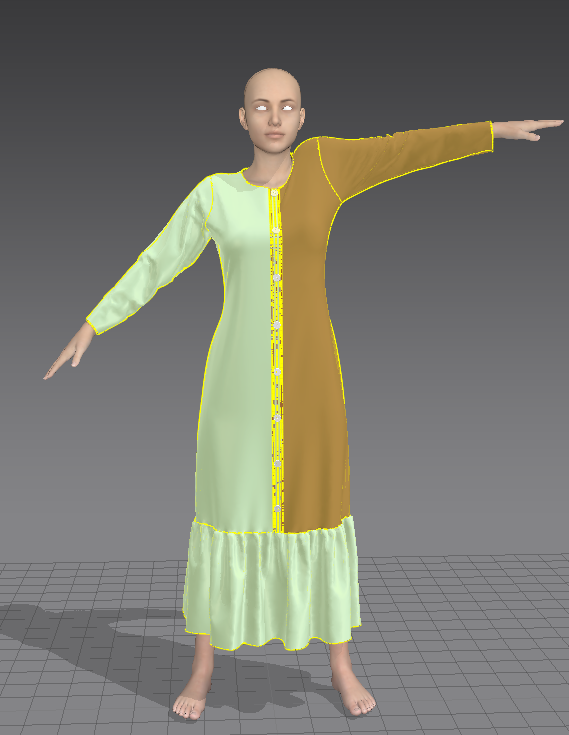
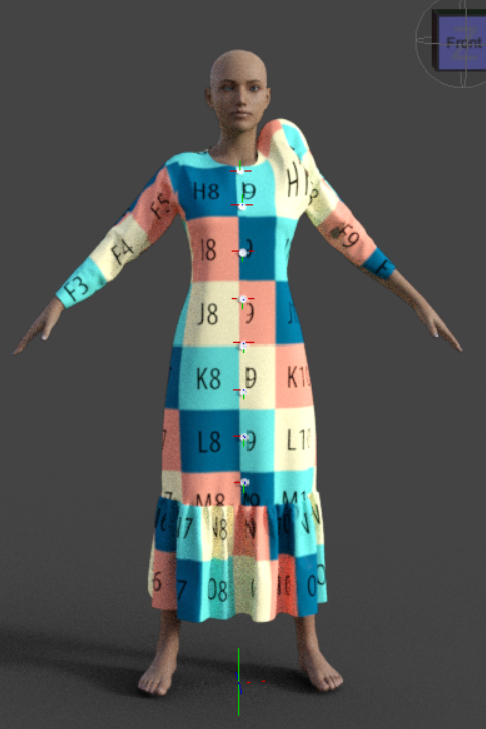
[Solved] Need help pJCM problemSo I just learned that after Transfer Utility
pJCM of my G8F also transfered to the cloth, which often make our cloth geometry looks bad/streched badly.We can fix that by making the pose triggering certain pJCM,
export the cloth outside, fix the geometry,
Import it back using morph loader pro.But...but... this happened and I dont know how to fix it...
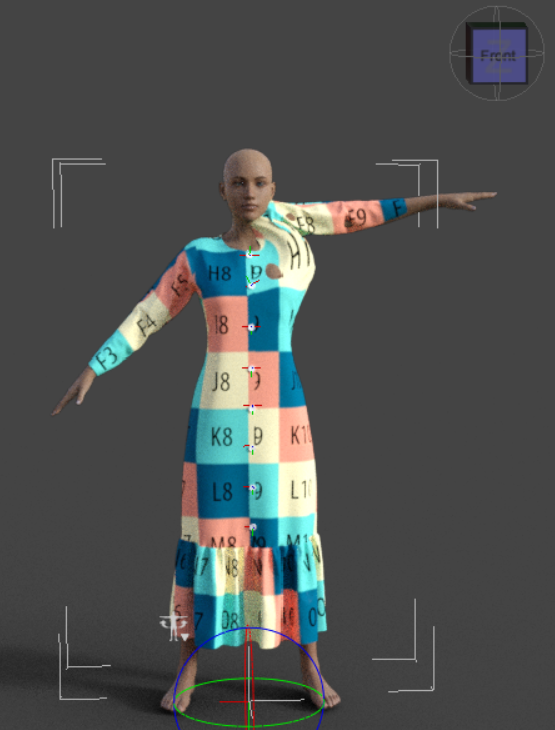
It should be like this.
These are the settings I used
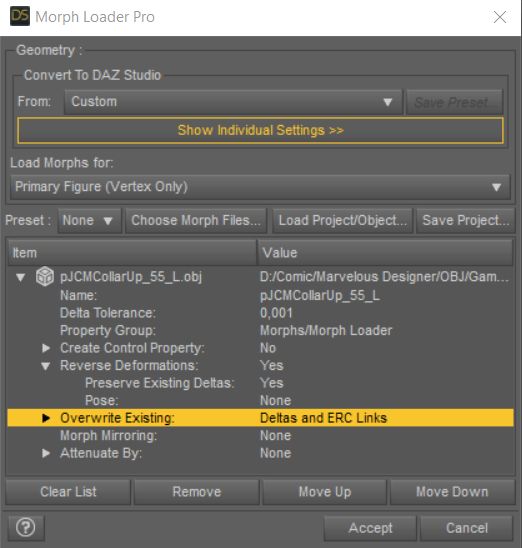
I tried to reload it over and over again, but not working.
And what does 'p' on pJCM stands for?
Solution: Overwrite Existing: Deltas onlyDaz 3D is part of

Connect
DAZ Productions, Inc.
7533 S Center View Ct #4664
West Jordan, UT 84084Licensing Agreement | Terms of Service | Privacy Policy | EULA
© 2026 Daz Productions Inc. All Rights Reserved.