-
Moving assets after using Transfer Utility
In the bundle : dForce Skate Punk with Skateboard for Genesis 8 Female(s)
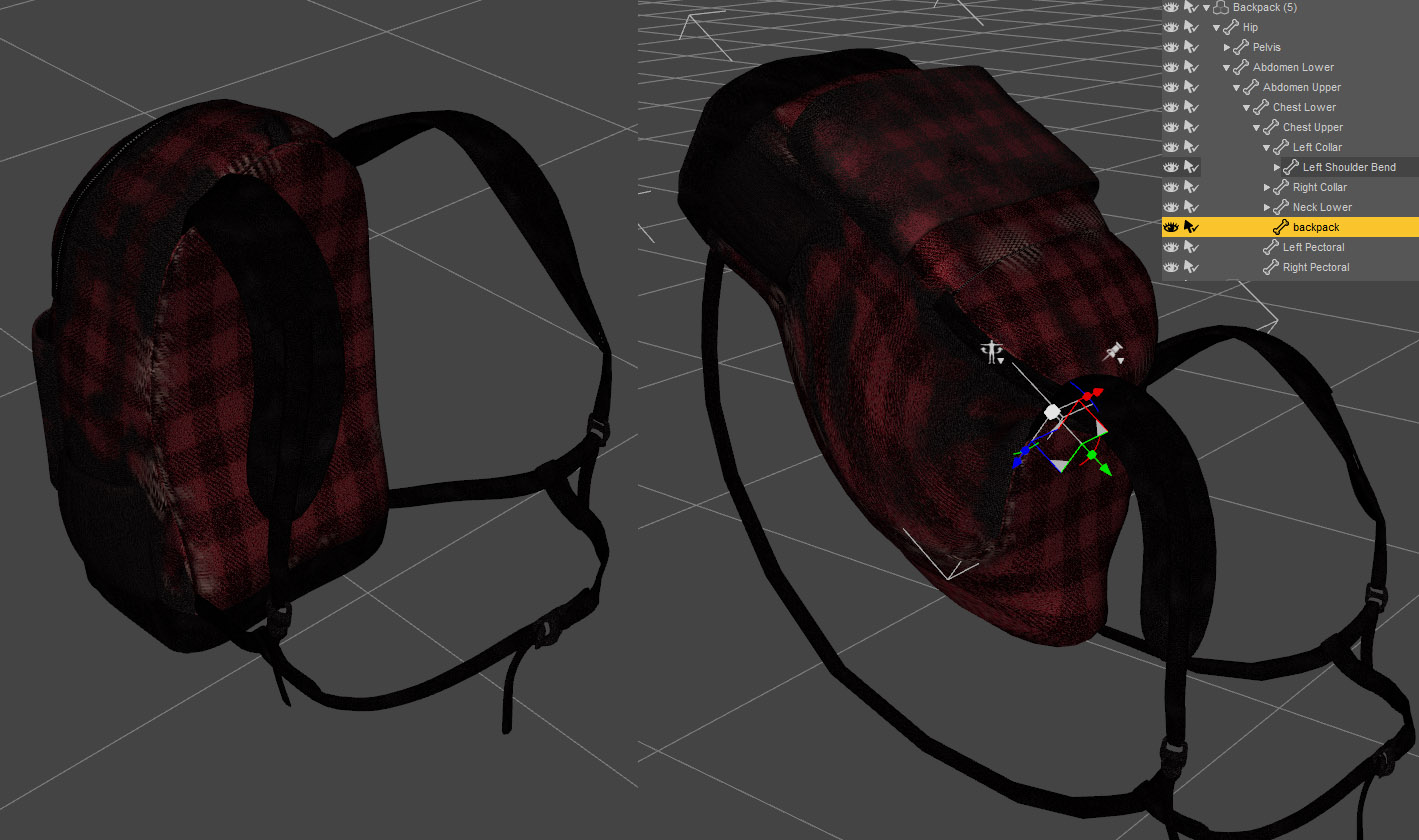
The backpack seems to have been rigged using the Transfer Utility. But one can still select the backpack and, when rotating it, straps and bag deform which is pretty damn cool. I'm not sure I've seen that behavior with other assets before ?
Could someone please give me a hint, as the way it has been designed would open up a lot of possibilities for assets I am working on.
Thanks.
 Import DS settings/plugins into a fresh DS installation
Hi! I recently got a new computer and installed a new Daz Studio on my new HDD. I moved my library over and everything is working fine so far, but I have 2 questions
- Is it possible to transfer my plugins to the new installation without reinstalling/configuring them?
- Is there any way to import/copy my workspace settings(tab configurations, custom actions etc.) from my old DS installation? Where do i find the files?
Thanks in advance!
Custom pJCM IgnoredI have had that happen a couple of times and usually its because I did not copy the exact name of the morph I want to replace so DS creates a new morph that is then of course not linked. Check if there's any morphs on the parameters tab under Morphs section - that's where DS will place morphs that's new and not autogenerated.
Custom pJCM IgnoredTimotheus said:
I am attempting to add a custom pJCM to a clothing item for Genesis 8 Female. The JCM is pJCMShldrFront_p110_Bend_p40_R. When I import the morph, Morph Loader Pro reports success, but the new morph is not implemented. I still see the auto-generated one. The same process worked fine for the corresponding JCM on the left side and for countless other JCMs I have done for this clothing and other items in the set. I double checked everything and tried it multiple times. The morph is simply ignored, and there's no error in the log.
Any ideas?
Tim
Sure. D/S does not recognize 2 morphs with the same name. Before bringing in your new morph, rename the "name" and "label" to something like "delete" [so you remember which one not to save], dial it to "0" -- then bring in and make the new morph "reverse deformations". If it works as desired, put it to zero and then save that new one. Then delete the clothing from the scene and load it afresh. Check that the morphs are as expected.
IF perchance you had ever saved the autogenerated morph, then with D/S closed, dig through the data folders and manually delete it.
Animation mesh distortion when scaling model down to 1%Yeah, something {I think, I could be wrong} is not working as expected in the keeping of the information regarding bones and morphs, etc.
Now I did get what was called a Character preset in the save dialog [but for some reason the label it puts on my icon is for clothing?]. I asked for no materials so of course it wrote in a LONG list of them. So I manually edited them all out.
This is not a morph. This is not a pose. I have no idea if or how it might be brought into your game but I hope it will work somehow.
In D/S it can be posed, but to note, not all poses are properly made.
So, it should load G2M into D/S stripped: Add your mats: Add whatever pose you want: and oh yes, you can also apply any [or most anyways] of the various character morphs {the properly made ones}.Let me know if this helps or not.
For those thinking ah, another freebie, please, 1% is too tiny to work with in D/S unless you've got a micro lens of somekind for the cameras.
DazToUnreal bug report - Morph export didn't work on child objects of a G8 figureDaz studio does very good job auto rigging and auto weighing any humanoid and convert them into genesis character morphs (Load .obj with Morph Loader and use the Joint Editor: Right click and select Edit – Adjust Rigging To Shape, then ERC freeze the rig with new morphs)
Manually skin weighing takes most of the time of rigging jobs, good auto weighing features are very useful. For this reason I've changed the default skeleton for game development from Unreal mannequins to Genesis 8 skeletons and retarget animations from other sources to Genesis 8 skeletons added with IK solvers.
Animation mesh distortion when scaling model down to 1%Thanks, its been a real struggle... I'm stuck on this issue for a long time now.
I've been trying scale down a G2 Male to 1%, via morph import, (scaling only via transformer, will give the error: "node root as been scaled" in the game engine I need it to be imported to).
So, whenever I scale via transformer all works well in DAZ, but when I scale via morph import (the only way the game engine accepts the model), the mesh gets all twisted If I apply any pose or move body parts.
I just need to fix the distortion of the mesh when I apply a pose, after this downscale procedure!
Animation mesh distortion when scaling model down to 1%wokowen said:
So... no one knows how to fix this? Guess I'm really stuck then...
Just wonder what is the point of being able to scale down via morph to 1% and fitting the rig to skeleton, if you cant apply any pose correctly!!
Oh don't give up so quickly, we don't all work on the same clock ;-)
Precisely which base character are you using? To morph it down to 1% -- more likely a pose or parameters preset would work.
Custom pJCM IgnoredI am attempting to add a custom pJCM to a clothing item for Genesis 8 Female. The JCM is pJCMShldrFront_p110_Bend_p40_R. When I import the morph, Morph Loader Pro reports success, but the new morph is not implemented. I still see the auto-generated one. The same process worked fine for the corresponding JCM on the left side and for countless other JCMs I have done for this clothing and other items in the set. I double checked everything and tried it multiple times. The morph is simply ignored, and there's no error in the log.
Any ideas?
Tim
Can someone make HD 'beauty fingers and toes' for Genesis 8 female?brimstoneomega said:
My favorite HD morph actually comes with a character, Aurore ( https://www.daz3d.com/aurore-for-genesis-3-and-8-female ). She works with both Gen 3&8, has a belly button ring, and a tounge ring, and has some of the best looking feet details in the HD sculpt. I dial her HD morph into almost all my dial spun characters, looks great even without any of her character morph turned in. She's a heck of a deal if you ask me, you're getting two HD morphs and two(ish) characters, along with the jewelry. She's even on sale now!
But yes, I agree, I'd love to see that morph package for the fingers and toes more forward to gen 8. There is a product on Renderosity that I like for the hands called Golden Core Hands and Feet. I don't really use the foot morph all that much, but the hands look great IMO.
I am also using golden core to try to adjust the character's feet, but I don't know how to use this product.
I only get two files, golden_feet.DSF and golden_hands.dsf, I would appreciate it if you could tell me how to use it
Animation mesh distortion when scaling model down to 1%So... no one knows how to fix this? Guess I'm really stuck then...
Just wonder what is the point of being able to scale down via morph to 1% and fitting the rig to skeleton, if you cant apply any pose correctly!!
Multiple Duplicate Formula ListI assuem you mean Duplkicate Formulas, not Duplicate Files? Having duplicate labels (which is what you are seeing in the Properties pane) is not the same issue. To identify one of the pair (usually) responsible for a duplicate formuilas error you need to check the log file, then work out which other morph or property uses the same name.
Mid-way through 2022 a new Sales Thread:Report Issues Here "There's Always Another Sale™"Mark_e593e0a5 said:
Jason Galterio said:
I don't know how I feel about one of my images being used as the daily sale pitch image.
Avoiding that was one of the reasons I pulled my gallery here.
EDIT: Since this isn't the first time this has happened, I opened a ticket asking them to remove my image from whatever archive they have been pulling it from.
The funny part is... I didn't even use DAZ Studio to render it. I'm using assets in the image that are not licensed for commercial use. And it was a tribute to a song which also isn't something I own.
Interesting. I would expect they ask if they want to use an image? I may have not noticed, but the ToS does not seem to say "if you are posting in the DAZ site's gallery, we can grab that image and use it for whatever reason we may find use" - like Meta usually does.
From the Froum and Gallery Submission Addendum of the EULA https://www.daz3d.com/eula#general_license :
License to Use the User Creative. User hereby grants to DAZ a worldwide, royalty-free, non-exclusive license to use the User Creative ("Right to Use") as follows:
- to store, backup, copy, transfer, publicly display and exhibit the User Creative, or any part of the User Creative, digitally, as well as through other mediums such as print or video, including, but not limited to, displaying the User Creative on any of the Sites; and
- to modify, adapt, change or otherwise alter the User Creative, or to incorporate the User Creative into one or more combined work(s) with images, text, video, or other materials submitted by other DAZ users or with other elements (each a "Combined Work").
Multiple Duplicate Formula ListI finally tired of the Duplicate Files message prompt that I had to OK for G8F to continue loading, and I went through the Parameters listing to note which morphs had a parenthetical numeral beside them. Since I'm gonna file tickets for each of these (yeah, I know), I decided I would post my list here to save someone else the trouble searching or buying.
Muscularity Morphs for Genesis 8 Female(s) has multiple duplicate names with Musculature HD Morphs for Genesis 8 Female
Daz Originals' Genesis 8 Female Body Morphs conflicts with Handspan Studios' Genesis 8 Female Body Morph Resource Kit 3 (Love Handles & maybe one other morph)
Colm Jackson's Ultra Face Morphs - 60 Essential Faces for Genesis 8 duplicates files with Aisling [DO/RedzStudio], Alana [DO/Akasha/Anain], Cara [FWSA], Cassidy, & Sorcha [Belladzines]
"Lara" pits Thorne VS DO/Anain/Belladonna
"Natalie Head" is shared by FWHP VS 200 Plus Head Morphs
"Nora" fights between Cherubit & Adiene/Vex
"Tara" is Kayleyss VS DO/TristanLiu/YCFCG (the "8" was added to her name a few days after her release) THIS CONFLICT MAY BE DUE TO A G3F CHARACTER CONVERSION. I'LL CHECK AND UPDATE IF SO.
Released - Andrea for Genesis 8 Female (Commercial)Eyes are definitely beautiful and the slight shine on the skin is very well done and really makes it look realistic.
Sadly all lovely promo images show a face perfectly facing the camera. There's NO way to know what the morph really looks like.
My wife bought the bundle and the least I can say is that Andrea's profile is ... surprising.
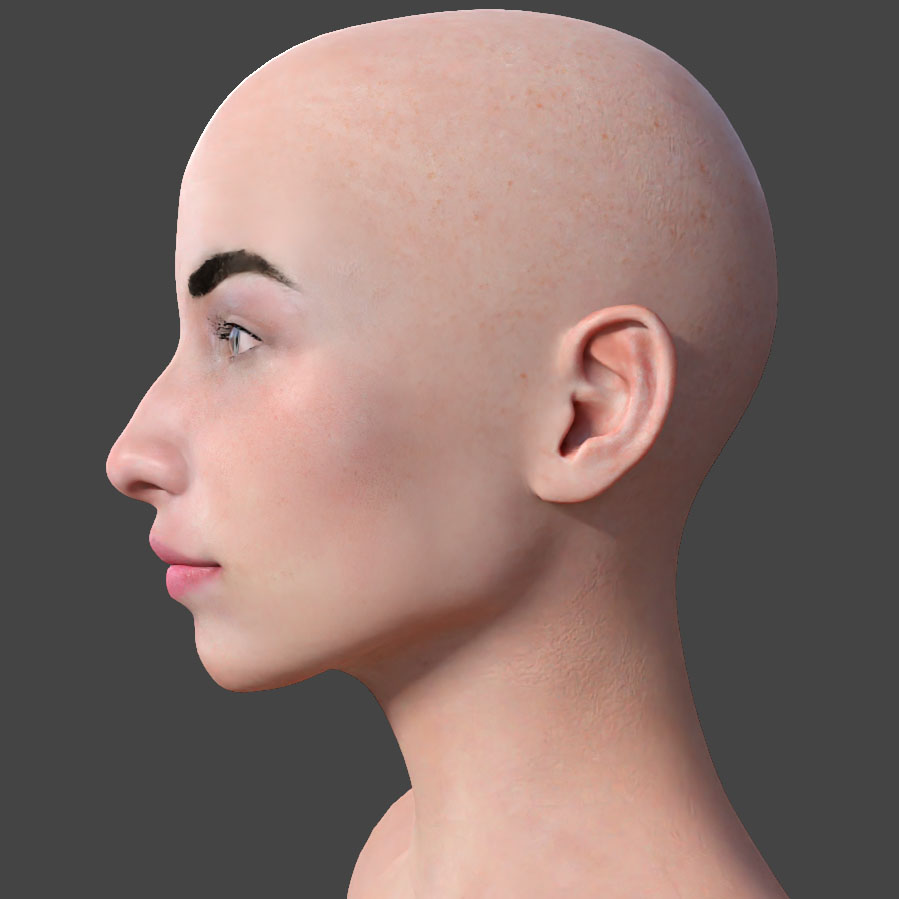
I don't say it's good or bad, I'm just saying one cannot know what he bought until he/she installs the bundle.
It's quite possible to make nice promotional images with profile or quarter-profile views rather than an unpteenth full frontal view.
A product like : https://www.daz3d.com/elsa-for-genesis-8-female at least gives a much better idea of what to expect.
AIUTO...CHI CONOSCE L’ITALIANO? PARTE TREDICIPiù che buttarcisi a pesce, fanno tutto un corredo e ci fanno l'offerta sopra. Tanto è palese che modellano tutto insieme e poi splittano il prodotto (o al massimo fanno fare qualcosa di marginale ad un altro PA tipo le pose o i vestiti)
Ad ogni nuovo personaggio ti vendono separatamente:- character (solo morph base e skin texture)
- file per metamixer
- HD morph
- capelli
- outfit
- materiali alternativi per l'outfit
- pose
E poi ti fanno i due bundle (Starter e Pro) per cui cercano di piazzare il possibile.
Inoltre stanno cercando di fare offerte tematiche: esce un personaggio robot, fanno offerte sui prodotti sci-fi.
La cosa che però odio al momento è sta mania dei coupon... mettimi il prezzo direttamente, così il prodotto lo vedo dallo store principale in homepage, anzichè dover:- cliccare sul banner
- segnarmi il coupon
- cliccare per aprire la pagina coi prodotti ammessi allo sconto
- filtrare questi prodotti con la wishlist (solo se hai il plugin di chrome)
- scorrere di nuovo tra le centinaia di prodotti rimasti per vedere se ti interessa qualcosa
Solo cercare tra le offerte porta via 20 minuti al giorno e in più tocca pure perdere tempo per cercare di farle incastrare per pagare il meno possibile.
Why we have trouble with clothing texturesChumly said:
I think I am over my head here...
But could you create the bust area as a seperate material zone in geometry editor, and then adjust the tiling of the textutures pattern t bring it closer/back into scale with the other parts of the dress?I think you are on the right track, except that there are morphs that affect the whole figure. The creator does not know whether users will apply an emaciated body morph or an obese body morph. To sort of automate adjustments to tiling requires the equivelant of substituting a new UVMap for each stylized morph. On the one hand, yay, multiple UVMaps can be created and substituted for the same clothing item. So for full body morphs with a lot of distortion, like 'The Girl' series, you could have a UVMap tailored to 'The Girl' morph to be applied if the morph is on a high setting. So far so good. But the problem then becomes that there can be only one UVMap at the time of rendering, but multiple stylized morphs can be dialed on the figure and copied to the clothes at the same time.
Why we have trouble with clothing texturesI don't think G2F avoids the problem of morphs morphing. Here is a default load of G2F in a shirt with vertical lines. See what happens when a Full Body Morph from a character in the Daz store is applied (Lotus for G2F). The problem is not the efforts of the PAs or DForce. As several have mentioned above, it is a feature, not a bug, that clothing in Daz Studio can morph to match the morphs of the figure. However, there is a trade off. If the clothing morphs, the textures are distorted to some degree. As true for G2F as for G8F.
AIUTO...CHI CONOSCE L’ITALIANO? PARTE TREDICIKainjy said:
Sono 500 dollari dati via gratis... e comunque i G3 sono ancora buoni per moltissime cose (soggetti non in primo piano tipo mezzibusti) e hanno anche materiali Iray
Io Genesis 3 lo uso ancora e lo userò per molto ancora. Genesis 8non riesco a digerirlo, tanto che molti vestiti per G8 li uso su G3 se posso. Io parlavo del trend nella DAZ, che appena hanno una figura nuova, ci si buttano sopra a pesce. Figurati che io vendo ancora oggi i miei morph per G3F su Renderhub.
Path Length vs performance ?Thanks PerttiA ,
yes path length limit is also a topic .I don't know how DS4 react if it happens , no morph loading ? ...
"D;\Daz3D" is a good idea!
as I use turboboost loader, I imagine I must reinitialize all my morphs before changing the path.
Daz 3D is part of

Connect
DAZ Productions, Inc.
7533 S Center View Ct #4664
West Jordan, UT 84084Licensing Agreement | Terms of Service | Privacy Policy | EULA
© 2026 Daz Productions Inc. All Rights Reserved.