-
default g8m face morph to g8f
thanks thats what i wanted but it still looks messed up guess the face morph doesnt work on g8f
Face Transfer - Custom 'base' textures?alan bard newcomer said:
face transfer.... face gen ... headshop aka faceshop.
when you say face transfer are you talking about face transfer the program or transfering a face from facegen?
===|
I've used both face transfer and head shop and either create a new skin in skin builder or just copy/paste a skin from a compataible character.
---
could you acccomplish what you want by creating a character in face gen ... and then adding the custom skin you have on an existing character?
This older thread was resurrected to ask for my tutorial for the Face Transfer plugin. It does not cover Headshop or Facegen.
default g8m face morph to g8fI was wondering if there was a product or way to morph the default g8f face into the default g8m face. its a long story but I transfered a face morph used for g8m to g8f but the face doesn't come out right on g8f face.
Face Transfer - Custom 'base' textures?face transfer.... face gen ... headshop aka faceshop.
when you say face transfer are you talking about face transfer the program or transfering a face from facegen?
===|
I've used both face transfer and head shop and either create a new skin in skin builder or just copy/paste a skin from a compataible character.
---
could you acccomplish what you want by creating a character in face gen ... and then adding the custom skin you have on an existing character?
DS Cadichon - yay, donkey! But requirements?Oh blast, I'll still buy the donkey I guess. I really do love Deepsea's stuff, and I want to support them. Also want to show my appreciation for making animals when everybody else seems to be making cute girls and dolly clothes. Soooo ... I'll bite the bullet and see what to do about the missing morph from the Pro Bundle. Really do wish though this could have been done differently.
Face Transfer - Custom 'base' textures?credford said:
Catherine3678ab said:
Oh I think I reupped that {the one for Face Transer} ... will take a look for the link.
Here it is: https://sharecg.com/v/97598/view/3/PDF-Tutorial/Using-the-Face-Transfer-Plugin-%7Bin-Daz-Studio%7D
That tutorial link is broken now. Do you have the tutorial uploaded somewhere else?
Yes, I think somewhere in the forums I have a link to my Google Drive BUT what I will do today is upload it to Renderosity. Should be available there in a day or two.
...............
It's uploaded along with a new note.
Basically on the page where I show a check mark in the change bone orientation, UNCHECK that ;-)
Enjoy :-)
DS Cadichon - yay, donkey! But requirements?Daventaki said:
Gordig said:
Daventaki said:
This is Cadichon without the Pro Bundle Donkey
Could you please also do a side-by-side of Cadichon next to Horse 2 with the donkey morph?
Unfortunately I do not at this time own the Pro Bundle, I have wishlisted it for a good sale in the future hopefully. I went ahead and purchased because with the discounts I got a pretty decent deal.
Thanks anyway. I just got paid, so I might grab Cadichon and do the comparison myself.
New! Novica & Forum Members Tips & Product Reviews Pt 14I have been compiling a list of all products, including the original artists at release date. We can see that the information changes with time (intentionally or not), so it can be quite revealing after the fact. Artists leave or change their name; sometimes the product stays, sometimes it doesn't.
Other Rarestone contributions and collaborations still available that were not mentioned above. The name is often scrubbed from all references, but just as often is still in file lists on the ReadMe pages as Rarestone, RS, RN (for Rare&Nirv), and maybe others.
All Sweet Fashion Poses for Genesis 8 Female
Anime Bun Hair for Genesis 8 Female(s)
Sweater Shaders Merchant Resources
Japanese Anime Poses for Sakura 8 and Genesis 8 Female(s)
dForce Kitty Sweater for Genesis 8 Female(s)
dForce Bunny Outfit for Sakura 8
Fairy Outfit for Karyssa 8 and Genesis 8 Female(s)
All Sweet Fashion Poses Series 2 for Genesis 8 Female
Rare n Nirv Shoes Collection for Genesis 8 Female(s)
Rare n Nirv Shoes Collection 2 for Genesis 8 Female(s)
Face Morph Collection for The Girl 8
All Sweet Fashion Poses III for Genesis 8
FE JK Hemmed Blazer 01 for Genesis 8 Female(s)
FE Short Hair Vol 2 for Genesis 8
All Sweet Poses 4th Youth Collection
FE Long Hair Vol 01 for Genesis 8 Female
Others no longer available as DAZ:
67637 FE Decoration Background Vol 1
68593 FE Decoration Background Vol 2
68931 FE Chinese Tea Restaurant
69023 FE Decoration Background Vol 3
69707 FE Sauna Room
69915 FE Girl's Bedroom
70645 FE Bedroom
70651 FE Sofa Tea Table Combination Props
72979 dForce RN Kids Outfits and Poses for Genesis 8 Female(s)
79951 Rare n Nirv Shoes Collections the 3rd
82033 RS Genesis 8.1 Female Skin Merchant Resources Vol 01[Released] Environment Set Splitter * Commercial *Just for testing, converted M4 + L75 Hero Captain outfit.
After convert and load I applied Jepes Enzo (I think it was) was DS Iray mats
Applied mats to the clothes (added a bit of grey to the white shirt
Had to adjust the eyes after the morph was applied (still works, but "not supported" due to things like that)
Applied smothing modifiers, and all items needed to be fit to, and some morph adjustents as well.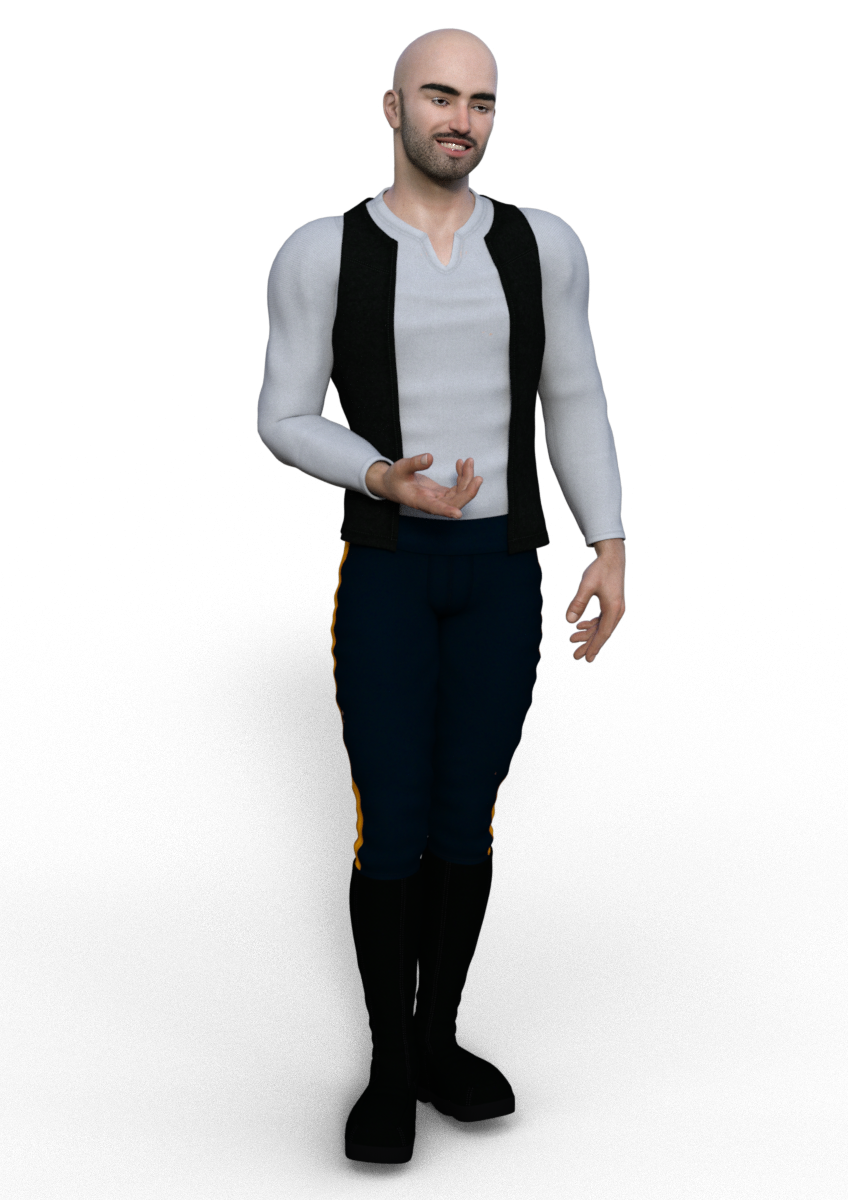 Missing Files Error Referencing Old dsf File
Missing DSF asset warnings usually come either from a DUF file with a bad pathway, or a morph DSF with a bad Parent pathway.
DS Cadichon - yay, donkey! But requirements?Thanks for clarifying, @Deepsea, and @Daventaki for the render without the morph! Yeah, a bummer in my view, too. I will wishlist the donkey and the Pro Bundle for now. @Deepsea, maybe you could somehow contrive to make a version which does not rely on the bundle? Would really love to buy that!
[Released] Turbo Loader for Genesis 8 and 8.1 [Commercial]gellenburg said:
Same exact config for both. Same directories. Same order. (I double-checked this morning just in case the order was different. Certainly there's more "data" (pun intended) in the My DAZ 3D Library as opposed to my Third-Party Library Content directories.
All morphs are still enabled and then you cleared the list and rescanned?
Several times. Over the past couple of days I've physically deleted the cache files out of the Turbo Loader Configuration folder just to be sure.
I've even run the "Disable All" utility and the "Enable All" utility a couple of times.
Even ran the Reset Morph Directory button and pointed it to /data so it went through and scanned the entire hierarchy to enable stuff even! (It only found 20 items but I don't remember which "Generation" of character they were from.)
Public Beta:

Pro:

Are all those directories where everything is? Nothing hidden? If so, I will provide you a test script to tell you what TL thinks it sees.
DS Cadichon - yay, donkey! But requirements?Gordig said:
Daventaki said:
This is Cadichon without the Pro Bundle Donkey
Could you please also do a side-by-side of Cadichon next to Horse 2 with the donkey morph?
Unfortunately I do not at this time own the Pro Bundle, I have wishlisted it for a good sale in the future hopefully. I went ahead and purchased because with the discounts I got a pretty decent deal.
[Released] Turbo Loader for Genesis 8 and 8.1 [Commercial]Same exact config for both. Same directories. Same order. (I double-checked this morning just in case the order was different. Certainly there's more "data" (pun intended) in the My DAZ 3D Library as opposed to my Third-Party Library Content directories.
All morphs are still enabled and then you cleared the list and rescanned?
Several times. Over the past couple of days I've physically deleted the cache files out of the Turbo Loader Configuration folder just to be sure.
I've even run the "Disable All" utility and the "Enable All" utility a couple of times.
Even ran the Reset Morph Directory button and pointed it to /data so it went through and scanned the entire hierarchy to enable stuff even! (It only found 20 items but I don't remember which "Generation" of character they were from.)
Public Beta:
Pro:
DS Cadichon - yay, donkey! But requirements?Fishtales said:
I have all the items in the bundle but I am not buying the bundle just to get the morph so I can use this.
One of the reasons to have picked up bundles for free when DAZ has one of those "Puchase the bundle for just the price of items not owned" sales
DS Cadichon - yay, donkey! But requirements?I have all the items in the bundle but I am not buying the bundle just to get the morph so I can use this.
DS Cadichon - yay, donkey! But requirements?Daventaki said:
This is Cadichon without the Pro Bundle Donkey
Could you please also do a side-by-side of Cadichon next to Horse 2 with the donkey morph?
DS Cadichon - yay, donkey! But requirements?then it won;t be a donkeybut a horse with donkey textures?
I can either use it on a horse exclusively or I'm sure I can create a mule morph myself. I already have textures that would do for an army mule I think.
I think ashyemmett has a free mule morph for the Daz Horse 2 available at sharecg.
It's a shame the Cadichon requires the Horse 2 pro bundle version as I need donkeys and mules for my book project. I have the Millennium horse with its mule and donkey morphs, but they look flat without dforce or lamh manes, tails and body fur. Oh, well...
XTransfer Module 1- Genesis 3 to Genesis 8 Morph Converter (Commercial)Hi. On some figure shapes for some reason it does "Hang" but it isn't frozen, If that makes sense. Some shapes transfer immediately. We don't know if this is because of peoples OS, or another factor, or studio itself.
Renders suddenly failing with errorLeonides02 said:
1 year later, I'm also having this problem. When I try to render, I get this in the log:
"Transaction is released without being committed or aborted. Automatically aborting."
Did anyone ever solve?
Hey!
I also had this issue, and discovered that it was down to the fact I was using detail morphs that were bumping my render subD minumum level up. So, I had my subD level set at 4 but a morph was then subsequently increasing the render subD to 5. This render SubD level was too high and thus causing the bork.
I reset the SubD to 1 and then turned it back up to 4, making sure both the subD and the render subD minimum were at 4... and hey presto! Rendered in 15 minutes.
Might not be the solve for everyone, but just in case it helps someone.
Daz 3D is part of

Connect
DAZ Productions, Inc.
7533 S Center View Ct #4664
West Jordan, UT 84084Licensing Agreement | Terms of Service | Privacy Policy | EULA
© 2026 Daz Productions Inc. All Rights Reserved.