-
Pose and animation conversion for multiple generations of DAZ figures
I think "The Girl" is a generation 3 figure, but I could be wrong. As delivered, neither my script, nor rsg's scripts, specifically support The Girl.
If you have the pose(s) or animation(s) and Aiko or Victoria 3, you could try applying them to one of those models and then try copying. That would be your simplest option.
If that doesn't work for you, you could make a small change to my script to force it to use the A3 scripts provided by rsg. To do this, you need to add an element to the figToName array. How well it works would depend on how close the skeleton of The Girl is to the skeleton of the original Aiko.
In my SG Copy Pose Animated.dsa script, starting at line 58, you'll see the figToName array:
var figToName = [  [ "blAiko3_72712", "A3", 3 ],
                   [ "blMilWom_v3_72712", "A3", 3],    // Not a perfect match, but seems to work.
                   [ "blMilMan_m3_72712", "M3", 3],
                   [ "blMilWom_v4b_68498", "V4", 4 ],
                   [ "blMilMan_m4b_68498", "M4", 4 ],
If you add a line below the first line, that should provide support for The Girl using the A3 scripts:
var figToName = [  [ "blAiko3_72712", "A3", 3 ],
                   [ "blGirl_57720", "A3", 3],    // Treat The Girl the same as Victoria 3
                   [ "blMilWom_v3_72712", "A3", 3],    // Not a perfect match, but seems to work.
                   [ "blMilMan_m3_72712", "M3", 3],
                   [ "blMilWom_v4b_68498", "V4", 4 ],
                   [ "blMilMan_m4b_68498", "M4", 4 ],
You would be adding the line containing blGirl_57720 as shown above.
I don't have any poses or animations that I'm aware of that are specifically made for The Girl, so I can't really test how well this will convert the poses/animations. If you correctly make the change I describe above, it should function, but the results may or may not be satisfactory.
Why Is So Much Cool Stuff for Older Generation Figures?That's exactly the reason why getting Victoria 4 for Genesis 2 was by far my best purchase to date. It lets you use V4 clothes on G2F (and if you save it as a wearable then you can have G3F wear it as well). And not only does it let you wear V4 clothes on G2F (and via autofit G3F) but it also lets you use V4 textures/skins on G2F as well. It's an awesome product that I can't recommend enough. :)
Damn, I have that product; who knew!
Obviously not me, until now at least.
Same here. Obviously I bought it for just that reason, and it got lost in the my content library.
There is a kind of weird logic I've heard on several occasions that tends to allude that the only reason we have any unique and varied articles at all for V4 is simply because it was around so long PA's must have exhausted all their ideas for skimp wear so they eventually had to create something different, and that we'll probably only see a similar assortment of articles when another model lasts as long before getting updated. Crazy, but that actually seems to be the case.I don't think it's so much that they ran out of ideas for skimpwear... they're still making V4 skimpwear out there... as it was people's libraries were filling up with it and more vendors getting to the point where they were willing to gamble on something different in hopes of standing out from the pack. Ironically, with the V3 generation things seemed to go the other way, ie: there was a greater assortment of uniforms and unique items because it was harder, in general, to make the figures themselves stand up to the closer scrutiny that V4 and the Genesis figures can. So, a lot more long legged pants, full length sleeves and a lot of outfits based on 2nd skins rather than close fitting mesh.
Why Is So Much Cool Stuff for Older Generation Figures?That's exactly the reason why getting Victoria 4 for Genesis 2 was by far my best purchase to date. It lets you use V4 clothes on G2F (and if you save it as a wearable then you can have G3F wear it as well). And not only does it let you wear V4 clothes on G2F (and via autofit G3F) but it also lets you use V4 textures/skins on G2F as well. It's an awesome product that I can't recommend enough. :)
Damn, I have that product; who knew!
Obviously not me, until now at least.
Same here. Obviously I bought it for just that reason, and it got lost in the my content library.
There is a kind of weird logic I've heard on several occasions that tends to allude that the only reason we have any unique and varied articles at all for V4 is simply because it was around so long PA's must have exhausted all their ideas for skimp wear so they eventually had to create something different, and that we'll probably only see a similar assortment of articles when another model lasts as long before getting updated. Crazy, but that actually seems to be the case.Why Is So Much Cool Stuff for Older Generation Figures?That's exactly the reason why getting Victoria 4 for Genesis 2 was by far my best purchase to date. It lets you use V4 clothes on G2F (and if you save it as a wearable then you can have G3F wear it as well). And not only does it let you wear V4 clothes on G2F (and via autofit G3F) but it also lets you use V4 textures/skins on G2F as well. It's an awesome product that I can't recommend enough. :)
Damn, I have that product; who knew!
Obviously not me, until now at least.
There are a lot of talented artists here at DAZ, but to me, the ones who deserve the most acclaim are the ones who make the utility products that make other products more useful and expand their lifecycle.
Possibility of Beauty Fingers and Toes + Toes Control for Genesis for GEN3 Male?Hello Daz3D community! Been lurking now and then, slowly upgrading my computer to be able to handle Daz Studio 4.9 and Genesis 3. ALMOST GETTING THERE (yay!). But I have a question, and I'll get straight to the point: Is there ever a possibility of Beauty Fingers and Toes and Toes Control for Genesis for Genesis 3 Male? I ask because, and I don't mean to offend anyone, but I've noticed there's a MASSIVE bias and catering to the Victoria 4, Genesis Female, Genesis 2 Female, and Genesis 3 Female (they each have nearly triple the amount of products their male counterparts do!). Usually, when these fancy morphs come out, they're for the female models only. Which is a bummer (for me, maybe some). I know zev0 said he likely wont be working on anything for Toes Control for Genesis 3 as it sold poorly. Which sucks. A lot. I don't know how to contact chungdan about possibly making a Beauty Fingers and Toes for the male. But surely, there are other people around that could? If I could, I totally would, but I know nothing of this.
I'm mainly just looking for the HD for the hands and feet, while also having more control with the toes (length in particular) for Genesis 3 Male. I hope this isn't the wrong place to ask, by the way. Forgive me if it is!
Why Is So Much Cool Stuff for Older Generation Figures?That's exactly the reason why getting Victoria 4 for Genesis 2 was by far my best purchase to date. It lets you use V4 clothes on G2F (and if you save it as a wearable then you can have G3F wear it as well). And not only does it let you wear V4 clothes on G2F (and via autofit G3F) but it also lets you use V4 textures/skins on G2F as well. It's an awesome product that I can't recommend enough. :)
Damn, I have that product; who knew!
Obviously not me, until now at least.
Icons don't all showDaz Studio: Some icon's don't show in content folders. In this case most of my poses do not show icons (thumbnails) of the poses. I've tried totally erasing and reinstalling DS from the start, Cleaned out all the stuff in app data, the MyDazLibrary stuff in user/public. and deleted studio via insall manager and a complete uninstall of manager. This gives me a full reinstall, redownload everything. I've tried slowly adding content, i.e. installed studio, postgre, then all my victoria content and then genessis etc. incase it needs time to completely install. Still the pose icons don't show. Now I know that at one time they did show (a previous installation).
I'm working on an Asus K55N laptop with 8 gb ram, 64 bit, windows 10. Latest Studio
Anyone have any thoughts?
If this is a repeate issue I wasn't able to find it by searching the content which makes me think its a unique issue
Thanks for any help you can provide.
Bruce
*CLOSED* RRRR What does it mean? Render Contesttag: luci45 #2
Restless Ricky's Rairaiken Romance
Ricky hopes he has found true love again, but Yoon-Ji is not impressed by the glowing parasol that he bought from Magic Makoto.Trey for M4
The Neighbour's Yard (used TV antenna and billboard trees background)
The Treasure Beast
Rairaiken Shinjuku 1954
Strange Substances Pack 2 (LB)
Minato Outfit for Genesis 2 Male(s) (LB)
Grungy Jeeps (LB)
Mage Tower Accessory Pack 2 (LB)
Asteria (LB)
City Ruins : Vehicles (LB)
And Love Flowers Poses (LB)Also used:
Nature Shaders
Lee 7
Ice Bandit Outfit for Genesis 3 Male(s)
Streetwear Jeans and Shoes
LoRez Police
Geisha Prop Collection parasol
Amazing Hats
i13 Hello Smart Phone
Yu Hair for Genesis 2 Female(s) and Victoria 4
Casual Days leggings and boots
Loretta LoRez shopping bag
Maxi Skirt bag
Mei Lin 6 texture
East Asia for Genesis 2 Females
Various shaders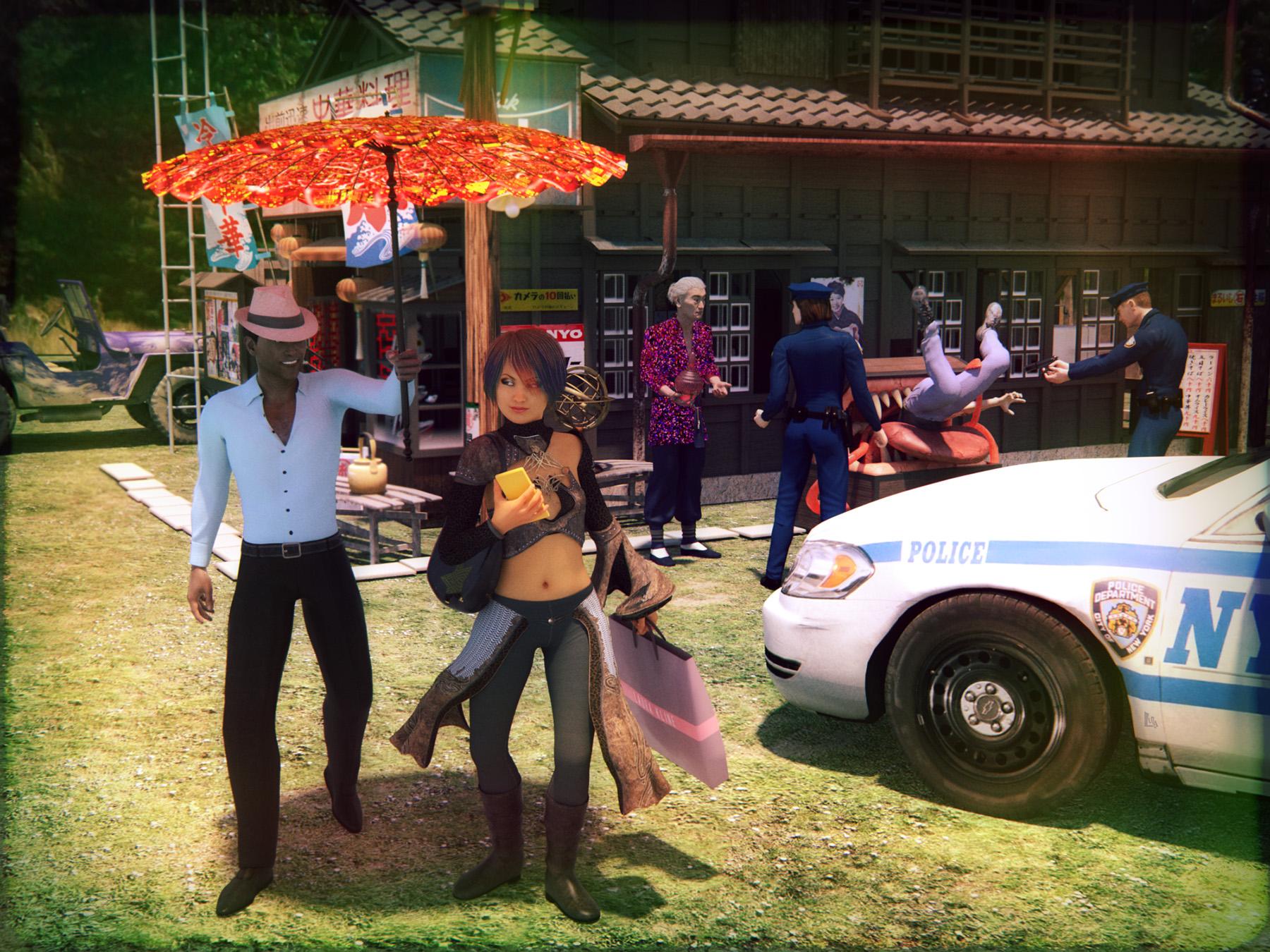 Pose and animation conversion for multiple generations of DAZ figures
Please accept my apologies if I'm asking a stupid noob question.
I downloaded the sgapps-posing-scripts.zip and installed it, and downloaded and installed 4f2081e11d6376813a93c388e7bb1c.zip
I tried to copy a pose from DAZ The Girl (not Girl 4 but to earlier version) to Victoria 4.2.
I keep getting an error message that says
Copy Pose Script ''Scripts/SGApps/Posing/Fix Pose UNSET-V4'.{dsa,dsb,dse} was not found.
I did a search of my computer and did not find any files named UNSET-V4
Is that something I have to make myself?
I'm using DAZ 4.9 (64 bit)
Infinite Insanity - There's ALWAYS Another Sale! (Daily Sale Talk):sigh: why is it all 4 of the "7s" that have turned up in the megagrab are ones I have? Aiko 7, Teen Josie 7, Victoria 7, Micheal 7....maybe it's a sign I should stop buying the 7s? I keep hoping maybe Rune will turn up there....
Yep, same here. Rune 7 would be great.
Why Is So Much Cool Stuff for Older Generation Figures?That's exactly the reason why getting Victoria 4 for Genesis 2 was by far my best purchase to date. It lets you use V4 clothes on G2F (and if you save it as a wearable then you can have G3F wear it as well). And not only does it let you wear V4 clothes on G2F (and via autofit G3F) but it also lets you use V4 textures/skins on G2F as well. It's an awesome product that I can't recommend enough. :)
How well does this product work in practice? Do they need lots of tweaking to fit right?
There are indeed a lot of cool things for M/V4 that don't seem to have an equal. Its a bit irritating to me, especially when there are so many things that look strikingly similar to each other for newer generations (figures and clothes.)
For V4 to G2F, textures/skin transfer is pretty much flawless. Clothing transfers usually work extremely well on tight fitting outfits while more finagling is required with looser items. Shoes are okay, much better than the V4 to Genesis 1 process, but for tight closeups and things like solid shell items, like suits of armor, or accessories lke swordbelts/scabbards, you may find you get better results manually placing the item rather than using autofit or the transfer utility.
So this item is all that's required for getting M/V4 clothes to G2? No extra addons? I'm just looking at this for clothes. I have managed getting some skins transfered, but stayed away from clothing.
It is all you need to get clothes and skins from V4 onto G2F, but for M4 to G2M you need the companion product from Slosh:
Infinite Insanity - There's ALWAYS Another Sale! (Daily Sale Talk):sigh: why is it all 4 of the "7s" that have turned up in the megagrab are ones I have? Aiko 7, Teen Josie 7, Victoria 7, Micheal 7....maybe it's a sign I should stop buying the 7s? I keep hoping maybe Rune will turn up there....
Why Is So Much Cool Stuff for Older Generation Figures?That's exactly the reason why getting Victoria 4 for Genesis 2 was by far my best purchase to date. It lets you use V4 clothes on G2F (and if you save it as a wearable then you can have G3F wear it as well). And not only does it let you wear V4 clothes on G2F (and via autofit G3F) but it also lets you use V4 textures/skins on G2F as well. It's an awesome product that I can't recommend enough. :)
How well does this product work in practice? Do they need lots of tweaking to fit right?
There are indeed a lot of cool things for M/V4 that don't seem to have an equal. Its a bit irritating to me, especially when there are so many things that look strikingly similar to each other for newer generations (figures and clothes.)
For V4 to G2F, textures/skin transfer is pretty much flawless. Clothing transfers usually work extremely well on tight fitting outfits while more finagling is required with looser items. Shoes are okay, much better than the V4 to Genesis 1 process, but for tight closeups and things like solid shell items, like suits of armor, or accessories lke swordbelts/scabbards, you may find you get better results manually placing the item rather than using autofit or the transfer utility.
So this item is all that's required for getting M/V4 clothes to G2? No extra addons? I'm just looking at this for clothes. I have managed getting some skins transfered, but stayed away from clothing.
Why Is So Much Cool Stuff for Older Generation Figures?That's exactly the reason why getting Victoria 4 for Genesis 2 was by far my best purchase to date. It lets you use V4 clothes on G2F (and if you save it as a wearable then you can have G3F wear it as well). And not only does it let you wear V4 clothes on G2F (and via autofit G3F) but it also lets you use V4 textures/skins on G2F as well. It's an awesome product that I can't recommend enough. :)
Agreed. There are workarounds for almost all generations clothing to be used on newer figures. I can't imagine buying many new items remade for newer figures when so many work well already.
Especially when DAZ keeps runnning 80% off sales on the back catalog. At those prices I'll buy an entire outfit just to get a pair of shoes or a hat I like. :)
Why Is So Much Cool Stuff for Older Generation Figures?That's exactly the reason why getting Victoria 4 for Genesis 2 was by far my best purchase to date. It lets you use V4 clothes on G2F (and if you save it as a wearable then you can have G3F wear it as well). And not only does it let you wear V4 clothes on G2F (and via autofit G3F) but it also lets you use V4 textures/skins on G2F as well. It's an awesome product that I can't recommend enough. :)
How well does this product work in practice? Do they need lots of tweaking to fit right?
There are indeed a lot of cool things for M/V4 that don't seem to have an equal. Its a bit irritating to me, especially when there are so many things that look strikingly similar to each other for newer generations (figures and clothes.)
For V4 to G2F, textures/skin transfer is pretty much flawless. Clothing transfers usually work extremely well on tight fitting outfits while more finagling is required with looser items. Shoes are okay, much better than the V4 to Genesis 1 process, but for tight closeups and things like solid shell items, like suits of armor, or accessories lke swordbelts/scabbards, you may find you get better results manually placing the item rather than using autofit or the transfer utility.
Why Is So Much Cool Stuff for Older Generation Figures?That's exactly the reason why getting Victoria 4 for Genesis 2 was by far my best purchase to date. It lets you use V4 clothes on G2F (and if you save it as a wearable then you can have G3F wear it as well). And not only does it let you wear V4 clothes on G2F (and via autofit G3F) but it also lets you use V4 textures/skins on G2F as well. It's an awesome product that I can't recommend enough. :)
Agreed. There are workarounds for almost all generations clothing to be used on newer figures. I can't imagine buying many new items remade for newer figures when so many work well already. With the dynamic script, I have also been using poser, TY2, and Miki clothing on GF3, LOL.
Why Is So Much Cool Stuff for Older Generation Figures?That's exactly the reason why getting Victoria 4 for Genesis 2 was by far my best purchase to date. It lets you use V4 clothes on G2F (and if you save it as a wearable then you can have G3F wear it as well). And not only does it let you wear V4 clothes on G2F (and via autofit G3F) but it also lets you use V4 textures/skins on G2F as well. It's an awesome product that I can't recommend enough. :)
How well does this product work in practice? Do they need lots of tweaking to fit right?
There are indeed a lot of cool things for M/V4 that don't seem to have an equal. Its a bit irritating to me, especially when there are so many things that look strikingly similar to each other for newer generations (figures and clothes.)
Teen Josie 7I used her skin on a Victoria 7 morph in this image; in case you were wondering how it could look.
Never would have thought of doing that, but the results are quite nice.
Why Is So Much Cool Stuff for Older Generation Figures?That's exactly the reason why getting Victoria 4 for Genesis 2 was by far my best purchase to date. It lets you use V4 clothes on G2F (and if you save it as a wearable then you can have G3F wear it as well). And not only does it let you wear V4 clothes on G2F (and via autofit G3F) but it also lets you use V4 textures/skins on G2F as well. It's an awesome product that I can't recommend enough. :)
Why Is So Much Cool Stuff for Older Generation Figures?A good part of it is simply a factor of time on the market. DAZ's 4th generation was at the top of the market, by itself, for as long as all three of the Genesis generations combined... that's 2006-2011 for Victoria 4, for example, as compared to 2011 to 2013 for Victoria 5, 2013- 2015 for Victoria 6 and 2015 to present for Victoria 7), and for various reasons the 4th Generation has continued to be the go-to figure for many Poser users. That's 10 years worth of content just for the V4 generation without even counting the four years that the Victoria 3 generation was the dominant figure (2002-2006), wheras none of the newer Generations has had more than 2 years at the top of the pyramid. For the artists who opted to support the Poser market, that meant coming up with ever newer variants on themes which breeds variety. And that meant filling out every possible niche and subniche to weasel every last possible penny out of the market. Look at the more recent V4 characters and you see a lot of things like elaborate tatoowork and multiple skins to make the new characters stand out, as they've pretty much hit the end of what can be done with the standard morphs of the base mesh.
The other thing is that since one of the big perks of the Genesis generations is that, except for shoes, they can use any of the previous generation's clothing, so for the smaller niche products there's the question of whether doing a new G3F or whatever version will really sell that well, or whether the existence of the Gen3/Gen4 version will satisfy that need to the point where they cannabalize any potential sales of newer versions. For some of the major products like the MFD and the Mech suit we have seen upgrades for the newer generations, and the G3s are still less than two years old so there are probably still upgraded versions of older outfits in the works, but I doubt that we'll ever see a generation of figures with the depth of support that V4 and her kin enjoyed.
Daz 3D is part of

Connect
DAZ Productions, Inc.
7533 S Center View Ct #4664
West Jordan, UT 84084Licensing Agreement | Terms of Service | Privacy Policy | EULA
© 2026 Daz Productions Inc. All Rights Reserved.