-
Pose and animation conversion for multiple generations of DAZ figures
Maybe,
 .
.I stuck with rsg's naming convention. I assume that A3 stands for Aiko (the original I believe) from the 3rd generation. Aiko/A3 was quite popular with many people, although I wasn't messing around with DAZ models at that time.
For generation 4 or later, rsg named everything based on the generation of Victoria and Michael. That's why there aren't any G3F, G2F or G2M scripts as they are named V7, V6 and M6. I'm not sure why rsg used what appears to be the Aiko label for generation 3 and just assume that rsg is either a fan of Aiko, thought that Aiko was more popular than Victoria 3 or only had Aiko available for the 3rd generation.
I did a quick stab at using the FixPoseGenerator.dsa script to create Victoria3 (V3) to G2F and G3F scripts and found them to be a little off because I didn't spend enough time matching up the bone orientations for the script to work as well as it can.
I then tried using the A3 scripts provided by rsg and they worked better than my one poor attempt at making V3 Fix Pose scripts. In fact, in the few number of cases I tried, I felt the A3 to G2F and G3F scripts were close enough to work with for converting both poses and animations for the few Victoria 3 samples I have, so I stopped working on making V3 specific scripts.
If one needed more precise pose and animation conversion from V3 to G2F and G3F, one could use the FixPoseGenerator.dsa script to make V3 scripts. I'm not sure it is worth it as pose and animation conversion is very rarely 100%. I was pretty happy with the V3 converted poses and animations as the results were very useable with a few quick fixes, so I didn't put any more time into making "better" V3 Fix Pose scripts for my own use.
Thanks so much for offering these pose conversion scripts for free! I have many beautiful poses for V3 by schlabber and cascarda that your A3 > V7/G3F script converted very well. I only had to tweak hands where they were touching the body and toe bends. Anyone who is trying to convert V3 poses can use the A3 > G3F script with minor post-scripting adjustments.
--MW
Fiddling with Iray skin settings...Experimenting... Test Object: Victoria 7 HD. (Involuntarily. But still "alive").

Putting in the recent SSS Reflectance Tint color (RGB 255-240-215) into Translucency Color and using the "Legacy" SSS Reflectance Tint color (RGB 236-255-255) looks like the translucence will blow both Base and transmission (#0). As side effect I discovered that a too bright Translucency Color has a large impact on render times: Total Rendering Time: 15 minutes 30.32 seconds; 268 iterations, 73.433s init, 845.055s render. For the default material (#1): Total Rendering Time: 5 minutes 13.81 seconds; 93 iterations, 69.890s init, 231.981s render. Almost tripled.
Putting in my favored Transmitted Color solution (picked from diffuse map (RGB 196-155-132) with Transmitted Measurement Distance: 1.00, Scattering Measurement Distance: 0.05 and SSS Amount: 0.835) into the default Victoria 7 material results only in a very subtle change (#2), but with a Total Rendering Time: 4 minutes 10.37 seconds; 73 iterations, 65.715s init, 172.699s render, around 20% less time needed to complete.
Looking for a more "physicallly based" solution I got to the idea to try a new Translucency Color (RGB 217-133-114) based on in vivo (natural samples containing blood etc.) measurements for the Transmitted Color of the epidermis (#4). Total Rendering Time: 6 minutes 9.75 seconds; 101 iterations, 66.633s init, 291.309s render.
If you prefer a skin that looks more pale, you can use the "Legacy" SSS Reflectance Tint color value (RGB 236-255-255) (#5). Total Rendering Time: 7 minutes 28.20 seconds; 124 iterations, 72.496s init, 363.942s render.
I found a very interesting article about skin shading: A Spectral BSSRDF for Shading Human Skin by Craig Donner and Henrik Wann Jensen (the link to the PDF is at the bottom left). The 10 pages describing nicely where the color of our skin comes from.
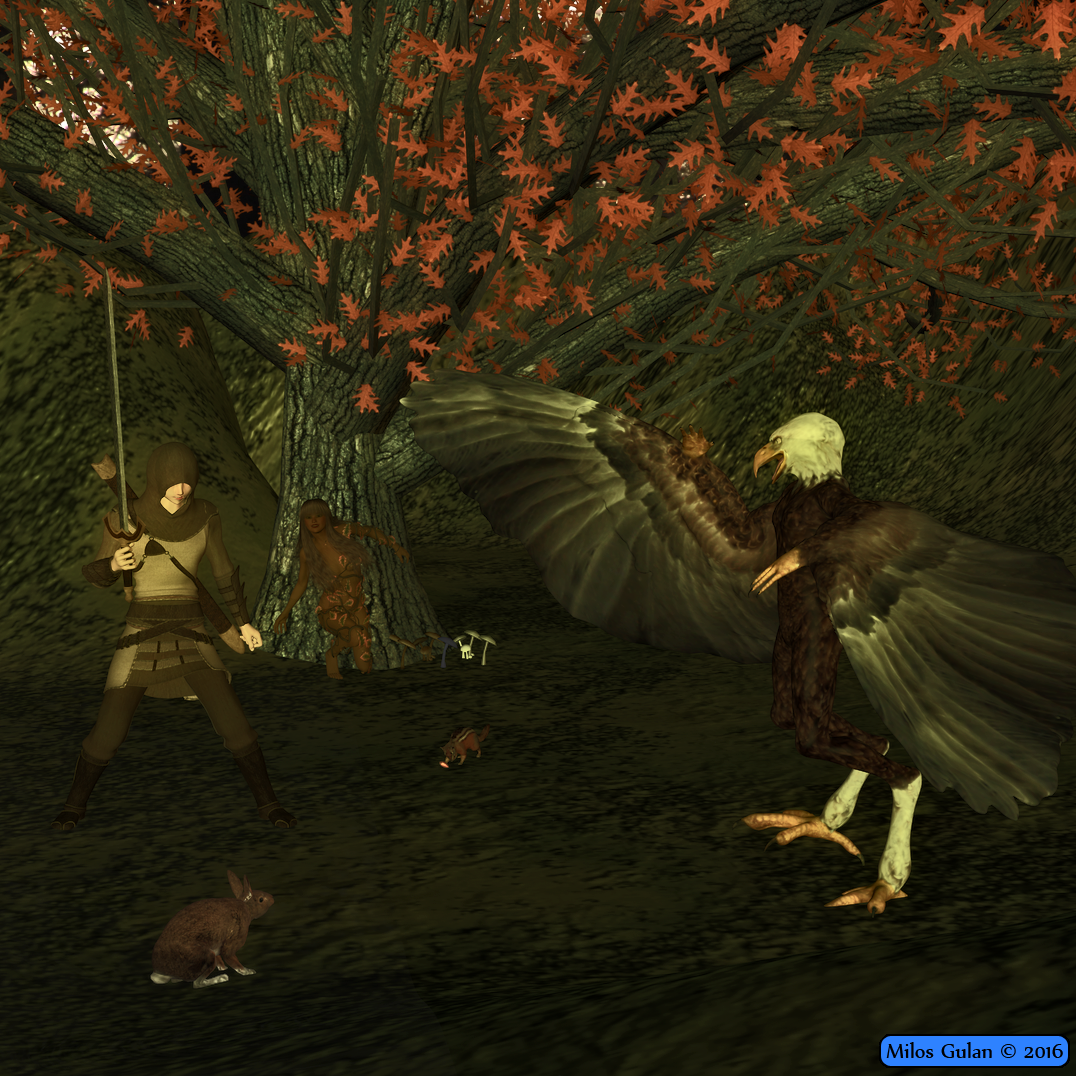
3D Art Freebie Challenge – September, 2016: The Leaves of Autumn Bring Changes (Entry Thread)Forest Spirits
*******
Something that can happen when You are after some adventure in the forest.
*******
Done with Daz Studio 4.9
Items marked with an asterisk require registration.
Not Counting: Victoria 4
Freebies:
1.) H4 M02 (Hero 4 Character, scroll down)
2.) Textures for Slicer for M4/H4 (Slicer 1 file)
3.) Rabbit
5.) Aarakocra
6.)* Dryad Leaves for V4-A4-G4-GND4-V4Elite
7.)* Mighty Oak
8.)* Oak Tree For Daz 4.6
9.)* A bunch of mushrooms
10.)* MC Mega Terrain
11.)* alta_V4M++01 (for V4.2) (V4 Character, Scroll down)
13.)* Render Profiles for DAZ Studio 4.5 (Rendered on Insane)
Inactive links Misty Woods by Rowan54 (backdrop, I couldn't find it on her ShareCg or Deviant Art Account either)
Paid: Hero 4, Slicer Outfit, Aspasia Hair
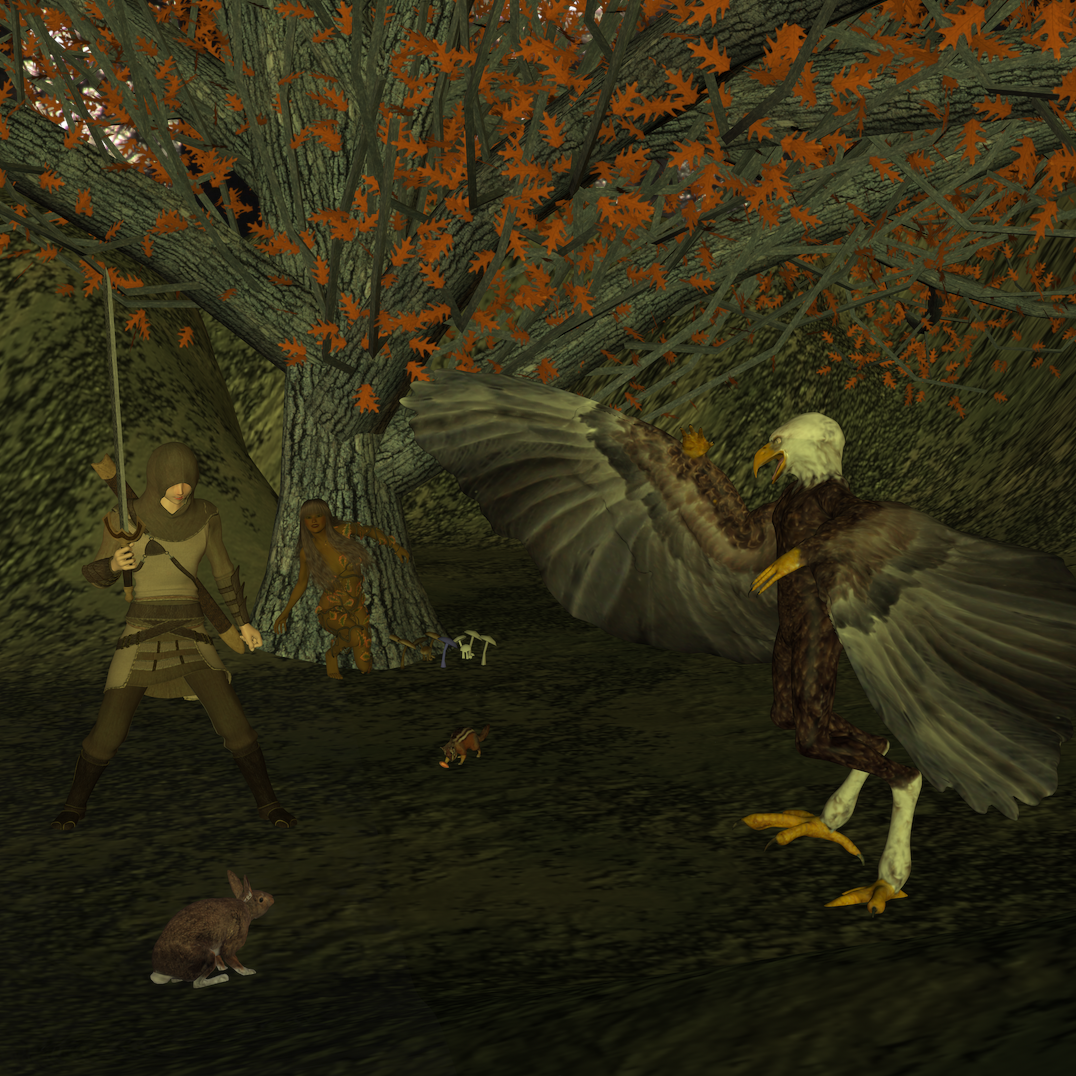
Picture without postwork:
 Why Is So Much Cool Stuff for Older Generation Figures?
...would that process work using Genesis "Classic" to set it up as G2F doesn't have an AIko3 fit clone?
I'm not sure. The product is Victoria 4 for Genesis 2 Female. I've never tried it with Genesis? I'm not sure how to do that.
Why Is So Much Cool Stuff for Older Generation Figures?That's exactly the reason why getting Victoria 4 for Genesis 2 was by far my best purchase to date. It lets you use V4 clothes on G2F (and if you save it as a wearable then you can have G3F wear it as well). And not only does it let you wear V4 clothes on G2F (and via autofit G3F) but it also lets you use V4 textures/skins on G2F as well. It's an awesome product that I can't recommend enough. :)
How well does this product work in practice? Do they need lots of tweaking to fit right?
There are indeed a lot of cool things for M/V4 that don't seem to have an equal. Its a bit irritating to me, especially when there are so many things that look strikingly similar to each other for newer generations (figures and clothes.)
It works pretty well, imo. Of the clothes I've transferred so far I've had to do little to no tweaking. At least for the clothes - shoes don't do as well as far as I can tell. I've never been able to get shoes to transfer well, regardless of product, sadly. Some shoes transfer better than others though. For the clothes transfer I give it an A to A-, for shoes I give it a B- to a C (but then I've never seen a product be able to transfer shoes well).
Here's G3F wearing V4 Future Cop:
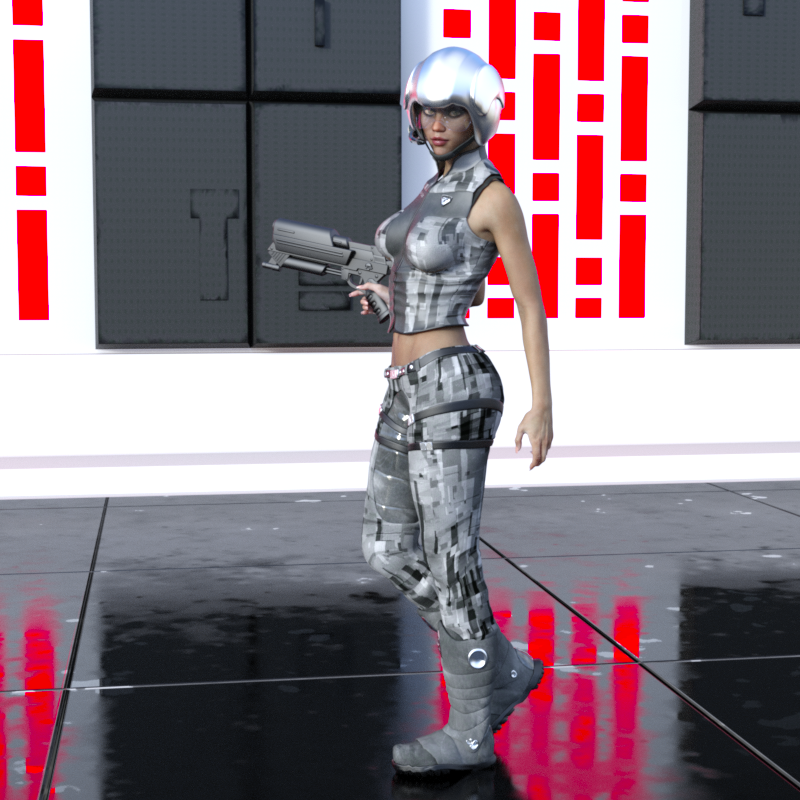
What I do is transfer it to G2F using the product, then save it as a "wearable". Then it goes on G3F pretty easy via the wearable preset. :)
3D Art Freebie Challenge – September, 2016: The Leaves of Autumn Bring Changes (Main Thread)Here is my entry, I am hoping that I did it good.
Forest Spirits
*******
Something that can happen when You are after some adventure in the forest
*******
Done with Daz Studio 4.9
Items marked with an asterisk require registration.
Not Counting: Victoria 4
Freebies:
1.) H4 M02 (Hero 4 Character, scroll down)
2.) Textures for Slicer for M4/H4 (Slicer 1 file)
3.) Rabbit
5.) Aarakocra
6.)* Dryad Leaves for V4-A4-G4-GND4-V4Elite
7.)* Mighty Oak
8.)* Oak Tree For Daz 4.6
9.)* A bunch of mushrooms
10.)* MC Mega Terrain
11.)* alta_V4M++01 (for V4.2) (V4 Character, Scroll down)
12.)* VYK_Maria (V4 texture only) My idea was to use Moreena the dryad from here but I couldn't make textures work as folder seems to be named differently http://freezone.thefantasiesattic.net/index.php?main_page=product_info&cPath=138_197&products_id=366
13.)* Render Profiles for DAZ Studio 4.5 (Rendered on Insane)
Inactive links Misty Woods by Rowan54 (backdrop, I couldn't find it on her ShareCg or Deviant Art Account either)
Paid: Hero 4, Slicer Outfit, Aspasia Hair
So nice to see someone using Chohole's textures. I've used the Insane settings before.
All links verified.
ENTRY ACCEPTED
Please move to Entry Thread.
Pose and animation conversion for multiple generations of DAZ figuresI think "The Girl" is a generation 3 figure, but I could be wrong. As delivered, neither my script, nor rsg's scripts, specifically support The Girl.
If you have the pose(s) or animation(s) and Aiko or Victoria 3, you could try applying them to one of those models and then try copying. That would be your simplest option.
If that doesn't work for you, you could make a small change to my script to force it to use the A3 scripts provided by rsg. To do this, you need to add an element to the figToName array. How well it works would depend on how close the skeleton of The Girl is to the skeleton of the original Aiko.
In my SG Copy Pose Animated.dsa script, starting at line 58, you'll see the figToName array:
var figToName = [  [ "blAiko3_72712", "A3", 3 ],
                   [ "blMilWom_v3_72712", "A3", 3],    // Not a perfect match, but seems to work.
                   [ "blMilMan_m3_72712", "M3", 3],
                   [ "blMilWom_v4b_68498", "V4", 4 ],
                   [ "blMilMan_m4b_68498", "M4", 4 ],
If you add a line below the first line, that should provide support for The Girl using the A3 scripts:
var figToName = [  [ "blAiko3_72712", "A3", 3 ],
                   [ "blGirl_57720", "A3", 3],    // Treat The Girl the same as Victoria 3
                   [ "blMilWom_v3_72712", "A3", 3],    // Not a perfect match, but seems to work.
                   [ "blMilMan_m3_72712", "M3", 3],
                   [ "blMilWom_v4b_68498", "V4", 4 ],
                   [ "blMilMan_m4b_68498", "M4", 4 ],
You would be adding the line containing blGirl_57720 as shown above.
I don't have any poses or animations that I'm aware of that are specifically made for The Girl, so I can't really test how well this will convert the poses/animations. If you correctly make the change I describe above, it should function, but the results may or may not be satisfactory.
Thank you for responding. I'll try the first solution first.
EDIT: When I tried the first method (applying the Girl pose to Aiko3, and then using the script to copy it to V4, I received this error message.
Copy Pose Script ''Scripts/SGApps/Posing/Fix Pose A3-V4'.{dsa,dsb,dse} was not found.
I did a search of my hard drive and I do not have that file.

I'll try applying the pose to V3, then copy to V4 later today.
EDIT 2: When I applied the pose to Victoria 3 and then tried to copy to Victoria 4 I received this error
Copy Pose Script ''Scripts/SGApps/Posing/Fix Pose UNSET-V4'.{dsa,dsb,dse} was not found.
I'll try editing the script later.
EDIT 3: I edited the script, applied the pose to The Girl, loaded Victoria 4.2, then ran the script.
I received this error message.
Copy Pose Script ''Scripts/SGApps/Posing/Fix Pose A3-V4'.{dsa,dsb,dse} was not found.
EDIT 4: I feel so dumb. I just directly applied the pose to Victoria 4 (without using the script). The figure accepted the pose, but it required adjusting the arms and legs.
Never mind.
is victoria 4.2?If the package contains a \Runtime\Libraries\!DAZ\Victoria 4 folder it will be an ExP expansion (for Victoria 4), or at least is very likely to be. If it doesn't then it definitely isn't. Any such expansion will appear in the Poser Loader dialogue, though if it lacks metadata (not the same as the emtadata for the conetent management system) it will have just a product code and No Metadata, not its proper name and an icon.
Sharing Body Parts Across the Generations (eyes and nails)I usually go in and manually change things around from V4 to Genesis to Genesis 2. (Gen 3 excluded -- nothing shares easily on that model, including poses).
Sometimes I have to adjust the UV map setting for specific parts - Hiro 5 to Victoria 4, depending on what I'm changing around. Of course, I might own the UV transfer maps for each (I never knew what I was actually buying when I first started buying 3D content here on DAZ a year ago).
3D Art Freebie Challenge – September, 2016: The Leaves of Autumn Bring Changes (Main Thread)Here is my entry, I am hoping that I did it good.
Forest Spirits
*******
Something that can happen when You are after some adventure in the forest
*******
Done with Daz Studio 4.9
Items marked with an asterisk require registration.
Not Counting: Victoria 4
Freebies:
1.) H4 M02 (Hero 4 Character, scroll down)
2.) Textures for Slicer for M4/H4 (Slicer 1 file)
3.) Rabbit
5.) Aarakocra
6.)* Dryad Leaves for V4-A4-G4-GND4-V4Elite
7.)* Mighty Oak
8.)* Oak Tree For Daz 4.6
9.)* A bunch of mushrooms
10.)* MC Mega Terrain
11.)* alta_V4M++01 (for V4.2) (V4 Character, Scroll down)
12.)* VYK_Maria (V4 texture only) My idea was to use Moreena the dryad from here but I couldn't make textures work as folder seems to be named differently http://freezone.thefantasiesattic.net/index.php?main_page=product_info&cPath=138_197&products_id=366
13.)* Render Profiles for DAZ Studio 4.5 (Rendered on Insane)
Inactive links Misty Woods by Rowan54 (backdrop, I couldn't find it on her ShareCg or Deviant Art Account either)
Paid: Hero 4, Slicer Outfit, Aspasia Hair
Why Is So Much Cool Stuff for Older Generation Figures?That's exactly the reason why getting Victoria 4 for Genesis 2 was by far my best purchase to date. It lets you use V4 clothes on G2F (and if you save it as a wearable then you can have G3F wear it as well). And not only does it let you wear V4 clothes on G2F (and via autofit G3F) but it also lets you use V4 textures/skins on G2F as well. It's an awesome product that I can't recommend enough. :)
Damn, I have that product; who knew!
Obviously not me, until now at least.
There are a lot of talented artists here at DAZ, but to me, the ones who deserve the most acclaim are the ones who make the utility products that make other products more useful and expand their lifecycle.
+1
That's exactly the reason why getting Victoria 4 for Genesis 2 was by far my best purchase to date. It lets you use V4 clothes on G2F (and if you save it as a wearable then you can have G3F wear it as well). And not only does it let you wear V4 clothes on G2F (and via autofit G3F) but it also lets you use V4 textures/skins on G2F as well. It's an awesome product that I can't recommend enough. :)
Damn, I have that product; who knew!
Obviously not me, until now at least.
Same here. Obviously I bought it for just that reason, and it got lost in the my content library.
There is a kind of weird logic I've heard on several occasions that tends to allude that the only reason we have any unique and varied articles at all for V4 is simply because it was around so long PA's must have exhausted all their ideas for skimp wear so they eventually had to create something different, and that we'll probably only see a similar assortment of articles when another model lasts as long before getting updated. Crazy, but that actually seems to be the case.It sounds plausable, but that doesn't make it accurate.:) I expect it was a combination of reasons, including that one, and maybe included: PAs bored with skimp wear, or a particular look from a film (or elsewhere) was in vogue. I was looking at a figure at the other site, and if had been for G3F would have bought; it looked really beautiful.
This suggests to me another possibility; V4 was around so long, that PAs got really skilled at rendering; IRAY, so often used, is new and everyone is still learning how to use it, so the looks tend to be less varied - although that is starting to change.
A lot of Uzilite's stuff transfers quite well to newer generations. For example, here is Eva 7 (GF3) wearing the MOS Invasion Ranger outfit for M3 ( http://www.daz3d.com/mos-invasion ) with Starship Crew textures ( http://www.daz3d.com/starship-crew-for-mos-invasion ). I used autofit to transfer from M3 to Genesis (the original) and then saved that outfit as wearable preset and then autofitted it to G3F in a second round. I also updated the materials to Iray.
Ciao
TD
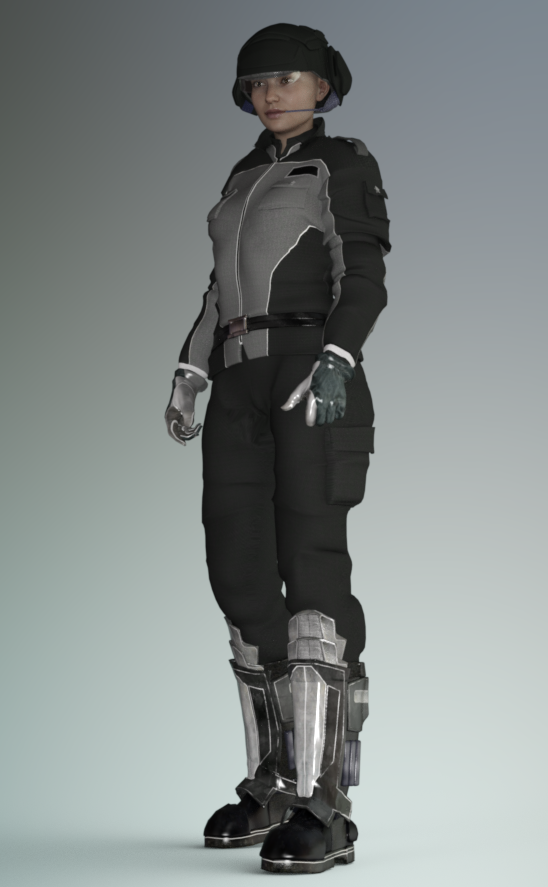
Yes, thanks alot, I just purchased that article because it really looked too good to not use, even if I had to use older generation figures V4 was really as far back as I was willing to go, and that was primarily because of all the support from sites like Rendo. But as I mentioned Uzilite's promos were so good, I figured it was worth the chance even if I couldn't make it work. There really isn't a true equivalent to that uniform for Gen3 figures.
Wow, I have to struggle to see skin on the female model.

In contrast, this new product, which I really like: http://www.daz3d.com/broken-doll-for-genesis-3-female-s is quite different.
Personally, damaged limbs are the result of thinking such an outfit is armour.
Infinite Insanity - There's ALWAYS Another Sale! (Daily Sale Talk):sigh: why is it all 4 of the "7s" that have turned up in the megagrab are ones I have? Aiko 7, Teen Josie 7, Victoria 7, Micheal 7....maybe it's a sign I should stop buying the 7s? I keep hoping maybe Rune will turn up there....
indeed, other than michael; I'd prefer any 7 but michael.
Why Is So Much Cool Stuff for Older Generation Figures?That's exactly the reason why getting Victoria 4 for Genesis 2 was by far my best purchase to date. It lets you use V4 clothes on G2F (and if you save it as a wearable then you can have G3F wear it as well). And not only does it let you wear V4 clothes on G2F (and via autofit G3F) but it also lets you use V4 textures/skins on G2F as well. It's an awesome product that I can't recommend enough. :)
Agreed. There are workarounds for almost all generations clothing to be used on newer figures. I can't imagine buying many new items remade for newer figures when so many work well already. With the dynamic script, I have also been using poser, TY2, and Miki clothing on GF3, LOL.
Call me whatever you wish, but I've bought every version of MFD, including all the addons.
I think it's more practical to do so for some outfits than others. Items that aren't figure-conforming, like long dresses, are a lot more futzsy to adapt, so buying the new version may make more sense... especially if it's as cheap as the MFD upgrades always are. On the other hand, an upgrade on something like Mech Girl or a hair isn't as necessary. And while I automatically bought most of the upgrades that were made for V4-Genesis, I've bought relatively few of the G2F-G3F step ups... they're just not that different most of the time. Of course, a lot of that is also partially due to how many other items I've accumulated in the meantime.
Why Is So Much Cool Stuff for Older Generation Figures?That's exactly the reason why getting Victoria 4 for Genesis 2 was by far my best purchase to date. It lets you use V4 clothes on G2F (and if you save it as a wearable then you can have G3F wear it as well). And not only does it let you wear V4 clothes on G2F (and via autofit G3F) but it also lets you use V4 textures/skins on G2F as well. It's an awesome product that I can't recommend enough. :)
Agreed. There are workarounds for almost all generations clothing to be used on newer figures. I can't imagine buying many new items remade for newer figures when so many work well already. With the dynamic script, I have also been using poser, TY2, and Miki clothing on GF3, LOL.
Call me whatever you wish, but I've bought every version of MFD, including all the addons.
Pose and animation conversion for multiple generations of DAZ figuresI think "The Girl" is a generation 3 figure, but I could be wrong. As delivered, neither my script, nor rsg's scripts, specifically support The Girl.
If you have the pose(s) or animation(s) and Aiko or Victoria 3, you could try applying them to one of those models and then try copying. That would be your simplest option.
If that doesn't work for you, you could make a small change to my script to force it to use the A3 scripts provided by rsg. To do this, you need to add an element to the figToName array. How well it works would depend on how close the skeleton of The Girl is to the skeleton of the original Aiko.
In my SG Copy Pose Animated.dsa script, starting at line 58, you'll see the figToName array:
var figToName = [  [ "blAiko3_72712", "A3", 3 ],
                   [ "blMilWom_v3_72712", "A3", 3],    // Not a perfect match, but seems to work.
                   [ "blMilMan_m3_72712", "M3", 3],
                   [ "blMilWom_v4b_68498", "V4", 4 ],
                   [ "blMilMan_m4b_68498", "M4", 4 ],
If you add a line below the first line, that should provide support for The Girl using the A3 scripts:
var figToName = [  [ "blAiko3_72712", "A3", 3 ],
                   [ "blGirl_57720", "A3", 3],    // Treat The Girl the same as Victoria 3
                   [ "blMilWom_v3_72712", "A3", 3],    // Not a perfect match, but seems to work.
                   [ "blMilMan_m3_72712", "M3", 3],
                   [ "blMilWom_v4b_68498", "V4", 4 ],
                   [ "blMilMan_m4b_68498", "M4", 4 ],
You would be adding the line containing blGirl_57720 as shown above.
I don't have any poses or animations that I'm aware of that are specifically made for The Girl, so I can't really test how well this will convert the poses/animations. If you correctly make the change I describe above, it should function, but the results may or may not be satisfactory.
Why Is So Much Cool Stuff for Older Generation Figures?That's exactly the reason why getting Victoria 4 for Genesis 2 was by far my best purchase to date. It lets you use V4 clothes on G2F (and if you save it as a wearable then you can have G3F wear it as well). And not only does it let you wear V4 clothes on G2F (and via autofit G3F) but it also lets you use V4 textures/skins on G2F as well. It's an awesome product that I can't recommend enough. :)
Damn, I have that product; who knew!
Obviously not me, until now at least.
Same here. Obviously I bought it for just that reason, and it got lost in the my content library.
There is a kind of weird logic I've heard on several occasions that tends to allude that the only reason we have any unique and varied articles at all for V4 is simply because it was around so long PA's must have exhausted all their ideas for skimp wear so they eventually had to create something different, and that we'll probably only see a similar assortment of articles when another model lasts as long before getting updated. Crazy, but that actually seems to be the case.I don't think it's so much that they ran out of ideas for skimpwear... they're still making V4 skimpwear out there... as it was people's libraries were filling up with it and more vendors getting to the point where they were willing to gamble on something different in hopes of standing out from the pack. Ironically, with the V3 generation things seemed to go the other way, ie: there was a greater assortment of uniforms and unique items because it was harder, in general, to make the figures themselves stand up to the closer scrutiny that V4 and the Genesis figures can. So, a lot more long legged pants, full length sleeves and a lot of outfits based on 2nd skins rather than close fitting mesh.
Why Is So Much Cool Stuff for Older Generation Figures?That's exactly the reason why getting Victoria 4 for Genesis 2 was by far my best purchase to date. It lets you use V4 clothes on G2F (and if you save it as a wearable then you can have G3F wear it as well). And not only does it let you wear V4 clothes on G2F (and via autofit G3F) but it also lets you use V4 textures/skins on G2F as well. It's an awesome product that I can't recommend enough. :)
Damn, I have that product; who knew!
Obviously not me, until now at least.
Same here. Obviously I bought it for just that reason, and it got lost in the my content library.
There is a kind of weird logic I've heard on several occasions that tends to allude that the only reason we have any unique and varied articles at all for V4 is simply because it was around so long PA's must have exhausted all their ideas for skimp wear so they eventually had to create something different, and that we'll probably only see a similar assortment of articles when another model lasts as long before getting updated. Crazy, but that actually seems to be the case.Why Is So Much Cool Stuff for Older Generation Figures?That's exactly the reason why getting Victoria 4 for Genesis 2 was by far my best purchase to date. It lets you use V4 clothes on G2F (and if you save it as a wearable then you can have G3F wear it as well). And not only does it let you wear V4 clothes on G2F (and via autofit G3F) but it also lets you use V4 textures/skins on G2F as well. It's an awesome product that I can't recommend enough. :)
Damn, I have that product; who knew!
Obviously not me, until now at least.
There are a lot of talented artists here at DAZ, but to me, the ones who deserve the most acclaim are the ones who make the utility products that make other products more useful and expand their lifecycle.
Possibility of Beauty Fingers and Toes + Toes Control for Genesis for GEN3 Male?Hello Daz3D community! Been lurking now and then, slowly upgrading my computer to be able to handle Daz Studio 4.9 and Genesis 3. ALMOST GETTING THERE (yay!). But I have a question, and I'll get straight to the point: Is there ever a possibility of Beauty Fingers and Toes and Toes Control for Genesis for Genesis 3 Male? I ask because, and I don't mean to offend anyone, but I've noticed there's a MASSIVE bias and catering to the Victoria 4, Genesis Female, Genesis 2 Female, and Genesis 3 Female (they each have nearly triple the amount of products their male counterparts do!). Usually, when these fancy morphs come out, they're for the female models only. Which is a bummer (for me, maybe some). I know zev0 said he likely wont be working on anything for Toes Control for Genesis 3 as it sold poorly. Which sucks. A lot. I don't know how to contact chungdan about possibly making a Beauty Fingers and Toes for the male. But surely, there are other people around that could? If I could, I totally would, but I know nothing of this.
I'm mainly just looking for the HD for the hands and feet, while also having more control with the toes (length in particular) for Genesis 3 Male. I hope this isn't the wrong place to ask, by the way. Forgive me if it is!
Why Is So Much Cool Stuff for Older Generation Figures?That's exactly the reason why getting Victoria 4 for Genesis 2 was by far my best purchase to date. It lets you use V4 clothes on G2F (and if you save it as a wearable then you can have G3F wear it as well). And not only does it let you wear V4 clothes on G2F (and via autofit G3F) but it also lets you use V4 textures/skins on G2F as well. It's an awesome product that I can't recommend enough. :)
Damn, I have that product; who knew!
Obviously not me, until now at least.
Daz 3D is part of

Connect
DAZ Productions, Inc.
7533 S Center View Ct #4664
West Jordan, UT 84084Licensing Agreement | Terms of Service | Privacy Policy | EULA
© 2026 Daz Productions Inc. All Rights Reserved.