-
Expression morphs not transferred with the Transfer Utility
Bejaymac said:
Genesis 3 was the first figure DAZ went full blown facial rigging for expressions with, everything in the Starter Essentials as well as the expressions pack are basically pose controls. There are some morphs in there, but they are partial HD morphs used to add in details like wrinkles, crows feet etc.
How can you transfer this controls?
pJCMs: "Make Unique" vs "Deltas Only"When I'm making my pJCMs, I'm making unique pJCMs hence I use the "make unique." [I zap the generated pJCMs] If I want to 'fix' an existing morph then as Richard mentions, it would be 'deltas only.' Whatever works ;-)
Help - Genesis 8 Eyelashes missing morphs?I don't own Miriam, but I have some other Mousso characters. Some of those, like Gail and Zsazsa have the eyelash morphs showing up when Genesis 8 Female is selected in the Scene pane. Others, like Albany have the eyelash morphs, but they are hidden. When I load the Albany character preset, the Albany Lashes morph is automatically dialed in, but t0 actually see that, I have to enable Preferences>Show Hidden Properties in the Parameters pane.
Edit: third and fourth attached images are the same. Stupid slow forum software made it look like it wasn't attached, so I attached it again. If I delete it, it will delete all attached images. Forum softaware
 pJCMs: "Make Unique" vs "Deltas Only"
Richard Haseltine said:
If you want to modify an existing morph then you want Deltas Only, which would geenrally be the case witha JCM. If you are modifying the JCM created by AutoFollow make sure that the new version isn't set as a projection morph (in Parameetr Settings unless it has moved) as that would cause it to be be forgotten on save.
Thanks, Richard! I've just modified the whole bunch of JCMs created by AutoFollow. So far so good. I'm following the tutorial (I showed the link above). Never heard of Projection morph setting. OK, I am sticking to Deltas Only.
 Expression morphs not transferred with the Transfer Utility
Richard Haseltine said:
Are you sure they are morphs and not pose controls for bones?
It looks like a morph
Help - Genesis 8 Eyelashes missing morphs?barbult said:
Select Genesis 8 Female in your scene, instead of the eyelashes. The eyelash morphs are supposed to be accessed from G8F, not the eyelash object. This Josh Darling video explains some of this.
Thank you this seems to work for some of my models like Krashwerks but many are still missing. For example https://www.daz3d.com/miriam-hd-for-genesis-8-female this one (in fact all Mousso girls) don't have any eyelashes morph on the Genesis 8 figure. I verified and the Miriam Eyelashe Morph is correctly in the \Genesis 8\Female Eyelashes\Morphs\ folder.
Any ideas ?
WIP - coming attractions: Grace KellyThe best of both worlds is to have a really big screen tv set. Or visit one of these:
The lifecast of GK was shipped today and should arrive on Friday (hopefully!). Then I have to get my husband to shoot the photos of it, so it will take me some time before I'll be done with the sculpt. Just letting you know, so you don't expect the head morph to be ready tomorrow! I believe that sometime next week I'll have it ready for upload. I cannot wait to compare what I sculpted based only on photo references and the lifecast scan - how much they will differ and in what way. It will be a good learning experience!
Semi-realistic cats: Experiences with "Zeus" and "Mars"?Nath said:
The kitten does work with the DAZ version - quick test render (poses from DAZ Zeus)
Cool! Thanks for checking!
I've never shopped at Renderhub before. Are they safe/legit?
Strand based hair? Look at my Hair Strand based hair, hard coded strand based hair or the DAZ-native strand based hair? with the latter I can work :)
Is there a point in owning both or them or has one of them a morph to change the shape a little bit?
I came quiete along with the Sailor Warriors, but whoever knews the anime knews: You need Artemis and Luna (the magic cats) to complete it ;-)
The DAZ version of Zeus has dforce. Mars has DAZ SBH. I would assume the 'Hub version of Zeus does, as well. IIRC, she did post a fibermesh hair file for Zeus in the original Zeus thread in the Commons.
The only real reason to get them both is if you want the different morphs. The cats themselves are the same.
Converting items and clothing from 8 to 8.1?Is this on a default figure or is there a morph applied?
pJCMs: "Make Unique" vs "Deltas Only"If you want to modify an existing morph then you want Deltas Only, which would geenrally be the case witha JCM. If you are modifying the JCM created by AutoFollow make sure that the new version isn't set as a projection morph (in Parameetr Settings unless it has moved) as that would cause it to be be forgotten on save.
Holy Hanna - I need some dental workYes, both Mouth Realism morphs usually need to be set to zero in order for the distortion to disappear. Setting only one to zero doesn't completely fix the issue. However, in some cases, certain characters still allow a small amout of Mouth Realism morph before the disortion becomes too noticeable.
pJCMs: "Make Unique" vs "Deltas Only"barbult said:
This is what I think it means, but I am not an expert:
Make Unique creates a new morph. Deltas Only modifies the vertex positions of an existing morph. "Deltas" means "changes" in vertex position. A morph is essentially a list of changes in the position of an object's vertices.
Thank you! Very interesting... Let's say I'm modifying an existing pJCM as it is described in this tutorial pJCM Poses for Daz Studio - YouTube. You're saying that If I choose "Make Unique", I will create a new morph. But I am creating a new custom morph anyway. I am saving this new morph on my hard drive. Of course, I am giving my new morph the name of an already existing pJCM. Since I use "Reverse deformation - Yes", my new pJCM gets executed instead of the old one (as I undertand it). What's going to happen if I while following the procedure from the tutorial above choose "Make Unique" instead? Is my new pJCM going to behave differently?
pJCMs: "Make Unique" vs "Deltas Only"This is what I think it means, but I am not an expert:
Make Unique creates a new morph. Deltas Only modifies the vertex positions of an existing morph. "Deltas" means "changes" in vertex position. A morph is essentially a list of changes in the position of an object's vertices.
pJCMs: "Make Unique" vs "Deltas Only"I've read a few tutorials about JCMs. When you are inserting your custom made OBJ file (with Morph Loader Pro) and you need to fill in the line "Overwrite Existing", some people recommend to use the option "Make Unique". The others suggest to use "Deltas Only". What's the difference?
What does it exactly meant to make it unique? What are these deltas? I always love to understand what I am doing. Can you help me?
Morphs issue after upgrading to DS 4.20WendyLuvsCatz said:
temporarily move or rename your entire genX folder in data with an added .bak and reload a new figure to eliminate that as the cause
GenX is notoriously guilty of causing such issues for me, I then narrow it down and find the guilty morph
Ok, tried that, still no cigar! However, I exported a bunch of the offending morphs as .obj from DS 4.9. They work just fine after adjusting rigging to shape, go figure...
Atleast now there is some kind of workaround...jeeeez...
Expression morphs not transferred with the Transfer UtilityHello, I am having problem with the TU, when transfering morphs all morphs are being transfered except the facial expression morphs and visemens.
Anybody knows why this is happening and how to transfer them?
Thank you.
Morphs issue after upgrading to DS 4.20temporarily move or rename your entire genX folder in data with an added .bak and reload a new figure to eliminate that as the cause
GenX is notoriously guilty of causing such issues for me, I then narrow it down and find the guilty morph
[Released] Character Converter from Genesis 8 Female to Genesis 3 Female - Conv JCMs too[Commercial]Nekura2000 said:
RiverSoftArt said:
Nekura2000 said:
RiverSoftArt said:
Nekura2000 said:
RiverSoftArt said:
Nekura2000 said:
RiverSoftArt said:
Nekura2000 said:
RiverSoftArt said:
Nekura2000 said:
RiverSoftArt said:
Nekura2000 said:
RiverSoftArt said:
Nekura2000 said:
RiverSoftArt said:
Nekura2000 said:
RiverSoftArt said:
Nekura2000 said:
I had to get a new hard drive so I reinstalled Daz Studio. When trying to convert my Generation 7 female characters to Generation 8, I'm getting a distorted face. I've uninstalled and reinstalled the program, even deleted the RSCloneGenesis3Female.obj file from the folder C:\Users\nekur\AppData\Roaming\DAZ 3D\Studio4\CharacterConverterMorphs, with no change. The Generation 7 character as well as Genesis 8 load without a flaw. Here's what I'm getting, attached or from https://www.deviantart.com/wow-creations/art/Converted-920761392. ; I just looked at the parameters for the character I converted, which was Agnes. It isn't showing an Agnes head or body for 8, just Agnes itself.
The clone is for a different Character Converter. Maybe it is pulling in the converted morphs twice? From your previous conversion on the old hard drive and a new conversion? What directories are specified in the content manager? You should check all the currently used morphs on the character and find the morphs. The Parameter Settings show the Asset File Path of the morph (and the [...] button shows the full path of the morph). Make sure the morphs are coming from where you think they should be coming.
I use two different drives when using software. I have the OS drive which I replaced and the data drive. I renamed the original Daz drive as “Daz 3D2 Old”, before installing the Daz Studio. When installing Daz Studio, I allowed it to keep the “Daz 3D” folder, but also use the new “My DAZ 3D Library” folder. I just remember to look at the Error Log when loading Agnes Genesis 8 and this is what I’m getting:
2022-06-29 07:16:21.449 [WARNING] :: ..\..\..\..\..\src\sdksource\fileinput\dzassetdaz.cpp(6903): Formula output property not found: Genesis8Female:/data/Daz%203D/Genesis%208/Female/Morphs/XTransfer/3D%20Universe/ToonGenerations2/Base/XT_CTRL3duToonGenerations2_AdjustAge.dsf#XTIDCTRL3duToonGenerations2_AdjustAge?value - in file: /data/Daz%203D/Genesis%208/Female/Morphs/Zev0/Shape%20Shift/Arm%20Length.dsf
2022-06-29 07:16:21.506 [WARNING] :: ..\..\..\..\..\src\sdksource\fileinput\dzassetdaz.cpp(6903): Formula output property not found: Genesis8Female:/data/DAZ%203D/Genesis%208/Female/Morphs/DAZ%203D/Head/Old/PHMEyesIrisSize.dsf#PHMEyesIrisSize?value - in file: /data/Daz%203D/Genesis%208/Female/Morphs/vyktohria/Meredith/VYK%20Meredith%20Head.dsf
2022-06-29 07:16:22.060 [WARNING] :: ..\..\..\..\..\src\sdksource\fileinput\dzassetdaz.cpp(6903): Formula output property not found: Genesis8Female:/data/DAZ%203D/Genesis%208/Female/Morphs/SickleYield2017/UniversalBreastHelper/PBMSYUBHGiantAll_proj.dsf#PBMSYUBHGiantAll_proj?value - in file: /data/Daz%203D/Genesis%208/Female/Morphs/SickleYield2017/UniversalBreastHelper/PBMSYUBHGiantAll.dsf
2022-06-29 07:16:22.125 [WARNING] :: ..\..\..\..\..\src\sdksource\fileinput\dzassetdaz.cpp(7134): Unsupported formula: /data/Daz%203D/Genesis%208/Female/Morphs/RiverSoft%20Art/Javeria%20for%20Victoria%207%20and%20Genesis%203/pJCMRSG3FVictoria7ThighBndFwdHDR.dsf
2022-06-29 07:16:22.155 [WARNING] :: ..\..\..\..\..\src\sdksource\fileinput\dzassetdaz.cpp(7134): Unsupported formula: /data/Daz%203D/Genesis%208/Female/Morphs/RiverSoft%20Art/Javeria%20for%20Victoria%207%20and%20Genesis%203/pJCMRSG3FVictoria7ThighBndFwdHDL.dsf
2022-06-29 07:16:22.628 [WARNING] :: ..\..\..\..\..\src\sdksource\fileinput\dzassetdaz.cpp(7134): Unsupported formula: /data/Daz%203D/Genesis%208/Female/Morphs/RiverSoft%20Art/FWSA%20Caterina%20for%20Victoria%207%20and%20Genesis%203/pJCMRSG3FVictoria7ShoulderBndFwd_110_R.dsf
2022-06-29 07:16:22.665 [WARNING] :: ..\..\..\..\..\src\sdksource\fileinput\dzassetdaz.cpp(7134): Unsupported formula: /data/Daz%203D/Genesis%208/Female/Morphs/RiverSoft%20Art/FWSA%20Caterina%20for%20Victoria%207%20and%20Genesis%203/pJCMRSG3FVictoria7ShoulderBndFwd_110_L.dsf
2022-06-29 07:16:22.769 [WARNING] :: ..\..\..\..\..\src\sdksource\fileinput\dzassetdaz.cpp(7134): Unsupported formula: /data/Daz%203D/Genesis%208/Female/Morphs/RiverSoft%20Art/FWSA%20Caterina%20for%20Victoria%207%20and%20Genesis%203/pJCMRSG3FVictoria7ShinBndBck_145_R.dsf
2022-06-29 07:16:22.806 [WARNING] :: ..\..\..\..\..\src\sdksource\fileinput\dzassetdaz.cpp(7134): Unsupported formula: /data/Daz%203D/Genesis%208/Female/Morphs/RiverSoft%20Art/FWSA%20Caterina%20for%20Victoria%207%20and%20Genesis%203/pJCMRSG3FVictoria7ShinBndBck_145_L.dsf
2022-06-29 07:16:22.895 [WARNING] :: ..\..\..\..\..\src\sdksource\fileinput\dzassetdaz.cpp(7134): Unsupported formula: /data/Daz%203D/Genesis%208/Female/Morphs/RiverSoft%20Art/FWSA%20Caterina%20for%20Victoria%207%20and%20Genesis%203/pJCMRSG3FVictoria7ForearmBnd_135_R.dsf
2022-06-29 07:16:22.935 [WARNING] :: ..\..\..\..\..\src\sdksource\fileinput\dzassetdaz.cpp(7134): Unsupported formula: /data/Daz%203D/Genesis%208/Female/Morphs/RiverSoft%20Art/FWSA%20Caterina%20for%20Victoria%207%20and%20Genesis%203/pJCMRSG3FVictoria7ForearmBnd_135_L.dsf
2022-06-29 07:16:31.020 [WARNING] :: ..\..\..\..\..\src\sdksource\fileinput\dzassetdaz.cpp(6903): Formula output property not found: Genesis8Female:/data/DAZ%203D/Genesis%208/Female/Morphs/DAZ%20Originals/data/DAZ%203D/Genesis%208/Female/Morphs/Fred%20Winkler%20Art%2CSabby%2CDAZ%20Originals/FW%20Frankie%20HD%20for%20Victoria%207/CTRL-RSC-Frankie.dsfCFred%20Winkler%20Art/data/DAZ%203D/Genesis%208/Female/Morphs/Fred%20Winkler%20Art%2CSabby%2CDAZ%20Originals/FW%20Frankie%20HD%20for%20Victoria%207/CTRL-RSC-Frankie.dsfCSabby/FWSA%20Agnes%20HD%20for%20Lilith%207/PHMMouthRealismHD.dsf#PHMMouthRealismHD?value - in file: /data/DAZ%203D/Genesis%208/Female/Morphs/Fred%20Winkler%20Art%2CSabby%2CDAZ%20Originals/FW%20Frankie%20HD%20for%20Victoria%207/CTRL-RSC-Frankie.dsf
2022-06-29 07:16:31.020 [WARNING] :: ..\..\..\..\..\src\sdksource\fileinput\dzassetdaz.cpp(6903): Formula output property not found: Genesis8Female:/data/DAZ%203D/Genesis%208/Female/Morphs/DAZ%20Originals/data/DAZ%203D/Genesis%208/Female/Morphs/Fred%20Winkler%20Art%2CSabby%2CDAZ%20Originals/FW%20Frankie%20HD%20for%20Victoria%207/CTRL-RSC-Frankie.dsfCFred%20Winkler%20Art/FW%20Brooke%20HD%20for%20Victoria%207/FHMVictoria7.dsf#FHMVictoria7?value - in file: /data/DAZ%203D/Genesis%208/Female/Morphs/Fred%20Winkler%20Art%2CSabby%2CDAZ%20Originals/FW%20Frankie%20HD%20for%20Victoria%207/CTRL-RSC-Frankie.dsf
2022-06-29 07:16:31.021 [WARNING] :: ..\..\..\..\..\src\sdksource\fileinput\dzassetdaz.cpp(6903): Formula output property not found: Genesis8Female:/data/DAZ%203D/Genesis%208/Female/Morphs/DAZ%20Originals/data/DAZ%203D/Genesis%208/Female/Morphs/Fred%20Winkler%20Art%2CSabby%2CDAZ%20Originals/FW%20Frankie%20HD%20for%20Victoria%207/CTRL-RSC-Frankie.dsfCFred%20Winkler%20Art/FW%20Brooke%20HD%20for%20Victoria%207/FBMVictoria7.dsf#FBMVictoria7?value - in file: /data/DAZ%203D/Genesis%208/Female/Morphs/Fred%20Winkler%20Art%2CSabby%2CDAZ%20Originals/FW%20Frankie%20HD%20for%20Victoria%207/CTRL-RSC-Frankie.dsf
2022-06-29 07:16:32.694 [WARNING] :: ..\..\..\..\..\src\sdksource\fileinput\dzassetdaz.cpp(6969): Formula target property not found: Genesis8Female:/data/DAZ%203D/Genesis%208/Female/Morphs/DAZ%203D/Olympia%208/FBMOlympia8.dsf#FBMOlympia8_Test?value - in file: /data/Daz%203D/Genesis%208/Female/Morphs/fabiana/KillerLegsG8/1FK-Olympia8BaseFix.dsf
2022-06-29 07:16:40.096 [WARNING] :: ..\..\..\..\..\src\sdksource\fileinput\dzassetdaz.cpp(7134): Unsupported formula: /data/Daz%203D/Genesis%208/Female/Morphs/DAZ%203D%2CHeysun%20Oh/Olympia%207%20HD%20Add-On/pJCMRSG3FOlympia7ForeArmBndHD_n100L.dsf
2022-06-29 07:16:40.261 [WARNING] :: ..\..\..\..\..\src\sdksource\fileinput\dzassetdaz.cpp(7134): Unsupported formula: /data/Daz%203D/Genesis%208/Female/Morphs/DAZ%203D%2CHeysun%20Oh/Olympia%207%20HD%20Add-On/pJCMRSG3FOlympia7ForeArmBndHD_100R.dsf
2022-06-29 07:16:40.986 [WARNING] :: ..\..\..\..\..\src\sdksource\fileinput\dzassetdaz.cpp(7134): Unsupported formula: /data/Daz%203D/Genesis%208/Female/Morphs/DAZ%203D%2CHeysun%20Oh/Mei%20Lin%207%20HD%20Add-On/pJCMRSG3FMeiLin7ShinBndBck_95R.dsf
2022-06-29 07:16:41.152 [WARNING] :: ..\..\..\..\..\src\sdksource\fileinput\dzassetdaz.cpp(7134): Unsupported formula: /data/Daz%203D/Genesis%208/Female/Morphs/DAZ%203D%2CHeysun%20Oh/Mei%20Lin%207%20HD%20Add-On/pJCMRSG3FMeiLin7ShinBndBck_95L.dsf
2022-06-29 07:16:41.322 [WARNING] :: ..\..\..\..\..\src\sdksource\fileinput\dzassetdaz.cpp(7134): Unsupported formula: /data/Daz%203D/Genesis%208/Female/Morphs/DAZ%203D%2CHeysun%20Oh/Mei%20Lin%207%20HD%20Add-On/pJCMRSG3FMeiLin7ShinBndBckR.dsf
2022-06-29 07:16:41.494 [WARNING] :: ..\..\..\..\..\src\sdksource\fileinput\dzassetdaz.cpp(7134): Unsupported formula: /data/Daz%203D/Genesis%208/Female/Morphs/DAZ%203D%2CHeysun%20Oh/Mei%20Lin%207%20HD%20Add-On/pJCMRSG3FMeiLin7ShinBndBckL.dsf
2022-06-29 07:16:43.828 [WARNING] :: ..\..\..\..\..\src\sdksource\fileinput\dzassetdaz.cpp(7134): Unsupported formula: /data/Daz%203D/Genesis%208/Female/Morphs/DAZ%203D%2CHeysun%20Oh/Karen%207%20HD%20Add-On/pJCMRSG3FKaren7ShldrFwd_n90L.dsf
2022-06-29 07:16:44.007 [WARNING] :: ..\..\..\..\..\src\sdksource\fileinput\dzassetdaz.cpp(7134): Unsupported formula: /data/Daz%203D/Genesis%208/Female/Morphs/DAZ%203D%2CHeysun%20Oh/Karen%207%20HD%20Add-On/pJCMRSG3FKaren7ShldrFwd_90R.dsf
2022-06-29 07:16:44.191 [WARNING] :: ..\..\..\..\..\src\sdksource\fileinput\dzassetdaz.cpp(7134): Unsupported formula: /data/Daz%203D/Genesis%208/Female/Morphs/DAZ%203D%2CHeysun%20Oh/Karen%207%20HD%20Add-On/pJCMRSG3FKaren7ShinBndBck_90R.dsf
2022-06-29 07:16:44.369 [WARNING] :: ..\..\..\..\..\src\sdksource\fileinput\dzassetdaz.cpp(7134): Unsupported formula: /data/Daz%203D/Genesis%208/Female/Morphs/DAZ%203D%2CHeysun%20Oh/Karen%207%20HD%20Add-On/pJCMRSG3FKaren7ShinBndBck_90L.dsf
2022-06-29 07:16:44.669 [WARNING] :: ..\..\..\..\..\src\sdksource\fileinput\dzassetdaz.cpp(7134): Unsupported formula: /data/Daz%203D/Genesis%208/Female/Morphs/DAZ%203D%2CHeysun%20Oh/Karen%207%20HD%20Add-On/pJCMRSG3FKaren7ForearmBnd_n85L.dsf
2022-06-29 07:16:44.910 [WARNING] :: ..\..\..\..\..\src\sdksource\fileinput\dzassetdaz.cpp(7134): Unsupported formula: /data/Daz%203D/Genesis%208/Female/Morphs/DAZ%203D%2CHeysun%20Oh/Karen%207%20HD%20Add-On/pJCMRSG3FKaren7ForearmBnd_85R.dsf
2022-06-29 07:16:56.769 [WARNING] :: ..\..\..\..\..\src\sdksource\fileinput\dzassetdaz.cpp(7134): Unsupported formula: /data/Daz%203D/Genesis%208/Female/Morphs/-Yannek-%2CDAZ%203D%2CHeysun%20Oh/Gia%207/pJCMRSG3FGia7ForeArmBnd_n135L.dsf
2022-06-29 07:16:57.067 [WARNING] :: ..\..\..\..\..\src\sdksource\fileinput\dzassetdaz.cpp(7134): Unsupported formula: /data/Daz%203D/Genesis%208/Female/Morphs/-Yannek-%2CDAZ%203D%2CHeysun%20Oh/Gia%207/pJCMRSG3FGia7ForeArmBnd_135R.dsf
2022-06-29 07:17:00.107 [WARNING] :: ..\..\..\..\..\src\sdksource\fileinput\dzassetdaz.cpp(7134): Unsupported formula: /data/Daz%203D/Genesis%208/Female/Morphs/-Yannek-%2CDAZ%203D%2CHeysun%20Oh/Arabella%207%20HD%20Add-On/pJCMRSG3FArabella7ForeArmBnd_n135L.dsf
2022-06-29 07:17:00.418 [WARNING] :: ..\..\..\..\..\src\sdksource\fileinput\dzassetdaz.cpp(7134): Unsupported formula: /data/Daz%203D/Genesis%208/Female/Morphs/-Yannek-%2CDAZ%203D%2CHeysun%20Oh/Arabella%207%20HD%20Add-On/pJCMRSG3FArabella7ForeArmBnd_135R.dsf
2022-06-29 07:17:02.981 [WARNING] :: ..\..\..\..\..\src\sdksource\fileinput\dzassetdaz.cpp(5962): Parent for modifier not found: TMLI Lashes 06.
2022-06-29 07:17:02.981 [WARNING] :: ..\..\..\..\..\src\sdksource\fileinput\dzassetdaz.cpp(1712): Modifier not prepared: TMLI Lashes 06!
2022-06-29 07:17:02.981 [WARNING] :: ..\..\..\..\..\src\sdksource\fileinput\dzassetdaz.cpp(1729): Modifier not created: TMLI Lashes 06!
Here’s an image of my Content Directory Manager.
What looks bad in your Content Directory is that you have no user library in the Daz Studio Formats. That means the character converter would be writing morphs (and possibly deleting morphs if the overwrite option is checked) in the Daz content folder. You will get bad/weird results from that. I am afraid you might have hosed your morphs folder at this point. You need something a user content folder as the first folder in the Daz Studio Formats section. Then, this folder would be used to write out morphs from the conversions and would not overwrite your Daz content library.
I'm sorry, but from what I can see I have a Content Directory in the Daz Studio Format. Could you give a step by step solution in solving this problem. I've used Daz Studio for several years, along with Character Converter, but I think I'm missing something based on what you're seeing and I'm trying to interpret.
Usually what you will see in Daz Studio Formats is something like this:
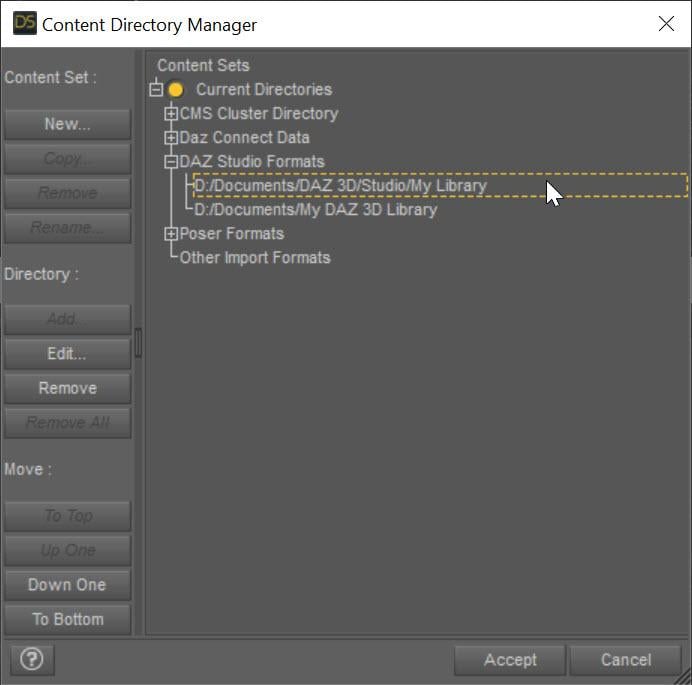
The SECOND entry points to My Daz 3D Library which has all of your installed content. The FIRST entry points to all of YOUR content, whether stuff you create or is created for you by converters. This ensures that everything you create never overwrites the installed content causing problems. Mostly, Daz Studio treats these two content directories as one big content directory, for example the morphs in D:\Documents\My Daz 3D Library\data\DAZ 3D\Genesis 8\Female\Morphs AND in D:\Documents\DAZ 3D\Studio\My Library\data\DAZ 3D\Genesis 8\Female\Morphs are both loaded and available as morphs for Genesis 8 Females. However, Daz Studio saves all the morphs and other data ONLY in the FIRST directory when a conversion occurs, ensuring that converted morphs do not overwrite installed content morphs. However, you are missing that first entry and your converters have been saving into the installed content folder, more than likely corrupting installed content.
I fixed my Daz Studio folders like the image. I even manually downloaded the converter program and copied the files into my "My Daz 3D Library" folder. However, I'm still getting the same result, however the male converter program is working fine. Any other ideas?
What do you mean that you copied the files into "My Daz 3D Library" folder? What files? None of the converted morphs should go in there. I would uninstall and reinstall Essentials so you get back the original morphs from Daz. Load a figure and make sure it is fixed. Then with the Daz Studio folders fixed, re-convert and make sure the morphs are showing up in your "My Library" folder and not "My Daz 3D library" folder.
This may or may not be important, I use the Daz Install Manager. I uninstalled the Genesis 3 and 8 Essentials, converter 3 to 8 female, along with Victoria 7. I then reinstalled them . Before I tried the conversion on Victoria 7, I removed the morph folder in the "M:\NZXT Storage\Documents\DAZ 3D\My Library\data\DAZ 3D\Genesis 8\Female\Morphs" folder for Victoria 7. I also made certain to remove the folder that was created by the converter for Victoria 7 from the "M:\NZXT Storage\Documents\My DAZ 3D Library\data\DAZ 3D\Genesis 8\Female\Morphs" folder, from my previous conversions. However, I'm still getting the same problem. The morphs are going into the "M:\NZXT Storage\Documents\DAZ 3D\My Library\data\DAZ 3D\Genesis 8\Female\Morphs" folder. I reset the settings on the converter and I've verified that they are the same for the female as the male (which is working), but I'm still getting the same problem. It's making me wonder if there are another set of files that need to be deleted, to make this thing work.
When the converter converts something, its morphs will go in M:\NZXT Storage\Documents\DAZ 3D\My Library\data\DAZ 3D\Genesis 8\Female\Morphs. However, BEFORE you converted anything, was the vanilla G8F correct? If not, there are some bad morphs in your installed morphs folder: M:\NZXT Storage\Documents\My DAZ 3D Library\data\DAZ 3D\Genesis 8\Female\Morphs
I uninstalled everything from "M:\NZXT Storage\Documents\DAZ 3D\My Library\" and "M:\NZXT Storage\Documents\My DAZ 3D Library\", even uninstalled the Daz Program. I deleted folders that weren't needed. However, after reinstalling everything, I'm getting the same problem. In fact, the converter program remembered the old settings. There's a setting in the system that didn't get deleted when I uninstalled everything that I could think of. I even deleted the files in username/appdata/ that belonged to Daz Studio. The only thing I didn't deleted were settings for the Daz Install Manager.
The script remembers its SETTINGs because those are in the registry (but the morphs, which are the problem should be gone if you uninstalled and deleted properly). If you are comfortable with RegEdit, you can remove the settings (just search for the script name in the registry).
There are morphs corrupted somewhere or being pulled in when they shouldn't be. Clear your scene. Load in your generic Genesis 8 Female figure (that contains the distortion). View the Daz Log (Help->Troubleshooting...->View Daz Log. Look for
2022-07-11 07:08:46.257 [INFO] :: Begin asset load (open): /People/Genesis 8 Female/Genesis 8 Basic Female.duf
[...LOTS OF MESSAGES HERE]
2022-07-11 07:08:50.243 [INFO] :: Finished asset load (open): 0m 3.986s - /People/Genesis 8 Female/Genesis 8 Basic Female.duf
Somewhere in there is probably a message about loading something it shouldn't (look for .dsf). If not, it is the /People/Genesis 8 Female/Genesis 8 Basic Female.duf that is corrupted I think. You *might* (because it is a relative path and could have been installed via DIM or Daz Connect) multiple versions of that file. One of them is the problem.
Just so we're on the same page, here's what I did to bring things back to normal. I used Daz Install Manager, so I used it to uninstall everything, including Daz Studio. I changed the "My DAZ 3D Library" to "My DAZ 3D Library - Broke" and created the new folder "My DAZ 3D Library". I even did the same to the "DAZ 3D" folder. I went into the "C:\Program Files\DAZ 3D" folder and removed everything accept the "DAZ3DIM1" folder. I went into the "C:\Users\nekur\AppData\Roaming" folder and copied the "DAZ 3D" folder to "DAZ 3D - Broke". I then deled the "cms", "dson", and "Studio4" folders in "DAZ 3D". Once that was all done, I reinstalled Daz Studio and then loaded all the rest. However, when I load Genesis 8, I'm getting the following errors:
2022-07-11 07:09:24.445 [WARNING] :: ..\..\..\..\..\src\sdksource\fileinput\dzassetdaz.cpp(6903): Formula output property not found: Genesis8Female:/data/Daz 3D/Genesis 8/Female/Morphs/XTransfer/3D Universe/ToonGenerations2/Base/XT_CTRL3duToonGenerations2_AdjustAge.dsf#XTIDCTRL3duToonGenerations2_AdjustAge?value - in file: /data/Daz 3D/Genesis 8/Female/Morphs/Zev0/Shape Shift/Arm Length.dsf
2022-07-11 07:09:24.502 [WARNING] :: ..\..\..\..\..\src\sdksource\fileinput\dzassetdaz.cpp(6903): Formula output property not found: Genesis8Female:/data/DAZ 3D/Genesis 8/Female/Morphs/DAZ 3D/Head/Old/PHMEyesIrisSize.dsf#PHMEyesIrisSize?value - in file: /data/Daz 3D/Genesis 8/Female/Morphs/vyktohria/Meredith/VYK Meredith Head.dsf
2022-07-11 07:09:24.792 [WARNING] :: ..\..\..\..\..\src\sdksource\fileinput\dzassetdaz.cpp(6903): Formula output property not found: Genesis8Female:/data/DAZ 3D/Genesis 8/Female/Morphs/SickleYield2017/UniversalBreastHelper/PBMSYUBHGiantAll_proj.dsf#PBMSYUBHGiantAll_proj?value - in file: /data/Daz 3D/Genesis 8/Female/Morphs/SickleYield2017/UniversalBreastHelper/PBMSYUBHGiantAll.dsf
2022-07-11 07:09:29.047 [WARNING] :: ..\..\..\..\..\src\sdksource\fileinput\dzassetdaz.cpp(7134): Unsupported formula: /data/Daz 3D/Genesis 8/Female/Morphs/DAZ 3D%2CHeysun Oh%2CYannek/Victoria 7/pJCMRSG3FVictoria7ShoulderBndFwd_110_R.dsf
2022-07-11 07:09:29.128 [WARNING] :: ..\..\..\..\..\src\sdksource\fileinput\dzassetdaz.cpp(7134): Unsupported formula: /data/Daz 3D/Genesis 8/Female/Morphs/DAZ 3D%2CHeysun Oh%2CYannek/Victoria 7/pJCMRSG3FVictoria7ShoulderBndFwd_110_L.dsf
2022-07-11 07:09:29.321 [WARNING] :: ..\..\..\..\..\src\sdksource\fileinput\dzassetdaz.cpp(7134): Unsupported formula: /data/Daz 3D/Genesis 8/Female/Morphs/DAZ 3D%2CHeysun Oh%2CYannek/Victoria 7/pJCMRSG3FVictoria7ShinBndBck_145_R.dsf
2022-07-11 07:09:29.403 [WARNING] :: ..\..\..\..\..\src\sdksource\fileinput\dzassetdaz.cpp(7134): Unsupported formula: /data/Daz 3D/Genesis 8/Female/Morphs/DAZ 3D%2CHeysun Oh%2CYannek/Victoria 7/pJCMRSG3FVictoria7ShinBndBck_145_L.dsf
2022-07-11 07:09:29.571 [WARNING] :: ..\..\..\..\..\src\sdksource\fileinput\dzassetdaz.cpp(7134): Unsupported formula: /data/Daz 3D/Genesis 8/Female/Morphs/DAZ 3D%2CHeysun Oh%2CYannek/Victoria 7/pJCMRSG3FVictoria7ForearmBnd_135_R.dsf
2022-07-11 07:09:29.657 [WARNING] :: ..\..\..\..\..\src\sdksource\fileinput\dzassetdaz.cpp(7134): Unsupported formula: /data/Daz 3D/Genesis 8/Female/Morphs/DAZ 3D%2CHeysun Oh%2CYannek/Victoria 7/pJCMRSG3FVictoria7ForearmBnd_135_L.dsf
2022-07-11 07:09:31.130 [WARNING] :: ..\..\..\..\..\src\sdksource\fileinput\dzassetdaz.cpp(5962): Parent for modifier not found: TMLI Lashes 06.
2022-07-11 07:09:31.130 [WARNING] :: ..\..\..\..\..\src\sdksource\fileinput\dzassetdaz.cpp(1712): Modifier not prepared: TMLI Lashes 06!
2022-07-11 07:09:31.130 [WARNING] :: ..\..\..\..\..\src\sdksource\fileinput\dzassetdaz.cpp(1729): Modifier not created: TMLI Lashes 06!
Have you ever seen anything like this that might help solve the problem? I got rid of one of the errors I'm not showing after buying Olympia 8. However, I can't find any of these files in my previous version of Daz Studio entitled "Daz 3D2 Old" or in the Genesis 8 female zip file I downloaded from the Product Library. I even tried to copy the Genesis 8 file from "Daz 3D2 Old", but with no luck.
Usually, you will get some errors like "Formula output property not found" and such. When vendors save some morphs, they could have unintentionally pulled in other morphs that are on their system but not on your system. If you are not having problems, you can ignore these. They slow down loading figures because of all the log messages but don't affect stuff otherwise.
I would warn you if you ever do this again to make sure the Daz Connect folder had been nuked too. It is easy, even if you think you always use DIM, for some stuff to be installed by Daz Connect and end up there.
But it sounds like things are working now?
No, I'm still having the same problem. I've done just about everything I can think of to get Daz back to square one, so I'd get a good conversion. I've even tried copying the older conversions I did, with not success.
Nuking everything definitely would make it so the standard G8F loads properly. You are not nuking something. As I mentioned, the Daz Connect directory (under the Daz Connect Data node in the Content Directory Manager dialog) should be nuked as well. That is the only thing I can think you missed. You need to make sure ALL the directories pointed to in the Content Directory Manager do not have corrupted data.
What exactly do you mean by nuking the Daz Content Data. My Daz Content Data is located in "M:\NZXT Storage\Documents\DAZ 3D\Studio\My Daz Connect Library". After I uninstalled everything, I left the "M:\NZXT Storage\Documents\DAZ 3D" empty.
Ok, that sounds like you emptied it as well. Unfortunately, I don't know how to help you. If you had a clean install, DS would be loading a uncorrupted G8F, but since it IS corrupted, some old data is being pulled in somewhere. This is a DS installation problem.
Cool. Thanks for everything.
Sorry, I could not help more.
Facial Expressions and the Transfer utilitykitakoredaz said:
I record here how to transfer only expression morphs from genesis1 with TU if I need it .
If you use ds default current version, it is not easy,
you may transfer all morphs from genesis or, you need to set-up in edit mode,
and remove morphs which you need not transfer.then, In 4.5 beta last version, You can use option to choose transfer morphs.
1. select Genesis root, in parameter tab. in parameter tab option, check on "Show hideen properties"
because about genesis1 most of head pozing morphs are set as hidden properties.
these are not controller. which we find when select genesis1 head. it is important.
because, we can not transfer any controller how we tweak them in parameter setting.how you change type or path,move them to root, there is no meaning.
we can only transfer actuall hidden morphs. (which change geometry).
and ALL actual morphs should be assigned with genesis root.
if you find morphs with another node, it is simply Alias or controller.2 go to edit mode, in parameter tab. it clear show us what property type, and easy to select.
the property is morph, alias, or property,, they spelled as M A,PAnyway go to General>poze controll>head section.
then you may find many PHMs which used for expression or head pozing.
they should be marked as M.3 choose and select morphs which you need to transfer only.
with Ctrl key (windows). then R-click in parameter tab on your selected morphs.
select, Auto follow >Enabe auto-follow ON on selected properties"Because when you transfer these morphs from genesis, the current option
should be transfered too. if you keep Auto-Follow OFF,
transfered PHMs of Target are Auto Follow OFF.
you need to tweak them after transfer morphs.4 keep current selection, then R click again,
Favorite>Add selected properties to Favorite.5 OK, now we can trasnfer PHM for expression to Target.
check again, in Favorite section, keep select genesis root,
All morphs which you need are grouped as Favorite,
and their auto-follow setting is correct (ON)in my pic, I only grouped eye blow morphs as favorite,
which need to use eye head blow poze controlelr.OPEN TU, then set Your TU setting,
you need to set Extended Options for Moprh Target.
From soruce, Favorites (or Favorites and Sub-Componets)
if you have missed before, check on Override Existing.If you check sub-Component, it may export All mcm which work with the PHMs.
(I feel usually we need not, because most of MCM are set correclty, then they can be generated
without transfer them, and not need change setting)(check my pic setting, ,I have already transfered weight map etc,
so that just check on About Moprh Targets, at this time,
you may use projection template too, if you need)6 To check them, first, un fit your Target from genesis.
then, remove genesis, and reload genesis.
then Fit to again.7 select genessi Head then tweak any poze controller (about my case, only blow controlelr work)
now transfered morphs should be work without problem.
if you have already transfered some morphs, they may need to change auto-follow setting too.
(but as for me, I needed not change setting any more)8 then reset-genesis, save your transfered morphs as morph again.
(but without changing genesis morph auto-follow type, they can never auto-generated,
which you have not transfered)I do not like transfer and save any-morphs without clear reason.(eg I need to modify and overwrite generate morphs etc)
it is simply genesis morph setting problem. and we need not transfer expression morph,
if daz correct them for genesis and genesis2.How long we need to wait daz simply find correct good setting for DAZ base figure?
DAZ ofthen change DS, and improbe them, but forget and lose many important things too.Hi, I followed this steps but expressions are still not transfering =/
[Released] Character Converter from Genesis 8 Female to Genesis 3 Female - Conv JCMs too[Commercial]RiverSoftArt said:
Nekura2000 said:
RiverSoftArt said:
Nekura2000 said:
RiverSoftArt said:
Nekura2000 said:
RiverSoftArt said:
Nekura2000 said:
RiverSoftArt said:
Nekura2000 said:
RiverSoftArt said:
Nekura2000 said:
RiverSoftArt said:
Nekura2000 said:
RiverSoftArt said:
Nekura2000 said:
RiverSoftArt said:
Nekura2000 said:
I had to get a new hard drive so I reinstalled Daz Studio. When trying to convert my Generation 7 female characters to Generation 8, I'm getting a distorted face. I've uninstalled and reinstalled the program, even deleted the RSCloneGenesis3Female.obj file from the folder C:\Users\nekur\AppData\Roaming\DAZ 3D\Studio4\CharacterConverterMorphs, with no change. The Generation 7 character as well as Genesis 8 load without a flaw. Here's what I'm getting, attached or from https://www.deviantart.com/wow-creations/art/Converted-920761392. ; I just looked at the parameters for the character I converted, which was Agnes. It isn't showing an Agnes head or body for 8, just Agnes itself.
The clone is for a different Character Converter. Maybe it is pulling in the converted morphs twice? From your previous conversion on the old hard drive and a new conversion? What directories are specified in the content manager? You should check all the currently used morphs on the character and find the morphs. The Parameter Settings show the Asset File Path of the morph (and the [...] button shows the full path of the morph). Make sure the morphs are coming from where you think they should be coming.
I use two different drives when using software. I have the OS drive which I replaced and the data drive. I renamed the original Daz drive as “Daz 3D2 Old”, before installing the Daz Studio. When installing Daz Studio, I allowed it to keep the “Daz 3D” folder, but also use the new “My DAZ 3D Library” folder. I just remember to look at the Error Log when loading Agnes Genesis 8 and this is what I’m getting:
2022-06-29 07:16:21.449 [WARNING] :: ..\..\..\..\..\src\sdksource\fileinput\dzassetdaz.cpp(6903): Formula output property not found: Genesis8Female:/data/Daz%203D/Genesis%208/Female/Morphs/XTransfer/3D%20Universe/ToonGenerations2/Base/XT_CTRL3duToonGenerations2_AdjustAge.dsf#XTIDCTRL3duToonGenerations2_AdjustAge?value - in file: /data/Daz%203D/Genesis%208/Female/Morphs/Zev0/Shape%20Shift/Arm%20Length.dsf
2022-06-29 07:16:21.506 [WARNING] :: ..\..\..\..\..\src\sdksource\fileinput\dzassetdaz.cpp(6903): Formula output property not found: Genesis8Female:/data/DAZ%203D/Genesis%208/Female/Morphs/DAZ%203D/Head/Old/PHMEyesIrisSize.dsf#PHMEyesIrisSize?value - in file: /data/Daz%203D/Genesis%208/Female/Morphs/vyktohria/Meredith/VYK%20Meredith%20Head.dsf
2022-06-29 07:16:22.060 [WARNING] :: ..\..\..\..\..\src\sdksource\fileinput\dzassetdaz.cpp(6903): Formula output property not found: Genesis8Female:/data/DAZ%203D/Genesis%208/Female/Morphs/SickleYield2017/UniversalBreastHelper/PBMSYUBHGiantAll_proj.dsf#PBMSYUBHGiantAll_proj?value - in file: /data/Daz%203D/Genesis%208/Female/Morphs/SickleYield2017/UniversalBreastHelper/PBMSYUBHGiantAll.dsf
2022-06-29 07:16:22.125 [WARNING] :: ..\..\..\..\..\src\sdksource\fileinput\dzassetdaz.cpp(7134): Unsupported formula: /data/Daz%203D/Genesis%208/Female/Morphs/RiverSoft%20Art/Javeria%20for%20Victoria%207%20and%20Genesis%203/pJCMRSG3FVictoria7ThighBndFwdHDR.dsf
2022-06-29 07:16:22.155 [WARNING] :: ..\..\..\..\..\src\sdksource\fileinput\dzassetdaz.cpp(7134): Unsupported formula: /data/Daz%203D/Genesis%208/Female/Morphs/RiverSoft%20Art/Javeria%20for%20Victoria%207%20and%20Genesis%203/pJCMRSG3FVictoria7ThighBndFwdHDL.dsf
2022-06-29 07:16:22.628 [WARNING] :: ..\..\..\..\..\src\sdksource\fileinput\dzassetdaz.cpp(7134): Unsupported formula: /data/Daz%203D/Genesis%208/Female/Morphs/RiverSoft%20Art/FWSA%20Caterina%20for%20Victoria%207%20and%20Genesis%203/pJCMRSG3FVictoria7ShoulderBndFwd_110_R.dsf
2022-06-29 07:16:22.665 [WARNING] :: ..\..\..\..\..\src\sdksource\fileinput\dzassetdaz.cpp(7134): Unsupported formula: /data/Daz%203D/Genesis%208/Female/Morphs/RiverSoft%20Art/FWSA%20Caterina%20for%20Victoria%207%20and%20Genesis%203/pJCMRSG3FVictoria7ShoulderBndFwd_110_L.dsf
2022-06-29 07:16:22.769 [WARNING] :: ..\..\..\..\..\src\sdksource\fileinput\dzassetdaz.cpp(7134): Unsupported formula: /data/Daz%203D/Genesis%208/Female/Morphs/RiverSoft%20Art/FWSA%20Caterina%20for%20Victoria%207%20and%20Genesis%203/pJCMRSG3FVictoria7ShinBndBck_145_R.dsf
2022-06-29 07:16:22.806 [WARNING] :: ..\..\..\..\..\src\sdksource\fileinput\dzassetdaz.cpp(7134): Unsupported formula: /data/Daz%203D/Genesis%208/Female/Morphs/RiverSoft%20Art/FWSA%20Caterina%20for%20Victoria%207%20and%20Genesis%203/pJCMRSG3FVictoria7ShinBndBck_145_L.dsf
2022-06-29 07:16:22.895 [WARNING] :: ..\..\..\..\..\src\sdksource\fileinput\dzassetdaz.cpp(7134): Unsupported formula: /data/Daz%203D/Genesis%208/Female/Morphs/RiverSoft%20Art/FWSA%20Caterina%20for%20Victoria%207%20and%20Genesis%203/pJCMRSG3FVictoria7ForearmBnd_135_R.dsf
2022-06-29 07:16:22.935 [WARNING] :: ..\..\..\..\..\src\sdksource\fileinput\dzassetdaz.cpp(7134): Unsupported formula: /data/Daz%203D/Genesis%208/Female/Morphs/RiverSoft%20Art/FWSA%20Caterina%20for%20Victoria%207%20and%20Genesis%203/pJCMRSG3FVictoria7ForearmBnd_135_L.dsf
2022-06-29 07:16:31.020 [WARNING] :: ..\..\..\..\..\src\sdksource\fileinput\dzassetdaz.cpp(6903): Formula output property not found: Genesis8Female:/data/DAZ%203D/Genesis%208/Female/Morphs/DAZ%20Originals/data/DAZ%203D/Genesis%208/Female/Morphs/Fred%20Winkler%20Art%2CSabby%2CDAZ%20Originals/FW%20Frankie%20HD%20for%20Victoria%207/CTRL-RSC-Frankie.dsfCFred%20Winkler%20Art/data/DAZ%203D/Genesis%208/Female/Morphs/Fred%20Winkler%20Art%2CSabby%2CDAZ%20Originals/FW%20Frankie%20HD%20for%20Victoria%207/CTRL-RSC-Frankie.dsfCSabby/FWSA%20Agnes%20HD%20for%20Lilith%207/PHMMouthRealismHD.dsf#PHMMouthRealismHD?value - in file: /data/DAZ%203D/Genesis%208/Female/Morphs/Fred%20Winkler%20Art%2CSabby%2CDAZ%20Originals/FW%20Frankie%20HD%20for%20Victoria%207/CTRL-RSC-Frankie.dsf
2022-06-29 07:16:31.020 [WARNING] :: ..\..\..\..\..\src\sdksource\fileinput\dzassetdaz.cpp(6903): Formula output property not found: Genesis8Female:/data/DAZ%203D/Genesis%208/Female/Morphs/DAZ%20Originals/data/DAZ%203D/Genesis%208/Female/Morphs/Fred%20Winkler%20Art%2CSabby%2CDAZ%20Originals/FW%20Frankie%20HD%20for%20Victoria%207/CTRL-RSC-Frankie.dsfCFred%20Winkler%20Art/FW%20Brooke%20HD%20for%20Victoria%207/FHMVictoria7.dsf#FHMVictoria7?value - in file: /data/DAZ%203D/Genesis%208/Female/Morphs/Fred%20Winkler%20Art%2CSabby%2CDAZ%20Originals/FW%20Frankie%20HD%20for%20Victoria%207/CTRL-RSC-Frankie.dsf
2022-06-29 07:16:31.021 [WARNING] :: ..\..\..\..\..\src\sdksource\fileinput\dzassetdaz.cpp(6903): Formula output property not found: Genesis8Female:/data/DAZ%203D/Genesis%208/Female/Morphs/DAZ%20Originals/data/DAZ%203D/Genesis%208/Female/Morphs/Fred%20Winkler%20Art%2CSabby%2CDAZ%20Originals/FW%20Frankie%20HD%20for%20Victoria%207/CTRL-RSC-Frankie.dsfCFred%20Winkler%20Art/FW%20Brooke%20HD%20for%20Victoria%207/FBMVictoria7.dsf#FBMVictoria7?value - in file: /data/DAZ%203D/Genesis%208/Female/Morphs/Fred%20Winkler%20Art%2CSabby%2CDAZ%20Originals/FW%20Frankie%20HD%20for%20Victoria%207/CTRL-RSC-Frankie.dsf
2022-06-29 07:16:32.694 [WARNING] :: ..\..\..\..\..\src\sdksource\fileinput\dzassetdaz.cpp(6969): Formula target property not found: Genesis8Female:/data/DAZ%203D/Genesis%208/Female/Morphs/DAZ%203D/Olympia%208/FBMOlympia8.dsf#FBMOlympia8_Test?value - in file: /data/Daz%203D/Genesis%208/Female/Morphs/fabiana/KillerLegsG8/1FK-Olympia8BaseFix.dsf
2022-06-29 07:16:40.096 [WARNING] :: ..\..\..\..\..\src\sdksource\fileinput\dzassetdaz.cpp(7134): Unsupported formula: /data/Daz%203D/Genesis%208/Female/Morphs/DAZ%203D%2CHeysun%20Oh/Olympia%207%20HD%20Add-On/pJCMRSG3FOlympia7ForeArmBndHD_n100L.dsf
2022-06-29 07:16:40.261 [WARNING] :: ..\..\..\..\..\src\sdksource\fileinput\dzassetdaz.cpp(7134): Unsupported formula: /data/Daz%203D/Genesis%208/Female/Morphs/DAZ%203D%2CHeysun%20Oh/Olympia%207%20HD%20Add-On/pJCMRSG3FOlympia7ForeArmBndHD_100R.dsf
2022-06-29 07:16:40.986 [WARNING] :: ..\..\..\..\..\src\sdksource\fileinput\dzassetdaz.cpp(7134): Unsupported formula: /data/Daz%203D/Genesis%208/Female/Morphs/DAZ%203D%2CHeysun%20Oh/Mei%20Lin%207%20HD%20Add-On/pJCMRSG3FMeiLin7ShinBndBck_95R.dsf
2022-06-29 07:16:41.152 [WARNING] :: ..\..\..\..\..\src\sdksource\fileinput\dzassetdaz.cpp(7134): Unsupported formula: /data/Daz%203D/Genesis%208/Female/Morphs/DAZ%203D%2CHeysun%20Oh/Mei%20Lin%207%20HD%20Add-On/pJCMRSG3FMeiLin7ShinBndBck_95L.dsf
2022-06-29 07:16:41.322 [WARNING] :: ..\..\..\..\..\src\sdksource\fileinput\dzassetdaz.cpp(7134): Unsupported formula: /data/Daz%203D/Genesis%208/Female/Morphs/DAZ%203D%2CHeysun%20Oh/Mei%20Lin%207%20HD%20Add-On/pJCMRSG3FMeiLin7ShinBndBckR.dsf
2022-06-29 07:16:41.494 [WARNING] :: ..\..\..\..\..\src\sdksource\fileinput\dzassetdaz.cpp(7134): Unsupported formula: /data/Daz%203D/Genesis%208/Female/Morphs/DAZ%203D%2CHeysun%20Oh/Mei%20Lin%207%20HD%20Add-On/pJCMRSG3FMeiLin7ShinBndBckL.dsf
2022-06-29 07:16:43.828 [WARNING] :: ..\..\..\..\..\src\sdksource\fileinput\dzassetdaz.cpp(7134): Unsupported formula: /data/Daz%203D/Genesis%208/Female/Morphs/DAZ%203D%2CHeysun%20Oh/Karen%207%20HD%20Add-On/pJCMRSG3FKaren7ShldrFwd_n90L.dsf
2022-06-29 07:16:44.007 [WARNING] :: ..\..\..\..\..\src\sdksource\fileinput\dzassetdaz.cpp(7134): Unsupported formula: /data/Daz%203D/Genesis%208/Female/Morphs/DAZ%203D%2CHeysun%20Oh/Karen%207%20HD%20Add-On/pJCMRSG3FKaren7ShldrFwd_90R.dsf
2022-06-29 07:16:44.191 [WARNING] :: ..\..\..\..\..\src\sdksource\fileinput\dzassetdaz.cpp(7134): Unsupported formula: /data/Daz%203D/Genesis%208/Female/Morphs/DAZ%203D%2CHeysun%20Oh/Karen%207%20HD%20Add-On/pJCMRSG3FKaren7ShinBndBck_90R.dsf
2022-06-29 07:16:44.369 [WARNING] :: ..\..\..\..\..\src\sdksource\fileinput\dzassetdaz.cpp(7134): Unsupported formula: /data/Daz%203D/Genesis%208/Female/Morphs/DAZ%203D%2CHeysun%20Oh/Karen%207%20HD%20Add-On/pJCMRSG3FKaren7ShinBndBck_90L.dsf
2022-06-29 07:16:44.669 [WARNING] :: ..\..\..\..\..\src\sdksource\fileinput\dzassetdaz.cpp(7134): Unsupported formula: /data/Daz%203D/Genesis%208/Female/Morphs/DAZ%203D%2CHeysun%20Oh/Karen%207%20HD%20Add-On/pJCMRSG3FKaren7ForearmBnd_n85L.dsf
2022-06-29 07:16:44.910 [WARNING] :: ..\..\..\..\..\src\sdksource\fileinput\dzassetdaz.cpp(7134): Unsupported formula: /data/Daz%203D/Genesis%208/Female/Morphs/DAZ%203D%2CHeysun%20Oh/Karen%207%20HD%20Add-On/pJCMRSG3FKaren7ForearmBnd_85R.dsf
2022-06-29 07:16:56.769 [WARNING] :: ..\..\..\..\..\src\sdksource\fileinput\dzassetdaz.cpp(7134): Unsupported formula: /data/Daz%203D/Genesis%208/Female/Morphs/-Yannek-%2CDAZ%203D%2CHeysun%20Oh/Gia%207/pJCMRSG3FGia7ForeArmBnd_n135L.dsf
2022-06-29 07:16:57.067 [WARNING] :: ..\..\..\..\..\src\sdksource\fileinput\dzassetdaz.cpp(7134): Unsupported formula: /data/Daz%203D/Genesis%208/Female/Morphs/-Yannek-%2CDAZ%203D%2CHeysun%20Oh/Gia%207/pJCMRSG3FGia7ForeArmBnd_135R.dsf
2022-06-29 07:17:00.107 [WARNING] :: ..\..\..\..\..\src\sdksource\fileinput\dzassetdaz.cpp(7134): Unsupported formula: /data/Daz%203D/Genesis%208/Female/Morphs/-Yannek-%2CDAZ%203D%2CHeysun%20Oh/Arabella%207%20HD%20Add-On/pJCMRSG3FArabella7ForeArmBnd_n135L.dsf
2022-06-29 07:17:00.418 [WARNING] :: ..\..\..\..\..\src\sdksource\fileinput\dzassetdaz.cpp(7134): Unsupported formula: /data/Daz%203D/Genesis%208/Female/Morphs/-Yannek-%2CDAZ%203D%2CHeysun%20Oh/Arabella%207%20HD%20Add-On/pJCMRSG3FArabella7ForeArmBnd_135R.dsf
2022-06-29 07:17:02.981 [WARNING] :: ..\..\..\..\..\src\sdksource\fileinput\dzassetdaz.cpp(5962): Parent for modifier not found: TMLI Lashes 06.
2022-06-29 07:17:02.981 [WARNING] :: ..\..\..\..\..\src\sdksource\fileinput\dzassetdaz.cpp(1712): Modifier not prepared: TMLI Lashes 06!
2022-06-29 07:17:02.981 [WARNING] :: ..\..\..\..\..\src\sdksource\fileinput\dzassetdaz.cpp(1729): Modifier not created: TMLI Lashes 06!
Here’s an image of my Content Directory Manager.
What looks bad in your Content Directory is that you have no user library in the Daz Studio Formats. That means the character converter would be writing morphs (and possibly deleting morphs if the overwrite option is checked) in the Daz content folder. You will get bad/weird results from that. I am afraid you might have hosed your morphs folder at this point. You need something a user content folder as the first folder in the Daz Studio Formats section. Then, this folder would be used to write out morphs from the conversions and would not overwrite your Daz content library.
I'm sorry, but from what I can see I have a Content Directory in the Daz Studio Format. Could you give a step by step solution in solving this problem. I've used Daz Studio for several years, along with Character Converter, but I think I'm missing something based on what you're seeing and I'm trying to interpret.
Usually what you will see in Daz Studio Formats is something like this:
The SECOND entry points to My Daz 3D Library which has all of your installed content. The FIRST entry points to all of YOUR content, whether stuff you create or is created for you by converters. This ensures that everything you create never overwrites the installed content causing problems. Mostly, Daz Studio treats these two content directories as one big content directory, for example the morphs in D:\Documents\My Daz 3D Library\data\DAZ 3D\Genesis 8\Female\Morphs AND in D:\Documents\DAZ 3D\Studio\My Library\data\DAZ 3D\Genesis 8\Female\Morphs are both loaded and available as morphs for Genesis 8 Females. However, Daz Studio saves all the morphs and other data ONLY in the FIRST directory when a conversion occurs, ensuring that converted morphs do not overwrite installed content morphs. However, you are missing that first entry and your converters have been saving into the installed content folder, more than likely corrupting installed content.
I fixed my Daz Studio folders like the image. I even manually downloaded the converter program and copied the files into my "My Daz 3D Library" folder. However, I'm still getting the same result, however the male converter program is working fine. Any other ideas?
What do you mean that you copied the files into "My Daz 3D Library" folder? What files? None of the converted morphs should go in there. I would uninstall and reinstall Essentials so you get back the original morphs from Daz. Load a figure and make sure it is fixed. Then with the Daz Studio folders fixed, re-convert and make sure the morphs are showing up in your "My Library" folder and not "My Daz 3D library" folder.
This may or may not be important, I use the Daz Install Manager. I uninstalled the Genesis 3 and 8 Essentials, converter 3 to 8 female, along with Victoria 7. I then reinstalled them . Before I tried the conversion on Victoria 7, I removed the morph folder in the "M:\NZXT Storage\Documents\DAZ 3D\My Library\data\DAZ 3D\Genesis 8\Female\Morphs" folder for Victoria 7. I also made certain to remove the folder that was created by the converter for Victoria 7 from the "M:\NZXT Storage\Documents\My DAZ 3D Library\data\DAZ 3D\Genesis 8\Female\Morphs" folder, from my previous conversions. However, I'm still getting the same problem. The morphs are going into the "M:\NZXT Storage\Documents\DAZ 3D\My Library\data\DAZ 3D\Genesis 8\Female\Morphs" folder. I reset the settings on the converter and I've verified that they are the same for the female as the male (which is working), but I'm still getting the same problem. It's making me wonder if there are another set of files that need to be deleted, to make this thing work.
When the converter converts something, its morphs will go in M:\NZXT Storage\Documents\DAZ 3D\My Library\data\DAZ 3D\Genesis 8\Female\Morphs. However, BEFORE you converted anything, was the vanilla G8F correct? If not, there are some bad morphs in your installed morphs folder: M:\NZXT Storage\Documents\My DAZ 3D Library\data\DAZ 3D\Genesis 8\Female\Morphs
I uninstalled everything from "M:\NZXT Storage\Documents\DAZ 3D\My Library\" and "M:\NZXT Storage\Documents\My DAZ 3D Library\", even uninstalled the Daz Program. I deleted folders that weren't needed. However, after reinstalling everything, I'm getting the same problem. In fact, the converter program remembered the old settings. There's a setting in the system that didn't get deleted when I uninstalled everything that I could think of. I even deleted the files in username/appdata/ that belonged to Daz Studio. The only thing I didn't deleted were settings for the Daz Install Manager.
The script remembers its SETTINGs because those are in the registry (but the morphs, which are the problem should be gone if you uninstalled and deleted properly). If you are comfortable with RegEdit, you can remove the settings (just search for the script name in the registry).
There are morphs corrupted somewhere or being pulled in when they shouldn't be. Clear your scene. Load in your generic Genesis 8 Female figure (that contains the distortion). View the Daz Log (Help->Troubleshooting...->View Daz Log. Look for
2022-07-11 07:08:46.257 [INFO] :: Begin asset load (open): /People/Genesis 8 Female/Genesis 8 Basic Female.duf
[...LOTS OF MESSAGES HERE]
2022-07-11 07:08:50.243 [INFO] :: Finished asset load (open): 0m 3.986s - /People/Genesis 8 Female/Genesis 8 Basic Female.duf
Somewhere in there is probably a message about loading something it shouldn't (look for .dsf). If not, it is the /People/Genesis 8 Female/Genesis 8 Basic Female.duf that is corrupted I think. You *might* (because it is a relative path and could have been installed via DIM or Daz Connect) multiple versions of that file. One of them is the problem.
Just so we're on the same page, here's what I did to bring things back to normal. I used Daz Install Manager, so I used it to uninstall everything, including Daz Studio. I changed the "My DAZ 3D Library" to "My DAZ 3D Library - Broke" and created the new folder "My DAZ 3D Library". I even did the same to the "DAZ 3D" folder. I went into the "C:\Program Files\DAZ 3D" folder and removed everything accept the "DAZ3DIM1" folder. I went into the "C:\Users\nekur\AppData\Roaming" folder and copied the "DAZ 3D" folder to "DAZ 3D - Broke". I then deled the "cms", "dson", and "Studio4" folders in "DAZ 3D". Once that was all done, I reinstalled Daz Studio and then loaded all the rest. However, when I load Genesis 8, I'm getting the following errors:
2022-07-11 07:09:24.445 [WARNING] :: ..\..\..\..\..\src\sdksource\fileinput\dzassetdaz.cpp(6903): Formula output property not found: Genesis8Female:/data/Daz 3D/Genesis 8/Female/Morphs/XTransfer/3D Universe/ToonGenerations2/Base/XT_CTRL3duToonGenerations2_AdjustAge.dsf#XTIDCTRL3duToonGenerations2_AdjustAge?value - in file: /data/Daz 3D/Genesis 8/Female/Morphs/Zev0/Shape Shift/Arm Length.dsf
2022-07-11 07:09:24.502 [WARNING] :: ..\..\..\..\..\src\sdksource\fileinput\dzassetdaz.cpp(6903): Formula output property not found: Genesis8Female:/data/DAZ 3D/Genesis 8/Female/Morphs/DAZ 3D/Head/Old/PHMEyesIrisSize.dsf#PHMEyesIrisSize?value - in file: /data/Daz 3D/Genesis 8/Female/Morphs/vyktohria/Meredith/VYK Meredith Head.dsf
2022-07-11 07:09:24.792 [WARNING] :: ..\..\..\..\..\src\sdksource\fileinput\dzassetdaz.cpp(6903): Formula output property not found: Genesis8Female:/data/DAZ 3D/Genesis 8/Female/Morphs/SickleYield2017/UniversalBreastHelper/PBMSYUBHGiantAll_proj.dsf#PBMSYUBHGiantAll_proj?value - in file: /data/Daz 3D/Genesis 8/Female/Morphs/SickleYield2017/UniversalBreastHelper/PBMSYUBHGiantAll.dsf
2022-07-11 07:09:29.047 [WARNING] :: ..\..\..\..\..\src\sdksource\fileinput\dzassetdaz.cpp(7134): Unsupported formula: /data/Daz 3D/Genesis 8/Female/Morphs/DAZ 3D%2CHeysun Oh%2CYannek/Victoria 7/pJCMRSG3FVictoria7ShoulderBndFwd_110_R.dsf
2022-07-11 07:09:29.128 [WARNING] :: ..\..\..\..\..\src\sdksource\fileinput\dzassetdaz.cpp(7134): Unsupported formula: /data/Daz 3D/Genesis 8/Female/Morphs/DAZ 3D%2CHeysun Oh%2CYannek/Victoria 7/pJCMRSG3FVictoria7ShoulderBndFwd_110_L.dsf
2022-07-11 07:09:29.321 [WARNING] :: ..\..\..\..\..\src\sdksource\fileinput\dzassetdaz.cpp(7134): Unsupported formula: /data/Daz 3D/Genesis 8/Female/Morphs/DAZ 3D%2CHeysun Oh%2CYannek/Victoria 7/pJCMRSG3FVictoria7ShinBndBck_145_R.dsf
2022-07-11 07:09:29.403 [WARNING] :: ..\..\..\..\..\src\sdksource\fileinput\dzassetdaz.cpp(7134): Unsupported formula: /data/Daz 3D/Genesis 8/Female/Morphs/DAZ 3D%2CHeysun Oh%2CYannek/Victoria 7/pJCMRSG3FVictoria7ShinBndBck_145_L.dsf
2022-07-11 07:09:29.571 [WARNING] :: ..\..\..\..\..\src\sdksource\fileinput\dzassetdaz.cpp(7134): Unsupported formula: /data/Daz 3D/Genesis 8/Female/Morphs/DAZ 3D%2CHeysun Oh%2CYannek/Victoria 7/pJCMRSG3FVictoria7ForearmBnd_135_R.dsf
2022-07-11 07:09:29.657 [WARNING] :: ..\..\..\..\..\src\sdksource\fileinput\dzassetdaz.cpp(7134): Unsupported formula: /data/Daz 3D/Genesis 8/Female/Morphs/DAZ 3D%2CHeysun Oh%2CYannek/Victoria 7/pJCMRSG3FVictoria7ForearmBnd_135_L.dsf
2022-07-11 07:09:31.130 [WARNING] :: ..\..\..\..\..\src\sdksource\fileinput\dzassetdaz.cpp(5962): Parent for modifier not found: TMLI Lashes 06.
2022-07-11 07:09:31.130 [WARNING] :: ..\..\..\..\..\src\sdksource\fileinput\dzassetdaz.cpp(1712): Modifier not prepared: TMLI Lashes 06!
2022-07-11 07:09:31.130 [WARNING] :: ..\..\..\..\..\src\sdksource\fileinput\dzassetdaz.cpp(1729): Modifier not created: TMLI Lashes 06!
Have you ever seen anything like this that might help solve the problem? I got rid of one of the errors I'm not showing after buying Olympia 8. However, I can't find any of these files in my previous version of Daz Studio entitled "Daz 3D2 Old" or in the Genesis 8 female zip file I downloaded from the Product Library. I even tried to copy the Genesis 8 file from "Daz 3D2 Old", but with no luck.
Usually, you will get some errors like "Formula output property not found" and such. When vendors save some morphs, they could have unintentionally pulled in other morphs that are on their system but not on your system. If you are not having problems, you can ignore these. They slow down loading figures because of all the log messages but don't affect stuff otherwise.
I would warn you if you ever do this again to make sure the Daz Connect folder had been nuked too. It is easy, even if you think you always use DIM, for some stuff to be installed by Daz Connect and end up there.
But it sounds like things are working now?
No, I'm still having the same problem. I've done just about everything I can think of to get Daz back to square one, so I'd get a good conversion. I've even tried copying the older conversions I did, with not success.
Nuking everything definitely would make it so the standard G8F loads properly. You are not nuking something. As I mentioned, the Daz Connect directory (under the Daz Connect Data node in the Content Directory Manager dialog) should be nuked as well. That is the only thing I can think you missed. You need to make sure ALL the directories pointed to in the Content Directory Manager do not have corrupted data.
What exactly do you mean by nuking the Daz Content Data. My Daz Content Data is located in "M:\NZXT Storage\Documents\DAZ 3D\Studio\My Daz Connect Library". After I uninstalled everything, I left the "M:\NZXT Storage\Documents\DAZ 3D" empty.
Ok, that sounds like you emptied it as well. Unfortunately, I don't know how to help you. If you had a clean install, DS would be loading a uncorrupted G8F, but since it IS corrupted, some old data is being pulled in somewhere. This is a DS installation problem.
Cool. Thanks for everything.
Daz 3D is part of

Connect
DAZ Productions, Inc.
7533 S Center View Ct #4664
West Jordan, UT 84084Licensing Agreement | Terms of Service | Privacy Policy | EULA
© 2026 Daz Productions Inc. All Rights Reserved.