-
Getting a G8F characters breast morphs back to default G8F
So the breasts shape is part of the character's shape?
What I would do,in case the defaul G8F and your character have the same size.
Go to Menue>Tools> Geometry Editor
then
go to Menue>Panes>Tool Settings
Make sure to have Vertices Selection activated
Get your Parameter Tab in Edit mode (right click in Parameter tab)
Right click on your Character dial in question and mark it as favorite (little heart next to the wheel)
"Select Morph Vertices"
You will see now yellow dots all over your character representing morphed verteces.
Right click on the character in the editor and select Geometry selection.
Select by face groups, rPectorial and lPectorial maybe you will need to grow selection by Geometry Selection > Grow Selection
Now select Morph Editing>Clear selected Deltas from Favorites.
Done
You might now have to clean up some sharp creases in an external modeller or the DAZ dFormer.harddrive broke - new install - scenes were stored different but all morphs are "missing files" knowDeinWirbelwind said:
DrunkMonkeyProductions said:
DeinWirbelwind said:
DrunkMonkeyProductions said:
That path looks like you created your own morphs. If you didn't back them up, you're only option is to make them again.
Okay, but how did I create my own morph? Like, I just adjusted shapes and saved the files? I don't want to make this mistake again.
I can edit all the DUFs and link the correct paths. But I wanna avoide doing this mistake again. :(
There's several ways of doing it, but mostly it's done by saving a Support Asset.
If you have any scripts or plug ins you use for creating custom characters, be sure to check the documentation to see if they create custom morphs or not.
Modifying the duf's to correct the paths, may solve the problem of missing files, but it's also possible the DSF's have been modified, and the results may not be the same as you previously had.
You'll just have to try it and see.
Well, I don't know if I have plugins like that. Maybe I have, and I hit a "funky button" without noticing.
At least, I can fix my DUFs. Will take a while. I make a new character, hit all morphs that were missing - save it - and then copy and paste the path from there into the old DUFs with the correct values. Lucky, I have a free day tomorrow and a new audiobook.

Did you make use of any commands in File>Save As>Support Assets?
harddrive broke - new install - scenes were stored different but all morphs are "missing files" knowDrunkMonkeyProductions said:
DeinWirbelwind said:
DrunkMonkeyProductions said:
That path looks like you created your own morphs. If you didn't back them up, you're only option is to make them again.
Okay, but how did I create my own morph? Like, I just adjusted shapes and saved the files? I don't want to make this mistake again.
I can edit all the DUFs and link the correct paths. But I wanna avoide doing this mistake again. :(
There's several ways of doing it, but mostly it's done by saving a Support Asset.
If you have any scripts or plug ins you use for creating custom characters, be sure to check the documentation to see if they create custom morphs or not.
Modifying the duf's to correct the paths, may solve the problem of missing files, but it's also possible the DSF's have been modified, and the results may not be the same as you previously had.
You'll just have to try it and see.
Well, I don't know if I have plugins like that. Maybe I have, and I hit a "funky button" without noticing.
At least, I can fix my DUFs. Will take a while. I make a new character, hit all morphs that were missing - save it - and then copy and paste the path from there into the old DUFs with the correct values. Lucky, I have a free day tomorrow and a new audiobook.
harddrive broke - new install - scenes were stored different but all morphs are "missing files" knowDeinWirbelwind said:
DrunkMonkeyProductions said:
That path looks like you created your own morphs. If you didn't back them up, you're only option is to make them again.
Okay, but how did I create my own morph? Like, I just adjusted shapes and saved the files? I don't want to make this mistake again.
I can edit all the DUFs and link the correct paths. But I wanna avoide doing this mistake again. :(
There's several ways of doing it, but mostly it's done by saving a Support Asset.
If you have any scripts or plug ins you use for creating custom characters, be sure to check the documentation to see if they create custom morphs or not.
Modifying the duf's to correct the paths, may solve the problem of missing files, but it's also possible the DSF's have been modified, and the results may not be the same as you previously had.
You'll just have to try it and see.
harddrive broke - new install - scenes were stored different but all morphs are "missing files" knowDrunkMonkeyProductions said:
That path looks like you created your own morphs. If you didn't back them up, you're only option is to make them again.
Okay, but how did I create my own morph? Like, I just adjusted shapes and saved the files? I don't want to make this mistake again.
I can edit all the DUFs and link the correct paths. But I wanna avoide doing this mistake again. :(
Getting a G8F characters breast morphs back to default G8FI'm not at my computer, but from memory you can create a d-former that's a selection of the mesh parts you're interested in and use apply that to an imported morph.
There are a few ways you could do it. The way I do it, however, is to make it a negative morph on the selected area. My reason being that you can't export and reimport HD morphs, and I would want to rest of the morph to maintain any HD sculpture that it has.
Steps after creating your d-former (perhaps others can help with that):
- Make sure the character morph is dialed in
- In parameters > mesh resolution, set the resolution to base
- With the character selected, File > export as obj. Make sure the pop-up doesn't have patented objects selected
- Save the file somewhere
- i think you'll find the morph loader pro option somewhere in the edit menu. Maybe Edit > Object. Click that
- Click the browse button and open the folder you saved the object file to. Select it and hit load, open, ok. Whatever the button is
- In the pop-up, expand the attenuate menu. I think it's then a right click on the articulate by option. Find the option in the menu to attenuate by d-former and select the d-former you created
- Once loaded, back to the parameters tab. There should be a menu somewhere for morphs. It might be under the hidden or actor menu. It's there somewhere
- Your imported morph should be in the right pane. Click the settings cog and set its lower limit to -100. Save/ok out of there
- Set the slider to -100
- Rember to put your mesh resolution back to high so renders look the best they can
Nit the best instruction while I'm not at my computer, but hopefully some pointers in there. You can google a lot of these steps if they're unclear. The quality of the result will depend on the d-former you created. There's an art to it - you may need to adjust it as you learn how to go.
MimicMolly's Renders & WIPsI haven't been rendering anything worth posting. But, I am more aggressively rendering pics to use as "sketches" to trace over/line for "2D" art.
Here is an example of a character I drew back in late February of this year. Today, I tried to recreate his body in DAZ, because I want to make a more "realistic" styled lineart of him, for a character reference. As always, I will draw a lot over the render.
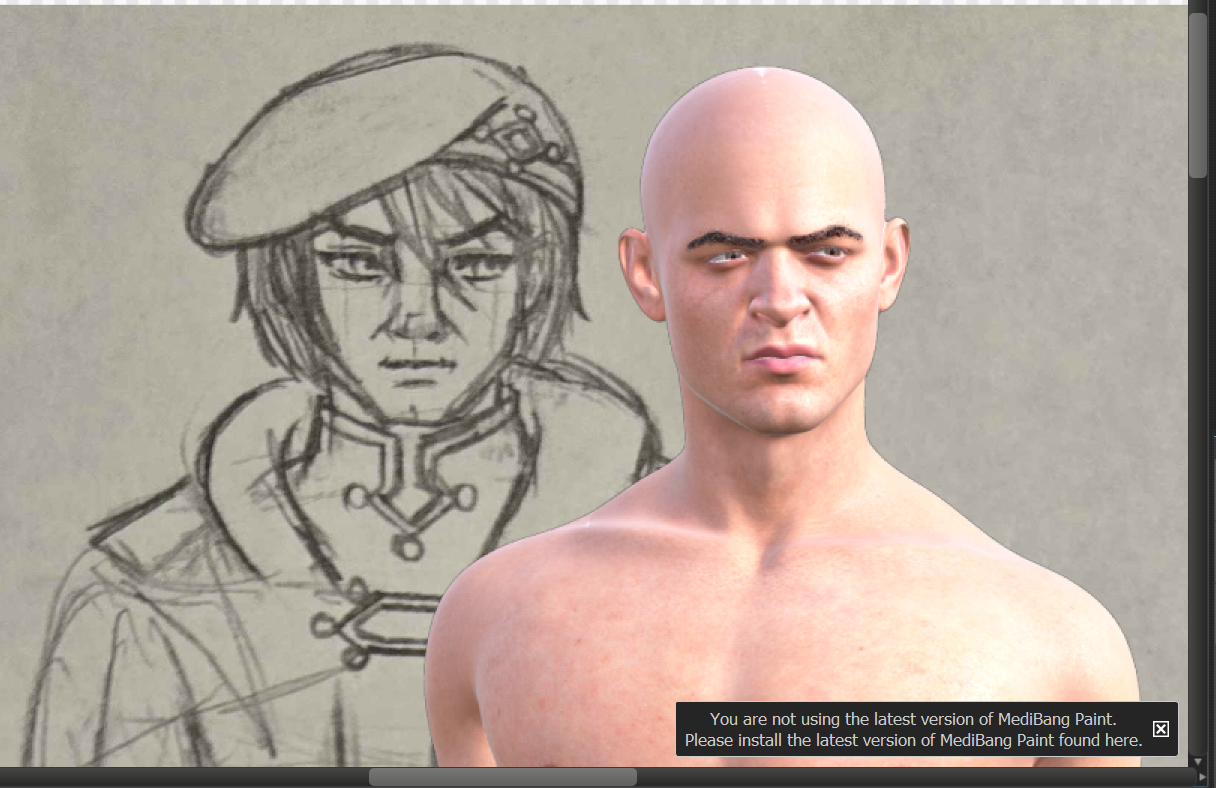
As you can tell by his outfit, this is not something I will ever find in DAZ which just further discourages me in making "proper" renders of these OCs because they will only look phenotypically accurate, but the clothes will be totally wrong. (I think this one uses a couple of morphs I brought over from G8M. I think the strongest morph influencing his face is SONSY Dwarf Male.)
I'm surprised by the sketch, actually. Except for his legs, he had realistic proportions. It was a small drawing, I think his head was like less than 1" tall, so that's why he looks toony. With taking a photo/scanning, I can draw tiny pics, which I inevitably lose, and then draw in more details digitally.
Since this isn't a DAZ render, I've posted the finished result on my regular DeviantArt account. (It is a brief bio of the character, but the beginning of the bio, after the stats, is not nice.) What is traced off of DAZ and what I drew freehand are indistinguishable.
Daz Studio 4.24[.0.x], General Release!lowelluk said:
DoctorJellybean said:
Pantros2 said:
Daz Save Guard is not compatible with Daz 4.24
DAZ 3D process was not found. Application will exit.
The photoshop bridge seems to have issues in DIM - the above error might be the photoshop bridge, but I think it is Save Guard.
SaveGuard is a 3rd party plugin, you'll need to submit a report so that it can be checked and reported to the PA.
Can we talk about the utter embarrasment of Daz being in development for 15 years and still lacking a feature so basic as an autosave or font resizing.
Auto save can lead to problems such as duplicate formulas, especially when saving an asset morph and and saving to scene in the same session.
In fact, every software is in development. When they stop keeping it in development, that software is dead.Fit Control Genesis 9 Male & Female Edition (Commercial)Can I ask for a clarification a point about the Merchant Resource terms for Fit Control? It is not entirely clear from the terms as presented in the User Guide as to whether the clothing item has to be for the officially supported base figure.
The resource rules state that it must be a clothing item, be for sale, be saved under a new morph name, and cannot be in a Fit Control directory. But while the specification section states that only Genesis 9 is supported, this is not clear whether this is intended as part of the usage conditions or a disclaimer about the product's default capabilties.
The reason I am asking is that I am developing clothing items that will (at least as an option) support the centaurs, and in many cases these have to be fitted to the centaur geograft rather than the main figure for technical reasons. But because they are then not directly fitted to the Genesis figure, the Fit Control script cannot/will not recognise them.
Particularly as people won't be able to load FC shapes themselves, I want to make sure I've got good adjustment support included. Some of that I'll have to do myself, some of that I want to do myself, but for some things (like supplying a wide range of breast adjustments) it doesn't make sense to reinvent the wheel when Fit Control already has options, and indeed, it's entirely possible to get the morphs on via Transfer Utility.
However, I would like to clarify whether it is legitimate to distribute Fit Control derivatives on clothing for things other than the Genesis base for that Fit Control version.
Need help with makeupThere's been somthing that's been bothering me for years. Whenever I used makeup on a model, she ends up looking like someone else. For instance, I often use the Face Transfer option and when I try using makeup, the end resuilts is a stranger. Lipstick, brow and mascara makeup is no problem. It'w when I try blush or whatever on the face. Is there a makeup product I can use to enhance my model and not turn them into someone else?
And another thing, when I don't like the results after saving it, is there a way to remove it?
genesis 3: eyes closed / the foot stretchesRichard Haseltine said:
That sounds like a proeprty linked to the character is incorrectly affecting the feet - probably in a corrective morph for the left or right eye closed property. Try the minimum shape plus eye closed that you can find that triggers the issue, then in the parametrs pane enable option menu>Preferences>Show Hidden Properties (that's the lined/hamburger button in the top corner, or right-click the tab). The go through Currently used looking at the greyed out sliiders - those will be the corrective morphs - and try zeroing each in turn until you find the guilty party. Now, the question will be whether it is an HD orph or a standard morph - in the latter case it should be fixable, but try identifying the actual property involved first.
thanks, Buddy. I'll go through these steps and see if I can solve it! Thanks!
Skyrim-like Mage robes in DAZ?Okay, I played around a bit and while it's definitely not perfect, it's something. I played around a fair bit with getting different layers to work together but I had a hard time getting them all to mesh together. I ended up going with a dForce Wrap Dress for Genesis 8 Female(s) | Daz 3D and using a different texture. I used a geoshell underneath so that the top wasn't actually open, but there's still a wrap effect. The dress comes with a nice fit adjust morph that, if I set to max, makes it more baggy/lose when I dforce (and come to think of it, I could probably remove the limits and go even further with this). The cape thing at the top (which I might need to fix some of the texture on) is from dForce Empiric for Genesis 8 Males | Daz 3D . Then I added a belt with a pouch from dForce Medieval Barmaid for Genesis 8 Female(s) | Daz 3D . It's definitely not perfect or an exact match, but it matches the general style I think, it's got an asymmetrical hemline, a similar ish little cape like thing, and it's a lot easier to work with than what I was originally playing around with. I think there's still more I might want to do with some of the textures, but this is passable for now! Especially when it's just for me doing random fanart of my own characters.

Edit: Ugh, the forums seem to be doing that thing again where they don't let you upload images. I'll check back here later and see if I can fix it.
Couldn't get the image to work for longer than 5 minutes (grrr) so I broke down and just posted it to my gallery: Mage Robes Creation | Daz 3D
 genesis 3: eyes closed / the foot stretches
That sounds like a proeprty linked to the character is incorrectly affecting the feet - probably in a corrective morph for the left or right eye closed property. Try the minimum shape plus eye closed that you can find that triggers the issue, then in the parametrs pane enable option menu>Preferences>Show Hidden Properties (that's the lined/hamburger button in the top corner, or right-click the tab). The go through Currently used looking at the greyed out sliiders - those will be the corrective morphs - and try zeroing each in turn until you find the guilty party. Now, the question will be whether it is an HD orph or a standard morph - in the latter case it should be fixable, but try identifying the actual property involved first.
Cellulite Displacement MapRichard Haseltine said:
You can't export an HD morph, so if you need detail that goes beyond what the base shape allows then you need to bake that sculpt to normlas or displacement.
Sorry im really new to these, what do you mean bake?
Cellulite Displacement MapYou can't export an HD morph, so if you need detail that goes beyond what the base shape allows then you need to bake that sculpt to normlas or displacement.
dForce Simulation and Cloth TearingIt isn't possible to literaslly save a simulation, the best you can do is turn the current state into a morph and use that as a starting point for a new simulation - but that would almost certainly be noticeably gliitchy as it would lose all the information about energy and momentum from the earlier steps, it would just be starting from rest in the new shape.
Loading a series of pose presets as keyframes for want of converting animations between generationsHey folks,
So I've got a massive (thousands) library of animations I've made for G8. I'm trying to formulate a gameplan for converting them to G9 using the tools I currently have.
I've got a couple of good ideas to start, but there's a ??? at some point in each.
I've got Universal Pose Splitter (which doesn't handle G9 yet) and all of the Zev0 Pose/Batch Pose converters.Zev0 doesn't work on animations from what I can tell, thus UPS.
- UPS the animation to "custom list of frames" that is actually every frame so I get a G8 pose preset per frame and not a G8 animation preset.
- Batch convert this group of G8 pose presets to G9 pose presets with Zev0
- ???? Is there an easy way to load a series of pose presets as a series of keyframes other than "load 0...next frame, load 1...next frame, load 2..."
EDIT: The second option "just works" out of the box but...it's per pose with neither save nor batch functionality
- n_alexandru's fantastic free pose converters which DO convert animations, but with no save/batch and I BELIEVE no way to handle pose morphs since most authors, even if they release the same product on multiple generations, change the names of the morph per generation
- repeat until I'm old and grey
Underwater Poses G2F, G8F and now G3F, G9 and GV3I don't have any of RiverSoftArt's bone minions, but it's on my list of things to do to use my own pose transfer scripts to convert them to G8F and possibly then onto G3F & G9.
Thank you for the vote of confidence in the poses.
Regards,
Richard.
ETA 1 July 2025: I've converted five of the poses to G8F, had to tweak a couple of the poses a little, and was able to change Pose 2 so the character's arm pointed straight up, G8F rigging seems better at the shoulder than G2 and the results look more realistic. Should be able to get Underwater 07 looking as I originally wanted too, with the arms straight out front ready for a breast-stroke arm movement.
help for the artisan's masks me be not matching non human's headwell no idea if in right place but i just bought to day 3 of FPE Artisan Mask Okami for Genesis 8 and 9 and 2 an 2 other mask in same line up , my problem is i thought these were morghable in way would fit non human face if this not the case then i need get money back , as thought i could morph each of maskinto ne mask reshaping into new form but they doint seam to morgh cant see any diel mode ,if there is way to doit simple then i need help but if not then i bought pointless items , like if wanted make tengu bird warrios the mask doint fallo the shape of the charecters , or werwolf
Render your buys! Use buys from the current month and the previous month of salesFinally pulled everything together to nerd out and give my geeky character the Doctor Who fangirl cosplay she so richly deserves
New assets:TARDIS: https://www.daz3d.com/historic-police-box
backdrop: https://www.daz3d.com/back-alley (currently in Outlet for the lower tier; the gas mask graffiti was already there! Added the White Wolf off to the side as a decal node. Also hid some of the stuff on the side of the building because it was irrelevant visual clutter)
coat: https://www.daz3d.com/classic-trenchcoat-for-genesis-3-male-s (comes with a nice flare morph, had to parent to the jacket and then use geometry editor to hide some persistent pokethrough bits)suit: https://www.daz3d.com/trading-floor-outfit-for-genesis-3-male-s (works remarkably well as long as you fit the jacket to the shirt)
sneakers: (not new, but for the sake of being complete) https://www.daz3d.com/dforce-capsule-wardrobe-01-for-genesis-9 with https://www.daz3d.com/capsule-wardrobe-01-texture-addon
Sonic screwdriver: freebie from Sketchfab

Daz 3D is part of

Connect
DAZ Productions, Inc.
7533 S Center View Ct #4664
West Jordan, UT 84084Licensing Agreement | Terms of Service | Privacy Policy | EULA
© 2026 Daz Productions Inc. All Rights Reserved.