-
Filament rendering option disappeared
I can find the filament render option in the drop down of render settings. I had it at one point but for some reason it disappeared completely.
Background Bug?davpet77_53e573d360 said:
Fishtales said:
The Viewport is on Filament view, try changing it.
Thankyou that fixed it. Much appreciated :-)
You're welcome.
Background Bug?Fishtales said:
The Viewport is on Filament view, try changing it.
Thankyou that fixed it. Much appreciated :-)
Background Bug?The Viewport is on Filament view, try changing it.
Filament Rendersmding said:
Filament might become interesting once the problem with the transparency/opacity mask is solved. As long as that doesn't happen, its' use is very limited, unfortunately.
I solved that by not using any

my Filament characters wear hats, helmets or headpieces (or are bald) and no cutout opacity on clothing

this has geometry shell shadows too
Filament RendersFilament might become interesting once the problem with the transparency/opacity mask is solved. As long as that doesn't happen, its' use is very limited, unfortunately.
Filament RendersCybersox said:
von Hobo said:
Is Filament just a preview then? Nothing more?
For all intents and purposes, yes, and even then it's a limited one. What it really is is another of those major boondoggles that DAZ keeps shoving into Studio. The dumb thing is so limited that it treats human figures and other objects as if they were transparent, so they don't even cast shadows, so the only use I've really found for it is rough placement of objects and quicker posing previews. Beyond the benefit of not having to turn the headlamp on and off, though, the old 3DL renderer is generally vastly superior for most of that work as at least things look sort of like they're supposed to there.
For soemone doing toons or animation and either doesn't have a high-end nVidia card or just wants a speed boost, it can provide excellent results, especially if your end goal isn't absolute photorealism. Some of the Filament products in the store show some exceptional final images.
For shadows -- again, if your goal is to use Filament for whatever reason as your final rendering engine (something I plan on doing once DAZ Studio 5 is released) there's this product to bring back your shadows: https://www.daz3d.com/rssy-3delight-and-iray-to-filament
-- Walt Sterdan
Filament Rendersvon Hobo said:
Is Filament just a preview then? Nothing more?
For all intents and purposes, yes, and even then it's a limited one. What it really is is another of those major boondoggles that DAZ keeps shoving into Studio. The dumb thing is so limited that it treats human figures and other objects as if they were transparent, so they don't even cast shadows, so the only use I've really found for it is rough placement of objects and quicker posing previews. Beyond the benefit of not having to turn the headlamp on and off, though, the old 3DL renderer is generally vastly superior for most of that work as at least things look sort of like they're supposed to there.
Filament Rendersbarbult said:
Well, you can't always know everything before you buy. When there is a super bargain price, you might need to take the leap, and then figure it out. You have 30 days to return it if you made a mistake. Sometimes someone knows so little about a topic, they dont even know that they don't know. I think the user here did exactly the right thing in this case.
I agree; one of the very best things about the DAZ store is the return policy, one I've used my fair share of times.
My only issue here is that people are jumping on the PA for not providing enough information on how to use their product when the OP's questions all dealt with what Filament is and how to use it, which is not the PA's responsibility. I felt it was unfair to the PA.
-- Walt Sterdan
Filament Rendersas someone who frequently used the openGL viewport to render quick animations Filament was not a big leap in as far as understanding how to use it

I can see how those rendering images with 3Delight or iray etc would be puzzled as it's not the usual DAZ workflow

conversely there are those who don't understand how to render a finished image and wonder why the interactive viewport is missing so many things

it's all a learning experience
 Filament Renders
richardandtracy said:
I have to point out that it's the job of the PA to convince me I need the product, not my job to find reasons not to get the product. I start assuming I don't need it, and if the sales pitch fails due to inadequate wording or insufficient explanation.. No sale. To hand over money when you don't understand the product.. that is the action of the perfect collector, not user, and I regard it as foolish behaviour. Regards, Richard.
That's fair. In this instance, the PA wrote:
Atmosphere for Filament is a collection of shaded grids and primitives that produce a misty effect when added to your scene. Atmosphere grids are provided in several resolutions. When dropped into your scene, the Atmosphere Grids will diffuse your scene lights and produce an ethereal and dream-like effect. In addition to the grids, a set of foggy planes are also included to provide a final smokey flourish.
Intensity, color and texture presets are also provided.
I think the PA has described fairly well how this works. The PA has made the assumption that someone buying a shader package for rendering in Filament will know what rendering in Filament is. I read their description, saw the samples provided and had a pretty decent idea of what the package does and how it works. I honestly don't see how much more information should be needed beyond what they've provided. I do agree that if you don't even know what filament is nor how it works, one should not buy the product until one does.
The original poster asked:
I've purchased this product today, and want to test it on a scene to compare to an Iray render of the same scene.
But how do you render in Filament?
There is a Filament viewport preview but I have no idea how to change the actual final rendering to Filament.
There is no "Filament" choice in the Render Engine dropdown, only Iray or OpenGL.
Is there a Filmanent Render Engine plug-in for DAZ?
Fair enough. The OP came to the forum to ask the questions because they did not know anything about Filament and the forum helped them out. Finding out what Filament is and how it works would probably be better investigated before buying somethihg that literally has "for Filament" in its name.
Out of curiosity, what extra description do you think you'd add to help any customer who's going to look at "XXXXX for Filament" and ask, "What's Filamant?", or "XXXXX for iRay" and ask, "What's iRay"?
We'll have to agree to disagree but personally, I don't think thie product description should be expected to explain what Filalment is and how it works, how to use Filament, and so on, just as I don't expect every PA to explain what Genesis 9 is, how to load the character in the scene, how to use it, and so on.
-- Walt Sterdan
Filament Renderscaravelle said:
richardandtracy said:
I tend to go on the principle that "If the description is inadequate to tell you how to use the product, don't buy.". I'm left completely baffled by that filament product, and would never spend my money on it. Regards, Richard.
That's how I see it too. If a product is not sufficiently explained and needs umpteen pages of attempts to explain it in forums, the developers can keep it.
I have to point out the hundreds of pages explaining how to use DAZ Studio, not to mention the hundreds more explaining how to use iRay in the forums.
-- Walt Sterdan
Filament Rendersrichardandtracy said:
I tend to go on the principle that "If the description is inadequate to tell you how to use the product, don't buy.". I'm left completely baffled by that filament product, and would never spend my money on it. Regards, Richard.
That's how I see it too. If a product is not sufficiently explained and needs umpteen pages of attempts to explain it in forums, the developers can keep it.
Filament Renders@von Hobo: I tried it (click to enlarge):
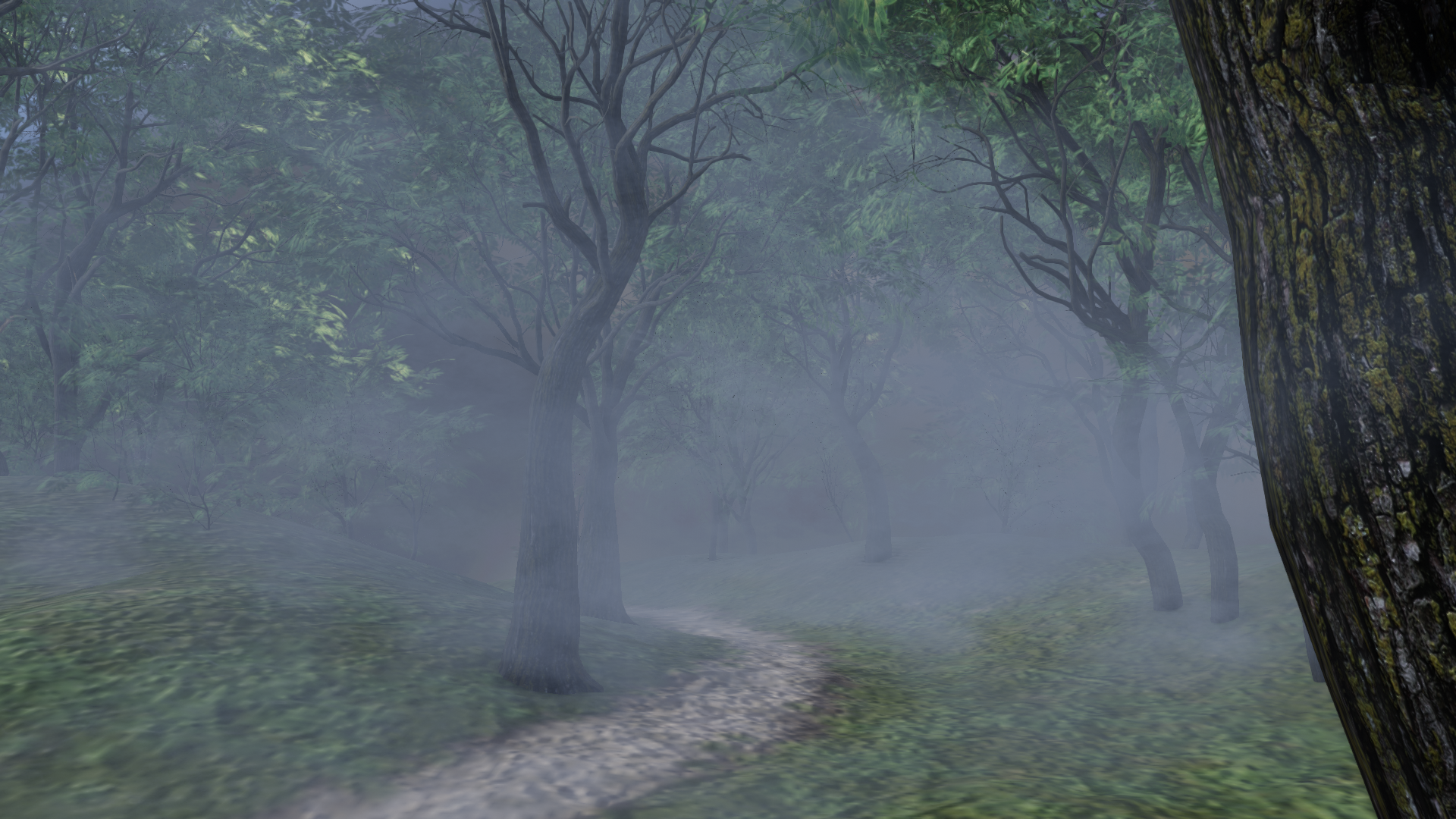
Of course with more talent and investing more time especially in lighting and postwork you can achieve better results in filament. But you will never reach IRAY quality, especially when organic material (e.g. plants) is involved.
If you still want to give it a try: go to the product and there to the prop section.
Here you find 2 props: First the atmophere prop in 7 different sizes (for this image i used 64x64). And the mist prop (i used several in my image):
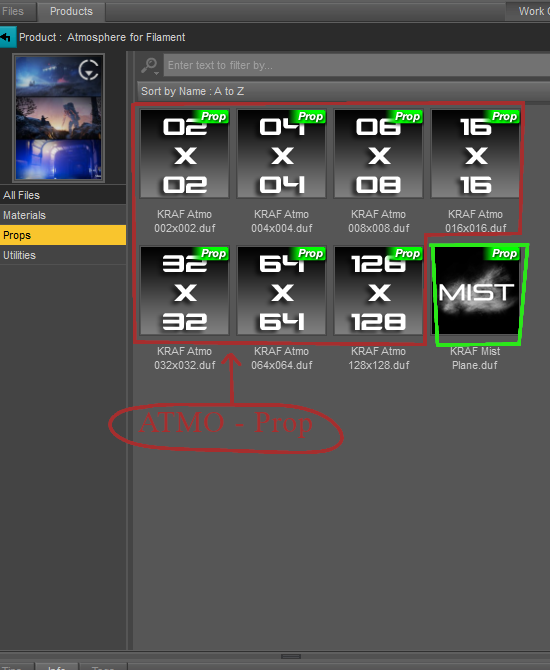
When you load a prop, move it around, scale and rotate it until you are content. Also play with the settings like color and intensity (you find those in the material section).
Good luck!
Filament RendersI tend to go on the principle that "If the description is inadequate to tell you how to use the product, don't buy.". I'm left completely baffled by that filament product, and would never spend my money on it. Regards, Richard.Filament Rendersvon Hobo said:
barbult said:
A Filament render will be exactly what is shown in the Filament viewport. Remember, to render Filament, the selected render engine is Viewport. There is no separate plugin or enhanced features.
So confusing. Thank you for clearing that up for me. So I guess the product I purchased called "Atmospher for Filament" will only work in the Filament viewport, not for Iray renders?
I don't own it, so I don't know what would happen in an Iray render, but that is not its intended usage.
Filament Rendersvon Hobo said:
barbult said:
A Filament render will be exactly what is shown in the Filament viewport. Remember, to render Filament, the selected render engine is Viewport. There is no separate plugin or enhanced features.
So confusing. Thank you for clearing that up for me. So I guess the product I purchased called "Atmospher for Filament" will only work in the Filament viewport, not for Iray renders?
filament
nounnoun: filament; plural noun: filaments
-
-
ASTRONOMY
a slender, elongated body of luminous gas or other material in the sun’s atmosphere, a nebula, or interstellar space.
-
Filament Rendersbarbult said:
A Filament render will be exactly what is shown in the Filament viewport. Remember, to render Filament, the selected render engine is Viewport. There is no separate plugin or enhanced features.
So confusing. Thank you for clearing that up for me. So I guess the product I purchased called "Atmospher for Filament" will only work in the Filament viewport, not for Iray renders?
Filament RendersA Filament render will be exactly what is shown in the Filament viewport. Remember, to render Filament, the selected render engine is Viewport. There is no separate plugin or enhanced features.
Filament RendersIs Filament just a preview then? Nothing more?
How were these final images in the promos of this product created?
Daz 3D is part of

Connect
DAZ Productions, Inc.
7533 S Center View Ct #4664
West Jordan, UT 84084Licensing Agreement | Terms of Service | Privacy Policy | EULA
© 2026 Daz Productions Inc. All Rights Reserved.