-
N.G.S. Anagenessis II - Revolution [Commercial]
I see the UVs for Genesis 3 characters getting changed to Base and Victoria 7... is that intentional?
Black Is Beautiful IIFW Phoenix looks amazing: http://www.daz3d.com/fw-phoenix-hd-for-victoria-7
FW Phoenix HD for Victoria 7Just wanted to say a big Thanks for a beautiful character! Oh, and a HUGE thumbs up for having 3Delight mats!! There have been so many items in the store lately that I'd have loved to buy but they were Iray only. I've been shaking my fist at the sky and cursing (followed by copious amounts of whimpering) a lot lately.

Yes, one could manually convert for Iray, but I have so little time to spend with Daz (yet I love it so!) that it's not worth my time. So, a big THANKS for the 3Delight!
 FWSA Narkissa HD for Genesis 3 Female(s)
The Narkissa character is amazing! Thank you so much FWSA! You guys have really gone above and beyond with this character!
I'm having so much fun dialing her into other characters and creating new characters with her - she's really cool! Particularly her shape morphs! She's definitely one of my favorite purchase I've made here at Daz! :D
I just wanted to show some love, and show my thanks for creating such a great character!

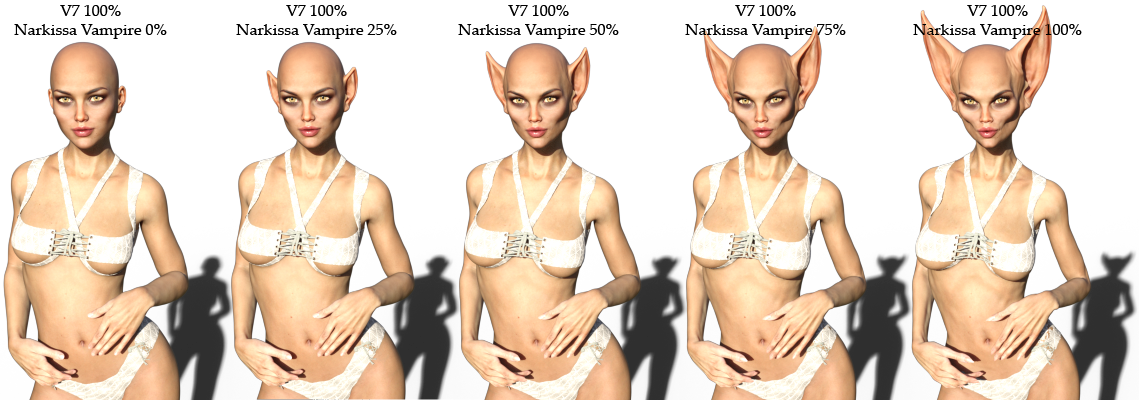
Here I've dialed her full body morph into Victoria 7 (she also comes with a separate vampire head morph if you just want to dial in the head alone).
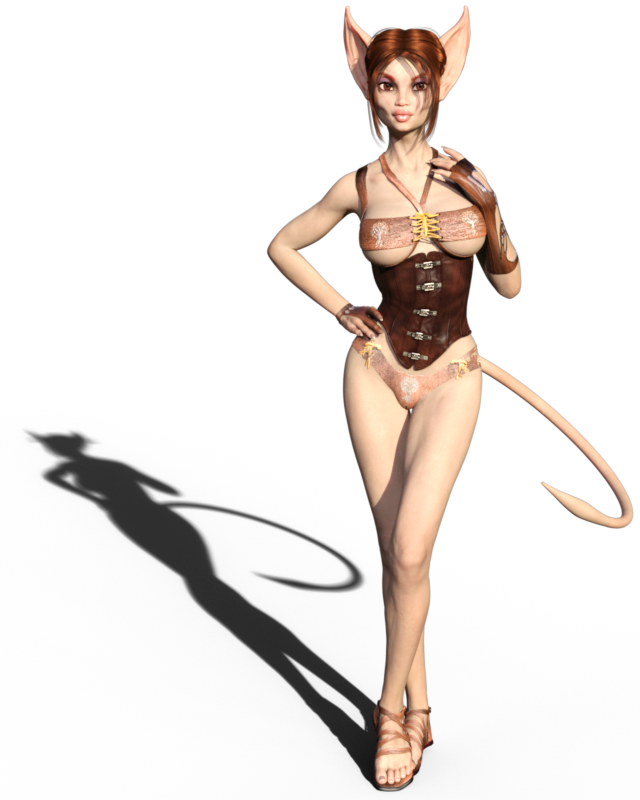
I also played with adding a tail and some other morphs and made her into a cat girl. lol :)
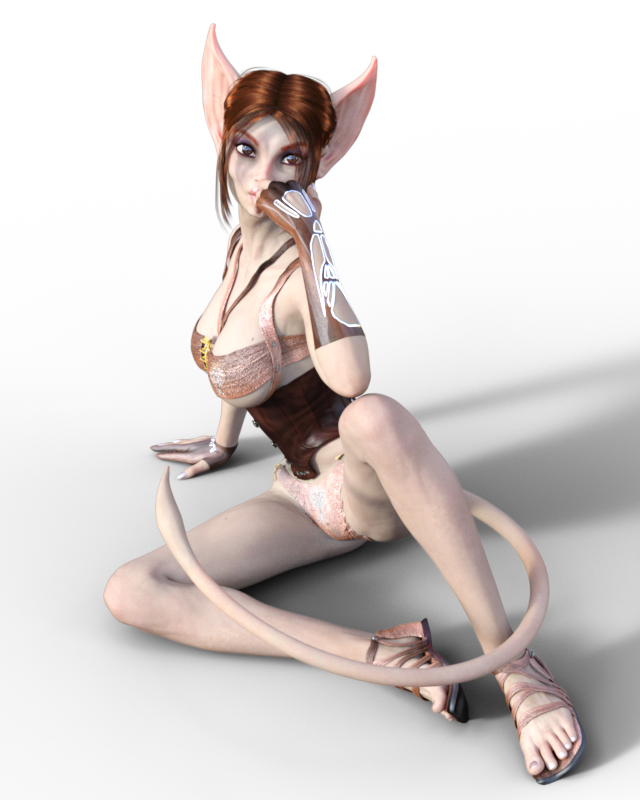
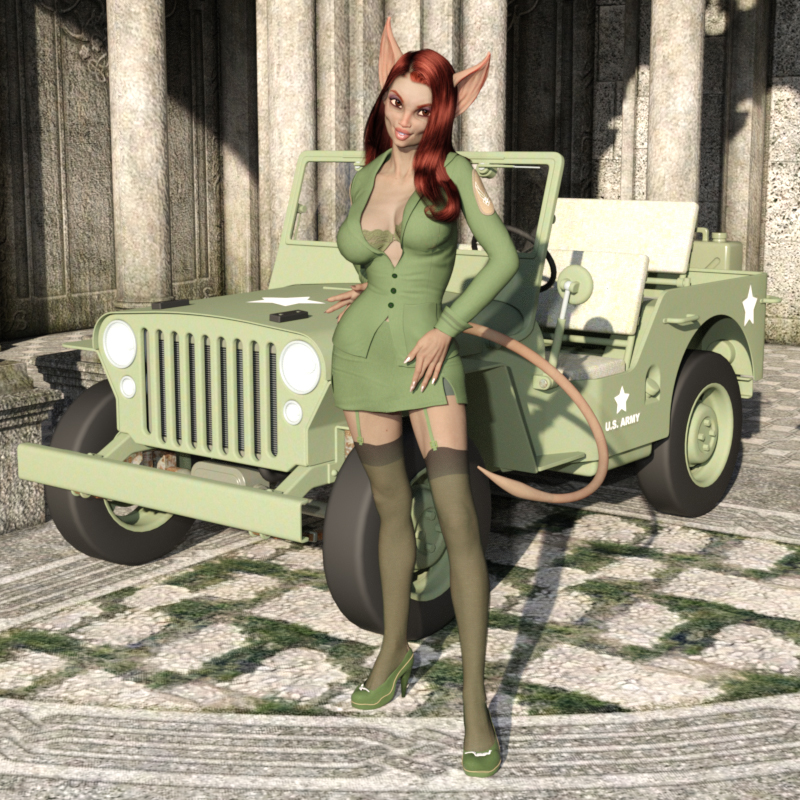
She's definitely one of my favorite purchases so far! Thank you, FWSA, for the great character! :D I love her and hope to see more like her in the future!
Awesome stuff, Diva! Ended up picking her up so I can add her to my gene pool. Already have a concept for a render in mind . . .
- Greg
FWSA Narkissa HD for Genesis 3 Female(s)The Narkissa character is amazing! Thank you so much FWSA! You guys have really gone above and beyond with this character!
I'm having so much fun dialing her into other characters and creating new characters with her - she's really cool! Particularly her shape morphs! She's definitely one of my favorite purchase I've made here at Daz! :D
I just wanted to show some love, and show my thanks for creating such a great character!
Here I've dialed her full body morph into Victoria 7 (she also comes with a separate vampire head morph if you just want to dial in the head alone).
I also played with adding a tail and some other morphs and made her into a cat girl. lol :)
She's definitely one of my favorite purchases so far! Thank you, FWSA, for the great character! :D I love her and hope to see more like her in the future!
Babes on a BudgetI'm really loving the new character Narkissa! She's really cool. I've not had a character before that is kind of a creature type character, but I've been wanting a cat girl character for quite a while. So when I saw her I was like - 'OHHHH SWEET! She might make a good cat girl!'. And sure enough, with a few morphs, a few tweaks, and a tail, she makes a cute cat girl, imo. LOL Leave it to me to see a creepy bat-creature type character and think "Oh oh! Let's make her a pin-up cat girl!". lol
That shadow is awesome in the first render! You know I like the beasties. Question about the character - are the ears a morph, or geograft? If a morph, I would love to get that morph transferred into the Genesis gene pool.
- Greg
Thank you, Greg! :D As for the ears - it's a full head morph. The Narkissa character has a regular head and the Vampire head with the ears. You can dial the head with the ear morphs in by either dialing in the full Narkissa Vampire body morph or just dial in the head which has a separate head morph option.
I did some quick renders to show Narkissa Vampire (the full body morph, not just the head morph) dialed into Victoria 7 in increments of 25%:
And, of course, the head can be dialed in separately from the body. :) She's really an awesome character. I'm usually not a fan of creature characters but I absolutely love her! :)
The new Centaur 'n stuff thread - reloadedCongrats Hemii and an early wedding blessing
May God be with you and bless you;May you see your children's children.May you be poor in misfortune,Rich in blessings,May you know nothing but happiness From this day forward.
Thank you very much, this is really touching.
I have uploaded the MillCentaurV4 to ShareCG. I packed the version 2 of my morphs in the ZIP, so can someone check if the instructions make any sense?
Can I post a link to my files on ShareCG or does this violate any rules here in the forum?
Yes, posting links to ShareCG is allowed...
Great, here's the link:
https://www.sharecg.com/v/86470/browse/11/Poser/Centaur-Morph-for-DAZ-MillHorse-SR1-Victoria-4.2
It's Raining Men Again Competition -- Winners Revealed!!!!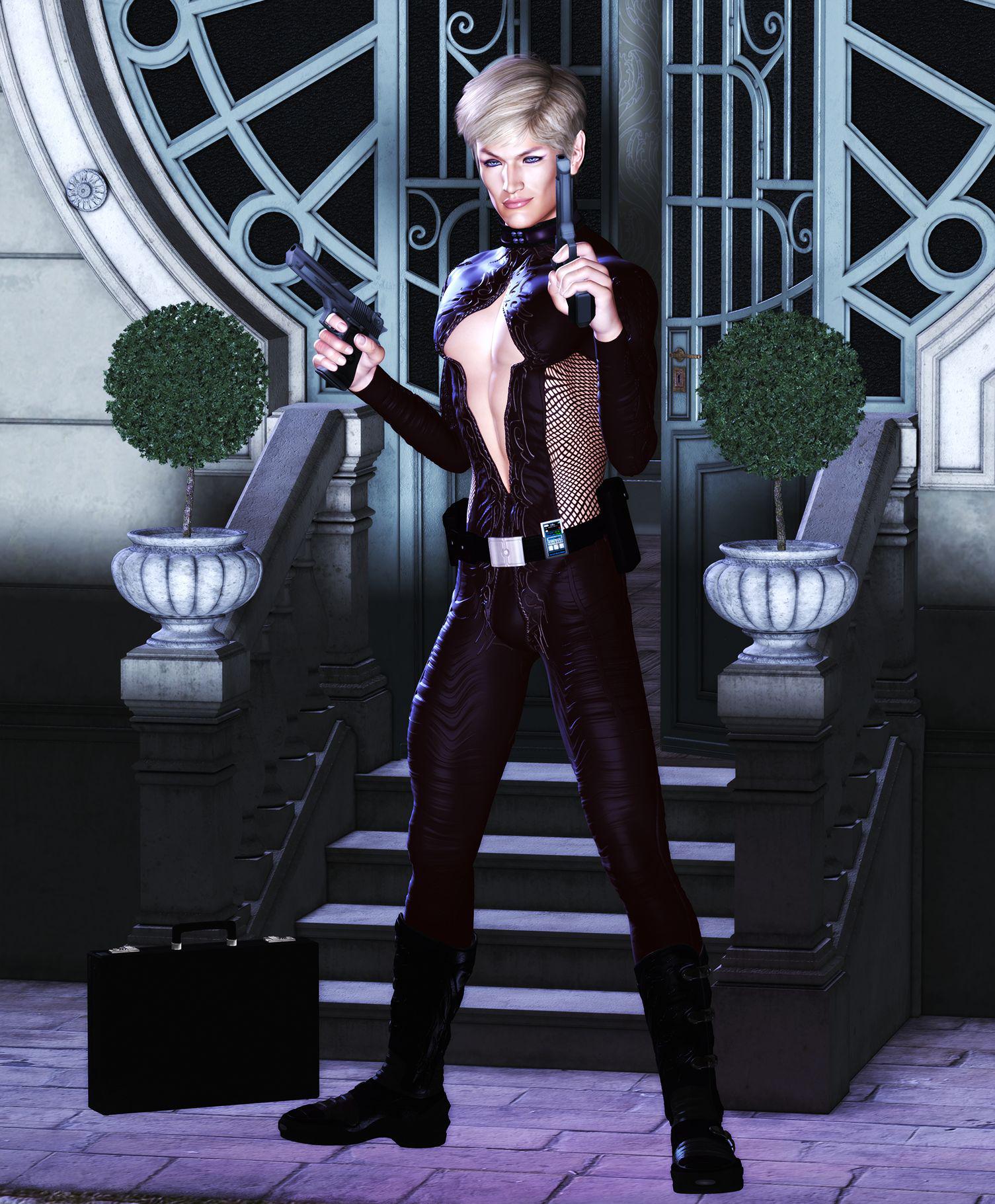
Finally got the boring RL stuff out of the way long enough to finish my first one. Meet The Man From Moscow ("You were expecting maybe a hobbit?"). Re-purposed items are the eye makeup and lip gloss which is Vicky 4's, also most of the outfit. I put it together from a V4 second skin pack and one of her "club wear" collars re-textured to match. Was going for a blend of urban fantasy/1960's spy series but unfortunately there are no really sexy leather catsuits for the guys to slink around in so I had to make my own.
Model is Michael 4 with Victoria 4 UVs. Character is a blend of Michael 4 and Guy 4. Rendered in PoserPro 2014, postworked (color boost and an ear fix) in PSP.
Moving library to second hard driveEverything moved fine with out sybolic links but Victoria 4 and Michael 4 need to be reinstalled to a local directory or they won't completly work for me.It's not exactly that they need to be installed to a local folder, it's that all Generation 4 (V4, M4, etc.) figures and all their morphs must all be installed to the same content location. It's because of the way Gen4 morphs are designed for installation, if you (or DIM) get it wrong the installed morphs can't be found and won't work. This limitation isn't a problem for any other earlier or later figure generation.
Novica & Forum Members Tips & Product Reviews Pt 7Gotta get out the door to run errands, I don't have time to see which vendors are still featured stores so want to get these products shown as soon as possible.
Featuring Crescent Cove
Dmitri for Gen3M European Clothes for Gen3M Thomas Hair
FWSA Mina for Arabella 7 (got her for$3.10, still in featured stores) Everyday Updo Hair Open Pumps for Gen3F
I'll be honest, that set took me awhile to light from where I wanted my characters, and I'm stubborn. The dome rotation is already set at 200, I changed the Y rotation to 103.35 to get more sunlight coming from the front/side (I'm just used to doing Y. I like 270 for most sets, it gives side lighting.) Also, I went into the Surface tab and made the diffuse color gray for the white walls, otherwise you're dealing with quite a bit of washout (depending on your lighting.) It needs more tweaking but moving on, said I was spending half an hour on a scene for you and it's been a couple! Doing a closeup of the two characters for you now, because that's what's not showing up well here. (Well, running errands for a couple hours first. Back in awhile.)
Dmitri doesn't have a clean-shaven option, so if you don't like stubble, remember that. I like him!
For poses, I find myself using Muscleman's Ritratto Poses for V7 and tweaking from there. When you want good, basic standing or walking, take a peek at those. There are hand poses too, and you can easily move a finger or two and get more natural looking hands (to me, those are a bit too "elegant" and staged.) For men, the Nice Guy Poses for Guy 7 are a great posing set. Again, there are hand poses.
"THAT'S my view?"
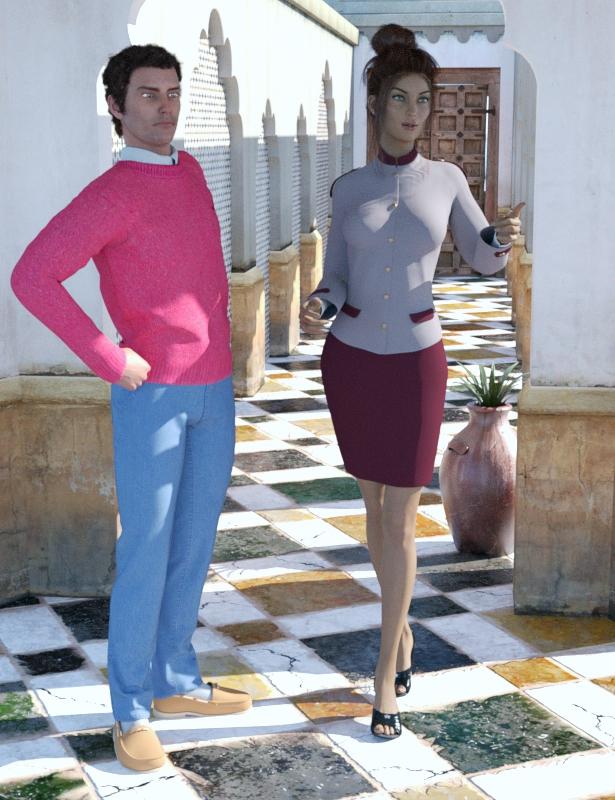
@bitwelder @darwinsmishap @oskarsson @3DCelebrity @outoftouch @tentman (for both he pumps and staff uniform)
@muscleman @designanvil
Skin Blender - [Commercial]Okaaaay.... I'm probably buying this no matter what, but a few questions:
1 - does the shell hold ALL of the texture layers from the original texture... ie: diffuse, normal, bump, etc?
2. - If it handles all the above, can they be intermixxed. That is, say, to do something like use the bumps from an old V4 set with the diffuse of one for G2F?
3. - Can the resulting combinations be stored as a single preset? Or will there be an add-on product later that allows that, as happened with Skin Builder?
4. - in regards to:
Very cool! Works with all generations? Works across generations?
Works with all generations. Across generation only if the UV is available thru something like http://www.daz3d.com/victoria-6-and-michael-6-uvs-for-genesis
Does that include a skin that's been transferred with Geografts ala Cayman Studio's products, or something like the old Four Arms for Genesis?
Moving library to second hard driveWhoa! Hold the fort!? You don't need a lot of fancy work! Trust me, I've moved my stuff from PC to Mac, and all around the place on 3 different Macintosh computers.
First, I'll assume you've saved all your original DAZ Studio content files in a folder on your computer. I always do that!
You can copy your DAZ install content folder over to a new hard drive. Just copy all the content itself. You can even rename the content folder if you wish. Just remember you need to tell DAZ Studio and DAZ Install Manager (DIM) where to find it later!
Once you've copied all the content, run DAZ Install Manager (DIM). Immediately go in and tell DIM where to find your content. Remember you'll need to also tell DAZ Studio where to find that content later. Add the new content folder info into DIM, then delete the entry for the old folder location. Now close down the Preferences pane.
Go to the main DIM pane. Look in the "installed" pane. It's showing your content in the old folder. You'll notice on the right, the box says Uninstall. Select All, then click Start Queue. DIM will uninstall all the stuff that was in the old folder. The next step is a little tricky.
Now go to the Ready to Install pane, and select all. Click Start Queue. This part will take awhile. DIM will go through and rewrite the "dsx" files that tell DIM where to put your stuff. Eventually DIM will be done, and you are done.
The entire process is easy if you saved your DAZ originals on your computer. If not, you could be waiting a few hours for the job to finish. I have 16 years of DAZ content. It's a major deal for me.
Everything moved fine with out sybolic links but Victoria 4 and Michael 4 need to be reinstalled to a local directory or they won't completly work for me.
Skin Blender - [Commercial]Very cool! Works with all generations? Works across generations?
Works with all generations. Across generation only if the UV is available thru something like http://www.daz3d.com/victoria-6-and-michael-6-uvs-for-genesis
Half Victoria Half Lilith Question- You have a tab called "Smart Content". In it you should find a figure called "Genesis 3 Female" Double Click on it.
- Now click on that figure.
- Find a tab called "Shaping". Its a tab like "Smart Content", "Paramaters", "Scene", etc. If you cannot find it anywhere, go to the upper list of options and you will find it in Window -> Panes (tabs) -> Shaping.
- In the Shaping tab (while the Genesis 3 Female figure is selected in the Viewport) you will find different "Morphs" for the character. Sliders that put a shape on the character.
- In "actor" there should be Lilith and Victoria sliders. Just set them to a desired value.
Does this answer your question?
New here :) Question about Genesis 1 & General AdviceA few corrections:
Each Genesis includes autofit clones to use clothing from the previous generation; you need add-ons to go back more than one generation. G1 can use V4/M4/Kids4 textures; G2 can use V5 and M5 textures (but not other G1 UV sets). G2 & G3 also come with autofit clones to convert clothing between the male and female versions. Some clothes convert better than others -- footwear, skirts, dangling sleeves are more difficult; form-fitting clothes are the easiest.
Genesis 2 includes Iray texture presets also.
There are paid products to expand usability across different generations.
Personally, I use Genesis 1 99% of the time, although I have bought a lot of Genesis 3 content. I skipped Genesis 2 because I really hated V6, much too skinny.
Can you explain the add ons further? Also if I buy the fairy wings for Genesis 2, can it work on Victoria 7? Thanks for replying :)
Half Victoria Half Lilith QuestionGo to the shaping tab, select the shaping morph for the characters, and dial in the value you want.
For the shaping tab, I recommend you take a look at the video training, point 5: http://www.daz3d.com/help/help-daz-3d-video-tutorials
Hi so I have to click the character of Victoria first then click the character of Lilith then adjust it on he shaping tab? Won't it add Lilith as a separate character resulting in 2 characters instead of a merged one character? Thanks for replying by the way :)
Half Victoria Half Lilith QuestionHi guys how do you make a figure look like a mixture of two charcter presets like for example 50% Victoria and 50% Lilith or 60% Victoria and 40% Lilith, etc.
N.G.S. Anagenessis II - Revolution [Commercial]Since the names for some Genesis 1 surfaces are different from Genesis 2 and Genesis 3, and likewise between Genesis 2 and Genesis 3, I assume you had to set them yourself to make the presets. Did you leave out the V3 preset because relatively few people use her?
By the way, are you still working Victoria 3?I use her sometimes in the mid-ground or as a mannequin. I have some hi-res textures and high fashion clothes that I use with her. But I don't know if I want to rename all the textures just for that. I have all the conversion tools, but I'm not motivated to change yet. This may do it.
As I said N.G.S. 2 has One Click Solution only for All Genesis Figures (Including V4 & M4). Any other Non-Genesis Figure needs manually to be applied.
Although I will give to all people a guide & a freebie manual system after product's releasing for easier applying on Non-Genesis Figures.
Thank you
Dimension-Z
N.G.S. Anagenessis II - Revolution [Commercial]Since the names for some Genesis 1 surfaces are different from Genesis 2 and Genesis 3, and likewise between Genesis 2 and Genesis 3, I assume you had to set them yourself to make the presets. Did you leave out the V3 preset because relatively few people use her?
By the way, are you still working Victoria 3?I use her sometimes in the mid-ground or as a mannequin. I have some hi-res textures and high fashion clothes that I use with her. But I don't know if I want to rename all the textures just for that. I have all the conversion tools, but I'm not motivated to change yet. This may do it.
A good time to invest in Genesis 3?I would love to think that we have at least one more year of Genesis 3 ahead of us!
Also, it would be great if Daz considered discount for Victoria 8 based on how many Genesis 3 characters you own for example to make the transition to new generation easier for loyal customers : )
Agreed, DAZ does seem to reward customers who own a good amount of their base models. I bought some G2 stuff and got discounts for G3 base models so hopefully they keep that trend. Also like with G3 and G2. Most of the content does work with both generations so hopefully with a newer gen they do the same. So we should be able to still use all the G3 stuff off the bat with a newer generation.
I also forgot to mention. The following products helped a lot when i adopted G3 early and content was limited. So much I still actively use these with almost every scene. You'll be able to wear most of G2 stuff off the bat with G3 with little to no adjustments. As G2 wasn't aimed for Iray and G3 is. Some of the items you will need to run Uber Base Shader over and maybe edit the surface a bit to get the correct shader look for the wearables. G1 stuff you will be able to also use a good amount of their invesntory. Ultimately you can also use some of the vast Iray Shader packs for metals, materials and just inject it over the none Iray surfaces of products you wish to use. voila. Those packs are dirt cheap in the PC+ membership.
Excellent tools I highly recommend is Wear Them All and Fit Control for G3. These products have brought a lot of V4/M4 stuff back from locker for me. Provided there are some minor issues where the low poly material in some places dont work well in the high poly areas of G3. But all in all is you avoid clothing that attached to highly strechable areas such as innner thighs then you should be able to use old stuff no problem. V4 Shoes is also a problem but very much possible. I have brought quite a few stuff over from V4 to G3 (See last recomendation on the possibility).
Star 2.0. This gives G3 an auto fit ability to wear old original Star wardrobe. Very excellent. I bought tons of old Star stuff that was on sale at Daz, Rendo, Hivewire and RDNA and use them on G3. Certainly go over to RDNA and grab the clearance sale of Star stuff when you go down this path. Stuff is very cheap now as DAZ will be closing that store shortly T_T RIP RDNA...and my stuff that wasn't transferred... 8 (
V4 for G2, G2 for G3. This will be a awesome tool to use if you have a good amount of V4 inventory. You basically morph G2 to V4 then use transfer utility to bring your V4 stuff to G2. From there you can either just autofit it to G3 or Transfer it again to G3 with the G2 etc. This very quickly explained but there are quite a lot of tutorials out there at the current moment that will tell you how to do this correct.
Daz 3D is part of

Connect
DAZ Productions, Inc.
7533 S Center View Ct #4664
West Jordan, UT 84084Licensing Agreement | Terms of Service | Privacy Policy | EULA
© 2026 Daz Productions Inc. All Rights Reserved.