-
Double Installation? - DazConnect vs Install Manager
4th generation figures and the SubDragon can't be installed with Connect.
Thank you for clarifying.
Never noticed because I personally "vaulted" characters and figures older than Genesis 3.
The clothing is available though and works fine with autofit.
Maybe it would be easier for new customers if only content would be sold in the store that can actually be installed with Connect?
But I guess it is still to early to suggest such a thing because "V4 is still popular and all that..."
They did update DIM -- they added the ability to filter on "Connect Available" and "Connect Installed".
That filter system still does not seem to be fully working as expected.
Experienced users may be able to work around this by using Connect Available and Connect installed and then hide those products.
New users may end up using "Not connect available" and then still install products file versions that they actually would not need to install...
Example:
VUE, .obj files etc may not be able to be installed with connect. But you also do not need to install them at all and can still download the Connect version with studio...
- - -
More detailed problem description:
Request #219558
Current status May 2016:
added to the bug tracker for further investigation
- - -
In any case what I allready suggested back then was:
"For new users the DIM should only show the files to download "Software" and "plugins".
For new users the DIM should not show any files that they could also download in DAZ Studio with DAZ Connect directly."- - -
So my suggestion for new users remains
- stay away from older content for Generation 4, 3, figures (Victoria 4, Michael 4 etc) until you have a basic understanding about the differences and limitations
-> Purchase generation 7 content like Genesis 3 first and learn DAZ Studio with that
- only install plugins and software with the DIM
- install everything else directly inside DAZ Studio.
- - -
issues with genesis 6 and carraraFirst let me say that my downlaod manager account won't recognize my password, so I am waiting for DAZ to get back to me on that. They said within three days.
Nevertheless, I am trying to migrate from Victoria4 to 6, i.e. Genesis 2. I am currently at the office and operating from memory(shaky). AT home, at lunch, I manually downloaded and unzipped the files into my regular runtime. In Carrara, there is no "people" subfolder, only the previously exisiting "figures," which is where I used to load Vic 4 from (under "DAZ people" subfolder). There was no "genesis" or "Victoria 6" option under "DAZ People). I have read that I should go the 2 content folders to the right end of my tags at the bottom of the screen. There, I also find subfolders that look promising, but there is no "Genesis" subfolder. There is a "people" folder, but no genesis. I know that download manager probably installs this stuff where it can be seen, but that is not available. Can someone give me (62 years old) CLEAR instructions where to download the zipped Genesis 2 Male and Female, etc zip files so that Carrara can see them?
Also, I thought I might locate the DUF file (under people) which I believe i did for Genesis and then create a new runtime for Carrara to link to, but the option to create a new runtime (far right lower corner of Carrara screen) is greyed out and not an option.
Dead in the water at the moment, eppreciate help.
Jay
Warrior Queen items won't allow double click, and autofit doesn't always workIs this the Warrior Queen you are talking about? http://www.daz3d.com/warrior-queens
If yes, the outfit this texture is made for http://www.daz3d.com/she-war is for Victoria 3. That is NOT a Genesis 3 figure, but a very old figure. Which figure are you trying to fit the clothing to?
Warrior Queen items won't allow double click, and autofit doesn't always workI'm a new user and is trying to load Bodica Panties and dress on to figure. Normally when the cursor goes over a piece of clothing I should get "double click" to load item. All that comes us is a description. Next I have tried dragging item over to figure, normally in the past I get the message fit to "victoria" or which ever model but now I just get the small plus sign. This is very frusting as I am working on some Palace Guard amazons but none of the Warrior queen items seem to want to work. Please I would entertain suggestions, but I am not a Techie. Further I have asked they the designers put in more tutorial videos that would show us how to fix issues like shields merging into thighs etc. Can anyone give me some simple help - remeber I am not brilliant - I little better than a raw newbie. Any help would be most appreciated. Cheers:)
Genesis 3 UVs for Genesis and Genesis 2 [Commercial]Genesis 3 UVs for Genesis 2 Male(s) will be released shortly. It includes UV support for the Anatomical Elements and PDF documentation, as usual.
I have attached some promos which use the pistol and poses from Pistol and Poses for Michael 6 and Victoria 6 by Porsimo.
Carrara Sale Email Message Alert threadNot Carrara related, but a free dress for V5 and V5 is included in Carrara 8.5, so a little Carrara related:
http://www.daz3d.com/victoria-5-tank-dress
V4 Pose Converter for Genesis 1 & Genesis 2 Female (Commercial)When I run the script 'V4 to Genesis 2 Female Pose Converter', it shows an error message below.
Missing Files
Some assets needed to load the file were missing. The content may not work as expected.
The following files could not be found:
data/daz 3d/genesis 2/female/uv sets/daz 3d/victoria 4/victoria 4.dsf
Do I have to install some other products?
Please anyone help me.
N.G.S. Anagenessis II - Revolution [Commercial]worked great ...
this is 1) 3dl 2) iray no ngs 3) iray igs
--
except for losing the browns into darker...
fixes what iray did to my characters..
--
note it did this without being able to find the victoria 7 dsf... apparently she's not in base bundle...
---
but there must be a way to turn off the happy rendering window?
already seen in twenty times ... nineteen times too many...
Show Us Your Iray Renders. Part VIs that Stormy from Lyoness texture set? I've come within a hair of buying that texture set a few times. You render looks good.Nope, the character and textures are all Victoria 7 HD, just with a very heavily modified shader setup.
Question about shaping the eyesDid you think of getting Genesis Generation X2 and its add-ons ? It would let you transfer your G2 morphs (even full character) to G3 so that you have a quite accurate version of G3 Liberty Lass or others, with the advantages G3 offers. Not really cheapest solution but worth the money if you think of transfering other characters or morph packs too. Together with the Legacy UVs for Genesis 3 you could also transfer the original texture to G3, depending if you used one based on V6 UVs or G2F UVs (or even V4 etc), some of these Legacy UVs products are available from Daz, some from Renderosity.
http://www.daz3d.com/genesis-generation-x2
http://www.daz3d.com/genx2-addon-for-genesis-2
http://www.daz3d.com/genx2-addon-for-genesis-3http://www.daz3d.com/legacy-uvs-for-genesis-3-victoria-6
Maybe there's another catch-up sale when PC sales ends soon and eventually those PAs are included ?
Btw. I've read your comic from page one up to the end just 10 days or so ago, nice work ! :DThanks for the compliment.
I thought about doing a GenX2-3 conversion but, I'm actually happier with the new figure *except* for the eyes. I was able to shape them a little more to my liking though. I have no desire to keep the old skin texture. No matter how you convert it, the old converted 3DL skins do not look as good as the ones made specifically for Iray, at least to my eyes. But I may try it and see.
Question about shaping the eyesDid you think of getting Genesis Generation X2 and its add-ons ? It would let you transfer your G2 morphs (even full character) to G3 so that you have a quite accurate version of G3 Liberty Lass or others, with the advantages G3 offers. Not really cheapest solution but worth the money if you think of transfering other characters or morph packs too. Together with the Legacy UVs for Genesis 3 you could also transfer the original texture to G3, depending if you used one based on V6 UVs or G2F UVs (or even V4 etc), some of these Legacy UVs products are available from Daz, some from Renderosity.
http://www.daz3d.com/genesis-generation-x2
http://www.daz3d.com/genx2-addon-for-genesis-2
http://www.daz3d.com/genx2-addon-for-genesis-3http://www.daz3d.com/legacy-uvs-for-genesis-3-victoria-6
Maybe there's another catch-up sale when PC sales ends soon and eventually those PAs are included ?
Btw. I've read your comic from page one up to the end just 10 days or so ago, nice work ! :DN.G.S. Anagenessis II - Revolution [Commercial]Another test/play around. This time I used the lighting setup with Face and body lights as previously mentioned (face and Body A with changes and an additional back rim light). Shader alterations similar to my previous post, just more in line with this particular skin tone.
I am really delighted with this shader set up, as it isn't difficult to achieve terrific results. Thanks again!
Very nice Render!
Can you please tell me what textures you used? Victoria 7?
Yes, & thanks! That's default V7 Iray skin; the eyes are actually replacement from Project Eyeray (DimensionTheory) with the PeachFuzz add on (ThePhilosopher).
Having so much fun playing with all this =D
I'm very glad that you like it so much! I think you'll get better results than me!
N.G.S. Anagenessis II - Revolution [Commercial]Another test/play around. This time I used the lighting setup with Face and body lights as previously mentioned (face and Body A with changes and an additional back rim light). Shader alterations similar to my previous post, just more in line with this particular skin tone.
I am really delighted with this shader set up, as it isn't difficult to achieve terrific results. Thanks again!
Very nice Render!
Can you please tell me what textures you used? Victoria 7?
V4 Skins Batch Converter to Genesis 2 Female.....Victoria 4 for Genesis 2 female (This is the folder I want the converted files to go) but when I get to this (select folder and its subfolder to convert) I get nothing!
You don't see a list of files there because you are selecting the entire folder. Once that folder is selected the list boxes above will fill in with the presets from the selected folder, and any subfolder(s) of that folder.
P3D Josina HD is not really HDThe HD is referring to the body morphs, as compared to a character created for the "base" version of G3F or Victoria 7. The description even says so.
P3D Josina HD is not really HDWhy some artist keep adding the HD to some of their characters, as if the textures were HD quality, they even state on their product that their textures are high quality created from high resolution photos.
http://www.daz3d.com/p3d-josina-hd-for-victoria-7
But they are NOT! Im annoyed of this false advertisement =/
Here is a side to side comparison of his "HD" texture and a real HD, they both are 4096x4096, but the Josina one looks realy like a 2048 that was resized to 4096.
 V4 Skins Batch Converter to Genesis 2 Female.....
Victoria 4 for genesis 2 female
V4 Skins Batch Converter to Genesis 2 Female.....Victoria 4 for Genesis 2 female (This is the folder I want the converted files to go) but when I get to this (select folder and its subfolder to convert) I get nothing!
N.G.S. Anagenessis II - Revolution [Commercial]This product ROCKS.
Fantastic render! Could you please tell me "who she is" :) - the model has much similarity to Erin from Rendo store, but seems to have more freckles, other eyebrows (or is that perhaps the effect of the NGS shader?) and a slightly modified mouth. (If it is a custom tweak it would be great if you could tell us the morph values...) (edit 2: Now I am pretty sure the model is Cailin http://www.daz3d.com/cailin-for-victoria-7 ...) And the hair is perfect for the face shape, too - which product is it? (edit: I just found it, seems to be the new Raffaella Hair...) - Thanks in advance!
Novica & Forum Members Tips & Product Reviews Pt 7Going to try a Genesis (but it's 1am, actually 2am but the clocks turned back. Not sure how long I'll stay up for this.) Doing Hudson. Just keep checking back on this post, even tomorrow.
Here's the default, rendered in Iray, without the Iray materials. Next is with the Uber Base applied. (I don't know if this is how I am supposed to be doing it, but that's how I am LOL)
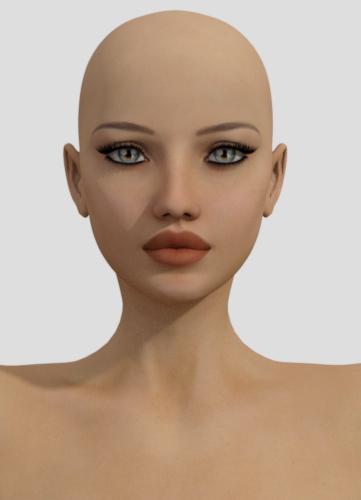
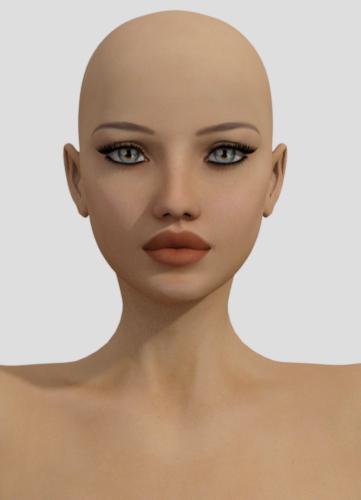
Oh hey, this isn't bad for out of the box. (better than the Generation 3 Brooklyn and Gianni, that's for sure!) She's dark, but at least not green! But this is before adjusting the lighting. Then I was curious- would Gianni's settings work? Not only no, heck no. You get a lobster!
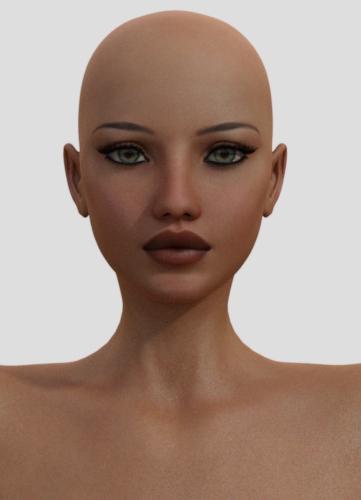
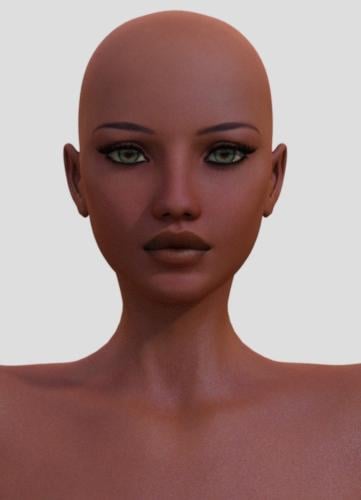
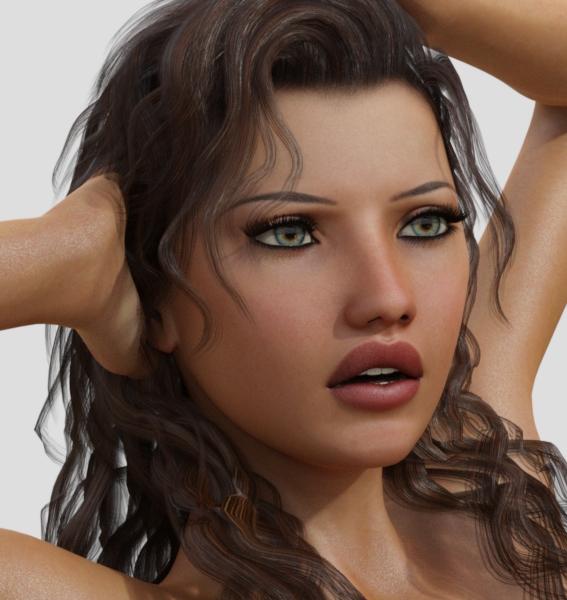
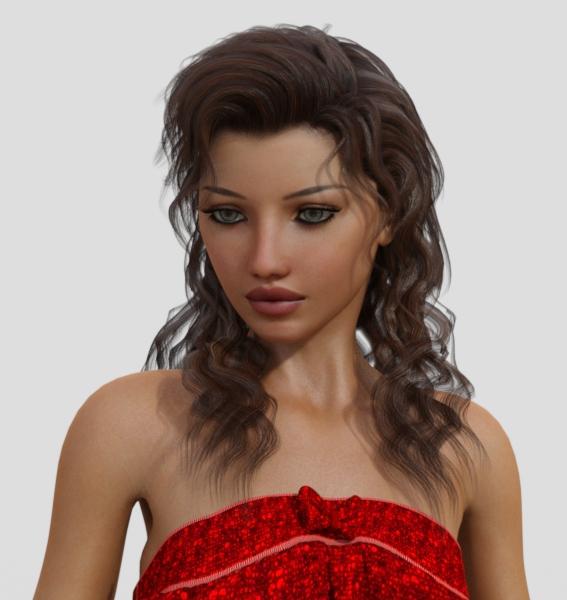
So I adjusted the lighting, lowered the bump of the top coat as it is really grainy looking, and just toyed around a bit. I think remembering to adjust your lighting after you apply the shader will make a big difference.
Daz 3D is part of

Connect
DAZ Productions, Inc.
7533 S Center View Ct #4664
West Jordan, UT 84084Licensing Agreement | Terms of Service | Privacy Policy | EULA
© 2026 Daz Productions Inc. All Rights Reserved.