-
MANGA STYLE & VISUAL STYLE topic - Update Sept 23rd 2017: Fixed Dropbox links! [Commercial]
I'm still voting for a Filament version, though not as popular it seems.
MANGA STYLE & VISUAL STYLE topic - Update Sept 23rd 2017: Fixed Dropbox links! [Commercial]Does this only work in 3Delight and iRay? I'd love for it to work in Filament as well.
Help render and AMDYou can use filament, that's the only one which will use amd cards in daz studio, but it's more a preview render engine not full featured as 3dl or iray. As an alternative you can export to blender and work there, both cycles and eevee work fine with amd cards. There's the daz bridge and diffeomorphic to do that, I recommend the latter.
Viewport doesn't show nothing how could i fix this?In the upper right corner where it says Front View, clcik that and select Perspective View.
Else you can load an item, then it will show up in any view. It is just that orthogonal view like Front View, the ground plane will only be a line, which you might have clipped away in your screenshot.
The button left of 'front view' is the drawstyle. It is currently in Filament (a kind of realtime renderer), you might want to switch that to 'Teture Shaded'.
Filament PBR - Distant Light issueYou can only use 1 distant light in filament.
Two GPU's but only one workinghapciupalit said:
fearthefailure said:
What GPU's are you using for this? I'm assuming they're Nvidia GPU's so that you can GPU render, as AMD GPU's aren't supported for GPU rendering in DAZ at present [unless something changed since I last checked]. I'm looking to do another dual GPU build with Nvidia GPU's this time, but it's a bit difficult to find updated information about which cards still have mGPU support. I believe Nvidia once had it on the 3060, then removed it after the 40 Series was released. I've been asking around but no one would respond. When I look up the specs, there's no mention of it aside from the standard mGPU is dead schtick that isn't actually true outside of gaming.
Sorry I haven't seen your comment until now. I'm using 2x3090. I might be wrong but the problem with AMD GPUs is on the iray, if you want to do filament renders you should not have a problem, but iray is powered by nvidia, so it make sense to only work with nvidia GPUs. Other than the fact that on task manager I didn't had a problem with the GPUs on any DAZ version I have used. Before this machine I had an older one with 2x1080ti. I'm still using it from time to time, to render animations and it still works well without any problems.
My apologies for not seeing your response until now. Thank you very much for returning and providing this information. Would you still consider the 1080 Ti dual setup still pretty fast? I'm just looking for an idea of how much faster GPU rendering is. If you render one character at stellar quality and no other elements in the scene, how long do you think that would take?
Huge Opportunity for the Future of DAZ if they are bold enough to embrace it.Integration into other areas is fine. But Daz should be sorting the issues that they/the customer base already have. Like better customer service (listening to their customers). Removing bits of the program that are defunct (like is Filament still supported?). Having the latest version of the program working on Mac, like it does on Windows. And every other age old gripes that other users have. But hey, that's just how I see it.
Set loading crashI'm using Filament (PBR) Drawstyle and Perspective View, I've never changed those as far as I know. I've only been using Daz a little over a month now, so I'm always wondering if I changed something by accident and still learning the software.
Improve Renderdigitell said:
Sorry for the delay in response. I was hospitalized.
Render size in pixels is 1800x2700.
Progressive Render settings attached image:
I looked at the log and I cant make out anything about what could be the cause.
Thank you for your help!
Christina
o) Max Time set to ZERO on the slider and it will do 5000 iterations or converge first. 7200 seconds almost is never enough for a iRay render of that size.
PLUS what I already spoke of you checking above:
a) Check and turn off/down fog/haze under the Environment
b) Adjust the Filtering to be sharper in the Filtering
c) Check the Camera Lens forcus by setting the Preview Window to use the Filament preview (top right hand side list of white gizmos)
You could probably stand to watch the introductory series of tutorials on the YouTube DAZ 3D channel; by that Dutch guy (WP?) and Colm Jackson have made them.
What is FilamentRichard Haseltine said:
I don't believe Filament is intended, even by Google, to be quite that feature-rich.
Given the features available in https://github.com/google/filament, I'm inclined to think there is a lot left untapped with DAZ's implementation of the filament render engine. Just some things have not been plumbed in to tap this potential.
Loading an older G3 character in DAZ causes a crash, but only if I attempt to view in irayI've never had this happen before, and this seems to be specific to this one character... not sure if it's a textue or what but ...
If I view it in any mode (Texture based,filament, wireframe...etc. all is well) if I click to view in iray... Daz crashes. with an exception:
Exception Reason
DAZStudio.exe caused ACCESS_VIOLATION in module "E:\Program Files\DAZ 3D\DAZStudio4\libs\iray\libiray.dll" at 0033:00000000F6CFBBDB, mi_plugin_factory()+2658315 byte(s)
Registers
RAX=000000000014E834 RBX=000000003115B370
RCX=00000000000C4030 RDX=00000000000001A8
RSI=000000003115B370 RDI=000000003115DBD0
FLG=00010212 RBP=000000003115A470Dark scene in Texture Shaded viewA lot of my purchased scenes have masses of lights, which, when they're in the scene, make the entire scene dark and hard to navigate in Texture Shaded view. Now, I've since started using Filment view to navigate such scenes because Filament is great for making the scene bright and easy to see. But I was just wondering, apart from deleting every light, is it possible to make things easier to see in Texture Shaded view? If so, how?
Can Daz Studio use an eGPU?@gordig There's no "DAZ implementation" of filament as there's no "DAZ implementation" of iray. What DAZ does is to pass the scene data, but the engine itself with its features and hardware support is independent from DAZ. So yes filament works with any gpu.
White skin color in viewportPlease don't post images showingf nude, textured figures.
You are using the Filament Drawstyle (the lightbulb icon at top-right) which does tend to be overbright without adjustment to the Envirionment Intensity.
Daz Studio 5 development updateFilament is interesting as a level of screen detail, but it isn't anywhere up to the image quality of the game engine render engines, particularly when considering transparency. If the Omniverse non-raytraced version could be added to the toolset to compliment or replace Filament, I think that would be fantastic.
Regards,
Richard
Daz Studio 5 development updateRichard Haseltine said:
Essentially everything added in 4.20+ is DS 5 (or whatever it ends up being called) that can be made to work in the older version of Qt, and so has been released as 4.x updates.
That's truly great to know that DS 4 is getting updated with fixes/features that are compatible with the newer Qt (and DS 5).
I wonder how much longer it will take for the remaining DS 4 features to be rolled into a viable, shipping DS 5? Native Apple Silicon processor support (non-emulated), Filament, fixed GUI glitches, fixed keyboard shortcuts, etc.? I'm primarily interested in performance improvements within DS and the bug fixes with the interface and shortcuts. Don't know if Iray rendering is emulated or not, but if any aspect of the internal Iray render pipeline (between DS and Iray) can be improved for native performance, that would be most welcome.
Surely there's a project management methodology being used to track milestones and obstacles during development. A high level/forward looking update on DS 5 progress is what we're looking for since we don't have a product yet. It would help build customer confidence. Or not if we're still years away from seeing DS 5. :)
Thanks, Richard! We always appreciate the updates and insights you're able to give us. :)
Lee
Daz Studio 5 development updateleemoon_c43b45a114 said:
I'm disappointed that DS5 has not arrived yet.
I understand that migrating both versions (Mac and PC) to a more modern version of the Qt cross-platform development environment is challenging. DAZ Studio is essentailly (mostly?) a framework of plug-ins. The newer Qt breaks compatiblity with the older version, so (almost?) every plug-in needs a rewrite. That seems daunting from a developer standpoint and I'm sure takes a lot of time for coding and testing. There may be plug-ins that are more challenging to update. Even the database software needs to be stable with Qt and the latest operating systems across both platforms.
The DAZ Studio developer(s) have their hands full supporting DS4 while chipping away at DS5. We've been told that DS4 has been getting some benefits from DS5 development, and that's nice.
From a Mac user perspective, it's been years without having a version of DS capable of running natively on Apple Silicon systems. With Apple's assistance, the DAZ developers did get DS4 running under emulation on modern Macs. I'm grateful for that as it allowed me to continue enjoying my passion for 3D rendering.
As others have asked for, I'd also like to see some progress/status reporting from DAZ regarding DS5 development. I keep waiting for DS5 to arrive before picking up a new Mac. I'm also just putting items in my wishlist and shopping cart without buying anything, no matter how nice the items are. So my spending has dropped to zero over the last month or so.
The last time I stopped spending here was in 2022 due to product and site quality issues. I used the money I had set aside for technology and graphics (DAZ purchases) and bought a 2022 Chevy Bolt EV. This time around, I repeated the process and bought a 2024 Tesla Model Y from that same account and have been enjoying the new car for the past 4 weeks. I still run DS4 on my Macs (and sometimes my HP Omen 40L PC), but really, really, really would like to have a modern, quick, and stable DS5 on the Mac. With more feature alignment with the PC version.
Pull back the cloak of secrecy a tiny bit and let us know what's going on with DS5. Give us estimate on when we'll see it, expected enhancements (Filament on Mac, native Apple Silicon version, rendering performance improvements, etc.)
I'm waiting to upgrade my current Mac(s), but if development drags out much longer, my interest in DAZ will diminish and I'll find other alternatives. I dropped Poser after faithfully using it since the first version when I moved to DS. I can do the same with DAZ, especially since we're seeing more AI based tools out there. Do I prefer using DS over AI? Yes, absolutely, as I want as much control over what I'm rendering as possible.
Anyway, that's just a few of my personal thoughts today. Others would and should have different takes on DS5. I'm just getting impatient. LOL!
Lee
+1 I really feel the same way. I too have stopped purchasing and have added things to my wishlist without buying, no matter how nice they seemed. I also have started experimenting with AI, both here and on another site.
[Fisio SB addOn released] Fisio: Physics Simulatortylerreinelt said:
Alberto said:
CyperImer said:
Have you found a solution to this? I am also having the same problem as described above and have went through the different steps as well.
Also, I've manually installed the api-ms-win-crt dlls such that there's no missing dependencies but the simulations are still failing in the same way as before unfortunately.
If I try to "Run Simulation" again after the error message, then daz studio crashes. A crash report snippet is attached.
Not yet, but your CFF report could help.
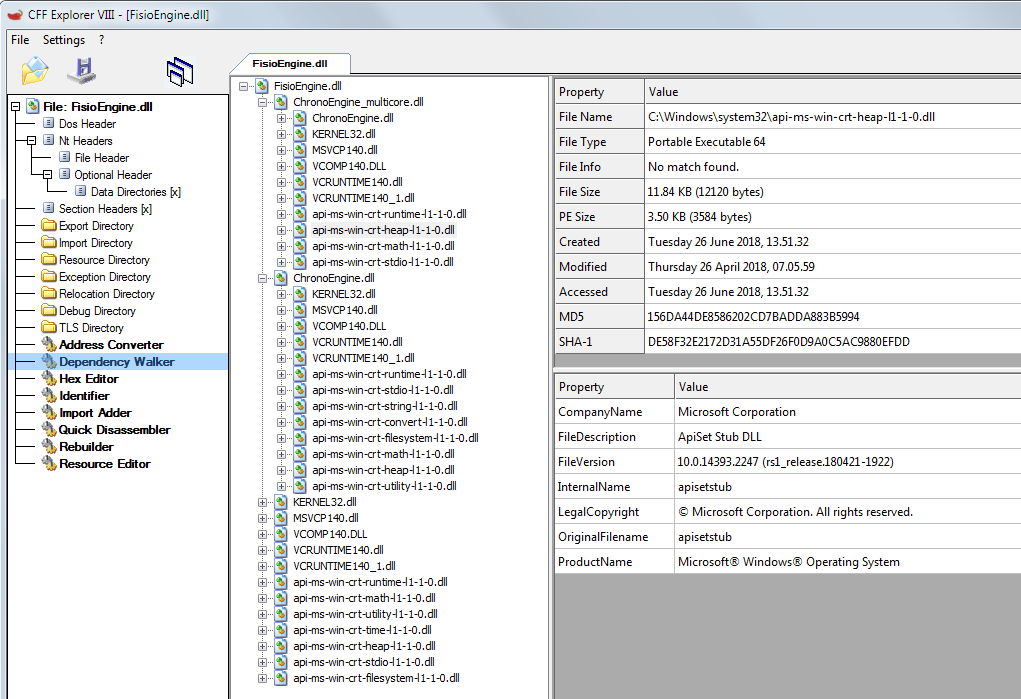
The "api-ms-win-crt-heap-l1-1-0.dll" in your computer is for a 32-bit machine (it says Portable Executable 32), but the requirement is a Portable Executable 64. So this file is not compatible. Could you install the 64-bit version?
See the following image from my computer:
I just purchased this and have the same issue, Filament works perfectly. but the moment i run simulation i get an error and the second time it just crashes daz for me all together.
Try the following. After each step, check if the plugin is working.
- Update Windows.
- Install the Visual C++ Redistributable (https://www.microsoft.com/en-in/download/details.aspx?id=48145 )
- Repair installed Visual C++ 2015 Redistributable package: (https://answers.microsoft.com/en-us/windows/forum/all/how-to-fix-api-ms-win-crt-runtime-l1-1-0dll-is/5c50232f-5af7-4f09-bf06-63718bb17e22)
See this also: https://helpdeskgeek.com/help-desk/how-to-fix-program-cant-start-because-api-ms-win-crt-runtime-l1-1-0-dll-is-missing/
Let me know if the problem persists.
Daz Studio 5 development updateI'm disappointed that DS5 has not arrived yet.
I understand that migrating both versions (Mac and PC) to a more modern version of the Qt cross-platform development environment is challenging. DAZ Studio is essentailly (mostly?) a framework of plug-ins. The newer Qt breaks compatiblity with the older version, so (almost?) every plug-in needs a rewrite. That seems daunting from a developer standpoint and I'm sure takes a lot of time for coding and testing. There may be plug-ins that are more challenging to update. Even the database software needs to be stable with Qt and the latest operating systems across both platforms.
The DAZ Studio developer(s) have their hands full supporting DS4 while chipping away at DS5. We've been told that DS4 has been getting some benefits from DS5 development, and that's nice.
From a Mac user perspective, it's been years without having a version of DS capable of running natively on Apple Silicon systems. With Apple's assistance, the DAZ developers did get DS4 running under emulation on modern Macs. I'm grateful for that as it allowed me to continue enjoying my passion for 3D rendering.
As others have asked for, I'd also like to see some progress/status reporting from DAZ regarding DS5 development. I keep waiting for DS5 to arrive before picking up a new Mac. I'm also just putting items in my wishlist and shopping cart without buying anything, no matter how nice the items are. So my spending has dropped to zero over the last month or so.
The last time I stopped spending here was in 2022 due to product and site quality issues. I used the money I had set aside for technology and graphics (DAZ purchases) and bought a 2022 Chevy Bolt EV. This time around, I repeated the process and bought a 2024 Tesla Model Y from that same account and have been enjoying the new car for the past 4 weeks. I still run DS4 on my Macs (and sometimes my HP Omen 40L PC), but really, really, really would like to have a modern, quick, and stable DS5 on the Mac. With more feature alignment with the PC version.
Pull back the cloak of secrecy a tiny bit and let us know what's going on with DS5. Give us estimate on when we'll see it, expected enhancements (Filament on Mac, native Apple Silicon version, rendering performance improvements, etc.)
I'm waiting to upgrade my current Mac(s), but if development drags out much longer, my interest in DAZ will diminish and I'll find other alternatives. I dropped Poser after faithfully using it since the first version when I moved to DS. I can do the same with DAZ, especially since we're seeing more AI based tools out there. Do I prefer using DS over AI? Yes, absolutely, as I want as much control over what I'm rendering as possible.
Anyway, that's just a few of my personal thoughts today. Others would and should have different takes on DS5. I'm just getting impatient. LOL!
Lee
Daz Studio 5 development updatewsterdan said:
wsterdan said:
Richard Haseltine said:
While posting might take minutes, deciding what to post would take considerably longer I would think - and would still be offering hostages to fortune, as this thread shows. And of course there would then be requests for updates on that, which again would require a lot of careful thought and consideration - by definition, from people who already have a lot on their plates managing the actual development.
I agree it would take longer than "minutes" to compose a message, but again, it's been 28 months, though... that's a lot of minutes.
I agree as well that making any type of commitment at all has the consequence of being held hostages to fortune, but with all due respect, choosing to make no commitment is, in itself, a commitment and has its own consequences. I know I'm probably the odd man out, but after spending tens of thousands of dollars here (60+) one consequence of not being able to plan my future projects with DAZ without knowing what will work next year or the year after that has been that I've stopped spending.
Yes, posting status updates would have us expecting more updates somewhere down the line, no argument there. As much as I'd love a status update, I'm not expecxting one, so not posting status updates has worked in that regard.
Hopefully, having saved all that time they would have wasted by posting annual or semi-annual status updates will mean they'll be releasing DAZ Studio 5 that much sooner.

Hopefully 2024 will be the year!

Happy Anniversary!
Man, the year zipped by, didn't it?
Unless I've missed it, still no estimate for DAZ Studio 5; lots of updates to Version 4.x.x, which, to be honest, I'm not sure gets us closer to Version 5 or farther away. A pre-Beta version was working three years ago (one that had Filament working for the Mac); if they'd released an actual features-light version of DAZ Studio 5 in January, 2022 they'd have had 30 months to add all the features into DAZ Studio 5 that we have now and testing them on an actual version of DAZ Studio 5. Hopefullly when they do release DAZ Studio 5, all of the features they've been adding to version 4 will still work.
At any rate, fingers crossed for DAZ Studio 5 some time this year, or at least a status update.Happy anniversary Walt ... I'll check the thread in 12 months time again to see if there is any change...
in the meantime.... back to the cubes

Daz 3D is part of

Connect
DAZ Productions, Inc.
7533 S Center View Ct #4664
West Jordan, UT 84084Licensing Agreement | Terms of Service | Privacy Policy | EULA
© 2026 Daz Productions Inc. All Rights Reserved.