-
Is there any way to use PowerPose Face with 8.1 figures?
benniewoodell said:
Anytime you open Daz and it's saying you're missing a character, for whatever reason you didn't install it through DIM yet or whatever, you know that box that comes up when you turn it on, do not install it that way as Daz might put the dummy files back into the folders. I had bought Kento 8.1 and did a shot for a scene, sent it to my other computer to render and I had forgotten to install it. That box came up so I clicked it knowing I needed the character and the power pose wouldn't work after that, I had to go and find the files again in the cloud folders I believe is where they got reinstalled. So just keep that in mind, don't install through smart content or Daz Central and they won't show back up in those folders.
Yeah, I will keep an eye on those dummy files.
I had some issues like that in the past; now, all that I install using DIM is Daz Studio and starter essentials; those dummy files must also come with the starter essentials...
I manually install characters, hairstyles, clothes, props, and everything else; it is safer that way.
Daz Central - items all out of orderI launched my DazCentral this morning and everything is all jumbled. While it says the items are listed in decending dates, they are not. I have items from years ago at the top of my list intermixed with recent purchases. Anyway to restore this?
Edit: Each time I lauch it, it has new items listed as my most recent purchase. Again, these are from numerous different orders all jumbled together.
Is there any way to use PowerPose Face with 8.1 figures?Anytime you open Daz and it's saying you're missing a character, for whatever reason you didn't install it through DIM yet or whatever, you know that box that comes up when you turn it on, do not install it that way as Daz might put the dummy files back into the folders. I had bought Kento 8.1 and did a shot for a scene, sent it to my other computer to render and I had forgotten to install it. That box came up so I clicked it knowing I needed the character and the power pose wouldn't work after that, I had to go and find the files again in the cloud folders I believe is where they got reinstalled. So just keep that in mind, don't install through smart content or Daz Central and they won't show back up in those folders.
Daz Install Manager (DIM) Not Showing Latest Purchases For DownloadIt looks like something is propagating through all the products in Daz's database, a few hours ago I had about 100 products that had no order number or date associated with them, in either DIM or the product list on the website under my account. (I don't know anything about Daz Central, but I like to sort DIM by order date so that's why I noticed this issue. Maybe Daz Central doesn't show products with no order number for some reason?)
But I just checked again now, and those pruducts from before have the correct order info in both My Account and DIM. However, another set of products that were fine a few hours ago now have no order data. The products range from things I bought in 2011 to things I bought last week, so there's no rhyme or reason except that it must be some process that's going through every product in the database. But it's probably a temporary problem.
Forum issues?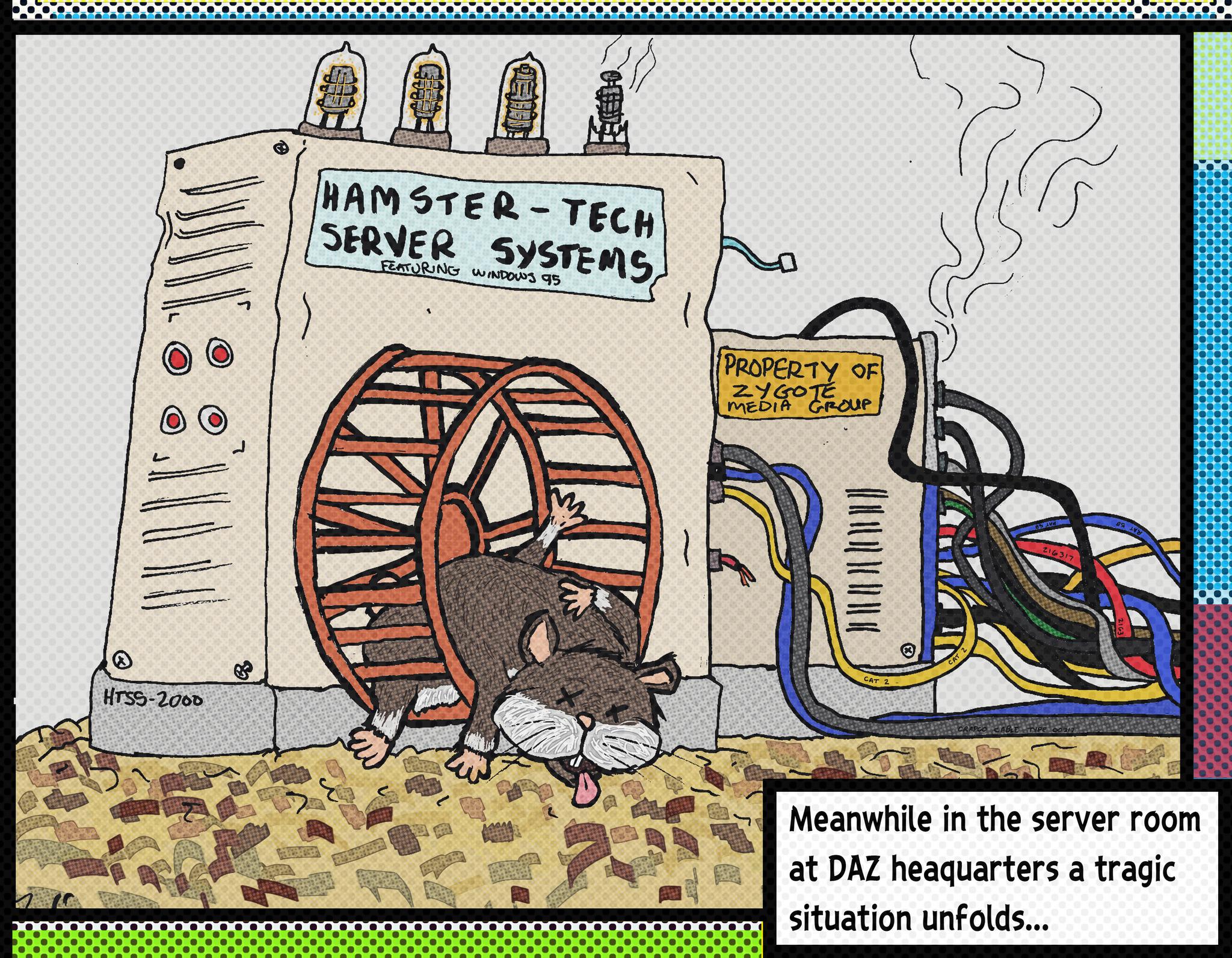
Clearly some of you have never heard of the story of Server Hamster...
Poor little Bert was never the fastest hamster, nor was Bert the smartest hamster, but Bert had something other hamsters at Hamster Depot didn't...
Bert had three extra toes on his left foot and a really weird looking patch of missing fur in the shape Guatemala on his back... But that's not what made Bert different... it wasn't even his strange odor or his spontaneous narcolepsy whenever he heard loud noises...Bert had heart.
Well, technically 3/4 of a functional heart, but Burt had spunk and determination which nothing, not even his chronic flatulence or his lazy, much larger right eye could interfere with.
From the moment he was eaten by his mother and subsequently spit out, he was determined to become the best hamster ever... to show everyone that by underestimating or trying to eat him, they were wrong and one day they'd wished they had gotten to know him or had treated him better.Bert was dead set on being adopted by a nice school teacher who would make him the class pet and that he'd teach all the little children about the true meaning of determination and courage... and that generations of little children would grow up to be better people for having known Bert.
But no matter how much Bert tried, he was never adopted... not even by the evil mad scientist who wanted hamsters to experiment on.Bert was heartbroken, but he persevered.
Every time someone came by his Hamsterarium, he'd run on the exercise wheel as fast as he could... usually he'd fall off or get his head jammed in between the bars, but he sure did put on a show... yet always after he'd wake up from one of his narcolepsy episodes he'd inevitably experience while putting on a show, it was the other more handsome or less drippy hamsters with no missing fur in the shape of any Central American nation that were chosen.
Bert was always rejected.
But he never stopped trying.
Then one day one of the hamster wranglers that worked at Hamster Depot was passing by and spotted Burt... he bent down and looked right at him!
"This is it!!" thought Bert... "Someone called in an order for a spunky hamster with courage and determination!!"... "I've got a home!!"
Bert started doing his signature hamster dance knowing it might trigger his narcolepsy, but regardless, he'd have to risk it.The hamster wrangler shook his head and winced and started putting on some rubber gloves... "That's odd..." thought Bert.
But undeterred, he continued doing his little hamster dance so the hamster wrangler wouldn't grab the wrong hamster.The hamsters wrangler opened the hamsterarium reached right for him and picked him up.
Bert was overjoyed!
The hamster wrangler held him up and examined him... "Ugh, what's that weird cheese smell?"
Burt blushed a bit, he was proud of his odor and no one ever complimented it before.He held Bert up by the scruff of his neck turning him all around... "Yup... just as I thought... missing patch of fur the shape of Nicaragua, leaky orifices and uncontrollable seizures... Terminal Deranged Hamster Syndrome...
"Wait... What?" thought Bert, "that was dancing, not a seizure and it's Guatemala, not Nicaragua!..."
But it was too late... the wrangler shook poor Bert a little to see if any parts would fall off and then said "Sorry little fella, but it's the hamster compactor for you... we can't have diseased hamsters like you infecting all the other handsome hamsters"...
And with that he tossed Bert into a bucket labeled "Hamsters For Compacting".
Burt landed with a squishy thud... he lay there in abject sadness... his tiny drippy weird smelling soul crushed like a spoiled grape under the wheel of a shopping trolley in the grocery store.
He lay there for hours awaiting compaction... maybe it was better this way he thought... "Who wants a drippy, smelly hamster who keeps falling off his exercise wheel?"... "I'm probably more useful as a fine paste used in cosmetic products"... "I was a fool for thinking I'd ever amount to anything"...
The hamster wrangler came by two more times with customers looking for "adorable hamsters"... Bert heard the other hamsters being adopted and silently cried at the bottom of the compaction bucket.
The wrangler passed by one more time and looked down at Bert... "Oops, sorry... I didn't forget about you... I'll be back for you as soon as I take care of this next customer..."
Burt cried uncontrollably... he barely heard the wrangler and the customer talking over his hysterical sobs...
"Well, they told me to pick up a new hamster... the adorable ones keep dying", said the new voice... "But these ones are all too expensive... are you sure there is nothing cheaper?"
"No, that's it, those are the cheapest entry level hamsters we have... they are sold as is, no warranty or repairs... fairly disposable actually"...
Bert sobbed harder... he wasn't even "disposable quality"!
"Okay, I guess that's it... the cheap bastards won't spring for a halfway decent hamster, I guess we'll just have to use a diseased sewer rat to power our servers... it's the worst case scenario, but they are determined not to spend money on their forums, so..."
The voice paused... Bert looked up at the strange face staring down into his death bucket...
"What's going on with that one?" the voice asked.
"Oh... he's got deranged hamster syndrome... he's not for sale." said the wrangler to the customer with the strange face.
The man with the strange face replied "So does that mean he's free?"
"No, no it doesn't... but you know what... I'm busy and turning on the hamster squasher takes five minutes for it to warm up... you know what, you can have it... just get it out of here now", said the hamster wrangler.
Before Bert knew it he was snatched up and dropped into a mostly empty Starbucks matcha green tea latte cup and taken away.
After a long journey in the cup holder of a high mileage late nineties Saturn SL sedan, Bert was brought into a janky old brick building way across town and brought down into the basement into a dark room that smelled of mildew and burning electrical insulation.
The man with the strange face dumped Bert out on a table littered with old scratch-off lottery tickets and Settebello Pizzeria menus.
He took an old sweat sock and dabbed off the whipped cream and green tea from Bert’s fur and grabbed him by the scruff of the neck.
He then carried Bert over to a old machine made of yellowing beige plastic and dented up metal… on the side was a hamster wheel with a handsome looking hamster laying dead on the wheel.
The strange faced man picked up the dead hamster and unceremoniously tossed it in the recycling bin far across the room.
It landed with a muffled "thump".
“Damn, I was aiming for the trash bin”, he said… and without a proper greeting or introduction, he tossed Bert on the wheel.
“Well, you know what to do…” said the man.Bert knew exactly what to do... he ran... he ran with all his three quarters of a functional heart, he ran as fast and as best as he could... he ran because he knew who he was... he was now the Server Hamster.
And with that Bert began his origin story as “Server Hamster".
Bert started running and hasn't stopped... aside from when he falls off the wheel or has a seizure or gets his head stuck in the bars.
But Bert has a purpose and he'll never give up... because he finally has a home and he's gonna show everyone he's the best damn hamster ever.So now you know… the forums are wonky because they are powered by a spunky, funny smelling, drippy hamster with a patch of missing fur the shape of Guatemala, who frequently has narcoleptic episodes whenever someone slams a door or the water cooler compressor turns on, or even if someone sneezes on the third floor… the servers may freeze, they may falter and really suck because of it, but they always come back because of plucky and courageous Server Hamster… or as we know him…
Bert.
Arch Bridge and Other Bridges. New: Cable Stayed.I have had an interesting time creating filigree tracery to use on the bridge, and added another pair of walkway rooves. I think I have worked out how to model the roof tiles. Will have to try it out soon. Need to add some more on the ends of the central walkways, then I'll be ready to start converting it to DS.


In some ways, this makes me long for the elegant simplicity of a Cable Stayed Suspension Bridge. Never thought I'd say that...
Regards,
Richard.
DIM sorting has suddenly failedI'm still having issues with DAZ central on Windows, everything is showing the same date and item order changes everytime I open the app. Which is nice.
The items I bought yesterday were there and installed ok but I had to do a search to find them.
Daz Central [disordered]My Daz cental has suddenly become very unorderly, items are all over the place old items appearing in the middle of latest stuff, is this just me?
DIM Sorting Incorrectly?There were massive issues of the sorts when DAZ updated their store a while back, never really got fixed properly but I learnt to live with it by sorting bypurchase day in Central. However, not sure what happens this time around but it's getting concerning and frankly hard to deal with. I have a large collection of items accumulated over the years. Daz doesnt offer the best content mamangement to start with, but in the state things are today, it's just impossible to be productive. Takes more time to look for products than to create anything. Everytime I re-open Daz Central, the order is now different! Slot machine content management is NOT a solution! Daz, please fix and improve QA. thx.
UltraSceneryXT - large terrain/landscape generatorTrouble said:
I tried reading through this thread but 31 pages is too much. I've attached an image from ultrascenery and you can see there is no ground material. Didn't do anything special. Loaded the landscape and applied a preset to it. Saved the maps created in their seperate folder under documents. There are no error messages and no matter which preset I use I get the same ground. Even changing the terrain mat doesn't change the render results.
Any suggestions? btw, I installed through DAZ central, uninstalled, installed with DIM, uninstalled and installed manually and nothing changes.
Thanks
People have reported incompatibilities between nvidia 1.7.0 vMaterials and DS 4.20. If you have vMaterials installed, update to nvidia 2.0 vMaterials for use with the current version of Iray in DS.
You didn't mention what version of DS you are using or what graphics card and driver you are using. That info may be helpful if the vMaterials issue doesn't solve your problem.
UltraSceneryXT - large terrain/landscape generatorI tried reading through this thread but 31 pages is too much. I've attached an image from ultrascenery and you can see there is no ground material. Didn't do anything special. Loaded the landscape and applied a preset to it. Saved the maps created in their seperate folder under documents. There are no error messages and no matter which preset I use I get the same ground. Even changing the terrain mat doesn't change the render results.
Any suggestions? btw, I installed through DAZ central, uninstalled, installed with DIM, uninstalled and installed manually and nothing changes.
Thanks
Old Attic not loadingI deleted all folders and files in DS Content and Product folders, then did a search on my drive for all files that may have been missed and deleted any I found. I then uninstalled through Daz Central and reinstalled but no luck reinstalling. I have also tried using DIM. I then located the product in my Daz account and did a manual download and install but all I get is in the pic attached. I have been permutating all sorts of strategies all day, at a loss :(
Thanks for the advice
Old Attic not loadingOK RH.....deleted FG Attic in Content folder in Daz, did a search in Finder for FG Attic and deleted any files I found, went to Daz Central and it still showed "Open" so uninstalled it. Reinstalled. Now I can't find it anywhere so searched in Smart Content and get File does not exist, pic attached. After reinstalling through DC I clicked on the OPEN button but nothing happens.
Not one to give up, I opened the asset from DC, maybe I could download manually, and Im told it's purchased but opening My Orders, of which I have 9 pages worth, yields only order numbers not what they are so finding it will take me a while :(
Thoughts?
Many thanks
Old Attic not loadingOught to say, I have uninstalled and re-installed the asset via Daz Central. Thanks
Dear NathyIf you are logging in to DS thus allowing DAZ Connect to call the DAZ servers and download metadata "updates" and maybe unintentionally also installing assets/updates, while you are also installing products and updates with DIM, everything will be installed twice to two separate locations with the DAZ Connect installed products/updates taking priority over the installations made with all the other methods (DIM/DAZ Central/Manual installation)
Set your DS for off-line mode by setting the Startup options as in the attachment, and uninstall everything in 'Smart' Content that gives you the option to do so.
Logging in to DS and working in Online mode is needed only when one chooses to use DAZ Connect within DS as their primary means of installing products, and in that case there is no sense in using DIM or DAZ Central to install them.
DIM sorting has suddenly failedFrom these replies it sounds like a problem at the Daz end of the system, especially if it is affecting Daz Central as well. I don't know where the sorting gets done, on the server or the client, so I thought it might be a problem with my setup.
When I go to the installed tab DIM automatically switches the sort order to Installed Date and this is correct. If I change it to Order Date it is wrong again. I supect the Installed date may be coming from locally stored files.
DIM sorting has suddenly failedI'm having this issue with Daz Central. None of my recent purchases are listed, only really old stuff with a current purchase date.
Uninstall/reinstall DAZ StudioI am running DAZ Studio 4.20 on a PC with Windows 10. Due to various issues I am running into, I want to uninstall and do a fresh reinstall. I've used DAZ Central since it was released to install everthing. From what I've read on the forums, some people suggest uninstalling it via DAZ Central. According to the Help Center here https://helpdaz.zendesk.com/hc/en-us/articles/360055963392-How-do-I-uninstall-delete-Daz-Studio- I should just delete all the folders that contain DAZ and it's files. Can anyone that has successfully done this, give me some tips?
Thanks!!
Rich
Daz Bridge Support Is Here!So, folks, my problem is that the physical model does not import when I utilize BRIDGE to transfer from daz STUDIO to C4D; just the IK rigs do. I repeatedly uninstalled DAZ Central, Studio, and Bridge. and I have no idea what the upgrade changed.
New! Novica & Forum Members Tips & Product Reviews Pt 14Novica said:
Well Genesis 9 is the news- so the rest of you will have to showcase her as I'm not diving in to another figure.
We've got a possible hurricane forming in the Caribbean and future models (GFS) shows it will hit us Sept 30th timeframe, maybe Oct 1. Models hopefully will shift, I hope it doesn't hit us, but don't wish it on anyone else. Edit- and now the midnight run has it headed more toward Texas and Louisiana.
Victoria 9 is way too pricey for me, especially when I don't know what will be in the bundle
It looks like it could be at least a catagory 2 or 3 hurricane. I'm not sure where it will go after it gets into the Gulf; but when I run the EMCF model I'm seeing the possibilty of it turnning NE and going across central Florida and then up the East Coast toward me. I hope it doesn't get either one of us.
Daz 3D is part of

Connect
DAZ Productions, Inc.
7533 S Center View Ct #4664
West Jordan, UT 84084Licensing Agreement | Terms of Service | Privacy Policy | EULA
© 2026 Daz Productions Inc. All Rights Reserved.