-
The OMG It is 2017 This thread's end is Nigh Complaint Thread.
anybody makin cawffee? need a reboot ... Zzzzzz
Bit late for Quaffee. Currently drinkig a can of Fosters (the Australian for gnats pee...)
heard Australia brews a victoria bitter lol
The irony is, they both come from the same brewery! (although Fosters is brewed here by Heineken under licence rather than imported)
Monique 7The problem is more--what if blue-eyed blondes ONLY appeared wearing Oktoberfest dresses? I'm hoping now that there's a Feature black woman for Genesis3 we'll see a lot more dark skin in promos.
I agree. Considering we only get ONE official "7" figure that is a black woman, they need to stay clear of stereotypes. It would be a different story if we had a more equal representation of characters of different races. But since we've gotten TWENTY THREE white "7 figures" so far and only ONE black character, there doesn't need be any stereotypes attached to the ONE black character's bundle.
What about Kalea and Kimo? Polynisian isn't exactly known for looking ghostly pale.
I'm not sure what your point is. I didn't count Kalea, Kimo, Lee, or Mei Lin as part of the 23 - as I only counted the white figures.
Lucian
Lilith
Sunny
Tween Ryan
Tween Julie
Kenji
Aiko
Ivan
Rune
Izabella
Guy
Girl
Gianni
GiaLeo
Olympia
Michael
Arabella
Teen Josie
Karen
Bethany
Eva
VictoriaTo be fair there are a couple of characters, like Sunny, who's ethnicity is a bit less clear, but for the most part the VAST majority of them are white.
Trying to setup a morph to morph transition/controller.I have the models morphs saved as a "Properties Preset"... For a Gen3 model. (Because it just sets the sliders to the desired morphs.) They can also esialy be found in a location that I can find in Daz3D. They show in "Saved Files->Presets->Properties", in the smart content.
1: Load Gen3Female {I now see, whatever this default chick is. She is not Victoria 7.}
2: Apply/Load my presets for (Girl A) {I now see Girl-A}
3: Goto "Parameters" window and set the window to "Edit Mode", from the menu.
4: Create my "Girl-A" control by using "Create new property", using default settings.
5: Move the slider to 100%, and do an "ERC Freeze", so the morph actually works. Min:0.0, Max1.0, as percent.
6: Restore the model, repeat 2-5 for "Girl-B".
7: Make a new control, again, for the "Mixer"...
8: Select "Show in Property Hierarchy"... For that new mixer control.
9: I set Girl-A to 100% and put her on "1st stage (add/subtract)", with ERC "Delta Add" as the type.
10: I set Girl-B to 100% and put her on "2nd stage (add/subtract)", with ERC "Subtract" as the type.
Now, when I set the "Mixer" to 0, and Girl-B to 100%... Moving "Mixer" up to 50%, mixes 50% of Girl-A and Girl-B. Going up to 100% mixer, I get Girl-A 100% and 0% for Girl-B... (Perfect, but sort-of backwards, and I am sure I didn't do it quite right.)
There wasn't a dedicated "Additive" and "Subtractive" section... Both are the same section, with a couple of options for both. However, there are two individual sections.
Now the million-dollar question...
Where the hell are these controls saved, so I can delete them, when done. (Deleting them from here will only delete them from this project/model. As soon as I open daz again, they are all still here. {The ones I was instructed to "save morph asset" for. These I created above, I am sure will disapear as soon as daz closes, which is what I want them to do. It is all the others that I made before, while following the tutorials and instructions, which I do NOT want lingering around.)
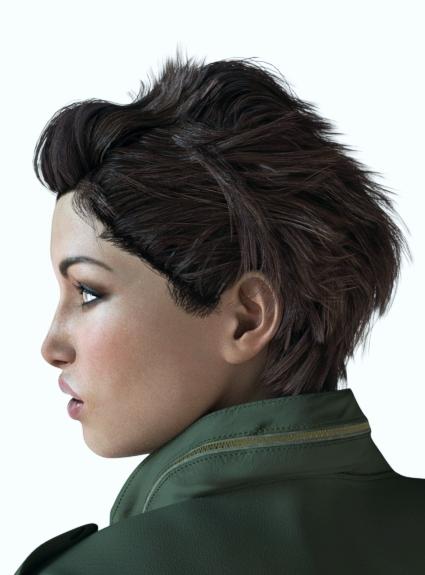
Novica & Forum Members Tips & Product Reviews Pt 7VHP3D Angelique Soleil Hair M-65 Jacket
Well, she didn't look like the promo to me, so I loaded up G3F and applied the morphs, then loaded up V7 (from scratch, not on the other figure) and applied the morphs. You can compare.
First is on Gen3F. Just an upper shot.
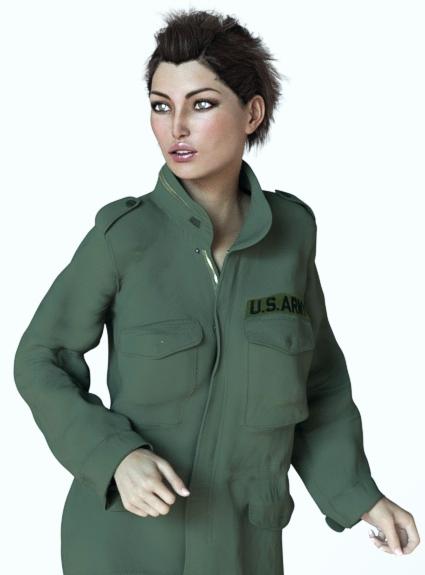
Second is Gen3F, Face Front.
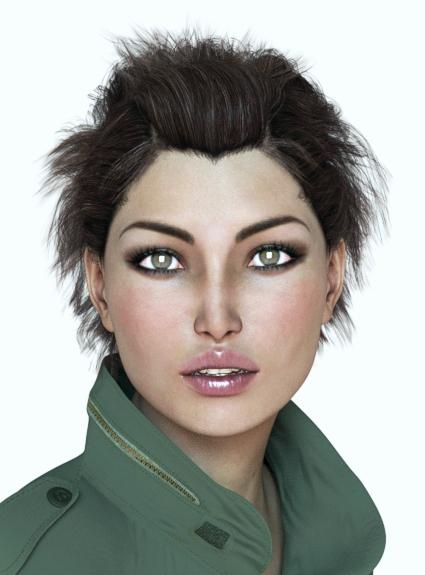
Third, compare that with Victoria 7, Face Front. The expressions don't do quite the same btw. I had to reduce the amount, they react more easily on V7. That was the main difference I noticed.
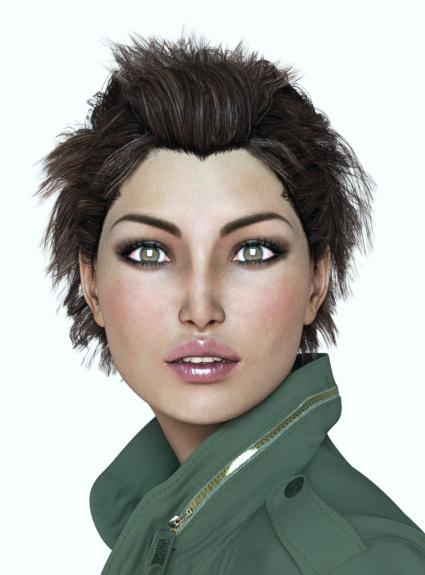
Fourth, side view on Gen3F. (I personally don't like her from the side.)
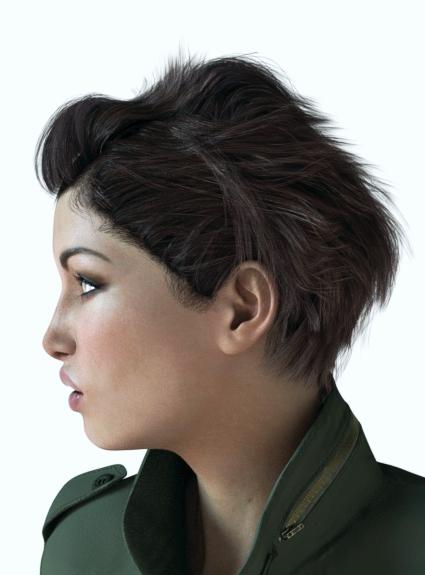
Fifth, side view on Victoria 7. I noticed the nose tip is very slightly more tipped, and there is slightly more space between the nose and upper lip, with slightly more indentation. Not much.
 The OMG It is 2017 This thread's end is Nigh Complaint Thread.
anybody makin cawffee? need a reboot ... Zzzzzz
Bit late for Quaffee. Currently drinkig a can of Fosters (the Australian for gnats pee...)
heard Australia brews a victoria bitter lol
Characters! Your RendersAmazing collection you've put together here Novica!

I don't post much images on the forums, but as I mostly render single character portrait style renders, I'd like to contribute with a few of my gallery images. If they don't meet the standards for this thread's purpose, please feel free to ignore them.
Draupadi for Geneis 3 Female(s) (not to point finger at Sonja, but she's spelled Draupadi, not Draupardi.
 ) Here showing off some of the more exotic make up options.
EJ Atsuko is my most rendered model and I see she's already listed twice, but if there's room for one more of her, that's my latest with her, using N.G.S. Anagenessis 2 - Revolution on her skin.
Three characters I didn't see in the list:
FWSA Piper HD for Victoria 7 and her jewelry (sporting some of her special make up options)
Edit: Noticed the request for alphabetical listing.
Nice! I hope more HD figures are on the horizon from Daz/vendors. Also, @isidorn please check your messages.
 Monique 7
I remember, 4 months or so after Monique 6 came out, Victoria 7 was introduced, maybe Victoria 8 in March Madness?
Nice character, btw.
Please... NO!!!
Not 8, not 8, not8...
Not yet.
 Monique 7
I remember, 4 months or so after Monique 6 came out, Victoria 7 was introduced, maybe Victoria 8 in March Madness?
Nice character, btw.
*CLOSED* RRRR Alternative Holidays Render ContestTotte #5
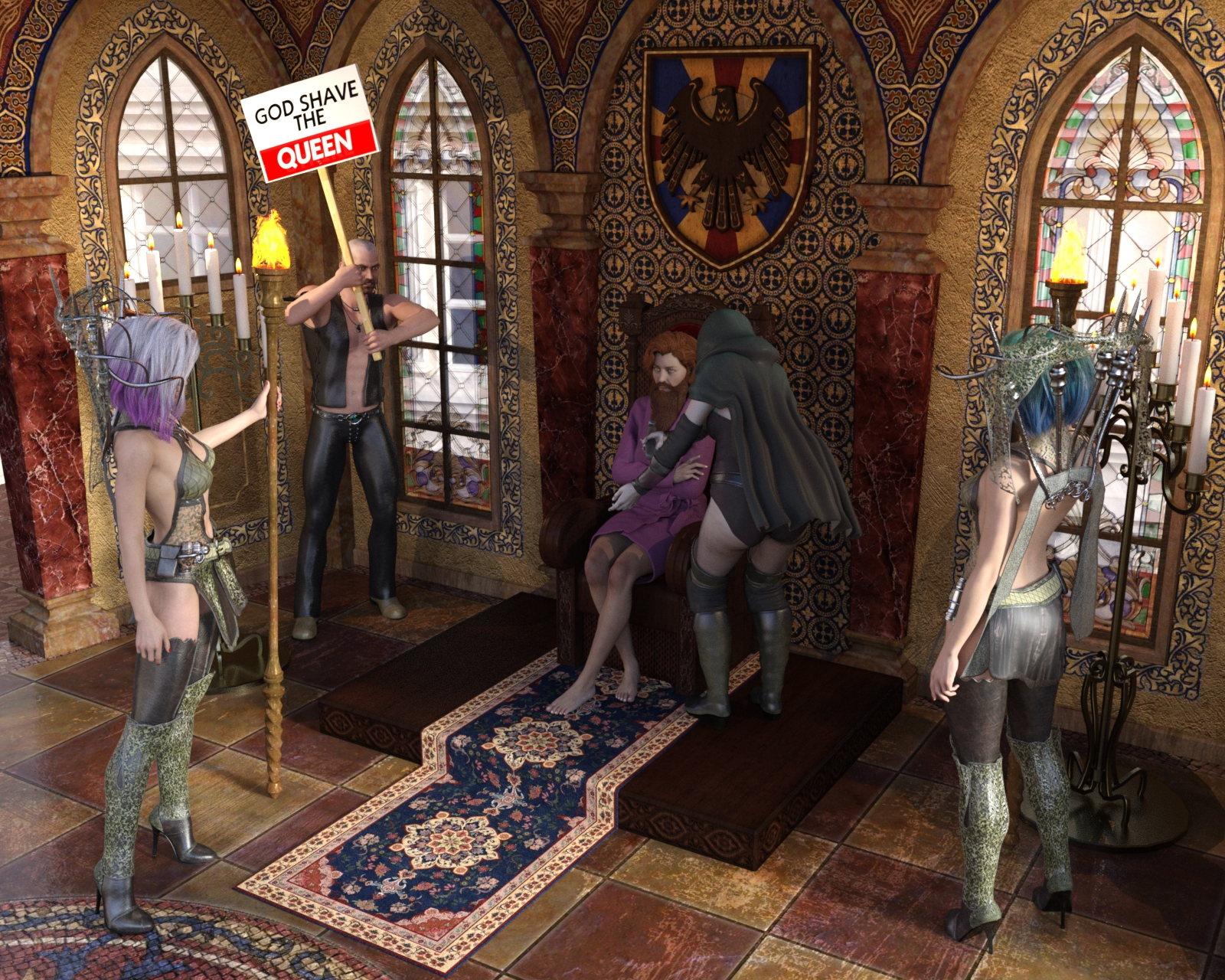
#5182 Signs of Protest (#19454)
#3245 Lone Wolf for Genesis (#13428)
#4105 OOT Styles for Dark Sisterhood for Genesis 2 Female(s) (#19472)
#4466 Queen's Chamber Bundle (#17945) {
Adrianna for Victoria 6 (#16891)
DM's Queen's Chamber (#17719)
DM's Queen's Chamber Poses (#17720)
Briar Princess For Genesis 2 Female(s) (#17899)
}Also Used:
Genesis + Doyle
G2F + MeHoo HD + Shaving Kit
2 x G2F + Coleraine Hair
G2F + Joanie HD + Portia Hair + Unshaven2 + H&C Sleepwear
Puss Ib Boots Castle
Shaders Used:
Iray Converter for Genesis
EcVh0 Daily Cloth Shader
JG Metal and Gemstones
PBS Shaders Vol 3
JM Human Shaders
Subsurface Workshop
UHT2 Hair SalonShaving Day
In memory of the vikings, who shaved off their winter beards at the spring equinox, the Royal family in great Britain started hold a Gods shave the King festival, that later turned into God save the King. Now, having a Queen on the throne for so long, the traditions still continues.
 Characters! Your Renders
BD Esther for Victoria 7 HD
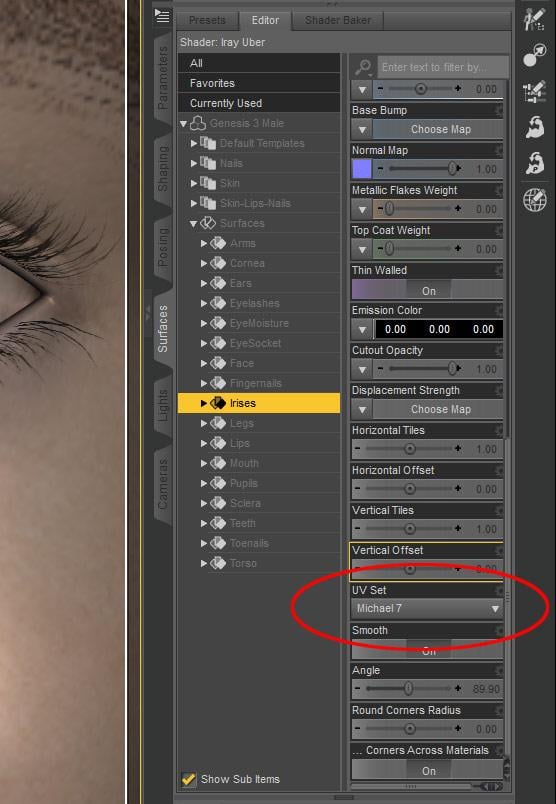
Macro Eyes for IrayOk, that helps. Now I see what you see. But I still need more information to be able to tell what exactly is the cause and how to fix it. Originally, before you edited your last post, you suggested that maybe it was a morph. I think that is a good guess. The difference between the eye presets you usually use and Macro Eyes looks to me like it is either a morph or a UV set difference. But the size of the iris on the map could also be different as well, like your friend said.
It may be obvious, but just in case it's not, I want to mention that it seems like we are making two completely different comparisons. I am comparing Macro Eyes to Victoria 7 and Michael 7 default character presets. In that scenario, Macro Eyes irises are slightly bigger. But I'm pretty sure the character you are using has custom settings which make the irises even larger than Macro Eyes.
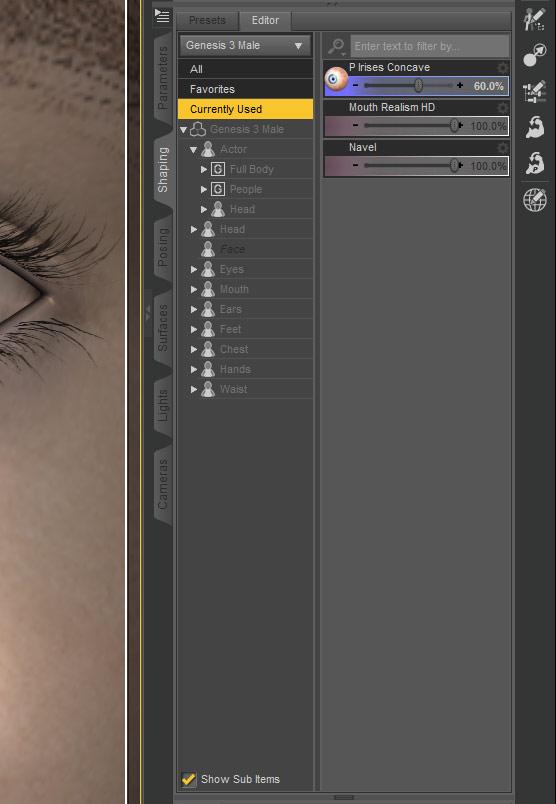
It could help me somewhat to know specifically what character you are using, who made it, and where you bought it. But it would probably be a lot more helpful just to know what morphs your character applies to the eyes and what UV set it uses. Can you select the figure in the Scene tab and then select Currently Used on the Shaping tab and tell (or better yet do a screenshot and show) me what you see? Can you choose Surfaces tab > Genesis 3 Male (or Michael 7 or whatever > Surfaces > Irises and scroll down to the bottom and show or tell me what is listed under UV Set? Thanks.
 Monique 7
I'd also point out that when you look at Michael or Victoria or Olympia pro bundles, you aren't seeing 'stereotypically Caucasian' stuff.
And if you're immediate reaction is 'well, no, they have _normal_ stuff' then bingo, there's the problem right there.
CMS crash......and a total Genesis Takeover!Hmzzzz, you've got a point there......I must admit.....it crashed right at the point when I closed DAZ 3D........kaboom.....and all gone......so indeed a Windows own proces could also be the culprit....in that case I have to set Victoria 5 free of course, then her being the victim not the criminal.....hmzzzz,
Greets, ArtisanS
CMS crash......and a total Genesis Takeover!Well today a strange thing happened on the way to the office.......all looked normal, I had installed Stonemason's City After the War.......great day ahead. But then I shut down DAZ and suddenly "Boom" a rare Windows 10 blue screen........a full system crash! So after a shutdown from my side (Mr. Gates can mind his own computer memory, not mine) I restarted DAZ......and low and behold.....all content was gone, except a smiling Genesis character.....no Vickies 4, 6 and 7, no Kalea 7 no nothing. So I busted mr. Victoria 5 for a 17 fold Genocide (pictures will follow later) and went along.....it seemed she had tempered with the data as well.....re-installling metadata worked well enough at first glace, but a screaching laugh from the prison cell complex should have warned me....indeed nothing had changes.....all content gone!
So now I've transfered my DIM files back into my original directory (on a 250 Gb SSD drive) and I'm installing again......ah, worst case scenario is a total reïnstall of the software and content.
Greets, ArtisanS
newbie just bought Victoria 4.2 for Poser - which file type for base?hello - maybe this is a dumb question but I just bought V 4.2 starter pack and in a couple of the components there are multiple options - like in the base there is file download with "powerloader" in the name and another with "StudioCS" (something like that) in the name. Do I need all 3 or are those other 2 for more advanced users or something? Any wisdom that can be shared would be much appreciated!
Infinite Insanity - There's ALWAYS Another Sale! (Daily Sale Talk)Anyone know how to make http://www.daz3d.com/v4-ultra-aging-morphs work in Daz? It's a bunch of injectors for V4 figures... but they don't seem to do anything when I try to apply them to a V4.2 figure.
Obviously they are pmd morphs - which don't work in DS since Version 4.5 ...
http://forum.runtimedna.com/showthread.php?73332-Ultra-Aging-Morphs-For-V4-Daz
V4 Ultra Aging Morphs
-
-
ADD TO CART
- -31%
-
$10.99
$7.69
Artist:
Daz Originals Colm Jackson RuntimeDNA
Compatible Figures:
Victoria 4
Compatible Software:
DAZ Studio 4.9, DAZ Studio, Poser
Required Products:
Install Types:
- Daz Connect
- Install Manager
- Manual Install
Seems like there are going to be a lot of upset customers if it is a morph that doesn't work with 4.9 if they say it does on the product page?
Export to C4D - no visible difference standard vs HD morphs?Hi
I've been trying to get a detailed human into C4D and have one from Daz I like, based on a G2F Victoria HD morph.
I've tried exporting FBX for both standard Victoria and Victoria HD, and bringing these into the same C4D file. There does not appear to be any difference in the mesh, to my eyes, nor when overlaying the 2 meshes. They look identical.
From reading in the forums and googling, I thought HD was based on SubD and had more detail in terms of musculature or other body detail. Am I wrong?
Or is the detail of the HD addon, just "enabling" a SubD inside Daz only?
What am I missing here?
I basically want to get the most detailed human I can out of Daz to render with a non-Daz render engine. G3 is causing issues for me in terms of motion because of the additional bones, so I am sticking with G2 for now.
Am I misunderstanding the HD add on? Perhaps I am exporting the FBX with the wrong morph settings?
*EDIT*
Found the answer after I posted this, turns out as a new user I am as confused as other were before me. No HD export, limited to PAs only.
So I would be interested in what tips people could give for more realism? 4k maps and displacement? Anything else?
Characters! Your RendersAmazing collection you've put together here Novica!
I don't post much images on the forums, but as I mostly render single character portrait style renders, I'd like to contribute with a few of my gallery images. If they don't meet the standards for this thread's purpose, please feel free to ignore them.
Draupadi for Geneis 3 Female(s) (not to point finger at Sonja, but she's spelled Draupadi, not Draupardi.
) Here showing off some of the more exotic make up options.EJ Atsuko is my most rendered model and I see she's already listed twice, but if there's room for one more of her, that's my latest with her, using N.G.S. Anagenessis 2 - Revolution on her skin.
Three characters I didn't see in the list:
FWSA Piper HD for Victoria 7 and her jewelry (sporting some of her special make up options)
Edit: Noticed the request for alphabetical listing.
Missing Expressions Michael 7I am a very new use to Daz3d. Not sure if this is the right place for this question or not.
I purchased the Michael 7 pro pack which includes some expressions. However with content filtering on I don't see any expressions under the poses tab. I also have Victoria 7 and her experssions appear there. If I turn off content filtering I can find the expressions by searching for the term "expression" or the term "M7". If I use the term M7 with content filtering off then there is an expressions tab under poses and it shows me the correct expressions. If I just use the term "expression" it show me all the expressions both male and female. If I turn content filtering on the expression tab disappears altogether when M7 figure is selected. It reappears when Victoria 7 is selected.
I used DIM to install all the content.
My questions: Is this normal? If not how do I fix it?
Thanks for any help or advice.
How To Autofit for Victoria 4 / Michael 4?I'm with you in the same boat. 'Fit To' does not always work. It's unfair for there to be autofit for Genesis but not Victoria. I've suggested to them that they make an autofit for Victoria. I do not even work with Genesis as my pc is so weak it only loads Victoria bases.
Daz 3D is part of

Connect
DAZ Productions, Inc.
7533 S Center View Ct #4664
West Jordan, UT 84084Licensing Agreement | Terms of Service | Privacy Policy | EULA
© 2026 Daz Productions Inc. All Rights Reserved.