-
Long load times? This may help! - Morphs Manager
Sci Fi Funk said:
@3dOutlaw Thanks for doing this.
I was just about to use it when I thought about the implications of ticking / unticking 8GB worth of morphs. So I tried a test:-
If make a permenant copy my G8f morphs folder to another one called something like ALL_MORPHS_RESTORE which never gets used for anything except splatting my morphs folder to restore it, (Downside 8GB of extra storage used in my case), and instead just keep the DAZ folder within morphs - any of my remaining 40 chracters load in 8 seconds!
Previously it took 43 seconds to load a scene with a single G8f, which in my world (animating), is aggravating, especially after yet another crash. A heavy duty scene (4 x G8fs and a heavy indoor scene with all 8GB of morphs) takes 2:14 seconds to load, so anything to speed this part of the task up is a help.
Finally a word of warning, if you remove/rename morphs and attempt to load a scene that depends on them, it won’t load with warnings, Daz will just crash. That’s why you need a bullet proof restore. The choice is do a splat (but wait a while for all those Gigabytes to be copied back), or @3dOutlaws utility, but then if I understand correctly you have to tick all the tickboxes. At least there is a way back.
Anyway, I’m thankful for your work, and grateful at least new scenes can load as fast as my G8.1f scenes, without issues :)
With DAZ 4.20, if you load a scene that relies on a morph DSF that was renamed to .NOLOAD, it won't crash, instead it just informs you it couldn't find the morph file. So you can rename the extension of morphs to disable them, and if the scene can't find them; since they were renamed, then it won't crash, it just won't load that morph in the scene since it couldn't be found.
Duplicate morphs are removed!Only one morph with the same .dsf file name is displayed in the parameter.
So I couldn't change the 'Name' of both morphs at the same time.
Therefore, after uninstalling 200Plus, I changed the 'Name' of the RFMC morph, but when I turn Daz off and on, the 'Name' does not change.I think the problem is that the 'File Path' remains the same even if the 'Name' is changed.
It keeps getting files from the wrong path.
Can't I change this path?
Even if I click '...' on the right side of 'File Path', I can't change the path.Are the Daz body morphs merchant mesources?but I thought baking merchant resources isn't illegal as long as it's not just a single morph that could be extracted from the final product.
Duplicate morphs are removed!Has nothing to do with the name of the morph file, it's about what is used as the "ID", "Name" and "Label" inside the file file - "Label" is what the user sees on the dial, "Name" is used by other morphs to activate the morph in question.
"Label" can be changed without it causing problems, and then one gets two different dials, but if the "Name" is the same, one must find out if other morphs are calling that morph with that name and change the name in all of them.
Download the latest versions of those products and see if they have been fixed, clashes between those two have been around for long, but as far as I know some fixes have been made.
Please ID model used (Think its a Krashwerks)Skin is this: https://www.daz3d.com/p3d-riza-for-aiko-8
No idea about the morph, though first instinct suggests https://www.daz3d.com/zelara-8 due to the cleft chin.
Duplicate morphs are removed!All installed morphs are displayed in the parameters.
However, morphs of the same name with different creators are removed.For example, RFMC (RareStones Face Morphs Collection) and 200Plus (200PlusHeadandFaceMorphs) both have Mouth Depth Out.dsf, and only the morphs from RFMC are displayed in the parameters.
However, the morph's name is automatically appended with 'Adj', and the actual file is loaded from 200Plus.Not all morphs with 'Adj' after their name are like this, but the problem is that I don't know how many morphs have this problem.
Renaming duplicate .dsf files didn't solve it.How can I use all the morphs without missing anything?
Please advise.Star Trek Builders Unite 8: THE REBOOTI started working on a Trek project back in 2011; I wanted my story to take place around the beginning of the Archer years. I wanted a very small ship, one that could be used for a decent scout ship or a system patrol ship. My thoughts were to have something small but capable of Warp 2.5-3, that could make the trip from Earth to Proxima Centauri in 40-50 days and provide in-system support for Proxima, while also making regular jumps to the Alpha Centauri system.
I love the look of the Warp Delta ships, but as far as I know they don't do planetary landings as a matter of course.
My thought was to take small, non-warp, civilian courier ships and add warp sleds to them with micro-warp engines.
At the time, I hired modeller 3Dman25 to build some ships. The main one starts out as an impulse-powered system ship then gets three nacelles added to it to give it warp capability.
Here's two very early animations he did showing the ship landing (landing gear comes out and the ramp opens and the stairs come out) and an overhead shot showing the doors opening and closing internally:
http://www.youtube.com/watch?v=F66yPTe8Q0c
And
http://www.youtube.com/watch?v=z9UzSDuhhDk
Below I have a shot of three of the ships he built for me (the centre shot is the one with the warp sled added) while the outside two ships are actually the same ship, one with the wings morph showing the main hull with wings, the other using the "Trader" morphs to make it look more like a small cargo ship in the game, "Traveller".
All three ships have landing gear that retracts, internal rooms with working doors and a cargo hatch with an elevator platform.
Finally, a render or two of the main ship. There's two morphs for the main deck, one where the centre is the captain's quarters, the second where the bridge is located.
3Dman25 dropped off the scene before all the work was completed, so they're all "not quite finished" but very usable as is.
After being unable to reach the artist for six or seven years, I hired Vanishing Point to do an overhaul on the main ship, and they did a brilliant job. I'll post some of the work on it tomorrow, but they gave it UV mapping, allowed for parts of the ship's exterior to be hidden to allow for better camera views, made the ship larger (adding a full deck and a central elevator, and more).
For the interior shots, I dropped a few pieces of furniture in for reference, I have yet to set up the interiors of any of the ships properly. Time is alway the enemy.
-- Walt Sterdan
New! Novica & Forum Members Tips & Product Reviews Pt 14Novica said:
barbult said:
She looks nice except for those rounded off teeth.
True. Is there a way to swap character's teeth? (Other than ghosting another character on top of another one LOL) EDIT: I found this thread. Is it possible since this character is for more than one type of gal there is a morph issue?
Does that fix itself when you turn Mouth Realism off?
Skinny ribs for Genesis 8This is an old thread but I created a torso texture normal map which you can find here https://we.tl/t-w1xsU896ch or use the attachment below. You see, you can't create a morph showing individual ribs because the base body mesh is of low resolution, you can't add that much detail to it. Now, I use blender and I sculpted a high res version of the G8F body (using multiresolution modifier for those interested) and then I baked the normal map for the torso. It's only for the ribs, so it's best if you go to photoshop and combine it with any other torso normal map by using "overlay" as a blending mode. If someone knows how to create an HD addon body morph, like some daz models have, out of my sculpt, then I can maybe share my blend file. Oh and it's best if you use the "thin" body morph. Cheers.
Garden Gate and Estate FenceI have started some 'Estate Fencing' to go with it. The basic model is now done - 180cm lengths, which is close to a metricated version of 6ft. I just need to get a 'shear' morph to allow it to cope with ground slope in the direction of the fence, apply groups and surface material groups, texture map, turn it into a prop, sleep, eat, bathe and it'll all be done (not necessarily in that order). So not today! Regards, Richard.Custom ClothingRichard Haseltine said:
Transfer Utitliy is the place with the options. The utility, without being told otherwise, assumes that the rlation of the model to the source figure is what you want the rigging to respect - setting the Source Shape and enabling Reverse Source Shape from Target is how you tell it otherwise.
You've got a gift for succinctly explaining things, Richard. After 4 years, I FINALLY understand. Thanks.
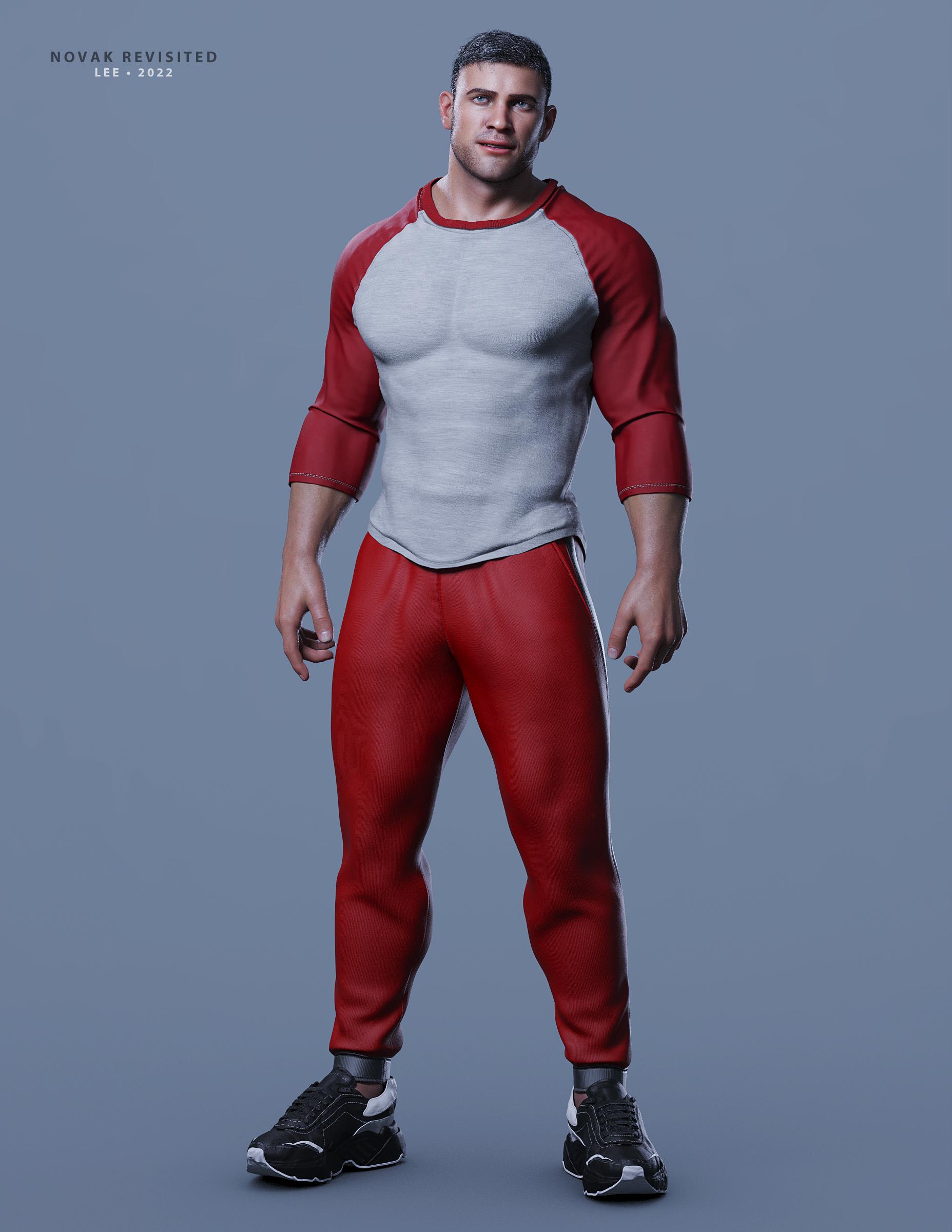
[Released]: Novak Revisited HD for Genesis 8.1 Male [Commercial]I love Novak Revisited. :)
Picked him up the morning he was released. The figure is very easy to work with and accepts my usual figure/morph mixing very well. I am completely happy with him!
As I've been fighting a migraine, this sample render is not put together very well and I haven't finished tuning Novak's textures to my lighting setup (so he's using Pablo's textures.) As shown here, he's 100% Novak, but also a beefy/muscular character dialed in at low strength and some minor additional shaping add-ons dialed in. The outfit is a mix of 2 different products.
Novak Revisited is an excellent addition to my content library. Thank you FaberInc for another awesome creation!
Lee
 Custom Clothing
Transfer Utitliy is the place with the options. The utility, without being told otherwise, assumes that the rlation of the model to the source figure is what you want the rigging to respect - setting the Source Shape and enabling Reverse Source Shape from Target is how you tell it otherwise.
Any scenario in which a Threadripper 3960x would out-render 2x RTX 3090's?felis said:
For the saber. It should anyway be its own surface, and then you can just set cut-out oppacity to 0, and then it will be invisible.
Yes, that works for simple on/off, but for turning on a lightsaber and it coming out of the hilt, and then going back in a morph works better (these sabers have that morph built in).
[Solved] Why my SubD lines goes missing after transfer utility?I always apply subD after the transfer
Hemm, yea that seems how it works.
Custom ClothingWhen your clothing is modelled towards your morphed character, then you should also use the morphed charcter as source for transfer rigging.
And in the transfer rigging dialogue you shall set source shape as current, and in the options below check 'reverse source shape from target'
Custom Clothingwell, now I'm confused again :P
why would I need to transfer rigging to my morphed character, and from what?
Custom ClothingWhen you use transfer rigging, it is assumed that it is modelled against the base character.
When you transfer rigging towards your morphed character, then use current shape and open options and check reverse source shape from target.
Custom ClothingI exported a custom character and modeled it around her. When I imported to Daz I first tried the process with the custom figure and had the issue I described. I then tried the Transfer Utility with the base G8.1F model and had the same problem. To be clear the custom character was created via the morph dials in Daz, not in Blender or anything.
[Solved] Why my SubD lines goes missing after transfer utility?AS far as I know subD gets removed when you do transfer utility.
I always apply subD after the transfer
Daz 3D is part of

Connect
DAZ Productions, Inc.
7533 S Center View Ct #4664
West Jordan, UT 84084Licensing Agreement | Terms of Service | Privacy Policy | EULA
© 2026 Daz Productions Inc. All Rights Reserved.