-
SOS help.....(Duplicate Formula Error)
Usually that means that two different characters have the same name (internal reference, not the label that appears on the slider) and link to proeprties with the same name. If you go to Help>Troubleshooting>View Log File and search the text for Duplicate you will find the entries listing the clashes, which will give the full filename for one of the two properties in each pair. One you have that information you may be able to figure out which the other character or morph is, and you can report the clash to the store (for products from Daz) or creator. In the emantime you can either unisntall one of the two, if that is acceptable, or it is possible to manually edit the files to make the names unique (but bear in mind that an official fix may rename them in a different way)
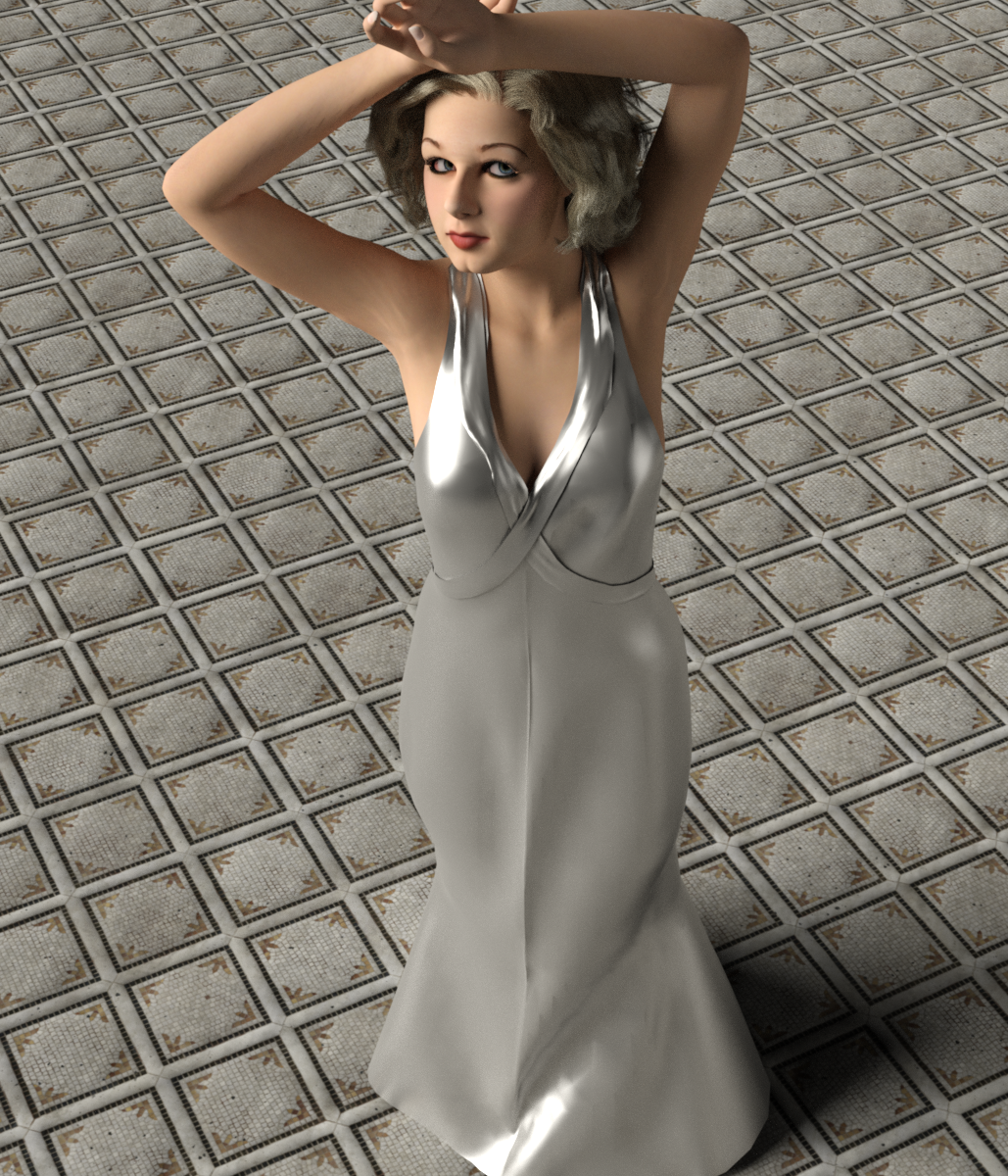
Dinner at 8 dress for G8FIt's here... the dress to go with @AOBB 's fabulous "Babyface" morph.
https://www.deviantart.com/perlk/art/Free-Dinner-at-8-dress-for-Genesis-8-Female-926173016
Like the dress that Ms. Harlow was practically sewn into, it is not meant for extreme poses (like sitting, ha ha - on the set, apparently, the crew built her a piece of furniture she could lean on to rest since she couldn't sit down).
 Clothing Converter from Genesis 3 Male to Genesis 8 Male
Michael L Rogers said:
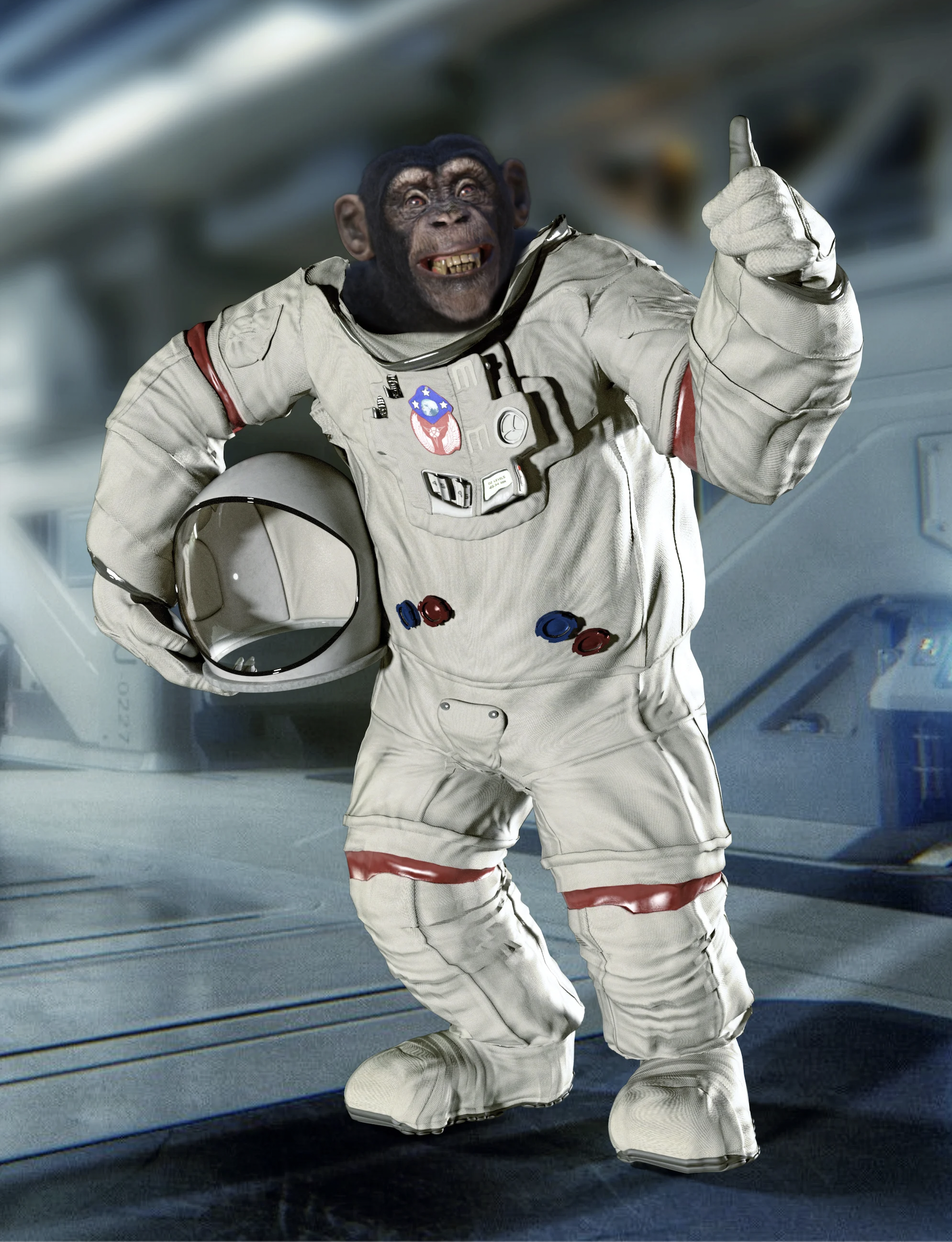
It's so sad that I can't use the "Clothing Converter from Genesis 3 Male to Genesis 8 Male" to work on the "Anthropomorphs - Chimpanzee for Genesis 8 Male". Yet here it is in a photo from the products page. Any ideas how to get this to work just as good as what's in the promotion photo?
https://www.daz3d.com/anthropomorphs--chimpanzee-for-genesis-8-male
Any ideas, sure. If you haven't already, download/install the Auto-fit clones I spent weeks making [links in my siggie], then with the default G8 figure selected, load the G3 clothing. Look for the autofit match with the "T" ... that should get the clothing fitting G8. If it looks pretty good, do a "Save As" figure/prop file to G8's closet under DIFFERENT FOLDERS so the new .duf in the data fields does not overwrite the original file. [i.e. author = you, project = private [because you can't share this]
Fresh scene, load G8, make it base resolution, NO eyelashes, and zap the fancy skin shaders too, [this is called being nice for Hexagon] load the clothing. The G8 figure still selected, dial in the ape shape [should be somewhere on the Parameters Tab].
In the scene select the clothing, on the Parameters Tab go to Edit Mode [right-click on any dial], then go to the cog wheel of the shape for the Ape. Copy the "Name" exactly of the body morph [if the head and body are separate morphs, do not select the full character - that's a controller]. Paste that name into Notepad or something like that. Change the name of the morph to something like 'delete this' and also the 'label'. Okay and close that.
Select the figure and send it over the bridge to Hexagon [or whatever modeler you're using]. KEEP D/S OPEN [or it will close Hexagon]. In D/S select the clothing piece you will be fixing. Now dial that renamed morph to "0".
In Hexagon rearrange the mesh so it looks nice on the Ape. Then send just the clothing back over the bridge to make the morph -- and name the morph EXACTLY what the body morph was called. [the one you pasted to Notepad or somesuch]. REVERSE DEFORMATIONS.
If you the morph is a keeper, dial it back to 0, Save the clothing now under author = you [that's okay] project = FBMs [or whatever you want].
Clear the scene, load in either G8 or the Ape, and load in that newly saved clothing. It should be looking great ;-)
Rarestone gone? - part 2 - What's currently availablerichardandtracy said:
That's interesting. I have had poke-through with displacement maps, but never normal maps. I shall have to investigate this again. On every normal map object I have created, when looking on edge, the rendered mesh looks un-displaced (so couldn't cause poke-through) while a mesh with a displacement map does seem displaced, and the displacement is entirely unrelated to the mesh density. Maybe I need to look again at it. Regards, Richard.
Some of the guys like Darius can do this when using their normal map versions instead of HD. It depends on what the normal map is used for. But either way, both displacement and normals are ways of cheating true geometry. That is why normal maps are popular in video games, because they can save on geometry.
Now why would somebody want to have the normal map on with clothing? Well what if the clothing doesn't cover the entire body? This doesn't have to be a super hero suit, that was simply an example, it can be other forms of clothing. Any time a piece of clothing makes contact with the skin can result in a situation where a normal map causes poke through. It can be from draping or conforming clothing.
Geoshells in my experience kill the normal map details. So not really a suitable replacement, IMO.
Additionally, because normal maps are essentially faking this detail, the detail they create is not physically accurate. It may be passable to the observer, but that doesn't mean it is accuarate. And that can be ok, the result is what matters. But if a user's goal is physical accuracy then they require HD mesh, period.
Normal maps exist as a comprimise solution to the problem of rendering complex geometry. They are a substitue for the real thing, but they are not to be confused with the real thing. The thing is we are reaching a point to where computer hardware can render crazy amounts of geometry. Yet Daz Studio is still stuck on limiting users to only modify base meshes that are less than 18,000 vertices. Meanwhile many modern video games can pump far more than that into a character on screen. This threshold was passed years ago. Unreal 5 can push many millions of vertices at once with even modest hardware. But yet here we are, and we the customers can only hope that Daz releases HD meshes that we like. We have no way to create our own, even just for personal use. Sure, we can use normal maps to cheat this, but I just covered that.
A great example was Tara 8. Tara released with a facial scar built into her HD mesh. With a base mesh users can smooth such a scar out (ignoring the fact that a base mesh cannot even do a proper scar in the first place). But with a HD mesh there was no way for any customer to remove this scar on her face. It was pretty annoying! We the customers had BEG Daz to update the product with a version that made the scar optional. Now while Daz did comply with this, the fact remains that they could have chosen not to. And then all the customers would be stuck with this scar on Tara's face with absolutely no way to remove it themselves.
And that is just one example. There are plenty of examples where I would personally like to alter a HD mesh. I can't. There countless examples of users posting in this forum wishing they could transfer a HD morph from a past Genesis to the current one. They can't. The Creature Creator HD pack in particular is frequently mentioned in these forums.
How is this a good thing? How is it even a good thing for Daz for that matter? I would argue that at this point it is doing more harm than good to keep HD meshes exclusive to certain PAs.
Face Transfer questionriverman63 said:
Save the figure with the new face as a scene or character after saving the initial Face Transfer so you can just load or merge it anytime you like into a scene
Thanks. I didn't realize it was a 2 step process. so saving the transfer just saves it to the active/live scene. If I didn't also save the scene or character I basically wasted a freebie it seems.0
Maybe it's just me, but that should probably be mentioned in the save function as a next step (unless I missed it, I'm gonna check on my next save)
Camera Magic (Commercial)Hi. Any morph modifier classified as pose works with pose addon, any with shape requires shape addon. If say an expression is a Modifier/Shape it wont work with the pose addon as its designed to remember pose modifiers only. Alternatively, you can change the modifier class of the morph and resave it.
Face Transfer questionSave the figure with the new face as a scene or character after saving the initial Face Transfer so you can just load or merge it anytime you like into a scene
Duplicate morphs are removed!If your base G8.1F still shows a dial "Mouth Depth Out" and the name of the morph file on your drive is "Mouth Depth Out.dsf" for the Rarestones MouthDepthOut-morph, you have not downloaded the latest version of of the product.
The attached picture shows what the code inside "RFMC_Mouth Depth Out.dsf" (Note the file name) says about "Id", "Name" and "Label"
Edit, you should uninstall the Rarestones morph pack before installing the latest version, as the file names have changed, so the old ones will not be overwritten.
JCM HelpMorphs move the vertices in straight lines, from the base position to the final morph position. they can't work as the main driver for rotations, just as an adjustment (and even there is is common for there to be several morphs for different bend angles).
Face Transfer questionI am messing with the free face transfers and finally came up with one decent enough to save as a test.
How do I reload the face transfer in a new session? Do I need to generate a new one each time? If so, what is the purpose of the save function?
I tried searching for the file name in Shaping, content explorer and smart content and could not find it.
Duplicate morphs are removed!The image attached below is
Left : G8.1F base figure / Right : My characterBoth have 'Consolidate Properties' unchecked.
(As advised, I didn't rename the actual file.)
In the first place, the label of the RFMC morph was different from that of the 200Plus, so changing the label didn't change anything.Moved My DAZ 3D Library directory for new PC install, and not everything works nowDarkElegance said:
Sorry, Silly question coming from someone returning to 3d and ds.
If the path is not the same, can I direct DS to find the files? I was going to transfer over the old library to my new puter, but not have it on the main drive.Can I set the preferences to "find" it?
Fortunately, products don't use the full path - just the relative path within the library folders. As long as you add it in the correct place as mentioned above it will work even if the first part of the path is the different from before. This is handy for me since I have my asset library on both my Mac and Windows machines and so on one the files are in "/Volumes/Design/DAZ 3D/Library/..." and on the other they are in "Z:/DAZ 3D/Library/..". This is not an issue since the assets use relative paths - e.g. "/Runtime/Support/DAZ_3D_85433_FG_Bakeshop.jpg"
Duplicate morphs are removed!Thank you for answer.
To summarize in advance,
When the file name is not changed:
Missing Files message does not appear, but the actual path to 'Mouth Depth Out.dsf' of RFMC is 200Plus. (wrong)
When the file name is changed:
Missing Files message appears, and the actual path to 'Mouth Depth Out.dsf' of RFMC is RFMC. (correct)I turned off 'Consolidate Properties' as you said, but unfortunately nothing happened.
So I went to the morphs folder and renamed the file.
RFMC's 'Mouth Depth Out.dsf' → 'Mouth Depth Out 1.dsf'
200Plus's 'Mouth Depth Out.dsf' → 'Mouth Depth Out 2.dsf'Then when I opened my character I got a message saying that RFMC's Mouth Depth Out.dsf could not be found.
But the parameters showed this morph and it came from the correct path. (Although it's in Hidden)Garden Gate and Estate Fence@Faeryl Womyn, I do hope it lives up to expectations! Good luck with getting the computer working again.
I need to share one or two extra bits of information:
- To get the fence piece to match up with the gatepost on the right of the gate, translate the fence 102.3cm in X and switch property 'Hide Support 1' to 'On'.
- To get the fence piece to match up with the gatepost on the left of the gate, translate the fence -210.3cm in X and switch property 'Hide Support 2' to 'On'.
- If you use my 'Linear Array Script' to duplicate the fence, switch one or other 'Hide Support' switch to 'On' and set the instance spacing to 180cm, then there will be a support every 180cm as occurs in the real Estate Fences. You may need an 'Uninstanced' panel at the far end of the line of instanced fence panels to ensure there is a support at the far end.
- The 'Slope' morph is at 100mm (approx4") at 100% strength. If you need more than +/- 400% (400mm/approx 16"), then the bars will start to look distorted, which is why I've put in those limits.
- The support bar angle can be changed by clicking the appropriate bar and moving the 'Support Angle' slider.
Regards,
Richard.
Moved My DAZ 3D Library directory for new PC install, and not everything works nowSorry, Silly question coming from someone returning to 3d and ds.
If the path is not the same, can I direct DS to find the files? I was going to transfer over the old library to my new puter, but not have it on the main drive.Can I set the preferences to "find" it?
Underbelly not workingI purchased underbelly when it first came out, and I liked it. But now it is not loading any morphs. When I click on the underbelly image in "Characters," the basic Genesis 8 character loads with the underbelly hair and texture. BUT NO MORPHS. In fact, when I checked the installation, the morph files were missing. I tried to reload the figure, but DAZ said I had to purchase it first. I have, in fact, just repurchased the bundle for the THIRD time. And it still will not work.
Please, either tell me how to fix it or refund my money!
Dan Shackelford
Star Trek Builders Unite 8: THE REBOOTnomad-ads_8ecd56922e said:
wsterdan said:
Below I have a shot of three of the ships he built for me (the centre shot is the one with the warp sled added) while the outside two ships are actually the same ship, one with the wings morph showing the main hull with wings, the other using the "Trader" morphs to make it look more like a small cargo ship in the game, "Traveller".
All three ships have landing gear that retracts, internal rooms with working doors and a cargo hatch with an elevator platform.
Finally, a render or two of the main ship. There's two morphs for the main deck, one where the centre is the captain's quarters, the second where the bridge is located.
3Dman25 dropped off the scene before all the work was completed, so they're all "not quite finished" but very usable as is.
After being unable to reach the artist for six or seven years, I hired Vanishing Point to do an overhaul on the main ship, and they did a brilliant job. I'll post some of the work on it tomorrow, but they gave it UV mapping, allowed for parts of the ship's exterior to be hidden to allow for better camera views, made the ship larger (adding a full deck and a central elevator, and more).
For the interior shots, I dropped a few pieces of furniture in for reference, I have yet to set up the interiors of any of the ships properly. Time is alway the enemy.
-- Walt Sterdan
Nice. Are these ships available, or going to be available, for download somewhere?
Thanks. I probably won't release this one, as it's a little on the "less polished" side and more difficult to work with.
If there's interest, I will release the second one, the one VP updated for me as it's much friendlier for the average user to work with and, due to the open floorplan (well, "empty" might be more accurate) people can lay the interior out to suit them. I'll check with VP about hosting it as a freebie.
Below, a shot in space, landed with gear down and lights uncovered, with the elevator down and a character standing in front of it, a shot with the bay doors open (they slide forward a bit, then slide to the sides) with the loading ramp extended, a shot with the left wall and roof hidden to see the three decks, a shot from slighty above with a character on the ramp for scale, and a final shot with the warp sled hidden so you can see the system ship on its own.
The main viewscreen is mapped to be a huge view screen to work with from the bridge but can be cleared to be an open viewing screen.
The one regret is that to give the ship three decks (part of the bottom deck is used for the landing gear wells) the main (middle) deck is rather high in comparison to the windows. If you're sitting on the bridge, for example, the forward screen/window is fine, but if you're standing, you're kinda looking downward through it. I felt it would have been too much work to alter that since we were starting with the original mesh, but it probably wouldn't be too much work to scale the whole ship up a few percent if it's an issue.
The elevator stops at all three floors (and on the ground outside) and VP included sections of walls (with and without working doors) to help you set up the interior. I'd love to see what people could come up with, possibly sharing some furniture to help others outfit it.
I've also tested the elevator for use on an outpost base; the ship can dock on the landing pad and, the station "roof" opens and the elevator is the right size to descend into the outpost corridor, it's actually kinda cool. I'll post a pict or two later to show that.
-- Walt Sterdan
How to fix Genesis 8.1 eyes?Thank you for the hints. I ended up creating my own morph file. The Eyes Size morph unfortunately does not only affect the eyeball size.
New! Novica & Forum Members Tips & Product Reviews Pt 14Well, I found THIS POST. Geometry Editor tool? Edit- except what do they mean by favorite your morph?
Star Trek Builders Unite 8: THE REBOOTwsterdan said:
I started working on a Trek project back in 2011; I wanted my story to take place around the beginning of the Archer years. I wanted a very small ship, one that could be used for a decent scout ship or a system patrol ship. My thoughts were to have something small but capable of Warp 2.5-3, that could make the trip from Earth to Proxima Centauri in 40-50 days and provide in-system support for Proxima, while also making regular jumps to the Alpha Centauri system.
I love the look of the Warp Delta ships, but as far as I know they don't do planetary landings as a matter of course.
My thought was to take small, non-warp, civilian courier ships and add warp sleds to them with micro-warp engines.
At the time, I hired modeller 3Dman25 to build some ships. The main one starts out as an impulse-powered system ship then gets three nacelles added to it to give it warp capability.
Here's two very early animations he did showing the ship landing (landing gear comes out and the ramp opens and the stairs come out) and an overhead shot showing the doors opening and closing internally:
http://www.youtube.com/watch?v=F66yPTe8Q0c
And
http://www.youtube.com/watch?v=z9UzSDuhhDk
Below I have a shot of three of the ships he built for me (the centre shot is the one with the warp sled added) while the outside two ships are actually the same ship, one with the wings morph showing the main hull with wings, the other using the "Trader" morphs to make it look more like a small cargo ship in the game, "Traveller".
All three ships have landing gear that retracts, internal rooms with working doors and a cargo hatch with an elevator platform.
Finally, a render or two of the main ship. There's two morphs for the main deck, one where the centre is the captain's quarters, the second where the bridge is located.
3Dman25 dropped off the scene before all the work was completed, so they're all "not quite finished" but very usable as is.
After being unable to reach the artist for six or seven years, I hired Vanishing Point to do an overhaul on the main ship, and they did a brilliant job. I'll post some of the work on it tomorrow, but they gave it UV mapping, allowed for parts of the ship's exterior to be hidden to allow for better camera views, made the ship larger (adding a full deck and a central elevator, and more).
For the interior shots, I dropped a few pieces of furniture in for reference, I have yet to set up the interiors of any of the ships properly. Time is alway the enemy.
-- Walt Sterdan
Nice. Are these ships available, or going to be available, for download somewhere?
Daz 3D is part of

Connect
DAZ Productions, Inc.
7533 S Center View Ct #4664
West Jordan, UT 84084Licensing Agreement | Terms of Service | Privacy Policy | EULA
© 2026 Daz Productions Inc. All Rights Reserved.