-
Filament project has been abandoned?
slighlty off topic, but filament matcaps would be nice. I.e., just plain color matcaps, similar to smooth shaded drawstyle. You can kind of get some good detail/shdadows with the plain opengl and iray uber shader on the smooth shaded drawstyle but it leaves a lot to be desired. Filament would be better.
Filament project has been abandoned?DAZ's implementation of Filament is incomplete - you'll likely need to wait until the next major release is out, there has been work done as shown in the changelog. I am one of those users who is hoping that Filament becomes more useful for renders/animations.
Filament project has been abandoned?Richard Haseltine said:
Are you talking about the z ordering? That applies to OpenGL too - fixing it would significantly impact performance, which isn't (or at least wasn't) deemed acceptable in a Drawstyle.
I'm just trying to create hair cards in Filament, but the alphas aren't working. I really like how everything else looks, so it would be great if they could fix that and make it a priority so I don't have to leave the job half-finished.
Filament project has been abandoned?Richard Haseltine said:
It may well not be a "bug" but some adjustment that is needed - Filament is drawstyle not a render engine, and is adifferent beast from Iray or 3Delight so some tweaking is to be expected.
As for abandoned, the changelog clearly shows it is having work devoted to it http://docs.daz3d.com/doku.php/public/software/dazstudio/4/change_log
but what happens with the alphas, it can't draw more than one... something is not right... they just need to fix that and it would be perfect for me... I get good results but the alphas don't load, It is impossible to make a hair card with filament... I would like to help but I am not a developer... I feel like my hands are tied...
Filament project has been abandoned?It may well not be a "bug" but some adjustment that is needed - Filament is drawstyle not a render engine, and is adifferent beast from Iray or 3Delight so some tweaking is to be expected.
As for abandoned, the changelog clearly shows it is having work devoted to it http://docs.daz3d.com/doku.php/public/software/dazstudio/4/change_log
Filament project has been abandoned?Hi everyone,
I'm encountering a problem with the Filament render engine in DAZ Studio. When I try to render hair cards that use alpha textures, everything appears transparent, which is obviously not the expected result. I’ve done some research and it seems like this is a known bug in the community.
My question is: does anyone know if there are plans to fix this bug? Or is there any indication that the Filament project has been abandoned? I’d appreciate any updated information or temporary solutions to this issue.
Thanks in advance for your help.
How do I tell Daz to render in 32 bit color?Richard Haseltine said:
PBR meaning? It isn'ta render engine, to be picked as an alternative to Iray, and the PBR Skin shader should support 32 bit colour output as any Iray shader should.
My bad: I meant Filament
sRGB is a colour space, the renders saved from DS do not have a colour space assigned (so many editors will, by default, assign sRGB).
sRGB also defines a transfer function and that is what is relevant to the observed banding. This is what I am referring to; the transfer function limits the dynamic range by making a balanced choice between dynamic range and precision. I should probably have added that no 8-bit encoding can ever be sufficient; Poynton's estimate was (is) 463 separate levels based on 1% accuracy, my estimate based on 1/60 accuracy is 279 levels but I maintain 100:1 dynamic range is not enough).
The colour space does not matter in this context, it only matters how that colour space is digitally encoded.
The portability has nothing to do with colour spaces - it's about being readily readable, using a common, published code base (unlike soem existing formats used for websites when it was released). PNG does support higher bit-depths
I sort-of agree with your definition. However while you or I can write an HDR PNG which matches the v0 specification, for example by using a high gamma encoding, as in the ITU's definition of PQ, here:
https://www.itu.int/dms_pubrec/itu-r/rec/bt/R-REC-BT.2100-1-201706-S!!PDF-E.pdfIt's still the case that the resultant image will hardly ever be handled correctly. You sort-of explained why:
PNG does support higher bit-depths, that isn't why the base render is limited to 8 bits per channel.
Indeed. Most punters monitors really are very close to sRGB, so even if the output image file (PNG or otherwise) isn't sRGB it will get reduced to sRGB and that will often be done incorrectly causing the bands to re-appear. Producing a PNG which is not sRGB is just going to lead to confusion, bug reports and bad press.
What's with artist page promo images not having what's on them in the store?RexRed said:
I tend to believe that Iray is the best rendering engine out there available for consumers and PAs. It is created by Nvidia, the second largest company in the world, second to Apple with Microsoft trailing closely behind Nvidia.
To the best of my knowledge, neither Microsoft nor Apple have rendering engines.
There is a lot of hype about other rendering engines, but I do not fully buy into it.
The "industry standard" is notorious for not always being the best...
NVidia is nowhere near the second biggest company in the world, and even if it were, what does that tell us about the quality of its rendering engine? NVidia is a GPU manufacturer that happens to have a rendering engine also. Alphabet (Google) is a much bigger company than NVidia, but we can't assume from that fact alone that their rendering engine, Filament, is better than Iray. Also, there is no one "industry standard" rendering engine. Some use Arnold, others Redshift, or Octane, or V-Ray, etc. What does it even mean to be the "best" rendering engine? Best for what? Best by what metric? I've tried many rendering engines, and even if Iray were available for the other programs I use, it wouldn't be in the running for me.
Card for just using the UI (Viewport)? (3060 - 4080)Just a quick question. I have a stationary with a 3090, where I do all my render, but I do a lot of traveling an consider getting a laptop in a not too distant future. What is the minimum graphics I need to run the normal UI normally, with as little lag as possible? I do anything from small to big scenes (Up to around 10 figures, many items and objects). Still, the card does not need to outperform a 3090 as of now. I want it to handle texture-, cartoonshader, filament,
How many have tried running daz3d on a 3060 or 4060? Is it possible or noticeably slow?
Same question about 3070 and 4070?
Or am I just kidding myself and should I at least aim for something around 3080 and 4080?
random stop of undo function3DmentiaNull said:
Wow crosswind! That was an amazing call! I was, of course, using the G8f version ( which IMO looks pretty good in Filament, with darker coloring, of course ). And it's much appreciated having the screencap .duf edit instructions, many thanks to you for taking the time for these very helpful, in depth, responses!

 / peace
You're welcome ! Happy rendering !
 random stop of undo function
Wow crosswind! That was an amazing call! I was, of course, using the G8f version ( which IMO looks pretty good in Filament, with darker coloring, of course ). And it's much appreciated having the screencap .duf edit instructions, many thanks to you for taking the time for these very helpful, in depth, responses!
/ peacecan I import curve based hair from blender to daz(particle or extrapolated)OMG have to pop in and thank you for this thread and UncannyValet for their suggestion
which also works on Carrara hair exports

(one of Jon Stark's hairs but also now doing all of mine)

almost 6mil vertices before

just under 2mil afterwards, yay!!!
of course it only renders in iray not filament but I still have the original for that
CellShaderIn the recent changelogs there has been suggestion they are using Filament to create a NPR renderer.
random stop of undo functionHi everyone, D/S 4.22.0.16 has been confusing me lately, I hit control/z and find I'm back to much earlier events. Typically, I realize that the undo stack is missing when I do a parameter change, hit control/z, and the item i've been working on for a while is deleted!
 The only other related info would be that, I think each time it was a scene with G9 having either timeline keyframes, aniblocks, or both, applied. When loading legacy hair to only be parented to the G9 head later, when loading hair the timeline stopper advances cause keyframes have been added, even though the figure is at frame zero. After struggling to delete the keys and moving and scaling the hair many times, at least the hair wont move, but many times I'll lose all my adjustments with control/z cause the stack wasn't generating. Maybe I should use the menu window undo to keep track of whats in the stack, but I undo so much and control/z is so much faster. Anyway, this is a random event, on reloading it works fine. The scenes were one G9 with clothing and legacy hair, minimal lighting in Filament mode. I'm running 32gb ram and an RTX 3060 TI. Anybody have this happen? Thanks / peaceLooking for a Daz Compatible Incendiary Rocket Launcher
Richard Haseltine said:
OBJ is static, FBX can carry rigging - though you want to be using the current beta to take advantage of some improvements there.
File>Import will let you bring in FBX and OBJ files (OBJ requires setting options to make sure the scale is correct).
If Iray is the current render then the Iray Uber base shader will be applied on import, if not seelct the model in the Scene and its surfaces in the Editor tab of the Surfaces pane, then double-click the Iray Uber Base preset in the Presets tab. The Surfaces pane's editor tab is also where you apply maps (by drag-and-drop or by clicking the icon to the left of the colour proeprty and selecting Browse...)
Thank you for replying.
Nvidia Iray needs to be selected, not texture or filament or any of the options in the viewpoint sceen? Or is it a totally different Iray option?
Current Beta? Do you mean Daz or Iray Uber?
Filament work done with DAZ beta builds (hopefully path forward to opacity fixes)Some of the features are exposed, via the Filament Draw Options node, but the stuff marked as "Internal" in the change log has not yet been made available outside Daz' hallowed halls (even to PAs, though I beleive that may soon change).
Filament work done with DAZ beta builds (hopefully path forward to opacity fixes)Reviving this. Has anyone tried the latest beta to see if the new changes to filament are live and working?Limited Time Freebies Discussion Threadmiladyderyni_173d399f47 said:
It is a pretty nice selection. I got Maryse a while back on deep discount because I liked the skin although I haven't tried the shape since I don't have Mika.
Maryse looks remarkably unhappy without Mika as a base. Seriously! Wide mouth, looks frowny. The skin is very nice! Oddly, the skin shows seams with the Filament preview - No idea why. No problems with 3DL or Iray. The skin looks great on other characters, too. If/when I finally get Mika7, Maryse will be complete.
New! Novica & Forum Members Tips & Product Reviews Pt 14Fishtales said:
jjoyner said:
NorthOf45 said:
Novica said:
jjoyner said:
I don't know if you have Amusement Park - Ferris Wheel (https://www.daz3d.com/amusement-park--ferris-wheel) or not, but if you do, do you know if the wheel spins. As far as I can tell, it does not. I bought it last Spring.
Hey there! I do have it, but haven't installed it or used it. Perhaps someone who has actually done so can assist. The place to look would perhaps be in the Scene tab, breaking down the "bones" of it and seeing if in the parameters something shows up such as a slider for any of those. That's about all I can think of.
Sorry to say that nothing moves, or at least not as expected. All parts are static props, with little or no attempt at rigging. The Center Points on the chairs (Cabins) are at the bottom, so rotations are messed up. You can spin them, but the top section spins, too. And, the gates do not open. Ansiko's is not much better, wheel does not turn, but some of the chairs can be rocked and the gates opened (the instances hierarchy is messed up). Haven't tried powerage's yet. The original Ferris Wheel (with Iray add-on) rotates and the seats stay horizontal as the wheel spins, and you can rock them back and forth.
Thanks much. I suspected that the answer was No. I searched all of the parameters prior to posting and had found nothing to rotate regarding the wheel itself. I have two other Ferris Wheels – the Sarsa/DAZ Original Ferris Wheel and one by Mausel from 2010 from the long defunct Content Paradise store. I had tested the Sarsa Ferris Wheel and confirmed that it rotates nicely and also noted that the seats remain horizontal as the wheel rotates. Perhaps its vintage look can be updated with “shinier” shaders. The Amusement Park - Ferris Wheel set looks nice so it’s too bad that the wheel doesn’t rotate. The Mausel Ferris Wheel doesn’t rotate properly; you can rotate the wheel by rotating it on its z-axis, but the gondolas aren’t rigged to rotate and remain horizontal.
This Ferris Wheel. I did this annimation five years ago and I amsure it came with the product. I haven't looked at it since so I can't remember how I did it. I also did one withe the swing ride and carousel.
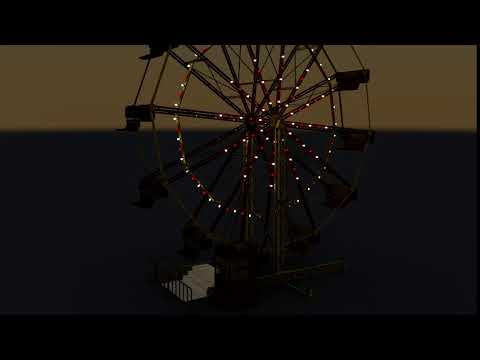
Finally got around to installing the powerage Ferris Wheel. The wheel spins, and the individual baskets all pivot to stay level. You must use the top-level "Poses Controls - Wheel Turn" to get the proper movement.
Here's a MEGA link to a little animation I made with Filament. powerage ferris wheel.mp4
MANGA STYLE & VISUAL STYLE topic - Update Sept 23rd 2017: Fixed Dropbox links! [Commercial]Dupe post due to Cloudfare.
I concure on Filament. And would love to see it available for Mac OS systems.
Daz 3D is part of

Connect
DAZ Productions, Inc.
7533 S Center View Ct #4664
West Jordan, UT 84084Licensing Agreement | Terms of Service | Privacy Policy | EULA
© 2026 Daz Productions Inc. All Rights Reserved.














