-
Selbsthilfegruppe DAZ Studio - Beispiele, Fragen, Diskussion und sonstiges Gequatsche
Für die Morphs benötigst du GenX mit dem Zusatzmodul für Genesis 2&3. Im FAQ unten in meiner Signatur steht eine superanleitung auf Deutsch vpn @MN-150374
- http://www.daz3d.com/genesis-generation-x2
- http://www.daz3d.com/genx2-addon-for-genesis-2
- http://www.daz3d.com/genx2-addon-for-genesis-3
Texturen: Die Texturen M/V4 und G1Basis sind jeweils direkt von der darüberliegenden Basis-Version nutzbar, also M/V4 von G1, G1 von G2. Du kannst also solche Texturen quasi von einer Generation zur nächsten "Weiterreichen", und zwischendurch als Material Preset abspeichern. Man kann aber mithilfe der untenstehenden UV-Sets auch die Skins direkt nutzen:
- http://www.daz3d.com/genesis-2-male-and-female-base-uvs-for-genesis
- http://www.daz3d.com/victoria-6-and-michael-6-uvs-for-genesis
- http://www.daz3d.com/generation-5-uv-bundle-for-genesis-2-male-s
- http://www.daz3d.com/generation-5-uv-bundle-for-genesis-2-female-s
- http://www.daz3d.com/michael-4-for-genesis-2-male
- http://www.daz3d.com/victoria-4-for-genesis-2-female
- http://www.daz3d.com/m4-skins-batch-converter-to-genesis-2-male-s
- http://www.daz3d.com/v4-skins-batch-converter-to-genesis-2-female-s
Genesis 3 geht nur mit einem Workaround; die Produkte hierzu findest Du unter http://www.daz3d.com/cayman-studios
Ebenso kannst Du zwischen den Geschlechtern tauschen:
Die Anziehsachen (ausgenommen Schuhe, die funktionieren meistens nicht) kannst Du ebenfalls von Generation zu Generation weiterreichen. und als Wearable Preset abspeichern. Falls Du GenX hast, kannst Du damit auch eigenen "Clones" herstellen. Direkt gekauft geht es auch:
- http://www.daz3d.com/wear-them-all-autofitting-clones-and-clothing-smoothers-for-genesis-3-female-s
- http://www.daz3d.com/wear-them-all-autofitting-clones-and-clothing-smoothers-for-genesis-3-male-s
- http://www.daz3d.com/genesis-3-female-for-genesis-2-female-s
- http://www.daz3d.com/genesis-3-male-for-genesis-2-male-s
- http://www.daz3d.com/genesis-2-female-clone-for-genesis
- http://www.daz3d.com/genesis-2-male-clone-for-genesis
- http://www.daz3d.com/genesis-3-clones-for-genesis-bundle
EDIT: Falls Du gut Englisch sprichst, kann ich Dir diesen Thread absolut wärmstens empfehlen: http://www.daz3d.com/forums/discussion/64403/converting-to-g1-g2-g3/p1
Daz Studio 4.9.3 Pro, General Release!OK, The Heretic Recants! (me)
I got tempted and installed D|S version 4.9.3.166, Macintosh, 64-bit on my Macintosh computer, with OS version 10.12.3 (latest, released Monday, January 23). Most things seem to be working well. The plugins are all working. I have rendered a scene. The iRay does seem better. What I'm questioning about here are are some items under Lost and Found.
I think one set is from Victoria 5. Should I uninstall and then reinstall? Or, is there a way to do this within D|S? Is there some way to get D|S to find or recognize and move the items back?
Another item is from Darrin, which I think is a genesis 1 male. Same questions as above.
Also, when I go to the aniBlocks, I get exclamation points inside of picture frames. No little pictures. Same questions as above.
I'm guessing I should try uninstalling and reinstalling, but I want to hear from those who know more than I do.
I'm attempting to attach three files, which I hope will show what I'm talking about.
Selbsthilfegruppe DAZ Studio - Beispiele, Fragen, Diskussion und sonstiges GequatscheLeider ein anderes Thema, ich weiß aber nicht genau, wo ich meine Frage stellen kann, deshalb hier im Thread:
Ich weiß, daß man die Texturen bzw. Character für Victoria 4 auch auf Genesis, Genesis 2 und Genesis 3 im Studio verwenden kann. Gibt es hierfür ein spezielles Tool (für die Convertierung?) oder wo wird die Handhabung verständlich erklärt? Ich habe so viele Character und Kleidung für die Victoria 4, die ich auch sehr gerne für die neueres Figuren DAZ verwenden würde. Insbesondere wären mir die Character sehr wichtig, da ich fast ausschließlich nur noch mit Genesis Figuren bastel.
Wäre schön, wenn jemand einen Tip für mich hätte bzw. wo so etwas evtl. genauer und verständlich erklärt wird?
Danke und liebe Grüße
3D Art FREEBIE CHALLENGE-January 2017- THE DAY AFTER HANGOVER -Entries Thread OnlySongwave
*******
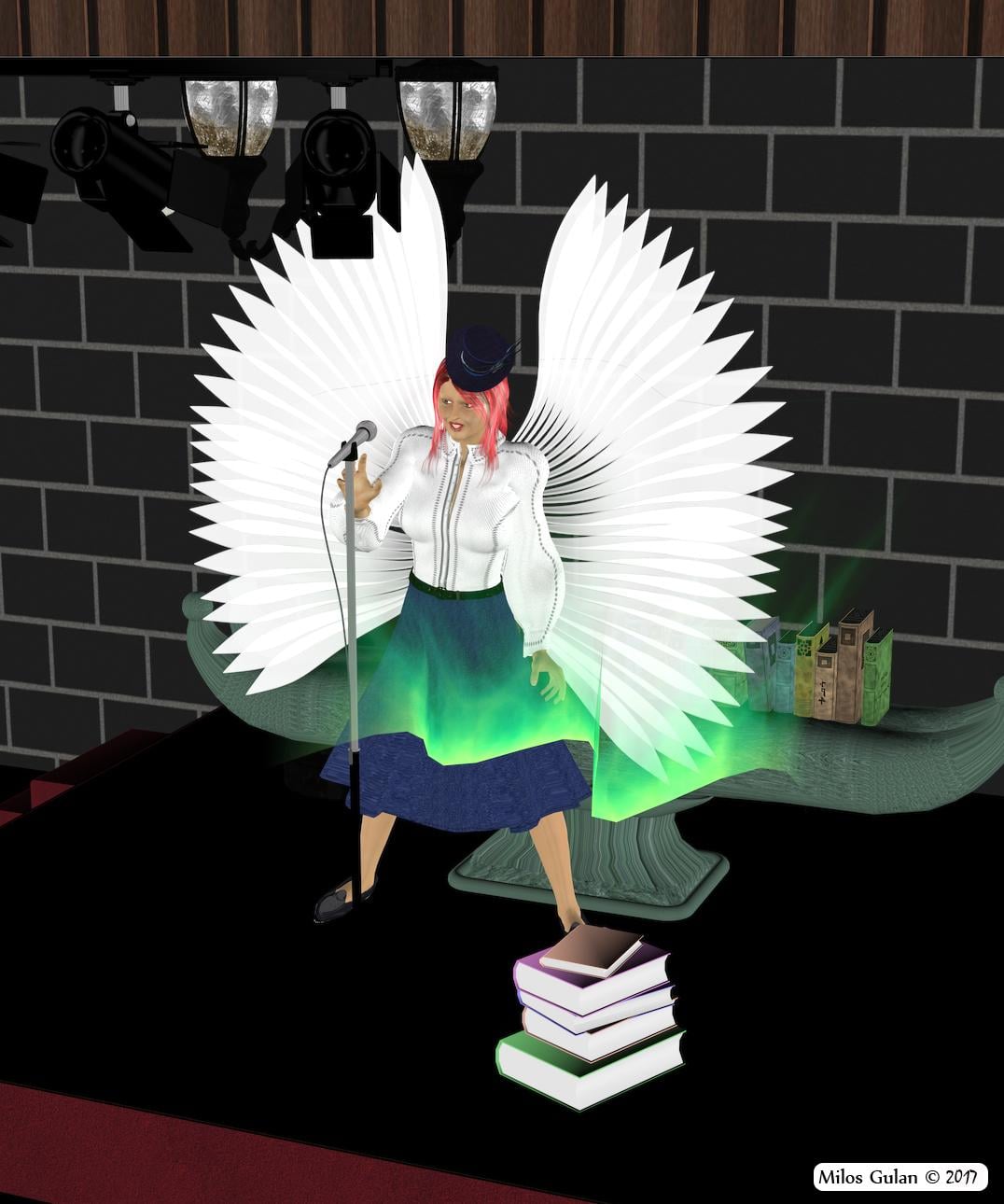
I tried do make something with singing and that green wave is something like a magical pattern of song.
*******
Done with Daz Studio 4.9
Items marked with an asterisk require registration.
Not Counting: Victoria 4
Freebies:
1.)* Radiance (V4 Character Part 1/3)
1.)* Radiance (V4 Character Part 2/3)
1.)* Radiance (V4 Character Part 3/3)
2.) Librarian for V4
4.) Koz's Long Hair
5.)* Celebration 2010 - Day 7 - Celeb for Koz Long Hair
6.)* Midnight Bird Hat
7.)* Poser Club Stage
8.)* Antique Street Lamp
9.)* Luna Faye's Bases and Pedestals
10.) Pile of Books
11.) Row of Books
12.) Aurora prop
13.)* Render Profiles for DAZ Studio 4.5 (Rendered on Insane)
14.)* Lili Wings
Who is this model?I think the attached image comes pretty close. It uses the texture set for Sunny 7, and Sunny 7 dialed at 38%, Teen Josie 7 at 38%, and Victoria 7 at 34%
 Converting to G1, G2, G3, G8 & G9
In the Mil3 to G3 section you might want to change it to show that mil 3 skins can be placed directly onto G3 using Caymen's new product http://www.daz3d.com/legacy-uvs-for-genesis-3-special-edition-victoria-3
Updated
3D Art FREEBIE CHALLENGE-January 2017- THE DAY AFTER HANGOVER -Main ThreadSongwave
*******
I tried do make something with singing and that green wave is something like a magical pattern of song.
*******
Done with Daz Studio 4.9
Items marked with an asterisk require registration.
Not Counting: Victoria 4
Freebies:
1.)* Radiance (V4 Character Part 1/3)
1.)* Radiance (V4 Character Part 1/3)
1.)* Radiance (V4 Character Part 1/3)
2.)* Librarian for V4
4.)* Koz's Long Hair
5.)* Celebration 2010 - Day 7 - Celeb for Koz Long Hair
6.)* Midnight Bird Hat
7.)* Poser Club Stage
8.)* Antique Street Lamp
9.)* Luna Faye's Bases and Pedestals
10.)* Pile of Books
11.)* Row of Books
12.)* Aurora prop
13.)* Render Profiles for DAZ Studio 4.5 (Rendered on Insane)
ALL LINKS CHECK OUT PLZ MOVE TO THE ENTERIES THREAD
Who is this model?I have an idea but im not certain. I think that might be Cathy by Raiya, http://www.daz3d.com/cathy-hd-for-victoria-7 , and I believe she may have had Growing Up 3 applied to her, http://www.daz3d.com/growing-up-for-genesis-3-female-s . Im guessing this is the case because the other model is Jolina by Raiya, http://www.daz3d.com/jolina-hd-for-victoria-7, and she definetely looks like Growing Up has been applied to her.
Actually, you may be right. It might be Ronya with growing up applied.
3D Art FREEBIE CHALLENGE-January 2017- THE DAY AFTER HANGOVER -Main ThreadSongwave
*******
I tried do make something with singing and that green wave is something like a magical pattern of song.
*******
Done with Daz Studio 4.9
Items marked with an asterisk require registration.
Not Counting: Victoria 4
Freebies:
1.)* Radiance (V4 Character Part 1/3)
1.)* Radiance (V4 Character Part 2/3)
1.)* Radiance (V4 Character Part 3/3)
2.) Librarian for V4
4.) Koz's Long Hair
5.)* Celebration 2010 - Day 7 - Celeb for Koz Long Hair
6.)* Midnight Bird Hat
7.)* Poser Club Stage
8.)* Antique Street Lamp
9.)* Luna Faye's Bases and Pedestals
10.) Pile of Books
11.) Row of Books
12.) Aurora prop
13.)* Render Profiles for DAZ Studio 4.5 (Rendered on Insane)
14.)* Lili Wings
Novica & Forum Members Tips & Product Reviews Pt 7Well, my Piper isn't looking at all like this one. FWSA Piper HD (V7)
(deleted) See previous post, which actually comes AFTER this one. I tested the lips, the pose on this one distorted the top one.
I REALLY like her materials, so I showed them in shade so you can get a good look at them. I'll do one with her turned into the sun. This is still the skies of iRadiance (the sunny ones.)
And I did a custom color for the Geneva Hair that I think is a perfect match for those brows (EDIT: under the Skies of iRadiance lighting. It changes, depending on what you are lighting with. You'll see in the next one.) The Geneva color that has red, has way too much red. This is the strawberry blonde that I made. Like it? Here's the new color tweaks:
Load the blonde color for Geneva Hair, then change this in Surfaces (with all parts of the hair selected)
Base Color: 155 / 129 / 117
Translucency: 180 / 162 / 148
Glossy Color: 240 / 217 / 198
This one, the lips are distorted due to the expression, So be careful!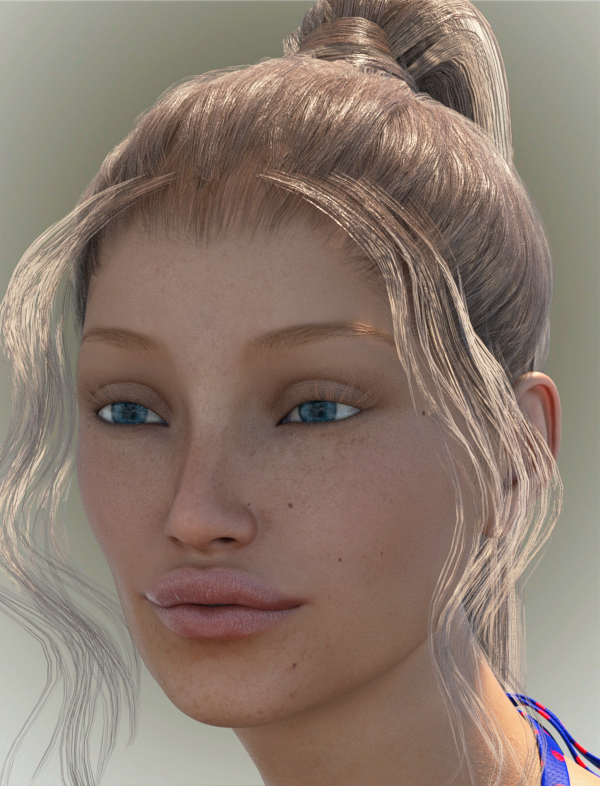 Novica & Forum Members Tips & Product Reviews Pt 7
Posting this first- due to duplicate post. This looks more like Piper in the promos. Also notice the hair seems more brown since I am using different lighting.
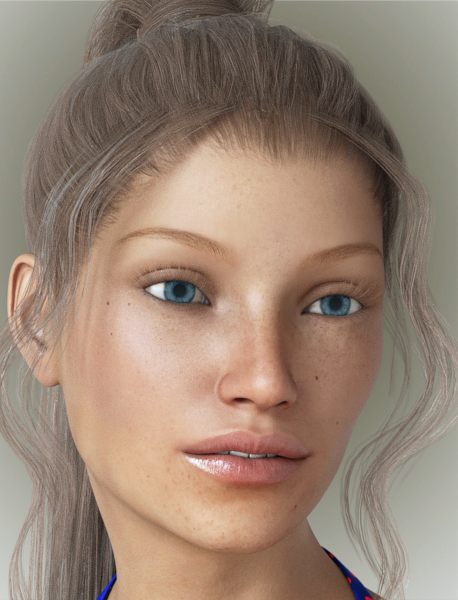 Novica & Forum Members Tips & Product Reviews Pt 7
So here's a better idea of the size of the set. I checked on the groupings of the props, they are very well organized and grouped logically IMO, with great attention to detail in the groupings.
70% at 2:38 seconds. Pool has wonderful refraction btw. That's FWSA Piper HD (V7) with Geneva Hair, H&C Bikini Set (Gen3F)
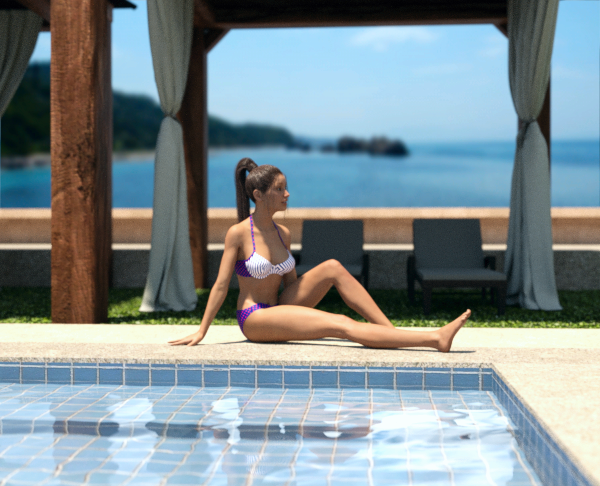 Converting to G1, G2, G3, G8 & G9
In the Mil3 to G3 section you might want to change it to show that mil 3 skins can be placed directly onto G3 using Caymen's new product http://www.daz3d.com/legacy-uvs-for-genesis-3-special-edition-victoria-3
Petite Fleur Hair UpdateIt would be nice if Goldtassel, or someone could update the Petite Fleur hairstyle ( Victoria 3.0) for Genesis 2 or higher. It's a fantastic and unique hairstyle that can fit a lot of moods, but it's really damn difficult to try and fit to any figure and get it to look right.
Genesis head shape to Genesis 3 head shapeI have a Genesis Female (Victoria 5) head shaped a way I like and would like to transfer this head shape to a Genesis 3 Female (Victoria 7).
I have tried a lot of different things none of which has not worked.
I am open to any ideas anyone might have on how to proceed with this action.
I have tried GenX, I tried a process well defined on another site on exporting the GF1 as an object to create morphs to import into a GF3
I have tried a product I found on this site to transfer shapes to objects as well.
I really want to get this face onto a GF3 model, If anyone has a method to accomplish this PLEASE contact me.
I am still what most might consider a novice working with DAZ, I can do some moderately sophisticated operations so I have a fair understanding on how to manipulate things but am by no means an expert.
Any help is greatly appreciated.
Thanks.
need help with infinite white floorIs anyone more familiar with http://www.daz3d.com/pwcatch
I was thinking I could use the plugin to create shadows without creating a plane. But, does the plugin need a surface to cast shadows?
In other words, could I have Victoria in a scene with nothing but her (no floor, etc) and have shadows cast on the floor from her? Just trying to confirm this before I purchase plugin. Thanks for any help.
Get 95% off one of these current Day in the Life saleVictoria 7 or Teen Josie 7. They are listed on the banner. If you have them both, they are probably hidden for you on the sales page. That's kind of confusing.
Duplicate formulas found in filesI am getting this error whenever I load a G3F character. It seems to be caused by the Victoria 7 Attitudes Expressions product. If I uninstall that product, I don't get the error. I even tried removing the product from my library, then having DIM re-download and install it, and the error comes back.
How do I fix this?
Resource Error "File does not exist"I just managed to realize that Content Library will tell you where assets are installed. Who knew? Anyway I discovered after looking that in My Library there are a whole range of characters, core characters all installed in C:\Users\Havok\Documents\DAZ 3D\Studio\My Library\People\Genesis 3 Female\Materials. Now I'm talking Aiko 7, Arabella 7, Bethany 7, Eva 7, Genevieve 7, Gia 7, Girl 7, Izabella 7, Kalea 7, Karen 7, Lilith 7, Mei Lin 7, Monique 7, Olympia 7, Rune 7, Sunny 7, Teen Josie 7, Victoria 7. Virtually all the core characters. They show up in Smart Content, mostly but when I try to load 'em I'm told that the files don't exist. So now what I suspect is that for some reason Studio decided to install them there arbitrarily and can't look for them there despite the fact that (clearly) it knows exactly where it is located. It might also explain why I have to go into my Content Library just to load the default Genesis 3 figure - that's the only place the icon shows up, in the main Characters folder yet not in Smart Content.
What I'm going to try to do is copy over the data from those directories and see if they'll load after a refresh. Who knows, maybe I can outsmart Smart Content?
A UV converter tool.Map Transfer requires that a dingle figure have both the source and destiantion UV sets. You could, if you had Victoria 5, use it to bake Victroia 4 maps to Victoria 5 and then apply those to Genesis 2 Female for example.
Daz 3D is part of

Connect
DAZ Productions, Inc.
7533 S Center View Ct #4664
West Jordan, UT 84084Licensing Agreement | Terms of Service | Privacy Policy | EULA
© 2026 Daz Productions Inc. All Rights Reserved.