-
Victoria 4 and Victoria 4.2
I wouldn't worry about it, I only have Victoria 4.2 and all Victoria 4 products and characters work perfectly with her.
Is there any way to use Genesis 3 clothes or Genesis 2 clothes on Victoria 4? :)
I don't think so. I know that you can use G3F and G2F clothes on Genesis 1 with clones. But I don't know of any way to use genesis clothes on V4.
The History of CarraraWe will get another another update when pigs fly, we are more likely getting Victoria 8 and Generation 4 this June :D Fingers crossed
Victoria 4 and Victoria 4.2I wouldn't worry about it, I only have Victoria 4.2 and all Victoria 4 products and characters work perfectly with her.
Is there any way to use Genesis 3 clothes or Genesis 2 clothes on Victoria 4? :)
Victoria 4 and Victoria 4.2I wouldn't worry about it, I only have Victoria 4.2 and all Victoria 4 products and characters work perfectly with her.
eye reflection for animated scenes?After some serious searching, I found a great tutorial by @SpyroRue:
http://www.daz3d.com/forums/discussion/6376/cat-like-eyeshine-in-daz-3d-tutorial-page-6/p3
I applied his tutorial settings to the eye surface for my Victoria 4 elite character. These is a noticeable improvement as you can see in the image below. The eye reflection is "real" in the sense that it doesn't change when the eye is moved to the left or right:
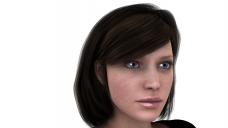
The only issue seems to be with the eye surface. The eye surface doesn't cover the whole eye so it's resulting in a "contact lense" effect, which I don't think looks good.
As an alternative, I did get lucky and stumble across this product:
http://www.daz3d.com/eye-maps-generation-4
It includes "spherical reflection maps" which supposedly "stay oriented when the eyes move." This looks promising for what I am attempting to achieve. Has anyone had experience with this product or have any other better suggestions (for creating a eye glare that doesn't move when eye moves)?
Thank you for any advice.
Victoria 4 and Victoria 4.24.2 is just the most current version number of Victoria 4. In essence, Vicky 4.2 IS Victoria 4. It's the only one you want to use. LOL
Laurie
Displacement Map to Roughen Up G3F Skins Used on G3MThanks to UV Swap, we can use female skins on males, but the female skins usually/always lack the bumpiness of testosterone-influenced skin. AlFan made some very useful displacement maps for Victoria 7 and G3F, and N.G.S. helps with an orange peel quality, but it would be nice to have some razor bumpiness and stuff.
Victoria 4 and Victoria 4.2Any Victoria 4 character should work just fine on Victoria 4.2, there is no reason to use the older model.
There are a number of products around that will convert Gen 4 skins to IRay, or look for a free V4 character that has IRay shaders, and use those shaders.
Victoria 4 and Victoria 4.2Hi I just want to ask if they are the same because j can't seem to find a Victoria 4 figure in the shop, only the Victoria 4.2. I'm interested in some Victoria 4 characters so I'm asking about it. Also how can you make the Victoria 4 look iray-ish?
Most realistic?What are the products (in your opinion) delivering the most realistic touch for Genesis 3 female?
Skin:?
Eyes:?
Hair:?
Thanks for your help!
Well the Genesis 3 Female and the Genesis 3 Male that come with the Genesis 3 Essentials if you use the iRay materials are every bit as realistic as Victoria 7, Michael 7, and all the other paid characters. While to the best of my memory, the Tolouse (spelling?) hair that comes with the essentials is also one of the most realistic hairs. The male only comes with a painted on buzz cut option. The clothing though is only so-so realistic when you use dark clothing but you'll find that is true of all DAZ Store paint clothing mostly. However the essential free clothing only includes underwear and a one bizarre fantasy outfit if I remember. Eyes are realistic too.
Main thing is learn to get the lighting and environment the character is in correctly, most people buy the other models not because they are more realistic but because they want more variety and when they shop they buy their personal favorites according to the styles they want.
Show Us Your Iray Renders. Part Vthis is Seven's Victoria 4 Iray " Charity" character i picked up yesterday at another store for $3 she's a beauty . V4 is still one of my favorite character sets. its nice to see some iray stuff for v4.
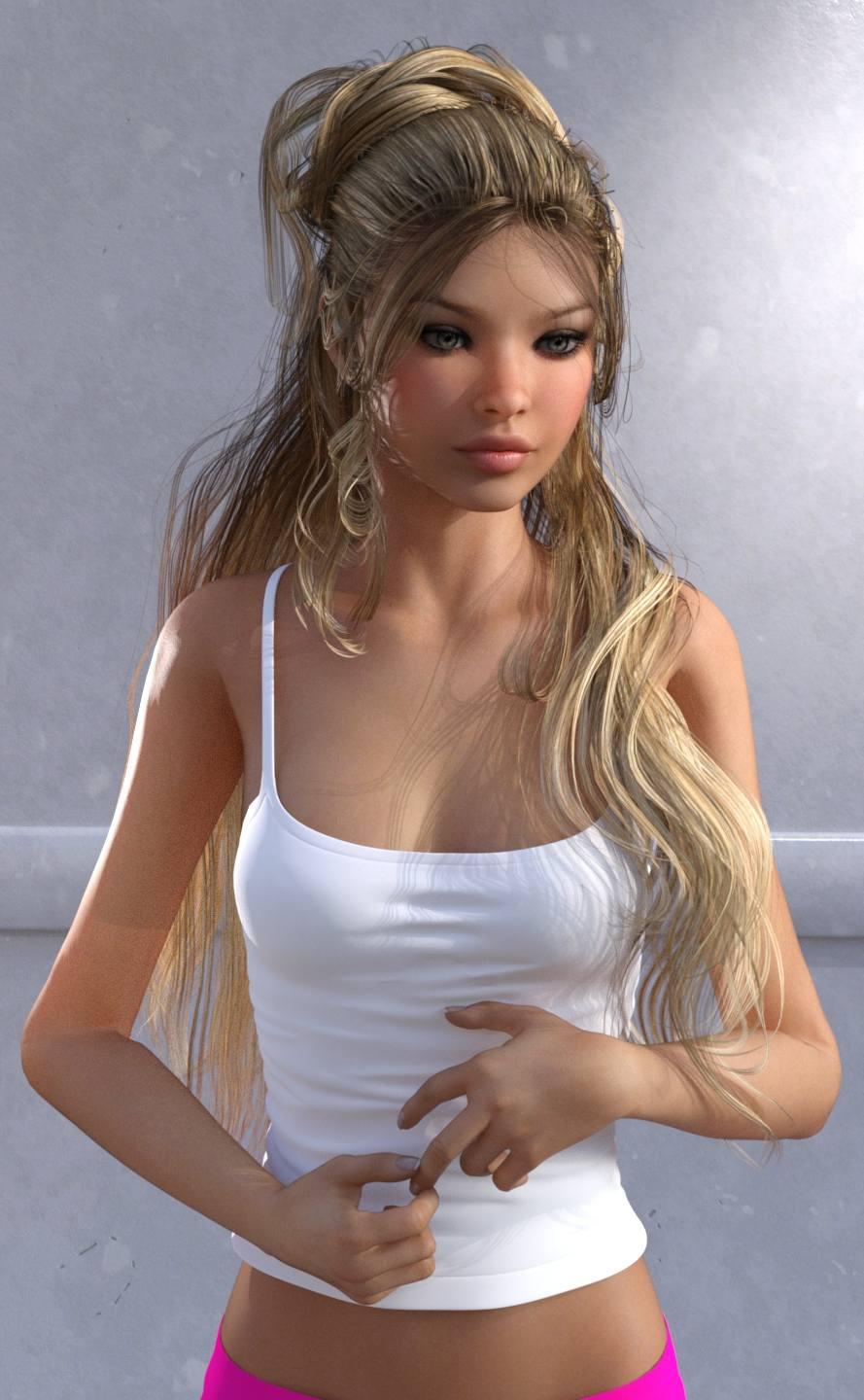

She looks very pretty Ivy
Help in Legacy UV for Genesis 3 FemaleI've found the easiest way to do it is to first save the texture as a "material preset". Then from there it's a three step process. 1) Click the "prepare" button, 2) apply the desired texture via the "material preset", 3) click the "apply" button. The scripts do the work from there.
How do you save it as a material preset? And I can't find the material preset in the surface tab
Select the character that has the textures you want to use. Then go to File >> Save As >> Material Preset (it's about half way down the "save as" list).
You should then be able to find that material preset under your Content Library under My Library >> Presets >> Materials.
Oh so I stilvl have to download Victoria 4 then because I only have the metropolitan characters but I don't have Victoria 4.
You could apply it to the original Genesis figure - I'm pretty sure it comes with the V4 UV.
Yes, Genesis 1 has V4 and M4 UVs.
The onyl drawback to usign Genesis is that it doesn't have the transparent overlay layer on the eyes, which the fourth generation figures and Genesis 2 do, so any materials on that will be lost. For the most part that will be fake reflections if anything, so no great loss to my taste, but some fantasy sets will use it as a more essential part of the look.
Help in Legacy UV for Genesis 3 FemaleI've found the easiest way to do it is to first save the texture as a "material preset". Then from there it's a three step process. 1) Click the "prepare" button, 2) apply the desired texture via the "material preset", 3) click the "apply" button. The scripts do the work from there.
How do you save it as a material preset? And I can't find the material preset in the surface tab
Select the character that has the textures you want to use. Then go to File >> Save As >> Material Preset (it's about half way down the "save as" list).
You should then be able to find that material preset under your Content Library under My Library >> Presets >> Materials.
Oh so I stilvl have to download Victoria 4 then because I only have the metropolitan characters but I don't have Victoria 4.
You could apply it to the original Genesis figure - I'm pretty sure it comes with the V4 UV.
Yes, Genesis 1 has V4 and M4 UVs.
Can you use Genesis 2 and Genesis 3 clothes and hairs on Genesis 1?
Yeah, you need clones to do that though:
To wear G3F clothes on Genesis 1: http://www.daz3d.com/genesis-3-female-clone-for-genesis
To wear G3M clothes on Genesis 1: http://www.daz3d.com/genesis-3-male-clone-for-genesis
To wear G2F clothes on Genesis 1: http://www.daz3d.com/genesis-2-female-clone-for-genesis
To wear G2M clothes on Genesis 1: http://www.daz3d.com/genesis-2-male-clone-for-genesis
Help in Legacy UV for Genesis 3 FemaleI've found the easiest way to do it is to first save the texture as a "material preset". Then from there it's a three step process. 1) Click the "prepare" button, 2) apply the desired texture via the "material preset", 3) click the "apply" button. The scripts do the work from there.
How do you save it as a material preset? And I can't find the material preset in the surface tab
Select the character that has the textures you want to use. Then go to File >> Save As >> Material Preset (it's about half way down the "save as" list).
You should then be able to find that material preset under your Content Library under My Library >> Presets >> Materials.
Oh so I stilvl have to download Victoria 4 then because I only have the metropolitan characters but I don't have Victoria 4.
You could apply it to the original Genesis figure - I'm pretty sure it comes with the V4 UV.
Yes, Genesis 1 has V4 and M4 UVs.
Can you use Genesis 2 and Genesis 3 clothes and hairs on Genesis 1?
Help in Legacy UV for Genesis 3 FemaleI've found the easiest way to do it is to first save the texture as a "material preset". Then from there it's a three step process. 1) Click the "prepare" button, 2) apply the desired texture via the "material preset", 3) click the "apply" button. The scripts do the work from there.
How do you save it as a material preset? And I can't find the material preset in the surface tab
Select the character that has the textures you want to use. Then go to File >> Save As >> Material Preset (it's about half way down the "save as" list).
You should then be able to find that material preset under your Content Library under My Library >> Presets >> Materials.
Oh so I stilvl have to download Victoria 4 then because I only have the metropolitan characters but I don't have Victoria 4.
You could apply it to the original Genesis figure - I'm pretty sure it comes with the V4 UV.
Yes, Genesis 1 has V4 and M4 UVs.
Help in Legacy UV for Genesis 3 FemaleI've found the easiest way to do it is to first save the texture as a "material preset". Then from there it's a three step process. 1) Click the "prepare" button, 2) apply the desired texture via the "material preset", 3) click the "apply" button. The scripts do the work from there.
How do you save it as a material preset? And I can't find the material preset in the surface tab
Select the character that has the textures you want to use. Then go to File >> Save As >> Material Preset (it's about half way down the "save as" list).
You should then be able to find that material preset under your Content Library under My Library >> Presets >> Materials.
Oh so I still have to download Victoria 4 then because I only have the metropolitan characters but I don't have Victoria 4.
You could apply it to the original Genesis figure - I'm pretty sure it comes with the V4 UV.
Help in Legacy UV for Genesis 3 FemaleI've found the easiest way to do it is to first save the texture as a "material preset". Then from there it's a three step process. 1) Click the "prepare" button, 2) apply the desired texture via the "material preset", 3) click the "apply" button. The scripts do the work from there.
How do you save it as a material preset? And I can't find the material preset in the surface tab
Select the character that has the textures you want to use. Then go to File >> Save As >> Material Preset (it's about half way down the "save as" list).
You should then be able to find that material preset under your Content Library under My Library >> Presets >> Materials.
Oh so I still have to download Victoria 4 then because I only have the metropolitan characters but I don't have Victoria 4.
Help in Legacy UV for Genesis 3 FemaleI already clicked the prepare g3f and the apple the victoria 5 UV but then I dont' know what to do. I'm able to apply the V4 head .jpg texture on the face but that's it. I don't know where to put the other textures because there are a lot of divided parts in the genesis 3 figure, more than the victoria 4 textures. Also, the yellow areas seem to be not affected when I surface select it and put the head texture. Am I doing it correctly? Using the surface tool and clicking the human parts individually then going to diffuce color and browse the jpg textures? If so, the metropolitan textures only has the head, torso, and limbs where do I put those when the geensis 3 figure has like 5 divided parts on the head, are those 5 parts all head textures but if I do that wouldn't the ears of the genesis 3 figure have eyes? since the texture has eyes? I'm so confused about this.
Show Us Your Iray Renders. Part Vthis is Seven's Victoria 4 Iray " Charity" character i picked up yesterday at another store for $3 she's a beauty . V4 is still one of my favorite character sets. its nice to see some iray stuff for v4.
Novica & Forum Members Tips & Product Reviews Pt 8More of Luna. I really like her! Also showing a few of the Victoria 7 Expressive facial poses. The first render has the Oleander Hair, which frankly seems straggly and I couldn't find any thicken strands options. I couldn't find a way to make it look as thick as the promo does, not in the Parameters or in Scene, I broke the hair down and there was just the massive Scale option which distorts the crown and top of the head, no way to do front strands. Good for zombies, beach/wet hair perhaps, but overall I'm so-so with this unless I can find a way to thicken the hair in front. It's probably right there going nana nana nah nah. Mine looks more like the main promo, very thin.
I don't recall ever using Scott Hair on a gal, I probably have, but it looks good.
BTW, that Abigail Outfit is one of those that removes the legs once you load it, what was the quick fix for getting those back? HATE those. I was going to put different pants on her and of course, no legs. Poor gal. I do really like the top because it's long and makes a good layered look for the jacket, extending past it.
Well, it's 75 degrees here, going to put the top down on the convertible and head out to run errands- too nice to be inside! Crazy for January, it's normally 50-60 on average here in the Florida panhandle, or colder. Two years ago, we had three days of sleet and freezing rain. Lost my beautiful mature palm tree in the front yard. Right now, all the flowers are confused and blooming, the late March/April ones are in full bloom because we had a cold snap, now warm, so they're thinking "Time to come out!"
Daz 3D is part of

Connect
DAZ Productions, Inc.
7533 S Center View Ct #4664
West Jordan, UT 84084Licensing Agreement | Terms of Service | Privacy Policy | EULA
© 2026 Daz Productions Inc. All Rights Reserved.