-
New computer, new install - DIM not seeing my already installed?
felis said:
The image you posted shows that these products are ready to be installed with Connect (which is seperate from DIM). If you installed them from there you would have installed it in 2 different locations.
If the character work just ignore these "ready for download" inside Daz Studio.
If you only use DIM (and not are Premier) you do not have to log into Daz Studio.
Ok.. I get that.. but... When I click on SMART CONTENT tab... and try and look for an outfit for a character (see screenshot below... you can see most of the content is gray except for the swimsuit I had to wait to download) Most of the content is grayed out... I have to wait for it to install to use it... From what I understand that is the re_import Metadata option... Which I tried.... Let it run for over 12 hours and it was only 5percent done :( This is turning into a nightmare for me to use DAZ... :( It's a shame cause I used to render something EVERY day... Now I'm so discouraged I don't even wanna buy anything new. My 4tb hard drive is almost full.. I want to get a bigger drive ... BUT... I don't wanna have to go through these headaches all over again. (sighs...) Looks like my Daz days are coming to an end. :(
UserData files installed into "My Third Party Content." Why?It is most likely still in the database, it just could not link it to real assets. Check your third-party products to see if any metadata you added is still there (icon flashes like Actor, Materials, Pose, etc.) The metadata created when installing (if none is provided by the product itself) is not UserData, but is stored as Vendor data, most of which is really just a list of assets for the product that is displayed in the Product view.
UserData files installed into "My Third Party Content." Why?You wouldn't lose Products, per se, but you might have omitted some metadata associated with them. A UserData dsx file has a maximum size of about 30 MB, so if some data were missed, it probably all fit into one file. Try exporting it again, and you will probably get two files this time.
Daz Studio 6 Beta - version 6.25.2026.14722! (Updated May 28, 2026)Richard Haseltine said:
Totte said:
Richard Haseltine said:
Totte said:
memcneil70 said:
Totte said:
memcneil70 said:
I was finally able to download DS 2025 on my Win11. I had to open DIM, untick the items necessary items needed for download and then tick them again and refresh DIM. The downloads then appeared. I did have to search for the sku 109051, but it was there also now.
I have been working back on 4.23 on my MacMini and I have noticed its performance has degraded. Is there an expected impact of the DS 6 on DS 4? I have started working on updating my Poser/3DL products to .duf/Iray so I won't lose some of my favorite older products when DS 6 goes fully live. Thank you to Code66, RiversoftArt and SickleYield for their work over the past few years.
What exactly is slower in DS 6? I see uo to a three times speed boost with some of my scripts on DS vs. DS4 when it comes to loading stuff (but that did require updating them for DS 6)
It wasn't scripts but when I was adding additional categories for Smart Content to products I had installed from my existing library of products. I have categories that help me find items more easily and that seemed to lag when I was adding them. Or just looking at the product to ensure it had the correct category or where it was located. Sometimes I am able to recall the image better than a name, and having an idea where an obscure item is located helps me save time. And sometimes a character is not assigned the correct category in Smart Content. They may only have 'Figures' but nothing after, or be Male, when they are Female, or a Creatures when they are a Dog and should be an Animal. And as I pause between work, I find the swirly gets longer. I also found with the scripts I did have to reboot my MacMini M4, DS 4.23.1.47 locked up. I had just used it too long. Need to add in a reboot in long sessions of work.
The CMSDB (Postgres databse) sometimes gets really screwed up if it has crashed too many times ( A database is a system that sooner or later will corrupt the data you store there / old djungle maxim )
I sometimes reset the cms 8 by exporting user data then reminit it and reimport metadata), then it usually gets fast and snippy again.Not an option, however, if one installs with Connect.
Are these options not available when installing through connect, or is the metadata not available for reimport when installed through connect?
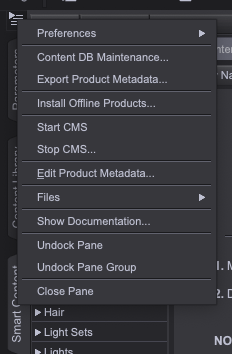
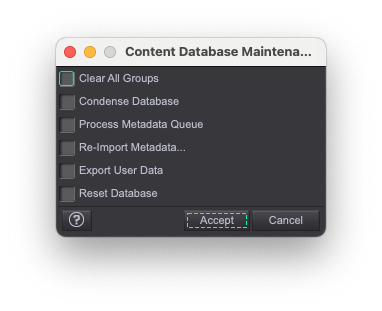
The products certainly aren't available for reimport, they have to be reinstalled (though the system should spot that the ones on disc match the ones on the servers and so not actaully download them, assumning the destination directory is unchanged).
I should add that I only use DIM or Content Wizard to install products into Daz Studio. I generally 'export user data' each day I am in D|S. Of course, with Macs, crashes are expected. It generally takes four crashes when D|S or a opening a script to get D|S stable and then I am good to go in the Beta. It is better than it used to be. But I try to never log into DAZ. It messes everything up.
The dForce Hair ThreadSquishy said:
If you export the hair from D|S as OBJ format (make sure you have "Write Polylines" checked) and then import it into Carrara what do you get? Anything?
e: these are my export options I use to go to Cinema (i.e., these get splines out of D|S hair and into Cinema)
busy rendering so cannot look but Carrara can actually load the duf files which are polylines (with weightmapping if rigged)
and yes can import obj too as strips, triangular tubes or just polylines depending on settings
the latter not much use though as I said, the former way too big to be useful
this is not something someone who is not familiar with the Carrara SDK can likely help with and that includes me
I know absolutely nothing about coding either except Carrara apparently uses C++ and according to Philemo much is not revealed in the SDK including how it's hair works but DAZ added it so they would know
but
again no longer in development
 The dForce Hair Thread
If you export the hair from D|S as OBJ format (make sure you have "Write Polylines" checked) and then import it into Carrara what do you get? Anything?
e: these are my export options I use to go to Cinema (i.e., these get splines out of D|S hair and into Cinema)
 The dForce Hair Thread
Squishy said:
Gordig said:
Squishy said:
I just showed a screenshot of the vertices in Cinema straight from import, that's geometry :) Geometry is not strictly polygons. I don't have Maya so can't comment but I'm not doing anything at all to the data after importing to Cinema, it comes in in spline form because D|S writes it out in spline form in the OBJ file.
In C4D, the Hair object is what tells the program how to convert the splines into renderable geometry, and you can only edit hair with dedicated hair tools, not normal geometry tools (unless that's changed since 2023). Similarly, Iray curves/SBH/dForce Hair is not "geometry" until it's rendered.
Yeah while you can convert splines into hair objects and back, that's not what I showed a screenshot of, and you can edit those splines in my screenshot as they are, with the standard geometry tools, and export them back out in the same state. I didn't bother to convert them to hair objects because I'm pretty certain this will wreck the vertex order on re-export and as discussed before, you have no way to re-import the spline geometry without the proprietary importer. I don't know why people are dug in about whether splines are geometry or not, you can read the plaintext OBJ file and see vertex data on exporting curve based hair from D|S. It's ... geometry! It doesn't have faces, but it's still geometry.
e: still not useful to me though as Cinema R18's OBJ exporter won't write out splines/"lines" even though it will read them in, and Spanki's good old OBJ plugin doesn't work with my version, but I'll give FBX a shot (normally I pass all my geometry from C4D to D|S in FBX and it works well)
e: might be time to start learning blender, I'll never be able to afford to update cinema again
e: here's a spline object exported as FBX and imported to DS, came in as a faceless curve (that's promising):

If FBX gives you trouble, why not just use OBJ?
The dForce Hair ThreadGordig said:
Squishy said:
I just showed a screenshot of the vertices in Cinema straight from import, that's geometry :) Geometry is not strictly polygons. I don't have Maya so can't comment but I'm not doing anything at all to the data after importing to Cinema, it comes in in spline form because D|S writes it out in spline form in the OBJ file.
In C4D, the Hair object is what tells the program how to convert the splines into renderable geometry, and you can only edit hair with dedicated hair tools, not normal geometry tools (unless that's changed since 2023). Similarly, Iray curves/SBH/dForce Hair is not "geometry" until it's rendered.
Yeah while you can convert splines into hair objects and back, that's not what I showed a screenshot of, and you can edit those splines in my screenshot as they are, with the standard geometry tools, and export them back out in the same state. I didn't bother to convert them to hair objects because I'm pretty certain this will wreck the vertex order on re-export and as discussed before, you have no way to re-import the spline geometry without the proprietary importer. I don't know why people are dug in about whether splines are geometry or not, you can read the plaintext OBJ file and see vertex data on exporting curve based hair from D|S. It's ... geometry! It doesn't have faces, but it's still geometry.
e: still not useful to me though as Cinema R18's OBJ exporter won't write out splines/"lines" even though it will read them in, and Spanki's good old OBJ plugin doesn't work with my version, but I'll give FBX a shot (normally I pass all my geometry from C4D to D|S in FBX and it works well)
e: might be time to start learning blender, I'll never be able to afford to update cinema again
e: here's a spline object exported as FBX and imported to DS, came in as a faceless curve (that's promising):
The dForce Hair ThreadGordig said:
Squishy said:
I just showed a screenshot of the vertices in Cinema straight from import, that's geometry :) Geometry is not strictly polygons. I don't have Maya so can't comment but I'm not doing anything at all to the data after importing to Cinema, it comes in in spline form because D|S writes it out in spline form in the OBJ file.
In C4D, the Hair object is what tells the program how to convert the splines into renderable geometry, and you can only edit hair with dedicated hair tools, not normal geometry tools (unless that's changed since 2023). Similarly, Iray curves/SBH/dForce Hair is not "geometry" until it's rendered.
According to the messages I see from DS, when I export the dForce SBH to OBJ, the OBj is geometry. When I import the OBJ to Blender, I can edit it with Edit mode and Sculpt mode. I can select vertices, grab and move them, scale them, etc., like any other geometry I import. So I think they are really geometry once exported and handled in a modeling application.

 The dForce Hair Thread
Squishy said:
I just showed a screenshot of the vertices in Cinema straight from import, that's geometry :) Geometry is not strictly polygons. I don't have Maya so can't comment but I'm not doing anything at all to the data after importing to Cinema, it comes in in spline form because D|S writes it out in spline form in the OBJ file.
In C4D, the Hair object is what tells the program how to convert the splines into renderable geometry, and you can only edit hair with dedicated hair tools, not normal geometry tools (unless that's changed since 2023). Similarly, Iray curves/SBH/dForce Hair is not "geometry" until it's rendered.
DAZ Studio 2025 - Content Questions -file paths vs database entriesRichard Haseltine said:
Searching doesn't chnage the database anyway, just potentially reads from it.
So, in order to get the database to update, I have to do the update metadata option...or what, If I want files installed in the past year...?
JD
Daz Studio 6 Beta - version 6.25.2026.14722! (Updated May 28, 2026)Totte said:
Richard Haseltine said:
Totte said:
memcneil70 said:
Totte said:
memcneil70 said:
I was finally able to download DS 2025 on my Win11. I had to open DIM, untick the items necessary items needed for download and then tick them again and refresh DIM. The downloads then appeared. I did have to search for the sku 109051, but it was there also now.
I have been working back on 4.23 on my MacMini and I have noticed its performance has degraded. Is there an expected impact of the DS 6 on DS 4? I have started working on updating my Poser/3DL products to .duf/Iray so I won't lose some of my favorite older products when DS 6 goes fully live. Thank you to Code66, RiversoftArt and SickleYield for their work over the past few years.
What exactly is slower in DS 6? I see uo to a three times speed boost with some of my scripts on DS vs. DS4 when it comes to loading stuff (but that did require updating them for DS 6)
It wasn't scripts but when I was adding additional categories for Smart Content to products I had installed from my existing library of products. I have categories that help me find items more easily and that seemed to lag when I was adding them. Or just looking at the product to ensure it had the correct category or where it was located. Sometimes I am able to recall the image better than a name, and having an idea where an obscure item is located helps me save time. And sometimes a character is not assigned the correct category in Smart Content. They may only have 'Figures' but nothing after, or be Male, when they are Female, or a Creatures when they are a Dog and should be an Animal. And as I pause between work, I find the swirly gets longer. I also found with the scripts I did have to reboot my MacMini M4, DS 4.23.1.47 locked up. I had just used it too long. Need to add in a reboot in long sessions of work.
The CMSDB (Postgres databse) sometimes gets really screwed up if it has crashed too many times ( A database is a system that sooner or later will corrupt the data you store there / old djungle maxim )
I sometimes reset the cms 8 by exporting user data then reminit it and reimport metadata), then it usually gets fast and snippy again.Not an option, however, if one installs with Connect.
Are these options not available when installing through connect, or is the metadata not available for reimport when installed through connect?
The products certainly aren't available for reimport, they have to be reinstalled (though the system should spot that the ones on disc match the ones on the servers and so not actaully download them, assumning the destination directory is unchanged).
The dForce Hair ThreadOh, I remembered another trick. If you simulate with the Geometry Editor tool selected, the hair seems to lose its baked in stiffness and will drape a lot. That's really the best way to make upside down morphs or droopy wet looks, I think. You don't even need a modeler for this. Just simulate, export and import to morph loader pro (or use MorphMaster, which is fabulous).
Edit: And always select another tool, like the Node Selection Tool, before Iray rendering. The dForce hairs won't render all the strands with the Geometry Editor (or Mesh Grabber, etc.) tools selected.
New computer, new install - DIM not seeing my already installed?frank0314 said:
Llola Lane said:
frank0314 said:
We pay about $130 a month for ours, not including the modem, router, fiber optics and wireless pods. You should be able to go to ISPs site and look up your plan. Do you a limit that you can't go over before they down throttle you? Here is my speed test.

I will have to check with ISP later this week... As far as I know it's SUPPOSED to be unlimited. ughh... I'm so dumb when it comes to stuff like this. Maybe it's the wireless??? I don't know. I'll see if I can find out. In the meantime I'm still trying to get Daz sorted... but it's a long process... I really like having metadata... TRYING to figure out where stuff is in my runtime is so complicated. Each PA uses their own naming system.. Nothing is as I EXPECT it to be. :( Gonna be slow going doing any rendering for me. (sighs) Thanks Frank ... not sure what else to do. :(
A wireless connection very well can contribute to the issue. I'm using a good old-fashioned RG45 Ethernet cable so we can download and upload new products here quickly, and it not take a half hour like the old days. I would never use wireless unless I had to. I would expect much lower speeds and interruptions, as they are common with wireless. If we had a big product which a lot of our broker releases are, we would say heck with it and upload it to our site and give QA a link to it.
My wireless is an Arris Surfboard SBG10.. it says I'm supposed to get 72mps upload and download... I got it about 5 years ago. It is in the livingroom and my computer is in the familyroom... we don't have a cable long enough to reach. I my have to just bring my hard drive to the livingroom to upload stuff...but I'm trying to avoid that cause the content IS on my external drive. I have the programs going to my new internal C drive but the content goes to external D drive. I'm sure I have DIM set up the right way... but I'm missing something cause DIM is not finding the content on D. I have not found any documentation to say HOW to set things up so I'm winging it. Last time I had to do all this was 4 years ago and I had a younger brain back then. I don't do this that often so I've forgotten HOW i got Daz to work right. My D drive which hall all my daz is almost full... 4tbs of stuff.. so I need to purchase a bigger drive and I'll be going through this all over again. There HAS to be an easier way???
The dForce Hair ThreadSquishy said:
I just showed a screenshot of the vertices in Cinema straight from import, that's geometry :) Geometry is not strictly polygons. I don't have Maya so can't comment but I'm not doing anything at all to the data after importing to Cinema, it comes in in spline form because D|S writes it out in spline form in the OBJ file.
This is correct. The splines and vertices show up in Blender, too (as long as you export the polylines from DS along with the vertices). Blender is what I use.
The dForce Hair ThreadSquishy said:
No, the geometry is there, which is why you can export it back out to OBJ. They've had 8+ years to add features to the user side to make this easier to work with if they wanted to.
e: the geometry is there in the form of vertex data, the same as polygons, just with no face data.
barbult said:
With Geometry Editor tool active, you can export the "curves" hair, move the vertices in a modeler, and with the Geometry Editor still active, import your modified OBJ to DS to create a morph. You do not have to be a PA to do that. I have made several morphs for PA dForce (strand-based) hair products that way. I have posted this in the forums a couple of times at least. You can even simulate in DS and export that and reimport it as a morph. The key is to have the Geometry Editor tool active during export and import. There can be millions of vertices in some of these hairs, so the morph creation can take some time.
This is a cool trick, never would have thought to try something like this. Thanks! Is there documentation on details of this or anything? What else can be done?
e: being able to make a few morph targets really would be great, e.g. with that particualr hair I love the way it looks from the front but not so much from the back. would be nice to be able to customize!
I don't know of any documentation on this. I don't even remember how i learned it. I may have discovered it by accident or maybe someone else told me. I started doing it years ago, starting when Neroli Hair was released.
The dForce Hair ThreadI just showed a screenshot of the vertices in Cinema straight from import, that's geometry :) Geometry is not strictly polygons. I don't have Maya so can't comment but I'm not doing anything at all to the data after importing to Cinema, it comes in in spline form because D|S writes it out in spline form in the OBJ file.
The dForce Hair ThreadNo, the geometry is there, which is why you can export it back out to OBJ. They've had 8+ years to add features to the user side to make this easier to work with if they wanted to.
e: the geometry is there in the form of vertex data, the same as polygons, just with no face data.
barbult said:
With Geometry Editor tool active, you can export the "curves" hair, move the vertices in a modeler, and with the Geometry Editor still active, import your modified OBJ to DS to create a morph. You do not have to be a PA to do that. I have made several morphs for PA dForce (strand-based) hair products that way. I have posted this in the forums a couple of times at least. You can even simulate in DS and export that and reimport it as a morph. The key is to have the Geometry Editor tool active during export and import. There can be millions of vertices in some of these hairs, so the morph creation can take some time.
This is a cool trick, never would have thought to try something like this. Thanks! Is there documentation on details of this or anything? What else can be done?
e: being able to make a few morph targets really would be great, e.g. with that particualr hair I love the way it looks from the front but not so much from the back. would be nice to be able to customize!
The dForce Hair ThreadSquishy said:
WendyLuvsCatz said:
maybe it should be called iray curves
they are just curves, the iray part comes in as the material applied to them. the geometry that make them up can be exported in OBJ format and taken into modeling apps (e.g Cinema, here) where you can see they're just splines. There is a little more going on, in that there's selection grouping that lets the artist set stuff like stiffness via point weights but it's not tied to the render engine.
unfortunately this is a one way operation, you can't get it back into D|S in this state without the proprietary import tool, you have to convert the splines to polys - roughly quadrupling the vertex count, which is already over a million verts just for this hair. if you ever wondered why this type of curve based hair feels so heavy to work with, yeah that's why (the G8 characters themselves are 16.5 thousand vertices)
With Geometry Editor tool active, you can export the "curves" hair, move the vertices in a modeler, and with the Geometry Editor still active, import your modified OBJ to DS to create a morph. You do not have to be a PA to do that. I have made several morphs for PA dForce (strand-based) hair products that way. I have posted this in the forums a couple of times at least. You can even simulate in DS and export that and reimport it as a morph. The key is to have the Geometry Editor tool active during export and import. There can be millions of vertices in some of these hairs, so the morph creation can take some time.
The dForce Hair ThreadWendyLuvsCatz said:
maybe it should be called iray curves
they are just curves, the iray part comes in as the material applied to them. the geometry that make them up can be exported in OBJ format and taken into modeling apps (e.g Cinema, here) where you can see they're just splines. There is a little more going on, in that there's selection grouping that lets the artist set stuff like stiffness via point weights but it's not tied to the render engine.

unfortunately this is a one way operation, you can't get it back into D|S in this state without the proprietary import tool, you have to convert the splines to polys - roughly quadrupling the vertex count, which is already over a million verts just for this hair. if you ever wondered why this type of curve based hair feels so heavy to work with, yeah that's why (the G8 characters themselves are 16.5 thousand vertices)
Daz 3D is part of

Connect
DAZ Productions, Inc.
7533 S Center View Ct #4664
West Jordan, UT 84084Licensing Agreement | Terms of Service | Privacy Policy | EULA
© 2026 Daz Productions Inc. All Rights Reserved.