-
November 2025 - Daz 3D New User Challenge - Materials and Next Level Kitbashing
Beginner Challenge - Materials!
From shiny polished gems to rough bark, and from silk to leather! This month's focus will be on Materials and Surfaces. One of the most important aspects of a great render is the effective use of materials. Effective surface settings can add realism, style, and visual interest to an image. This month we will be concentrating on how to create and manipulate the surfaces on the objects in your scene.Also, keep in mind all the various items covered over the past several months. They will affect the way your materials look in your final rendered scene.
Previous Challenges on this topic:
Helpful Links:
When following tutorials, be cognizant of the different applications (Bryce, Daz Studio, Poser, Carrara and Blender, etc.) and different render engines (3Delight, Iray, Reality, etc). Techniques for one may not apply directly to another. If you have some favorite Materials, Surfaces, and Shader tips, please share them in this thread.
Daz Studio Tutorials:
Daz 101: Surfaces by Daz 3D (video)
Iray Surfaces and What They Mean by Sickleyield
The Iray Uber Base Shader by Daz 3D (video)
Daz 3D Tutorial: Make anything a light source by Daz 3D (video)
Daz 3D Tutorial: Using bump and displacement maps by Daz 3D (video)Tutorials with Jay Versluis:
In the Studio with Daz 3D - Shaders and Materials by Jay Versluis:
Daz 3d Animation Series: Animation- Filament by Jay Versluis
Surfaces PlaylistBryce Tutorials:
A compilation of tutorials for Bryce, there is a lot about materials to find there as well by Daz 3D
Other Helpful Places:
3Delight - Uberenvironment made easy!
This is more in depth and experimental for the 3delight renderer: 3Delight Laboratory Thread: tips, questions, experiments
I hope you like - Using Dazjeronimocollares said:
Thank you for the reply. :)
Try using 'Filament' to render animations. Filament focuses on 'light' and shadows. We can achieve a rendering quality close to that of Iray using it (Filament and directional light) - you can enhance your scene using up to 6 spotlights (maximum for producing shadows) + directional light with general shadow. You can also work on the surface materials to control glossiness (specular), ambient occlusion (SAO), etc. For indoor environments, it works perfectly. (use the bloon effect to give to your renders/scenes a 'Iray Effect' *)
Good suggestion, thanks. BTW, the first link in your original message gives a 404 Error, Not Found. The second link shows some cool images.
 I hope you like - Using Daz
Thank you for the reply. :)
Try using 'Filament' to render animations. Filament focuses on 'light' and shadows. We can achieve a rendering quality close to that of Iray using it (Filament and directional light) - you can enhance your scene using up to 6 spotlights (maximum for producing shadows) + directional light with general shadow. You can also work on the surface materials to control glossiness (specular), ambient occlusion (SAO), etc. For indoor environments, it works perfectly. (use the bloon effect to give to your renders/scenes a 'Iray Effect' *)
AIUTO...CHI CONOSCE L’ITALIANO? PARTE QUATTORDICIImago said:
Tiziano said:
Io ho provato a caricare qualche immagine creata con Daz su svariate AI, perchè me le facessero muovere.
I risultati migliori li ho avuti con Grok, che ha aggiunto movimento realistico, con particolari impossibili da realizzare a casa propria:
Esempi:
-far respirare un personaggio
-far muovere dal vento capelli e vestiti.
-animare il mare
-far camminare un personaggio in un prato, con l'erba che si sposta al suo passaggio
-far camminare un personaggio con i vestiti che si adattano al suo movimento
-ottenere espressioni più realistiche
-creare automaticamente le ombre
Tutto in un minuto. Altrochè renderizzare ogni singolo fotogramma con Iray.
Il grosso preblema è la "consistenza" dei personaggi, dato che tutto ciò che nell'immagine non si vede, l'AI se lo inventa ^_^;
Altro problema: far fare al personaggio ESATTAMENTE quello che si vuole. Sono attori molto indisciplinati.
Daz dovrebbe introdurre una AI specifica, per tramutare i propri personaggi in veri e propri attori.
Tutte cose che puoi già fare con DAZ Studio...
 Dove hai visto che è impossibile animare il mare, far respirare i personaggi, adattare i vestiti al movimento e al vento o creare le ombre?
Se non ti piacciono i tempi di render regola le impostazioni, a forza di pestare sono riuscito a costringere IRay a renderizzare un fotogramma in condizioni di semioscurità (la peggiore per quello scassone) in meno di venti secondi. Con ombre, luci e personaggi completi. Diversamente puoi usare Filament o 3Delight.
Concordo al 100%
Freebie Challenge October 2025 - "Monster Mash!" - Entries ThreadJiangshi

Software: Daz Studio
Render Engine: Filament
Postwork: PhotoshopJiangshi for G9
https://www.renderosity.com/freestuff/items/98560/jiangshi-for-g9
Figure - Rigged Long Tongue
https://www.renderosity.com/freestuff/items/78963/figure-rigged-long-tongue
Lilith for G9 (morph)
https://www.deviantart.com/shinteo/art/Lilith-for-G9-959197934
Acheron for G9 (hair)
https://www.deviantart.com/shinteo/art/Acheron-for-G9-1039193588
Grasshouse by Bonnyb1234
https://www.renderosity.com/freestuff/items/88623/grasshouse
Japanese Maple 6m 3D Model
https://www.renderhub.com/cgaxis/japanese-maple-6m110 FREE FUTURISTIC ANIME BACKGROUNDS - PACK 39
https://cubebrush.co/era7/products/m9qlua/10-free-futuristic-anime-backgrounds-pack-39
20 Firefly PS Brushes abr vol.3
https://www.brusheezy.com/brushes/61225-20-firefly-ps-brushes-abr-vol-3AIUTO...CHI CONOSCE L’ITALIANO? PARTE QUATTORDICITiziano said:
Io ho provato a caricare qualche immagine creata con Daz su svariate AI, perchè me le facessero muovere.
I risultati migliori li ho avuti con Grok, che ha aggiunto movimento realistico, con particolari impossibili da realizzare a casa propria:
Esempi:
-far respirare un personaggio
-far muovere dal vento capelli e vestiti.
-animare il mare
-far camminare un personaggio in un prato, con l'erba che si sposta al suo passaggio
-far camminare un personaggio con i vestiti che si adattano al suo movimento
-ottenere espressioni più realistiche
-creare automaticamente le ombre
Tutto in un minuto. Altrochè renderizzare ogni singolo fotogramma con Iray.
Il grosso preblema è la "consistenza" dei personaggi, dato che tutto ciò che nell'immagine non si vede, l'AI se lo inventa ^_^;
Altro problema: far fare al personaggio ESATTAMENTE quello che si vuole. Sono attori molto indisciplinati.
Daz dovrebbe introdurre una AI specifica, per tramutare i propri personaggi in veri e propri attori.
Tutte cose che puoi già fare con DAZ Studio...
Dove hai visto che è impossibile animare il mare, far respirare i personaggi, adattare i vestiti al movimento e al vento o creare le ombre?Se non ti piacciono i tempi di render regola le impostazioni, a forza di pestare sono riuscito a costringere IRay a renderizzare un fotogramma in condizioni di semioscurità (la peggiore per quello scassone) in meno di venti secondi. Con ombre, luci e personaggi completi. Diversamente puoi usare Filament o 3Delight.
Daz Studio 2026 Beta - version 6.25.2026.4408! (Updated February 18, 2026)I don't see anything in the viewport... only filament and iray are working.
I know it's still alpha and I know my PC is not good(AMD - Ryzen/Radeon), but Blender 5 alpha works like a charm! So I guess the problem is not my PC.
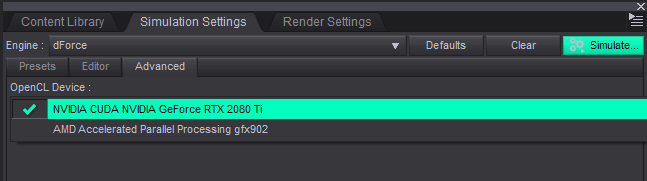
Daz Studio and LinuxHeads-up for any AMD users, having the ROCm OpenCL runtime (
rocm-opencl-runtimeon Arch and similar, not sure about other distros) installed seems to cause Daz to hang at startup. Drove me nuts trying to figure out what the cause was until I tried starting from the terminal and keeping an eye on the output. If you want dForce on an AMD GPU, the mesa openCL runtime (opencl-mesa) seems to work. Obviously this is just for dForce - you're not gonna get Iray running on an AMD GPU no matter what CUDA alternative you're running.Additionally, wine (or at least, wine-staging) versions beyond 10.14 seem to cause severe flickering issues in the viewport while in Filament mode - not great if you're generally working with Filatoon. If you're encountering the same issue I'd suggest downgrading to wine-staging 10.14 and seeing if that helps.
G3Renderworks said:
Has anyone tried winboat.app to get Daz to work in Linux?
From what I can see there's no GPU passthrough, so it's probably not gonna be a great experience.
dforce products without dforce?odd because I used my Vega graphics the time Nvidia broke the driver for DAZ Studio by switching to AMD
for Dforce that is, obviously not rendering except I did with Filament
there is of course the option of using Blender instead
Black screen in Daz3DHello there!
Out of the blue a few weeks ago Daz "crashes" for me. Its not a blue screen crash because things in the background are still going. E.g if I'm listenting to a Youtube podcast I can still hear it going on and light is still being emitted from the PC and my peripherals. It just turns off the monitors. Only way to fix it is by doing a hard-reset on the PC. I've seen some similar threads were people say its a VRAM issue. Yet why would this happen to me out of the blue? Sure I only got 10gb but that has always been enough and these aren't resource intensive scenes we are talking about. I've even done close-up 6 charachter renders before and it have worked fine. It can even occur during me playing around in Filament. I've been using Daz3D for a couple of years now, so I don't really get why this issue have popped up.
What I have done;- Updated my GPU and monitor drivers
- Updated Daz3D to 4.24.0.3
- Cleaned out my PC
Here is a example log:
2025-10-20 17:03:20.254 Iray [INFO] - MATCNV:RENDER :: 1.0 MATCNV rend info : found 194 textures, 0 lambdas (0 unique)
2025-10-20 17:03:20.255 Iray [INFO] - IRAY:RENDER :: 1.0 IRAY rend info : Emitter geometry import (1 light source with 2 triangles, 1 instance) took 5.900 us
2025-10-20 17:03:20.255 Iray [INFO] - IRAY:RENDER :: 1.0 IRAY rend info : Updating compiled material code.
2025-10-20 17:03:20.255 Iray [INFO] - IRAY:RENDER :: 1.0 IRAY rend info : Updating material textures.
2025-10-20 17:03:20.258 Iray [INFO] - IRAY:RENDER :: 1.0 IRAY rend info : Updating BSDFs.
2025-10-20 17:03:20.258 Iray [INFO] - IRAY:RENDER :: 1.0 IRAY rend info : Updating volumes.
2025-10-20 17:03:20.258 Iray [INFO] - IRAY:RENDER :: 1.0 IRAY rend info : Updating lights.
2025-10-20 17:03:20.258 Iray [INFO] - IRAY:RENDER :: 1.0 IRAY rend info : Updating object flags.
2025-10-20 17:03:20.258 Iray [INFO] - IRAY:RENDER :: 1.0 IRAY rend info : Updating decals.
2025-10-20 17:03:20.260 Iray [INFO] - IRAY:RENDER :: 1.0 IRAY rend info : Using iray core convergence estimate.
2025-10-20 17:03:20.260 Iray [INFO] - IRAY:RENDER :: 1.0 IRAY rend info : Allocating 1-layer frame buffer
2025-10-20 17:03:20.262 Iray [INFO] - IRAY:RENDER :: 1.0 IRAY rend info : Using interactive scheduling, caustic sampler disabled
2025-10-20 17:03:20.263 Iray [INFO] - IRAY:RENDER :: 1.0 IRAY rend info : Rendering with 1 device(s):
2025-10-20 17:03:20.263 Iray [INFO] - IRAY:RENDER :: 1.0 IRAY rend info : CUDA device 0 (NVIDIA GeForce RTX 3080)
2025-10-20 17:03:20.263 Iray [INFO] - IRAY:RENDER :: 1.0 IRAY rend info : Rendering...
2025-10-20 17:03:20.263 Iray [INFO] - IRAY:RENDER :: 1.14 IRAY rend progr: CUDA device 0 (NVIDIA GeForce RTX 3080): Processing scene...
2025-10-20 17:03:20.302 Iray [INFO] - IRAY:RENDER :: 1.15 IRAY rend info : Importing lights for motion time 0
2025-10-20 17:03:20.302 Iray [INFO] - IRAY:RENDER :: 1.15 IRAY rend info : Initializing light hierarchy.
2025-10-20 17:03:20.302 Iray [INFO] - IRAY:RENDER :: 1.15 IRAY rend info : Light hierarchy initialization took 493.200 us
2025-10-20 17:03:20.305 Iray [INFO] - IRAY:RENDER :: 1.14 IRAY rend info : CUDA device 0 (NVIDIA GeForce RTX 3080): Scene processed in 0.042s
2025-10-20 17:03:20.306 Iray [INFO] - IRAY:RENDER :: 1.15 IRAY rend info : CUDA device 0 (NVIDIA GeForce RTX 3080): Allocated 11.616 MiB for frame buffer
2025-10-20 17:03:20.307 Iray [INFO] - IRAY:RENDER :: 1.14 IRAY rend info : CUDA device 0 (NVIDIA GeForce RTX 3080): Allocated 2.094 GiB of work space (2048k active samples in 0.000s)
2025-10-20 17:03:20.307 Iray [INFO] - IRAY:RENDER :: 1.14 IRAY rend info : CUDA device 0 (NVIDIA GeForce RTX 3080): Optimizing for cooperative usage (performance could be sacrificed)
2025-10-20 17:03:20.329 Iray [INFO] - IRAY:RENDER :: 1.0 IRAY rend info : Received update to 00001 iteration after 62.666 ms.
2025-10-20 17:03:20.330 Iray [INFO] - IRAY:RENDER :: 1.0 IRAY rend info : Rendering...
2025-10-20 17:03:20.374 Iray [INFO] - IRAY:RENDER :: 1.0 IRAY rend info : Received update to 00002 iterations after 102.712 ms.
2025-10-20 17:03:20.375 Iray [INFO] - IRAY:RENDER :: 1.0 IRAY rend info : Rendering...
2025-10-20 17:03:20.418 Iray [INFO] - IRAY:RENDER :: 1.0 IRAY rend info : Received update to 00003 iterations after 142.999 ms.
2025-10-20 17:03:20.419 Iray [INFO] - IRAY:RENDER :: 1.0 IRAY rend info : Rendering...
2025-10-20 17:03:20.462 Iray [INFO] - IRAY:RENDER :: 1.0 IRAY rend info : Received update to 00004 iterations after 182.830 ms.
2025-10-20 17:03:20.464 Iray [INFO] - IRAY:RENDER :: 1.0 IRAY rend info : Rendering...
2025-10-20 17:03:20.507 Iray [INFO] - IRAY:RENDER :: 1.0 IRAY rend info : Received update to 00005 iterations after 226.756 ms.
2025-10-20 17:03:20.550 Iray [INFO] - IRAY:RENDER :: 1.0 IRAY rend info : Received update to 00006 iterations after 268.478 ms.
2025-10-20 17:03:20.592 Iray [INFO] - IRAY:RENDER :: 1.0 IRAY rend info : Received update to 00007 iterations after 309.906 ms.
2025-10-20 17:03:20.634 Iray [INFO] - IRAY:RENDER :: 1.0 IRAY rend info : Received update to 00008 iterations after 352.121 ms.
2025-10-20 17:03:20.675 Iray [INFO] - IRAY:RENDER :: 1.0 IRAY rend info : Received update to 00009 iterations after 393.723 ms.
2025-10-20 17:03:20.717 Iray [INFO] - IRAY:RENDER :: 1.0 IRAY rend info : Received update to 00010 iterations after 435.476 ms.
2025-10-20 17:03:20.759 Iray [INFO] - IRAY:RENDER :: 1.0 IRAY rend info : Received update to 00011 iterations after 477.231 ms.
2025-10-20 17:03:20.801 Iray [INFO] - IRAY:RENDER :: 1.0 IRAY rend info : Received update to 00012 iterations after 519.387 ms.
2025-10-20 17:03:20.857 Iray [INFO] - IRAY:RENDER :: 1.0 IRAY rend info : Received update to 00014 iterations after 575.434 ms.
2025-10-20 17:03:20.925 Iray [INFO] - IRAY:RENDER :: 1.0 IRAY rend info : Received update to 00017 iterations after 643.529 ms.
2025-10-20 17:03:21.006 Iray [INFO] - IRAY:RENDER :: 1.0 IRAY rend info : Received update to 00021 iterations after 725.229 ms.
2025-10-20 17:03:21.101 Iray [INFO] - IRAY:RENDER :: 1.0 IRAY rend info : Received update to 00026 iterations after 819.348 ms.
2025-10-20 17:03:21.194 Iray [INFO] - IRAY:RENDER :: 1.0 IRAY rend info : Received update to 00031 iterations after 912.875 ms.
2025-10-20 17:03:21.287 Iray [INFO] - IRAY:RENDER :: 1.0 IRAY rend info : Received update to 00036 iterations after 1.006 s.
2025-10-20 17:03:21.382 Iray [INFO] - IRAY:RENDER :: 1.0 IRAY rend info : Received update to 00041 iterations after 1.101 s.
2025-10-20 17:03:21.539 Iray [INFO] - IRAY:RENDER :: 1.0 IRAY rend info : Received update to 00051 iterations after 1.259 s.
2025-10-20 17:03:21.724 Iray [INFO] - IRAY:RENDER :: 1.0 IRAY rend info : Received update to 00063 iterations after 1.442 s.
2025-10-20 17:03:21.919 Iray [INFO] - IRAY:RENDER :: 1.0 IRAY rend info : Received update to 00076 iterations after 1.638 s.
2025-10-20 17:03:22.117 Iray [INFO] - IRAY:RENDER :: 1.0 IRAY rend info : Received update to 00089 iterations after 1.836 s.
2025-10-20 17:03:22.311 Iray [INFO] - IRAY:RENDER :: 1.0 IRAY rend info : Received update to 00102 iterations after 2.030 s.
2025-10-20 17:03:22.506 Iray [INFO] - IRAY:RENDER :: 1.0 IRAY rend info : Received update to 00115 iterations after 2.225 s.
2025-10-20 17:03:22.701 Iray [INFO] - IRAY:RENDER :: 1.0 IRAY rend info : Received update to 00128 iterations after 2.421 s.
2025-10-20 17:03:22.898 Iray [INFO] - IRAY:RENDER :: 1.0 IRAY rend info : Received update to 00141 iterations after 2.616 s.
2025-10-20 17:03:23.093 Iray [INFO] - IRAY:RENDER :: 1.0 IRAY rend info : Received update to 00154 iterations after 2.812 s.
2025-10-20 17:03:23.288 Iray [INFO] - IRAY:RENDER :: 1.0 IRAY rend info : Received update to 00167 iterations after 3.007 s.
2025-10-20 17:03:23.483 Iray [INFO] - IRAY:RENDER :: 1.0 IRAY rend info : Received update to 00180 iterations after 3.202 s.
2025-10-20 17:03:23.679 Iray [INFO] - IRAY:RENDER :: 1.0 IRAY rend info : Received update to 00193 iterations after 3.398 s.
2025-10-20 17:03:23.875 Iray [INFO] - IRAY:RENDER :: 1.0 IRAY rend info : Received update to 00206 iterations after 3.593 s.
2025-10-20 17:03:24.071 Iray [INFO] - IRAY:RENDER :: 1.0 IRAY rend info : Received update to 00219 iterations after 3.789 s.
2025-10-20 17:03:24.266 Iray [INFO] - IRAY:RENDER :: 1.0 IRAY rend info : Received update to 00232 iterations after 3.985 s.
2025-10-20 17:03:24.461 Iray [INFO] - IRAY:RENDER :: 1.0 IRAY rend info : Received update to 00245 iterations after 4.180 s.
2025-10-20 17:03:24.656 Iray [INFO] - IRAY:RENDER :: 1.0 IRAY rend info : Received update to 00258 iterations after 4.376 s.
2025-10-20 17:03:24.874 Iray [INFO] - IRAY:RENDER :: 1.0 IRAY rend info : Received update to 00271 iterations after 4.593 s.
2025-10-20 17:03:25.084 Iray [INFO] - IRAY:RENDER :: 1.0 IRAY rend info : Received update to 00283 iterations after 4.802 s.
2025-10-20 17:03:25.258 Iray [INFO] - IRAY:RENDER :: 1.0 IRAY rend info : Received update to 00294 iterations after 4.976 s.
2025-10-20 17:03:25.445 Iray [INFO] - IRAY:RENDER :: 1.0 IRAY rend info : Received update to 00306 iterations after 5.164 s.
2025-10-20 17:03:25.634 Iray [INFO] - IRAY:RENDER :: 1.0 IRAY rend info : Received update to 00318 iterations after 5.353 s.
2025-10-20 17:03:25.820 Iray [INFO] - IRAY:RENDER :: 1.0 IRAY rend info : Received update to 00330 iterations after 5.539 s.
2025-10-20 17:03:26.017 Iray [INFO] - IRAY:RENDER :: 1.0 IRAY rend info : Received update to 00343 iterations after 5.736 s.
2025-10-20 17:03:26.218 Iray [INFO] - IRAY:RENDER :: 1.0 IRAY rend info : Received update to 00356 iterations after 5.937 s.
2025-10-20 17:03:26.420 Iray [INFO] - IRAY:RENDER :: 1.0 IRAY rend info : Received update to 00369 iterations after 6.139 s.
2025-10-20 17:03:26.621 Iray [INFO] - IRAY:RENDER :: 1.0 IRAY rend info : Received update to 00382 iterations after 6.340 s.
2025-10-20 17:03:26.815 Iray [INFO] - IRAY:RENDER :: 1.0 IRAY rend info : Received update to 00395 iterations after 6.533 s.
2025-10-20 17:03:27.012 Iray [INFO] - IRAY:RENDER :: 1.0 IRAY rend info : Received update to 00408 iterations after 6.730 s.
2025-10-20 17:03:27.207 Iray [INFO] - IRAY:RENDER :: 1.0 IRAY rend info : Received update to 00421 iterations after 6.926 s.
2025-10-20 17:03:27.404 Iray [INFO] - IRAY:RENDER :: 1.0 IRAY rend info : Received update to 00434 iterations after 7.123 s.
2025-10-20 17:03:27.606 Iray [INFO] - IRAY:RENDER :: 1.0 IRAY rend info : Received update to 00447 iterations after 7.325 s.
2025-10-20 17:03:27.812 Iray [INFO] - IRAY:RENDER :: 1.0 IRAY rend info : Received update to 00460 iterations after 7.531 s.
2025-10-20 17:03:27.997 Iray [INFO] - IRAY:RENDER :: 1.0 IRAY rend info : Received update to 00472 iterations after 7.716 s.
2025-10-20 17:03:28.193 Iray [INFO] - IRAY:RENDER :: 1.0 IRAY rend info : Received update to 00485 iterations after 7.912 s.
2025-10-20 17:03:28.393 Iray [INFO] - IRAY:RENDER :: 1.0 IRAY rend info : Received update to 00498 iterations after 8.111 s.
2025-10-20 17:03:28.597 Iray [INFO] - IRAY:RENDER :: 1.0 IRAY rend info : Received update to 00511 iterations after 8.316 s.
2025-10-20 17:03:28.786 Iray [INFO] - IRAY:RENDER :: 1.0 IRAY rend info : Received update to 00523 iterations after 8.505 s.
2025-10-20 17:03:28.973 Iray [INFO] - IRAY:RENDER :: 1.0 IRAY rend info : Received update to 00535 iterations after 8.692 s.
2025-10-20 17:03:29.159 Iray [INFO] - IRAY:RENDER :: 1.0 IRAY rend info : Received update to 00547 iterations after 8.878 s.
2025-10-20 17:03:29.356 Iray [INFO] - IRAY:RENDER :: 1.0 IRAY rend info : Received update to 00560 iterations after 9.074 s.
2025-10-20 17:03:29.553 Iray [INFO] - IRAY:RENDER :: 1.0 IRAY rend info : Received update to 00573 iterations after 9.272 s.
2025-10-20 17:03:29.751 Iray [INFO] - IRAY:RENDER :: 1.0 IRAY rend info : Received update to 00586 iterations after 9.469 s.
2025-10-20 17:03:29.948 Iray [INFO] - IRAY:RENDER :: 1.0 IRAY rend info : Received update to 00599 iterations after 9.666 s.
2025-10-20 17:03:30.145 Iray [INFO] - IRAY:RENDER :: 1.0 IRAY rend info : Received update to 00612 iterations after 9.864 s.
2025-10-20 17:03:30.348 Iray [INFO] - IRAY:RENDER :: 1.0 IRAY rend info : Received update to 00625 iterations after 10.067 s.
2025-10-20 17:03:30.717 Iray [INFO] - IRAY:RENDER :: 1.0 IRAY rend info : Received update to 00651 iterations after 10.435 s.
2025-10-20 17:03:31.418 Iray [INFO] - IRAY:RENDER :: 1.0 IRAY rend info : Received update to 00703 iterations after 11.137 s.
2025-10-20 17:03:32.514 Iray [INFO] - IRAY:RENDER :: 1.0 IRAY rend info : Received update to 00785 iterations after 12.233 s.
2025-10-20 17:03:33.760 Iray [INFO] - IRAY:RENDER :: 1.0 IRAY rend info : Received update to 00876 iterations after 13.479 s.
2025-10-20 17:03:35.072 Iray [INFO] - IRAY:RENDER :: 1.0 IRAY rend info : Received update to 00974 iterations after 14.790 s.
2025-10-20 17:03:36.543 Iray [INFO] - IRAY:RENDER :: 1.0 IRAY rend info : Received update to 01084 iterations after 16.261 s.
2025-10-20 17:03:38.172 Iray [INFO] - IRAY:RENDER :: 1.0 IRAY rend info : Received update to 01205 iterations after 17.891 s.
2025-10-20 17:03:39.937 Iray [INFO] - IRAY:RENDER :: 1.0 IRAY rend info : Received update to 01337 iterations after 19.656 s.
2025-10-20 17:04:02.889 [WARNING] :: \src\pluginsource\DzIrayRender\dzneuraymgr.cpp(373): Iray [ERROR] - IRAY:RENDER :: 1.32 IRAY rend error: CUDA device 0 (NVIDIA GeForce RTX 3080): Kernel [13] (MaterialSurface ) failed after 21.400s
2025-10-20 17:04:02.890 [WARNING] :: \src\pluginsource\DzIrayRender\dzneuraymgr.cpp(373): Iray [ERROR] - IRAY:RENDER :: 1.32 IRAY rend error: CUDA device 0 (NVIDIA GeForce RTX 3080): unknown error (while launching CUDA renderer in <internal>:904)
2025-10-20 17:04:02.890 [WARNING] :: \src\pluginsource\DzIrayRender\dzneuraymgr.cpp(373): Iray [ERROR] - IRAY:RENDER :: 1.32 IRAY rend error: CUDA device 0 (NVIDIA GeForce RTX 3080): Failed to launch renderer
2025-10-20 17:04:02.890 [WARNING] :: \src\pluginsource\DzIrayRender\dzneuraymgr.cpp(373): Iray [ERROR] - IRAY:RENDER :: 1.14 IRAY rend error: CUDA device 0 (NVIDIA GeForce RTX 3080): Device failed while rendering
2025-10-20 17:04:02.890 [WARNING] :: \src\pluginsource\DzIrayRender\dzneuraymgr.cpp(373): Iray [WARNING] - IRAY:RENDER :: 1.14 IRAY rend warn : CUDA device 0 (NVIDIA GeForce RTX 3080) is no longer available for rendering.
Any type of help would be appreciated. Thanks in advance!Daz Studio 2026 Beta - version 6.25.2026.4408! (Updated February 18, 2026)Richard Haseltine said:
DoctorJellybean said:
acidfast22 said:
I just downloaded 2025 and immediately, I don't see anything in viewport in "texture shaded" mode. I cannot find a setting to make it visible in viewport - am I missing something?
I'm not sure what you mean. Could you post a screen shot so we have an idea please.
Also system details. Are other Drawstyles working?
CPU: AMD Ryzen 7 5800X 8-Core Processor (3.80 GHz)
GPU AMD Radeon RX 6650 XT
Windows 11 Home
Nvidia Iray works, Filament is not showing some hair on models
Daz Studio 2026 Beta - version 6.25.2026.4408! (Updated February 18, 2026)TromNek said:
crosswind said:
barbult said:
Richard Haseltine said:
barbult said:
DoctorJellybean said:
barbult said:
TromNek said:
I still have a problem with turning off the 'Display in Viewport' in Daz 2025.
When I do that the light does not emit light in my scene (it used to emit in 4.x)
I like a lot of lights to light up small little areas in my scene. But without the ability to 'Display in Viewport'->Off, they clutter up my scene and I can't see to manipulate objects well.
Is there anyway to change the display of the 'white lines' to be invisible ?
Like add a material to the light and then set transparency to zero ?
Yes, I have the same issue. I am interested to hear that I am not the only one unhappy with the change. I believe the developers are aware of it. I don't think it has been determined whether it is a bug in DS6, or a correction to an error in DS4, or something else. We'll have to wait for the developers to investigate it.
It is not a bug in 6.x, it is a correction to a bug (unintentional) in 4.x
What 4.x did would be a feature request (making it intentional) for a "Display Avatar" property that could be used to toggle display of a node's avatar - to align it with the Drawing > Draw Avatars property in the Draw Settings pane for the Filament DrawStyle, and the Drawing > Draw Node Avatars property in the Draw Settings pane for the NVIDIA Iray DrawStyles). So explaining that reveals an inconsistency in the labeling of the Draw Avatars vs Draw Node Avatars properties - the Filament DrawStyle property needs to be relabeled to Draw Node Avatars to be consistent.
Unfortunately, I don't understand any of that. I don't know what avatars and node avatars are, or what Filament has to do with the issue I see in Texture Shaded mode. I think I initially misunderstood the message I responded to. My problem is with cameras, not spot lights. If the camera selected in the viewport has its visibility eye closed (visibility off) the scene is unlit (black). Toggling Show Preview Lights has no effect. Camera visibility did not affect Texture Shaded scene lighting in DS4. Is that an intentional change in DS6? It has been confusing and frustrating to figure out that camera visibility can make the viewport black and impossible to work in.The avatar is the little camera or light mesh that appears in the scene view. You are wanting to be able to hide that, but keep the effect (in this case the light coming from the camera), which is also part of the node drawing, visible.
Dr. Jellybean's reply to me talks about Filament and Iray Preview, neither of which I am using. I am using Texture Shaded. His reply talks about Draw Settings pane labeling discrepancies. I don't understand how any of that applies to the problem of the Texture Shaded viewport going black when the selected camera's visibility is off.
Richard, thank you, now I understand that a "node avatar" refers to the little line drawing representation of that node in the viewport. For example, a camera's location in the viewport is represented by a little drawing of a camera. You can see that camera's node avatar in the viewport when you are viewing the scene from a different camera.
But Richard, I am not wanting to keep light coming from a camera. The headlamp is the only light I know that comes from a camera. Even if headlamp is on, it doesn't illuminate the scene when the camera visibility is off. I am wanting a camera whose visibility is OFF to be able to see the scene. I am using Texture Shaded draw style in the viewport. I want the viewport to have the same appearance when viewed through the camera, regardless of whether that camera has its visibility On or Off. I cannot work in a viewport that is all black. I can't imagine a scenario where that is an advantageous implementation of camera visibility. I'm not trying to be argumentative. I'm trying to clarify what I see as a DS6 problem and understand how that could be the intended implementation. There must be something I don't understand yet, maybe related to the statement about "light coming from a camera".
The reason I noticed this problem in DS6, is that BJ Camera Manager plugin (which I use in DS4) sets camera visibility fo OFF by default for any new camera it creates. The explanation for this is that it reduces viewport clutter. If you have a scene with 10 cameras, when you view your scene through one camera, or perspective view, having 9 or 10 camera node avatars cluttering the viewport makes it more difficult to see the elements you are trying to work with. This works fine in DS4. When the camera visibility is Off, the Texture Shaded view is still visible and toggling Preview Lights works as expected. Now, when I open that saved scene in DS6, the viewport is suddenly black and I can't see my characters, or environment, or props, or anything. Toggling Preview Lights does nothing. It took a long time to figure out that this had to do with CAMERA visibility.
Although I understand what a node avatar is now, I still don't understand what that has to do with the selected camera not being able to see what is in the scene. Why would camera's node avatar visibility affect what that same camera can see? I never expect to see the selected camera's node avatar in the viewport, because I am viewing the scene through that camera (My "eye" is behind that camera, looking through its viewfinder.)
I second barbult's point. I don't understand it either. This effect is different from DS 4.24. Why hiding the currently-used Camera (rather than hiding any light sources...) makes the whole scene dark with all xxx Shaded Draw Styles ? but with Filament and Iray preview, no dark scene at all ?
Such inconsistency makes no sense to me ~~
(maybe this is why) If you are using the camera headlamp as your light source. Then (with 2025alpha) when you turn off the camera visibility, your light source is turned off (in Shaded Draw Styles).
That's not the cause ~~
I never use headlamp which is pseudo. Headlamp on Cameras are always set as Off, Auto-Headlamp in Render Settings is always set as Never. There're always light source from HDRI and spotlights in my scenes.
Daz Studio 2026 Beta - version 6.25.2026.4408! (Updated February 18, 2026)crosswind said:
barbult said:
Richard Haseltine said:
barbult said:
DoctorJellybean said:
barbult said:
TromNek said:
I still have a problem with turning off the 'Display in Viewport' in Daz 2025.
When I do that the light does not emit light in my scene (it used to emit in 4.x)
I like a lot of lights to light up small little areas in my scene. But without the ability to 'Display in Viewport'->Off, they clutter up my scene and I can't see to manipulate objects well.
Is there anyway to change the display of the 'white lines' to be invisible ?
Like add a material to the light and then set transparency to zero ?
Yes, I have the same issue. I am interested to hear that I am not the only one unhappy with the change. I believe the developers are aware of it. I don't think it has been determined whether it is a bug in DS6, or a correction to an error in DS4, or something else. We'll have to wait for the developers to investigate it.
It is not a bug in 6.x, it is a correction to a bug (unintentional) in 4.x
What 4.x did would be a feature request (making it intentional) for a "Display Avatar" property that could be used to toggle display of a node's avatar - to align it with the Drawing > Draw Avatars property in the Draw Settings pane for the Filament DrawStyle, and the Drawing > Draw Node Avatars property in the Draw Settings pane for the NVIDIA Iray DrawStyles). So explaining that reveals an inconsistency in the labeling of the Draw Avatars vs Draw Node Avatars properties - the Filament DrawStyle property needs to be relabeled to Draw Node Avatars to be consistent.
Unfortunately, I don't understand any of that. I don't know what avatars and node avatars are, or what Filament has to do with the issue I see in Texture Shaded mode. I think I initially misunderstood the message I responded to. My problem is with cameras, not spot lights. If the camera selected in the viewport has its visibility eye closed (visibility off) the scene is unlit (black). Toggling Show Preview Lights has no effect. Camera visibility did not affect Texture Shaded scene lighting in DS4. Is that an intentional change in DS6? It has been confusing and frustrating to figure out that camera visibility can make the viewport black and impossible to work in.The avatar is the little camera or light mesh that appears in the scene view. You are wanting to be able to hide that, but keep the effect (in this case the light coming from the camera), which is also part of the node drawing, visible.
Dr. Jellybean's reply to me talks about Filament and Iray Preview, neither of which I am using. I am using Texture Shaded. His reply talks about Draw Settings pane labeling discrepancies. I don't understand how any of that applies to the problem of the Texture Shaded viewport going black when the selected camera's visibility is off.
Richard, thank you, now I understand that a "node avatar" refers to the little line drawing representation of that node in the viewport. For example, a camera's location in the viewport is represented by a little drawing of a camera. You can see that camera's node avatar in the viewport when you are viewing the scene from a different camera.
But Richard, I am not wanting to keep light coming from a camera. The headlamp is the only light I know that comes from a camera. Even if headlamp is on, it doesn't illuminate the scene when the camera visibility is off. I am wanting a camera whose visibility is OFF to be able to see the scene. I am using Texture Shaded draw style in the viewport. I want the viewport to have the same appearance when viewed through the camera, regardless of whether that camera has its visibility On or Off. I cannot work in a viewport that is all black. I can't imagine a scenario where that is an advantageous implementation of camera visibility. I'm not trying to be argumentative. I'm trying to clarify what I see as a DS6 problem and understand how that could be the intended implementation. There must be something I don't understand yet, maybe related to the statement about "light coming from a camera".
The reason I noticed this problem in DS6, is that BJ Camera Manager plugin (which I use in DS4) sets camera visibility fo OFF by default for any new camera it creates. The explanation for this is that it reduces viewport clutter. If you have a scene with 10 cameras, when you view your scene through one camera, or perspective view, having 9 or 10 camera node avatars cluttering the viewport makes it more difficult to see the elements you are trying to work with. This works fine in DS4. When the camera visibility is Off, the Texture Shaded view is still visible and toggling Preview Lights works as expected. Now, when I open that saved scene in DS6, the viewport is suddenly black and I can't see my characters, or environment, or props, or anything. Toggling Preview Lights does nothing. It took a long time to figure out that this had to do with CAMERA visibility.
Although I understand what a node avatar is now, I still don't understand what that has to do with the selected camera not being able to see what is in the scene. Why would camera's node avatar visibility affect what that same camera can see? I never expect to see the selected camera's node avatar in the viewport, because I am viewing the scene through that camera (My "eye" is behind that camera, looking through its viewfinder.)
I second barbult's point. I don't understand it either. This effect is different from DS 4.24. Why hiding the currently-used Camera (rather than hiding any light sources...) makes the whole scene dark with all xxx Shaded Draw Styles ? but with Filament and Iray preview, no dark scene at all ?
Such inconsistency makes no sense to me ~~
(maybe this is why) If you are using the camera headlamp as your light source. Then (with 2025alpha) when you turn off the camera visibility, your light source is turned off (in Shaded Draw Styles).
Daz Studio 2026 Beta - version 6.25.2026.4408! (Updated February 18, 2026)barbult said:
Richard Haseltine said:
barbult said:
DoctorJellybean said:
barbult said:
TromNek said:
I still have a problem with turning off the 'Display in Viewport' in Daz 2025.
When I do that the light does not emit light in my scene (it used to emit in 4.x)
I like a lot of lights to light up small little areas in my scene. But without the ability to 'Display in Viewport'->Off, they clutter up my scene and I can't see to manipulate objects well.
Is there anyway to change the display of the 'white lines' to be invisible ?
Like add a material to the light and then set transparency to zero ?
Yes, I have the same issue. I am interested to hear that I am not the only one unhappy with the change. I believe the developers are aware of it. I don't think it has been determined whether it is a bug in DS6, or a correction to an error in DS4, or something else. We'll have to wait for the developers to investigate it.
It is not a bug in 6.x, it is a correction to a bug (unintentional) in 4.x
What 4.x did would be a feature request (making it intentional) for a "Display Avatar" property that could be used to toggle display of a node's avatar - to align it with the Drawing > Draw Avatars property in the Draw Settings pane for the Filament DrawStyle, and the Drawing > Draw Node Avatars property in the Draw Settings pane for the NVIDIA Iray DrawStyles). So explaining that reveals an inconsistency in the labeling of the Draw Avatars vs Draw Node Avatars properties - the Filament DrawStyle property needs to be relabeled to Draw Node Avatars to be consistent.
Unfortunately, I don't understand any of that. I don't know what avatars and node avatars are, or what Filament has to do with the issue I see in Texture Shaded mode. I think I initially misunderstood the message I responded to. My problem is with cameras, not spot lights. If the camera selected in the viewport has its visibility eye closed (visibility off) the scene is unlit (black). Toggling Show Preview Lights has no effect. Camera visibility did not affect Texture Shaded scene lighting in DS4. Is that an intentional change in DS6? It has been confusing and frustrating to figure out that camera visibility can make the viewport black and impossible to work in.The avatar is the little camera or light mesh that appears in the scene view. You are wanting to be able to hide that, but keep the effect (in this case the light coming from the camera), which is also part of the node drawing, visible.
Dr. Jellybean's reply to me talks about Filament and Iray Preview, neither of which I am using. I am using Texture Shaded. His reply talks about Draw Settings pane labeling discrepancies. I don't understand how any of that applies to the problem of the Texture Shaded viewport going black when the selected camera's visibility is off.
Richard, thank you, now I understand that a "node avatar" refers to the little line drawing representation of that node in the viewport. For example, a camera's location in the viewport is represented by a little drawing of a camera. You can see that camera's node avatar in the viewport when you are viewing the scene from a different camera.
But Richard, I am not wanting to keep light coming from a camera. The headlamp is the only light I know that comes from a camera. Even if headlamp is on, it doesn't illuminate the scene when the camera visibility is off. I am wanting a camera whose visibility is OFF to be able to see the scene. I am using Texture Shaded draw style in the viewport. I want the viewport to have the same appearance when viewed through the camera, regardless of whether that camera has its visibility On or Off. I cannot work in a viewport that is all black. I can't imagine a scenario where that is an advantageous implementation of camera visibility. I'm not trying to be argumentative. I'm trying to clarify what I see as a DS6 problem and understand how that could be the intended implementation. There must be something I don't understand yet, maybe related to the statement about "light coming from a camera".
The reason I noticed this problem in DS6, is that BJ Camera Manager plugin (which I use in DS4) sets camera visibility fo OFF by default for any new camera it creates. The explanation for this is that it reduces viewport clutter. If you have a scene with 10 cameras, when you view your scene through one camera, or perspective view, having 9 or 10 camera node avatars cluttering the viewport makes it more difficult to see the elements you are trying to work with. This works fine in DS4. When the camera visibility is Off, the Texture Shaded view is still visible and toggling Preview Lights works as expected. Now, when I open that saved scene in DS6, the viewport is suddenly black and I can't see my characters, or environment, or props, or anything. Toggling Preview Lights does nothing. It took a long time to figure out that this had to do with CAMERA visibility.
Although I understand what a node avatar is now, I still don't understand what that has to do with the selected camera not being able to see what is in the scene. Why would camera's node avatar visibility affect what that same camera can see? I never expect to see the selected camera's node avatar in the viewport, because I am viewing the scene through that camera (My "eye" is behind that camera, looking through its viewfinder.)
I second barbult's point. I don't understand it either. This effect is different from DS 4.24. Why hiding the currently-used Camera (rather than hiding any light sources...) makes the whole scene dark with all xxx Shaded Draw Styles ? but with Filament and Iray preview, no dark scene at all ?
Such inconsistency makes no sense to me ~~
Daz Studio 2026 Beta - version 6.25.2026.4408! (Updated February 18, 2026)barbult said:
Richard Haseltine said:
barbult said:
DoctorJellybean said:
barbult said:
TromNek said:
I still have a problem with turning off the 'Display in Viewport' in Daz 2025.
When I do that the light does not emit light in my scene (it used to emit in 4.x)
I like a lot of lights to light up small little areas in my scene. But without the ability to 'Display in Viewport'->Off, they clutter up my scene and I can't see to manipulate objects well.
Is there anyway to change the display of the 'white lines' to be invisible ?
Like add a material to the light and then set transparency to zero ?
Yes, I have the same issue. I am interested to hear that I am not the only one unhappy with the change. I believe the developers are aware of it. I don't think it has been determined whether it is a bug in DS6, or a correction to an error in DS4, or something else. We'll have to wait for the developers to investigate it.
It is not a bug in 6.x, it is a correction to a bug (unintentional) in 4.x
What 4.x did would be a feature request (making it intentional) for a "Display Avatar" property that could be used to toggle display of a node's avatar - to align it with the Drawing > Draw Avatars property in the Draw Settings pane for the Filament DrawStyle, and the Drawing > Draw Node Avatars property in the Draw Settings pane for the NVIDIA Iray DrawStyles). So explaining that reveals an inconsistency in the labeling of the Draw Avatars vs Draw Node Avatars properties - the Filament DrawStyle property needs to be relabeled to Draw Node Avatars to be consistent.
Unfortunately, I don't understand any of that. I don't know what avatars and node avatars are, or what Filament has to do with the issue I see in Texture Shaded mode. I think I initially misunderstood the message I responded to. My problem is with cameras, not spot lights. If the camera selected in the viewport has its visibility eye closed (visibility off) the scene is unlit (black). Toggling Show Preview Lights has no effect. Camera visibility did not affect Texture Shaded scene lighting in DS4. Is that an intentional change in DS6? It has been confusing and frustrating to figure out that camera visibility can make the viewport black and impossible to work in.The avatar is the little camera or light mesh that appears in the scene view. You are wanting to be able to hide that, but keep the effect (in this case the light coming from the camera), which is also part of the node drawing, visible.
Dr. Jellybean's reply to me talks about Filament and Iray Preview, neither of which I am using. I am using Texture Shaded. His reply talks about Draw Settings pane labeling discrepancies. I don't understand how any of that applies to the problem of the Texture Shaded viewport going black when the selected camera's visibility is off.
Richard, thank you, now I understand that a "node avatar" refers to the little line drawing representation of that node in the viewport. For example, a camera's location in the viewport is represented by a little drawing of a camera. You can see that camera's node avatar in the viewport when you are viewing the scene from a different camera.
But Richard, I am not wanting to keep light coming from a camera. The headlamp is the only light I know that comes from a camera. Even if headlamp is on, it doesn't illuminate the scene when the camera visibility is off. I am wanting a camera whose visibility is OFF to be able to see the scene. I am using Texture Shaded draw style in the viewport. I want the viewport to have the same appearance when viewed through the camera, regardless of whether that camera has its visibility On or Off. I cannot work in a viewport that is all black. I can't imagine a scenario where that is an advantageous implementation of camera visibility. I'm not trying to be argumentative. I'm trying to clarify what I see as a DS6 problem and understand how that could be the intended implementation. There must be something I don't understand yet, maybe related to the statement about "light coming from a camera".
The reason I noticed this problem in DS6, is that BJ Camera Manager plugin (which I use in DS4) sets camera visibility fo OFF by default for any new camera it creates. The explanation for this is that it reduces viewport clutter. If you have a scene with 10 cameras, when you view your scene through one camera, or perspective view, having 9 or 10 camera node avatars cluttering the viewport makes it more difficult to see the elements you are trying to work with. This works fine in DS4. When the camera visibility is Off, the Texture Shaded view is still visible and toggling Preview Lights works as expected. Now, when I open that saved scene in DS6, the viewport is suddenly black and I can't see my characters, or environment, or props, or anything. Toggling Preview Lights does nothing. It took a long time to figure out that this had to do with CAMERA visibility.
Although I understand what a node avatar is now, I still don't understand what that has to do with the selected camera not being able to see what is in the scene. Why would camera's node avatar visibility affect what that same camera can see? I never expect to see the selected camera's node avatar in the viewport, because I am viewing the scene through that camera (My "eye" is behind that camera, looking through its viewfinder.)
Sorry, soemone was talking about the issue with invisible lights not casting light earlier and I go them confused. But it is the same thing, you want to hide the avatar (so you don't see the camera mesh) but keep the node active (so you can see through the camera). It is logically consistent for hiding the node to stop both behaviours but this isn't what DS 4 did, hence the apparent bug in its not behaving as expected now.
Doctor Jellybean is saying you can hide the avatar but not the node in those DrawStyles, though the Filament label needs to be changed to make it clear what it is doing (to avoid this kind of confusion), and what you are doing is making a feature request to have the same option for the OpenGL preview in some way.
Daz Studio 2026 Beta - version 6.25.2026.4408! (Updated February 18, 2026)Richard Haseltine said:
barbult said:
DoctorJellybean said:
barbult said:
TromNek said:
I still have a problem with turning off the 'Display in Viewport' in Daz 2025.
When I do that the light does not emit light in my scene (it used to emit in 4.x)
I like a lot of lights to light up small little areas in my scene. But without the ability to 'Display in Viewport'->Off, they clutter up my scene and I can't see to manipulate objects well.
Is there anyway to change the display of the 'white lines' to be invisible ?
Like add a material to the light and then set transparency to zero ?
Yes, I have the same issue. I am interested to hear that I am not the only one unhappy with the change. I believe the developers are aware of it. I don't think it has been determined whether it is a bug in DS6, or a correction to an error in DS4, or something else. We'll have to wait for the developers to investigate it.
It is not a bug in 6.x, it is a correction to a bug (unintentional) in 4.x
What 4.x did would be a feature request (making it intentional) for a "Display Avatar" property that could be used to toggle display of a node's avatar - to align it with the Drawing > Draw Avatars property in the Draw Settings pane for the Filament DrawStyle, and the Drawing > Draw Node Avatars property in the Draw Settings pane for the NVIDIA Iray DrawStyles). So explaining that reveals an inconsistency in the labeling of the Draw Avatars vs Draw Node Avatars properties - the Filament DrawStyle property needs to be relabeled to Draw Node Avatars to be consistent.
Unfortunately, I don't understand any of that. I don't know what avatars and node avatars are, or what Filament has to do with the issue I see in Texture Shaded mode. I think I initially misunderstood the message I responded to. My problem is with cameras, not spot lights. If the camera selected in the viewport has its visibility eye closed (visibility off) the scene is unlit (black). Toggling Show Preview Lights has no effect. Camera visibility did not affect Texture Shaded scene lighting in DS4. Is that an intentional change in DS6? It has been confusing and frustrating to figure out that camera visibility can make the viewport black and impossible to work in.The avatar is the little camera or light mesh that appears in the scene view. You are wanting to be able to hide that, but keep the effect (in this case the light coming from the camera), which is also part of the node drawing, visible.
Dr. Jellybean's reply to me talks about Filament and Iray Preview, neither of which I am using. I am using Texture Shaded. His reply talks about Draw Settings pane labeling discrepancies. I don't understand how any of that applies to the problem of the Texture Shaded viewport going black when the selected camera's visibility is off.
Richard, thank you, now I understand that a "node avatar" refers to the little line drawing representation of that node in the viewport. For example, a camera's location in the viewport is represented by a little drawing of a camera. You can see that camera's node avatar in the viewport when you are viewing the scene from a different camera.
But Richard, I am not wanting to keep light coming from a camera. The headlamp is the only light I know that comes from a camera. Even if headlamp is on, it doesn't illuminate the scene when the camera visibility is off. I am wanting a camera whose visibility is OFF to be able to see the scene. I am using Texture Shaded draw style in the viewport. I want the viewport to have the same appearance when viewed through the camera, regardless of whether that camera has its visibility On or Off. I cannot work in a viewport that is all black. I can't imagine a scenario where that is an advantageous implementation of camera visibility. I'm not trying to be argumentative. I'm trying to clarify what I see as a DS6 problem and understand how that could be the intended implementation. There must be something I don't understand yet, maybe related to the statement about "light coming from a camera".
The reason I noticed this problem in DS6, is that BJ Camera Manager plugin (which I use in DS4) sets camera visibility fo OFF by default for any new camera it creates. The explanation for this is that it reduces viewport clutter. If you have a scene with 10 cameras, when you view your scene through one camera, or perspective view, having 9 or 10 camera node avatars cluttering the viewport makes it more difficult to see the elements you are trying to work with. This works fine in DS4. When the camera visibility is Off, the Texture Shaded view is still visible and toggling Preview Lights works as expected. Now, when I open that saved scene in DS6, the viewport is suddenly black and I can't see my characters, or environment, or props, or anything. Toggling Preview Lights does nothing. It took a long time to figure out that this had to do with CAMERA visibility.
Although I understand what a node avatar is now, I still don't understand what that has to do with the selected camera not being able to see what is in the scene. Why would camera's node avatar visibility affect what that same camera can see? I never expect to see the selected camera's node avatar in the viewport, because I am viewing the scene through that camera (My "eye" is behind that camera, looking through its viewfinder.)
Daz Studio 2026 Beta - version 6.25.2026.4408! (Updated February 18, 2026)barbult said:
DoctorJellybean said:
barbult said:
TromNek said:
I still have a problem with turning off the 'Display in Viewport' in Daz 2025.
When I do that the light does not emit light in my scene (it used to emit in 4.x)
I like a lot of lights to light up small little areas in my scene. But without the ability to 'Display in Viewport'->Off, they clutter up my scene and I can't see to manipulate objects well.
Is there anyway to change the display of the 'white lines' to be invisible ?
Like add a material to the light and then set transparency to zero ?
Yes, I have the same issue. I am interested to hear that I am not the only one unhappy with the change. I believe the developers are aware of it. I don't think it has been determined whether it is a bug in DS6, or a correction to an error in DS4, or something else. We'll have to wait for the developers to investigate it.
It is not a bug in 6.x, it is a correction to a bug (unintentional) in 4.x
What 4.x did would be a feature request (making it intentional) for a "Display Avatar" property that could be used to toggle display of a node's avatar - to align it with the Drawing > Draw Avatars property in the Draw Settings pane for the Filament DrawStyle, and the Drawing > Draw Node Avatars property in the Draw Settings pane for the NVIDIA Iray DrawStyles). So explaining that reveals an inconsistency in the labeling of the Draw Avatars vs Draw Node Avatars properties - the Filament DrawStyle property needs to be relabeled to Draw Node Avatars to be consistent.
Unfortunately, I don't understand any of that. I don't know what avatars and node avatars are, or what Filament has to do with the issue I see in Texture Shaded mode. I think I initially misunderstood the message I responded to. My problem is with cameras, not spot lights. If the camera selected in the viewport has its visibility eye closed (visibility off) the scene is unlit (black). Toggling Show Preview Lights has no effect. Camera visibility did not affect Texture Shaded scene lighting in DS4. Is that an intentional change in DS6? It has been confusing and frustrating to figure out that camera visibility can make the viewport black and impossible to work in.The avatar is the little camera or light mesh that appears in the scene view. You are wanting to be able to hide that, but keep the effect (in this case the light coming from the camera), which is also part of the node drawing, visible.
Daz Studio 2026 Beta - version 6.25.2026.4408! (Updated February 18, 2026)
Unfortunately, I don't understand any of that. I don't know what avatars and node avatars are, or what Filament has to do with the issue I see in Texture Shaded mode. I think I initially misunderstood the message I responded to. My problem is with cameras, not spot lights. If the camera selected in the viewport has its visibility eye closed (visibility off) the scene is unlit (black). Toggling Show Preview Lights has no effect. Camera visibility did not affect Texture Shaded scene lighting in DS4. Is that an intentional change in DS6? It has been confusing and frustrating to figure out that camera visibility can make the viewport black and impossible to work in.DoctorJellybean said:barbult said:
TromNek said:
I still have a problem with turning off the 'Display in Viewport' in Daz 2025.
When I do that the light does not emit light in my scene (it used to emit in 4.x)
I like a lot of lights to light up small little areas in my scene. But without the ability to 'Display in Viewport'->Off, they clutter up my scene and I can't see to manipulate objects well.
Is there anyway to change the display of the 'white lines' to be invisible ?
Like add a material to the light and then set transparency to zero ?
Yes, I have the same issue. I am interested to hear that I am not the only one unhappy with the change. I believe the developers are aware of it. I don't think it has been determined whether it is a bug in DS6, or a correction to an error in DS4, or something else. We'll have to wait for the developers to investigate it.
It is not a bug in 6.x, it is a correction to a bug (unintentional) in 4.x
What 4.x did would be a feature request (making it intentional) for a "Display Avatar" property that could be used to toggle display of a node's avatar - to align it with the Drawing > Draw Avatars property in the Draw Settings pane for the Filament DrawStyle, and the Drawing > Draw Node Avatars property in the Draw Settings pane for the NVIDIA Iray DrawStyles). So explaining that reveals an inconsistency in the labeling of the Draw Avatars vs Draw Node Avatars properties - the Filament DrawStyle property needs to be relabeled to Draw Node Avatars to be consistent.
Is there any way to see how the character looks in the viewport?The viewport can have different styles: iray preview, texture shaded, Filament/Filatoon, wireframe, etc.
I guess you mean the texture shaded view (in which case no, there are no promos for that as it's meant to be rendered).
Daz Studio 2026 Beta - version 6.25.2026.4408! (Updated February 18, 2026)barbult said:
TromNek said:
I still have a problem with turning off the 'Display in Viewport' in Daz 2025.
When I do that the light does not emit light in my scene (it used to emit in 4.x)
I like a lot of lights to light up small little areas in my scene. But without the ability to 'Display in Viewport'->Off, they clutter up my scene and I can't see to manipulate objects well.
Is there anyway to change the display of the 'white lines' to be invisible ?
Like add a material to the light and then set transparency to zero ?
Yes, I have the same issue. I am interested to hear that I am not the only one unhappy with the change. I believe the developers are aware of it. I don't think it has been determined whether it is a bug in DS6, or a correction to an error in DS4, or something else. We'll have to wait for the developers to investigate it.
It is not a bug in 6.x, it is a correction to a bug (unintentional) in 4.x
What 4.x did would be a feature request (making it intentional) for a "Display Avatar" property that could be used to toggle display of a node's avatar - to align it with the Drawing > Draw Avatars property in the Draw Settings pane for the Filament DrawStyle, and the Drawing > Draw Node Avatars property in the Draw Settings pane for the NVIDIA Iray DrawStyles). So explaining that reveals an inconsistency in the labeling of the Draw Avatars vs Draw Node Avatars properties - the Filament DrawStyle property needs to be relabeled to Draw Node Avatars to be consistent.
Daz 3D is part of

Connect
DAZ Productions, Inc.
7533 S Center View Ct #4664
West Jordan, UT 84084Licensing Agreement | Terms of Service | Privacy Policy | EULA
© 2026 Daz Productions Inc. All Rights Reserved.