-
Stylized characters? (morphs, models, etc?)
Sakura 8 is your best option if you are interested in a traditional Anime look for your 3D characters
Aiko 8 is the latest incarnation of the DAZ character previously designed for Anime enthusiasts, although the later versions have tended more towards realism. Nevertheless, the figure remains quite stylized, if not Anime perse.
Dolly for Genesis 8 Female is a toonish variation.
Another toonish option are the Paige and Pace characters for Genesis 8 Female
There is also Kayma for Genesis 8 Female and Hanna for Genesis 8 Female.
The Toon Generation line by 3D Universe is also available, but its only for Genesis 3.
As for morph packages that are strictly collections of stylized morphs, I am not aware of any specifically, although usually morphs can be mixed and matched.
Perhaps if you could be a little more specific about what style of character you are looking for, that might elicit more responses.
If, however, you are looking for some package that would allow you to create virtually anything that you might imagine, that definitely does not exist, which is why vendors use modelling programs to create their distinctive characters.
Movement morphs for Paige Hair by PhilWAny chance of some morphs for use with position movement. Currently there is "Blow Left" along with right, back and front, which slightly move the whole (lower) hair in the direction specified. However, these act on both sides, as might be expected of a "blow" effect. It would be nice to have some morphs which simulate the effect of gravity when the head/body is in positions other than straight upright. It would also be nice to have some morphs which were split in to left and right eg for when a hand stops the hair from falling with gravity.
Paige Hair is very nice but without movement morphs, its use is rather limited.
Best current Asian G8 Femalethese are my g8 asian related females got several in the other generations too
https://www.daz3d.com/gallery/#images/563861
Pinup 1129pm150418
Description
Michiko, Michiko (alt version), Minami, Pei, Onishi, Izanami, Uki, Aiko
Made with...
- Vertigo Ponytail for Genesis 8 Female(s)
- Voss Hair for Genesis 3 & 8 Female(s)
- Surfer Outfit and Surfboard for Teen Josie 8
- Short Pigtails for Genesis 3 and 8 Female(s)
- Cady Hair for Genesis 3 & 8 Female(s)
- Izanami for Genesis 3 and 8 Female
- Pei and Pei Suit for Genesis 8 Female
- UltraHD IRAY HDRI With DOF - Seaside Resort
- Michiko HD for Genesis 8 Female
- Minami HD and Minami Hair for Genesis 8 Female(s)
- HP Uki for Genesis 8 Female
- PS Onishi for Genesis 8 Female & Victoria 8
- Aiko 8
- Paige Hair for Genesis 8 Female(s)
- Wild Wind Hair for Genesis 8 Female(s)
- Starlette Hair for Genesis 3 and 8 Female(s)

Support files in the Runtime folderOk. What puts a product in the Daz-style category?
Examples:
- I purchased "The Good, the Bad, and the Ugly." (rather than purchasing them individually) The donkey has the support files, yet the hippo and bison do not.
- Daz horses have the support files, but the Daz Lamb does not.
- Pace and Paige have support files, but the Pace Bundle for Genesis 8 male does not.
April 2018 - Daz 3D New User Challenge - Open Render Challenge@Tynkere - the hair used in my previous version is Paige Hair by PhilW. More than one product uses the name Paige. I mean this one. https://www.daz3d.com/paige-hair-for-genesis-8-femalesHere is my next step. Prop emissive tests. As per Daybird's and BeeMKay's instructions (thanks again), I've applied a flecked grayscale map to 4 toruses and inserted them in the color, emissive, and opacity cutout channels of the surfaces tab. All other lights are turned off. The only light right now comes from the 4 toruses, and those lights are set very low. Once again, I've got a placeholder G8F. She is wearing the Andromeda SciFi outfit.
Heh. Looks like I just missed hair-doo being on sale. Added to wishlist-- always another sale... : )
Added pentacle in background? Don't remember that-- good excuse to watch movie again. Am learning a lot from you in just how to be organized and plan a scene.

Here's the second version of my image. I have made the back wall darker and managed to lighten the man's right arm and get rid of the light in the mirror. There is no longer much of a shadow on the floor so I could try to change the lighting to improve this.
As others have said, looks good in toning down wall & moving spot.
Speaking of moving... Here's a suggestion for what it's worth.
How much room do you have to the left of your set? (to the viewers left or behind the dancers) If moved entire set to the right a little, you might be able to get all of the couple to show in the mirror. Just a thought.

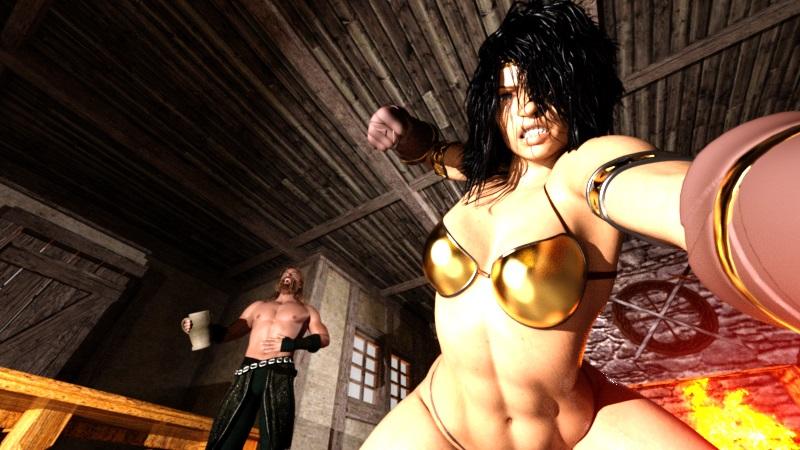
Don't flirt with an Amazon...
You really have a knack for different camera angles. Mine are always pretty tame.
Like how forearm is out of the picture, and fist... Seems aimed right at the viewer!
"Never flirt with an Amazon... Unless wearing a helmet." ; )
And here my WiP with the lighting. I'm using the SunSky only here. And pose the sun manually instead of using the time dials.I didn't know what the time dial was, so just blundered into tweaking on x, y, and z. : 0 !
Looks good. Only suggestion I might make is blank area to viewers left. Have you considered changing aspect ratio to crop a bit? Just a suggestion.
As for soldering irons, use one myself in restoring vintage tape decks, receivers, and amps from 70's. Lots of fun. Just don't make a mistake I did once. Had been using it, found defective part, tossed iron aside and went looking for replacement. Iron landed on lead to a probe on my scope. Tektronics is proud of their products. That little lesson cost me. Now I make sure scope related stuff safely tucked away. : )
Here's where I am currently:
Red Gold Blue: The Purification of Old Town
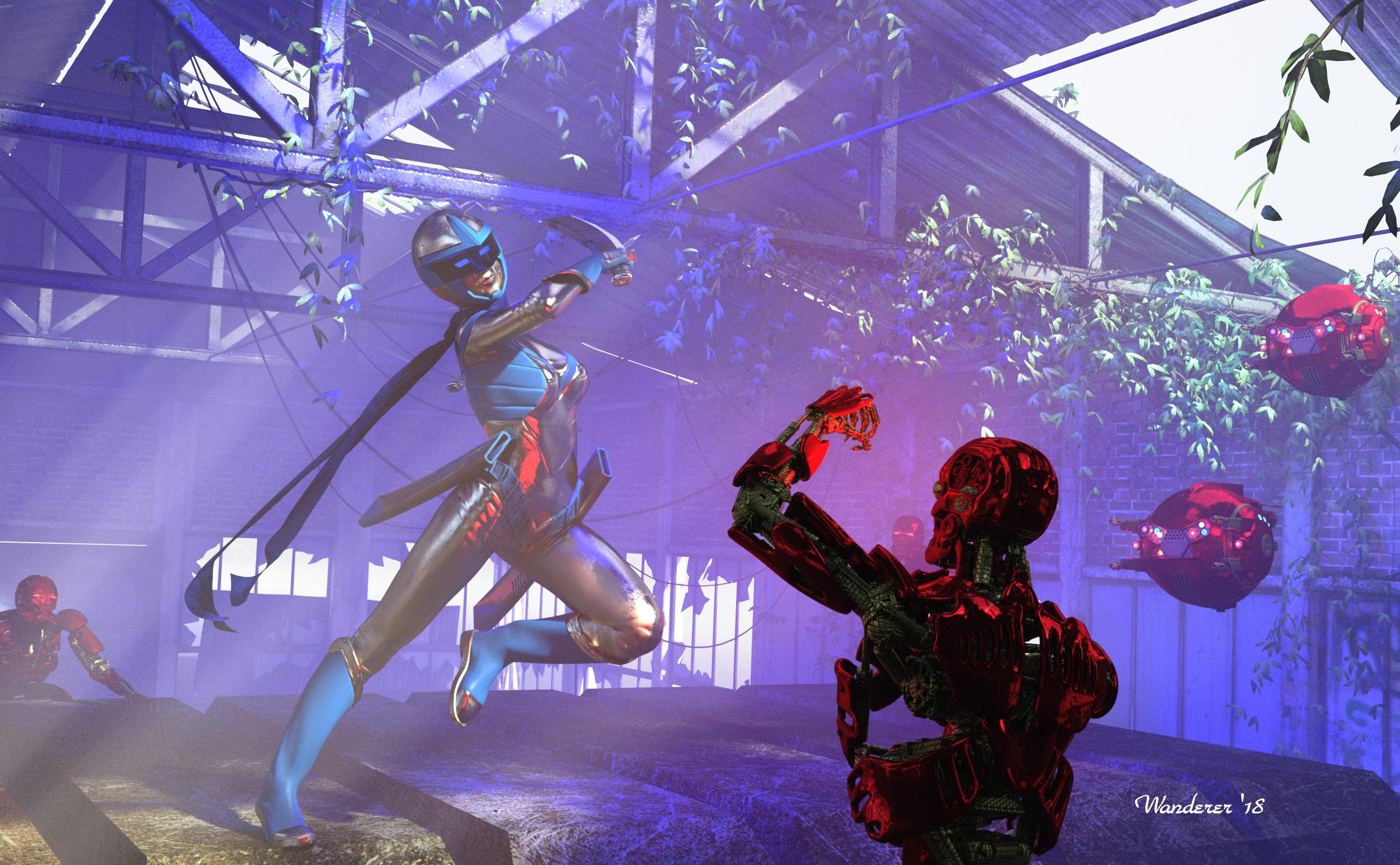
I'm not going for complete photorealism with this. I dialed back the blue a bit with the daylight, kept the red light in the foreground, but made sure the light highlighted the central figure. I tried to restore the clouds in the upper right, but the atmospheric effect made it either or (either the clouds or the lightshafts). I could force them anyway, but I'm not certain I want to go there. I may try to do some postwork, but for now, this is what I've got done.
Can definately see more, but not sure. Ask three people get six opinions. Kind of liked the earlier version that was darker, but that's just me.
Just curious, but what was the spiral thing from an earlier version? It's a guide for movement or how the eye scans an image? I learned composition back in the Pliestocene, so just a grid, or subdivide into triangles. As said, just curious how it helps? Any tool that helps you is a good one I guess. : )
I hope that's everyone
Meanwhile...
Putting the *.obj file into the water much easier than I had feared. The set has several, so interested to see what everyone thinks about it. Without ripples in water, project going no where.
Also... The more I look at the render, the more I am bothered by Vicky's feet. This started out with her wearing the shoes, but they looked too large. Tried posing Vikcy from scratch and (hopefully) successful, but feet flat on ladder rung still looked too long. (Vicky just has big feet?) So from a different angle, tried posing with her standing 'tip-toe.'
Now... Is it my imagination, or from the front, does it look like she's not putting any weight on the ladder and kind of floating?

Thanks for reading
--Bruce
Great reference image from Chohole. If in doubt test the pose yourself ( if you can ) or find a reference image.
The toes look off to me. They need to be flatter with the ball of the foot on the ladder ( as Chohole as already said ). Also, the character's right foot is intersecting with the step of the ladder.
April 2018 - Daz 3D New User Challenge - Open Render Challenge@Tynkere - the hair used in my previous version is Paige Hair by PhilW. More than one product uses the name Paige. I mean this one. https://www.daz3d.com/paige-hair-for-genesis-8-femalesHere is my next step. Prop emissive tests. As per Daybird's and BeeMKay's instructions (thanks again), I've applied a flecked grayscale map to 4 toruses and inserted them in the color, emissive, and opacity cutout channels of the surfaces tab. All other lights are turned off. The only light right now comes from the 4 toruses, and those lights are set very low. Once again, I've got a placeholder G8F. She is wearing the Andromeda SciFi outfit.
Heh. Looks like I just missed hair-doo being on sale. Added to wishlist-- always another sale... : )
Added pentacle in background? Don't remember that-- good excuse to watch movie again. Am learning a lot from you in just how to be organized and plan a scene.
Here's the second version of my image. I have made the back wall darker and managed to lighten the man's right arm and get rid of the light in the mirror. There is no longer much of a shadow on the floor so I could try to change the lighting to improve this.
As others have said, looks good in toning down wall & moving spot.
Speaking of moving... Here's a suggestion for what it's worth.
How much room do you have to the left of your set? (to the viewers left or behind the dancers) If moved entire set to the right a little, you might be able to get all of the couple to show in the mirror. Just a thought.
Don't flirt with an Amazon...
You really have a knack for different camera angles. Mine are always pretty tame.
Like how forearm is out of the picture, and fist... Seems aimed right at the viewer!
"Never flirt with an Amazon... Unless wearing a helmet." ; )
And here my WiP with the lighting. I'm using the SunSky only here. And pose the sun manually instead of using the time dials.I didn't know what the time dial was, so just blundered into tweaking on x, y, and z. : 0 !
Looks good. Only suggestion I might make is blank area to viewers left. Have you considered changing aspect ratio to crop a bit? Just a suggestion.
As for soldering irons, use one myself in restoring vintage tape decks, receivers, and amps from 70's. Lots of fun. Just don't make a mistake I did once. Had been using it, found defective part, tossed iron aside and went looking for replacement. Iron landed on lead to a probe on my scope. Tektronics is proud of their products. That little lesson cost me. Now I make sure scope related stuff safely tucked away. : )
Here's where I am currently:
Red Gold Blue: The Purification of Old Town
I'm not going for complete photorealism with this. I dialed back the blue a bit with the daylight, kept the red light in the foreground, but made sure the light highlighted the central figure. I tried to restore the clouds in the upper right, but the atmospheric effect made it either or (either the clouds or the lightshafts). I could force them anyway, but I'm not certain I want to go there. I may try to do some postwork, but for now, this is what I've got done.
Can definately see more, but not sure. Ask three people get six opinions. Kind of liked the earlier version that was darker, but that's just me.
Just curious, but what was the spiral thing from an earlier version? It's a guide for movement or how the eye scans an image? I learned composition back in the Pliestocene, so just a grid, or subdivide into triangles. As said, just curious how it helps? Any tool that helps you is a good one I guess. : )
I hope that's everyone
Meanwhile...
Putting the *.obj file into the water much easier than I had feared. The set has several, so interested to see what everyone thinks about it. Without ripples in water, project going no where.
Also... The more I look at the render, the more I am bothered by Vicky's feet. This started out with her wearing the shoes, but they looked too large. Tried posing Vikcy from scratch and (hopefully) successful, but feet flat on ladder rung still looked too long. (Vicky just has big feet?) So from a different angle, tried posing with her standing 'tip-toe.'
Now... Is it my imagination, or from the front, does it look like she's not putting any weight on the ladder and kind of floating?
Thanks for reading
--Bruce
---
Edit: weeding out old imgur files. PM missing links.April 2018 - Daz 3D New User Challenge - Open Render Challenge@Shinji - so sorry for you and your family. Take care, and then come back when you are ready.
@Wanderer - I'm another vote for godrays over clouds, for what it is worth. Great image.
@Sueya - excellent. Any comment of mine at this point is just nitpicking. Too that end, the shadow of her leg on the floor is a little harsh. Again, nitpicking. Really like what you've done with it.
@chrislillytv - wow, the expression and the hand poses are very expressive. Terrific.
@Tynkere - the hair used in my previous version is Paige Hair by PhilW. More than one product uses the name Paige. I mean this one. https://www.daz3d.com/paige-hair-for-genesis-8-females
Here is my next step. Prop emissive tests. As per Daybird's and BeeMKay's instructions (thanks again), I've applied a flecked grayscale map to 4 toruses and inserted them in the color, emissive, and opacity cutout channels of the surfaces tab. All other lights are turned off. The only light right now comes from the 4 toruses, and those lights are set very low. Once again, I've got a placeholder G8F. She is wearing the Andromeda SciFi outfit.
 Hair modeling question...ZBrush, Blender, or Hexagon?
This new release in the store was created using Carrara. Carrara has dynamic strand based hair that can be converted to polys, which makes creating wind and style morphs possible because bushed strands will have the same number of vertexes in the same order when converted.
"Get Them While You Can!" If Not… Well… "There's Always Another Sale™"Well, MM was the most disappointing sale for me, ever. Of the few things I did get, the only one that lived up to the promises was https://www.daz3d.com/paige-hair-for-genesis-8-females (Great work, PhilW), and Edward 8, though he was technically pre-MM. I hardly touched my wishlist, because any stacked discounts that did apply were less than previous discounts.
I guess I'll wait till the end of year sales, and any Fastgrab sales, in hope Daz returns to form. Otherwise, I'll keep my money. I'm already regretting extending my PC+ membership during the 2017 end of year sales. I've be posting here since 2005, and using Studio since it was in the original beta, and it's still fun, but I can see the cracks appearing: most products are failing quality control in varying degrees, and rising prices with unappealing discounts.
Need Help on Cartoon Skin texture or Anime ShaderThere are a few DAZ Store products that have very similar to such material shader settings.
You can mix & match and adjust the Surfaces settings manually. Also those simpler textures sets are easier to edit in external programs like Photoshop or Gimp.
A list of relevant products:
3DU Toon Generations 2 Megabundle (3DU stands for 3D Universe)
3DU Little One's Bundle
3DU Megan & Matt
3DU Paige & Pace
the Star 2.0 Pro Bundle
the Morpheus Bundle
Thanks, that's definitely an option.
Need Help on Cartoon Skin texture or Anime ShaderThere are a few DAZ Store products that have very similar to such material shader settings.
You can mix & match and adjust the Surfaces settings manually. Also those simpler textures sets are easier to edit in external programs like Photoshop or Gimp.
A list of relevant products:
3DU Toon Generations 2 Megabundle (3DU stands for 3D Universe)
3DU Little One's Bundle
3DU Megan & Matt
3DU Paige & Pace
the Star 2.0 Pro Bundle
the Morpheus Bundle
[Solved] Genesis 8 Starter Essentials update in Daz Connect wipes out metadataAlready Ollie has an update too as does Paige and her clothes. I wonder what that's all about?
Can Paige G8 be dialed part-way?Here's another picture. Pace body morph 50%, head morph 60%. I added 50% Ronen (Ronen is a full body morph, so no separate head and body morphs). Paige morphs still at 50%
March Madness is here! Buyer Bonus: Justus for Darius 8 and A Gentleman's Expressionsand you wont see them offered unless you buy something first or have done in the last three days
Hmmm, I bought the Paige & Pace bundle but I guess as non-DAZ Originals they don't trigger the special offers or orange banners?
Did you buy it within the last 3 days?
I bought on this Wednesday
That would be the 21st. I'm not sure if the 3 days includes the day of the purchase, so assuming the longer period when it doesn't, that means it gives you the bonus item extra discount until the 24th. You wrote on the 25th, so you were out of the 3 days for sure.
March Madness is here! Buyer Bonus: Justus for Darius 8 and A Gentleman's Expressionsand you wont see them offered unless you buy something first or have done in the last three days
Hmmm, I bought the Paige & Pace bundle but I guess as non-DAZ Originals they don't trigger the special offers or orange banners?
Did you buy it within the last 3 days?
I bought on this Wednesday
Can Paige G8 be dialed part-way?Here's Paige with the head morph at approx. 60 % and body morph at 50%. Works great
March Madness is here! Buyer Bonus: Justus for Darius 8 and A Gentleman's Expressionsand you wont see them offered unless you buy something first or have done in the last three days
Hmmm, I bought the Paige & Pace bundle but I guess as non-DAZ Originals they don't trigger the special offers or orange banners?
Did you buy it within the last 3 days?
March Madness is here! Buyer Bonus: Justus for Darius 8 and A Gentleman's Expressionsand you wont see them offered unless you buy something first or have done in the last three days
Hmmm, I bought the Paige & Pace bundle but I guess as non-DAZ Originals they don't trigger the special offers or orange banners?
March Madness is here! Buyer Bonus: Justus for Darius 8 and A Gentleman's ExpressionsHmmm, I have only bought the Paige & Pace Bundle of new products since MM began and have only been back in town since last Wednesday but I've seen nothing of these free bonus products at all except the current one for V4/M4 era freebies if I purchase something DAZ Store "new".product.
The bonus products are not free, "just" an extra 70% off.
ah, OK. thanks
Photo-real characters. A different approach.Here is an example of as close as I can get to photorealism at the moment - it is set up in Carrara, I think one of the big differences is using Carrara's strand based hair, and then rendered using Octane Render for Carrara. I think Octane has the edge, but iRay is very good with the right settings and lighting. And I am making an effort to get as close to strand-based hair as I reasonably can in Daz Studio too, with my Paige Hair product and others in the pipeline. There was also a little postwork to tidy up a couple of small areas and make a small adjustment to exposure and contrast, but this is pretty close to the original render.

excellent
Daz 3D is part of

Connect
DAZ Productions, Inc.
7533 S Center View Ct #4664
West Jordan, UT 84084Licensing Agreement | Terms of Service | Privacy Policy | EULA
© 2026 Daz Productions Inc. All Rights Reserved.