-
old versions
...wow that's even further back than what I have. in 2004 I was still doing drawings by hand though it was getting more and more difficult.
I still have an XP system which 2.8 is on.
I'm originally a professional traditional pencil animator, so I'm still drawing by hand, even if not professionally any more; I discovered Poser 4 around 2001 and thought it was a nice hobby; not long after that I discovered the Poser community, and also the DAZ website, and later on the flame war around Poser 5 that caused DAZ Studio in the first place. (Victoria 3 could not be used in the initial version of Poser 5, as I remember.) I only use Poser/Studio for still pictures; I have animated in Maya a bit, but found the process much more mechanical than traditional animation.
By the way, I also still have ancient versions of Poser running; 4, 5, 6, 7, 10 Debut and 11. I don't have a fancy graphics card with lots of cuda-cores so I went the Poser/Reality-way, and stuck with Vicky and Mike 4...
...due to advancing bone and joint issues it just got too difficult to hold a brush, pencil. or pen very steady or for long without incurring a lot of stiffness and pain. That is a major part of what pushed me into 3D.
Figure + Hair dead horse me thinks...I like the way you think.
This is how I emptied my cart yesterday.
It's the Tanning Salon Sale.
I grabbed just the poses hoping to trigger some discounts further down the page, but nothing happened in my cart.

Then I saw the word BUNDLE was underlined so I clicked that and grabbed a bundle instead. I'm still learning.
I was torn between Summer or Carmilla (Do I REALLY need more women?) So I opened both to inspect their promo pics (you know, who's cuter, etc [just kidding, but no, not really].
Great, I already owned Summer so Carmilla is it! Then I saw buy TWO bundles and get all FOUR FOR FREE

Slapped all three in the cart on reflex.
- started rationalizing about all the ways those sets can be worth it down the road....
Then saw that Eva 7 was needed for two of the three and she was only slightly discounted. Add that up and...
Add her in and all the savings go away and I am buying two building sets that I really didn't want for more than I was interested in spending.
Carmilla is not so different than Victoria's several morphs in the library so no, I wasn't really, really missing out.
Cart emptied.
Not so good for the Artist(s) as their products get skipped over for no real reason that isn't avoidable.
Make those figures for Genesis 3, as you suggested, and I would have bought them AND the salon and detective set.
Missing Victoria 4.2 morphsUnder Daz's Victoria, I have 3 sub directories: General Poses, Magnetize Clothing and MATerials Sample-Res (all with content). So no Morph Injections. But I just added the Morph Injection folder as runtime. Now I have the 4 files as you described earlier (2x + and 2x -).
The morphs are now added by double clicking on the two + items. Parameters are added. But most do not respond or morph weird. Anything else required?
Aww... no. Don't do it like that. You're just asking for more issues.
Do it like I describe in the long post. Please. You'll save yourself a lot of headaches. If you want to use V4, you might as well set it up so you can use all of her instead of just Morphs ++
Please... go back and bring that whole runtime into your content tab. Please
Missing Victoria 4.2 morphsYup.
- Open V4 in Carrara
- Make sure Victoria 4 is sected in the instances tray
- in the browser, go to Poses > Daz3d's Victoria 4 > Morph Injections
- Double-click the morphs you wish to INJect into Vicky
I have 5 main directories in my Carrara Browser (Content runtime, My Library, content, libraries, My DAZ 3D Library). In the last one, I found a Morph Injection folder. But all folders from Victoria are completely empty. The structure is there, but no content. I have also Victoria in my other main categories (including poses), but not anything like UnifiedBrain.
It should be in your Content Runtime
If you're not seeing the files, try reinstalling it. I didn't answer right away because Steve K and Unified Brain had you covered in the first two replies.
So something's not right. One thing to know about runtime content is that we can NOT move the files around. It breaks the structure. Not sure if you did, not saying you did, just saying.
When we look at a Runtime structure, we begin with the Main folder, which I call the Runtime folder, even though it's not the one that's named "runtime". The main folder was originally named "Poser" and inside that folder was Poser.exe
If the older Daz3d Installers didn't see the Poser.exe file, it wouldn't install your content
Poser could only show x number of items in the runtime, showing alphabetically This was a large number, but not as large as our growing collections. So Poser was then made to be able to read multiple runtimes, which is why I call these main folders the Runtime folders. We can name these folders anything we want and we would make a blank text file and name it "Poser.exe" and place that in our Runtime folders so that Daz3d installers would work on them.
Anyways, I'm saying this because it can be easy to mess up a runtime folder if we're not aware of how they work.
The easiest way to understand them is to perfrom a manual download of a generation 4 style product.
Nowadays when we manually download a Poser format product (V4 and M4 and their family are Poser format) we begin with the main, doenloaded compressed folder beginning with "IMxxxx" x's are numbers.
Open that folder and we have two things: a folder named Content and a IM Manifest
The manifest file is simply something to tell Install Manager what needs to be done with this Content Folder against the database
The Content folder is a Runtime Folder by every sense of the word, as I explain it above. So in other words, to properly install it's contents to another Runtime folder, we open it and drag all of it's contents directly into the Runtime folder of our choosing - and click "Yes" to merge or overwrite as it copies.
===========================================
So we need you to recognise where your V4 stuff gets installed when you install it. Find that folder on your machine.
Make sure that "that" folder is in Carrara's Content Browser as a Runtime
If you have V4's Morphs ++ installed, you'll see them where Unified Brain is showing you they are.
Poser has categories and, along the way, folks have found a way to use Pose files to be used to INJect morphs onto a figure and a way to apply MATerial collections onto a figure, so those files have to be in the Pose structure of the runtime:
Runtime Folder > Runtime > Libraries > Poses
Daz3d was trying all manner of ways to further set their content apart from others - making them easier to find and use - easier to explain in the ReadMe's, a folder introduced to Runtime Folders by Daz3d
Generation 3 made a mess of the runtime putting "!" in front of their names, and there were a LOT of them
Generation 4 answered that mess by making folders like "Daz3d's Victoria 4" and putting all of the relavent files in that. Poses, MAT files, morph INJ files
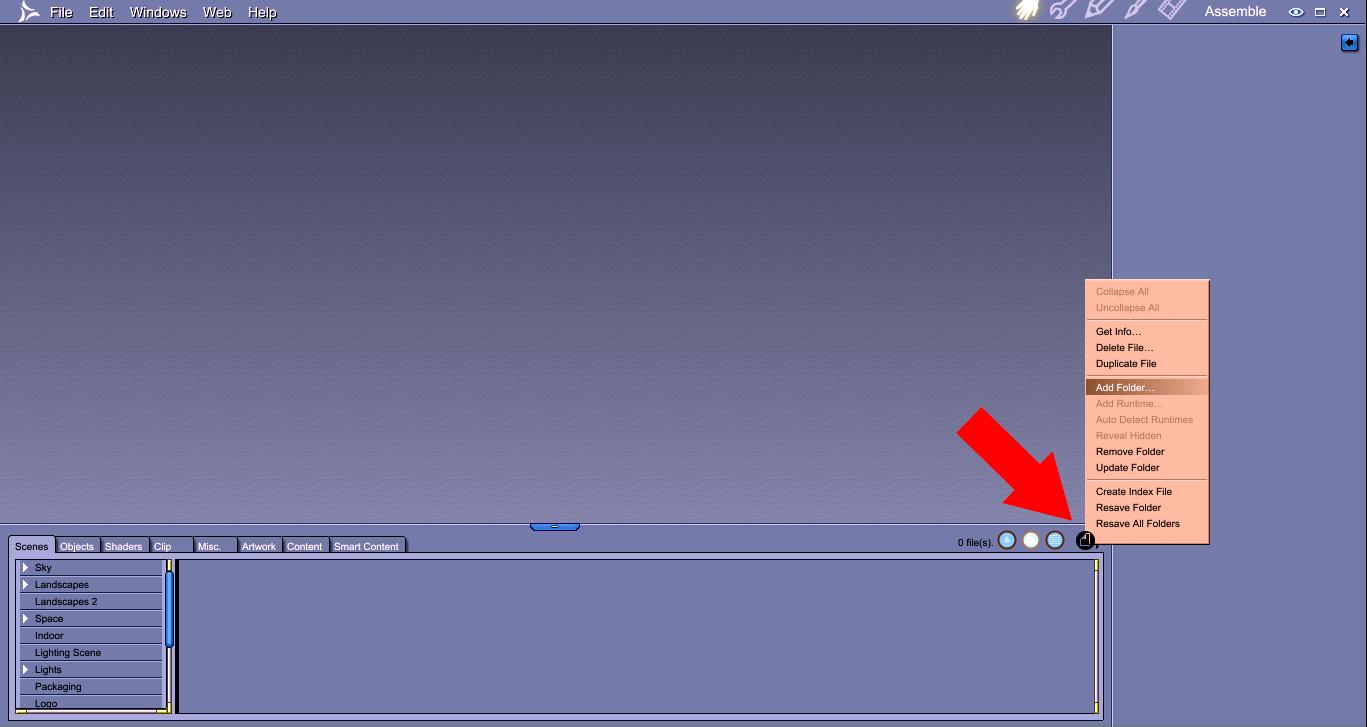
Some products may have a slightly different order - or a new folder within that folder, but they did a really good job of organizing everything in there, so if you're not seeing the INJ files in your browser, there is one of two issues: Either the content is not installed correctly or the Runtime folder they're installed to is not 'mapped' to Carrara's Content tab yet.
To check the latter, use the File/Folder menu in Carrara's browser. Find the Runtime Folder where you've installed your V4 content to. Now use the FIle/Folder menu in the Content tab and choose "Add Runtime" > browse to the Runtime folder (not the folder named "Runtime") and click Okay and, when asked, select "Runtime" instead of Content.
You'll find the files in that structures Pose category
 Help in Legacy UV for Genesis 3 Female
I've found the easiest way to do it is to first save the texture as a "material preset". Then from there it's a three step process. 1) Click the "prepare" button, 2) apply the desired texture via the "material preset", 3) click the "apply" button. The scripts do the work from there.
How do you save it as a material preset? And I can't find the material preset in the surface tab
Select the character that has the textures you want to use. Then go to File >> Save As >> Material Preset (it's about half way down the "save as" list).
You should then be able to find that material preset under your Content Library under My Library >> Presets >> Materials.
Oh so I stilvl have to download Victoria 4 then because I only have the metropolitan characters but I don't have Victoria 4.
You could apply it to the original Genesis figure - I'm pretty sure it comes with the V4 UV.
Yes, Genesis 1 has V4 and M4 UVs.
Can you use Genesis 2 and Genesis 3 clothes and hairs on Genesis 1?
Yeah, you need clones to do that though:
To wear G3F clothes on Genesis 1: http://www.daz3d.com/genesis-3-female-clone-for-genesis
To wear G3M clothes on Genesis 1: http://www.daz3d.com/genesis-3-male-clone-for-genesis
To wear G2F clothes on Genesis 1: http://www.daz3d.com/genesis-2-female-clone-for-genesis
To wear G2M clothes on Genesis 1: http://www.daz3d.com/genesis-2-male-clone-for-genesis
I've tried the material preset thing and was successful in transferring the skin textures however why doesnt it look the same? as the original victoira 4?
Are you still using the product for V5 UVs as you mentioned at the top of this post. If so that is not going to work with a V4 skin.
I've tried v4 too and they just don't look exactly the same, like even the morph has some small differences from the eyes and the nose. Can you kindly pose like comparisons from v4, g1, g2, and G3? If it's okay?
There will be some small differences in the morphs, a 100% fit when the figure is based on a different mesh would be near impossible.
I can not do V4 on G3F as I do not own that product (although I have a number of other Caymen converters). Below is a Gen X test conversion I did some time ago, it is Fransesca for V4,
G2F on the left, V4 in the center, Genesis on the right. The results are not identical, but in my opinion very similar.
Missing Victoria 4.2 morphsUnder Daz's Victoria, I have 3 sub directories: General Poses, Magnetize Clothing and MATerials Sample-Res (all with content). So no Morph Injections. But I just added the Morph Injection folder as runtime. Now I have the 4 files as you described earlier (2x + and 2x -).
The morphs are now added by double clicking on the two + items. Parameters are added. But most do not respond or morph weird. Anything else required?
GEN X2 HelpI will copy what divamakeup said in the other thread. Basically apply your skin to V4, select V4, and then:
Select the character that has the textures you want to use. Then go to File >> Save As >> Material Preset (it's about half way down the "save as" list).
It will prompt you where to put the preset file, and this file will be a duf file.
I've tried that but they don't look the same as how Genesis looks exactly the same as the Victoria 4 character though. Why's that?
Are you using the product from renderosity, or the one sold here for V5?
In using the one from renderosity, Is there a difference? Also I wasn't able to find a legacy uv converter for Genesis 2 from v4
The legacy converter for Genesis 2 from V4 is sold here, and is even easier to use: http://www.daz3d.com/victoria-4-for-genesis-2-female
However the one from Renderosity should work for V4. One possible mistake you are making is are you ensuring that both G3F and all geografts are selecting before applying the V4 skin?
Also go into the surface tab and check that UV for the skin for G3F and all geografts is set to V4. That should be done automatically by the second script. Also do not mix up the scripts for the different Caymen Studio products
Yeah I do click the prepare G3 then apply v4 first before I click the material preset. It's the correct process right?
GEN X2 HelpI will copy what divamakeup said in the other thread. Basically apply your skin to V4, select V4, and then:
Select the character that has the textures you want to use. Then go to File >> Save As >> Material Preset (it's about half way down the "save as" list).
It will prompt you where to put the preset file, and this file will be a duf file.
I've tried that but they don't look the same as how Genesis looks exactly the same as the Victoria 4 character though. Why's that?
Are you using the product from renderosity, or the one sold here for V5?
In using the one from renderosity, Is there a difference? Also I wasn't able to find a legacy uv converter for Genesis 2 from v4
The legacy converter for Genesis 2 from V4 is sold here, and is even easier to use: http://www.daz3d.com/victoria-4-for-genesis-2-female
However the one from Renderosity should work for V4. One possible mistake you are making is are you ensuring that both G3F and all geografts are selecting before applying the V4 skin?
Also go into the surface tab and check that UV for the skin for G3F and all geografts is set to V4. That should be done automatically by the second script. Also do not mix up the scripts for the different Caymen Studio products
Missing Victoria 4.2 morphsI'm guessing that the directory you want is "Content runtime," then click the little triangle next to Poses, then Daz's Victoria 4, and under that left-click directly on Morph Injections (and NOT the triangle next to it).
However, we keep describing the same thing, and you don't see it, so something else may be wrong.
Are you installing all content with the Daz Install Manager?
GEN X2 HelpI will copy what divamakeup said in the other thread. Basically apply your skin to V4, select V4, and then:
Select the character that has the textures you want to use. Then go to File >> Save As >> Material Preset (it's about half way down the "save as" list).
It will prompt you where to put the preset file, and this file will be a duf file.
I've tried that but they don't look the same as how Genesis looks exactly the same as the Victoria 4 character though. Why's that?
Are you using the product from renderosity, or the one sold here for V5?
In using the one from renderosity, Is there a difference? Also I wasn't able to find a legacy uv converter for Genesis 2 from v4
Help in Legacy UV for Genesis 3 FemaleI've found the easiest way to do it is to first save the texture as a "material preset". Then from there it's a three step process. 1) Click the "prepare" button, 2) apply the desired texture via the "material preset", 3) click the "apply" button. The scripts do the work from there.
How do you save it as a material preset? And I can't find the material preset in the surface tab
Select the character that has the textures you want to use. Then go to File >> Save As >> Material Preset (it's about half way down the "save as" list).
You should then be able to find that material preset under your Content Library under My Library >> Presets >> Materials.
Oh so I stilvl have to download Victoria 4 then because I only have the metropolitan characters but I don't have Victoria 4.
You could apply it to the original Genesis figure - I'm pretty sure it comes with the V4 UV.
Yes, Genesis 1 has V4 and M4 UVs.
Can you use Genesis 2 and Genesis 3 clothes and hairs on Genesis 1?
Yeah, you need clones to do that though:
To wear G3F clothes on Genesis 1: http://www.daz3d.com/genesis-3-female-clone-for-genesis
To wear G3M clothes on Genesis 1: http://www.daz3d.com/genesis-3-male-clone-for-genesis
To wear G2F clothes on Genesis 1: http://www.daz3d.com/genesis-2-female-clone-for-genesis
To wear G2M clothes on Genesis 1: http://www.daz3d.com/genesis-2-male-clone-for-genesis
I've tried the material preset thing and was successful in transferring the skin textures however why doesnt it look the same? as the original victoira 4?
Are you still using the product for V5 UVs as you mentioned at the top of this post. If so that is not going to work with a V4 skin.
I've tried v4 too and they just don't look exactly the same, like even the morph has some small differences from the eyes and the nose. Can you kindly pose like comparisons from v4, g1, g2, and G3? If it's okay?
Missing Victoria 4.2 morphsYup.
- Open V4 in Carrara
- Make sure Victoria 4 is sected in the instances tray
- in the browser, go to Poses > Daz3d's Victoria 4 > Morph Injections
- Double-click the morphs you wish to INJect into Vicky
I have 5 main directories in my Carrara Browser (Content runtime, My Library, content, libraries, My DAZ 3D Library). In the last one, I found a Morph Injection folder. But all folders from Victoria are completely empty. The structure is there, but no content. I have also Victoria in my other main categories (including poses), but not anything like UnifiedBrain.
GEN X2 HelpI will copy what divamakeup said in the other thread. Basically apply your skin to V4, select V4, and then:
Select the character that has the textures you want to use. Then go to File >> Save As >> Material Preset (it's about half way down the "save as" list).
It will prompt you where to put the preset file, and this file will be a duf file.
I've tried that but they don't look the same as how Genesis looks exactly the same as the Victoria 4 character though. Why's that?
Are you using the product from renderosity, or the one sold here for V5?
GEN X2 HelpI will copy what divamakeup said in the other thread. Basically apply your skin to V4, select V4, and then:
Select the character that has the textures you want to use. Then go to File >> Save As >> Material Preset (it's about half way down the "save as" list).
It will prompt you where to put the preset file, and this file will be a duf file.
I've tried that but they don't look the same as how Genesis looks exactly the same as the Victoria 4 character though. Why's that?
Help in Legacy UV for Genesis 3 FemaleI've found the easiest way to do it is to first save the texture as a "material preset". Then from there it's a three step process. 1) Click the "prepare" button, 2) apply the desired texture via the "material preset", 3) click the "apply" button. The scripts do the work from there.
How do you save it as a material preset? And I can't find the material preset in the surface tab
Select the character that has the textures you want to use. Then go to File >> Save As >> Material Preset (it's about half way down the "save as" list).
You should then be able to find that material preset under your Content Library under My Library >> Presets >> Materials.
Oh so I stilvl have to download Victoria 4 then because I only have the metropolitan characters but I don't have Victoria 4.
You could apply it to the original Genesis figure - I'm pretty sure it comes with the V4 UV.
Yes, Genesis 1 has V4 and M4 UVs.
Can you use Genesis 2 and Genesis 3 clothes and hairs on Genesis 1?
Yeah, you need clones to do that though:
To wear G3F clothes on Genesis 1: http://www.daz3d.com/genesis-3-female-clone-for-genesis
To wear G3M clothes on Genesis 1: http://www.daz3d.com/genesis-3-male-clone-for-genesis
To wear G2F clothes on Genesis 1: http://www.daz3d.com/genesis-2-female-clone-for-genesis
To wear G2M clothes on Genesis 1: http://www.daz3d.com/genesis-2-male-clone-for-genesis
I've tried the material preset thing and was successful in transferring the skin textures however why doesnt it look the same? as the original victoira 4?
Are you still using the product for V5 UVs as you mentioned at the top of this post. If so that is not going to work with a V4 skin.
Help in Legacy UV for Genesis 3 FemaleI've found the easiest way to do it is to first save the texture as a "material preset". Then from there it's a three step process. 1) Click the "prepare" button, 2) apply the desired texture via the "material preset", 3) click the "apply" button. The scripts do the work from there.
How do you save it as a material preset? And I can't find the material preset in the surface tab
Select the character that has the textures you want to use. Then go to File >> Save As >> Material Preset (it's about half way down the "save as" list).
You should then be able to find that material preset under your Content Library under My Library >> Presets >> Materials.
Oh so I stilvl have to download Victoria 4 then because I only have the metropolitan characters but I don't have Victoria 4.
You could apply it to the original Genesis figure - I'm pretty sure it comes with the V4 UV.
Yes, Genesis 1 has V4 and M4 UVs.
Can you use Genesis 2 and Genesis 3 clothes and hairs on Genesis 1?
Yeah, you need clones to do that though:
To wear G3F clothes on Genesis 1: http://www.daz3d.com/genesis-3-female-clone-for-genesis
To wear G3M clothes on Genesis 1: http://www.daz3d.com/genesis-3-male-clone-for-genesis
To wear G2F clothes on Genesis 1: http://www.daz3d.com/genesis-2-female-clone-for-genesis
To wear G2M clothes on Genesis 1: http://www.daz3d.com/genesis-2-male-clone-for-genesis
I've tried the material preset thing and was successful in transferring the skin textures however why doesnt it look the same? as the original victoira 4?
How is it differing?
GEN X2 HelpWhat was the morph you were trying to move over. Some of Thorne's morphs distort the eyes, although not as extreme as you are showing. Try using the product with some different morphs as well.
Angel for V4. I have the starter for victoria 4.2 I don't know what's wrong because I followed the video tutorials on youtube. This product is such a disapointment. I hope you can help me
I was able to create an Angel 4 full body morph (head and body) for Genesis.
In GenX2 tab:
1. Load Source: V4.2.cr2
2. Click Apply Pose, load: Pose>DAZ's Victoria 4>Morph Injections>INJ Morphs++ V4.pz2
3. Click Apply Pose, load: Pose>Angel V4>!+Angel Face INJ.pz2 and !+Angel Face INJ.pz2
4. Mode: Create single Morph
5. Mode: Select > Transfer: On for all Non-Zero values
6. Shape: Victoria 4
7. Target: Genesis
8. Output folder: set to <your path>/data/DAZ 3D/Genesis/Base/Morphs/D3D Gen X/
9. Press Transfer, Give it a name: ie: Angel V4 click Accept.To Test:
1. Load fresh Genesis
2. Dial in full body Morphs: Angel V4 and Victoria 4 (see pic attached)The problem is that I do not see the Victoria morph after everything is done I only see the Angel morph when I select the Genesis. I already tried uninstalling both the Victoria 4 and Gen x but I still don't have the **people** and the base Victoria 4 morph when I select the Genesis.
I think for Genesis no Victoria 4 morph is created, since Genesis already has one. Only for G2F and G3F would a V4 morph be created.
For Genesis you should see Victoria 4 under Actor/Female/Real World or if you can not find there, change to "Show Hidden Properties", and then look under
Hidden/Clones
I think to see the one in Actor/Female/Real World you need to own http://www.daz3d.com/v4-and-m4-shapes-for-genesis, but I am not certain.
I remember in the older version of Generation X, http://www.daz3d.com/v4-and-m4-shapes-for-genesis was a required product, but I did not think that was true for Gen X2.
Oh alright I'm going to try it later, if I were to convert it to Genesis 3 though do I still need to download anything else? Also how do you show hidden properties? Also do you know the file name of the Victoria 4 clone morph? Dimension3d told me that it has to have that clone, I'm going to look for it maybe he Victoria 4 clone is just being put in a different folder.
To show hidden properties, select the "Properties" tab, then click on the small icon with the four horizontal bars at the corner, and click on "Show Hidden Properties" on the pop up box. Alternatively right click on the title bar of the "Properties" tab, this brings up the same pop-up box.
The Genesis V4 morph is here: /data/DAZ 3D/Genesis/Base/Morphs/DAZ 3D/base/CloneVictoria4.dsf
This is the clone used by autofit to get V4's clothing onto Genesis.
Try moving the Angel Morph to Genesis 2, just to see if you can get it working. If so, then you can go back to trying to get it working on Genesis.
I haven't bought the add ons yet. By the way I was already able to make the Victoria morph someone helped me a while ago although even if I've already dialed in the base Victoria morph whenever I dial the Angel for v4 morph I still get the bulging eyes and teeth. Do you know how to solve it?
No idea sorry, I have not had that issue with other characters before. Do you suffer the same problem with other V4 morphs. Have you tried posting to this thread
http://www.daz3d.com/forums/discussion/94881/genx2-update-genesis-3-add-on-commercial
The developer listens to this thread. He might have an idea what is causing your problems.
By the way how do you transfer skin textures from v4 to G3?
If you look at this vendor, http://www.daz3d.com/cayman-studios, he has a number of products for showing older generation skins on G3F. However for V4 you need his product sold over at Renderosity. Just search over there, the vendor name is the same as here.
By the way Angel for V4 worked now! Just reinstalled the Angel for v4 :) alright so you need that product to be able to use v4 skin textures on Genesis 3? :)
Glad to hear you finally got it working :-)
Yes get that product, there is another way using a skin converter by a company called Blacksmith, or you can do it for free via Blender, but the product by Caymen Studio's is by far the easiest way IMHO.
Can you kindly tell me the process? I don't want it to not work again lol :) the legacy uv form Cayman? :)
Yes. It is easier to use than Generation X. You use a script to apply geografts to G3F, then another one to set the UV to V4. You can then apply any V4 skin you own (you need to save it as duf first), it works very well. In the image below all 20 figures are G3F, but I used Caymen's product to put generation 3 skins (V3, M3 etc) onto the characters. Note that all the characters are G3F, included the male ones, I used Gen X2 to move the male morphs to G3F.
how do you save skins into duf? And where do you save them?
GEN X2 HelpWhat was the morph you were trying to move over. Some of Thorne's morphs distort the eyes, although not as extreme as you are showing. Try using the product with some different morphs as well.
Angel for V4. I have the starter for victoria 4.2 I don't know what's wrong because I followed the video tutorials on youtube. This product is such a disapointment. I hope you can help me
I was able to create an Angel 4 full body morph (head and body) for Genesis.
In GenX2 tab:
1. Load Source: V4.2.cr2
2. Click Apply Pose, load: Pose>DAZ's Victoria 4>Morph Injections>INJ Morphs++ V4.pz2
3. Click Apply Pose, load: Pose>Angel V4>!+Angel Face INJ.pz2 and !+Angel Face INJ.pz2
4. Mode: Create single Morph
5. Mode: Select > Transfer: On for all Non-Zero values
6. Shape: Victoria 4
7. Target: Genesis
8. Output folder: set to <your path>/data/DAZ 3D/Genesis/Base/Morphs/D3D Gen X/
9. Press Transfer, Give it a name: ie: Angel V4 click Accept.To Test:
1. Load fresh Genesis
2. Dial in full body Morphs: Angel V4 and Victoria 4 (see pic attached)The problem is that I do not see the Victoria morph after everything is done I only see the Angel morph when I select the Genesis. I already tried uninstalling both the Victoria 4 and Gen x but I still don't have the **people** and the base Victoria 4 morph when I select the Genesis.
I think for Genesis no Victoria 4 morph is created, since Genesis already has one. Only for G2F and G3F would a V4 morph be created.
For Genesis you should see Victoria 4 under Actor/Female/Real World or if you can not find there, change to "Show Hidden Properties", and then look under
Hidden/Clones
I think to see the one in Actor/Female/Real World you need to own http://www.daz3d.com/v4-and-m4-shapes-for-genesis, but I am not certain.
I remember in the older version of Generation X, http://www.daz3d.com/v4-and-m4-shapes-for-genesis was a required product, but I did not think that was true for Gen X2.
Oh alright I'm going to try it later, if I were to convert it to Genesis 3 though do I still need to download anything else? Also how do you show hidden properties? Also do you know the file name of the Victoria 4 clone morph? Dimension3d told me that it has to have that clone, I'm going to look for it maybe he Victoria 4 clone is just being put in a different folder.
To show hidden properties, select the "Properties" tab, then click on the small icon with the four horizontal bars at the corner, and click on "Show Hidden Properties" on the pop up box. Alternatively right click on the title bar of the "Properties" tab, this brings up the same pop-up box.
The Genesis V4 morph is here: /data/DAZ 3D/Genesis/Base/Morphs/DAZ 3D/base/CloneVictoria4.dsf
This is the clone used by autofit to get V4's clothing onto Genesis.
Try moving the Angel Morph to Genesis 2, just to see if you can get it working. If so, then you can go back to trying to get it working on Genesis.
I haven't bought the add ons yet. By the way I was already able to make the Victoria morph someone helped me a while ago although even if I've already dialed in the base Victoria morph whenever I dial the Angel for v4 morph I still get the bulging eyes and teeth. Do you know how to solve it?
No idea sorry, I have not had that issue with other characters before. Do you suffer the same problem with other V4 morphs. Have you tried posting to this thread
http://www.daz3d.com/forums/discussion/94881/genx2-update-genesis-3-add-on-commercial
The developer listens to this thread. He might have an idea what is causing your problems.
By the way how do you transfer skin textures from v4 to G3?
If you look at this vendor, http://www.daz3d.com/cayman-studios, he has a number of products for showing older generation skins on G3F. However for V4 you need his product sold over at Renderosity. Just search over there, the vendor name is the same as here.
By the way Angel for V4 worked now! Just reinstalled the Angel for v4 :) alright so you need that product to be able to use v4 skin textures on Genesis 3? :)
Glad to hear you finally got it working :-)
Yes get that product, there is another way using a skin converter by a company called Blacksmith, or you can do it for free via Blender, but the product by Caymen Studio's is by far the easiest way IMHO.
Can you kindly tell me the process? I don't want it to not work again lol :) the legacy uv form Cayman? :)
Yes. It is easier to use than Generation X. You use a script to apply geografts to G3F, then another one to set the UV to V4. You can then apply any V4 skin you own (you need to save it as duf first), it works very well. In the image below all 20 figures are G3F, but I used Caymen's product to put generation 3 skins (V3, M3 etc) onto the characters. Note that all the characters are G3F, included the male ones, I used Gen X2 to move the male morphs to G3F.
Help in Legacy UV for Genesis 3 FemaleI've found the easiest way to do it is to first save the texture as a "material preset". Then from there it's a three step process. 1) Click the "prepare" button, 2) apply the desired texture via the "material preset", 3) click the "apply" button. The scripts do the work from there.
How do you save it as a material preset? And I can't find the material preset in the surface tab
Select the character that has the textures you want to use. Then go to File >> Save As >> Material Preset (it's about half way down the "save as" list).
You should then be able to find that material preset under your Content Library under My Library >> Presets >> Materials.
Oh so I stilvl have to download Victoria 4 then because I only have the metropolitan characters but I don't have Victoria 4.
You could apply it to the original Genesis figure - I'm pretty sure it comes with the V4 UV.
Yes, Genesis 1 has V4 and M4 UVs.
Can you use Genesis 2 and Genesis 3 clothes and hairs on Genesis 1?
Yeah, you need clones to do that though:
To wear G3F clothes on Genesis 1: http://www.daz3d.com/genesis-3-female-clone-for-genesis
To wear G3M clothes on Genesis 1: http://www.daz3d.com/genesis-3-male-clone-for-genesis
To wear G2F clothes on Genesis 1: http://www.daz3d.com/genesis-2-female-clone-for-genesis
To wear G2M clothes on Genesis 1: http://www.daz3d.com/genesis-2-male-clone-for-genesis
I've tried the material preset thing and was successful in transferring the skin textures however why doesnt it look the same? as the original victoira 4?
GEN X2 HelpWhat was the morph you were trying to move over. Some of Thorne's morphs distort the eyes, although not as extreme as you are showing. Try using the product with some different morphs as well.
Angel for V4. I have the starter for victoria 4.2 I don't know what's wrong because I followed the video tutorials on youtube. This product is such a disapointment. I hope you can help me
I was able to create an Angel 4 full body morph (head and body) for Genesis.
In GenX2 tab:
1. Load Source: V4.2.cr2
2. Click Apply Pose, load: Pose>DAZ's Victoria 4>Morph Injections>INJ Morphs++ V4.pz2
3. Click Apply Pose, load: Pose>Angel V4>!+Angel Face INJ.pz2 and !+Angel Face INJ.pz2
4. Mode: Create single Morph
5. Mode: Select > Transfer: On for all Non-Zero values
6. Shape: Victoria 4
7. Target: Genesis
8. Output folder: set to <your path>/data/DAZ 3D/Genesis/Base/Morphs/D3D Gen X/
9. Press Transfer, Give it a name: ie: Angel V4 click Accept.To Test:
1. Load fresh Genesis
2. Dial in full body Morphs: Angel V4 and Victoria 4 (see pic attached)The problem is that I do not see the Victoria morph after everything is done I only see the Angel morph when I select the Genesis. I already tried uninstalling both the Victoria 4 and Gen x but I still don't have the **people** and the base Victoria 4 morph when I select the Genesis.
I think for Genesis no Victoria 4 morph is created, since Genesis already has one. Only for G2F and G3F would a V4 morph be created.
For Genesis you should see Victoria 4 under Actor/Female/Real World or if you can not find there, change to "Show Hidden Properties", and then look under
Hidden/Clones
I think to see the one in Actor/Female/Real World you need to own http://www.daz3d.com/v4-and-m4-shapes-for-genesis, but I am not certain.
I remember in the older version of Generation X, http://www.daz3d.com/v4-and-m4-shapes-for-genesis was a required product, but I did not think that was true for Gen X2.
Oh alright I'm going to try it later, if I were to convert it to Genesis 3 though do I still need to download anything else? Also how do you show hidden properties? Also do you know the file name of the Victoria 4 clone morph? Dimension3d told me that it has to have that clone, I'm going to look for it maybe he Victoria 4 clone is just being put in a different folder.
To show hidden properties, select the "Properties" tab, then click on the small icon with the four horizontal bars at the corner, and click on "Show Hidden Properties" on the pop up box. Alternatively right click on the title bar of the "Properties" tab, this brings up the same pop-up box.
The Genesis V4 morph is here: /data/DAZ 3D/Genesis/Base/Morphs/DAZ 3D/base/CloneVictoria4.dsf
This is the clone used by autofit to get V4's clothing onto Genesis.
Try moving the Angel Morph to Genesis 2, just to see if you can get it working. If so, then you can go back to trying to get it working on Genesis.
I haven't bought the add ons yet. By the way I was already able to make the Victoria morph someone helped me a while ago although even if I've already dialed in the base Victoria morph whenever I dial the Angel for v4 morph I still get the bulging eyes and teeth. Do you know how to solve it?
No idea sorry, I have not had that issue with other characters before. Do you suffer the same problem with other V4 morphs. Have you tried posting to this thread
http://www.daz3d.com/forums/discussion/94881/genx2-update-genesis-3-add-on-commercial
The developer listens to this thread. He might have an idea what is causing your problems.
By the way how do you transfer skin textures from v4 to G3?
If you look at this vendor, http://www.daz3d.com/cayman-studios, he has a number of products for showing older generation skins on G3F. However for V4 you need his product sold over at Renderosity. Just search over there, the vendor name is the same as here.
By the way Angel for V4 worked now! Just reinstalled the Angel for v4 :) alright so you need that product to be able to use v4 skin textures on Genesis 3? :)
Glad to hear you finally got it working :-)
Yes get that product, there is another way using a skin converter by a company called Blacksmith, or you can do it for free via Blender, but the product by Caymen Studio's is by far the easiest way IMHO.
Can you kindly tell me the process? I don't want it to not work again lol :) the legacy uv form Cayman? :)
Daz 3D is part of

Connect
DAZ Productions, Inc.
7533 S Center View Ct #4664
West Jordan, UT 84084Licensing Agreement | Terms of Service | Privacy Policy | EULA
© 2026 Daz Productions Inc. All Rights Reserved.