-
Genesis 9 Coming Soon! Preorder Victoria 9 HD Today
Hey, everyone. Since we don't have any morph packs yet, I took Genesis 9 into Blender, sculpted in shapes and details, including veins, loaded the base-res as a morph, and also baked out normal maps. I'm just wondering what more I might be able to do with this workflow and these materials. I am likely going to create color maps in Substance with some Texture XYZ details projected, etc., but my main question is how usable is all of this within Daz Studio.
I've always used Blender primarily, and have a little Max experience, but I don't know much about setting up shaders or original characters inside Daz.
Any advice is very appreciated. If there is a thread where this is already being covered, I'd appreciate being directed there. Thanks!
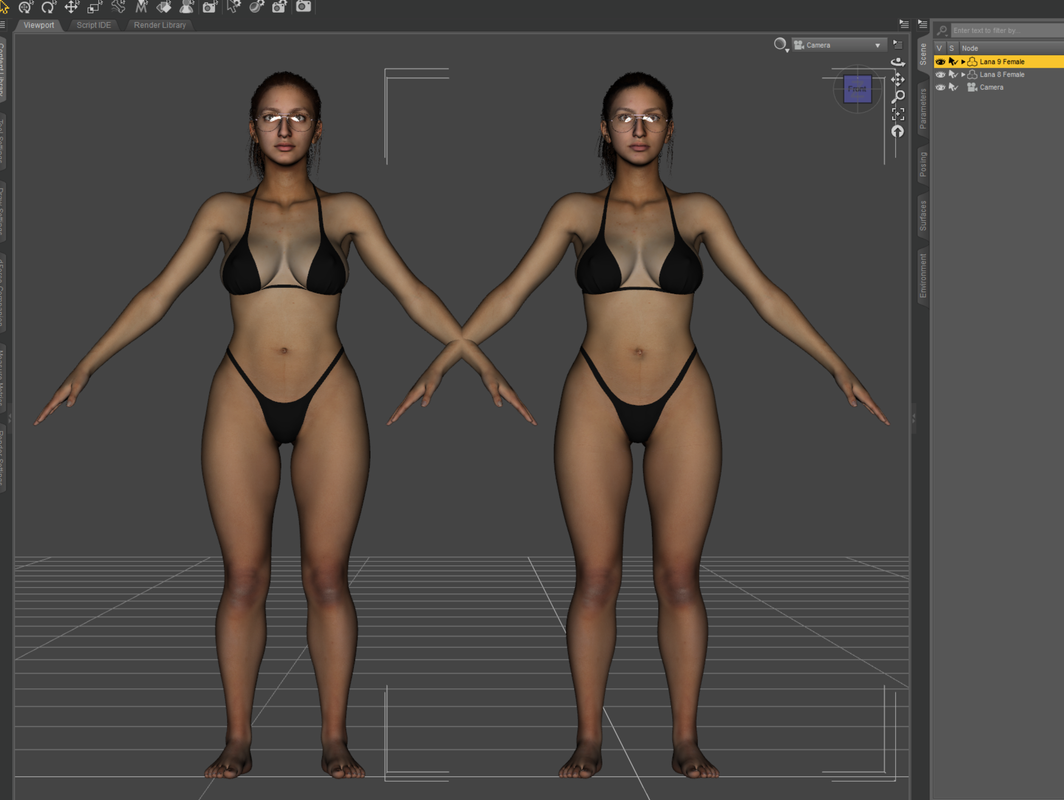
(I'll attach an image of the morphed character before any normals were created.) Also, here are additional images of the character at that point: https://www.daz3d.com/gallery/#gallery=newest&page=1&image=1253368Genesis 8 or 8.1 shapes on genesis 9?I not used a transfer utility, because with that you can't transfer textures too, i used a WRAP tool to do that:
 Getting on the 9 train, or not
I'm not going to rule out buying content for G9 but I doubt if there will be a deep dive. I render mostly males so I have nothing to work with at this point. I am used to the idea of not getting any content for the males early on but in the past I had the basic morph pack so I could at least make changes to the head and body. We are several days in now and still no basic morphs. I know they are coming "soon" but I really dislike the base characters of all the Genesis iterations. I am also starting to think that there will be even less content aimed at the male side than there is now. I am afraid the prevailing attitude will be "there is plenty of content - put it on G9 and slide the masculine slider on - Voila, male content". That is basically the attitude they had with the poses in the Genesis 9 Essentials pack. That's really not going to work for me.
Just received a sales alert for Zev0s GU for G9, yet where is it? [SOLVED]takezo_3001 said:
AllenArt said:
Probably in the body morphs that we don't HAVE yet. Why they rolled it out like this is way beyond me. What a cluster....

Yeah, the solution is easy enough, just toggle the morphs, but it's not a full solution, as far as DAZ holding back the body morphs is frustrating indeed!
And whose idea was it to NOT release the morph packs along with a new figure?!
Hopefully, it will come out either later today or Monday!
EDIT: Thanks go to Zev0 for fixing this issue!
Yes, I think Zev0 went above and beyond on this one. Daz owes him for the aggravation ;)
Growing Up for Genesis 9 (Commercial)I just loaded this with DIM, and then copied the patch files. The Base Morph works, and the presets, and zero utilies work, and the new Flatten morph works. None of the other sliders seem to do anything, or even want to move. No errors reported.
Tested on a fresh base V9 and base G9 with male character applied.
Also, GU for G9 does not show up in Smart Content/Shaping, unlike GU for previous generations.
Just received a sales alert for Zev0s GU for G9, yet where is it? [SOLVED]AllenArt said:
Probably in the body morphs that we don't HAVE yet. Why they rolled it out like this is way beyond me. What a cluster....
Yeah, the solution is easy enough, just toggle the morphs, but it's not a full solution, as far as DAZ holding back the body morphs is frustrating indeed!
And whose idea was it to NOT release the morph packs along with a new figure?!
Hopefully, it will come out either later today or Monday!
EDIT: Thanks go to Zev0 for fixing this issue!
Growing Up for Genesis 9 (Commercial)Zev0 said:
Yep I'm gonna ask why it's doing this. When a linked morph is missing, it should not be auto dialing. It should remain inactive. My apologies for the results users are getting, I did not expect this to happen.
 I will try and upload a quickfix (if possible) here in the thread.
Not your fault. It's usually standard practice when a new figure is released to also release the head and body morphs ON THE SAME DAY. This iteration of Daz must have missed the memo.
Just received a sales alert for Zev0s GU for G9, yet where is it? [SOLVED]AllenArt said:
takezo_3001 said:
Gordig said:
I'm playing around with it now, and it looks like the Growing Up morph largely overrides the masculine and feminine body sliders, and the GU breast morphs just move the breasts side to side. Seems pretty half-baked to me, and hopefully it gets a quick update.
I can confirm that I have the same issue, I mean sure, worse comes to worst I'll just Zbrush the issue away, but there should be no need; I'm hoping that it's not a DAZ mandate, which would entirely defeat the product's purpose! To be clear, I'm not saying it is or isn't a DAZ mandate, just hoping it's not.
EDIT: My issue is that two breast morphs stay enabled when they should be turned off when the youth morph is applied, the GU_body_cbs_Breast_Gone_Null, and the GU_body_cbs_Breast_Small_Null.
Probably in the body morphs that we don't HAVE yet. Why they rolled it out like this is way beyond me. What a cluster....
As the PA's have had access to G9/V9 and the morph packs for some time before the release, there is a surprising amount of problems surfacing at this late stage, were there no nerds amongst the ones that had access to them before release?
Once upon a time when I was in a small, invitation only beta group for a hardware/software manufacturer... Everything went well and we found issues they hadn't found in house, sometimes we even found the culprits, but it all went to that dark place when they started letting people in that had no understanding of hardware or software in general, never mind being able to troubleshoot anything and the inbox started filling with messages that had nothing to do with the hardware or software that was being tested - That was when I got out.
AOBB's test freebie head morph Genevieve G9. No materials nor textures.@nonesuch00 - I'm glad you like her! I didn't base her on anyone. She just came out that way and her name sort of popped into my head and I liked it, so I used it .That is the whole story. If I based her on someone, I wouldn't allow commercial use of this morph.
I already made a Catherine Deneuve head morph named Belle...

I'm very much looking forward to seeing your rendering!
AOBB
Getting on the 9 train, or notI am waiting for more content to come. Mostly morph packs or characters with materials, that look irresistible.
Just received a sales alert for Zev0s GU for G9, yet where is it? [SOLVED]takezo_3001 said:
Gordig said:
I'm playing around with it now, and it looks like the Growing Up morph largely overrides the masculine and feminine body sliders, and the GU breast morphs just move the breasts side to side. Seems pretty half-baked to me, and hopefully it gets a quick update.
I can confirm that I have the same issue, I mean sure, worse comes to worst I'll just Zbrush the issue away, but there should be no need; I'm hoping that it's not a DAZ mandate, which would entirely defeat the product's purpose! To be clear, I'm not saying it is or isn't a DAZ mandate, just hoping it's not.
EDIT: My issue is that two breast morphs stay enabled when they should be turned off when the youth morph is applied, the GU_body_cbs_Breast_Gone_Null, and the GU_body_cbs_Breast_Small_Null.
Probably in the body morphs that we don't HAVE yet. Why they rolled it out like this is way beyond me. What a cluster....
Growing Up for Genesis 9 (Commercial)MickyBe said:
Ghatanothoa said:
MickyBe said:
Zev0 said:
MarcCCTx said:
It doesn't seem to work as well on the younger ages even boosting it with the built in flatten morphs (masculine or feminine) Here's 5-6 GU Youth Chest Flatten auto set to 100.
I'm confused. Others are getting it to work? Can I see all currently used morphs on that please.
Growing Up with either masculine or feminine morph using 5-6 or 9-10 works fine here ...
No, it doesn't look fine. The 5-6 versions do, but the female 9-10 version does not! The female 9-10 version still has too big breasts. Your pics clearly show that. No 9-10 year old girl has such a breast shape. At that age there still shouldn't be any difference to the masculine breast shape.
Edit: But maybe you just need to increase the chest flatten morph for the 9-10 girl in that case. 62% seems insufficient here.Yup, you're right, 62 is too low ...
Here is 100 and 150%150% looks close to correctness. So I guess you need to set the flat chest morph somewhere between 150% and 180% for the 9-10 girl.
Growing Up for Genesis 9 (Commercial)Ghatanothoa said:
MickyBe said:
Zev0 said:
MarcCCTx said:
It doesn't seem to work as well on the younger ages even boosting it with the built in flatten morphs (masculine or feminine) Here's 5-6 GU Youth Chest Flatten auto set to 100.
I'm confused. Others are getting it to work? Can I see all currently used morphs on that please.
Growing Up with either masculine or feminine morph using 5-6 or 9-10 works fine here ...
No, it doesn't look fine. The 5-6 versions do, but the female 9-10 version does not! The female 9-10 version still has too big breasts. Your pics clearly show that. No 9-10 year old girl has such a breast shape. At that age there still shouldn't be any difference to the masculine breast shape.
Edit: But maybe you just need to increase the chest flatten morph for the 9-10 girl in that case. 62% seems insufficient here.Yup, you're right, 62 is too low ...
Here is 100 and 150%Growing Up for Genesis 9 (Commercial)Thats because you are blending in V9's body morph which has breasts on it. Dial down v9's body shape. Growing Up is and has always been about blending morphs together at the right values. You will not get great results if everything is dialed in at full.
Victoria 9 HD Pre Purchase Disappointment IssuesAlso waiting on the free pre-order items, though since the morphs to make a character interesting are not available I'm not really concerned
Until I can transfer existing character faces from G8 to G9 and convert poses I have no interest in using G9 for my regular rendering needs
Growing Up for Genesis 9 (Commercial)MickyBe said:
Zev0 said:
MarcCCTx said:
It doesn't seem to work as well on the younger ages even boosting it with the built in flatten morphs (masculine or feminine) Here's 5-6 GU Youth Chest Flatten auto set to 100.
I'm confused. Others are getting it to work? Can I see all currently used morphs on that please.
Growing Up with either masculine or feminine morph using 5-6 or 9-10 works fine here ...
No, it doesn't look fine. The 5-6 versions do, but the female 9-10 version does not! The female 9-10 version still has too big breasts. Your pics clearly show that. No 9-10 year old girl has such a breast shape. At that age there still shouldn't be any difference to the masculine breast shape.
Edit: But maybe you just need to increase the chest flatten morph for the 9-10 girl in that case. 62% seems insufficient here.Growing Up for Genesis 9 (Commercial)here a overview
1. G9 Base Female
2. G9 Base Female + VYK Sydney for Genesis 9
3. G9 Base Female + V9
No extra Flatten Morph active.Growing Up for Genesis 9 (Commercial)Zev0 said:
MarcCCTx said:
It doesn't seem to work as well on the younger ages even boosting it with the built in flatten morphs (masculine or feminine) Here's 5-6 GU Youth Chest Flatten auto set to 100.
I'm confused. Others are getting it to work? Can I see all currently used morphs on that please.
Growing Up with either masculine or feminine morph using 5-6 or 9-10 works fine here ...
Growing Up for Genesis 9 (Commercial)hm i did another test.
G9 Base Female Works
G9 Base with V9 Body gives Problems.Both has the Flatten Morph 100% acitve.
Werwulf for Genesis 9 [commercial]RawArt said:
Eboshijaana said:
Now I know this is not the intended use, but I thought I'd note this. When you apply shaping from the Smart Content menu, in this case Zev0's Growing Up, this happened XD
It looks like the eyes are no longer auto following, or that the other morph you applied is not also applied to the eyes.
I do not have "Growing up" for Genesis 9, so I cannot really say.
But I do know my character works with all the proportion morphs that come with G9
Good to know. If I apply the morphs through parameters it won't do that, so I'm guessing it might be a G9 growing pains bug.
Daz 3D is part of

Connect
DAZ Productions, Inc.
7533 S Center View Ct #4664
West Jordan, UT 84084Licensing Agreement | Terms of Service | Privacy Policy | EULA
© 2026 Daz Productions Inc. All Rights Reserved.