-
Anime Toons and Filatoon Shader Q&A
scorpio said:
Is this an actual Shader - ie it can be applied to anything?
Does the latest version of DS 4.23 work in windows 10, I've got the impression that it needs windows 11?
Yes it is an actual shader and it can be applied to anything - and then use Filament to render it out. The scripts supplied will create an outline and set up the shader in your surfaces tab, then you can tweak till its how you like it.
I prefer to disconnect all the other maps and only use a base map, and then tweak the rim lighting.I am not sure about the windows 10 question, I will ask. I however don't think that's the case. Edit to add - yes it works fine on Windows 10
Vicky 9 thoughts - Filament render only for cel-shading?caravelle said:
ArgleSW said:
You can try it now by updating to 4.23. Here is a quick render test.
Looks very good. But why do we need a Vicky 9 then? Toon figures, even those with an anime look, are already available in the shop (sorry; they all look very similar to me). But anime & co. aren't my genre anyway.
More choice, and aimed at Filament renders? After all, we don't really need any new character at this point, there are already so many available in the shop... (and quite a few of them look very similar to me as well ;-) ).
Anime Toons and Filatoon Shader Q&AMark_e593e0a5 said:
If I undrestand this correctly, the shaders only work in Filament render mode - which is not available at all on Mac up until current 4.22 version. Mac users have been instructed NOT to upgrade to 4.23, so I cannot check if it has been made avilable - suppose it isn't. I really like the look of the shaders, but they seem to be not useable for me. Please tell me I am wrong.
Unfortunately you are correct - but there are work going on behind the scenes to get it out to mac users as soon as possible. The shader relies on filament to work properly.
Anime Toons and Filatoon Shader Q&AIf I undrestand this correctly, the shaders only work in Filament render mode - which is not available at all on Mac up until current 4.22 version. Mac users have been instructed NOT to upgrade to 4.23, so I cannot check if it has been made avilable - suppose it isn't. I really like the look of the shaders, but they seem to be not useable for me. Please tell me I am wrong.
Premier QuestionsRod Wise Driggo said:
Well, my questions as a Mac user. If I subscribe Premier,...
- when will I be able to download and use 4.23? (read something that Mac users should wait)?
- when will all MF plugins work on Mac or will some of them probably never?
- does that FilaToon-thing run on Mac?
- If you're only using the public release and not the public beta, you still need to wait for the next public release because some plugins won't work on it.
- I tested with OBJ Companion and Seamster, who didn't work on the last 4.22.1.XXX public beta (who are, as far as I understand thing, the builts used to test Daz 4.23) but with the previous and current public beta (4.23.0.3 and 4.23.0.4), they are working fine.
- I don't think it will: it's based on Filament and as far as I can see, Filament is still not a thing for Mac even with the latest public beta. Maybe it's part of the recently released 4.23 Default ressources, but I'm not sure I want to install it to check with the beta version as long as the public release is not updated with the fix to the plugins.
The Mac FAQOK guys, guess this is finally the right place for my questions. So DAZ is talking a lot about Premier. And I am thinking about subscribing.
I was asking about the ManFriday plugins (like dForce Assistant or RenderQueue) which I was always interested in but which have been Win Only. One day after that I had an orange banner - just one day - stating that Mac users will get full plugin functionality but should not download Studio 4.23 at the moment.Well, Studio Premier is a vital part of the whole Premier thing, but...
- will Studio Premier have feature parity between Win and Mac? E.g. filament is a thing we are waiting for since ages or was that recently implemented?
- will all the ManFriday plugins be available for Mac and when?
- when to expect a first public version of 4.23 for Mac. I mean if I would subscribe Premier today, how many months would I pay for something I cannot fully use?
- is that new FilaToon-Thing available for Mac at all or is it limited to 4.23, which is of course not yet running properly on Macand finally
- when can we finally expect a real native Apple Silicon version of studio. It's ages since the M1 was released.
Vicky 9 thoughts - Filament render only for cel-shading?So, in terms of your Iray products, so far I've had plenty of success just messing around with a applying the toon filament shaders to iray clothing, environments, etc so I'd say theres plenty of use for your older products though heavily painted in base colours will likely look a wee bit odd.
Of course, if toon was never your thing, this isn't going to suddenly change your mind. But I reckon it's sort of like, a taste thing. Like retro tech isn't really my thing, but I never thought to myself "Why did they release that? I don't even like retro tech." if you see what I mean aha
I love anime, this particular shape/style isn't may absoloute favourite, but just the system being here now makes me super excited for what PAs might create in the future.
Like I'd love to see a more modern style as well. Anime comes in all sorts of styles though, I love seeing them all! (quick render here, obvious I didn't get around to hair aha)
Anime Toons and Filatoon Shader Q&AFinally the toons and the filatoon shaders are available :) I haven't had this much fun with a new feature in Daz Studio in a long time, and pretty much everyone who had the opportunity to test and play with it said the same.
You will find a new folder called Genesis 9 Toon with 2 figures - Genesis 9 Base Anime Feminine and Genesis 9 Base Masculine. MallenLane did an absolutely amazing job on sculpting and rigging the toons, everytime I use them I smile because its such a pleasure to work with :)
The Filatoon shader is used in combination with Filament’s fast rendering. The toon outline is accomplished by creating a geometry shell and applying a special shader to it.
***A general request - please don't post in this thread if all you have to say is you don't like it, it creates long threads to wade through in search of answers - I'd like to keep this thread easy to read for those users serious about wanting to learn and use the shaders and figures.
edit : under render settings I'm recommending to turn mipmaps off, but test with both options to get the best result for your image
Text for translation purposes:
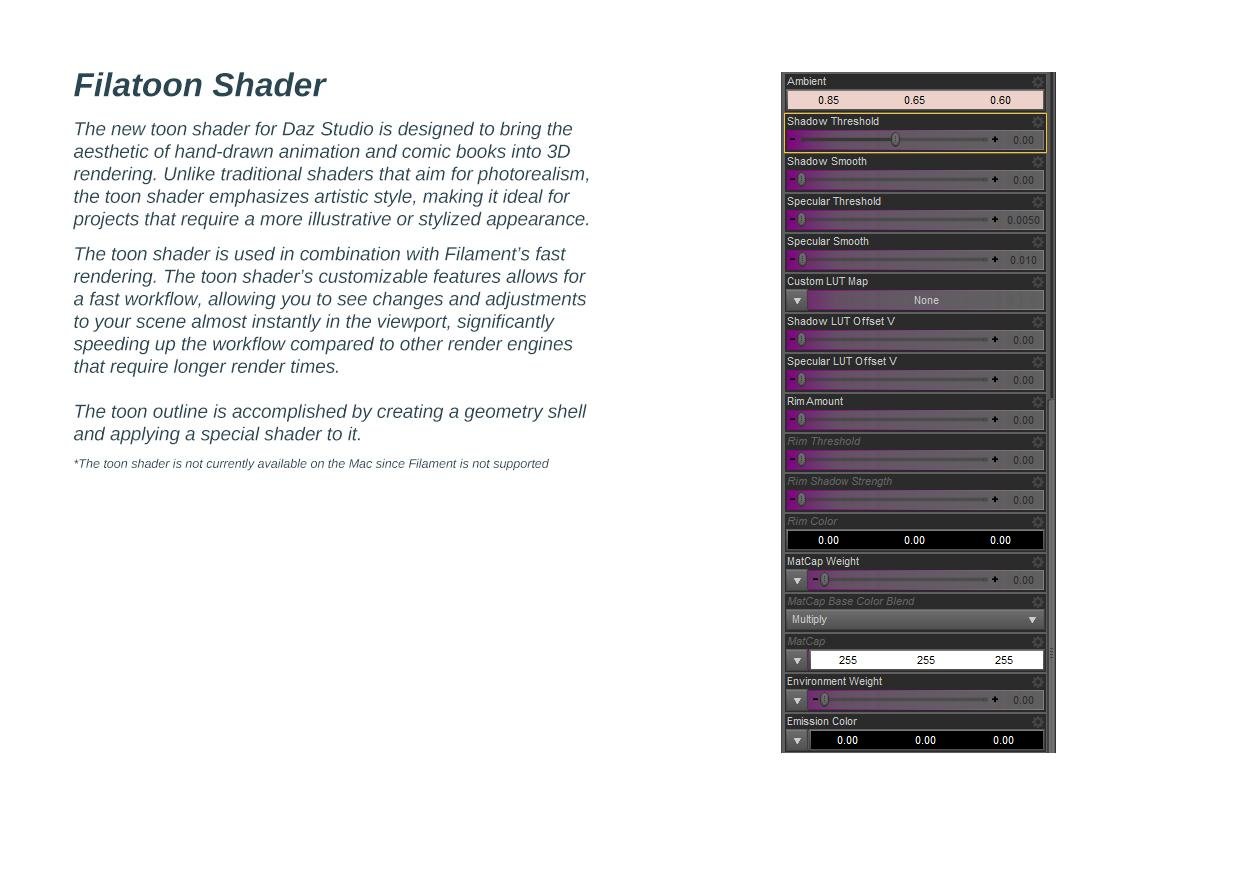
Filatoon ShaderThe new toon shader for Daz Studio is designed to bring the aesthetic of hand-drawn animation and comic books into 3D rendering.
Unlike traditional shaders that aim for photorealism, the toon shader emphasizes artistic style, making it ideal for projects that require
a more illustrative or stylized appearance.
The toon shader is used in combination with Filament’s fast rendering. The toon shader’s customizable features allows for a fast
workflow, allowing you to see changes and adjustments to your scene almost instantly in the viewport, significantly speeding up
the workflow compared to other render engines that require longer render times.The toon outline is accomplished by creating a geometry shell and applying a special shader to it.
*The toon shader is not currently available on the Mac since Filament is not supported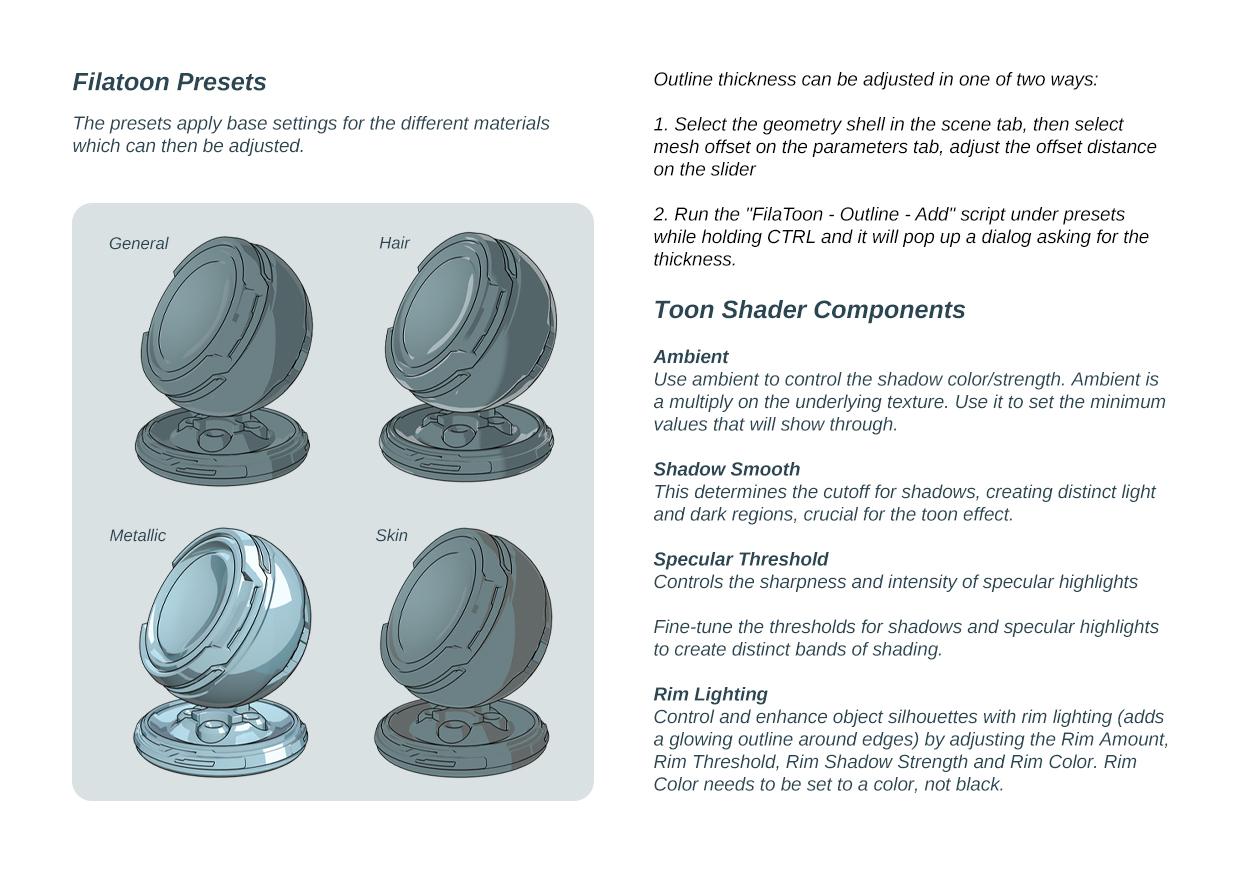
Text for translation purposes:
Filatoon Presets
The presets apply base settings for the different materials which can then be adjusted.
Outline thickness can be adjusted in one of two ways:
1. Select the geometry shell in the scene tab, then select mesh offset on the parameters tab, adjust the offset distance on the slider
2. Run the "FilaToon - Outline - Add" script under presets while holding CTRL and it will pop up a dialog asking for the thickness.
3. Filatoon - Constant
Use this preset for items that do not require an outline or shadow. The shadow line and outline are turned off, making it suitable for elements like eyelashes (which use alpha textures), irises, eye highlights, and eyebrows. It's also ideal for any clothing details where an alpha channel for opacity is necessary. It will remove the geoshell.4. Filatoon - General
Ideal for use with clothing, props, and environments. This preset includes a standard gray ambient shadow and a subtle rim light, providing a balanced and versatile toon shading effect.
*Can be applied to individual materials and tweaked5. FilaToon - Hair
Specifically designed for use with hairstyles, ensuring that hair renders with the appropriate toon shading properties.6. FilaToon - Skin
Tailored for characters' skin, this preset ensures that skin tones and details are shaded correctly within the toon shader framework.7. FilaToon - Metallic
Perfect for metallic items such as buckles. This preset enhances the reflective and shiny characteristics of metallic surfaces within the toon shader. Adjust the environment weight on the shader (last one on the list)... slide it from 0 until you get the effect you wanted.
Toon Shader Components
Ambient
Use ambient to control the shadow color/strength. Ambient is a multiply on the underlying texture.
Use it to set the minimum values that will show through.Shadow Smooth
This determines the cutoff for shadows, creating distinct light and dark regions, crucial for the toon effect.Specular Threshold
Controls the sharpness and intensity of specular highlightsFine-tune the thresholds for shadows and specular highlights to create distinct bands of shading.
Rim Lighting
Control and enhance object silhouettes with rim lighting (adds a glowing outline around edges) by adjusting the Rim Amount,
Rim Threshold, Rim Shadow Strength and Rim Color. Rim Color needs to be set to a color, not black.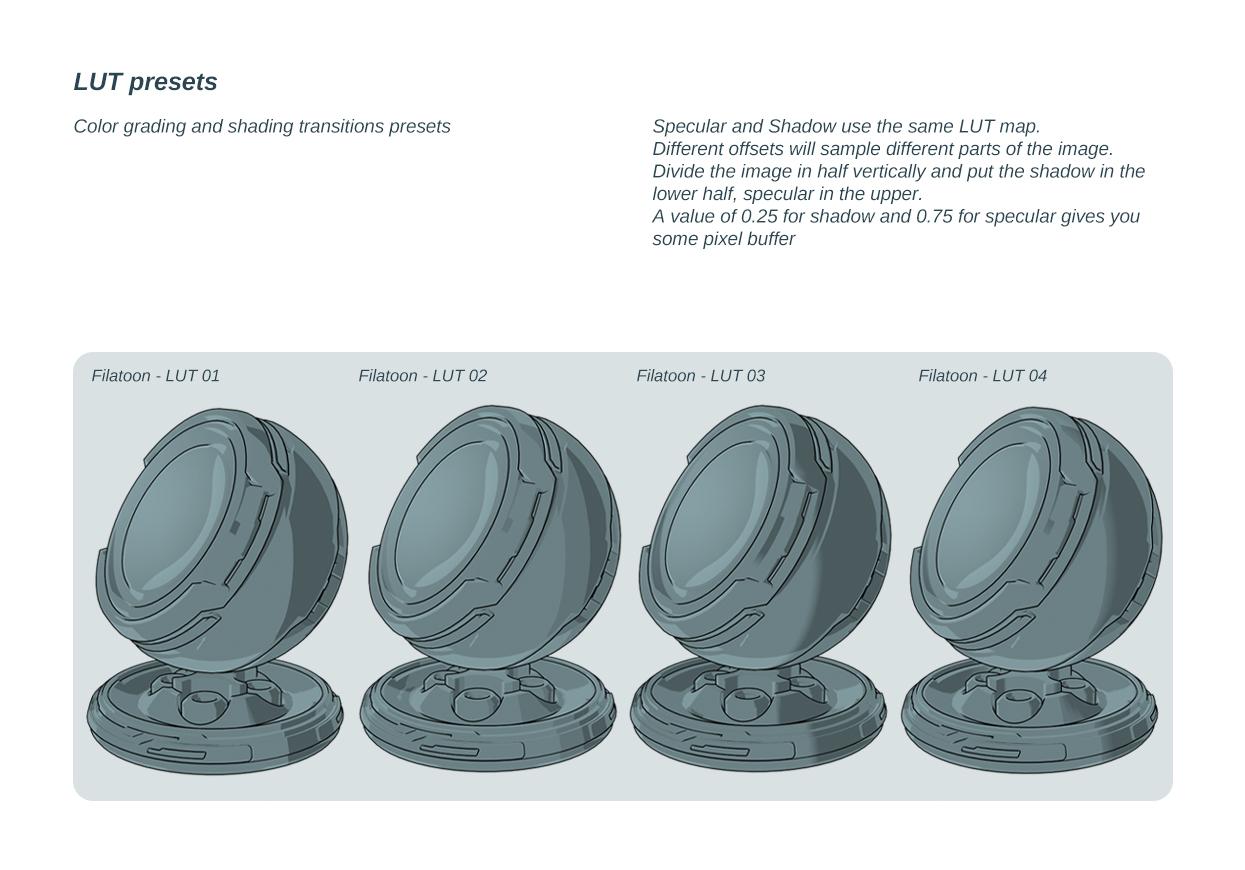
LUT presets
Color grading and shading transitions presets
Specular and Shadow use the same LUT map.
Different offsets will sample different parts of the image.
Divide the image in half vertically and put the shadow in the lower half, specular in the upper.
A value of 0.25 for shadow and 0.75 for specular gives you some pixel buffer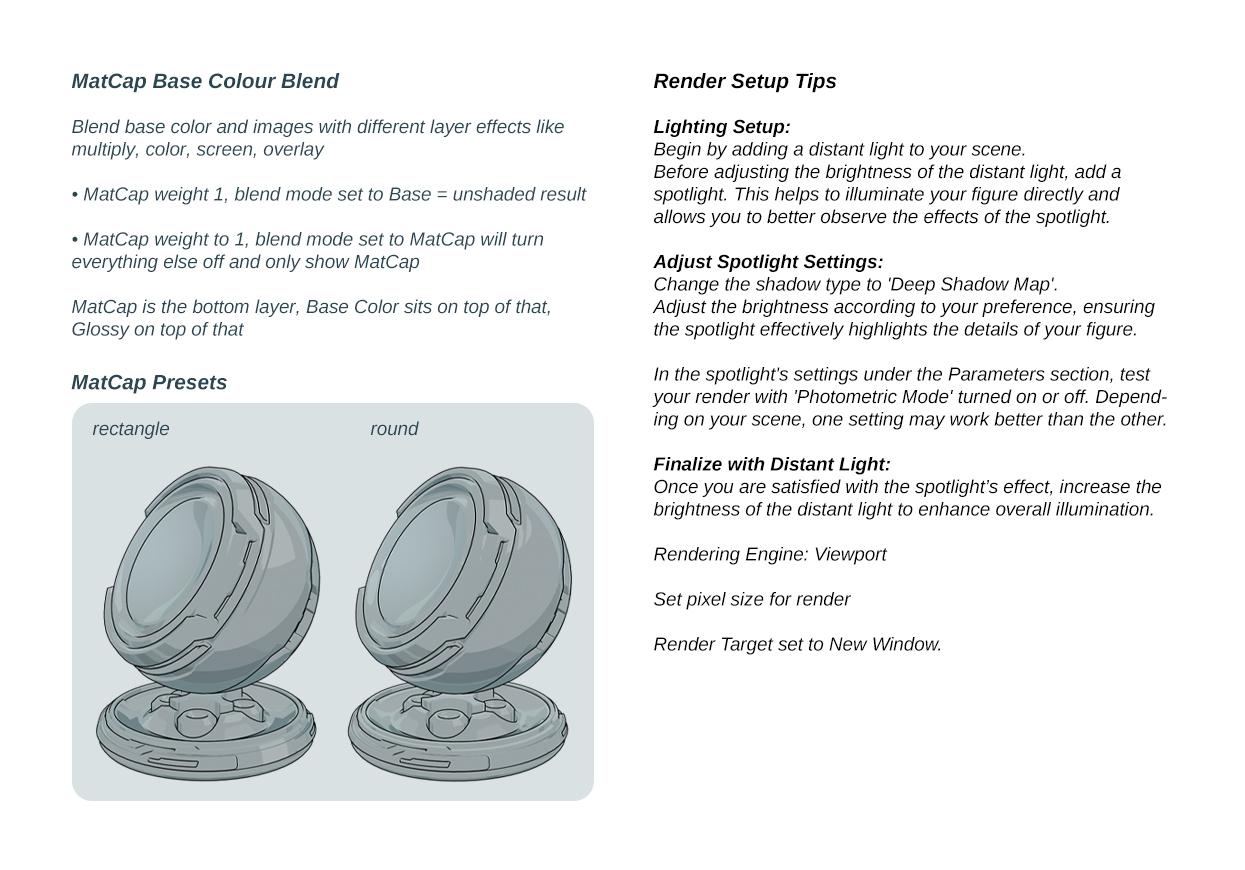
Text for translation purposes:
MatCap Base Colour BlendBlend base color and images with different layer effects like multiply, color, screen, overlay
• MatCap weight 1, blend mode set to Base = unshaded result
• MatCap weight to 1, blend mode set to MatCap will turn
everything else off and only show MatCapMatCap is the bottom layer, Base Color sits on top of that, Glossy on top of that
Render Setup Tips
Lighting Setup:
Begin by adding a distant light to your scene
Before adjusting the brightness of the distant light, add a spotlight. This helps to illuminate your figure directly and allows you to better observe the effects of the spotlight.Adjust Spotlight Settings:
Change the shadow type to 'Deep Shadow Map'.
Adjust the brightness according to your preference, ensuring the spotlight effectively highlights the details of your figure.In the spotlight's settings under the Parameters section, test your render with 'Photometric Mode' turned on or off. Depending on your scene, one setting may work better than the other.
Finalize with Distant Light:
Once you are satisfied with the spotlight’s effect, increase the brightness of the distant light to enhance overall illumination.Rendering Engine: Viewport
Set pixel size for render
Render Target set to New Window.
Q : Where can I find the FilaToon shader scripts
A : My DAZ 3D Library > Shader Presets > Filatoon. Under that you will find FilaToon - Base and Filatoon - Outline. You can also apply any of the presets and it will create the outline geoshell if it doesn't exist (except for FilaToon - Constant, it will apply the shader without the outline). If everything is black after you apply the preset make sure you're in the Filatoon renderer, and either turn on Auto Headlamp or add some lights.Q : How do I accentuate the black line in the middle of the nose as well as the lips?
A : Mouth Lips Part (3 shapes and 1 overall controller) was added under Pose Controls>Head>Mouth>Base Anime to control the gap between the lips to force line visibility at the lip seam; lines require a gap of space between geometry to appear. Three different regions so you can show the line where you want it, for things such as side smirk etc.Q : the outline is dotted or not showing on clothing
A : the outline shell needs to have a bit of thickness and if for example the edge is just a thin mesh it loses the line. First thing you can try to improve it is to use the expand all on the clothing item, the geoshell sometimes get hidden by the body if its tight fitting, so looser is better in this case. That should fix the dot lines.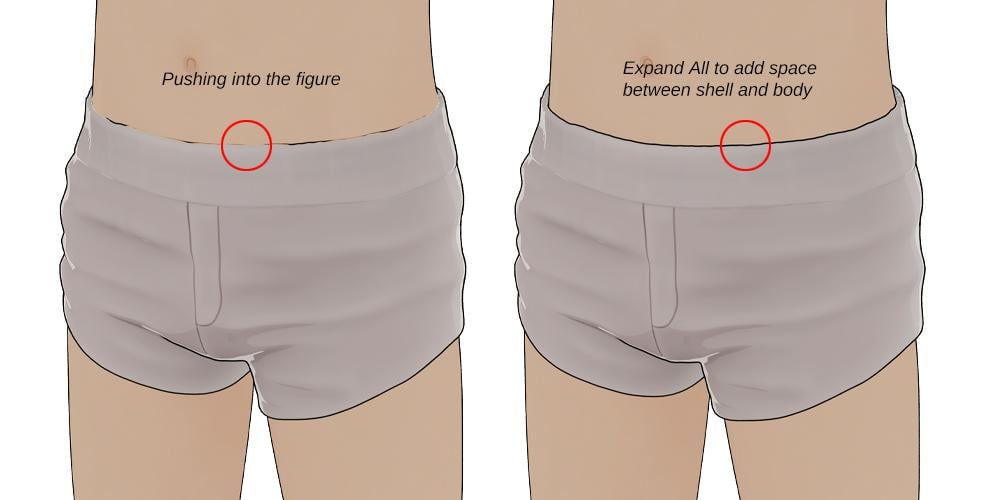
Q: How to make a surface looks metalic with FilaToon and Filament drawstyle
A: Apply the metallic preset to your item, then find the environment weight on the shader (last one on the list)... slide it from 0 until you get the effect you wanted.Q: The eyes create an optical illusion of always looking at the viewer
A: If you load a Toon figure and zero out the anime morph to get the default Genesis and that happens, you can use Toon Iris Depth Left and Right to fix it :)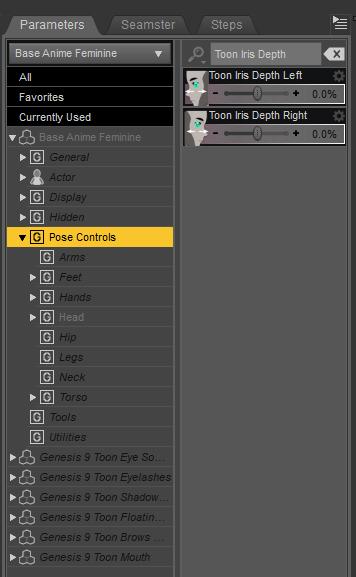
Tips and tricks from users in this thread :
Lights parented to nulls : https://www.daz3d.com/forums/discussion/comment/8905426/#Comment_8905426How do I use strandbased hair :
https://www.daz3d.com/forums/discussion/comment/8908286/#Comment_8908286
https://www.daz3d.com/forums/discussion/comment/8908356/#Comment_8908356
A: You need to have line tesselation set to 3 for both viewport and renderHow to control the effect of the specular highlights : https://www.daz3d.com/forums/discussion/comment/8920431/#Comment_8920431
How to use transmapped hair : https://www.daz3d.com/forums/discussion/comment/8923351/#Comment_8923351FilaToon / Cell shaded rendering with FilamentIs the running on Mac? Mac did never get filament in the first place.
FilaToon / Cell shaded rendering with FilamentJust for clarity, we Mac users have no access to Filament, no current access to 4.23, and hence can't really use the product?
Premier QuestionsCybersox said:
doubledeviant said:
Vicky 9 Anime Dark Elf Shape Add-On
Premier exclusive, huh? Is this going to be a regular thing - Daz picking items that would likely be popular and locking them behind the Premier subscription?
Going from bad to worse. Would've carted today's bundles with little to no hesitation in the past. Now I'm debating whether to spend $2.99 for the doorbuster because supporting Daz is becoming that distasteful. Sad state of affairs.What's especially annoying is that they're kind of glossing over the fact that the new figures are being rendered in Filament, not Iray. So, now you can get a semi-decent shader on the figure and the specifc outfits, the rest of the scene and any other clothes/hair will be shaderless.
doesn't the Filament shader work on anything?
not tried but holding ctl and choosing ignore maps should work
FilaToon / Cell shaded rendering with Filamentwell there's always 3Delight with various shader products for those who prefer that
and even a couple for iray
I don't mind more Filament shaders myself
Vicky 9 thoughts - Filament render only for cel-shading?AllenArt said:
Is Vicky 9 going to be a toon now or is this just a toon version of Vicky 9? Reason I ask is because I could not be LESS interested in a toon figure, especially anime. Ya keep disappointing me this week Daz ;)
It's a completely new sculpt... and not a bad one for trying to get a 2D effect on a 3D figure with a shader. Unfortunately, the whole thing appears to be based around the Filament renderer, and the info I'm finding makes it sound like it's going to be only partially compatible with a lot of iray products.
Premier Questionsdoubledeviant said:
Vicky 9 Anime Dark Elf Shape Add-On
Premier exclusive, huh? Is this going to be a regular thing - Daz picking items that would likely be popular and locking them behind the Premier subscription?
Going from bad to worse. Would've carted today's bundles with little to no hesitation in the past. Now I'm debating whether to spend $2.99 for the doorbuster because supporting Daz is becoming that distasteful. Sad state of affairs.What's especially annoying is that they're kind of glossing over the fact that the new figures are being rendered in Filament, not Iray. So, now you can get a semi-decent shader on the figure and the specifc outfits, the rest of the scene and any other clothes/hair will be shaderless.
FilaToon / Cell shaded rendering with FilamentI just started a thread on the new Base figure asking this same question, as it looks like all of the shader effects shown are exclusive to Filament. The promo at Daz 3D is suspciously specific about it being compatible with "most" G9 shaders and doesn't mention any other figure generations, nor does it mention background items. That, combined with the lack of much in the way of backgrounds in the promos makes me suspect that there's not currently a method... beyond rendering the backgrounds and props in Iray or 3DL print with a different shader program and then marrying the two in post. I'd be glad to be proven wrong, of course, but filament won't even render a lot of basic items without add-on conversion packs so...
Vicky 9 thoughts - Filament render only for cel-shading?While waiting, some thoughts on the base sculpts, which are decent attempts at an anime style design, though there are already many very solid anime-style and toon-style G9 characters already. It would be great if these effects could be used with those other figures, as well as the earlier generation figures, but the info I'm reading so far isn't very encouraging.
I can't find info on the FIlaToon shader beyond the very rudimentary stuff at the Filatoon promo at Daz 3D to find out if it can be applied to anything else, but at the moment it looks like one will either have to 1.) put one's figures in a non-toon shadered set, in FIlament, which has a lot of issues with Iray and 3DL materials, or 2.) render out the background elements seperately using the renderer they were designed for and convert them to a toon style as a flat image and composite with the foreground figure in post, or 3.) hand create new toonified textures for all of the props, etc.
Let's appreciate/discuss today's new releases - more ongoinger threadDefinitely an interesting direction. I'm sure there is a market for it.
And a reason to play with Filament, if that's what it takes for the cel shading.
Vicky 9 thoughts - Filament render only for cel-shading?As the caption says, it looks like the new Vicky anime style character is really only set up for Filament if you want the cel shading effect. Is this correct?
FilaToon / Cell shaded rendering with FilamentOMG
please tell me this can be applied to other characters and generations.
DAZ 4.23 & FilamentYes, if you go to the changelog and search within the page for Filament you will find details on a number of changes that are exposed for the DrawStyle in the current General Release/Public Build
Daz 3D is part of

Connect
DAZ Productions, Inc.
7533 S Center View Ct #4664
West Jordan, UT 84084Licensing Agreement | Terms of Service | Privacy Policy | EULA
© 2026 Daz Productions Inc. All Rights Reserved.