-
Shirley Hair Gen 3 and 8
Persistance
I dug into the the program files of both the public build and the general build comparing files and copying from the public back (knowing thhe product works in the public-beta) to the general release 4.22.0.15 and finally go this product working.
The culprits were in the program files of each repsective build: bin/shaderdl.exe, and bin/shaderinfo.exe (both files dated 12/22/23 in my beta folder) when copied over to the bin file of the general release wham bam thank you Shirley for working
Well the above sounded good then I noticed I was in filament mode ughhhhhhhhh
How does Basic Depth Map Maker for Daz Studio do with transparency?maybe if it used Filament, oops not for Mac

I guess the openGL no good for transparency
How can I achieve this particular look for my characters?It looks like an older character (or rendered with something like Filament instead if iray)
If you wanted to stay with G8 and iray, possibly helpful might be:
https://www.daz3d.com/digital-touch
https://www.daz3d.com/surgical-beauty- (If you can't find a character like that you can also buy more general morph sets for the generation you're working with)
You can make the skin surfaces glossy in the surfaces tab in Daz or get a wet-look geoshell from the store
Alternatively https://www.daz3d.com/wet-body-filament-for-genesis-8-and-81 (if you want to go with Filament)
Lots of options if you go older generations too
Disappearing dForce HairI'm rendering in Filament I'm having the same problem. I changed the setting as said above. I worked for a short render but when I made a render 900 frames long it had the problem. I noticed the glass in the scene was fluctuating with the reflection of the hair. So I removed all the glass just to see if it would help. It didn't.
Daz Studio 4.23(.0.x) - Highlights4.22.1.41 (December 22, 2023)
- NVIDIA Iray
- Integrated Iray 2023.1.0 (373000.1077); see this thread for more detail
- REQUIRES:
- NVIDIA Driver 545.84 (R545) on Windows
- NOTE: 546.01 is the first Studio Driver (SD) after the minimum
- See NVIDIA Driver Downloads
- NVIDIA recommends installing Studio Drivers (SD)
- SSSE3 enabled CPU is a minimum requirement on macOS/x86
- NVIDIA Driver 545.84 (R545) on Windows
- REQUIRES:
- Canvas Support
- Added a "White Mode Albedo Canvas Color" (White Mode BSDF Weight) property to the "White Mode" property group
- Initial support for the following canvas types:
- Material Tag
- Irradiance
- Object ID
- Texture Coordinate (UVWs)
- BSDF Weight (Albedo)
- Convergence Heat Map
- Toon (Post)
- World Position
- Rendered preview (Render Window) of the "Ambient Occlusion" canvas is now temporarily attenuated for visualization purposes
- Added controls for adjusting canvas order
- Lens Control
- Added support for using the "Lens Maximum FOV" property on a camera to control the cutoff angle for rays in the "equidistant" fisheye camera model
- Texture Compression
- Added a "Texture Compression" property to the "Optimization" property group
- Path Length
- Added a "Max SSS Path Length" property to the "Optimization" property group
- ...
- Integrated Iray 2023.1.0 (373000.1077); see this thread for more detail
- Filament (Windows Only)
- Integrated Filament 1.44.0
- Added Screen Space Ambient Occlusion (SSAO) parameters to the Filament Draw Options node
- ...
- Render Settings Dimensions - User Preset Saving
- Added the ability to choose from a list of existing preset names when saving a user preset
- Unique names are required
- The list of existing preset names is provided as a shortcut for naming patterns
- Added the ability to choose from a list of existing preset names when saving a user preset
- ...
- Scripting API
- Made additions in various areas; see the Change Log for more detail
- Fixed bugs and/or made improvements in various areas; see the Change Log for details
Wow! This is New!!! Animation update?!!!Tks for that info:)) If I hear about improved functionality I'll install the latest beta immediately! Still using 4.20 on a Mac...and of course patiently waiting for MacOSX Filament update that supports multiple transparency layers
 How to work with Poser Formats wardrobe?
Poser pp2 format is a Prop, so it's likely a dynamic cloth product for Poser. Not sure why you're not seeing anything though.
Check the Surfaces pane with the babydoll selected and see if there's anything in the Cutoff Opacity parameter. It's likely that there is, and probably along with a lowered value on that slider as well.
Have you tried turning on a different view option? Smooth Shaded, Iray, Filament?
Odd.
The Limits Of 3D Printing From A Complete OutsiderDiomede said:
Any thoughts on minimum printer requirements for use with Carrara, etc? Pitfalls?
Fascinating discussion. Inspired me to look at 3D printers. The low end printers are not as expensive as I thought they would be, which says more about how high I thought the prices would be. Even so, probably out of my 2024 hobby budget (or swallow up the whole thing) depending on whether I think I would use it and how many years I think it would last. Here is a review page.
Hi Ted, I bought mine about 18 months ago? So now old tech :)
I use Creality S1 Pro. Works good. I also bought a sonic pad so I can fiddle with the software and parameters of the print and stuff.
The Sonic Pad means you can fine tine your prints and watch them on a webcam. Also change paramters on the run.
As soon as you stop watching a 3d print it goes &^%^%$$#&*)(_)__)(*(*&^*$%$^#$%# ck.
Bare in mind you are buying a printer from a foreign country - sometimes their quality is not good - same as anywhere.
When you get yours check all the nuts and biolts and tight! And check the thing is square.
So my outlay if I started today Ender-3 S1 Pro 3D Printer (creality.com) (as I said it is old fashioned now)
Creality Sonic Pad Control Screen
It doesn't hurt to have an enclosure for filaments like PETG and ABS. Keeps the temp stable.
3D Printer Multifunction Enclosure (creality.com)
It wouldn't hurt to have a selection of good quality nozzles too.
For filaments - Esun Pla plus is very good. Easy to printy and tuff.
PLA is hard to post process. If you use ABS you can hit with an acetone bath to smooth it - but I wouldn't acetone is bad for your CNS.
If you want clear looking prints - not transparent - use PETG.
CarbonFibre infused nylon was a fail on my printer - nylon is very hard to print - it warps.
For the printer you want a direct extruder - not Boden type. Means the filament comes out evenly.
You also want an auto levelinng bed = you are working in .1 mm invrements so everything has to be level.
A PEI bed means your prints will stick properly to the bed with less chance of warping.
If you print eg M4 you need to export him as a posed obj, then reimport him into carrara and remove all the extraneous inner stuff like tongue eyeballs teeth etc, and make sure stuff like the fingernails are connected to the mesh.
3d Builder which comes frr with windows is your friend as it will make your mesh wtare tight so it can be printed - it does this automagically.
Whate else?
Watch as much youtube videos as you can on a printer once you have narrowed them down.
Keep in mind that youtubve creators make money out of getting you to watch their vids. They also get free stuff from companies to review - so buyer beware.
I've found
in no particular order these people are trustworthy - what ever trustworthy means
(53) The Edge of Tech - YouTube
most of these people are nerds so be careful not to become like them ;)
Lastly - imagine going to the hardware shop and buying a hammer. Suddenly everything becomes a nail.
3d printing is like that.
After 12 months of making surfboard fins I can now make an $45 fin for 3 dolars = after an outlay of about $3000 for r and d - and my wife thinks that I am mad because of all the surfbaord fins laying around
any questions let me know :)
PS don't be fooled like me into thinking because 3d printing is affordable that means it is approachable. The more expensive printers are reputed to work perfectly all the time straight out of the box ....
a 3d printer is like having an old car that needs tinkering occasionally - and you tighten one wheel nut and all the tyres fall off ,- for no apparent reason :)
but at least you get to have fun
more links - people mainly post when they have problems
Creality Sonic Pad Official Community | Facebook
Creality Ender 3 S1 / PRO group | Facebook
Creality Ender 3 S1 / S1 Pro / S1 Plus | Facebook
The Limits Of 3D Printing From A Complete OutsiderSteve K said:
I recently saw a sculpture that I had to have and I bought it (several angles attached). It's 2'x2', weighs 50 lb, made of copper. "Folk Art" from mid 20th century.
I have done zero 3D printing. My naive question is: Can 3D printing at the hobby level get even close to something like this? Even on a smaller scale?
I realize copper is not likely an option
 , but some kind of maleable material could be made to look like metal? Or wood? Just not plastic. And many pieces to be assembled seem needed, but from the same virtual model, so the pieces fit?
Or something? And yes, I realize the words "learning curve" will come up.

short question needs a big answer :)
Short answer yes, but it's a time thing.
Especially if you are doing 2 foot squared kind of work. {My printer will do about 220 by 220 by 240 cm - but the bigger you make stuff the more chance you have of a fail)
If you want to intricate stuff then you need to use smaller layers - lots of time. Lots.
I haven't watched this video but I bet it tells you a lot

So basically, for that building, you are looking for the detail of miniatures - but lots and lots added together.
For them to fit you need to have your printer properly calibrated - whcih is doable after you watch youtube ;)
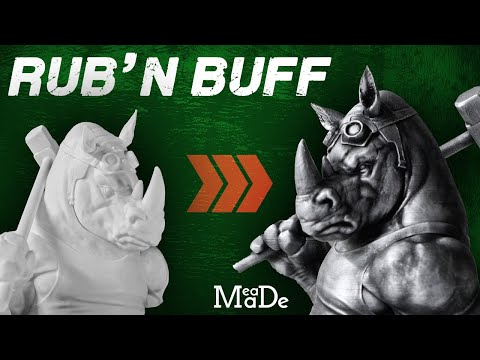
If you want an metal look you print black plastic and use rubb and buff.
 -
- If you want a wood look it isn't going to happen probably. The displacment tool in carrara is your friend o=in this - you displace the models with a wood texture from the lumber room - but then non of your peices will fit together unless they are all joined when you displace them. You can get wood laced filament but it won't look like real wood. texture is the best thing for this then rubbing wood colour on the plastic.
And carara doen't like big OBJ's as you have probably noticed.
To prepare your models use windows 3d builder and it will fix your meshes. You could also slice them into usable parts with this (not gcode slice!)
I am loading up lake village in carrara but it has stalled - though it has loaded before. Presntlat 89 percent.
I imagine for lake village you would have to export the whole as one obj,= except the boats and peripherals - bring it into 3d builder and slice it into managable parts.
if it loads I'll check it out
PS if you want something to feel heavy put nuts or sand in the bottom of the print :) Make sure they are warm though.
Error when applying materials on skinBecause the fur is made with Strand-Based Hair... You'll see the fur and its color when you render the scene.
If you wanna preview it in Viewport, turn on Preview PR Hairs and set Viewport Line Tessellation Sides >=2, then Ctrl + 0 or switch to Filament preview. (Be noted that turning on Preview PR will consume a lot of system resources RAM/VRAM, so be caucious...)
Items Loaded Washed OutLooks to me like you're in the Filament draw style. Switch to texture shaded.
Eyebrow Card 7 - help?It might be a Filament lighting and shading issue. It looks fine to me in Iray.
Eyebrow Card 7 - help?Hi. So I was trying all the eyebrows that come with Genesis 9 and I hit a little issue I don't know how to fix. eyebrow card 7 is uneven. It's most noticeable in filament view, but I can't figure out how to fix it. Does anyone know how?
Let's appreciate/discuss today's new releases - ongoing threadWendyLuvsCatz said:
Llola Lane said:
WendyLuvsCatz said:
https://www.daz3d.com/cb-habben-hd-for-genesis-8-male
https://www.daz3d.com/aldo-hd-and-mustache-for-genesis-8-male
https://www.daz3d.com/candida-hd-for-genesis-8-female
https://www.daz3d.com/grandmother-hd-addon
https://www.daz3d.com/reyna-for-genesis-8-female
https://www.daz3d.com/ovidius-for-m4
https://www.daz3d.com/reyna-addon-for-genesis-8-female
were all my free Advent picks
I skipped the day 2 textures for outfits I didn't have were offered
after getting the M4 character I added about 15 DAZ Originals to my Wishlist
Reyna and her addon were already in it
Outfits probably would work too but I deliberately chose interesting HD characters because they work well for close ups in Filament at high rez (with headwear not hair
)Thanks Wendy... wishlisted the ones I don't have... Filament has HIGH REZ???
it renders what's in the viewport so subdivision has to be set there not just in render
openGL and wireframe do too BTW
I just like that I can render several detailed characters in it close up animated talking with expressions without taking an eternity like iray would
ooo.. I didn't know about subdivision in filament... I'm gonna have to try and have a play this weekend... Thanksssssssssssssssssss!!!!
Let's appreciate/discuss today's new releases - ongoing threadLlola Lane said:
WendyLuvsCatz said:
https://www.daz3d.com/cb-habben-hd-for-genesis-8-male
https://www.daz3d.com/aldo-hd-and-mustache-for-genesis-8-male
https://www.daz3d.com/candida-hd-for-genesis-8-female
https://www.daz3d.com/grandmother-hd-addon
https://www.daz3d.com/reyna-for-genesis-8-female
https://www.daz3d.com/ovidius-for-m4
https://www.daz3d.com/reyna-addon-for-genesis-8-female
were all my free Advent picks
I skipped the day 2 textures for outfits I didn't have were offered
after getting the M4 character I added about 15 DAZ Originals to my Wishlist
Reyna and her addon were already in it
Outfits probably would work too but I deliberately chose interesting HD characters because they work well for close ups in Filament at high rez (with headwear not hair
)Thanks Wendy... wishlisted the ones I don't have... Filament has HIGH REZ???
it renders what's in the viewport so subdivision has to be set there not just in render
openGL and wireframe do too BTW
I just like that I can render several detailed characters in it close up animated talking with expressions without taking an eternity like iray would
Let's appreciate/discuss today's new releases - ongoing threadWendyLuvsCatz said:
https://www.daz3d.com/cb-habben-hd-for-genesis-8-male
https://www.daz3d.com/aldo-hd-and-mustache-for-genesis-8-male
https://www.daz3d.com/candida-hd-for-genesis-8-female
https://www.daz3d.com/grandmother-hd-addon
https://www.daz3d.com/reyna-for-genesis-8-female
https://www.daz3d.com/ovidius-for-m4
https://www.daz3d.com/reyna-addon-for-genesis-8-female
were all my free Advent picks
I skipped the day 2 textures for outfits I didn't have were offered
after getting the M4 character I added about 15 DAZ Originals to my Wishlist
Reyna and her addon were already in it
Outfits probably would work too but I deliberately chose interesting HD characters because they work well for close ups in Filament at high rez (with headwear not hair
)Thanks Wendy... wishlisted the ones I don't have... Filament has HIGH REZ???
Let's appreciate/discuss today's new releases - ongoing threadhttps://www.daz3d.com/cb-habben-hd-for-genesis-8-male
https://www.daz3d.com/aldo-hd-and-mustache-for-genesis-8-male
https://www.daz3d.com/candida-hd-for-genesis-8-female
https://www.daz3d.com/grandmother-hd-addon
https://www.daz3d.com/reyna-for-genesis-8-female
https://www.daz3d.com/ovidius-for-m4
https://www.daz3d.com/reyna-addon-for-genesis-8-female
were all my free Advent picks
I skipped the day 2 textures for outfits I didn't have were offered
after getting the M4 character I added about 15 DAZ Originals to my Wishlist
Reyna and her addon were already in it
Outfits probably would work too but I deliberately chose interesting HD characters because they work well for close ups in Filament at high rez (with headwear not hair
)AIUTO...CHI CONOSCE L’ITALIANO? PARTE QUATTORDICISono anni che IRay è solo uno spreco. Sono stupito che ci sia ancora qualcuno che lo difende quando DAZ Studio stesso ha già integrato un motore migliore, Filament, ma trascurato perchè alla NVidia son felici di vendere blocchi di otto GPU alla volta per renderizzare francobolli in intere giornate.Filament e' una sorta di via di mezzo tra Shaded Texture ed iRay, va bene per lavorare in realtime, ma non tanto bene per i render finali. Nasce come motore di rendering Google per gli smartphone con hardware limitato rispetto a GPU discrete.
NVidia ha venduto iRay da un po.. chiaramente non tiente botta con Unreal a livello di prestazioni, pero' e' relativamente semplice da usare e non richiede trucchi particolari. Di default DAZ non ottimizza praticamente nulla la scena, quindi i render sono molto lenti. In base al formato finale e' possibile utilizzare dei pacchetti che ottimizzano (ridimensionano) le texture, rimuovono gli oggetti non visibili, etc.. tool di denoising fanno poi il resto. Una scheda video recente e' comunque praticamente obbligatoria per iRay. Il trucco migliore e' pero´dividere la scena in primo piano ed ambientazione. Si fa un render seperato dell'ambientazione e si crea un HDRI, si usa poi questo file nel rendering finale col personaggio e qualche oggetto in primo piano. Se devi renderizzare ogni volta tutta l'ambientazione, se e' ricca non c'e`scheda video che tenga.
AIUTO...CHI CONOSCE L’ITALIANO? PARTE QUATTORDICIImago said:
"Senza le maiuscole! Senza i punti!" Cit.
Da tutto questo discorso capisco che vuoi il fotorealismo ma IRay è troppo sfasciato per avere un buon risultato nel corso di una sola vita.
Giusto?Puoi provare con Filament, ci sono un pò di shader pronti nel negozio e con un pò di trucchi puoi ovviare al problema delle ombre mozzate e delle trasparenze folli.
Interessante.. molto interessante..
 Butto un occhio!AIUTO...CHI CONOSCE L’ITALIANO? PARTE QUATTORDICI
RCR-2631227 said:
Per quanto mi riguarda, tanti anni fa usavo AR di Cinema 4D e ricordo che, coi sistemi di allora e parliamo di non meno di 15 anni fa, facevo render puntando al fotorealismo, perchè facevo render di interni e ho sempre avuto il pallino del fotorealismo, la fissa, che c'è anche oggi quando sto con Iray e, scene ben più complesse erano molto più snelle rispetto a un banale render con Iray di quattro pareti con una finestra e qualche riflessione. Io non faccio animazioni su Daz, credo che avrò provato due volte in tutto a farne, a me con Daz interessano singoli frame di render con illuminazione realistica, il programma in sè ha delle sue carenze ma non è che mi dia più di tanto problemi, io uso sempre il solito layout dai tempi di DAZ quando c'era V3/V4, ormai sono abituato con quello e quello continuo a usare, quel che mi sta veramente stretto è Iray.. anche perchè funziona in maniera un pò tutta sua, si sa che cose come displacement, molte riflessioni, soprattutto rimbalzate e trasparenze sono cose pesanti in tutti i motori bene o male, qui però si va oltre, Iray proprio non digersce certe cose ma a livelli proprio assurdi e ripeto, render con AR su macchine che in confronto a queste moderne erano ridicole permettevano scene ben più complesse e in minor tempo. Poi si, c'erano anche i render definitivi che mi portavano via ore di calcolo, però erano cose assai più complesse rispetto a certe cose che per motivi che sa solo Iray risultano allucinantemente lente, parliamo di scene con alta mole di poligoni, AO spinto, moltissimi rimbalzi di luci, trasparenze, riflessioni, non 4 pareti e una finestra come su Iray, quello dovrebbero essere delle bazzecole da calcolare nel 2024 quasi. Ci sono cose che proprio non digerisce bene. Io ad esempio ormai tutte le stanze che uso per la scena le ho create io con delle primitive, che non hanno finestre, lì le puoi caricare anche in maniera piuttosto pesante e le gestisce bene, ormai se compro envirioments lo faccio perchè mi interessano i props, ma finiscono tutti nelle stanze che ho creato io, pensate per non risultare lentissime da calcolare. Passa da pochi secondi di render a decine di minuti solo di calcolo delle iterazioni per un non nulla, ma davvero, per un non nulla, per un'aggiunta ridicola alla scena che non digerisce per motivi che sa solo lui.
Cioè, ci sono negli store degli envirioments di stanze che a guardarli sono spartani, con pochi props, anche piuttosto low poly e qualche luce, che in un engine sano non sarebbero difficili da calcolare, che su Iray non riesce a calcolarle nemmeno il viewport, si appesantisce tutto il sistema, proprio non ce la fa.. ci sono delle cose che non è capace di digerire bene, c'è poco da fare.
"Senza le maiuscole! Senza i punti!" Cit.
Da tutto questo discorso capisco che vuoi il fotorealismo ma IRay è troppo sfasciato per avere un buon risultato nel corso di una sola vita.
Giusto?Puoi provare con Filament, ci sono un pò di shader pronti nel negozio e con un pò di trucchi puoi ovviare al problema delle ombre mozzate e delle trasparenze folli.
Daz 3D is part of

Connect
DAZ Productions, Inc.
7533 S Center View Ct #4664
West Jordan, UT 84084Licensing Agreement | Terms of Service | Privacy Policy | EULA
© 2026 Daz Productions Inc. All Rights Reserved.