-
Flash Sale Alerts II
Oh, Oh , oh....those other products are the pro bundle. I didn't see that.
I have Victoria 7 and Michael ....4 (I think) and I didn't recognize the figures.
I was looking for earlier versions of THOSE characters. lol
Okay. I'm sold!
Oh wait....that means that's the price for this whole month...I'll hold on and see if it ever combines with anything later on...
Flash Sale Alerts IIAs a Bonus Buyer and PC+ Member I got ....
Can't be just that, my cart shows $24.57
------------------------------------------
The Michael 5 doesn't seem to be the pro bundle. and I don't see anything Victoria mentioned at all. You sure?
I count 33 included items (including the software iteself)
And...and....I do intend to try my hand at animation very soon (have been looking at the iClone software), read through the other threads comparing the Daz,iClone - with some knocks against Carrara as being totallly different GUI from Daz, somewhat unsupported and a little old. (Everything is for Genesis and Genesis 2)
BUT! Is it worth it at these prices- and even for the added content, alone. Am I right in assuming all that content will be in my Daz runtime?
And if so, if anyone knows, does the included goodies show up like native bundles/products/purchases or in some (hidden) sub-category like poser stuff or 'other format products'...?
As corny as I sound, for $24, I'm like "Do I REAAAALLLLY Need this?"
But for $12 it seems like it's worth the inve$tment, even if I don't use it deeply or switch to iClone later.
Sketchy - Toon and Art Style Shaders for Iray [Commercial]I have been know to say in the past that to get toon renders out of Iray is a bit like driving a nail with a sponge cake. The sponge cakes must be pretty solid where you come from DT. Congrats on the product.
Here is my humble contribution. I post original render and sketchified render for comparison. I did not use the sketchy shaders on the eyes, but left them as my toon style eyes that were originaly made specifically to be used in conjunction with specialty render style shaders such as these.
Oh hey, one more note-when I apllied any of the 01 Full Shaders to my Keiko figure, the UV map bounced to Victoria 4. I had to manually change it back to Genesis 2 Base Female. Is it supposed to be doing that?
Ohhh I like that! That came out really cool!
Those eyes are incredible too. What character is that?
Character morph is straight Keiko 6 with skin, eyebrows and eyes from http://www.daz3d.com/dg-iray-toon-styles-for-genesis-2.
Oh man! I want those - they look so good with this Sketchy program. Hopefully it will go on sale soon. heheh :) I've spent too much lately to pay full price. Not that they don't look worth the price. I'm sure they're worth every penny.
Thanks, DG! I'm looking forward to getting it. I think that it will make a wonderful companion to the Sketchy shaders.
No probelm my dear. Now let us not hijack DT's thread any further. Thanks for posting the fix DT.
Who else has Sketchy renders?
Sketchy - Toon and Art Style Shaders for Iray [Commercial]I have been know to say in the past that to get toon renders out of Iray is a bit like driving a nail with a sponge cake. The sponge cakes must be pretty solid where you come from DT. Congrats on the product.
Here is my humble contribution. I post original render and sketchified render for comparison. I did not use the sketchy shaders on the eyes, but left them as my toon style eyes that were originaly made specifically to be used in conjunction with specialty render style shaders such as these.
Oh hey, one more note-when I apllied any of the 01 Full Shaders to my Keiko figure, the UV map bounced to Victoria 4. I had to manually change it back to Genesis 2 Base Female. Is it supposed to be doing that?
Ohhh I like that! That came out really cool!
Those eyes are incredible too. What character is that?
Character morph is straight Keiko 6 with skin, eyebrows and eyes from http://www.daz3d.com/dg-iray-toon-styles-for-genesis-2.
Oh man! I want those - they look so good with this Sketchy program. Hopefully it will go on sale soon. heheh :) I've spent too much lately to pay full price. Not that they don't look worth the price. I'm sure they're worth every penny.
Thanks, DG! I'm looking forward to getting it. I think that it will make a wonderful companion to the Sketchy shaders.
Sketchy - Toon and Art Style Shaders for Iray [Commercial]I have been know to say in the past that to get toon renders out of Iray is a bit like driving a nail with a sponge cake. The sponge cakes must be pretty solid where you come from DT. Congrats on the product.
Here is my humble contribution. I post original render and sketchified render for comparison. I did not use the sketchy shaders on the eyes, but left them as my toon style eyes that were originaly made specifically to be used in conjunction with specialty render style shaders such as these.
Oh hey, one more note-when I apllied any of the 01 Full Shaders to my Keiko figure, the UV map bounced to Victoria 4. I had to manually change it back to Genesis 2 Base Female. Is it supposed to be doing that?
Ohhh I like that! That came out really cool!
Those eyes are incredible too. What character is that?
Character morph is straight Keiko 6 with skin, eyebrows and eyes from http://www.daz3d.com/dg-iray-toon-styles-for-genesis-2.
Sunny Leone Look Alike Character In DazHonestly my Friend, Drawing is Drawing whether with a pencil or Dials; and I've 30years with a Pencil. Practice. And work Slow. Take Sunny there, her chin is still too wide, but its maxed on the dial so maybe take that staring point back off a little and add a lil more heart to the face. If I was to give her another go I would also Slant her eyes just a little at the start. The mouth is also still a bit wide, so narrow that just a touch. One good Idea is set a Timer say 90 min or Two hours. Take a Side by side like I have and come back at least an hour later. Its amazing how much jumps out at you with fresh eyes. Use the Sliders to rough things out, but know you'll have to enter exact numbers to get things really tight. So try one, see how it works, then another. Like going to the eye Doctor whats best 25 or 30; 30 ok 30 or 35. 30 again maybe 28 is the ideal chin width. Dont be afraid to crumple and start over, you will have learned from your previous try and the next will very likely be better.
Only so much can be done with the Dials at some point you'll want to save the Obj and work a little deeper in Sculptris or Hexagon; but Genesis is much Friendlier to making morphs this way than Victoria was so you've a leg up there.
For me there is nothing more Satasfying than looking at a face and knowing her Sister would say, Hey thats Sunny!
Sketchy - Toon and Art Style Shaders for Iray [Commercial]I found a problem with the pack - the shaders in the "01 Full Shaders" set have the UV Set saved in the settings. If you have a figure which can use the Victoria 4 UV Set (I have it for all 3 Genesis females), it will change the UV set to the Victoria 4 UV Set. The UV Set can be changed back as a workaround, but the shaders ought to be fixed to have that setting taken out.
I didn't test every shader in the "01 Full Shaders" folder, but the first 5 all had that problem. I spot checked the other folders and didn't encounter the issue so hopefully it's just that one folder.
If the shaders are used on a figure that doesn't have the Victoria 4 UV Set as an option, the UV Set remains unchanged.
I sent a trouble ticket in for this as well.
I'm getting this issue too. I thought it was just me doing something wrong. I'm glad that it's not just me.
Sketchy - Toon and Art Style Shaders for Iray [Commercial]I have been know to say in the past that to get toon renders out of Iray is a bit like driving a nail with a sponge cake. The sponge cakes must be pretty solid where you come from DT. Congrats on the product.
Here is my humble contribution. I post original render and sketchified render for comparison. I did not use the sketchy shaders on the eyes, but left them as my toon style eyes that were originaly made specifically to be used in conjunction with specialty render style shaders such as these.
Oh hey, one more note-when I apllied any of the 01 Full Shaders to my Keiko figure, the UV map bounced to Victoria 4. I had to manually change it back to Genesis 2 Base Female. Is it supposed to be doing that?
Ohhh I like that! That came out really cool!
Those eyes are incredible too. What character is that?
Sketchy - Toon and Art Style Shaders for Iray [Commercial]Genesis loads by default with the Victoria 4 UV Set so it wouldn't have been obvious with Hitomi. A lot of people don't have the add-ons that let newer figures use V4's UV Set so it's not surprising the problem was missed. (And naturally I trigged it immediately because I'm gifted at breaking things.)
I noted in the trouble ticket that you'd be submitting a fix to QA and resolved the ticket so all should be good on that end.
Thanks!
Problems with the replicator...Q: If I convert a replicated object in real instances, are they separates objects or is it like a duplicated object?
I have to say that I thought that the answer to that was that it created separate objects - but I was wrong. I just did a test with simple spheres and after real instances were created, there was still only one master sphere in the scene.
So I tried it with Victoria 4 - and again it worked to produce a number of copies, but still with one master object. This is significant because normally you can't copy or duplicate figures, so this provides a way to do it. Each figure will still be a slave to the original - you can't for example pose the figures differently (oddly, you can move the skeletons, but the figures don't follow). But you can move, rotate and scale the figures individually, while still having just the one master.
Sketchy - Toon and Art Style Shaders for Iray [Commercial]Is it loading Victoria 4 UVs for you like it is with DestinysGarden or are they different UVs? I wonder why it would be using V4 of all things, she certainly wasn't something I used when working on the set. Those UVs are also only available as an addon on current figures so I'm wondering if the issue only hits those with the addon or if it's loading different incorrect UVs for those who don't. I'll issue and update either way.
EDIT: It's only the first 10 Full Shaders that have the problem (Basic A-F and Sketch A-D). Seems to have something to do with using Genesis (namely Hitomi) as the base character during the creation procuess but I'm still not sure why it'd only affect 10 of them in that case. I'll have a fix posted here in a few.
Sketchy - Toon and Art Style Shaders for Iray [Commercial]I found a problem with the pack - the shaders in the "01 Full Shaders" set have the UV Set saved in the settings. If you have a figure which can use the Victoria 4 UV Set (I have it for all 3 Genesis females), it will change the UV set to the Victoria 4 UV Set. The UV Set can be changed back as a workaround, but the shaders ought to be fixed to have that setting taken out.
I didn't test every shader in the "01 Full Shaders" folder, but the first 5 all had that problem. I spot checked the other folders and didn't encounter the issue so hopefully it's just that one folder.
If the shaders are used on a figure that doesn't have the Victoria 4 UV Set as an option, the UV Set remains unchanged.
I sent a trouble ticket in for this as well.
Trying to understand daz4.9I spent a lot of time grouping my content. For example, anything for Victoria 4 starts with V4, like V4 Medusa. None of my genesis 3 products are there. Genesis & genesis 2 are in self created folders, however a recent purchase of Genesis 2 tribal dancer also requires searching for. Daz Connect does not have ANY genesis products. I could go on, but I find the whole indexing of products within Daz studio to grossly user unfriendly, and a shambles. I used to love using this program, but I'm looking at it as a waste of time and money.My WIPS, renders and animations :)Archaic Ruins by Merlin this time. The dancer is Sachra and the flames are from The Library on a cylinder with some volume. Lighting is from an HDRI and the flames being made emissive.
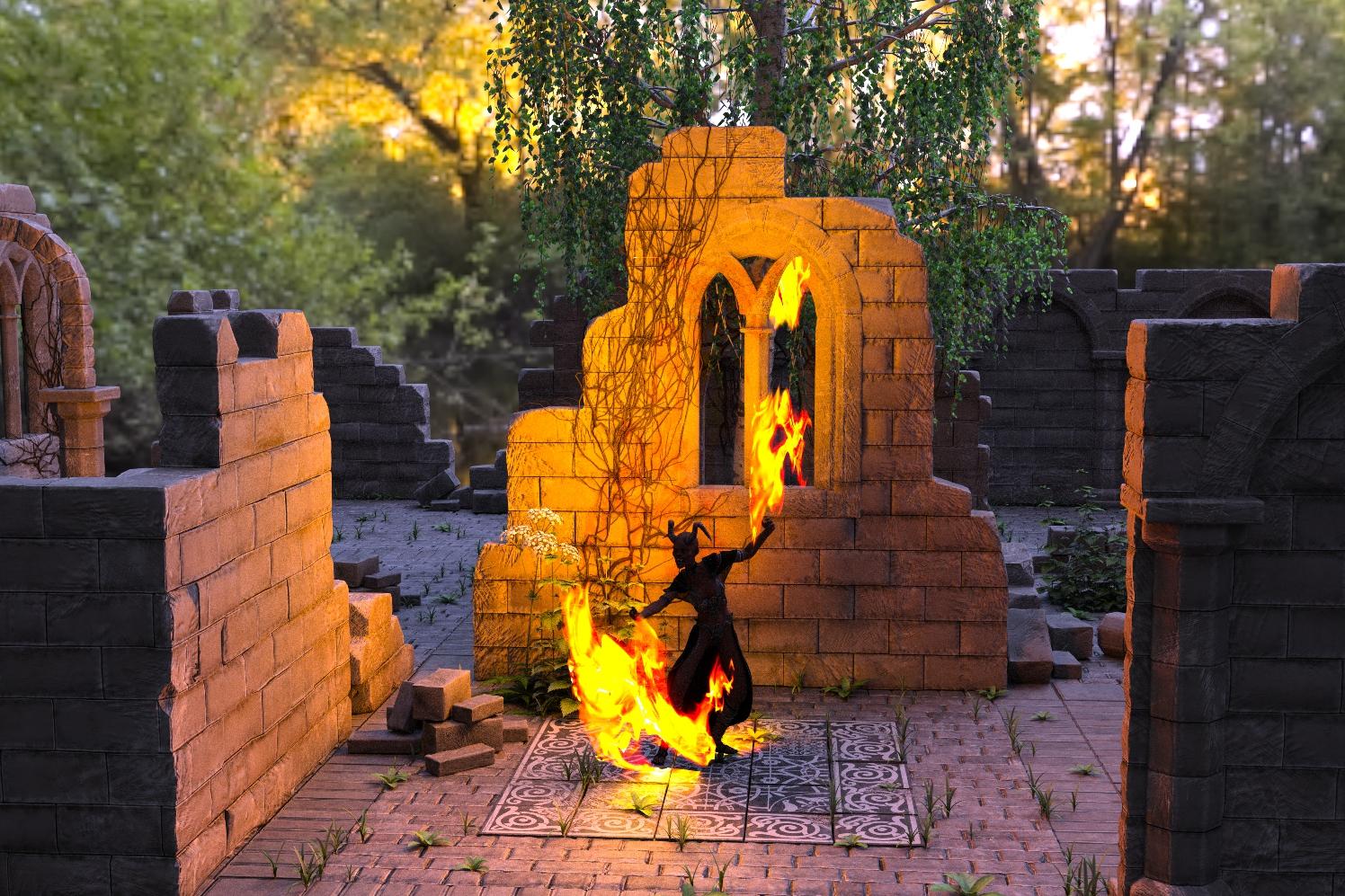 Click on image for full size.
I removed the volume from the cylinder and adjusted lighting and tone mapping on this one.
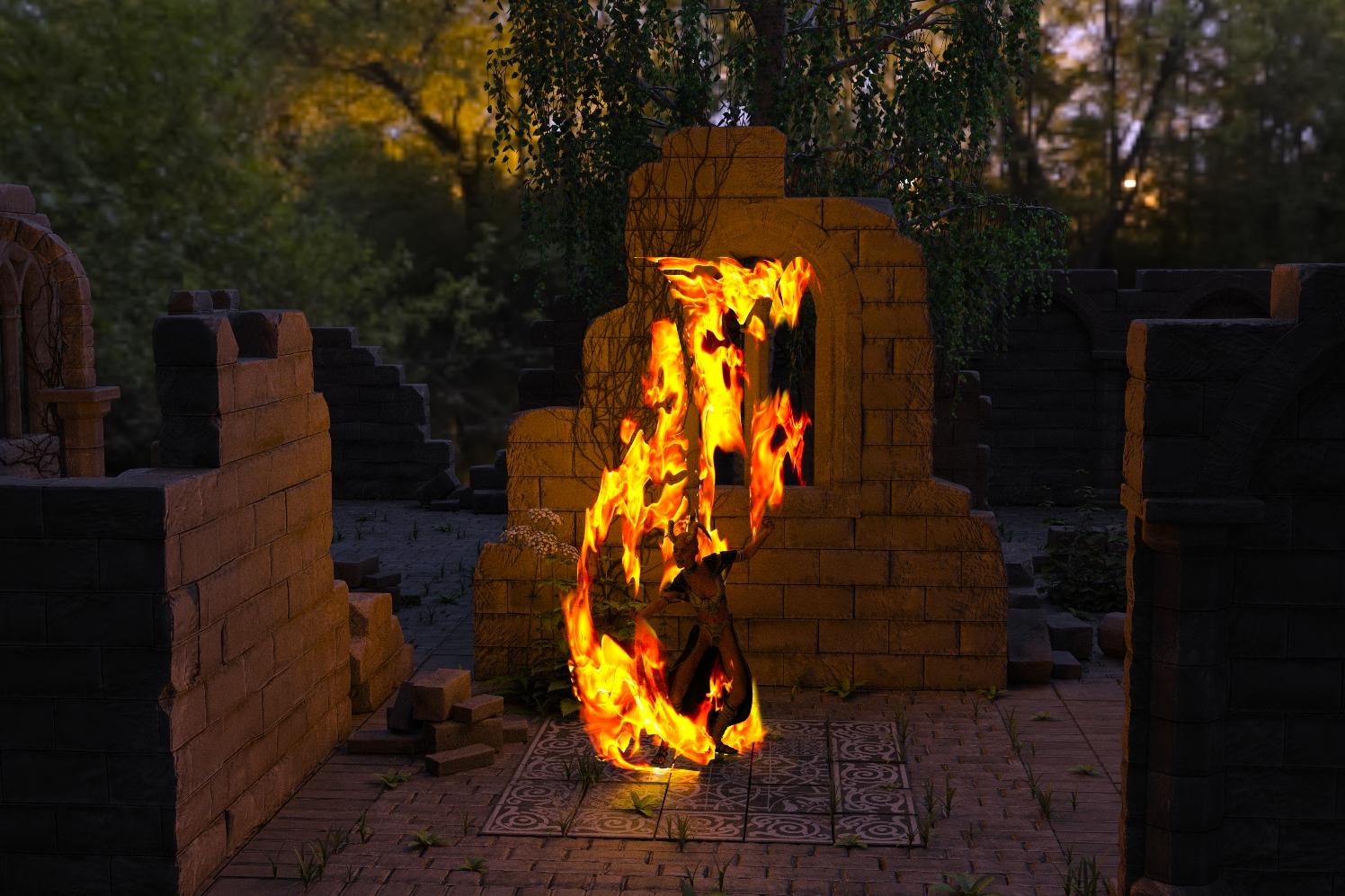 Click on image for full size.Sketchy - Toon and Art Style Shaders for Iray [Commercial]
I have been know to say in the past that to get toon renders out of Iray is a bit like driving a nail with a sponge cake. The sponge cakes must be pretty solid where you come from DT. Congrats on the product.
Here is my humble contribution. I post original render and sketchified render for comparison. I did not use the sketchy shaders on the eyes, but left them as my toon style eyes that were originaly made specifically to be used in conjunction with specialty render style shaders such as these.
Oh hey, one more note-when I apllied any of the 01 Full Shaders to my Keiko figure, the UV map bounced to Victoria 4. I had to manually change it back to Genesis 2 Base Female. Is it supposed to be doing that?
Step-By-Step Instructions on Injecting Morphs to Victoria 4.2 figure?Does anybody have a concise step-by-step tutorial on how to inject morphs into my Victoria 4.2 figure?
Also, how do I access the panel that allows me to adjust certain body parts, such as stomach, muscles, etc.?
Victoria 4 for genesis 3 female.Sketchy - Toon and Art Style Shaders for Iray [Commercial]I'm glad to finally see some customer renders for this! Thanks everyone,
Something to keep in mind is that these shaders aren't going to "toonify" textures in any way, like something along the lines of a Photoshop plugin would. The general toon effect is all geometry based which is then more or less overlayed over the existing textures, so you're not going to get any toon edges on features coming from diffuse textures etc. You can however get texture based features by using normal or bump maps since these modify what the renderer sees as geometry. Doing so is more "advanced usage" since it can also kind of destroy the toon effect if your bump / normals contain too much detail to draw smooth lines over.
If you look at this render you can see what the bump maps are doing to the toon edge. It'll break it up and take it away from being a line, turning it more into a shading effect. In general if you're working with something that's already a toon figure like Star you won't have to worry about their bump maps doing this. If you're trying to toonify Michael 7 though and want to use his bump / normal maps you'll have to be careful if you don't want it turning into shading.
Adding the geometry with bump / normal maps can be useful when dealing with surfaces that don't like to produce the effect in ways you want. Eyes for example are spheres which will usually only show the effect on their outer edges (which on a character tends to be inside the eye socket). Using the eye's bump / normal maps will help draw toon lines on things like the veins or other features contained in the map. Using morphs like iris bulge can help with this too. The Project EYEris / EYEray sets come with morphs that modify the iris in other ways that might help get lines in an around that as well.
One other thing you can try (your mileage may very) is adding a solid color to the normal map slot and adjusting the strength. This will change the direction of the surface normal for the entire material, so you can theoretically make the renderer think that polygons facing sideways are facing the camera. If you have interactive renderer on while adjusting the strength of a solid color normal map you can see the toon line more or less rotating around the figure it's on. Push it too far though and you start to get geometry faceting errors (this is the main reason why I didn't include it as a feature within the product). You can push it further without issue by subdividing a heck of a lot. This trick will also muck up surface seams though (areas on things like Victoria where her torso texture lines up with her arms). So it works best on objects that are only made up of a single surface.
In any case if you want to push bump / normal maps to their limits you'll likely want to disable the value limits that are set on the shader. Since they do have the ability to ruin toon outline effects I have the strength limits for these values set to 20% or so just in case maps get auto loaded and produce some screwed up results for someone unfamiliar with what might be going on.
RRRR - It could be true - 5th anniversary contestag: luci45 #3
Pest Control
Tired of the costly relocation of illegal wildlife invaders, the city of Watchoo, LA, contracted the Reiver sisters (sisters-in-law to Mayor Lumpit) to help them out. The animals were painlessly turned to exotic metal alloys and sold at auction, with profits going mostly to city beautification.Used:
Apprentice Mage in the Tower
Victoria Iven for Genesis 3 Female(s)
Hinde
Unrealty Downtown
Wicked Pyjama Party (LB)
Alligator (LB)Dynasty Textures for Wicked Pyjama Party
Morphing Python
Nox Hair
Buzzed Hair
LoRez Rat
Crow
Gargoyle Hound
Inked Vol. 2 for Genesis 2
Jepes Flames
CityScapes Backdrops
morphs
Anodized - Custom Shader and Preset Suite for Iray
Mina for Iven
RESURRECTION: Domina
Creature Creator G2Fs
Odelle (Rendo)
various moprhs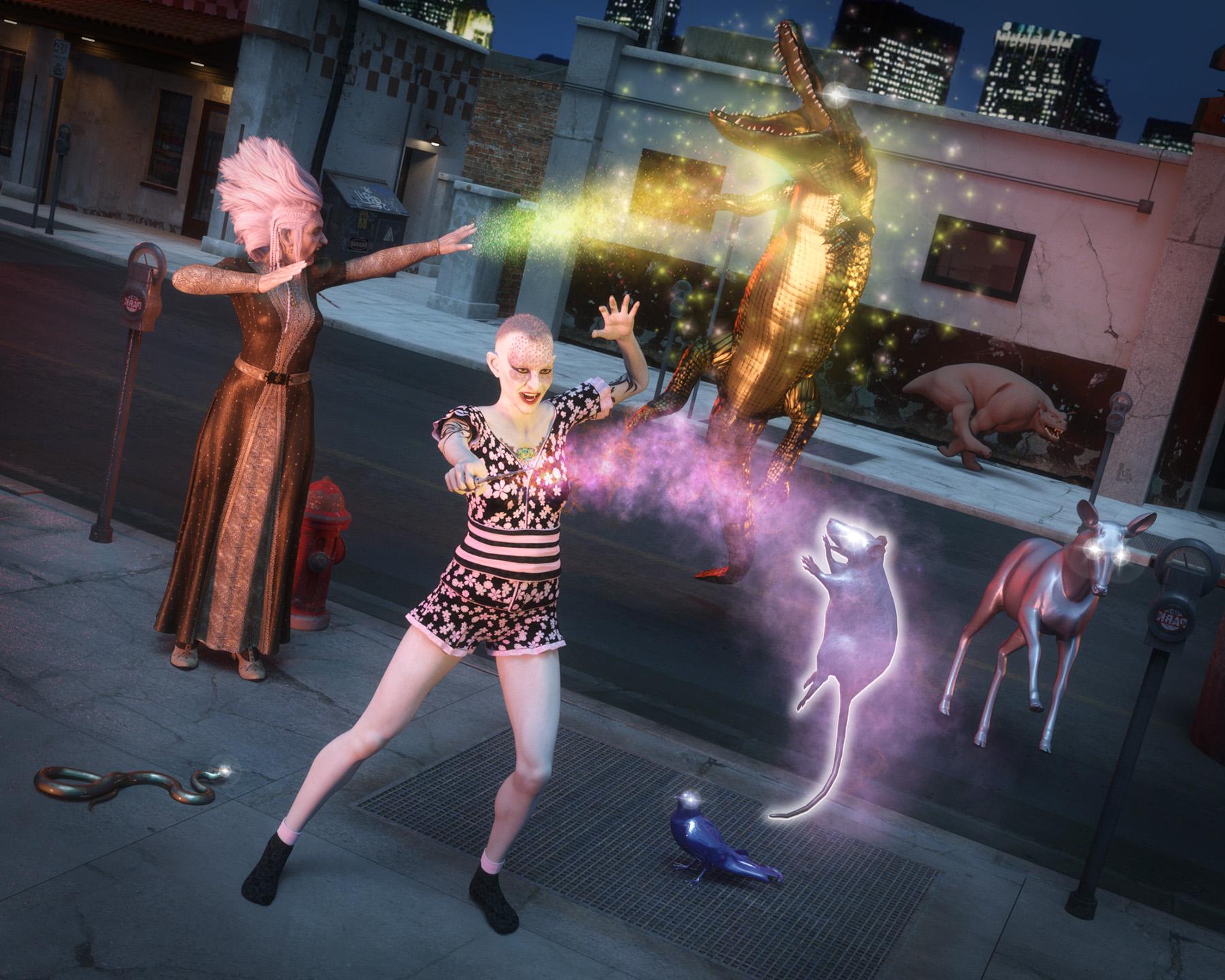 [SOLVED] Character Search - Long Hair for Genesis 3 Female(s)
Probably this one (eyebrowse look identical):
http://www.daz3d.com/p3d-josina-hd-for-victoria-7
That looks right. Thanks for your help!
Daz 3D is part of

Connect
DAZ Productions, Inc.
7533 S Center View Ct #4664
West Jordan, UT 84084Licensing Agreement | Terms of Service | Privacy Policy | EULA
© 2026 Daz Productions Inc. All Rights Reserved.