-
Splitting HD head/body morphs without expensive tool?
RenderPretender said:
Is there a way to split one character morph into a head and body morph without buying an expensive splitter that uldimately doesn't support HD morphs anyway? Hard as Nails is a stunningly pretty product, but its versatility is obliterated by the fact that it's a single morph. That's a shame. Suggestions welcome!
I stand corrected! It's split already, but it didn't show the separate morphs when I searched Parameters. Found them in Currently Used, though. Yay!
Splitting HD head/body morphs without expensive tool?Is there a way to split one character morph into a head and body morph without buying an expensive splitter that uldimately doesn't support HD morphs anyway? Hard as Nails is a stunningly pretty product, but its versatility is obliterated by the fact that it's a single morph. That's a shame. Suggestions welcome!
Morphs not loadingPendraia said:
Are you making this character yourself? If so what process did you use to load the morph?
If not what's the character called?
Are you working with the op?
Sorry, I have no affiliation with the OP, this was meant as a reply to the original request - since absolutely no information was included to allow anyone to help them I posted a link to the TV character "Morph".
Morphs not loadingAre you making this character yourself? If so what process did you use to load the morph?
If not what's the character called?
Are you working with the op?
custom morph issueWhen saving a morph you save it at zero. When you saved you had the morph dialled.
You should be able to edit the morph file and change it to zero.
custom morph issueToday I used Zbrush to create a custom morph on a genesis 2 male. I saved the morph as a morph asset. Now every time I load a genesis 2 male figure into a scene, he arrives with that new custom morph set to 100%. What did I do wrong?
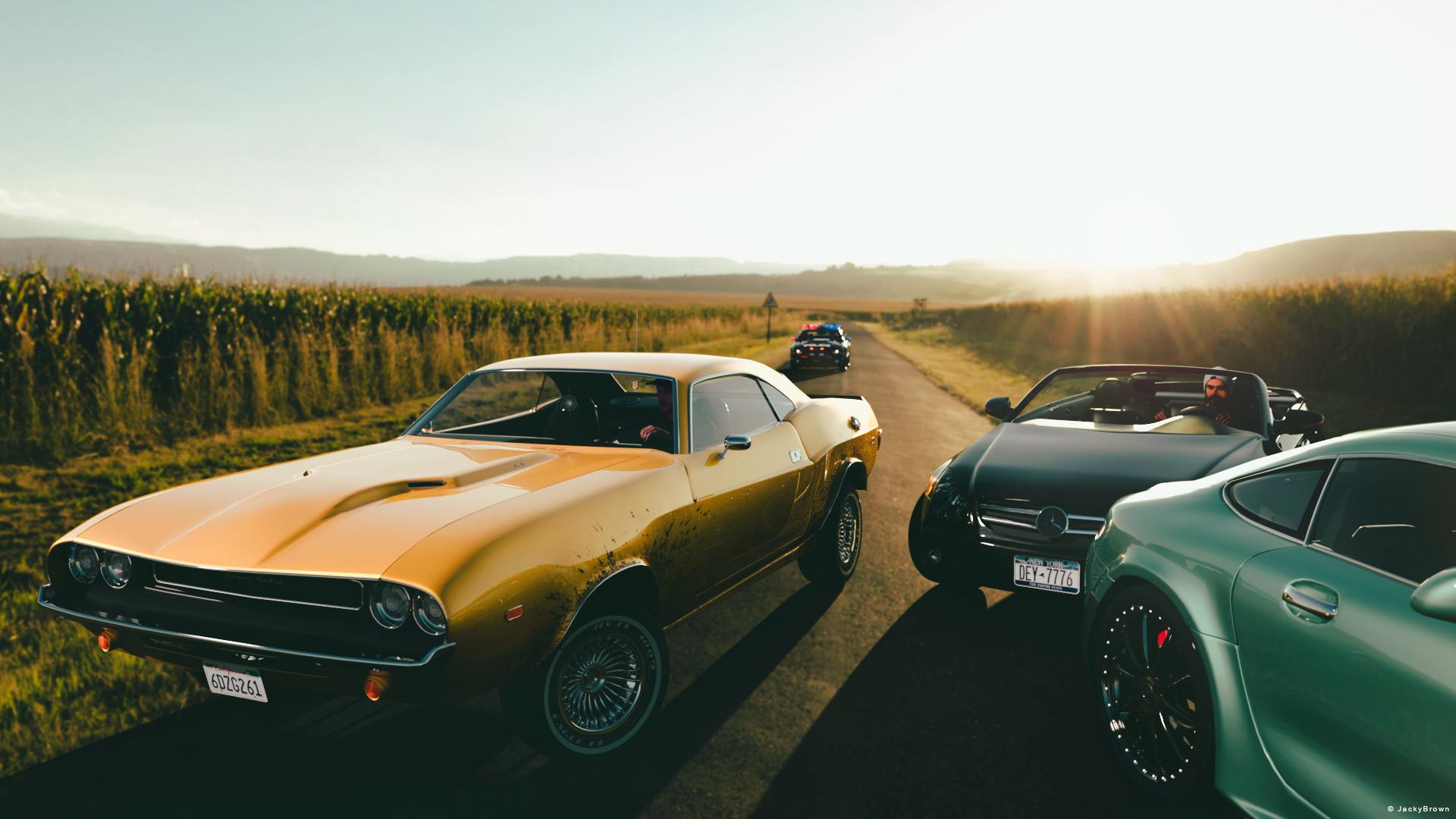
Freebie Challenge September 2022-"Cars, Cars and more Cars!" - Main Thread3D Art Freebie Challenge September 2022 "Cars, Cars and more Cars!"
"Go man, go! Ride!"
[Best watched at full size for details.]Starring: Claire, Barack and Walther
The tale: (Entirely fictional)
The fast and the curious... It's the end of summer, Walther and his best 2 friends (fast and expensive cars are their passion and life) have been racing their Muscle Car all summer long on this little-visited country road in the countryside. But now the fun seemed over...
Non-Motion Picture Soundtrack:
Pat Travers - Hot Rod Lincoln (© 1976) https://www.youtube.com/watch?v=uM0weRWS6EA
COUNTABLE FREEBIES: (Alphabetic order)#01! 33 Eyes Materials for the Genesis 8 + 8.1 people by LevKornowska
https://www.renderosity.com/freestuff/items/88372/33-eyes-materials-for-the-genesis-8-81-people **#02! Barack for G3M by dumbuser
https://www.sharecg.com/v/88699/gallery/21/DAZ-Studio/Barack-for-G3M **#03! Benzo Convertible by elele
https://www.renderosity.com/freestuff/items/66656/benzo-convertible **#04! Cao Ren for G8M and G8.1M by Shinteo
https://www.patreon.com/posts/cao-ren-for-g8m-60640842
[Beard used]#05! Claire for G8F and G8.1F by Shinteo
https://www.patreon.com/posts/claire-for-g8f-67510833#06! Claire Bad Cop outfit for Daz by Shinteo
https://www.patreon.com/posts/claire-bad-cop-67765735#07! Claire Classic for G8F and G8.1F by Shinteo
https://www.patreon.com/posts/claire-classic-67544693
[Needed for Bad Cop outfit]#08! Dante DMC5 Free Stubble for Genesis 8 Male by InTheFlesh
https://sharecg.com/v/94752/gallery/21/DAZ-Studio/Dante-DMC5-Free-Stubble-for-Genesis-8-Male **#09! Delsin Beanie and Hair for G8M by InTheFlesh
https://sharecg.com/v/92677/browse/21/DAZ-Studio/FINAL-Delsin-Beanie-and-Hair-for-G8M **#10! Demarcus for G8M by RenderGuyNY
https://www.sharecg.com/v/89285/gallery/21/DAZ-Studio/Demarcus-for-G8M-some-nudity **
[Face morph used]#11! Dream Catcher (.OBJ version) by LuxXeon
https://www.renderosity.com/mod/freestuff/dream-catcher-obj-version-/72303 **
[It's in the Muscle Car]#12! ED's Brick Shader (Iray) by Edheldil3D

https://www.deviantart.com/edheldil3d/art/Freebie-ED-s-Brick-Shader-Iray-788871766 **#13! Ford Mustang Police USA (.obj) by DMI
https://www.dmi-3d.net/rescue3.html (last item)#14! G8M Walther 2.0 by Ruslanomar
https://sharecg.com/v/97276/gallery/21/DAZ-Studio/G8M-Walther-2.0 **#15! Iray car related shader presets 'megapack' by Tom2099
https://www.deviantart.com/tom2099/art/Iray-car-related-shader-presets-megapack-539622361 **#16! Kratos for G8M and G8.1M by Shinteo
https://www.patreon.com/posts/kratos-for-g8m-57817814
[Eyebrows used]#17! Mealie Road HDRI by Greg Zaal
https://polyhaven.com/a/mealie_road#18! Modern Sporty Car by inLite studio
https://inlitestudio.com/3d/product/modern-sporty-car/ **#19! Muscle Car by Anders Lejczak

https://www.colacola.se/expo_musclecar.htm#20! New Walther 2.0 tanned skin + hair system by Ruslanomar
https://sharecg.com/v/98463/browse/21/DAZ-Studio/New-Walther-2.0-tanned-skin-%2B-hair-system **#21! Pd-Soft Leather Daz Studio Shaders for Iray by Parrotdolphin (Janet)
https://sharecg.com/v/80223/gallery/7/Material-and-Shader/Pd-Soft-Leather-Daz-Studio-Shaders-for-Iray **#22! "STRONG" for G8M Character Morph & Pose by Mar3D
https://www.renderosity.com/mod/freestuff/strong-for-g8m-character-morph-amp-pose/82833 **#23! SuitWell Watch G8M - FREE by SdeB
https://www.sdebstore.com/collections/free-stuff/products/suitwell-watch-g8m-free **#24! SY 200 Morphs for Genesis 8 Head and Body by SickleYield
https://sharecg.com/v/91888/view/21/DAZ-Studio/SY-200-Morphs-for-Genesis-8-Head-and-Body **
NO-COUNT ITEMS:--- Casual Outfit 2 T-shirt for G3M by Tab (Y_Personal)
++ Surf's Up Outfit and Board by Sarsa [Surf's Up Hat used, retextured]PURCHASED/PAID FOR ITEMS: None 100% Freebies
*1 E-mail address required
** Registration required
#x! Countable Items (Bold ones are used by me for the first time I think.)
--- No longer available freebies
++ Free with DAZ Studio (or the Essentials)
$x. Purchased/Paid For Item
Rendered with DAZ Studio 4.10.0.123 (nVidia Iray)Other free software used: GIMP v2.10.32 and Irfanview 4.60
Postwork: used the AltaLux Image Enhancement Filter (Effect) by Stefano Tommesani that comes with Irfanview and some filters (oa) that come with GIMP. Also used mcjDenoise (https://sites.google.com/site/mcasualsdazscripts9/mcjdenoise) and mcjLut by mcasual (https://sites.google.com/site/mcasualsdazscripts9/mcjlut) with the free FilterGrade Cinematic LUTs Pack (https://filtergrade.com/free-cinematic-luts-video-editing/).
"Go man, go! Ride!"
Genesis 9 Coming Soon! Preorder Victoria 9 HD Today
You mean unreal engine? Daz3d figures since G2 have always work will with unity even without A bridge. True you had to put some work in to fix it. But their were tiny problem. And usually take a minute or two to fix baby less. but unreal engine was a complete nightmare to bring a Genesis figure into unreal. Even with the Unreal bridge it still a pain.Artini said:nonesuch00 said:
I'm looking forward to this Victoria 9 & company. The expressions are so extremely improved and the way fat looks too.
Yes, I am looking forward to Victoria 9 and Genesis 9 items, too.
I like expressions a lot, especially animated.
It is a pity, that Daz is not willing to reveal a details of the V9 bundle.
I also wonder, how and if Victoria 9 will transfer to Unity using Daz to Unity bridge.
Anyhow, great work on this new generation of the figures - well done.
Questions about MetaMixer--Plusbarbult said:
I made this mod from Edie 8 with MetaMixer Plus. I had a real hard time with the nose. I couldn't find any MetaMixer Plus dots that would work on the center of anything. Everything was left or right. I wanted to lift the center of her nose tip, but couldn't find a way to do it.
This render is using Alexandra 8 materials instead of Edie 8 Materials.
Cool character!
Very interesting thread! I thought metamixer was about posing I didn't realise you could create characters.
A couple of questions, is it possible to save what you create as a morph or do you save them as shape presets?
Can you release the characters you create as freebies or even a product in a store?
Star Trek Builders Unite 8: THE REBOOTNot bad! I'd really like a Picard-era Seven morph. There aren't a lot of attractive middle-aged characters out there. Seems like everyone's either a 20 year old hottie or an 80 year old crone.
My favorite Jeri Ryan morph remains Voyager Knights for V3. Yes, V3. (I really think that generation of DAZ figures was the best for getting a likeness. There's more polys in the face, I think. Or they are arranged better) I use a weight-mapped V3 for better bending. It's a for sale product, but I love it. Good texture, and comes with the eye prop.
Which muscle morph is this?Vascularity HD for Genesis 8 Female and Male | Daz 3D
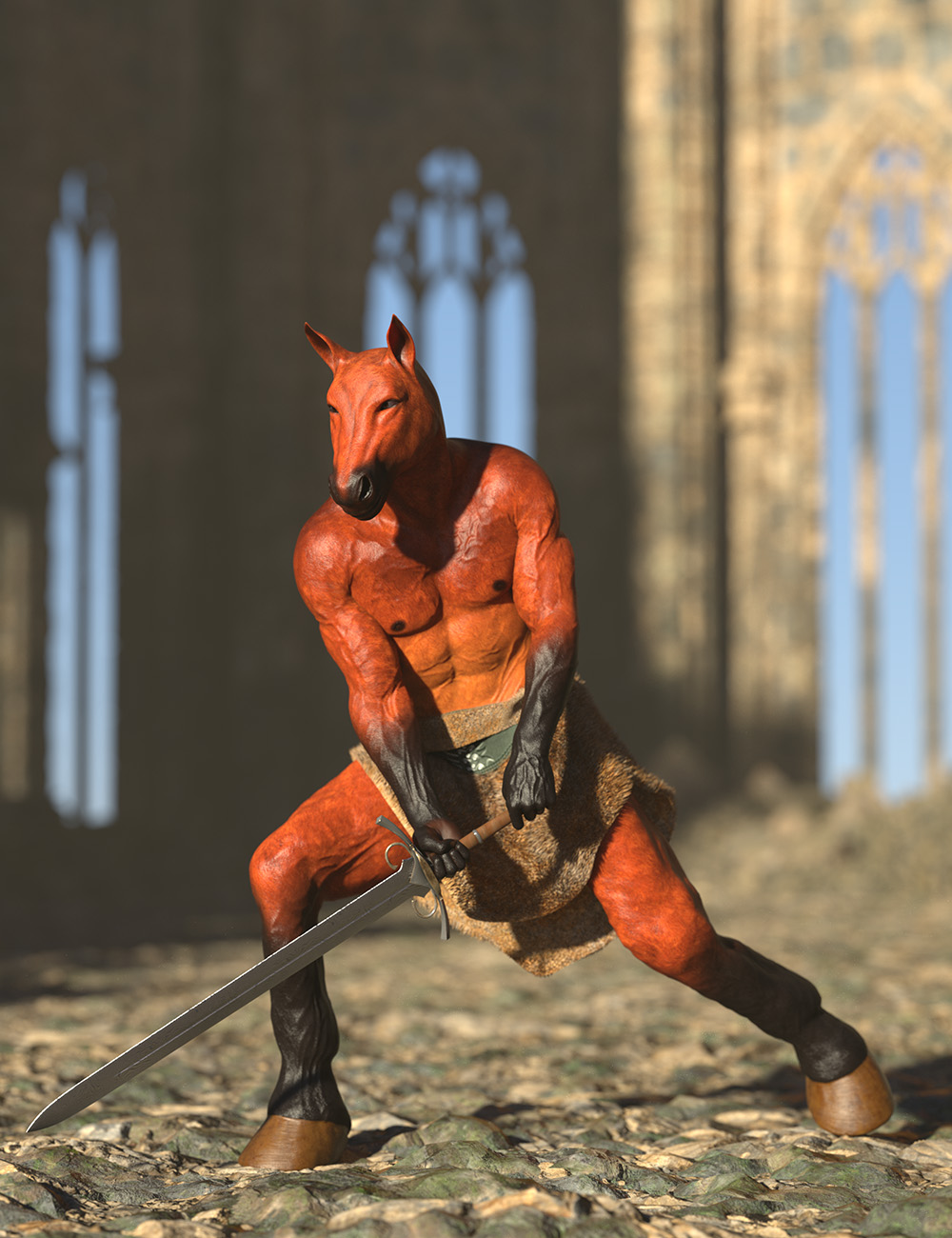
This one may be. I have it and really like the results I get with it. I also used this muscle morph in attached photo (just a simple test render), Musculature HD Morphs for Genesis 8 Female | Daz 3D. I believe this was the horse/male morph used Oso Horseman HD for Genesis 8.1 Male | Daz 3D
Gemma Ward look-alike (attempt)I have made a first attempt at a Gemma Ward look-alike morph (see attached image). You guys have much better artistic eyes than me so, what do you think I could do to get closer to the real thing?
More pronounced cheek bones? Something about the eyes?
The big announcement on September 21, 2022 - place your bets!I don't know if anyone has answered this earlier, but one of the things I see mentioned is that "HD morphs are built-in! No need to buy a separate add-on"
Is the base morph now set at something other than base resolution, or is it like before an we have and standard resolution morph and then a separate HD morph for details? I ask becasuse if we're not able to use an HD morph loader, trying to make jcm's and other morphs for a character that is only a subdivided morph is going to be an issue since you're importing a morph that doesn't have all the detail of the higher resolution morph (for reverse deformations).
The big announcement on September 21, 2022 - place your bets!ragamuffin57 said:
Umm G9 figure still looks plastic out of the box with a tango skin texture the expression was very toonish but a lot better than 8.1 out of the box.
I find statements like this amusing...the base figure isn't meant to look like anything other than a base. It allows more characters to be created.
One of the big criticisms against Hivewire's Dawn figure was that it was to hard to make her look like anything else. This same criticism has been aimed at earlier figures in the daz range also.
The base is not meant to be used on it's own. You are supposed to either apply a character or dial spin a character using morphs. The uv's tend to be fairly basic because they want you to buy characters. That's how they make money. Not from the base which is free but from the sale of products that make it more usable easily.
If Daz had more of a finished shape to her and was less basic you would hear complaints about it that it was too hard to morph into a character that didn't look like the base.
Thoughts about modeling clothes for G9Diomede said:
Is the following correct based on what I am reading above?
One could
1) Model clothing mesh for targeted gender (base male 9 or female 9).
2) Adjust the mesh and save separately for (a) the default unigender 9, and for (b) the other gender (base male 9 or base female 9)
3) Rig clothing mesh once for the targeted gender in transfer utility, and use 'reverse deformation' or similar to get to default uni-gender rigging based on targeted gender mesh.
4) Substitute your adjusted uni-gender 9 mesh obj from (step 2) for the mesh attached to transfer utility rigging of uni-gender 9 outcomes in (step 3), just like it was a character full body morph.
5) Treat the non-target-gender 9 base (male or female) like it was a supported character full body morph and substitute its adjusted obj from step 2.
6) Adjust weightmaps for all 3 base versions (female 9, male 9, and unigender 9).
7) Repeat obj substitutions and rigging adjustments for other full body morph supported characters like Victoria 9, Michael 9, Aiko 9, Brute 9,...
Seems like a lot of extra work for the PAs, but cross-gender use should be a lot easier. Or maybe I am wrong and it could be even easier than that? Or maybe I am wrong and it could be a lot harder than that? Still a little confused, but I think I see a work flow.
I hope that more information is forthcoming and would appreciate thoughts on a workflow.
Sounds right to me.
In regards to workflow some of that will depend on what type of item you're making. If it's obviously feminine clothing you might only ensure that it works with the male base as you wouldn't expect it to be used with male characters unless there are characters who would identify as feminine. Then you might include them.
Initially there won't be a lot of characters so you'll most likely be looking at ensuring it works with the base, the female base and the male base plus whichever figures you prefer to include.
When asking about which core figures need to be included in genesis 8 I was told it was up to the person creating the outfit.
There are too many core figures to do them all and not everyone will own them all unless they get provided to the vendor by Daz. Hivewire would provide the base character to vendors who were trying to make stuff but they were in a different situation to Daz. I don't know what the vendors here are provided with or at what cost.
Once the morphs are released you would want to create custom morphs for any that needed to be done. You would have to test eache morph to see if it required a custom morph.
I'm trying to work out my own workflow for creating at the moment.
Esha's series of tutorials can be very useful I have her rigging one. Which I've find helpful and I also have Arki's one for complex garments using dforce.
Which muscle morph is this?I was just wondering which body morph was used to create the muscles on this character? I really like the way the veins pop and the muscle anatomy seem very well made. I guess its very hard to tell and if the artist used multiplte different morphs it would be even harder to tell. Yet I appreciate any sort of help!
 AIUTO...CHI CONOSCE L’ITALIANO? PARTE TREDICI
Imago said:
Muscleman, visto che affermi di essere parecchio addentro i traffici di DAZ3D, mi togli una curiosità?
G9 NON HA capezzoli?
 Vedo nel video che la mesh nel petto è assolutamente quadrata e inadatta a quel tipo di parte anatomica e nel tab dei materiali non vedo una voce relativa... Magari la mesh per la presentazione è speciale e la release finale sarà completa di tale detaglio?
O forse dovremo creare noi un GeoGraft o comprarlo dallo store con i pacchetti Pro insieme a Walter e Jolanda?
Chiedo perchè ci sono già occhi, bocca e non so che altro staccato dalla figura, se lo fai ancora a pezzi finisce che il personaggio ha più pezzi di corpo che pezzi di vestiario! Non oso immaginare che inferno sarà dipingere le textures o creare un morph...
E' una mesh diversa quella finale...oh cmq non è che "affermo" perchè oggi mi sono svegliato PA eh XD XD
Thoughts about modeling clothes for G9Is the following correct based on what I am reading above?
One could
1) Model clothing mesh for targeted gender (base male 9 or female 9).
2) Adjust the mesh and save separately for (a) the default unigender 9, and for (b) the other gender (base male 9 or base female 9)
3) Rig clothing mesh once for the targeted gender in transfer utility, and use 'reverse deformation' or similar to get to default uni-gender rigging based on targeted gender mesh.
4) Substitute your adjusted uni-gender 9 mesh obj from (step 2) for the mesh attached to transfer utility rigging of uni-gender 9 outcomes in (step 3), just like it was a character full body morph.
5) Treat the non-target-gender 9 base (male or female) like it was a supported character full body morph and substitute its adjusted obj from step 2.
6) Adjust weightmaps for all 3 base versions (female 9, male 9, and unigender 9).
7) Repeat obj substitutions and rigging adjustments for other full body morph supported characters like Victoria 9, Michael 9, Aiko 9, Brute 9,...
Seems like a lot of extra work for the PAs, but cross-gender use should be a lot easier. Or maybe I am wrong and it could be even easier than that? Or maybe I am wrong and it could be a lot harder than that? Still a little confused, but I think I see a work flow.
I hope that more information is forthcoming and would appreciate thoughts on a workflow.
Assassin 8.1
If they aren't going to give us fibermesh brows with him, there should have at least been a missing finger morph included.Chaosophia said:Ok So... we get an Assassin's Creed character, what I really want to know is when are we gonna get a Sephiroth clone.
Uninstall/reinstall DAZ StudioPerttiA said:
Duplicate Formula will not be fixed by uninstalling DAZ Studio, as it has nothing to do with the problem.
The problem is caused by two or more Asset products (Characters, morph packs) using the same names for the morphs.
Like if one creator has a figure called "Maria", the morph for the body may be called "FBMMaria" and the morph for the head "FHMMaria".
Surpricingly there may be several other creators that have also made a ficure called "Maria" and they have used exactly the same names for their morphs.Unfortunately, the DAZ Log identifies only one of the "Maria"s that are conflicting with the other ones.
The only fix is to keep removing the characters/morph packs until there are no more Duplicate Formula warnings, and yes I have seen new, unrelated warnings appear after having removed other conflicting morphs.
Ok, thank you! I will keep plugging away and see if I can resolve it.
Daz 3D is part of

Connect
DAZ Productions, Inc.
7533 S Center View Ct #4664
West Jordan, UT 84084Licensing Agreement | Terms of Service | Privacy Policy | EULA
© 2026 Daz Productions Inc. All Rights Reserved.