-
Who is this character?
Greetings,
Google Image Search is your friend.
The image is Titania. The listing claims the character to be Victoria 7, actually. :-)
-- Morgan
p.s. Sorry about the thread necro; it was a left-over tab from weeks ago, and I was curious. :)
Would make sense since Azariah is for G3. ;)
Who is this character?Greetings,
Google Image Search is your friend.
The image is Titania. The listing claims the character to be Victoria 7, actually. :-)
-- Morgan
p.s. Sorry about the thread necro; it was a left-over tab from weeks ago, and I was curious. :)
3D Art FREEBIE CHALLENGE-MARCH 2017- WINNERS ANNOUNCED!! KISS THE BLARNEY STONE -Entries Thread OnlyThe Results of Kissing the Blarney Stone
Rendered with 3Delight. Post work done was to add signature.
Freebies:
Environment: mushrooms * fennjas mushrooms by Fennja.
Environment:Grounds * Vikike's Ground 01 by vikike176.
Environment:mushrooms * Fennjas Mushrooms for DAZ Studio 4.8 and up by DollyGirl13.
Environment:Pot of Gold * St. Patrick day by dorkatiGHD.
Environment:Rainbow Morphing Rainbow by mostdigitalcreations. 19th down
Environment:Rocks * Rocks by Yughues aka Nobiax.
Environment:Treeandflowers * Forgetmenot by Poisen.
G2F: Wings * Pixie Wings for V4 by Paul J. Zanca. Character
G2F:Hair Short Hair Evolution by Kozaburo.
G2F:Pose * Beach sport poses by peteg.
G2F:Pose * G2M Conversation poses by peteg.
G2F:Shoes * G2F Oriental Outfit by wilmap.
M4:Character Leprechaun M4 by mmalbert redeyecat.
M4:Character * 182 Morphs for Victoria 4 182 Morphs for Victoria 4 by DieTrying.
M4:Clothing * 18th century suit by Varsel.
M4:Hair * Hero hair by iceboy.
M4:Pipe Smoking Set by MostDigitalCreations. 12th down
M4:Staff * Wizard Staff by Christel.
Shader: Walking Stick * Iray Nobiax Shaders by kaz42.* - Free Registration Required
M4, Genesis 2 Female, Persian Beauty Outfit and Toulouse Hair are all no counts. The following items are no longer available. Sorry to see runtimedna's freebies located in their forums have been lost.
Cat: Mesky Mesky & Blackie by Ynaelis3D.
Environment:Background backgrounds by Himmel.
G2F:Hat Empress Headdress by Chi Studios.
M4:Character M4 - Curtis by Structure.
M4:Clothing Morphing St Pat Hat by Deerpath.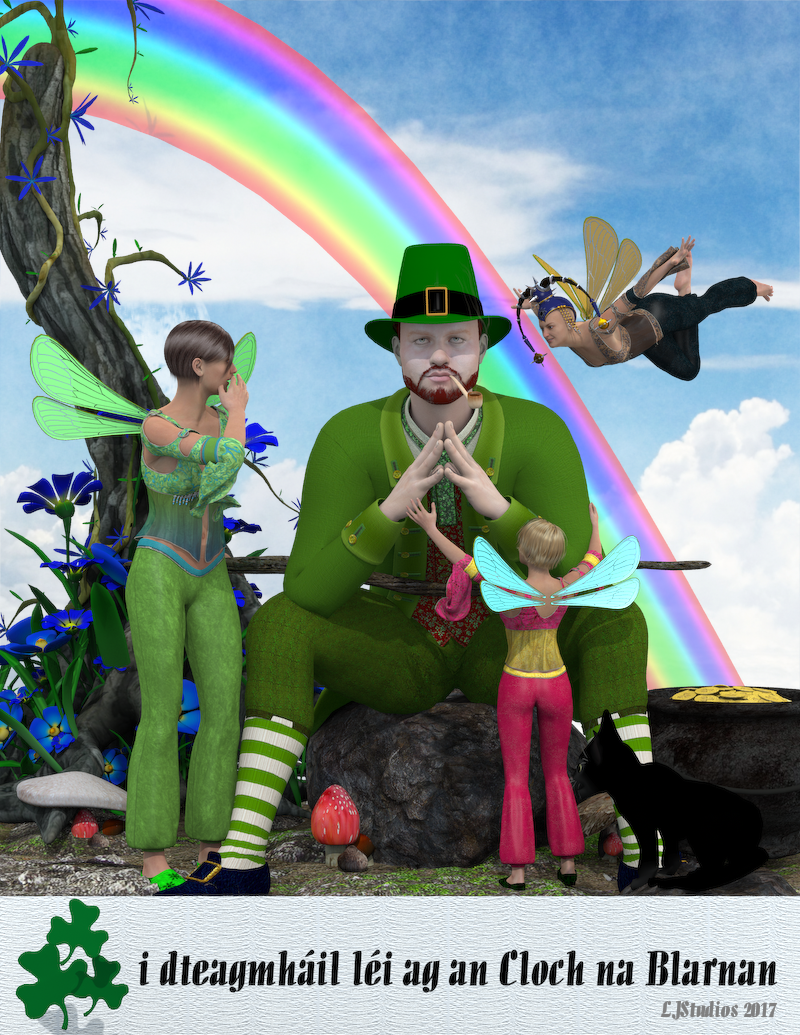 3D Art FREEBIE CHALLENGE-MARCH 2017- KISS THE BLARNEY STONE-Main Thread
The Results of Kissing the Blarney Stone
Rendered with 3Delight. Post work done was to add signature.
Freebies:
Environment: mushrooms * fennjas mushrooms by Fennja.
Environment:Grounds * Vikike's Ground 01 by vikike176.
Environment:mushrooms * Fennjas Mushrooms for DAZ Studio 4.8 and up by DollyGirl13.
Environment:Pot of Gold * St. Patrick day by dorkatiGHD.
Environment:Rainbow Morphing Rainbow by mostdigitalcreations. 19th down
Environment:Rocks * Rocks by Yughues aka Nobiax.
Environment:Treeandflowers * Forgetmenot by Poisen.
G2F: Wings * Pixie Wings for V4 by Paul J. Zanca. Character
G2F:Hair Short Hair Evolution by Kozaburo.
G2F:Pose * Beach sport poses by peteg.
G2F:Pose * G2M Conversation poses by peteg.
G2F:Shoes * G2F Oriental Outfit by wilmap.
M4:Character Leprechaun M4 by mmalbert redeyecat.
M4:Character * 182 Morphs for Victoria 4 182 Morphs for Victoria 4 by DieTrying.
M4:Clothing * 18th century suit by Varsel.
M4:Hair * Hero hair by iceboy.
M4:Pipe Smoking Set by MostDigitalCreations. 12th down
M4:Staff * Wizard Staff by Christel.
Shader: Walking Stick * Iray Nobiax Shaders by kaz42.* - Free Registration Required
M4, Genesis 2 Female, Persian Beauty Outfit and Toulouse Hair are all no counts. The following items are no longer available. Sorry to see runtimedna's freebies located in their forums have been lost.
Cat: Mesky Mesky & Blackie by Ynaelis3D.
Environment:Background backgrounds by Himmel.
G2F:Hat Empress Headdress by Chi Studios.
M4:Character M4 - Curtis by Structure.
M4:Clothing Morphing St Pat Hat by Deerpath.Great render, Dollygirl. All links check out!
Please Move to the Entries Thread!
3D Art FREEBIE CHALLENGE-MARCH 2017- KISS THE BLARNEY STONE-Main ThreadThe Results of Kissing the Blarney Stone
Rendered with 3Delight. Post work done was to add signature.
Freebies:
Environment: mushrooms * fennjas mushrooms by Fennja.
Environment:Grounds * Vikike's Ground 01 by vikike176.
Environment:mushrooms * Fennjas Mushrooms for DAZ Studio 4.8 and up by DollyGirl13.
Environment:Pot of Gold * St. Patrick day by dorkatiGHD.
Environment:Rainbow Morphing Rainbow by mostdigitalcreations. 19th down
Environment:Rocks * Rocks by Yughues aka Nobiax.
Environment:Treeandflowers * Forgetmenot by Poisen.
G2F: Wings * Pixie Wings for V4 by Paul J. Zanca. Character
G2F:Hair Short Hair Evolution by Kozaburo.
G2F:Pose * Beach sport poses by peteg.
G2F:Pose * G2M Conversation poses by peteg.
G2F:Shoes * G2F Oriental Outfit by wilmap.
M4:Character Leprechaun M4 by mmalbert redeyecat.
M4:Character * 182 Morphs for Victoria 4 182 Morphs for Victoria 4 by DieTrying.
M4:Clothing * 18th century suit by Varsel.
M4:Hair * Hero hair by iceboy.
M4:Pipe Smoking Set by MostDigitalCreations. 12th down
M4:Staff * Wizard Staff by Christel.
Shader: Walking Stick * Iray Nobiax Shaders by kaz42.* - Free Registration Required
M4, Genesis 2 Female, Persian Beauty Outfit and Toulouse Hair are all no counts. The following items are no longer available. Sorry to see runtimedna's freebies located in their forums have been lost.
Cat: Mesky Mesky & Blackie by Ynaelis3D.
Environment:Background backgrounds by Himmel.
G2F:Hat Empress Headdress by Chi Studios.
M4:Character M4 - Curtis by Structure.
M4:Clothing Morphing St Pat Hat by Deerpath.After a so long time ... a new Cookie CharacterThe release of "SugarCookie" today was really a big surprise. After a few years without any chararacter release for this cutie a new life sign. I have asked Lady Littlefox several times for a updated Cookie (and Chip), but I understand her point, that Toon Characters are not the best selling items.
And unfortunately, she is right, as you could finally find again with the release of Toon Generations 2.0 or Star 2.0 for Genesis 3. Toon characters are always a welcome change for a few days. But it is also much more artistic to render the tens of thousands of easily clad Victoria, than a really good toon picture. For that one must have ideas.
Thanks to 3D-GHDesign and Dream9Studiosm that you never give up with Cookie and thanks for the release.
Error when exportingInstructions to use Blacksmith advise to apply desired textures and then export from Daz. However, every time I attempt to export (as .cr2 file), I get this error in the log:
2017-03-22 11:41:44.877 Exporting File...
2017-03-22 11:41:44.877 File exported in: 0.00945311 ms
2017-03-22 11:41:44.877 Failed to export: D:\DAZ 3D\Studio\ExportedFigures\PoserForBlacksmith\test1.cr2
2017-03-22 11:41:44.881 Operation failedI've even loaded a base victoria 4, made no changes whatsoever, and still get the same error. I'm using the same export settings as shown in Daz (see attached). Any ideas as to why export isn't successful?
Thanks!
Show Us Your Iray Renders. Part VII haven't posted anything in awhile. I just finished this one. The only fairly new thing in the image is the Sci-Fi Bastion set. Everything is all old stuff, Jorga for V4, Dragonbraid, and the Lilithai Strigoia. I redid the textures on Prototype.
Nice one KM! I don't usually like postwork, but this has a metallic grittyness I really like, especially the floor.
Thanks. I'm still such a newbie with postwork but I like how it turned out. The lighting is kind of out there for most renders but I wanted to bring in the colors of the nebula I made to go with it outside the windows. It definitely isn't my normal type of image.
Selbsthilfegruppe DAZ Studio - Beispiele, Fragen, Diskussion und sonstiges GequatscheHallo Arnold,
ich verwechsle System- und VRAM mit Nichten !!
Und ich hoffe Du hast gesehen, daß ich keine GPU-Karte besitze.Also: das mit den ca. 3GB pro Genesis3 stammt hier irgendwo aus dem Forum. Speziell wenn man wg. iRay die Render-SubD für eine "glattere" Darstellung der Mesh raufschrauben muß. Dann gehen die Polygone irgendwie mit der dritten Potenz (Aussage von Richard).
Solange ein Render in den VRAM der GraKa paßt, alles kein Problem und die CPU-Last wird nur bei wenigen % liegen. Wie Du aus ADs Bild siehst, ist die Situation dort aber gaaannz anders.
Bei zumindest meinem System ist die Speicherlast "nur für Windows" irgendwo unter 1GB. Mit DAZ geladen und einer mittleren Szene geöffnet dann so zwischen 3 und 4 GB. Alles noch im System RAM. Erst beim Rendern geht dann die Luzi ab. Die gezeigten fast 10GB in ADs Bild besagen also, daß iRay so 6 bis 7 GB zur Verarbeitung des Renders belegt. --> Paßt also nicht mehr in die Grafikkarte, so daß iRay quitiert und auf CPU-only umschaltet.
Kann durchaus sein, daß die GPU-Karten den eigenen Speicher effizienter nutzen können und iRay auch speziell auf die nVidia Firmware abgestimmt ist.Ja, das mit der Graka ist mir bekannt.
Irgendwo im Forum hat mal jemand eine Berechnung gepostet, derzufolge ein Mesh für je 100.000 Polygone rd. 10 Megabyte VRAM belegt. Das kann so aber nicht stimmen, da bei meinem obigen Test die Speicherbelegung mit ca. +30 MB für eine Genesis 3 Figur zu Buche schlug, welche laut Decimator aus 33.872 Polygonen besteht. Jeder SubD Level vervierfacht die Polygonzahl, bei SubD Level 2 wären das dann 541.952 Polys. Mit der o.g. Umwandlungsformel entspräche das dann einer Speicherbelegung von 54,2 Megabyte.
Auch die Berechnung der Speicherbelegung für Texturen aus einem Thema hier im Forum kommt nicht so ganz hin, bei 3 Byte pro Texturpixel sollen das für eine 4k Textur rd. 50 Megabyte sein. Das hieße im Falle von Genesis 3 Female mit je drei 4k Texturen für Arme, Beine, Torso und Gesicht (Diffuse, Bump, Specular) und den sieben 2k Texturen (Reflection, Augen, Wimpern, Mund), dass eigentlich 680 MB zusätzlich zu Buche schlagen müssten. Sind aber nur ca. 120 MB. Gut möglich, dass da die Einstellungen für die Texturkompression ihre Finger im Spiel hat, die stehen bei mir auf den Vorgabewerten Medium/High 512 und 1024.
Na, dann kommt es aber auf den verwendeten SubD Level an, den derjenige verwendet. Standardmässig stehen die Genesis 3 Charaktere auf SubD Level 2 bzw. SubD Level 3 für die HD-Ausführung. Die kann man locker auch mit einer 2 GB Graka rendern, der Speicherbedarf samt Haar, Kleidung und einem 8x4k HDRi liegt bei mir für Victoria 7 HD bei ca. 1,6 Gigabyte.
ADs eigentliches Problem ist, dass die Quadro FX selbst mit dem aktuellsten Treiber CUDA Version 8.0 nicht unterstützt. Dass die GPU nicht zum Einsatz kommt, liegt bei ihr nicht am Mangel an Video RAM beim Start des Renders, sondern Studio kitscht die Graka schon beim Start der Software aus der Liste der Render Devices heraus.
Laut j cade (http://www.daz3d.com/forums/discussion/comment/2224956/#Comment_2224956) passt Stoneys Urban Future 5 locker in dessen 2 GB GPU. Und das meinte ich mit dem Unterschied zwischen System RAM und Video RAM. Beim GPU-Rendern passt's in eine 2 GB Graka, aber beim CPU-Rendern benötigt man plötzlich ein vielfaches an System RAM. Ich würde mal tippen, dass da um die 8 Gigabyte vereinnahmt werden. Das finde ich einen ziemlichen Unterschied.
Anbei ein paar Render, die selbst meine lütte GT 730 trotz geringem VRAM noch imstande war zu rendern.
Question regarding Bandage Bundle for Victoria 4I have a victoria 4 to genesis 2 autofit I bought a while back that has worked for other wardrobe items. So it should work for this.
Itll work just as well as any other autofit item. Here it is on Aiko 7.
Question regarding Bandage Bundle for Victoria 4I have a victoria 4 to genesis 2 autofit I bought a while back that has worked for other wardrobe items. So it should work for this.
Question regarding Bandage Bundle for Victoria 4I want to know is this a wardrobe item that I could use on other figures like Genesis. Or is it a material item exculsively for Victoria 4?
There are seperate cr2 files that will load independant of Victoria 4. So, presumeably ,they could be used on other figures; but I don't know how well autofit will work with them.
Question regarding Bandage Bundle for Victoria 4I initially read this as BOndage Bundle for Victoria 4...
I need sleep

I thought the same thing and was like "woohoo, DAZ is moving up in the world, off to buy", then reality kicked in.
They are actual mesh items and can probably be autofitted to other figures.
Question regarding Bandage Bundle for Victoria 4I initially read this as BOndage Bundle for Victoria 4...
I need sleep
Question regarding Bandage Bundle for Victoria 4I want to know is this a wardrobe item that I could use on other figures like Genesis. Or is it a material item exculsively for Victoria 4?
Face Mat Issue..It looks to me as though you have loaded Victoria 7, then applied the Adaline base material and then applied a default V7 face material to that. If that is what you have done, then the result is exactly what would be expected. You can either use one of the Adaline face/makeup options instead of the V7 one, or. alternatively, replace the base Adaline texture with the base V7 one.
Very slow load time for Genesis 3Hmm. FWIW, I just timed opening G3F (4.9.3.166, Win 7 64, 32GB). Character appeared after 48.48 seconds.
I saved the base G3F as a character preset and cleared the character from the scene.
I then loaded the character preset in 25.25 seconds.
More tests I think.
EDIT:
Another test. I loaded FWSA Mable (bradd new figure) in 20.70 seconds
Mika 7 20.8 seconds, Mei Lin 7 19.70 sec, Victoria 7 20.08 sec
Keep Calm : There's always another Sale (Daily Sale Talk)So Genesis 1 shoes is a wrap as in "Don't get those!"?/
There's a whole rack of Victoria 3 shoes....
What to do about those?
Skip them unless you are using them on V3. from my experience (and I am a heel fan) shoes do not transfer to other figures well.
Keep Calm : There's always another Sale (Daily Sale Talk)So Genesis 1 shoes is a wrap as in "Don't get those!"?/
There's a whole rack of Victoria 3 shoes....
What to do about those?
V4 and Genesis items can come forward AND go backwards. Use Wear Them All to bring forward to G2 and G3. They may work with V4, but have to experiment. Otherwise, take them backwards with Cross Dresser.
Keep Calm : There's always another Sale (Daily Sale Talk)So Genesis 1 shoes is a wrap as in "Don't get those!"?/
There's a whole rack of Victoria 3 shoes....
What to do about those?
Daz 3D is part of

Connect
DAZ Productions, Inc.
7533 S Center View Ct #4664
West Jordan, UT 84084Licensing Agreement | Terms of Service | Privacy Policy | EULA
© 2026 Daz Productions Inc. All Rights Reserved.