-
Creating Shape Preset
crosswind said:
Richard Haseltine said:
crosswind said:
Joe.Cotter said:
I figured it out... I was looking under the shaping pane... you know, the logical place one would look for reshaping a character... not the parameters pane since that would make no sense, unless I'm missing something.... why are they under the parameters pane rather than the shaping pane?
Btw, ty... I only looked there because I was rereading your comments (very closely, as if I was debugging code) and noticed you said parameters pane...
Ah, that's the culprit ~~ Shaping pane only shows you the morphs under Actor path while the morphs created by Shape Transfer are under the path of Shape Transfer. I personally never use Shaping pane and Posing pane ~~
Well, if you want them to be shown in Shaping pane, remember to change, in Parameter Settings, Path to Actor/Full Body or with other sub-path. Then save the morphs by using File > Save As > Support Assets > Modifier Asset(s)...
The Shaping and Posing panes filter what they display by type (modifier/shape, modifier/pose)
Not only by modifier Type... Shaping pane > Modifier/Shape + Actor path ONLY. Posing pane > Modifier/Pose ONLY, Path irrelevant ~~
Yes, changing only thr path of a shaping
Creating Shape PresetRichard Haseltine said:
crosswind said:
Joe.Cotter said:
I figured it out... I was looking under the shaping pane... you know, the logical place one would look for reshaping a character... not the parameters pane since that would make no sense, unless I'm missing something.... why are they under the parameters pane rather than the shaping pane?
Btw, ty... I only looked there because I was rereading your comments (very closely, as if I was debugging code) and noticed you said parameters pane...
Ah, that's the culprit ~~ Shaping pane only shows you the morphs under Actor path while the morphs created by Shape Transfer are under the path of Shape Transfer. I personally never use Shaping pane and Posing pane ~~
Well, if you want them to be shown in Shaping pane, remember to change, in Parameter Settings, Path to Actor/Full Body or with other sub-path. Then save the morphs by using File > Save As > Support Assets > Modifier Asset(s)...
The Shaping and Posing panes filter what they display by type (modifier/shape, modifier/pose)
Not only by modifier Type... Shaping pane > Modifier/Shape + Actor path ONLY. Posing pane > Modifier/Pose ONLY, Path irrelevant ~~
Aging Morphs for GenesisHello all,
Very new to this, so please don't assume I know a whole lot. I am using the the 4.24 Public Build, Beta version of Daz 3d, and I just purchased the Aging Morph package. I downloaded and installed it via DIM, and all seemed to go well. When I open DS, I can't find any way to access the Aging Morph. Can someone tell me exactly how to access it? Thank you very much!
Mark
How to convert Maddelirium products to Daz StudioJan_Scrapper said:
Guys, thank you for all of your replies!!
What awesome information!
I love Maddelirium products! I have 25 of them!! I am so glad she is here at Daz3D now.
I just tested a couple of V4 products in Daz Studio. One I tested was Mystique, which did turn out pretty good. I attached a comparison. I let each on render a second, but tells a lot!!
I want MDD Pearl for G8F IRAY Only | Daz 3D. She looks like Freddy Mercury! So cute!!
Havos That is facinating! I didn't know you could use morphs and textures on G8F that are for V4. I can do that with G2F with V4 Skins Auto Converter for Genesis 2 Female(s) | Daz 3D and Generation 4 Legacy Shapes for Genesis 2 Female(s) | Daz 3D.
I don't have MDD Kelsey!! I love her! What tools did you use?
Thank you all for helping me!!
I also used Generation X to get the morphs from V4 to G3F, and then X-Transfer to move the G3F morphs to G8F.
To get the V4 textures to G3F UV (which will work on G3 or G8) I used Blacksmith 3D's Texture Transformer, which does a really good job. That is a tool that was once on sale here, then moved to Renderosity, but unfortunately is not available anywhere now. I think the company that sold it has since disbanded, which is a shame as it is the only tool that does this job easily. The only alternative is to use a texture baker like available in Blender, as mentioned above. I can't say anything about that, as I have never used it.
The other alternative is this: https://www.daz3d.com/legacy-uvs-for-genesis-8-victoria-4, with which you can use the V4 skins directly on G8F without converting them to G3 UV.
Creating Shape Presetcrosswind said:
Joe.Cotter said:
I figured it out... I was looking under the shaping pane... you know, the logical place one would look for reshaping a character... not the parameters pane since that would make no sense, unless I'm missing something.... why are they under the parameters pane rather than the shaping pane?
Btw, ty... I only looked there because I was rereading your comments (very closely, as if I was debugging code) and noticed you said parameters pane...
Ah, that's the culprit ~~ Shaping pane only shows you the morphs under Actor path while the morphs created by Shape Transfer are under the path of Shape Transfer. I personally never use Shaping pane and Posing pane ~~
Well, if you want them to be shown in Shaping pane, remember to change, in Parameter Settings, Path to Actor/Full Body or with other sub-path. Then save the morphs by using File > Save As > Support Assets > Modifier Asset(s)...
The Shaping and Posing panes filter what they display by type (modifier/shape, modifier/pose)
G9 WoesNERDWORKS said:
I doubt such a product will ever exist
It's theoretically on my to-do list. (Although if I'm honest, that still leaves it in a lot of doubt).
I have a lot of experience with converting assets between base figures; the main problem is my limited scripting knowledge, so I'm having to try to explain the processes to a coder to try to automate my methods.
maikdecker said:
I'm 100% sure that such a product will never be made. The first reason for that is, no figure transfer product we got up to now was able transfer HD figures to a different generation.
In relation to what you said before about "even if I lose the HD part when doing it", every previous transfer product has been able to take an HD morph as an input. Some can even transfer the HD data, should you be a vendor with access to the HD functionality.
The next reason would be, it would remove the need to re-buys too many products to work with G9 as one has worked with G3/8 before. And many PA's here live from re-doing there full product list to work with the next generation.
This theory that Daz want to stop users from transferring stuff to instead make them buy it is prevalent and persistent, but holds little water.
There's really not that many products that get redone each generation; a few basic morph packs, some utility stuff like Fit Control, the anatomical elements, etc, but things like hair, clothes, characters, etc and the like are usually fresh.
Overall Daz don't really want people thinking "Oh, that's a really nice shirt, shame I can't use it for the figure I want, so I won't buy it", or refusing to move to a new generation because there's not enough content to make it usable yet.
I would say that as a general thing, Daz probably love converter products; when they don't exist, I would say it's more likely because of technical limitations or difficulties rather than reluctance.
There's Always Another Sale Thread -- Discussions Only Pt 4tsroemi said:
daveso said:
Dartanbeck said:
I Love being Premier!!!
Yeah... if you ever opt out of Premier, some of the fun Premier-Only special characters go away. But all of the Really Cool stuff we get as Premier Members is ours to keep!
Better discounts across the board (I need that because I'm poor) and exciting benefits within Studio itself - mostly for me is the Geometry Sculptor, which I can no longer live without. I do have the full Mesh Grabber Bundle. Geometry Sculptor does a Whole Lot More - Sculpt, Smooth, Scale... just to name those, but also the Tool Setting pane has widgets to go between Sculptor and Editor, so we can dart between them for making more specific selections, etc., - something I do every single day, several times a day. I use this for many things - one major one is to help set up objects to work specifically with an animation. You see, changes I make - even if it's just grabbing a pole and rotating it, for example, can be made into a morph slider. I can then use that slider throughout the animation.
Hair simulation corrections, making stuff fall apart, etc.,
So there's the Geometry Sculptor in Studio Premier, and the plethora of great deals that makes me entirely addicted to my Premier Membership - so Rosie says that I'll never have to go without!
You're right on being a Premier member. If you're buying here at DAZ its pretty much a necessity.. The discounting and free bundle, plus the included items in DAZ Studio is worth it.The tokens alone can save a lot of cash, especially on Monday and Tuesday.when you get double 2 tokens for every $5 spent. I would much rather we have the capability as non=-members to at least buy the included items in Premier, but I understand the carrot thing.
I don't think it's necessary, not at all actually. I'm DAZ+, always have been, and I get along just fine sales-wise.
I think Premier is just another sales tactic to get you to spend more overall. I don't need it either. I have another 14+ months of Daz+ already paid up from before the new Premier introduction. That's fine for me.
I'm surprised @daveso, who is always planning to quit, is now a Premier promoter. What happened there? Are you enthusiasticly shopping at Daz again? Nothing wrong with that, if it makes you happy!Is the character in the main promo render Victoria 9?Maybe it's her morph, but I think the skin, brows and ears are from someone else (no idea who): Victoria 9 is in the fifth render, with her skin and brows (there is also Mira 9 in other renders).
There's Always Another Sale Thread -- Discussions Only Pt 4daveso said:
Dartanbeck said:
I Love being Premier!!!
Yeah... if you ever opt out of Premier, some of the fun Premier-Only special characters go away. But all of the Really Cool stuff we get as Premier Members is ours to keep!
Better discounts across the board (I need that because I'm poor) and exciting benefits within Studio itself - mostly for me is the Geometry Sculptor, which I can no longer live without. I do have the full Mesh Grabber Bundle. Geometry Sculptor does a Whole Lot More - Sculpt, Smooth, Scale... just to name those, but also the Tool Setting pane has widgets to go between Sculptor and Editor, so we can dart between them for making more specific selections, etc., - something I do every single day, several times a day. I use this for many things - one major one is to help set up objects to work specifically with an animation. You see, changes I make - even if it's just grabbing a pole and rotating it, for example, can be made into a morph slider. I can then use that slider throughout the animation.
Hair simulation corrections, making stuff fall apart, etc.,
So there's the Geometry Sculptor in Studio Premier, and the plethora of great deals that makes me entirely addicted to my Premier Membership - so Rosie says that I'll never have to go without!
You're right on being a Premier member. If you're buying here at DAZ its pretty much a necessity.. The discounting and free bundle, plus the included items in DAZ Studio is worth it.The tokens alone can save a lot of cash, especially on Monday and Tuesday.when you get double 2 tokens for every $5 spent. I would much rather we have the capability as non=-members to at least buy the included items in Premier, but I understand the carrot thing.
I don't think it's necessary, not at all actually. I'm DAZ+, always have been, and I get along just fine sales-wise.
Star Trek Uniform For Valiant Breaks After Saving and LoadingMoved to Techncial Help as it is not a Daz Studio applicatiion issue. Diect product link https://www.daz3d.com/valiant-for-michael-4
You may need to right-click on the figure and select Transfer Active Moprhs, though that should need reapplying with most morphs.
How Do I Move Things in the Parameters Tab?dalittleman_9a96b805 said:
crosswind said:
Technically, you just need to change the Path of each property. For instance, I take Bloody Rayne in your screenshot as an example.
- You select Bloddy Rayne, right-click to turn on Edit Mode.
- Click into property list on the right, Ctrl + A. Right-click > Set > Property Group..., Select a Path from the drop-down list. You can further modify the path to make it more correct as needed. Accept.
(Be noted, you need to make sure the property going to a correct path. For example, a full body morph should go to: Actor/Full Body/... A head morph should go to: Actor/Head/... A thigh morph should go to: Actor/Legs/... etc. )
- Go to: File > Save As > Support Asset > Save Modified Assets...
- Confirm the list then Accept.Be aware that I use Windows. But the process should be the same on a Mac.
Another way is to directly modify DSF files in data folder by using Notepad++... but that way will take more time ~~~
Thank you so much! That worked. The only difference is I press Cmd + A to select all on Mac. You're a life saver, and this will let me clean up a lot of other things that bothered me, but not quite as much.
Ah, I always forget "Cmd" key for Mac users, haha ~
Great !
There's Always Another Sale Thread -- Discussions Only Pt 4Dartanbeck said:
I Love being Premier!!!
Yeah... if you ever opt out of Premier, some of the fun Premier-Only special characters go away. But all of the Really Cool stuff we get as Premier Members is ours to keep!
Better discounts across the board (I need that because I'm poor) and exciting benefits within Studio itself - mostly for me is the Geometry Sculptor, which I can no longer live without. I do have the full Mesh Grabber Bundle. Geometry Sculptor does a Whole Lot More - Sculpt, Smooth, Scale... just to name those, but also the Tool Setting pane has widgets to go between Sculptor and Editor, so we can dart between them for making more specific selections, etc., - something I do every single day, several times a day. I use this for many things - one major one is to help set up objects to work specifically with an animation. You see, changes I make - even if it's just grabbing a pole and rotating it, for example, can be made into a morph slider. I can then use that slider throughout the animation.
Hair simulation corrections, making stuff fall apart, etc.,
So there's the Geometry Sculptor in Studio Premier, and the plethora of great deals that makes me entirely addicted to my Premier Membership - so Rosie says that I'll never have to go without!
You're right on being a Premier member. If you're buying here at DAZ its pretty much a necessity.. The discounting and free bundle, plus the included items in DAZ Studio is worth it.The tokens alone can save a lot of cash, especially on Monday and Tuesday.when you get double 2 tokens for every $5 spent. I would much rather we have the capability as non=-members to at least buy the included items in Premier, but I understand the carrot thing.
How Do I Move Things in the Parameters Tab?crosswind said:
Technically, you just need to change the Path of each property. For instance, I take Bloody Rayne in your screenshot as an example.
- You select Bloddy Rayne, right-click to turn on Edit Mode.
- Click into property list on the right, Ctrl + A. Right-click > Set > Property Group..., Select a Path from the drop-down list. You can further modify the path to make it more correct as needed. Accept.
(Be noted, you need to make sure the property going to a correct path. For example, a full body morph should go to: Actor/Full Body/... A head morph should go to: Actor/Head/... A thigh morph should go to: Actor/Legs/... etc. )
- Go to: File > Save As > Support Asset > Save Modified Assets...
- Confirm the list then Accept.Be aware that I use Windows. But the process should be the same on a Mac.
Another way is to directly modify DSF files in data folder by using Notepad++... but that way will take more time ~~~
Thank you so much! That worked. The only difference is I press Cmd + A to select all on Mac. You're a life saver, and this will let me clean up a lot of other things that bothered me, but not quite as much.
Render your buys! Use buys from the current month and the previous month of salesLots of nice renders (including ones I'll not quote !).
paulawp (marahzen) said:
Before I go do something with that giant pile of G8 poses that I just bought, I finished this minor WIP that uses a bunch of stuff that I just picked up in the last week or so:

https://www.daz3d.com/dforce-hnc25-knit-cardigan-outfit-for-genesis-9
A lenght morph on a skirt that can add enough lenght to end under the knee is not that common.
She looks very fancy and ready to take on winter cold :)
SilverGirl said:
coat: https://www.daz3d.com/classic-trenchcoat-for-genesis-3-male-s (comes with a nice flare morph, had to parent to the jacket and then use geometry editor to hide some persistent pokethrough bits)
She seems to have the time of her life :)
I don't know if it could apply to your situation, and you may already know about them, but Weight Mapped Push Modifiers can help a lot to deal with pokethroughs when layering clothes from various products. If you have clothes by Mada, the ones with dForce usually have a WMPM already applied, and there is a tutoriel explaining how to use the ones Mada created (which is used exactly how every other one is used).
ArtCollaboration shared a tutorial about using them (to deform a body), explaining how to create one for items who don't have one already:
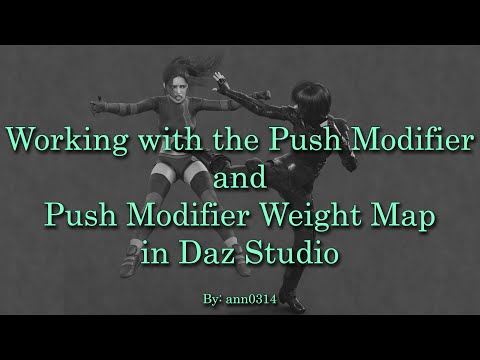
I don't remember if she's speaking about hidding clothes with, but it's usually done by placing the push modifier onto the clothes to hide (setting a negative value for that Push Modifier), except when you have to hide them behind something a bit too open ended (like strappy shoes), in this case, it's can be better to place the push modifier onto the clothes on top of the other (with a positive value). And of course, you can use two push modifiers, one on each piece of clothing if needed.
tsroemi said:
"Shades of Orange after Rain" (well ... duh ...)

I'm definitely not a dog person but this one look cute with how they are watching their owner, and the overall render is nice :) It gave the mood of being at the dusk of a rainy day, when rain finally stopped obscuring the sun :)
If you want a very short video on DoF, with a couple of useful tips, here is one where Jay Versluis and Colm Jackson are speaking about DoF:

-------
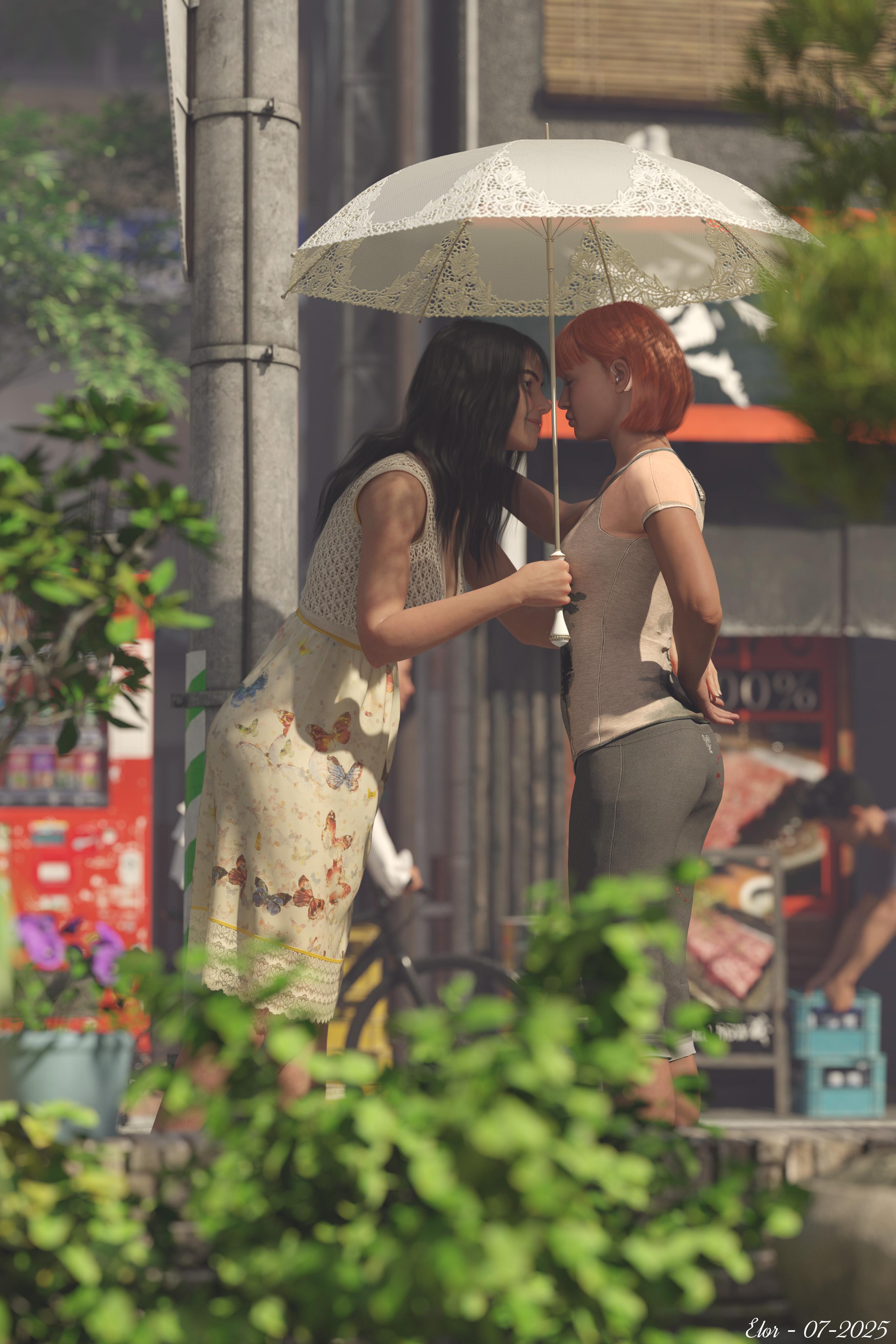
I have a new render, done for 'Llola Lane’s RENDER A MONTH Challenge 2025' with some products bough recently: it is called 'Morning stroll in Tokyo' (but maybe Street of Japan 2 is supposed to be about Kyoto
New products are:
- https://www.daz3d.com/playful-styles-for-everyday-2-clothes-and-poses-Texture-Add-on (pants' textures)
- https://www.daz3d.com/dforce-archmage
- https://www.daz3d.com/z-city-bike (I forgot to link it in the gallery, but to be fair, it's not very visible, behind the utility pole and Lacey, and well outside the 'DoF area').
- https://www.daz3d.com/everyday-2-for-genesis-8-females
- https://www.daz3d.com/sporty-for-everyday-2 (shirt's textures)
I got the first threes during the poses flash sale, and got the other two a couple of days later because I wanted the base outfit and some textures too :)
I didn't list Victoria's and Lacey's poses, not because it's my own creation (I wish I was able to pull something like that off, maybe one day, in the meantime, as the saying goes, 'for everything else, there's Mastercard'
 ) but because it's a product by @ParallaxCreates which was recently pulled from the store, so not linkable anymore.
Outside of Lacey's arm carrying the umbrella everything is as close as possible to the original poses (made for Victoria 8.1 and Michael 8.1 and G8F / G8M).
A short story:
Victoria and Lacey were enjoying a lovely morning stroll in Tokyo, in the neighbourhood around their hotel.
*grumble grumble*
*sshhhhh*
Taking to heart the advice of someone living in Japan they both followed on Youtube, Lacey carried their umbrella, to protect them from the already hot and aggressive sun.
*Wait, wait, it’s not pos… *
At the corner of two small streets, they made a pause and ended with Lacey leaning toward Victoria…
*It’s not possib…*
*WE KNOW IT’S A DREAM! You’re supposed to be the rational part among us, you don’t need to be the obnoxious one either. Let us enjoy a happy dream!*
Outside of the dream, in their flat in the US, unaware of the bickering between parts of her brain, Victoria moved a bit in her sleep, snuggling closer to Lacey before jumping right in a new sleep cycle, hoping the dream would resume right after it was stopped.
 How to Access "My DAZ 3D Library" from Script in Daz Studio?
var PATH_GROUPS = [ { title: "My Library", libIndex: 0, entries: [ { label: "G8F Clothing", path: "People/Genesis 8 Female/Clothing", method: "native" }, { label: "G8M Clothing", path: "People/Genesis 8 Male/Clothing", method: "native" }, { label: "G8F Poses", path: "People/Genesis 8 Female/Poses", method: "native" }, { label: "G8M Poses", path: "People/Genesis 8 Male/Poses", method: "native" }, { label: "G3F Clothing", path: "People/Genesis 3 Female/Clothing", method: "native" }, { label: "G3M Clothing", path: "People/Genesis 3 Male/Clothing", method: "native" }, { label: "G3F Poses", path: "People/Genesis 3 Female/Poses", method: "native" }, { label: "G3M Poses", path: "People/Genesis 3 Male/Poses", method: "native" } ] }, { title: "My DAZ 3D Library", libIndex: 1, entries: [ { label: "G8F Clothing (ID Path)", path: "People/Genesis 8 Female/Clothing", method: "idpath" }, { label: "G8M Clothing (ID Path)", path: "People/Genesis 8 Male/Clothing", method: "idpath" } ] }, { title: "Another My Library", libIndex: 0, entries: [ { label: "Props", path: "Props", method: "native" } ] } ]; function openPane() { var pm = MainWindow.getPaneMgr(); var p = pm.findPane("DzContentLibraryPane"); if (p) { pm.showPane(p); p.setVisible(true); return p; } else { MessageBox.warning("Content Library pane not found.", "Warning", "OK"); return null; } } function assertPath(pathRel, libIndex) { var cm = App.getContentMgr(); var base = cm.getContentDirectoryPath(libIndex); var full = base + "/" + pathRel; var exists = new DzDir(full).exists(); return { exists: exists, base: base, full: full }; } function jump(pathRel, libIndex, method) { var pane = openPane(); if (!pane) return; print("Attempting to jump:"); print(" Path Relative: " + pathRel); print(" Library Index: " + libIndex); print(" Method: " + method); var info = assertPath(pathRel, libIndex); print(" Full Path Derived: " + info.full); print(" Path Exists: " + info.exists); if (!info.exists && method !== "absolute") { // Allow absolute path to be tried even if initial check fails MessageBox.information("Folder not found:\n" + info.full, "Not Found", "OK"); return; } try { if (method === "native") { print(" Calling pane.browseToNativeFolder with relative path: " + pathRel); pane.browseToNativeFolder(pathRel, true); } else if (method === "idpath") { var aIdPath = ["My DAZ 3D Library"].concat(pathRel.split("/")); print(" Calling pane.browseToIDPath with array: " + aIdPath.join("/")); pane.browseToIDPath(aIdPath); } else if (method === "absolute") { print(" Calling pane.browseToNativeFolder with absolute path: " + pathRel); pane.browseToNativeFolder(pathRel, true); } pane.refresh(); print(" Navigation attempt complete."); } catch (e) { print(" ERROR during navigation: " + e); MessageBox.critical("Error navigating to path: " + e + "\nPath: " + pathRel + "\nLibrary Index: " + libIndex + "\nMethod: " + method + "\n\nPlease ensure the correct Content Library root is selected.", "Jump Failed", "OK"); } } function showDialog() { openPane(); var dialog = new DzDialog(); dialog.caption = "Quick Jump"; dialog.width = 350; // Increased width for new buttons and labels var layout = new DzVBoxLayout(dialog); layout.spacing = 6; for (var g = 0; g < PATH_GROUPS.length; g++) { var group = PATH_GROUPS[g]; var lbl = new DzLabel(dialog); lbl.text = "<div align='center'><b>" + group.title + "</b></div>"; layout.addWidget(lbl); for (var e = 0; e < group.entries.length; e++) { var entry = group.entries[e]; var btn = new DzPushButton(dialog); btn.text = entry.label; btn.clicked.connect((function(p, idx, m) { return function() { jump(p, idx, m); dialog.close(); // Keep closing for standard buttons }; })(entry.path, group.libIndex, entry.method)); layout.addWidget(btn); if (e === 3 && group.entries.length > 4) { layout.addSpacing(10); } } layout.addSpacing(5); } // --- Test Buttons Section --- var testLbl = new DzLabel(dialog); testLbl.text = "<hr><div align='center'><b>Test Options (No Dialog Close)</b></div>"; layout.addWidget(testLbl); layout.addSpacing(5); // Test 1: My DAZ 3D Library (libIndex 1, native method, relative path) var testBtn1 = new DzPushButton(dialog); testBtn1.text = "Test My DAZ 3D Library (libIndex 1, Native, Relative)"; testBtn1.clicked.connect(function() { print("\n--- Test Button 1 Clicked ---"); jump("People/Genesis 8 Female/Clothing", 1, "native"); }); layout.addWidget(testBtn1); // Test 2: My DAZ 3D Library (libIndex 1, ID Path method, relative path) var testBtn2 = new DzPushButton(dialog); testBtn2.text = "Test My DAZ 3D Library (libIndex 1, ID Path, Relative)"; testBtn2.clicked.connect(function() { print("\n--- Test Button 2 Clicked ---"); jump("People/Genesis 8 Female/Clothing", 1, "idpath"); }); layout.addWidget(testBtn2); // Test 3: Absolute Path (example: D:\My DAZ 3D Library\People\Genesis 8 Female\Clothing) var testBtn3 = new DzPushButton(dialog); testBtn3.text = "Test My DAZ 3D Library (Absolute Path)"; testBtn3.clicked.connect(function() { print("\n--- Test Button 3 Clicked ---"); jump("D:/My DAZ 3D Library/People/Genesis 8 Female/Clothing", -1, "absolute"); // -1 or any other index as it's absolute }); layout.addWidget(testBtn3); layout.addSpacing(10); var closeBtn = new DzPushButton(dialog); closeBtn.text = "Close"; closeBtn.clicked.connect(function() { dialog.close(); }); layout.addWidget(closeBtn); dialog.show(); while (dialog.visible) { processEvents(); sleep(50); } } showDialog();Please run this script and check or really transfer you to the library "My DAZ 3D Library"
G9 Woes3DSaga said:
Leana said:
maikdecker said:
Matt_Castle said:
In this respect, I have asked many times what people complaining about G9 actually want. (I usually get ignored).
Easy.. a product that allows me to transfer the look (form and textrues) of a G9 HD figure to a G8 figure, even if I lose the HD part when doing it. That's all I want to make G9 a product I would pay money for.
There's this to use G9 textures on G8 females : https://www.daz3d.com/genesis-9-uvs-for-genesis-8-and-81-female
Thanks fo the link to that product for using G9 textures on G8 females. That's worth trying; it may breathe new life into some of my G8s.
It most definitely will! My main characters are G8.1F, and I switched their skins to G9 textures using that product. I had to use the normals from one G9 and the skin from another in both cases because the skins I liked looked too mature when I put them on my G8.1s, but it worked great, and I'm very happy with the results.
There's Always Another Sale Thread -- Discussions Only Pt 4I Love being Premier!!!
Yeah... if you ever opt out of Premier, some of the fun Premier-Only special characters go away. But all of the Really Cool stuff we get as Premier Members is ours to keep!
Better discounts across the board (I need that because I'm poor) and exciting benefits within Studio itself - mostly for me is the Geometry Sculptor, which I can no longer live without. I do have the full Mesh Grabber Bundle. Geometry Sculptor does a Whole Lot More - Sculpt, Smooth, Scale... just to name those, but also the Tool Setting pane has widgets to go between Sculptor and Editor, so we can dart between them for making more specific selections, etc., - something I do every single day, several times a day. I use this for many things - one major one is to help set up objects to work specifically with an animation. You see, changes I make - even if it's just grabbing a pole and rotating it, for example, can be made into a morph slider. I can then use that slider throughout the animation.
Hair simulation corrections, making stuff fall apart, etc.,
So there's the Geometry Sculptor in Studio Premier, and the plethora of great deals that makes me entirely addicted to my Premier Membership - so Rosie says that I'll never have to go without!
G9 WoesLeana said:
maikdecker said:
Matt_Castle said:
In this respect, I have asked many times what people complaining about G9 actually want. (I usually get ignored).
Easy.. a product that allows me to transfer the look (form and textrues) of a G9 HD figure to a G8 figure, even if I lose the HD part when doing it. That's all I want to make G9 a product I would pay money for.
There's this to use G9 textures on G8 females : https://www.daz3d.com/genesis-9-uvs-for-genesis-8-and-81-female
Thanks fo the link to that product for using G9 textures on G8 females. That's worth trying; it may breathe new life into some of my G8s.
Another "which character" question - solvedtwiztedmetal said:
Hi everyone I can answer your questions, The morph is From TMHL Veshti for Genesis 9 and the skin is from one of DAZ's base skins The Feminine skin 04 to be exact and the lipstick was from my Twizted Makeup set for Genesis 9.
Nothing like a vendor who's engaged with their customers. Thanks, twizted!
G9 Woesmaikdecker said:
Matt_Castle said:
In this respect, I have asked many times what people complaining about G9 actually want. (I usually get ignored).
Easy.. a product that allows me to transfer the look (form and textrues) of a G9 HD figure to a G8 figure, even if I lose the HD part when doing it. That's all I want to make G9 a product I would pay money for.
There's this to use G9 textures on G8 females : https://www.daz3d.com/genesis-9-uvs-for-genesis-8-and-81-female
Daz 3D is part of

Connect
DAZ Productions, Inc.
7533 S Center View Ct #4664
West Jordan, UT 84084Licensing Agreement | Terms of Service | Privacy Policy | EULA
© 2026 Daz Productions Inc. All Rights Reserved.