-
[Released] Hat Check for Genesis 9 [Commercial]
Can't get it to work at all, No morph is ever created
2025-05-10 14:46:14.867 [DEBUG] :: Importing /Volumes/Private/My Daz3D Library2/data/RiverSoft Art/Data/G9HatCheckHigh.obj
2025-05-10 14:46:14.867 [WARNING] :: /src/sdksource/fileinput/dzimporter.cpp(227): Undo stack left open for file import - it will be closed to avoid errors
2025-05-10 14:46:14.867 [INFO] :: Importing File...
2025-05-10 14:46:15.192 [INFO] :: Importing: G9HatCheckHigh.obj...
2025-05-10 14:46:15.948 [INFO] :: Imported Wavefront Object: G9HatCheckHigh.obj
2025-05-10 14:46:15.965 [INFO] :: Imported file in: 0.1 sec (1097.54 ms)
2025-05-10 14:46:15.965 [INFO] :: Imported file: /Volumes/Private/My Daz3D Library2/data/RiverSoft Art/Data/G9HatCheckHigh.obj
2025-05-10 14:46:15.965 [DEBUG] :: Mask G9HatCheckHigh
2025-05-10 14:46:15.966 [DEBUG] :: Create Hair Morph RS Hat_2289 LayeredWinterStyleHair_195795 pCube(10q0000)20 2 0 true true false [object Object] 0
2025-05-10 14:46:16.229 [DEBUG] :: Num of Vertices 195795
2025-05-10 14:46:16.229 [DEBUG] :: Num of Facets 93692
2025-05-10 14:46:16.235 [WARNING] :: Script Error: Line 140
2025-05-10 14:46:16.235 [WARNING] :: TypeError: Result of expression 'oNode.inherits' [undefined] is not a function.
2025-05-10 14:46:16.235 [WARNING] :: Stack Trace:
<anonymous>()@/Volumes/Private/My Daz3D Library2/data/RiverSoft Art/Common/RSHatCheckFunctions.dse:140
2025-05-10 14:46:16.240 [WARNING] :: /src/sdksource/general/dzundostack.cpp(590): Call to DzUndoStack::cancel() with no matching beginHold()Free Toon Characters coming July 1st, early download available nowI've had some non-DAZ figures I made via Meshy go through Mixamo and import beautifully and fully possible in DAZ Studio, though; it's still pretty hit-or-miss for me, but I'll buckle down this weekend and see what I can do. Thanks again for your suggestions.
Free Toon Characters coming July 1st, early download available nowI've still had varying results, but I think I need to delve more closely into the import/export options. I have a difficult time, for example, exporting the Omnitoons as .FBX and then importing that into Mixamo, total failure.
I export as an .obj, import that into Mixamo and apply animations without issues, but then I export the Mixamo file – in a simple T-stance – and when I import *that* .FBX into DAZ Studio, it comes in with a blank Omnitoon skeleton but also with every single bone in the Omnitoon as its own skeleon with hip and other rparts.
Free Toon Characters coming July 1st, early download available nowoh they updated FBX import about build 4.23
you can import lots of stuff now and animated
Obj imports without any textures after recent updateAll the settings are default. And yes the textures work in blender and yes the objects imported with the textures applied (at least the ones I'm using) prior to the latest update of Daz! I think the Daz update borked something. Is there a fix? No applying the textures is NOT an option. Some objects have a TON of textures in a TON of places! And I'm not gonna say anything is labeled logically. Because they're not most of the time. But they did import successfully prior to the update but not after. And that's a HUGE Problem for a number of reasons!
MimicMolly's Renders & WIPsOther product I bought while I wasn't able to test things out right away is Censored's CNSRD Toon for Lucas 9. I don't have Lucas 9 and the product doesn't really need him. I'm satisfied with it, but sometimes the nose shading doesn't "fit" with some of the shapes. I opted to get this one instead of the feminine version because the feminine one seemed like it had "built-in" lipstick and I wanted a no-makeup base look that wouldn't conflict with the various LIE Makeups I have. Plus, the Lucas 9 product uses the regular G9 eye balls and not the anime/toon ones.
Here are some test renders of some assorted characters (which look good to me) I have managed to import to the new laptop:
Surprisingly, it worked well with the custom shape that's based off my own head. I am using random anime brows and eyelashes.

Here is Rarestone's Kayla transferred over to G9. Also with random anime brows and those same eyelashes.

Finally, Ivar 9 with the eyebrows that came with this Lucas 9 product, but random anime eyelashes.
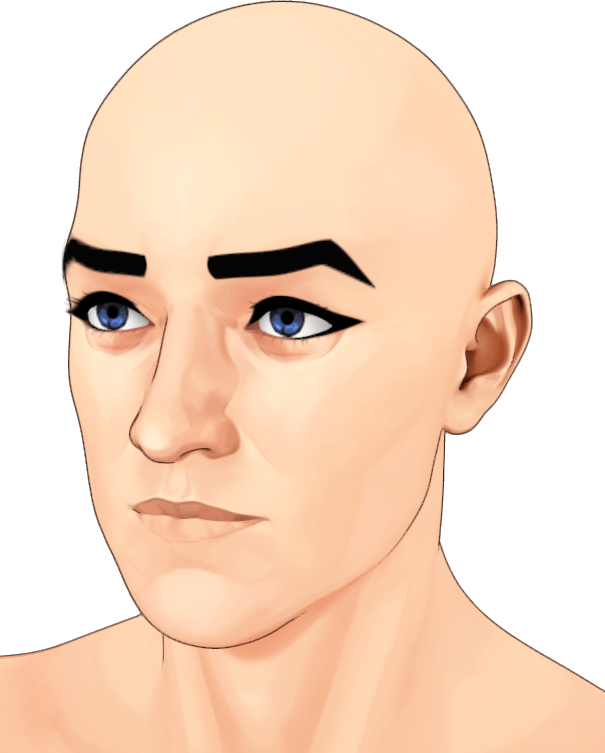
If I did some skin tone tweaks, all of them would look even more different. I also need to figure out how to colorize the G9 Tear to cover up those eyeball gaps.
Free Toon Characters coming July 1st, early download available nowrichardandtracy said:
Can I suggest a work-around for the clothing clone problem? It's a work-around I have followed myself to create a G8F/M clone for V3.
If you use DS itself to modify the shape of your character to moderately closely match G8 using bend, twist side-side and scale-x/y/z to match the surface of the character as well as is reasonable, then that shape will be close, but not a copy of the G8 shape. This posed shape could then be used as a close-enough clone to function as an auto-fit clone without being a copy. You should be able to get the clone surface within 2mm or so over the body simply by posing this way - and where it's difficult, pose your character so it's slightly inside a superimposed G8 as that'll reduce the chance of poke-through.
Now, that shape could be used as the clone, and I think you should be safe distributing it because it's only a loose representation of G8. BUT, if you're feeling terminally cautious, you could supply a script which the user would run to apply that pose to your character, save an obj, re-import the obj and turn it into a clone (I will confess the script is beyond me at the moment, but as there is a deformation to morph script product in the shop, it's possible). Then the only material being distributed is a pose and a script, both of which are your copyright and neither is an infringement of DAZ copyright.
I hope this contribution is helpful. If not that, I hope that it's not unhelpful.
Regards,
Richard
If you are trying to match the shape of another figure then you are creating a derivative and the issue still remains.
Obj imports without any textures after recent updatedaz obj import dialogue has an option to read material file. Are you checking that option?
Does Blender write the textures correctly to the material file? you can open .mtl file in a text editor like notepad to check
Can you not just add the textures manually to the Surfaces tab? Noting that an .obj material file is no a Blender-to-Daz bridge and will never add textures properly anyway and therefore is a flawed method to rely upon to get textures onto an obj and it is perhaps better to add them manually, or at least if you are going to rely on the material file, please ensure you check that they are all loading, and they are loading into correct slots in your shader, with correct values applied.
Obj imports without any textures after recent updateI can no longer import obj format assets (in my case imported from fbx into blender 4.0 and exported to obj first) since the recent Daz update. How do I fix it? I need obj assets to work in Daz for the type of scenes I do
Free Toon Characters coming July 1st, early download available nowrichardandtracy said:
Can I suggest a work-around for the clothing clone problem? It's a work-around I have followed myself to create a G8F/M clone for V3.
If you use DS itself to modify the shape of your character to moderately closely match G8 using bend, twist side-side and scale-x/y/z to match the surface of the character as well as is reasonable, then that shape will be close, but not a copy of the G8 shape. This posed shape could then be used as a close-enough clone to function as an auto-fit clone without being a copy. You should be able to get the clone surface within 2mm or so over the body simply by posing this way - and where it's difficult, pose your character so it's slightly inside a superimposed G8 as that'll reduce the chance of poke-through.
Now, that shape could be used as the clone, and I think you should be safe distributing it because it's only a loose representation of G8. BUT, if you're feeling terminally cautious, you could supply a script which the user would run to apply that pose to your character, save an obj, re-import the obj and turn it into a clone (I will confess the script is beyond me at the moment, but as there is a deformation to morph script product in the shop, it's possible). Then the only material being distributed is a pose and a script, both of which are your copyright and neither is an infringement of DAZ copyright.
I hope this contribution is helpful. If not that, I hope that it's not unhelpful.
Regards,
Richard
Thanks for the suggestion, it's much appreciated.
Currently, I have the four clones (Genesis 3 and Geneis 8 for male and female Omnitoons) and I *think* I have a workaround. As Richard has stated, we're allowed to use DAZ shapes to make clothing, since those are add-ons, not standalone figures.
My current plan is to remove the clones, but to include the Omnitoon meshes used to create the clones as Genesis 3 and 8 clothing. The users would get (probably pretty poor-quality) bodysuits for Gen3/8 that they could also use to create their own clothing clones fairly simply.
How to create a "squeeze" effect on breasts and buttocks
For more complex situations, the solution seems to be to learn how to use other software to create more advanced things. Exporting a 3D model from Daz to Blender (or another 3D software), making morph adjustments there and re-exporting it to Daz, sounds like a better option for more advanced details, but that's the thing: if you don't have the knowledge, you'll be more limited and may need to learn some tutorials to master another software or a certain feature of it.Squishy said:Magic Dragon 3D said:
Squishy said:
Imo you are much better off altering the geometry by hand, looking at references (if you have boobs of your own, that is super convenient). Mesh Grabber can do this, sculpting tools are much better (part of Premier subscription version).
It seems that Daz is not very perfect for simulating pressure and tightness in soft areas of the body from what I've heard. Apparently, the result would be better if done in other softwares like Blender.
It's very complex to simulate with physics and imo you will spend a huge amount of time learning the prerequisite import/export stuff and the blender specific "how do I make this hard mesh behave like a boob with physical accuracy" and setting up the collision and animating that. Whatever works best for you I can't say but I know from experience that's a huge set of prerequisites even when you already know what they are and where to go learn them.
Free Toon Characters coming July 1st, early download available nowCan I suggest a work-around for the clothing clone problem? It's a work-around I have followed myself to create a G8F/M clone for V3.
If you use DS itself to modify the shape of your character to moderately closely match G8 using bend, twist side-side and scale-x/y/z to match the surface of the character as well as is reasonable, then that shape will be close, but not a copy of the G8 shape. This posed shape could then be used as a close-enough clone to function as an auto-fit clone without being a copy. You should be able to get the clone surface within 2mm or so over the body simply by posing this way - and where it's difficult, pose your character so it's slightly inside a superimposed G8 as that'll reduce the chance of poke-through.
Now, that shape could be used as the clone, and I think you should be safe distributing it because it's only a loose representation of G8. BUT, if you're feeling terminally cautious, you could supply a script which the user would run to apply that pose to your character, save an obj, re-import the obj and turn it into a clone (I will confess the script is beyond me at the moment, but as there is a deformation to morph script product in the shop, it's possible). Then the only material being distributed is a pose and a script, both of which are your copyright and neither is an infringement of DAZ copyright.
I hope this contribution is helpful. If not that, I hope that it's not unhelpful.
Regards,
Richard
MimicMolly's Renders & WIPsI have been trying to organize my files and I have discovered that I bought a product a while ago that I can no longer ask for a refund for it because it's past the 30 days. (Besides, I had purchased it because it lowered the price of another product I wanted.) The problem is that it is not as I hoped it would be and because of that, I am unlikely to buy other characters from this vendor.
For the sake of the people who use the DAZ Deals 3rd party browser extension, the product in question is HD Details Plus Tattoo for Genesis 9. The product page makes it seem like it is selling the HD details (masc head, fem head, masc body, fem body), the tattoos, and the lemur-looking people (male head, male body, female head, female body). But the Read Me, which you have to jump through hoops to find, unless you're using the aforementioned browser extention, shows that it's only the HD details that are for like SubD 5 and the tattoos, no lemur people. I wanted the lemur people and maybe the tattoos, but since there's no lemur people I should technically go and get a refund. But, it's too late because I bought these back in February. RIP. (Fortunately, the details can be used on any G9 character, but I don't render with HD characters. Especially since I prefer to do "NPR," so it doesn't work out well)
Also, the icing on the cake is the way these HD morphs are saved in the "Characters" folder. I will have to move these manually, which would break metadata links, but I don't use Smart Content.
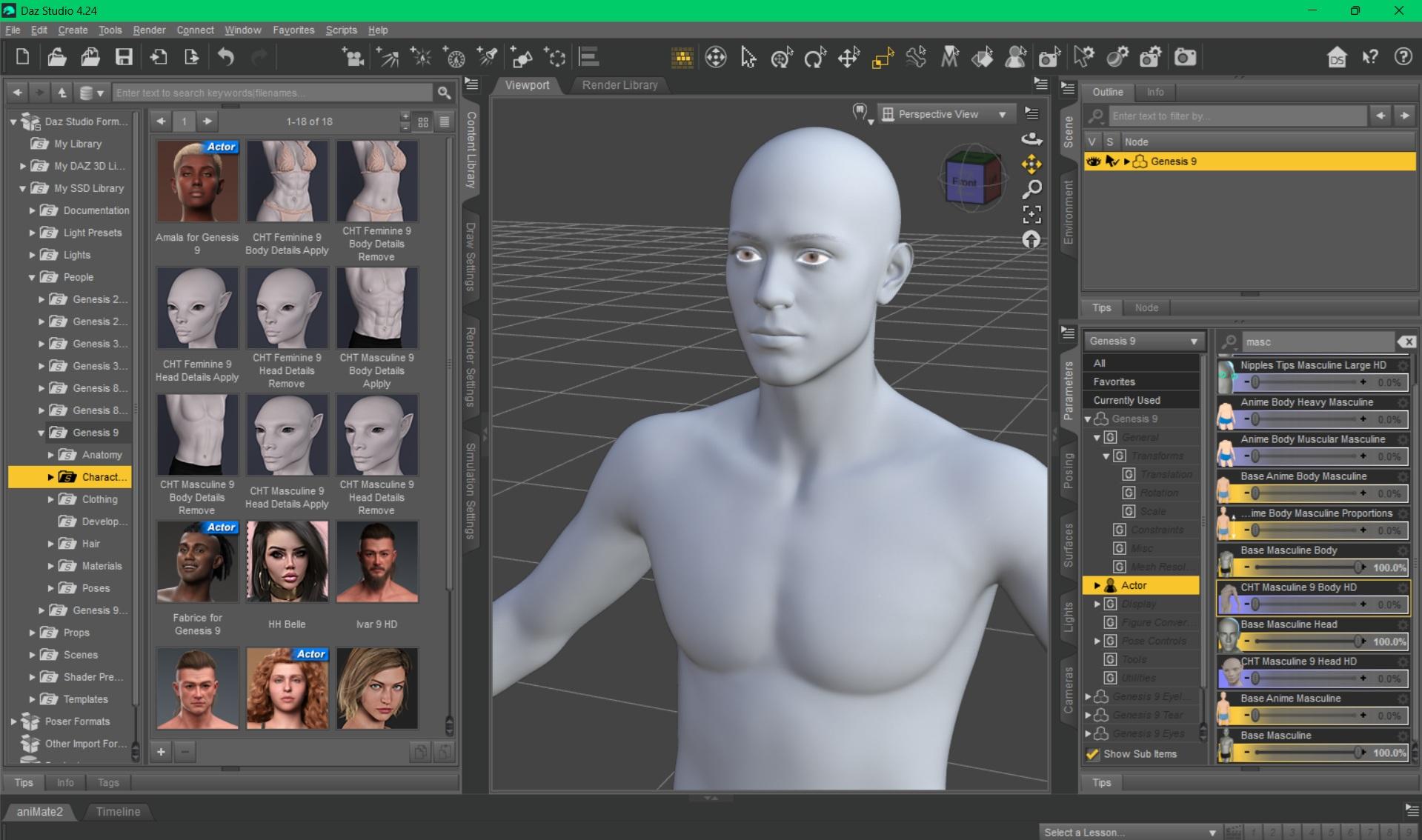
TL;DR - I wanted the lemur characters (the male and the female), and was fine with them not having skins. But these shapes aren't in the product, only the musculature and veins (for the heads and bodies), plus the tattoos. It's too late for a refund.
How to create a "squeeze" effect on breasts and buttocksMagic Dragon 3D said:
Squishy said:
Imo you are much better off altering the geometry by hand, looking at references (if you have boobs of your own, that is super convenient). Mesh Grabber can do this, sculpting tools are much better (part of Premier subscription version).
It seems that Daz is not very perfect for simulating pressure and tightness in soft areas of the body from what I've heard. Apparently, the result would be better if done in other softwares like Blender.
It's very complex to simulate with physics and imo you will spend a huge amount of time learning the prerequisite import/export stuff and the blender specific "how do I make this hard mesh behave like a boob with physical accuracy" and setting up the collision and animating that. Whatever works best for you I can't say but I know from experience that's a huge set of prerequisites even when you already know what they are and where to go learn them.
Can DAZ do obj sequence animation?Stonemason said:
how did you do the obj sequence?, in the past I think I used collada import?
I've not tried geometry switching in DS, it was a cool feature in Poser though, I first saw it used on the Dystopia city blocks by Moebius87 and Ajax
Oh really? Collada? Interesting. There is a function in Poser that we edit in text called 'uniqueInterp'.
We ended up making use of this feature in Poser for all sorts of things in RWBY and Red vs Blue since Monty realized it doesn't care how many frames there are. We were able to use this for Weapon transformations (even up to 500 frames for Ruby's Scythe). It was animated in Maya, exported obj. but we needed a script to rename the mtl lines written within the obj files to be in sequencial order. We also used this for fx animations on cars within Poser. I experinemted with various geometry shaps for fx too. You can then use a single dial to animate through all the frames since it is pulling up these models in a sequence in real-time. It worked out quite lovely. The process was very tedius to setup as you need to copy nodes in the pz3 file. Im pretty rusty at setting it up from scratch now, but we had a script to help automate the process too. For fx, we would end up doing the work once (per type) so there was a template, like 100 frames of cards. and then make a copy of the file and replace the file paths/textures, etc to make it unique.
Here are some visual examples
https://x.com/shanewville/status/1540896131663683592
That would be hilaruous though if no one actually edited it this way and we just stumbled onto it the hardway. It was all Monty Oum just looking at thins in the pz3 files and figuring things out.Can DAZ do obj sequence animation?how did you do the obj sequence?, in the past I think I used collada import?
I've not tried geometry switching in DS, it was a cool feature in Poser though, I first saw it used on the Dystopia city blocks by Moebius87 and Ajax
Modular building generator and cityscape generator scriptsGordig said:
Have you checked the Unreal store? Seems like the kind of thing they'd have, and for a pretty reasonable price.
im looking for one for Daz. I already have one for unreal that I currently use a lot. I want one for Daz as nothing seems to want to import into unreal seamlessly. Besides some assets look better in Daz as opposed to being imported into unreal. Just my personal opinion though.
Halloween 2023 Cup with cat-shaped handleThanks Elor! I'm glad you liked my cups and I thank you very much for this work you did for the metadata.

I noticed that the download link is still active, if there are any problems let me know, so I'll republish the cups here in the forum.Halloween 2023 Cup with cat-shaped handleHello,
I created metadata for these three beautiful cups, so if someone else want to have them too on their own computer, they are in the archive attached to this message.
I have done them two times: one for the default folders structure used by @emanuela1 (in the archive, it's in the folder named 'Default') and one for the folders structure I'm using on my own computer (in the folder named 'Elor'). If you have your own folders structure, sorry, you'll have to create the metadata yourself (you're also more likely to not care that much about metadata though).
Note: I didn't make a DIM compatible installer, just created the metadata and you'll have to import them using tools available in Daz Studio.
If you installed the cups keeping the default folders structure, you'll have to merge the content of the 'Default/Runtime/Support folder into the Runtime/Support folder of the library you have them installed (or in any active library, Daz Studio doesn't really care that much about that as long as it's in an active library but I think it's best to have the metadata files in the same library as the rest of a product's files).
The safest way to do the merge is by copying and pasting the three files 'LOCAL_USER_EM_Halloween_Cat_Cups.dsa', 'LOCAL_USER_EM_Halloween_Cat_Cups.dsx' and 'LOCAL_USER_EM_Halloween_Cat_Cups.jpg' inside the chosen 'Runtime/Support' folder especially if you're using a Mac (Finder is not great at merging folders).
If you want to use the folders structures I'm using:
1. Copy the content of the Props folder into the Props folder of the library where you installed the cups (you're unlikely to have an Emanuela folder here already, but beware if it's the case).
2. Move the three duf files located into 'cup3size' into '/Props/Emanuala/Halloween Cat Cups'
3. Rename them according to the name of the PNG files you'll find here (it's the thumbnails I created for them), so:
- 'cup3cat-big.duf' will become 'Cup Cat - Big.duf'
- 'cup3cat-med.duf' will become 'Cup Cat - Medium.duf'
- 'cup3cat-small.duf' will become 'Cup Cat - Small.duf'
Then you'll have to copy-paste the three files 'LOCAL_USER_EM_Halloween_Cat_Cups.dsa', 'LOCAL_USER_EM_Halloween_Cat_Cups.dsx' and 'LOCAL_USER_EM_Halloween_Cat_Cups.jpg' inside the chosen 'Runtime/Support' folder.
Once everything is done, you should be able to delete the 'cup3size' folder.
Regardless of which folders structures you want to use, the next steps are:
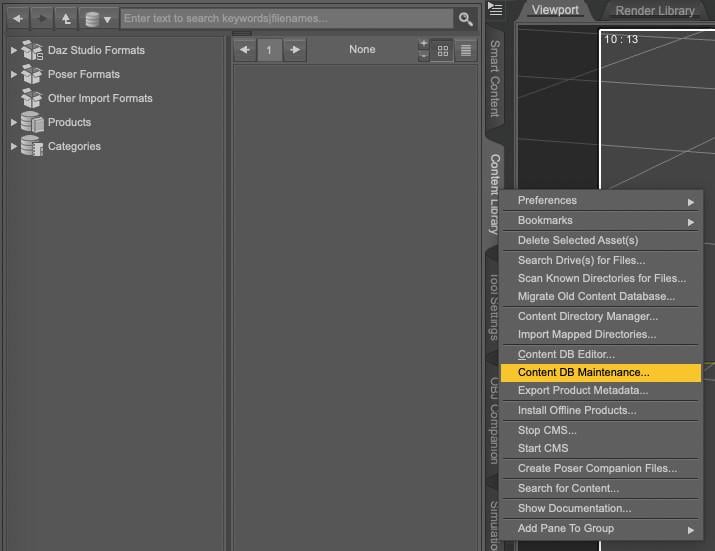
1. Open your Content Library, right click on the tab to get the following menu and select Content DB Maintenance
2. Select Re-import Metadata
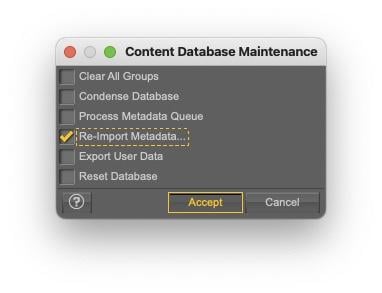
3. UNSELECT everything by unchecking User Data and All Products, to avoid overwritting existing metadata (it'll also be much faster to only import one product metadata than your whole library…).
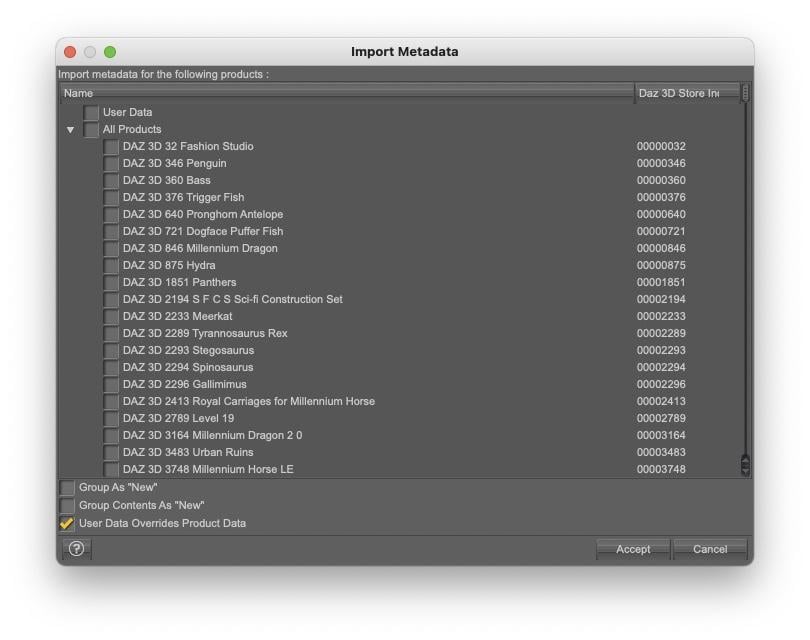
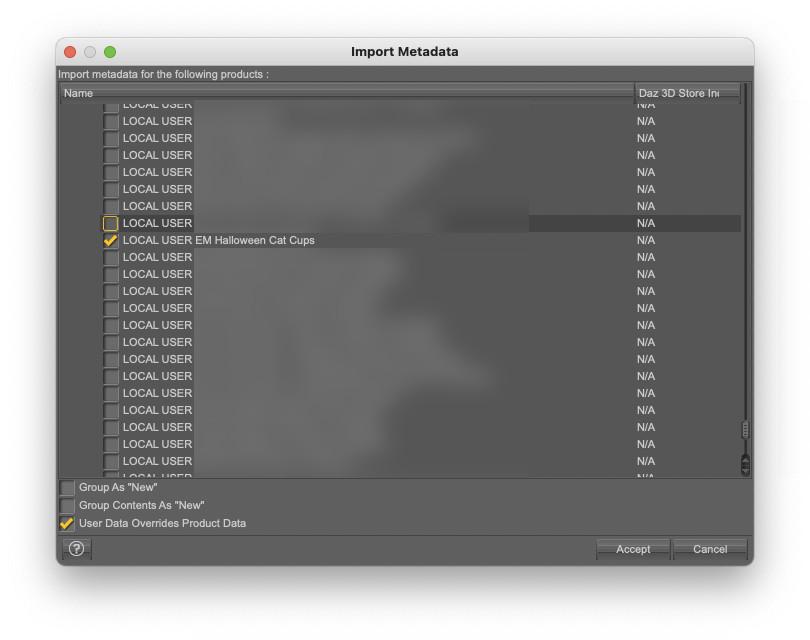
4. Select 'LOCAL USER EM Halloween Cat Cups' and click accept:
Once done, you'll be able to find the cups either by typing 'Halloween' (or any of the other words, but halloween is likely a less used word that cup or cat) or by searching using the author name as a key, so by typing key::Emanuela. The cups will also appears if you're looking for Props or Props/Kitchenware:
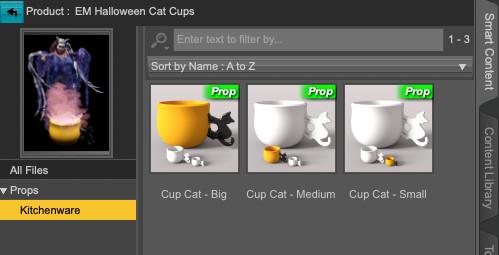
As they are no material presets, it's likely not that useful, but the correct Compatibility Bases are set for each cup (it'll save a step to someone who created material presets and wants to add metadata to them, but you'll have to learn how to do it yourself, this message is already far too long).
The product picture is based on an old render I did two years ago (The Tooth Buster) and you can replace the default product's picture by another one if you prefer: you can do so by replacing the file 'LOCAL_USER_EM_Halloween_Cat_Cups.jpg' located in 'Runtime/Support'. It's best to have a 10:13 picture ratio and I'm using a 380x494 picture. Once done, Smart Content will use the new picture the next time you're opening the product or searching for it.
Edit:
I don't know if it's necessary or not, but it won't hurt: do what you want with the content of the metadata archive, except pretending you did the various pictures included (no need to credit anyone though, except Emanuala1 for creating these three cups).
File TransferA while ago, I moved my content files to an external hard drive from the main hard drive of my iMac:
I copied my content folders/runtimes to the new hard drive; in your case, you will copy those folders to
I took a nice screenshot of the the settings of Daz Studio's Preferences/Content Manager and the DIM installation settings and printed it
In your case, you will install Daz Studio and DIM and you will copy the Daz Studio folders that are in the Shared User directory of your mac
You will open Daz Studio and go to Preferences and Content Manager and configure Content manager to match your now moved directories and DIM to match where you will now install content
Reinstall things like scripts
And Log into Daz Studio and update metadata and render
Content Manager needs to know where your content folders are, where Poser runtimes are, and where CMS cluster will live as well as Daz Connect info.
Daz 3D is part of

Connect
DAZ Productions, Inc.
7533 S Center View Ct #4664
West Jordan, UT 84084Licensing Agreement | Terms of Service | Privacy Policy | EULA
© 2026 Daz Productions Inc. All Rights Reserved.