-
FilaToon / Cell shaded rendering with Filament
midgard229 said:
TesseractSpace said:
Yeah, some kind of scene-wide shader conversion script would help a lot. Hopefully one is in the works.
You can use the general shader like a normal shader. Select multiple surfaces then apply. General toon shader and it should work. Sometimes it will miss some items and you have to reslect them and try again. Overall it works almost on anything that is an actual mesh, just nothing like vdb or opacity mapsTrue, but a script could help with having the shader a bit more tuned based on the whatever the original shader was. Something like the RSSY 3delight and Iray to Filament converter
Anime Toons and Filatoon Shader Q&AI never used Filament so I'm wondering what steps are required to switch any existing scene from iRay to Filament?
Is there a script? Do I have to change all the shaders?
Are the official instructions from DAZ hidden somewhere?
The Mac FAQRod Wise Driggo said:
- will Studio Premier have feature parity between Win and Mac? E.g. filament is a thing we are waiting for since ages or was that recently implemented?Filament is still not available for Mac.
- will all the ManFriday plugins be available for Mac and when?
From what I've read, that was the plan.
- is that new FilaToon-Thing available for Mac at all or is it limited to 4.23, which is of course not yet running properly on Mac
It uses filament, so not yet.
The Mac FAQinquire said:
Rod Wise Driggo said:
OK guys, guess this is finally the right place for my questions. So DAZ is talking a lot about Premier. And I am thinking about subscribing.
I was asking about the ManFriday plugins (like dForce Assistant or RenderQueue) which I was always interested in but which have been Win Only. One day after that I had an orange banner - just one day - stating that Mac users will get full plugin functionality but should not download Studio 4.23 at the moment.Well, Studio Premier is a vital part of the whole Premier thing, but...
- will Studio Premier have feature parity between Win and Mac? E.g. filament is a thing we are waiting for since ages or was that recently implemented?
- will all the ManFriday plugins be available for Mac and when?
- when to expect a first public version of 4.23 for Mac. I mean if I would subscribe Premier today, how many months would I pay for something I cannot fully use?
- is that new FilaToon-Thing available for Mac at all or is it limited to 4.23, which is of course not yet running properly on Macand finally
- when can we finally expect a real native Apple Silicon version of studio. It's ages since the M1 was released.
what is the Fla-Toon Thing?
The Mac FAQinquire said:
Rod Wise Driggo said:
OK guys, guess this is finally the right place for my questions. So DAZ is talking a lot about Premier. And I am thinking about subscribing.
I was asking about the ManFriday plugins (like dForce Assistant or RenderQueue) which I was always interested in but which have been Win Only. One day after that I had an orange banner - just one day - stating that Mac users will get full plugin functionality but should not download Studio 4.23 at the moment.Well, Studio Premier is a vital part of the whole Premier thing, but...
- will Studio Premier have feature parity between Win and Mac? E.g. filament is a thing we are waiting for since ages or was that recently implemented?
- will all the ManFriday plugins be available for Mac and when?
- when to expect a first public version of 4.23 for Mac. I mean if I would subscribe Premier today, how many months would I pay for something I cannot fully use?
- is that new FilaToon-Thing available for Mac at all or is it limited to 4.23, which is of course not yet running properly on Macand finally
- when can we finally expect a real native Apple Silicon version of studio. It's ages since the M1 was released.
what is the Fla-Toon Thing?
The toon stuff, which is suitable for Filament
The Mac FAQElor said:
Mada, in her FAQ about Fila-toon, confirmed that currently Fila-toon won't work on Mac, regardless of the version:
Mada said:
Mark_e593e0a5 said:
If I undrestand this correctly, the shaders only work in Filament render mode - which is not available at all on Mac up until current 4.22 version. Mac users have been instructed NOT to upgrade to 4.23, so I cannot check if it has been made avilable - suppose it isn't. I really like the look of the shaders, but they seem to be not useable for me. Please tell me I am wrong.
Unfortunately you are correct - but there are work going on behind the scenes to get it out to mac users as soon as possible. The shader relies on filament to work properly.
About your other questions: Manfriday's plugins should work with the most recent public beta version (OBJ Companion and Seamster do, it's the only ones I have from MF but they were prevented to load by the same bug, a bug that Daz fixed in Daz Beta 4.23.0.3). If you don't want to install beta version, you'll have to wait for a public release based on at least Daz Beta 4.23.0.3.
I don't know when a new public release will be made available, but hopefully soon, especially because it should also include changes made by Daz to improve the stability of Daz Studio on Mac OS Sonoma and later (which would allow me to finally update my own Mac).
Regarding a native Apple Silicon version, your guess is as good as anyone else guesses and AFAIK, no one in the known has publically wrote something on the subject since I started using Daz Studio last year.
Thanks for the info. Well I am already on Sonoma and kind of live with the instability of DAZ Studio at the moment:
- Don't use Menus, especially nested ones as they are doomed.
- Access scripts not via menus but smart content and double-click.
(not that this makes any sense but it's a way to use things live look@this and dforce2morph without killing studio out of the sudden all the time)
- Save often, really often. And even more often.
It is really funny that I pay this company loads of money for content when they still treat mac users like customers second third fouth class.Anime Toons and Filatoon Shader Q&AMake sure you're using the filament renderer, anything else will show up as black
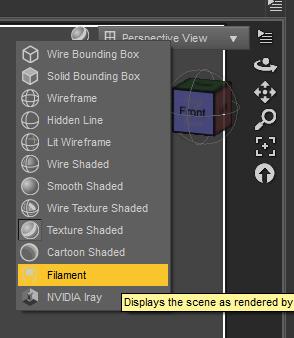
Also make sure you're not clicking on the geoshell, but on the prop. The geoshell base colour is black. Once you added the outline apply one of the presets depending on the material you're using. If you're using armour I assume it would be metallic. Turn up the environment weight on the filatoon shader to make it more or less metallic.
Anime Toons and Filatoon Shader Q&AFantastArt said:
Ok, maybe I'm blind, but please tell me how I switch to Filament Render Mode...I can't find it...
It's where you switch between view modes, like Iray preview, texture shaded, wire shaded etc. Filament is the one with the lightbulb icon.
The Mac FAQRod Wise Driggo said:
OK guys, guess this is finally the right place for my questions. So DAZ is talking a lot about Premier. And I am thinking about subscribing.
I was asking about the ManFriday plugins (like dForce Assistant or RenderQueue) which I was always interested in but which have been Win Only. One day after that I had an orange banner - just one day - stating that Mac users will get full plugin functionality but should not download Studio 4.23 at the moment.Well, Studio Premier is a vital part of the whole Premier thing, but...
- will Studio Premier have feature parity between Win and Mac? E.g. filament is a thing we are waiting for since ages or was that recently implemented?
- will all the ManFriday plugins be available for Mac and when?
- when to expect a first public version of 4.23 for Mac. I mean if I would subscribe Premier today, how many months would I pay for something I cannot fully use?
- is that new FilaToon-Thing available for Mac at all or is it limited to 4.23, which is of course not yet running properly on Macand finally
- when can we finally expect a real native Apple Silicon version of studio. It's ages since the M1 was released.
what is the Fla-Toon Thing?
Anime Toons and Filatoon Shader Q&Aainm.sloinneadh said:
FantastArt said:
Ok, maybe I'm blind, but please tell me how I switch to Filament Render Mode...I can't find it...
There's a scene file in the starter essentials that'll set the environment up for you. You can switch between iRay and Viewport rendering in the render settings tab. For viewport rendering, make sure your viewport is set to filament. I think that's how it works.
sorry but is this written somewhere? I still can't find this. How did you know?
Anime Toons and Filatoon Shader Q&AFantastArt said:
Ok, maybe I'm blind, but please tell me how I switch to Filament Render Mode...I can't find it...
There's a scene file in the starter essentials that'll set the environment up for you. You can switch between iRay and Viewport rendering in the render settings tab. For viewport rendering, make sure your viewport is set to filament. I think that's how it works.
Anime Toons and Filatoon Shader Q&AOk, maybe I'm blind, but please tell me how I switch to Filament Render Mode...I can't find it...
The Mac FAQMada, in her FAQ about Fila-toon, confirmed that currently Fila-toon won't work on Mac, regardless of the version:
Mada said:
Mark_e593e0a5 said:
If I undrestand this correctly, the shaders only work in Filament render mode - which is not available at all on Mac up until current 4.22 version. Mac users have been instructed NOT to upgrade to 4.23, so I cannot check if it has been made avilable - suppose it isn't. I really like the look of the shaders, but they seem to be not useable for me. Please tell me I am wrong.
Unfortunately you are correct - but there are work going on behind the scenes to get it out to mac users as soon as possible. The shader relies on filament to work properly.
About your other questions: Manfriday's plugins should work with the most recent public beta version (OBJ Companion and Seamster do, it's the only ones I have from MF but they were prevented to load by the same bug, a bug that Daz fixed in Daz Beta 4.23.0.3). If you don't want to install beta version, you'll have to wait for a public release based on at least Daz Beta 4.23.0.3.
I don't know when a new public release will be made available, but hopefully soon, especially because it should also include changes made by Daz to improve the stability of Daz Studio on Mac OS Sonoma and later (which would allow me to finally update my own Mac).
Regarding a native Apple Silicon version, your guess is as good as anyone else guesses and AFAIK, no one in the known has publically wrote something on the subject since I started using Daz Studio last year.
Anime Toons and Filatoon Shader Q&AI love the Filatoon shader!

Here are a few tips to get you started:
- Switch your viewport to Filament mode
- Add a distant light, at about 10000 to 15000 lumen
- To get a file of the workspace view, go to your render settings, set the size you want and switch your render engine to "Viewport" (right at the top of the panel).
Rendering is instant, it's amazing!Hope that helps; those were the things I struggled with when I used Filatoon for the first time, so I thought I'd pass this info on to make things easier for other users.
Anime Toons and Filatoon Shader Q&AVicky 9 looks awesome and is the only reason I will give Filament another try. But I run into a little problem. I upgraded to 4.23 via Install Manager and installed the character bundle also with IM. Now, when I try to use the figure I get the message that the BaseAnimeF_figure_ctrl_Character.dsf is missing. So where should the Morphs be located?
FilaToon / Cell shaded rendering with FilamentHylas said:
OMG
please tell me this can be applied to other characters and generations.
Yes it can!

You actually have several options, depending on the effect you want:
- Use both the toon outline and the toon shader (if you apply the shader to the selected surface, it will convert as much as it can).
- Use the toon outline but keep the Iray shader on the surface itself
- Use the toon shader without the outlineNote that this is based on Filament functionality. That means some special effects like Subsurface Scattering are not available, and transparency/opacity maps are tricky. (High-contrast black-white opacity maps work great, but intermediate shades get wonky results.)
Anime Toons and Filatoon Shader Q&AUthgard said:
First of all, this looks amazing, and it's something I've wished was available in DAZ for decades, so thank you very much! As to my first immediate questions, you mention that there was work made to have G9's eyes work with the cartoon shader; is there something the average user can do to replicate the effect on other figures? G8 would obviously be the priority, but animals would be quite important as well--and that brings up the issue about how, if at all, it works with strand-based hair. I haven't used Filament, but I guess that's a non-starter? What about VDB?
The eyes are completely new geometry with all kinds of effects and it was a lot of work. So right now no - its not easy to replicate.
Strand based hair does not work - you need geometry for the outline to show up.
No idea about VDB - hopefully someone else can answer that for you :)
Anime Toons and Filatoon Shader Q&AFirst of all, this looks amazing, and it's something I've wished was available in DAZ for decades, so thank you very much! As to my first immediate questions, you mention that there was work made to have G9's eyes work with the cartoon shader; is there something the average user can do to replicate the effect on other figures? G8 would obviously be the priority, but animals would be quite important as well--and that brings up the issue about how, if at all, it works with strand-based hair. I haven't used Filament, but I guess that's a non-starter? What about VDB?
Anime Toons and Filatoon Shader Q&AMada said:
scorpio said:
Is this an actual Shader - ie it can be applied to anything?
Does the latest version of DS 4.23 work in windows 10, I've got the impression that it needs windows 11?
Yes it is an actual shader and it can be applied to anything - and then use Filament to render it out. The scripts supplied will create an outline and set up the shader in your surfaces tab, then you can tweak till its how you like it.
I prefer to disconnect all the other maps and only use a base map, and then tweak the rim lighting.I am not sure about the windows 10 question, I will ask. I however don't think that's the case. Edit to add - yes it works fine on Windows 10
Thank you
Vicky 9 thoughts - Filament render only for cel-shading?Destiny's Design said:
So, in terms of your Iray products, so far I've had plenty of success just messing around with a applying the toon filament shaders to iray clothing, environments, etc so I'd say theres plenty of use for your older products though heavily painted in base colours will likely look a wee bit odd.
Of course, if toon was never your thing, this isn't going to suddenly change your mind. But I reckon it's sort of like, a taste thing. Like retro tech isn't really my thing, but I never thought to myself "Why did they release that? I don't even like retro tech." if you see what I mean aha
I love anime, this particular shape/style isn't may absoloute favourite, but just the system being here now makes me super excited for what PAs might create in the future.
Like I'd love to see a more modern style as well. Anime comes in all sorts of styles though, I love seeing them all! (quick render here, obvious I didn't get around to hair aha)As you might imagine, I had no intention of telling Daz what they could and could not publish. That was your thought, not mine. English is not my first language, so perhaps there was a misunderstanding.
Vicky 9 is certainly very welcome to anyone who makes manga and anime renders. The character and her male version look good to a layperson like me. But do they always have such red noses?
Daz 3D is part of

Connect
DAZ Productions, Inc.
7533 S Center View Ct #4664
West Jordan, UT 84084Licensing Agreement | Terms of Service | Privacy Policy | EULA
© 2026 Daz Productions Inc. All Rights Reserved.