-
Anime club
Here are the links:
Aiko 3.0 morph and map = https://www.daz3d.com/aiko-3-0-morphs-and-maps
Akemi for Aiko = http://web.archive.org/web/20060315111208/http://www.daz3d.com/shop.php?op=itemdetails&item=2881
[Akemi by Lucie is no longer sold it seems ]
Kioki = https://www.daz3d.com/kioki
Saeko A3 by Lalita = https://www.renderosity.com/mod/bcs/saeko/35487
[Saeko is no longer sold it seems]
Aiko 3 eyes = https://www.daz3d.com/aiko-3-0-eyes
Hair Bob is a freebie by Mato over at poserclub.net Japan = http://poserclub-cab.net/pf/free-staff/others-2/kururu/f448/
Sailor Sleeve set by Aio = https://www.renderosity.com/mod/bcs/index.php?ViewProduct=44356
[This uniform is no longer available please try contacting the seller at renderosity send him a note.]
Dumb Or Anime Eyes for Victoria 3 = https://web.archive.org/web/20060925192216/http://jjdelpy.free.fr/Poser/doaeyes.html
We will try to work around it in the next upcoming days...
Excessively long saved figure and scene loading, saving and clearing time ...SOLVED!!!Connect does not automatically encrypt files, it is the asinine "Cloud" folder and placing every item in its own sub-folder that breaks referencing files. I morph the heck out my characters when used in scenes and they still only take about a minute to load
For Victoria 4/Michael 4 this si potentially an issue - which is why those are no Connect-ready. For Genesis or later there is no issue with the way the files are split, it has always been possible to have support assets for a figure spread across multiple content directories. Some add-ons with hard-coded relative paths in scripts can be an issue, as they could if moved under a non-Connect install, butt hose will fail on first load and are the exceptions.
AIUTO...CHI CONOSCE L’ITALIANO? PARTE UNDICICiao a tutti, sono un super newbie utente di DAZ Studio.
Devo essere sincero, mi sto perdendo tra DAZ Studio, Genesis, Genesis 3, Victoria 4 ... tra nomi e versioni non ci ho capito molto.
Esiste una piccola guida che spieghi l'ecosistema DAZ? Altrimenti c'è qualcuno di voi che potrei contattare per capirci qualche cosa?
Ho provato a cercare in rete delle spiegazioni, ma non ho trovato un granché.
Grazie mille e scusate la domanda banale.
marcoCiao, scrivi pure quei i tuoi dubbi e cercheremo di risolverli al meglio delle nostre possibilità!
Dance of Kali (Anyone know what this is? ) + Link Gear + Poser...
--------------------
Also, do these items work in Daz (iray rendering engine and such)?
https://www.daz3d.com/the-qabbalah-addon
https://www.daz3d.com/the-qabbalah-aerandiel-interskeleton
--------------------
https://www.daz3d.com/linkgear-bundle-for-victoria-4-and-michael-4
AND...and...last time I looked at these products, it was a no-go for daz because it needs Poser's rendering engine.
Now, it says Daz Studio 4.9 compatible.
So I *should be okay getting this now.....shouldn't I?
The Quabbalah works but the textures will probably need quite a bit of tweaking to work in DS especially Iray, I haven't used it for a while but I do remember having to do quite a bit of work for it in 3dl. I don't have the texture add on so don't know about that.
As Chohole says the cloaks won't work in DS without the plugins that get Poser dynamics working in DS.
Also I'm not sure if the suits aren't using Poser procedural mats those won't work either.
AIUTO...CHI CONOSCE L’ITALIANO? PARTE UNDICICiao a tutti, sono un super newbie utente di DAZ Studio.
Devo essere sincero, mi sto perdendo tra DAZ Studio, Genesis, Genesis 3, Victoria 4 ... tra nomi e versioni non ci ho capito molto.
Esiste una piccola guida che spieghi l'ecosistema DAZ? Altrimenti c'è qualcuno di voi che potrei contattare per capirci qualche cosa?
Ho provato a cercare in rete delle spiegazioni, ma non ho trovato un granché.
Grazie mille e scusate la domanda banale.
marcoDance of Kali (Anyone know what this is? ) + Link Gear + PoserThis product:
https://www.daz3d.com/dance-of-kali
Is it JUST POSES?
Or do I get the female figure AND the headress?
I assume the blue skin is something I have to do myself...
And are the skin-inks/tats included on the figure (if there is one)?
--------------------
Also, do these items work in Daz (iray rendering engine and such)?
https://www.daz3d.com/the-qabbalah-addon
https://www.daz3d.com/the-qabbalah-aerandiel-interskeleton
--------------------
https://www.daz3d.com/linkgear-bundle-for-victoria-4-and-michael-4
AND...and...last time I looked at these products, it was a no-go for daz because it needs Poser's rendering engine.
Now, it says Daz Studio 4.9 compatible.
So I *should be okay getting this now.....shouldn't I?
Show Daz that Carrara users are a market worth supporting! How many Product Pages do you have?I will be needing to join Wendy in rehab..... I have been 'Misty-fied' by my GENESIS 3 CarrarActors!!!
Am afraid to do the math, yikes. But am loving working with them!

 Silene
(I have 2000 items-36 pages in my Product Library...below are just my G3 items)
~~~~~~~~~~~~~~~~~~~~~~~~~~~~~
Who Done It Sacrament Poses for Genesis 3
Super Sleeky Hair for Genesis 3 Female(s) and Genesis 3 Male(s) and OOT Hairblending 2.0
Shavonne Hair for Genesis 3 Female(s) and Male(s)
i13 Meticulous Pose Collection for the Genesis 3 Female(s)
Bast Hair for Genesis 3 Female
Absolute Basics Poses and Expressions for Genesis 3 Male(s)
Divinity Outfit for Genesis 3 Female(s)
Jungle Goddess for Genesis 3 Female(s)
Rasta Tails Hair and OOT Hairblending 2.0 for Genesis 3 Female(s)
Growing Up for Genesis 3 Female(s)
Shape Shift for Genesis 3 Female(s)
Shape Shift for Genesis 3 Male(s)
Growing Up for Genesis 3 Male(s)
Growing Up for Genesis 3 Bundle
ULTRAGENESIS: Faces of G
Professional Cellist Poses for Genesis 3 Female and Male
People of Earth: Faces of Asia Genesis 3 Female
People of Earth: Faces of Africa Genesis 3 Male(s)
People of Earth: Faces of Asia Genesis 3 Male
People of Earth: Faces of Africa Genesis 3 Female
Growing Up Skin Merchant Resource for Genesis 3 Male(s)
Growing Up Skin Merchant Resource for Genesis 3 Female(s) Adult Add-on
Growing Up Skin Merchant Resource Bundle for Genesis 3
Growing Up Skin Merchant Resource for Genesis 3 Female(s)
Growing Up Skin Merchant Resource for Genesis 3 Male(s) Adult Add-on
People of Earth: Faces of Europe Genesis 3 Female
People of Earth: Faces of Europe Genesis 3 Male
Genesis 3 Bundle Expressions & Face aniBlocks
Genesis 3 Male(s) Expressions & Face aniBlocks
Genesis 3 Female(s) Expressions & Face aniBlocks
Genesis 3 Female Body Morphs
i13 100 Essential Expressions for Michael 7
Genesis 3 Male Expressions
Genesis 3 Male Head Morphs
Genesis 3 Female Head Morphs
IGD Valborg Poses for Genesis 3 Male
i13 Elite Collection Poses for the Genesis 3 Male(s)
Genesis 3 Male Body Morphs
200 Plus - Head & Face Morphs for Genesis 3 Female(s)
Miami Summer Outfit for Genesis 3 Female(s)
i13 50 Essential Poses for Genesis 3 Female(s)
Genesis 3 Female Expressions
200 Plus - Head & Face Morphs for Genesis 3 Male(s)
Teen Josie 7
Tween Ryan 7
Challenger Poses for Tween Ryan 7
Striking Poses for Mika 7 and Genesis 3 Female
In the Garden Poses for Genesis 3 Female(s)
Hands Dial-up for Genesis 3 Male and Female
Cherry Blossom Dress for Genesis 2 Female(s)
Kylan Hair for Genesis 3 Male(s) and Female(s)
Saucy Hair for Genesis 3 Female(s)
Ayla Hair for Genesis 2 Female(s)
Jonas Hair for Genesis 3 Male(s)
Fun Saturday Outfit for Genesis 3 Female(s)
Alma Dress for Genesis 2 Female(s)
Genesis 3 Clones for Genesis Bundle
Genesis 3 Female Clone for Genesis
Ajax Hair for Genesis 3 Male(s)
Genesis 3 Male Clone for Genesis
Sienna Hair for Genesis 3 Female(s) and Genesis 2 Female(s)
Circe Outfit for Genesis 3 Female(s)
Heart Breaker Hair for Genesis 3 Female(s)
Hood Huntress Collection for Genesis 3 Female(s)
Traveler's Naturals - Rocks Volume 5
Traveler for Genesis 3 Male(s)
Hinata Dress
Fantasy Thief for Genesis 3 Female(s)
Misty Hair for Genesis 3 Female(s)
Wrap Style for Genesis 3 Female(s)
UltraGenesis 2/3
Lani Hair for Genesis 3 Female(s)
Battle Queen Outfit for Genesis 3 Female(s)
On The Fringe for Genesis 3 Female(s)
Dorian Hair for Genesis 3 Male(s)
Diesel Hair for Genesis 3 Male(s) & Female(s)
Poncho Girl Outfit for Genesis 3 Female(s) and Victoria 7
Viking Hair for Genesis 3 Male(s)
Apple Hair for Genesis 3 Female(s)
BlueBell Hair for Genesis 3 Female(s)
Colin Hair for Genesis 3 Male(s)
Cybele Hair for Genesis 3 Female(s)
Hellenic for Genesis 3 Female(s)
Frawn Hair for Genesis 3 Female(s)Released - Animation Four Wheeler Template (Commercial)I have this in my cart but my question is can any car be animated in this way? How about
Sports Car Morris 1936
Yamaki GTX-R
Car Victoria
1973 Station Wagon
Rigging & Weight Mapping~ Beginners Thru AdvancedSo I'm stuck on something and I cant figure it out. I'm making a helmet which supposed to be 100% solid. I've imported my mesh and ran transfer utility for it and it works fine on genesis 3. I filled the head weight map to 100% and it's all good if I pose it on the figure. I'm now trying to make it so that if I change shape from basic figure to lets say victoria 7 it stays solid but when I do that some parts stay fine but some other like the visor and chin deform. I can't figure out what step am I missing.
Transfer utility may assign part of your helmet geometry to the lower jaw group (or whatever it is named for G3, I'm not sure) so if you want the helmet rigid you should assign all those polygons back to the head group.
What is the "Products" folder and...Products is a database view, like Categories but showing an entry for each product. Anything with metadata (shown by a tick in the dtabase column in the Installed tab of DIM) shiud have an entry there. All the files from a product will appear in its folder, both those that load content and those that modify it (presets for pose, materials etc.) - there should be tags at top-right showing what type the file is.
Some content, such as the Victoria 4/Michael 4 figures and their add-ons, are Poser fomrat and will appear there in the Content directiry.
Dress for V4 won't loadI just bought the "Little Black Dress for V4" and tried to load it onto my Victoria 4.2 and it won't work. Tried it on other figures, Genesis 2, and 3. Nothing works.
Nevermind. I see now that it was only for Poser!!
Meanwhile, I've bought the other set called Little Black Dress (https://www.daz3d.com/little-black-dress) which is supposedly compatible with Genesis, Victoria 4, Michael 4, Aiko 4, The Kids 4, Victoria 4 Elite, Victoria 3, Michael 4 Elite, Victoria 2 & 1, Michael 3, Michael 2 & 1, Aiko 3, The Girl 4, The Girl, Stephanie 4, Hiro 4, Stephanie 3, Hiro 3, The Freak 4, The Freak 3, Millennium Kids - Young Teens.
Problem is, every time I try to load it, DAZ Studio (4.9.1) crashes. Every. Single. Time.
Help!!
Sparrow gargolyeI'm looking for a gargoyle (with seperate arms) whos wings and tail were fashioned after a barn swallow. The gargoyle for victoria 4 would be a good place to start but I'm looking for a more acrobatic looking set of feathers.
Things you may not know about Genesis and DAZ Studio 4Guys, I am such a NOOB. And I apologize for that, but I CANNOT find the answer to my question.
Will Genesis 3 Mods work on Victoria 7/Michael 7? Specifically, will "HFS Fantasy Shapes for Genesis 3 Bundle (Female and Male) work on the Victoria 7 and Michael 7?
In other words, do the new models retrofit to old Mods?
Thank you all
Rigging & Weight Mapping~ Beginners Thru AdvancedSo I'm stuck on something and I cant figure it out. I'm making a helmet which supposed to be 100% solid. I've imported my mesh and ran transfer utility for it and it works fine on genesis 3. I filled the head weight map to 100% and it's all good if I pose it on the figure. I'm now trying to make it so that if I change shape from basic figure to lets say victoria 7 it stays solid but when I do that some parts stay fine but some other like the visor and chin deform. I can't figure out what step am I missing.
I haven't done it myself, but I think you need to use a feature called rigidity maps to keep those areas from deforming (the same you have to do for buttons on clothing so they don't warp). If you search Google using the terms daz studio rigging rigidity you'll find some discussion on it.
Rigging & Weight Mapping~ Beginners Thru AdvancedSo I'm stuck on something and I cant figure it out. I'm making a helmet which supposed to be 100% solid. I've imported my mesh and ran transfer utility for it and it works fine on genesis 3. I filled the head weight map to 100% and it's all good if I pose it on the figure. I'm now trying to make it so that if I change shape from basic figure to lets say victoria 7 it stays solid but when I do that some parts stay fine but some other like the visor and chin deform. I can't figure out what step am I missing.
Genesis 2 vs Victoria vs StephanineI'll chime in that I think you're better off starting with Genesis 2 or even Genesis 3. Genesis 2 bends much better than Victoria 4. The shoulders and ankles bend much, much better in comparison. You can get joint fixes for V4, but even with those still not as nice and you'll spend more money.
Genesis 3 has a pretty big library now, and if you want more realistic looking renders come with Iray skins.
Genesis 2 vs Victoria vs StephanineFor generations 4 Victoria 4 (4.2) was the base female model. Stephanie 4 is a morph of Victoria 4. Clothes were initially made for a single character. Later they developed unimesh fits that would allow the same clothes to fit multiple characters.
For generation 5, Genesis 1 was the base female (and male) character. Victoria 5 is a morph of the Genesis 1 base. Stephanie 5 is a different morph of the Genesis 1 base. Clothes made for Genesis 1 will automatically adjusts to fit Genesis 1 characters. You can also auto fit clothes designed for Victoria 4 to work on Genesis 1.
The base female charcter for generation 6 and 7 are genesis 2 and 3 female. Victoria 6 and 7 are morphs of these base characters. Each generation will auto fit clothes from the previou by default. There are add on products that let you auto fit clothes back to Victoria 4.
I think there is an add on product that will auto fix genesis 3 clothes on genesis 2, but in general clothes are not backwardly compatible. Genesis 1, 2 or 3 clothes do not work on Victoria 4.
Genesis 2 vs Victoria vs StephanineWell looking at stuff, there are a number of things to confuse; the first and perhaps biggest is Genesis and Generation.
Generation started what (fifteen or so years ago?) and Victoria 1, 2, 3 and 4 (4.2) are all from that generation.
Genesis started about 6 ish years ago (i could be wrong); Genesis 1, 2 and 3; Genesis incorporates Victoria ( the most popular figure I believe) and they are named Victoria 5, 6 and 7 respectively.
(Generation can also be used to refer to Genesis, but happens less often, although it can refer to generation and genesis collectively.)
You need to konw what generation you're using and what one you're buying for; there are lots of tools (not all cost) that allow items to fit or be used in different generations (including Genesis)
Edit:
I'd consider returning what you bought, presuming it doesn't fit and is for a different generation than you are using.
Genesis 3 is the latest and at close to two years old, may soon be replaced by another generation - likely named Genesis 4. No idea if correct, but previous release cycles suggest this could happen. The character poses better than previous generation, but the lower geometry count makes other aspects sometimes limiting, but not something a new user is likely to need.
Modeling Objects in Carrara - Q&A - Come One and AllTo go with my Ned's Armour I need a home for him.. so I am going to venture out to the high countryof Victoria and give a go at modelling a cabin with landscape...
Along the lines of this photo....
MimicMolly's Renders & WIPsThis one is a bit tricky. It's basically Melody 2.0 on G3F.
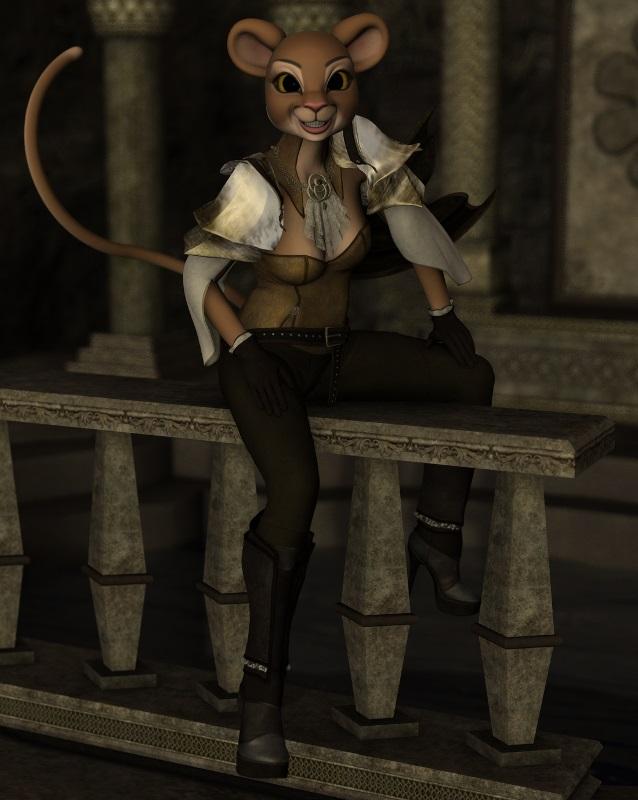
It's tricky only because I had to save the original material preset as .DUF on Genesis 1 and then use Cayman Studio's Legacy UVs for Genesis 3: Victoria 4, which is sold over at Renderosity, to apply them to G3F. Not only that, but I ended up having to parent the Melody head to G3F because the autofit distorted her snout. And then, I had to shrink GF3's head so it wouldn't poke through. Since the head was so much trouble, I just went straight to parenting her tail. XD
The set is Aikinaro, which apparently comes free with DS (at least I think it does, since I have no idea how it got there. O_o) Then I added the caverns from The Alchemy Chasm which I do know comes free with DS because that's where the freebie scenes are set in. And finally her outfit is Dark Storm for G3F which is another included freebie. Her pose, however is not a freebie. It's from Z Heavenly Poses and Expressions for Genesis 3 Female.
This is a nice render with that difference between the toon and the rather real looking anvironment. love the colours and the light here.
Daz 3D is part of

Connect
DAZ Productions, Inc.
7533 S Center View Ct #4664
West Jordan, UT 84084Licensing Agreement | Terms of Service | Privacy Policy | EULA
© 2026 Daz Productions Inc. All Rights Reserved.